
Consent Mode v2: basic vs advanced, modelling limits and a working setup
Data Engineer and Co-founder, martechdevs
Last updated 9 min read
Consent Mode v2 lets Google tags change their behaviour according to a visitor's consent choices. Basic mode blocks those tags until consent; advanced mode can send limited, cookieless signals when consent is denied. Neither guarantees that missing conversions will be modelled. Choose the collection behaviour first, then verify the implementation and your property's modelling eligibility separately.
Last updated: 4 September 2026.
A consent banner can look correct while the tags underneath behave incorrectly. The banner saves “reject,” a Google tag fires before that choice reaches it, and the team assumes the presence of the banner proves the implementation works.
The opposite failure also happens. Every tag is blocked, the team expects advanced modelling, and no denied-consent signals reach Google. The interface and the measurement system need to agree.
What the four consent signals mean
For a typical Google advertising and analytics implementation, inspect these four states:
analytics_storage: whether analytics-related storage is allowed.ad_storage: whether advertising-related storage is allowed.ad_user_data: whether user data can be sent to Google for advertising purposes.ad_personalization: whether personalised advertising is allowed.
The last two were the additions associated with v2. They answer different questions from storage permission. Allowing an analytics cookie does not automatically mean allowing advertising personalisation. Google's consent concepts.
Your consent management platform, or CMP, collects choices and maps them to these signals. Consent Mode communicates the resulting state to supporting tags. It does not supply the banner, decide your obligations or automatically control every third-party tag.
Martechdevs' analytics and tracking service checks the full chain: banner choice, consent state, tag behaviour, outgoing requests and reporting. That chain matters more than whether a dashboard displays a green installation indicator.
Basic and advanced mode, in one picture
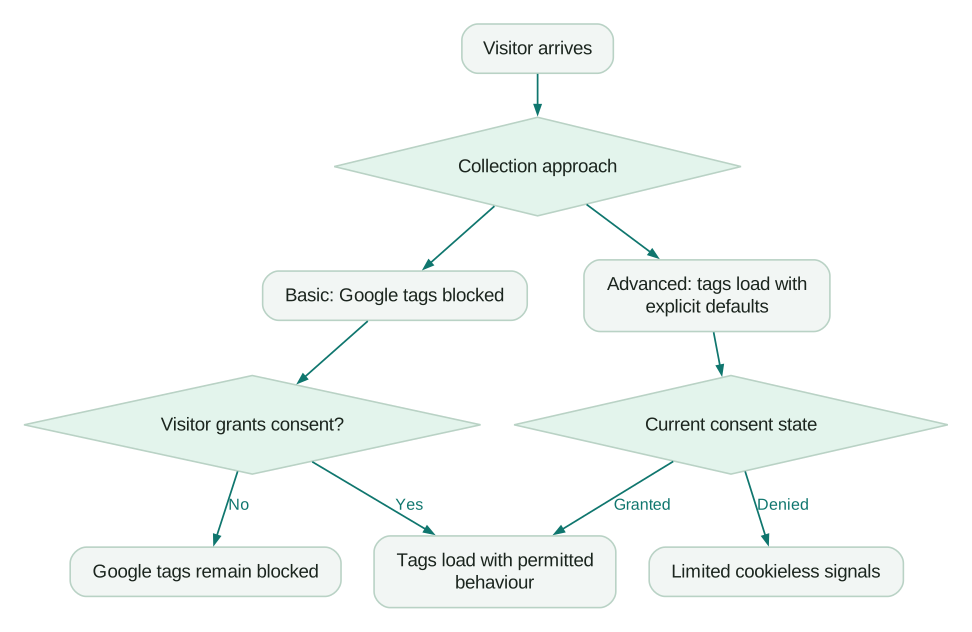
In basic mode, the relevant Google tags do not transmit data before consent. If the visitor rejects, they remain blocked. In advanced mode, supporting tags load with an explicit consent state and adjust their behaviour. Denied storage can still produce cookieless measurement signals.
This is a collection decision. Advanced mode should be chosen only when its actual data flow fits your requirements. “Cookieless” is a description of storage behaviour, not proof that a request contains no information or that every use is permitted.
Basic mode does not mean Google can never model an advertising conversion. Google's documentation distinguishes general modelling available with basic implementations from the richer, advertiser-specific modelling that advanced implementations can support. Neither is a promise that your account will qualify. Basic and advanced consent behaviour.
The modelling threshold that catches small sites
GA4 behavioural modelling has specific eligibility requirements. Google's current documentation requires advanced implementation and, among other conditions:
- At least 1,000 events per day with
analytics_storagedenied for at least seven days. - At least 1,000 daily users sending events with
analytics_storagegranted for at least seven of the previous 28 days.
Meeting those thresholds is necessary, but additional data-quality and training requirements still apply. Behavioural modelling is also distinct from conversion modelling in Google Ads. Do not apply one product's threshold to every modelling feature. GA4 behavioural modelling requirements.
Consider a fictional SaaS site with 200 consenting users a day and 20,000 events. High event volume does not satisfy a requirement for 1,000 consenting daily users. Firing additional events will not solve that gap and would make the implementation worse if those events have no analytical purpose.
This changes the business case. A small site should evaluate advanced mode based on the signals it can legitimately collect and use today. It should not budget around an assumed recovery of every rejected visitor.
For an eligible property, GA4's Blended reporting identity can include behavioural estimates. Those estimates do not appear in every analysis surface, and they are not exported into BigQuery. A warehouse query can therefore differ from a modelled interface report even when the export is functioning correctly. Model availability and limitations. Our GA4 BigQuery export guide explains how to keep that distinction visible in reporting.
Get the order of operations right
A reliable implementation follows a clear sequence:
- Establish the appropriate explicit default before a tag uses consent state.
- Restore a saved choice, when available, through the CMP's supported mechanism.
- Load or block tags according to the selected collection approach.
- Update consent when the visitor makes or changes a choice.
- Make the update before navigation can interrupt it.
Defaults should reflect the requirements for the visitor and your implementation. Do not rely on assumptions about an unset state. A default arriving after a measurement event cannot undo the earlier request.
In Google Tag Manager, use a supported CMP template and consent APIs. Google's guidance recommends setDefaultConsentState and updateConsentState for templates instead of issuing consent commands through a Custom HTML tag. Consent Initialization is the relevant early trigger for establishing state. Google's implementation guide.
Keep one owner for the default and update logic. A CMP template, a hardcoded script and a second GTM container can each appear valid in isolation while overriding one another in production.
Do not confuse an update with a new page-load event
Suppose a basic-mode page loads, its analytics tag is blocked, and the visitor grants consent ten seconds later. The original page-load trigger has already happened. Changing consent does not necessarily replay that trigger.
A supported consent-update event may be needed to start the permitted collection on that first page. Equally, adding another trigger to a tag that already fired can create duplicate page views. Test the complete sequence rather than adding triggers until a request appears.
Cookiebot's current GTM guidance documents this distinction and its cookie_consent_update event. Cookiebot basic-mode configuration.
Cookiebot settings that deserve a deliberate check
For Cookiebot through GTM, confirm the current CMP template, the correct Domain Group ID and the domains registered for that group. Put its consent initialisation in the documented early position. Configure global defaults and any regional exceptions from the actual requirements for the site. Cookiebot's GTM deployment guide.
Then inspect each tag. Google's built-in consent handling can support advanced behaviour. Adding a separate requirement that blocks the tag completely changes the result toward basic behaviour. That may be intentional, but it should be a decision rather than an inherited checkbox.
Cookiebot's internal GTM consent API calls may not appear as the simple dataLayer commands someone expects to see. An empty search for those commands is not sufficient evidence of failure. Use Tag Assistant's consent view and inspect the actual requests. Cookiebot's verification guidance.
Also check tags introduced outside GTM. A script inserted by a CMS plugin or CDN feature can run before the CMP even if the container itself is configured correctly. Cookiebot specifically flags load-order considerations for Google Tag Gateway. Tag Gateway consent guidance.
A five-minute first check
This check finds obvious faults; it does not replace full release testing.
Open a fresh browser session and connect Tag Assistant. Inspect the earliest available consent event. Verify all four relevant signals and the default timing. Then reject optional consent and inspect the tags and network requests.
For basic mode, confirm the intended tags remain blocked. For advanced mode, confirm denied consent is represented and that storage and requests match the configured behaviour. Grant consent, navigate, and confirm the new state persists. Finally, revoke it and check the next requests.
Tag Assistant can report defaults set too late and show the latest update and per-tag consent state. In a basic implementation, initial connection may be limited until consent allows the tag to load; that alone does not establish a fault. Google's consent debugging guide.
Record the browser, region, choice, expected behaviour and observed result. A screenshot of the banner without the corresponding tag evidence is an incomplete test record.
The release test needs more than “accept all”
Run a small test matrix covering:
- A new visitor who makes no choice.
- A visitor who rejects optional categories.
- Analytics accepted with advertising rejected, where the CMP offers that choice.
- Full acceptance and the first event after acceptance.
- A returning visitor with a stored choice.
- Revocation after a previous grant.
- Relevant geographic defaults and exceptions.
- A purchase or lead submission immediately after a choice.
Check browser collection and any server-side destinations. A server container should receive and enforce the relevant permission state; moving requests to your own infrastructure does not make that state irrelevant. See server-side tracking for the routing and validation work.
Include embedded forms, checkout domains and single-page navigation. A correct homepage can coexist with a checkout that runs a separate, ungoverned tag.
What Consent Mode “costs” in conversions
Three quantities often get mixed together: real business outcomes, directly observed platform conversions and estimated conversions.
Imagine a fictional shop with 1,000 paid orders in its order system. Its analytics setup directly observes 700. A report that includes modelling displays 850. There are still 1,000 orders; the measurement system has directly observed 700 and included an estimate in the reported total. The difference between 850 and 1,000 is not automatically a failed tag or lost revenue.
Evaluate the implementation against a reliable business ledger, consistent event times and a clear reporting scope. Changes in traffic mix, consent rate, attribution windows and model eligibility can all affect the comparison. Our Google Ads versus GA4 conversion guide provides the reconciliation sequence.
Do not promise a fixed recovery percentage. Measure the actual change in your eligible reports after the implementation has stabilised, and separate technical collection improvements from estimated attribution.
A 2026 setting change to avoid misreading
Google's June 15, 2026 update narrowed what the Google Signals setting controls: its association of Analytics data with signed-in user information for behavioural reporting. For linked advertising use, consent settings matter separately. Turning off Google Signals should not be treated as a universal switch for all advertising data use. The same notice describes further changes with their own rollout timing. Google's 2026 Analytics controls notice.
Review the current controls in the property instead of copying an old checklist that assumes one toggle governs the entire integration.
Implementation checklist
- Basic or advanced collection behaviour is explicitly chosen.
- The CMP maps choices to all four relevant Google signals.
- Defaults arrive before tags use consent state.
- Updates, saved choices and revocation work across navigation.
- Non-Google tags have their own appropriate controls.
- First-page collection after a grant does not disappear or duplicate.
- Browser and server destinations receive consistent state.
- GA4 behavioural modelling eligibility is checked separately from installation.
- Reporting distinguishes observed data, modelled data and business totals.
At Martechdevs, we implement tracking from the customer action through the records used in reporting and optimisation. Start with the free martech AI audit, or explore an AI assistant built around your approved workflows.
Questions people ask
Do I need Consent Mode v2 outside the EU?
Consider the people whose data is collected, the products used and the applicable requirements, rather than only your company's location. Google's EU User Consent Policy covers users in the EEA, UK and Switzerland and includes consent, disclosure and revocation obligations. Consent Mode is a technical mechanism within that wider implementation. Google's policy.
Which is better, basic or advanced mode?
Choose the behaviour that fits your requirements. Basic blocks the relevant tags before consent; advanced permits limited signals under denied consent. Advanced can support additional modelling, but eligibility and reporting availability still need verification.
Can I implement Consent Mode through GTM?
Yes. Use a supported CMP template, establish defaults during Consent Initialization and test updates in Tag Assistant. Check scripts outside the container as well, because they can run before its controls.
Why is modelling unavailable even though installation is correct?
The property may lack the required denied events, consenting users or sufficient quality data. Correct implementation and model eligibility are separate tests. Small properties can remain ineligible despite a technically sound setup.
Does Consent Mode recover every rejected conversion?
No. Modelling estimates some otherwise unobserved activity in eligible contexts. It does not provide a complete event-level record of every person who rejected consent, and modelled GA4 behavioural data does not become a matching BigQuery event export.
Sources
- Google: consent concepts. Accessed 4 September 2026.
- Google: implement Consent Mode. Accessed 4 September 2026.
- Google: consent debugging. Accessed 4 September 2026.
- Google Analytics: behavioural modelling. Accessed 4 September 2026.
- Cookiebot: GTM deployment. Accessed 4 September 2026.
- Cookiebot: basic-mode tags. Accessed 4 September 2026.
- Cookiebot: implementation verification. Accessed 4 September 2026.
- Cookiebot: Tag Gateway consent. Accessed 4 September 2026.
- Google: 2026 Analytics controls.
- Google: EU User Consent Policy. Accessed 4 September 2026.
Written by
Jafrin Akter AloData Engineer and Co-founder, martechdevs
Jafrin Akter Alo is a data engineer and co-founder of martechdevs, where the team has delivered 74+ martech, data and growth stack implementations.