
Automated Tracking QA: Test the Plan, the Payload and the Request
Automated tracking QA should run a customer journey, compare the resulting events with an approved tracking plan and fail the release when the evidence violates that plan. Capture both the application event and the outgoing request. A correct data-layer object can still reach the wrong destination, while a successful network request can carry the wrong amount.
On this page
Let an AI coding agent help write and maintain the tests. Keep the expected behavior in a reviewed contract, and let a repeatable test runner decide whether the captured evidence matches it. The agent should not silently rewrite the expectation whenever an implementation fails.
Start with one journey that matters commercially: a valid demo request, a completed purchase or the first successful product setup. The tracking-plan template supplies the event definitions. This guide turns those definitions into executable release checks.
What should automated tracking QA actually prove?
Automated tracking QA should prove that defined actions emit the right events under the tested conditions, including the actions that must produce no success event.
Give each check an explicit boundary:
| Evidence layer | What the test can establish | Follow-up still required |
|---|---|---|
| Business state | The test order or request reached the agreed state | Whether production follows the same path |
| Application event | Correct name, count, properties and timing | Whether destination mapping preserves them |
| Outgoing request | Intended endpoint, payload and response | Whether the destination processes and uses it |
| Destination record | The controlled event appears as expected | Production coverage and downstream behavior |
Our tracking implementation and QA work starts with those boundaries. “The tag fired” is useful evidence only when the team knows which boundary that statement covers.
AI-generated instrumentation needs the same checks as human-written instrumentation. Avo's vendor-authored example describes an agent inventing a new event and property despite related definitions already existing. Avo also describes exposing the tracking plan through MCP and placing proposed changes on a branch. Treat the example as a vendor illustration of a failure mode, without turning it into a measured failure rate. Avo's tracking-plan example.
The useful control is simple: approve the expected event before inspecting what the implementation happens to emit.
How do you turn a tracking plan into test cases?
Convert each important trigger, non-trigger, property rule and destination requirement into an assertion with a known input.
The contract should contain the event name, occurrence unit, trigger, required fields, types, allowed values, excluded fields, destination and consent rule. Add the evidence needed to decide that the journey has finished.
A hypothetical checkout contract could define:
| Journey step | Expected event | Specific assertion |
|---|---|---|
| Checkout begins | begin_checkout | Once for this transition |
| Shipping information is accepted | add_shipping_info | After successful acceptance |
| Payment information is accepted | add_payment_info | Currency present under this team's contract |
| Order is confirmed | purchase | Stable order reference, numeric value and currency |
The currency rule in this example belongs to the team's test contract. A stricter local rule should be labeled as such rather than presented as a universal vendor requirement.
Add negative cases beside the happy path: rejected payment, invalid form, repeated callback, refresh after success, back navigation and consent refusal. A test that only checks whether a purchase event exists cannot detect an event that also fires on payment failure.
Keep the contract version with the implementation. If the meaning changes, require review of the expected result before updating the test. A large snapshot regenerated from the new output can hide the very regression the suite was built to find.
Which browser approach belongs in the release pipeline?
Use a versioned Playwright suite for repeatable browser checks, and use interactive agent browsing to investigate failures and develop new cases.
Playwright supports request and response listeners, response waits and request interception. Its CI guidance covers installing dependencies and running the same tests in a build environment. Playwright network controls, Playwright in CI.
| Approach | Useful job | Boundary |
|---|---|---|
| Playwright tests | Repeat the same journey and assertions on releases | Requires maintained fixtures and selectors |
| Agent-controlled test browser | Explore an unfamiliar failure | Observations must become repeatable tests |
| Chrome DevTools MCP | Inspect detailed network and console behavior | Browser content is exposed to the connected agent |
| Claude's browser extension | Interactive investigation in an authorized browser session | Session and authentication requirements differ from CI |
Chrome DevTools MCP supports Chrome and Chrome for Testing and exposes browser/DevTools content to the MCP client. Use a dedicated test instance with controlled data. Chrome DevTools MCP.
Claude's browser integration shares the browser's login state, runs visibly and pauses for login or CAPTCHA. It requires a direct Anthropic plan and a login session; API-key and setup-token authentication keep the extension integration disabled. That makes the extension an interactive tool rather than the CI runner for this workflow. Claude browser integration.
Keep personal browser profiles out of automated QA. Use disposable browser contexts, test identities and a staging destination. A convenient logged-in session should not become an undocumented production dependency.
How do you capture data-layer events and network requests together?
Attach capture before the relevant action, then inspect the application event and the request produced by that same action.
Google's data layer passes information and events to Tag Manager. A push can trigger configured behavior, but the object itself does not prove delivery to an analytics service. Google data-layer behavior.
For a simple application, read the relevant data-layer entries after the journey settles. For an application that mutates objects, resets its queue or navigates across documents, record immutable snapshots at emission time. Preserve a reference to the original push function if instrumenting it, and verify that the recorder does not alter application behavior.
For network evidence, capture the endpoint, method, request body, relevant headers and response status. Restrict saved evidence to approved fields. Payloads and URLs can contain information that should not enter a broadly accessible CI artifact.
This original JavaScript function checks a small staging fixture. The fixture uses a JSON collector at /qa-collect, explicit consent buttons and a journey-settled element that appears only after all tracking attempts finish. It stores one local purchase event in either consent state and sends the collector request only when consent is granted.
async function inspectPurchase(page, baseURL, consent) {
  if (!["granted", "denied"].includes(consent)) {
    throw new Error("Choose a defined consent state");
  }

  const sent = [];
  await page.route(new URL("/qa-collect", baseURL).href, async route => {
    sent.push({
      method: route.request().method(),
      body: route.request().postDataJSON()
    });
    await route.fulfill({ status: 204 });
  });

  await page.goto(new URL("/qa-checkout", baseURL).href);
  await page.getByTestId("consent-" + consent).click();
  await page.getByTestId("complete-checkout").click();
  await page.getByTestId("journey-settled").waitFor();

  const local = await page.evaluate(() =>
    (window.dataLayer || []).filter(item => item.event === "purchase")
  );
  const expected = {
    event: "purchase",
    transaction_id: "qa-order",
    currency: "USD",
    value: 49
  };

  return { local, sent, expected, consent };
}
For this fixture, assert that local equals an array containing exactly expected. For granted consent, assert one POST whose body equals expected; for denied consent, assert no collector request. Exact equality catches additional fields as well as missing ones.
Create a fresh browser context for each invocation. Replace the fixture's selectors, collector and completion signal with the application's actual interfaces. The intercepted response is deliberately mocked, so this test establishes emission and payload behavior. Add a separate staging-destination check for real collection.
The completion signal matters. Waiting for the first matching request and immediately declaring success can miss a duplicate sent afterward. Define a bounded completion or flush condition, inspect the complete captured set, and test a delayed duplicate.
When a service worker handles requests, routing visibility needs separate attention. Playwright documents that service workers can obscure requests from its routing layer. Blocking them can help isolate a test, but that changes the environment; retain a separate check when the production application relies on a service worker. Playwright service-worker considerations.
What should the suite expect when consent is denied?
The expected denied-state behavior must follow the actual consent design, because basic and advanced Google Consent Mode behave differently.
With basic Consent Mode, Google tags remain blocked until consent is granted. With advanced Consent Mode, tags can send measurements without cookies while consent is denied. A blanket “any analytics request means failure” rule would reject a correctly configured advanced implementation. Google Consent Mode behavior.
Write separate expectations for each destination and consent category. The small fixture above deliberately uses a basic blocking policy for its own collector; it is not an implementation of Google Consent Mode.
Test at least these transitions:
- Initial page before a choice.
- Explicit refusal.
- Explicit acceptance.
- A later change from accepted to refused.
- A new page or route after the change.
Verify storage and outgoing behavior alongside the banner UI. A button label is insufficient evidence that a default state was applied early enough or that another tag respected it.
Google notes that events may be absent from DebugView when Analytics consent has not been granted. Use appropriate browser evidence for that state instead of declaring the implementation broken solely because DebugView is empty. GA4 DebugView guidance.
Keep the detailed Consent Mode setup and destination policy linked to the contract. Avoid copying encoded consent parameters into assertions without a maintenance plan; Google documents that transport encodings can change.
What does a useful tracking failure report contain?
A useful failure report names the violated rule, shows the smallest safe evidence and identifies the responsible implementation.
For the hypothetical checkout, suppose the captured output contains two begin_checkout events, one add_shipping_info, one add_payment_info without currency and one purchase whose value is the string "$49.00".
| Failure | Expected | Captured | Repair |
|---|---|---|---|
| Duplicate checkout start | One occurrence | Two occurrences | Remove the second emitter or repeated callback |
| Missing payment currency | Required under this contract | Field absent | Preserve currency through the payment step |
| Wrong purchase type | Numeric 49 | String "$49.00" | Send the numeric amount and separate currency |
This trace has five captured events where the contract expects four, with three distinct failed rules. A person-based funnel can still count one person at the checkout step and conceal the duplicated event count.
The report should also identify the contract version, application version, consent state, journey and failing assertion. Include a safe payload excerpt or diff. Do not attach a complete customer's form submission to explain that currency was missing.
Make the suite prove it can fail. Feed it a delayed duplicate, missing event, wrong type, unexpected field and denied-state transmission. If those mutations pass, repair the test before trusting a clean production candidate.
How do you make tracking QA a dependable release gate?
Run a named CI check against the candidate release, retain its evidence and require the responsible owner to review meaningful failures.
A small initial suite can run on every pull request. As it grows, select affected cases inside an always-created gate job and preserve the result of each required test. Do not treat “no tests ran” as a pass for a change that affects tracking.
GitHub warns that skipping an entire workflow through path filters can leave its required check Pending and block the pull request. Keep the required check's lifecycle explicit rather than attaching a required status to a workflow that may never start. GitHub workflow filtering.
Configure branch protection or rulesets to require the intended check. GitHub also supports code-owner review; having a CODEOWNERS file and requiring its approval are separate controls. Private-repository availability depends on the GitHub plan. Required status checks, code-owner review.
Use this release sequence:
- Review the contract change and intended data effect.
- Build the candidate application and load its matching tag configuration.
- Run the selected journeys with isolated test data.
- Produce assertions, trace evidence and a clear failing status.
- Repair the implementation or obtain an explicit contract-change review.
- Run the same cases again.
- Release the approved version and perform a narrow production smoke check.
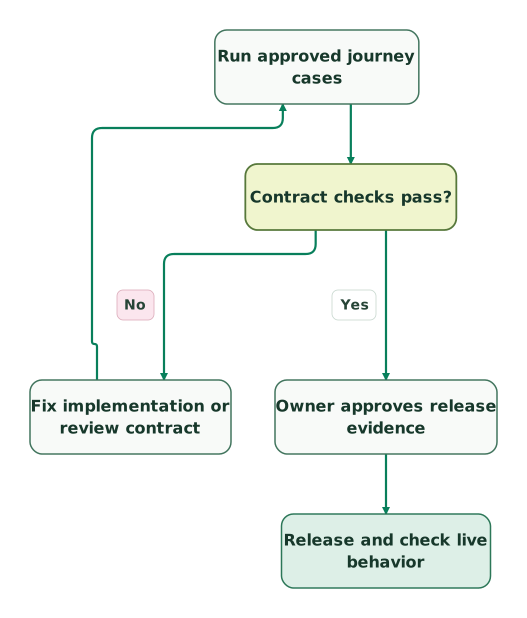
Read diagram as text
- Run approved journey cases to Contract checks pass?.
- Contract checks pass? to Fix implementation or review contract: No.
- Fix implementation or review contract to Run approved journey cases.
- Contract checks pass? to Owner approves release evidence: Yes.
- Owner approves release evidence to Release and check live behavior
An agent can explain failures or propose a repair. Its prose summary should not replace the test process's exit status. Review any change to test expectations as carefully as a change to tracking code.
Claude's scheduled tasks, formerly routines, can react to GitHub events with filters such as labels and branches. Their documented run status indicates whether the session started and exited without an infrastructure error; it does not establish that the requested work succeeded. Keep the deterministic test gate in CI. Claude scheduled-task behavior.
The tracking-governance guide covers publishing permissions, risk tiers and rollback ownership around this gate.
What remains outside a browser tracking test?
A browser test cannot establish every downstream transformation, attribution decision or production identity relationship.
For a server-side GTM implementation, the browser request proves arrival at the server-side endpoint only as far as the observed response supports. Check the server's outgoing destination request and the destination result separately.
Likewise, matching-quality diagnostics, ad-platform deduplication, late billing events and real production consent coverage need their own evidence. The Event Match Quality guide addresses a different question from whether a browser emitted the expected fields.
Run a small post-release check on real permitted activity and compare business outcomes with observed collection. Volume alone cannot prove correctness: a duplicate emitter can offset a missing emitter and leave the total unchanged.
Tracking QA and monitoring tools can add production scans, live payload monitoring or managed test coverage. Buy those capabilities against a defined gap in your evidence, rather than assuming a tool subscription replaces the contract.
Which checks should the team adopt first?
Adopt the smallest suite that protects a consequential journey and can produce a trustworthy failure.
Checklist
- Approved contract with trigger, non-trigger, counting unit and required fields.
- Positive and negative journey cases.
- Application events and outgoing requests captured separately.
- Consent expectations defined per destination.
- Duplicate detection after a bounded completion condition.
- Field allowlists and numeric/type checks.
- Test mutations that demonstrate the suite rejects known defects.
- Named CI status and review owner.
- Safe retained evidence with restricted sensitive data.
- A post-release destination check and rollback owner.
Keep reading
Browse all Tracking & Attribution guides
 Tracking & Attribution
7 ObservePoint Alternatives: Choose by the Tracking Job You Need
Compare seven ObservePoint alternatives by scans, journeys, live monitoring and schema validation. Check plan gates, real pricing units and a practical trial.
Jafrin Akter AloLast updated 13 min read
 Tracking & Attribution
Customer journey tracking: follow one customer from first click to revenue
Customer journey tracking links ads, website, product, CRM and billing into one timeline. See which ID carries each handoff and how to test every seam.
Jafrin Akter AloLast updated 17 min read
 Tracking & Attribution
Martech Migration Checklist: 7 Checks Before You Switch CRM, Analytics or Tracking
Moving a CRM, analytics tool or tracking setup? This martech migration checklist covers report rules, a side-by-side run and a safe cutover.
Jafrin Akter AloLast updated 17 min read
Analytics & tracking
See the implementation scope, deliverables and acceptance checks.
Questions people ask
Can the same coding agent implement tracking and draft its tests?
Yes, but the expected behavior should come from an independently reviewed contract. Require the agent to explain expectation changes and retain cases that deliberately fail on known defects. Have another reviewer inspect consequential assumptions. An agent can write useful test code; independence comes from the approved requirements, execution evidence and review boundary.
Is GTM Preview enough when the team has only one developer?
GTM Preview can help that developer inspect a particular journey, but the repeated release check still needs recorded expectations and evidence. Start with a few automated assertions for the highest-value action, then use Preview for diagnosis. Keep a manual destination check where automation is impractical. Team size changes the process's size, not the need to define success.
How should the suite handle an intermittent analytics request?
Investigate the source of intermittency before adding retries that hide it. Separate browser timing, endpoint availability, consent state and application races. Retain the first failure and the eventual result so a retry cannot erase useful evidence. Set a bounded observation window based on the application's delivery behavior, and treat unresolved delivery as a visible outcome.
Can browser tests replace mobile app tracking checks?
Browser tests cover the web implementation. Native mobile events need an SDK-specific test harness, controlled app state and destination evidence. Reuse the event contract and counting rules where they genuinely match, while keeping app version, offline queues, device identity and SDK behavior explicit. A passing web checkout test cannot approve the corresponding native app journey.
Should test purchases be sent to the live advertising account?
Keep synthetic purchases and leads out of production advertising optimization. Use an approved test destination or intercepted collector for emission checks, and label those checks accurately. Production smoke tests should inspect permitted real behavior or a deliberately isolated route. Verify destination selection as an assertion so a staging configuration cannot accidentally send sample revenue to live campaigns.
Sources

Written by
Jafrin Akter AloData Engineer and Co-founder at Martechdevs and Growth and Analytics Partners
Jafrin writes practical guides to marketing technology, customer data, analytics and AI workflows. Martechdevs is a Growth and Analytics Partners company.