
Cookiebot Implementation Mistakes: Consent State and Tag Behaviour
Data Engineer and Co-founder, martechdevs
Last updated 9 min read
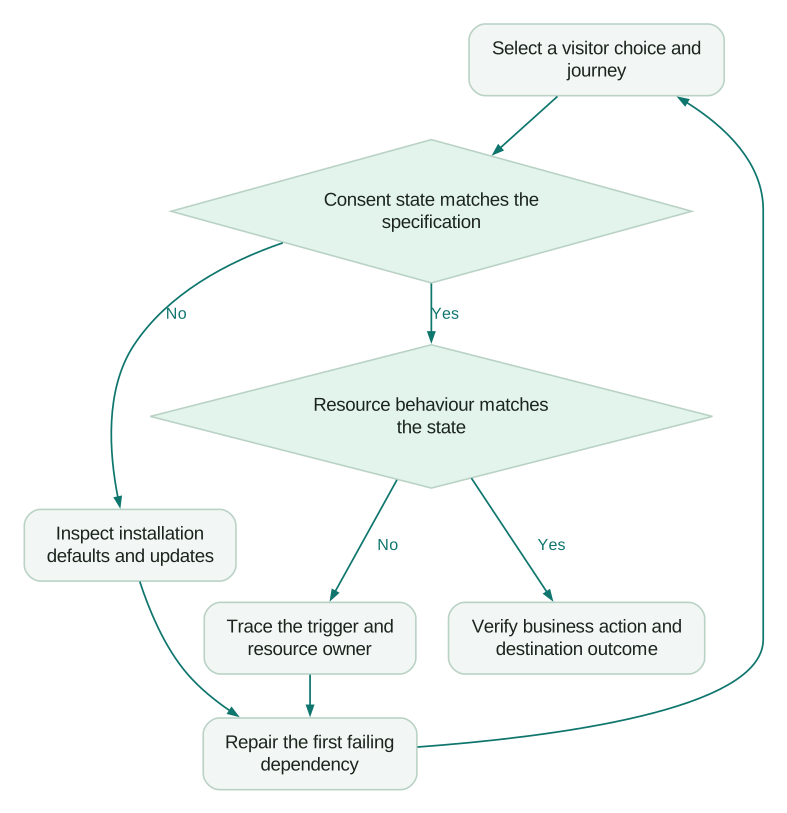
A Cookiebot banner can display correctly while measurement still behaves incorrectly. Diagnose the sequence from the visitor’s choice to the consent state, then to each tag’s actual network and storage activity. The common failures involve late defaults, duplicate installations, missing update triggers, unmanaged embeds and returning visitors. Start with an explicit expected behaviour for each consent choice before changing tags.
Last updated: 3 September 2026.
The useful question is what a specific visitor action allowed your website to do. A screenshot of the banner cannot answer it. Neither can an aggregate decline in GA4 sessions, because fewer measured sessions can be an expected consequence of the chosen implementation.
This guide focuses on technical verification. Your organisation must define the applicable consent policy and permitted collection behaviour. An analytics and tracking implementation should turn that policy into testable conditions for the website, its tags and its destinations.
What should you define before debugging Cookiebot?
Write down the expected behaviour for four situations: no choice yet, rejected optional categories, accepted selected categories and withdrawn permission. Specify the region, the device or browser context, the measurement destination and whether the visitor has a saved choice.
For Google tags, distinguish basic and advanced consent mode. Basic mode prevents Google tags from loading until the required permission is granted. Advanced mode loads them with consent defaults and adjusts their behaviour, including sending certain cookieless pings when storage is denied. A network request under a denied state is therefore not sufficient evidence of a fault; its presence must be assessed against the selected mode and payload. Google’s consent overview explains the distinction.
Do not choose a mode by whichever produces the largest dashboard number. The Consent Mode v2 guide explains the measurement implications, but the implementation still needs an agreed policy. Record that decision in the test specification so a later engineer does not interpret intentional blocking as a broken tag.
Include non-Google tools in the specification. A consent-aware Google tag does not automatically control an unrelated session replay script, advertising pixel or embedded video.
Is Cookiebot installed more than once?
Inventory the places where the banner or its supporting configuration can enter the page. Common candidates include the CMS plugin, the site template, a GTM container and a platform integration. Check the deployed page and its requests, rather than relying on a list of installed plugins.
A practical inspection starts with one fresh browser context and preserved network logs. Find each request loading the CMP, its initiator and the domain group used. Then inspect the source configuration responsible for it. Two requests are an investigation lead, not automatic proof of two active installations: confirm whether they are reloads, separate frames or genuinely competing owners.
The failure to avoid is two configurations writing different defaults or reacting differently to the same saved choice. Remove the redundant installation through the system that owns it, then retest the complete lifecycle. Deleting one visible banner element leaves the underlying scripts intact.
Cookiebot’s documented GTM route uses its CMP template, the account’s domain group identifier and a Consent Initialization trigger. It also requires the website domains to be registered in the account. Check these basics before changing downstream tags. Cookiebot GTM deployment is the relevant configuration reference.
Does the default exist before the first measurement event?
The initial consent state must be established before tags use it. If an advertising tag runs and sets storage first, a later denied default does not undo that earlier execution.
In Tag Assistant, inspect the earliest consent event and the first measurement event. Check the four Google parameters individually: analytics_storage, ad_storage, ad_user_data and ad_personalization. A configuration can handle analytics storage while leaving the advertising settings incomplete. Verify both the initial state and the change after interaction. Google’s debugging guide shows where these states appear.
For GTM, use the CMP template’s consent implementation. Google explicitly advises against calling the consent command through a Custom HTML tag in GTM. Its template APIs establish and update state within the container’s event processing. Direct gtag.js installations have a different implementation path; mixing instructions from the two approaches can create timing faults. Google’s implementation guide describes both.
Reproduce the problem with ordinary loading and a slower connection. If the outcome changes with timing, capture which event moved ahead of the default. Adding an arbitrary delay to every tag can hide the race while increasing measurement loss. Repair the dependency that allowed the wrong ordering.
Why does an accepted category still fail to start a tag?
A consent update and a tag trigger perform different jobs. The update changes permission. A trigger supplies an occasion for a tag to run.
Cookiebot documents that updating consent does not re-evaluate an already passed All Pages trigger. Its GTM guidance uses cookie_consent_update for tags that should start once the choice becomes available. This matters for the first visit: a tag blocked at initial page load may remain absent after acceptance unless it has an appropriate later trigger. Cookiebot’s deployment instructions explain this case.
Apply that instruction to the tag’s purpose. A library initialisation tag and a purchase event should not share a blanket replacement rule. The purchase event must still correspond to a completed purchase. Triggering a purchase tag whenever consent changes would manufacture conversions.
For an event that occurred while its destination was blocked, define whether the approved implementation discards it, records a limited signal or queues an eligible event. Do not assume the CMP replays business events. If queuing is part of your application design, preserve event time, consent context and a stable event reference, and prevent the same action from being replayed twice.
A useful diagnostic separates these questions: did the permitted library initialise, did the business event occur, and was its destination request sent exactly as intended?
Why does automatic blocking fail or break the website?
Cookiebot’s auto-blocker uses instructions derived from scans, with a known-tracker fallback before the first scan. Its documented automatic-blocking configuration needs the Cookiebot script to load before the resources it controls; asynchronous or deferred loading can defeat that ordering. Performance tools that rearrange scripts can therefore change the result. How automatic blocking works describes these dependencies.
These rules apply to that automatic-blocking deployment. Do not blindly copy script attributes into an unrelated GTM-template installation. First identify which integration is actually responsible for controlling the resource.
If rejecting marketing breaks the navigation or a lead form, trace the blocked resource. A combined application bundle may contain both essential interface code and optional tracking. Reclassifying the entire bundle as necessary makes the symptom disappear but leaves the original dependency unresolved. Separate the optional tracking from the functional code, or use the documented deployment approach suited to the application.
Treat a new widget as a release change. Record who added it, which pages load it, the categories it needs and the test results. A previously clean scan says little about code introduced afterward. Refresh the inventory and retest the changed journey.
How do you find a tracker that bypasses the banner?
Start from a specific unexpected request or storage entry. Use its initiator chain to find the script, iframe or image that caused it. Check whether it originates in GTM, the site template, an embedded vendor component or a server response.
Cookiebot’s scan report includes fields such as first-found URL, initiator, source and the resource through which an item loaded. The first-found URL is a starting point; it does not mean the tracker exists only there. Also, an unclassified item lacks an established category and should not be treated as a verified necessary resource. Cookiebot’s scan-report guide explains these fields.
Make the investigation reproducible. Save the page route, time, browser state, chosen categories, request hostname and redacted initiator evidence. Identify the system owner before editing. A developer changing GTM cannot fix a pixel hard-coded by an ecommerce theme unless that theme is included in the work.
Test embeds separately. A video that appears only after scrolling, a chat widget loaded after a delay and a form inside an iframe may never be exercised by a quick home-page check. The behaviour of each component must match the intended category and the visitor’s current choice.
What does a useful consent test specification look like?
Consider an illustrative SaaS website with GA4, one advertising pixel and an embedded demo form. The agreed design uses basic Google consent mode, statistics permission for analytics and marketing permission for the pixel. The form must remain usable under the organisation’s approved configuration when optional tracking is rejected. These are example assumptions, not recommended legal classifications for every website.
Test six separate journeys:
- Fresh visit with no action. Open the pricing page. The banner appears, defaults are established, and destinations blocked by this design do not load.
- Reject optional categories. Submit the demo form. The application reports a successful submission, while the blocked analytics and advertising destinations remain inactive.
- Accept statistics only. Confirm analytics starts with the intended state. The advertising pixel remains blocked. Repeat the form submission with a new test reference and inspect its allowed measurement.
- Accept all configured categories. Confirm both permitted destinations initialise and that the next business action produces one intended event per destination.
- Return with a saved choice. Close and reopen the relevant browser context without clearing the saved choice. Verify the expected state is restored before measurement uses it.
- Withdraw permission. Reopen preferences, revoke the optional choices and perform a new action. Check future requests and storage behaviour against the documented withdrawal design, then reload and repeat.
A pass requires evidence at the relevant layers. Form success is application evidence. Consent state is configuration evidence. Network requests and storage are execution evidence. Destination reporting is a later reconciliation check. Keep those observations separate so a failure points to an owner.
What should pass before the fix is released?
Use a small release record that connects the change to its evidence:
Checklist
- Each installed CMP and consent-writing configuration has a single identified owner.
- Fresh, returning, partial-acceptance and withdrawal journeys match the approved specification.
- The first relevant tag sees the intended default, and later events see the current update.
- Non-GTM embeds and delayed components have been exercised on their actual routes.
- Business actions remain usable where the agreed design requires them, with no invented or duplicated conversions.
- The production version has been checked after publication, with a rollback route recorded.
For server-side destinations, extend the test beyond the browser. Inspect how the current consent context reaches the server and how each destination template enforces it. The Stape troubleshooting guide follows that delivery chain. Moving an event through your own hostname does not supply missing permission.
Keep the scan inventory, technical release checks and commercial account scope connected. The Cookiebot pricing guide covers domain and page-count changes that may arise when the website expands. A new subdomain needs an implementation decision as well as a budget decision.
Questions people ask
Does a visible Cookiebot banner mean consent mode works?
No. The banner can render while defaults arrive late or updates never reach the tags. Verify the current consent state and the actual behaviour of each relevant resource during the same test journey.
Should every tag use the consent update trigger?
No. A tag that initialises an allowed service may need an opportunity to run after acceptance, but a transaction event still needs its own business trigger. Keep permission checks and event occurrence separate so a changed preference cannot create a purchase or lead.
Why do I see Google requests after rejecting consent?
Advanced consent mode can send certain cookieless pings under denied storage states. Basic mode has different loading behaviour. Check which mode was approved and inspect the request context before deciding whether the observed traffic is expected.
Will Cookiebot control scripts outside GTM?
That depends on the deployment and how those resources are integrated. Inspect the documented automatic-blocking or manual-markup approach for the resource rather than assuming a GTM tag governs every script on the page. Test delayed embeds and application-loaded components individually.
Can I use the GA4 session drop as the main acceptance test?
A session change cannot isolate a consent fault from traffic changes, consent choices or intentional collection limits. Use controlled journeys to validate the implementation first. Then interpret the reporting change using the release date, consent behaviour and the relevant measurement limitations.
Sources
- Google, Consent mode overview, accessed 3 September 2026.
- Cookiebot, Google Tag Manager deployment, accessed 3 September 2026.
- Google, Troubleshoot consent mode with Tag Assistant, accessed 3 September 2026.
- Google, Set up consent mode on websites, accessed 3 September 2026.
- Cookiebot, How does auto-blocking work?, accessed 3 September 2026.
- Cookiebot, Understanding the scan report, accessed 3 September 2026.
Written by
Jafrin Akter AloData Engineer and Co-founder, martechdevs
Jafrin Akter Alo is a data engineer and co-founder of martechdevs, where the team has delivered 74+ martech, data and growth stack implementations.