
GTM Audit Checklist: Container Evidence, Consent and Release Control
A GTM audit examines a Google Tag Manager container and the website behavior it controls. The useful result is a ranked repair list with reproducible evidence, a named owner and a release test for each issue. This guide covers Google Tag Manager web containers, including tags, triggers, consent and permissions. Go-to-market operations is a separate subject.
On this page
Audit areas and acceptance evidence
| Audit area | Evidence | Failure example | Acceptance condition |
|---|---|---|---|
| Installation and scope | Container IDs, domains and environments | Old and new containers both send the same outcome | Intended installation paths and destinations |
| Tag inventory | Published version and workspace comparison | Unowned Custom HTML with an unknown endpoint | Purpose, owner and approved destination |
| Trigger behavior | Positive, negative and repeated journeys | Purchase tag fires on a failed checkout | Business definition matches firing behavior |
| Data layer | Event-time values and application responses | Old value reused for a new event | Correct values available for each outcome |
| Consent | Defaults, updates and tag-specific behavior | A later choice has no effect on the next event | Agreed behavior for each visitor state |
| Access and release | Permissions, version history and rollback plan | Draft success mistaken for published success | Authorized publication and live retest |
The container configuration is only one part of the evidence. The page can also load a hardcoded tag, an application integration or another container. A clean-looking export does not establish a clean website. Keep the installation review and the container review connected through actual destination requests.
Our Google Tag Manager implementation service covers container cleanup and the application changes needed to make event collection reliable. The audit should identify that boundary before assigning every repair to the person who happens to manage tags.
Scope and baseline records
Begin with the production domains, important journeys and intended destinations. Include a separate checkout domain, embedded form or authenticated application when it participates in the same outcome. Record the web container ID and the environment each installation uses. Keep server containers as a separate connected workstream rather than assuming the web export describes server processing.
Capture the published version and the current workspace independently. A workspace can contain changes that visitors have never received. Google defines versions as configuration snapshots and makes workspace changes operational through publication to the selected environment. A saved version alone is not a release. Publishing and versions.
Use a compact baseline record:
- Record the container, environment, domains and review owner.
- Record the published version and any draft workspaces in scope.
- Export the selected version or workspace and label its origin.
- List the business journeys and expected destinations.
- Capture a small set of repeatable positive and negative tests.
- Agree which findings need application, analytics, privacy or publishing owners.
Container exports are JSON and can support comparisons. A partial export can omit dependencies; Google warns that continuing such an export removes missing tag and trigger references while preserving variable references. Prefer a complete baseline when the job is to audit relationships. Do not treat importing a file as a harmless review action: overwrite can replace existing tags, triggers and variables. Container export and import.
Keep the baseline unchanged while reviewing. A finding should point to the version in which it was observed. Otherwise, an ongoing cleanup can erase the evidence needed to understand the original behavior.
Inventory and ownership
Build one inventory row per tag, including its name, type, status, owner, destination, firing triggers and exceptions. Add the business purpose and the evidence needed to retain it. A tag name is not proof of its current configuration: a tag called “GA4 production” can still target the wrong property.
Review Custom HTML by what it does. Identify external script URLs, network destinations, values read from the page and dependencies on other tags. A short script is not automatically low risk, and a custom tag is not automatically wrong. The decision is whether its behavior is understood, necessary and supported by the owner.
Prefer native Google tag templates for Google tag configuration. Google's data layer guidance specifically advises against deploying gtag.js through Custom HTML and distinguishes consent APIs from ordinary queued messages. Inspect older snippets that combine these responsibilities in one custom tag. Google data layer guidance.
Paused tags belong in the inventory, but separate them from active tags when estimating current exposure. Retention can be justified by a documented rollback need or a planned campaign. An unowned paused tag still needs a disposition, because someone can reactivate it later.
For variables, record the producer and expected type as well as the consumer. A reusable variable used by many tags deserves more careful change testing than an unused one. A missing value should have an explicit effect, such as withholding an optional parameter, rather than silently substituting a misleading zero or stale value.
A small inventory reconciliation
Consider a hypothetical container with eight tags. Two are paused, leaving six active tags. Two active tags point to the same purchase destination and use the same trigger reference. Another active tag refers to a trigger that is absent from the reviewed inventory.
| Inventory observation | Count | Audit interpretation | Next evidence |
|---|---|---|---|
| Total tags | 8 tags | Complete inventory denominator | Export origin and version |
| Paused tags | 2 tags | Separate from active behavior | Retention or removal owner |
| Active tags | 6 tags | Current behavior candidates | Runtime journey coverage |
| Purchase tags with the same destination and trigger reference | 2 tags | Potential duplicate route | Conditions, sequencing and request inspection |
| Active tags with a missing trigger reference | 1 tag | Relationship requiring investigation | Complete export and current UI comparison |
The active share is 6 ÷ 8 = 75%, but that percentage is not a quality score. Two tags sharing a destination can be intentional. A missing reference in an incomplete export can be an artifact of the export. Use static findings to prioritize inspection, then record the runtime result separately.
Suppose the purchase pair both send the same accepted order during a controlled test. Consolidating the duplicate route is a plausible repair. If one tag is actually restricted to another application context, the matching names alone do not justify deleting it. Preserve the condition evidence with the decision.
Likewise, an apparently unused trigger may be part of a staged release. The audit is complete when the owner can explain its disposition, not when every count has been reduced.
Trigger and data layer diagnostics
A tag with multiple firing triggers can run when any one of those triggers matches. A narrow trigger does not constrain a broad trigger attached beside it. Exceptions can block firing, and advanced sequencing can bypass a sequenced tag's own triggers. Review the whole route to the tag action. Firing triggers and exceptions.
Start a failed test at the business action. If the purchase failed, an event emitted from the checkout button is already too early. If the purchase succeeded, inspect whether the application produced one outcome message and whether that message carried its values at the right time. The detailed Google Tag Manager triggers guide provides the setup and matching checks.
Google's data layer processes queued messages in order. An update made after an event does not establish that the earlier tag saw the new value. Inspect the selected event's values rather than the final state at the end of a journey. Preserve the existing data layer and keep associated event data together. Data layer processing.
Include these cases in the audit sample: a successful action, validation failure, server rejection, repeated callback, direct page entry and internal navigation. For a single-page application, repeat the action after a route change. A passing first page load does not prove later application states behave correctly.
Once per event and Once per page are firing scopes, not business identity rules. A repeated event message can still represent the same order. Confirm the producer and destination deduplication design before using a firing limit to suppress symptoms. Tag firing options.
Consent and destination boundaries
Review consent defaults before reviewing the final granted state. Consent Initialization is intended for tags that establish or update consent. Ordinary early tags belong on another appropriate trigger. A successful marketing event after acceptance cannot prove the initial state was handled correctly. Tag Manager consent support.
Use the Consent Overview as an inventory aid. “Not set” means no additional consent checks are configured; it does not tell you that a person reviewed the tag. “No additional consent required” still leaves built-in checks in effect. Additional required checks demand the specified consent types at firing time. Keep the accepted configuration tied to the destination's behavior.
Test a first visit, acceptance, rejection and a later change where the site supports those states. Record the event-time consent state, outgoing requests and relevant storage observations. A blocked tag count alone is not enough to describe a consent implementation.
Inspect destination-bound data for accidental personal information. Page URLs, titles, search terms and free-form fields can expose values that were never intended as analytics parameters. Google identifies URLs and titles as potential sources of PII in ordinary Analytics collection. Removing a field from one tag does not remove it from other tags using the same variable. Analytics PII guidance.
The consent debugging skill helps organize the test states and evidence. Keep policy decisions with the appropriate owner and turn them into concrete technical acceptance conditions.
Permissions and release ownership
Review account access and container access separately. Container Read permits inspection; Edit allows workspace changes but not version creation or publication. Approve adds version creation without publication, while Publish permits release. Direct and inherited permissions can coexist, so removing one access path may leave another. Tag Manager permissions.
Assign review access to the people who need to inspect the container, editing access to implementers and publication responsibility to an identified owner. Avoid using a shared login as the release process. The evidence should identify who reviewed the change and who published the version.
Do not assume that the Approve permission means a formal approval request workflow is available in every account. Google's dedicated approvals workflow belongs to Tag Manager 360. Teams using standard Tag Manager can still document an external review and keep publication with the authorized owner. Versions and approvals.
A rollback plan should name the known version and the journeys affected by the change. Restoring a draft without publishing it does not restore the live container. If an application release changed the event contract at the same time, an older container might no longer be compatible; test that dependency before treating rollback as automatic recovery.
Findings and repair priorities
Rank a finding by the decision or behavior it can corrupt. A duplicated purchase sent to an advertising destination can affect optimization. An unowned external script needs ownership and behavior review. A spelling inconsistency in a tag name may be worth fixing, but it should not delay a repair to the measured outcome.
| Finding record | Required detail | Closure evidence |
|---|---|---|
| Observed behavior | Exact journey and selected event | Reproducible test result |
| Affected destination | Property, account or endpoint | Correct target confirmed |
| Expected behavior | Business and consent condition | Positive and negative cases |
| Repair ownership | Application, container or destination owner | Reviewed change |
| Release state | Version and environment | Live retest after publication |
A useful finding says “the failed payment journey emitted purchase before the response,” rather than “tracking is broken.” The first statement identifies the event boundary and gives the developer a testable correction.
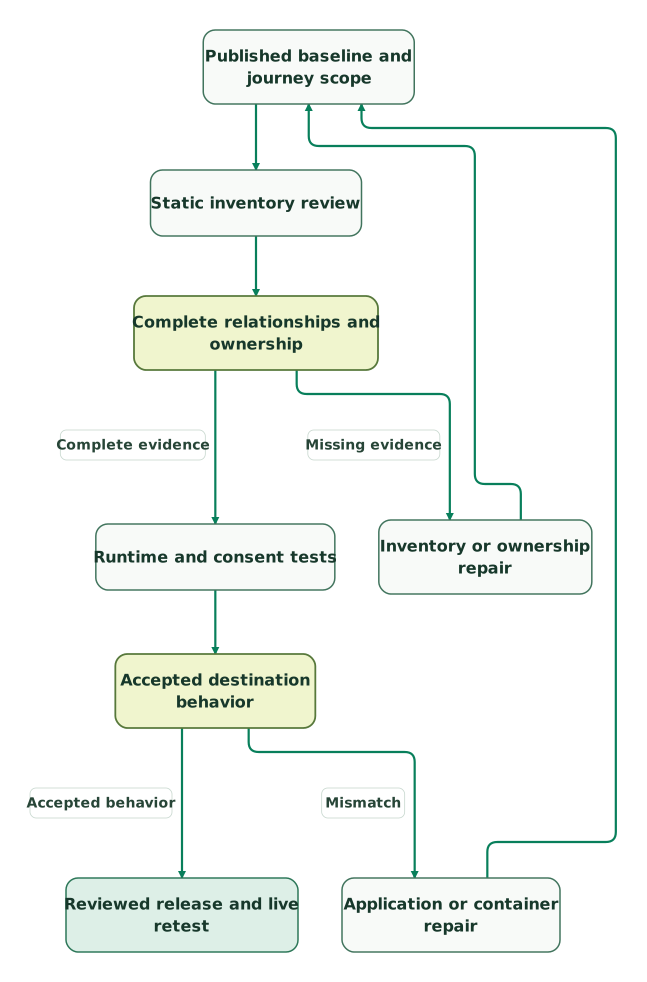
Read diagram as text
- Published baseline and journey scope to Static inventory review.
- Static inventory review to Complete relationships and ownership.
- Complete relationships and ownership to Inventory or ownership repair: Missing evidence.
- Inventory or ownership repair to Published baseline and journey scope.
- Complete relationships and ownership to Runtime and consent tests: Complete evidence.
- Runtime and consent tests to Accepted destination behavior.
- Accepted destination behavior to Application or container repair: Mismatch.
- Application or container repair to Published baseline and journey scope.
- Accepted destination behavior to Reviewed release and live retest: Accepted behavior
Repeat the affected tests after a repair and include neighboring journeys that share the changed variable or trigger. Keep unresolved items visible with an owner and a reason. An audit report should distinguish a confirmed defect, a candidate requiring runtime evidence and a deliberate configuration choice.
GTM audit checklist
- Production container IDs, environments and domains recorded.
- Published baseline separated from every reviewed workspace.
- Tag purpose, destination, status and owner reconciled.
- Trigger, exception, sequencing and variable dependencies reviewed.
- Success, failure, repetition and navigation journeys tested.
- Consent defaults, updates and destination behavior recorded.
- Ordinary analytics fields and URLs checked for accidental PII.
- Effective access and the publication owner reviewed.
- Repair evidence, release version and live retest retained.
Use the UTM checker to keep campaign test URLs consistent when validating arrival and URL-based conditions. The common GTM mistakes guide is a useful companion for explaining recurring implementation patterns; the audit record should remain specific to the actual container and journey.
Keep reading
Browse all Tracking & Attribution guides
 Tracking & Attribution
Common Google Tag Manager mistakes and how to fix them
The Google Tag Manager mistakes behind duplicate events, missing sessions and wrong conversions, with the fix for each and a pre-publish checklist.
Jafrin Akter AloLast updated 16 min read
 Tracking & Attribution
Tracking Plan: Free Template, Examples by Business Type and How to Build One
A tracking plan defines each event: when it fires, its properties, IDs, owner and tools. Get a free two-tab template, six examples and an approval checklist.
Jafrin Akter AloLast updated 42 min read
 Tracking & Attribution
Consent Mode v2: basic vs advanced, modelling limits and a working setup
Consent Mode v2 signals explained: basic versus advanced setup, and how to test defaults, updates and tags before you trust modelled conversions.
Jafrin Akter AloLast updated 13 min read
Google Tag Manager consulting
See the implementation scope, deliverables and acceptance checks.
Questions people ask
Can a container export alone establish that my tracking is correct?
No. An export describes the selected configuration, while the website can also contain hardcoded tags, other containers and application integrations. Partial exports can omit dependencies as well. Use the export to review relationships and prioritize tests, then confirm the actual page, event-time values and destination requests. Retain the export's version or workspace identity with the result.
Does every pair of similar purchase tags require deletion?
No. Similar names or matching destinations identify a review candidate, not a proven duplicate. Compare the full triggers, exceptions, sequencing and application contexts. Then perform a controlled accepted purchase and inspect the outgoing behavior. Remove or consolidate a route only after the owner understands which measured outcomes it serves and the remaining route passes its tests.
Is the Approve permission sufficient for publishing a GTM repair?
No. Approve allows version creation and editing but does not grant publication. Publish is the container permission that permits release. Also distinguish this permission ladder from the dedicated approval request workflow in Tag Manager 360. Record both the reviewer and the authorized publisher, then verify that the version tested in the workspace is the version released.
Should an audit remove every paused tag and unused variable?
No. First establish ownership, dependencies and any staged release or rollback purpose. An unused-looking item may still belong to an agreed change, while an active unowned item may deserve higher priority. Record a retain, repair or remove decision with its reason. Cleanup is useful when it makes the container understandable without destroying a required dependency.
What evidence belongs in a completed GTM audit finding?
A completed finding includes the original behavior, expected outcome, affected destination, repair owner and reproducible tests. It also identifies the reviewed container version and the live retest after publication. Keep negative and repeated-event cases where they matter. A screenshot of a tag firing is only one observation and does not establish the entire business or consent outcome.
Sources
- Google: Publishing, versions, and approvals
- Google: Container export and import
- Google: Managing users and permissions
- Google: The data layer
- Google: Firing triggers and trigger exceptions
- Google: Tag firing options
- Google: Tag Manager consent mode support
- Google: Avoid sending personally identifiable information

Written by
Jafrin Akter AloData Engineer and Co-founder at Martechdevs and Growth and Analytics Partners
Jafrin writes practical guides to marketing technology, customer data, analytics and AI workflows. Martechdevs is a Growth and Analytics Partners company.