
Single customer view without an enterprise CDP
A single customer view connects identity, product use, billing, support and communication preferences so someone can make a reliable customer decision. A small team can build it from an existing database, warehouse and customer relationship management (CRM) system. Start with one workflow, explained identity links and a few trusted fields, then verify that the destination received the right values.
On this page
Imagine a customer success manager preparing for a renewal. The CRM says the account is healthy. Billing shows a failed payment. The product contains three workspaces, one of which is inactive. Support has an unresolved issue under a different email address.
Putting all those records on one screen would help. First, you need to establish which records belong together, what each field means and whether the information is recent enough to use. Buying a platform does not make those decisions disappear.
This guide uses a small software-as-a-service (SaaS) business as an illustrative example. A customer data platform (CDP) can provide parts of the system, but its identity rules and operational responsibilities still need agreement. The same design questions apply to ecommerce customers and subscription apps, although their identities and actions differ.
What should the single customer view help your team do?
Choose a workflow with a clear owner and an observable result. For example: help customer success identify paid accounts approaching renewal that have an unresolved product obstacle.
For that workflow, the useful fields might be:
- Account identifier (ID), account owner and the people responsible for administration and billing.
- Subscription state, renewal date and a billing issue indicator.
- Recent qualifying product activity at the account level.
- Open support issues, their severity and the time they were last updated.
- The timestamp and source behind each signal.
- Eligibility for the proposed follow-up and any suppression rule.
You do not need the customer's entire click history displayed in the CRM. Keep detailed evidence accessible through a link or a controlled query. Present enough information for the person to understand the issue, decide what help is appropriate and record the outcome.
Write an acceptance statement before building: “An account owner can see whether the renewal signal is current, understand its reason and trace it to the source record.” This is easier to verify than “We now have a customer 360.” Use a tracking plan for the events behind each field to define which product occurrences can support that statement.
Our data warehouse and CDP implementation work starts with that decision, its source records and the evidence the destination must expose.
For a different workflow, the first model should change. Trial onboarding needs setup progress. Payment recovery needs invoice and payment state. The guide to identifying key customer journeys helps choose which customer outcome to support first.
Which customer entities should stay separate?
Keep people, commercial accounts, workspaces, memberships, subscriptions and source-ID mappings separate. “Customer” is often an overloaded word. In a team product, one person can belong to several workspaces. One account can pay for several subscriptions. The person signing the contract may never use the application. The marketplace role model applies this distinction to buyer actions, seller organizations and payout accounts.
For this hypothetical SaaS model, each record has one meaning. Keep these distinctions underneath the convenient customer summary:
| Entity | One record represents | Why the distinction matters |
|---|---|---|
| Person | An individual with a stable internal ID | An email change should not create another person |
| Account | The managed commercial relationship | Several opportunities do not imply several customers |
| Workspace | A product environment | Activity belongs to the environment where it happened |
| Membership | A person's role in an account or workspace, with effective dates | Access or employment can change without rewriting the person |
| Subscription | A purchased service and its billing lifecycle | One account can have different service periods |
| Source-ID mapping | An explained link to an external record | The same text ID can occur in different systems or environments |
Create a convenient account summary from these entities. Do not make that summary the only place their relationships exist. If HubSpot is the destination, evaluate custom objects for workspaces and subscriptions against the required edition and relationship rules.
Segment's Group specification illustrates the distinction between a user ID and a group ID. It also notes that users can belong to multiple groups while destination support varies. Your model and activation plan need to account for those differences. Segment also documents that Group has no native user-removal operation. Plan and test the destination-specific removal path when a membership ends; adding a relationship successfully does not prove you can withdraw it.
Stripe's Customer object holds customer information used for payments and billing. Treat its ID as a source identifier whose relationship to your commercial account is explicitly recorded. Do not assume an email address is enough to establish that relationship.
How do you resolve identity without merging unrelated customers?
Start with deterministic relationships your application already knows: an authenticated user ID, a workspace owner stored in the database, or a billing customer ID saved when a subscription is created.
Store the mapping with its source and scope. For example, an external ID should be qualified by source system and environment so a test record cannot collide with a production record that has the same text identifier.
For every identity link, be able to answer:
- Which two records are being connected?
- What evidence established the connection?
- When did it become valid, and is it still valid?
- Which workflow is allowed to use it?
- How can an incorrect connection be reversed?
Email can help locate candidate records, but it is a poor universal merge rule. People change addresses, shared inboxes represent several people and one person can participate in several companies. Normalising text does not resolve those relationships.
Route ambiguous matches for review or leave them unmatched with a reason. A visible unmatched record is easier to manage than a confident merge that sends one customer's information to another account owner. Apply identity resolution best practices to match evidence, ambiguity and reversal rules.
For anonymous browsing, establish a documented linking rule based on an observed relationship and permitted use. An authenticated transition on a shared device needs more care than assuming every historical event on that device belongs to the latest person who logged in.
RudderStack's Profiles documentation separates identity-graph construction from computing customer features. This is a useful architectural distinction even if you implement the first version yourself. Linking records and calculating “active workspaces in the past month” are different jobs, with different failure modes.
Which source should own each customer field?
A single customer view does not require one application to own every fact. Define which source is authoritative for each field and how conflicts are resolved.
Confirm a field-level agreement with the responsible teams. This is an illustrative ownership policy for the renewal workflow, not a vendor default:
| Field | Authoritative source | Check before action | If evidence is missing |
|---|---|---|---|
| Subscription state | Billing system | Correct subscription and current service period | Hold the state-dependent action |
| Workspace membership | Product database | Person, role and effective dates match this workspace | Request a relationship check |
| Commercial owner | CRM | Named person or queue accepts responsibility | Route an ownership exception |
| Messaging eligibility | Approved preference system | Purpose, brand and channel are eligible | Follow the agreed unknown-state policy |
| Qualifying activity | Defined product-event model | Relevant event window is complete and current | Mark activity unknown rather than zero |
Avoid a universal “latest update wins” policy. A CRM import performed today may contain an older subscription value than the billing system. Receipt time tells you when your pipeline encountered the record, not necessarily when the business fact changed.
Keep the source record ID, source update time, ingestion time and model refresh time. For an operational view, display a simple freshness indicator and retain the detailed timestamps for diagnosis.
Distinguish unknown, zero and false. No activity in a complete, current event feed can support a zero. No activity because the feed stopped cannot. A missing subscription field should not automatically turn a customer into a cancelled account.
How do you prevent customer joins from multiplying revenue?
Aggregate each source to one row per account before combining one-to-many records. Joining invoices, events and tickets directly to accounts can multiply legitimate rows and their amounts.
Consider this illustrative dataset: account A has two paid invoices of $100 each and three qualifying product events. Joining both raw tables on account ID creates six rows. Summing the invoice amount across those rows produces $600, although the invoices total $200.
SUM(DISTINCT amount) is not a repair. Both invoices happen to be $100, so that expression would return $100 and lose a legitimate invoice. Deduplicate using the invoice's identity, then aggregate each dataset to the intended account grain before joining.
The following Structured Query Language (SQL) example demonstrates the pattern. It assumes accounts has one row per account, invoices are already deduplicated, event IDs are canonical and both sources have already been mapped to the correct account. Required identifiers, monetary values and event/payment timestamps must be present and validated before this query. Reject missing or invalid inputs; a complete feed can still contain invalid rows. The example uses Coordinated Universal Time (UTC) timestamps stored in a consistent sortable format and a fixed September reporting window.
WITH invoice_totals AS (
  SELECT
    account_id,
    SUM(amount_paid_minor) AS paid_invoice_amount_usd_minor
  FROM invoices
  WHERE status = 'paid'
    AND currency = 'USD'
    AND paid_at >= '2026-09-01T00:00:00Z'
    AND paid_at < '2026-10-01T00:00:00Z'
  GROUP BY account_id
),
activity_totals AS (
  SELECT
    account_id,
    COUNT(DISTINCT event_id) AS qualifying_events
  FROM product_events
  WHERE event_name = 'Useful Report Generated'
    AND occurred_at >= '2026-09-01T00:00:00Z'
    AND occurred_at < '2026-10-01T00:00:00Z'
  GROUP BY account_id
)
SELECT
  a.account_id,
  COALESCE(i.paid_invoice_amount_usd_minor, 0)
    AS paid_invoice_amount_usd_minor,
  COALESCE(p.qualifying_events, 0) AS qualifying_events
FROM accounts AS a
LEFT JOIN invoice_totals AS i
  ON a.account_id = i.account_id
LEFT JOIN activity_totals AS p
  ON a.account_id = p.account_id
ORDER BY a.account_id;
For account A, the expected result is 20,000 US cents and three events. An account with a $50 paid invoice and no qualifying events should remain in the output with 5,000 cents and zero events. The left joins preserve accounts without matching activity.
Expected results for the same synthetic September window. Monetary values are USD minor units, so 100 cents equal USD 1. The zero-activity case assumes the relevant event feed is confirmed complete.
| Account | Paid invoices in the window, USD cents | Qualifying events | Interpretation |
|---|---|---|---|
| A | 20,000 | 3 | Two different USD 100 invoices and three events |
| B | 5,000 | 0 | A USD 50 paid invoice; no qualifying activity in a complete feed |
| C | 0 | 0 | No matching rows in either confirmed-complete source |
Use zero defaults here only after confirming that the relevant sources cover the reporting window. In an operational model, attach source-completeness and freshness fields so a downstream workflow can pause when that condition fails.
This example measures paid invoice amounts in one currency. It does not calculate recognised revenue, subtract subsequent refunds or combine currencies. Define separate, correctly named measures for those questions. Adapt timestamp syntax to your warehouse and reconcile the output against source totals before using it.
When does the customer view need historical state?
Use current state for today's operating queue and historical state for questions about an earlier decision. An account summary for today's customer success queue can use current ownership and current subscription state. An analysis of what was known before a renewal decision needs historical values.
If a user moves between accounts, preserve membership history rather than rewriting their past activity under the current account. If a subscription changes plan, retain the effective period for the previous plan. Decide whether account mergers should restate historical reporting or remain visible as a change.
This matters especially when training a churn prediction workflow. Using a customer's final cancellation state to explain a prediction supposedly made a month earlier gives the model information it could not have had at the time.
You do not need a complex historical model for every field on day one. You do need to identify the fields whose history affects your intended analysis and capture it before it disappears.
Which customer fields should reach the CRM?
Publish fields that help someone decide or act. For the renewal example, that might mean renewal_date, usage_window_end, qualifying_active_workspaces, open_critical_ticket_count and a link to the underlying evidence.
Use names that reveal the window and unit. usage_score is difficult to interpret without documentation. active_workspaces_28d is more informative, provided “active” has a linked definition. Reverse extract, transform and load (reverse ETL) moves modelled warehouse data into operational tools. Define that warehouse-to-CRM delivery with matching, field ownership and withdrawal behaviour before enabling those signals. Use a phased CRM rollout in HubSpot to prove a small destination cohort before expanding it.
HubSpot's association documentation supports relationships between CRM records, including labelled relationships. The number of associations depends on the object and subscription. Confirm those constraints before deciding how people, companies and workspaces will appear in your account model.
Define ownership for each destination field. If the warehouse writes a derived usage field, decide whether a CRM user can edit it and what the next sync should do. If the CRM owns the account manager field, avoid an integration loop that repeatedly overwrites a legitimate change.
The product data in HubSpot guide covers the operational handoff in more detail. The same field-ownership discipline applies to another CRM, support system or messaging tool, although its object model and application programming interface (API) behaviour need separate verification. Use data activation beyond the CRM to connect that customer view to another action with an owner and removal rule.
How do you verify the destination received the right customer state?
Compare the expected customer fields and relationships with the actual destination state after delivery. A correct warehouse row is not enough if the CRM still holds last week's value.
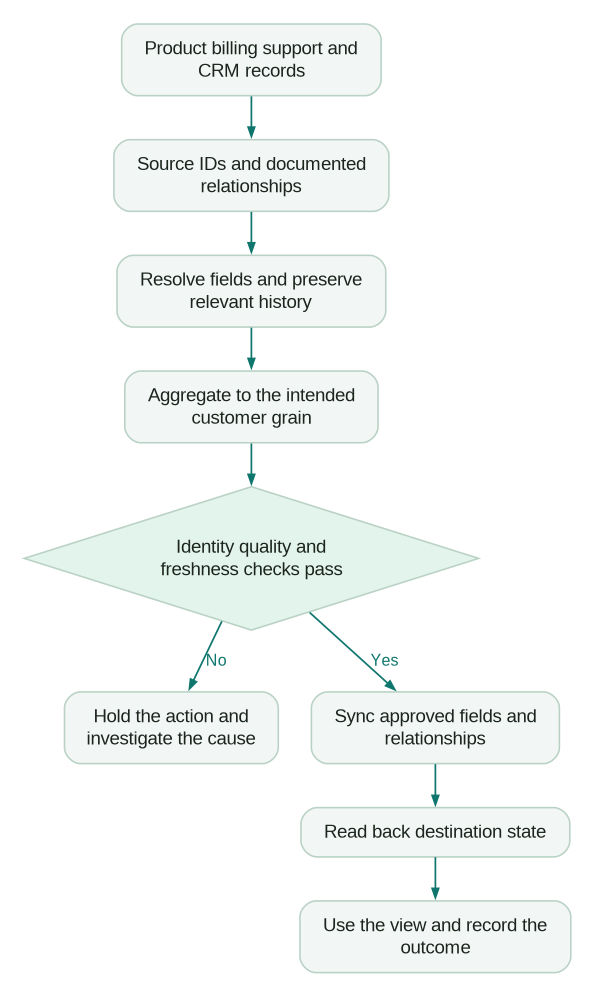
Read diagram as text
- Product billing support and CRM records to Source IDs and documented relationships.
- Source IDs and documented relationships to Resolve fields and preserve relevant history.
- Resolve fields and preserve relevant history to Aggregate to the intended customer grain.
- Aggregate to the intended customer grain to Identity quality and freshness checks pass.
- Identity quality and freshness checks pass to Hold the action and investigate the cause: No.
- Identity quality and freshness checks pass to Sync approved fields and relationships: Yes.
- Sync approved fields and relationships to Read back destination state.
- Read back destination state to Use the view and record the outcome
Track when a change was created, collected, transformed, sent and confirmed at the destination. These checkpoints show whether a delay comes from the source feed, the model or the final sync.
Plan for retries and out-of-order delivery. Stripe explicitly documents that webhook events can be duplicated and arrive out of order. Its guidance includes tracking processed event IDs and retrieving relevant objects when necessary. It also warns that snapshot-event creation times have second precision and must not be used to establish event order. Retrieve current state or use a source-supported ordering rule instead of treating that timestamp as an exact sequence. A pipeline should not let a late old event silently replace a newer business state.
Apply updates using the destination's documented matching and update behaviour. Keep failures visible, retry recoverable errors and avoid blindly replaying a historical audience into an active campaign. Read back a sample of destination records after a change to confirm the intended state and relationships.
Deletion and suppression need their own propagation path. Removing a row from a warehouse model does not establish that a contact was removed or suppressed everywhere else. Record which destinations must receive each operation, verify completion and prevent a later backfill from unintentionally recreating the excluded audience.
Should you build the customer view, buy a platform or narrow the scope?
Building on an existing warehouse is practical when the first workflows tolerate its refresh cadence, the required data is available and someone can maintain the models and syncs. A CRM-centred view may be enough when most useful information already lives there and the remaining fields are simple. If you do not have that foundation, assess when a warehouse is worth building before making it a prerequisite.
A specialised platform may be worth evaluating when identity rules, source coverage, low-latency decisions, audience operations or cross-team governance exceed what your team can reliably maintain. Ask vendors to demonstrate your difficult cases using representative test data, including merges, removed relationships and stale sources. Compare what a CDP adds beyond the warehouse before paying twice for the same responsibility. Compare assembling a composable CDP around the warehouse with when a customer context platform is worth buying; each option must pass the same identity and delivery cases.
Compare the full operating cost: ingestion, storage, transformation, activation, engineering maintenance and the time spent resolving data incidents. Include the opportunity cost of keeping a scarce engineer on pipelines. A smaller software bill does not necessarily mean a cheaper system. Use the agency, employee and freelancer comparison to cost the people who will build and operate it.
For a founder, the first investment question is whether the view enables a useful action at sufficient scale. If customer success manages twenty accounts and needs three fields for a weekly review, a narrowly scoped model may be enough. If several teams need different audiences refreshed throughout the day, the operating requirements are different.
What does a customer 360 programme cost, and how long can it take?
Scope the first customer view around one actionable workflow, then budget additional sources and destinations as separate phases. “Client 360” and “customer 360” describe the same goal here: a connected view that supports a reliable customer decision.
The following durations are hypothetical planning allowances, not a delivery commitment or a client benchmark. Assume an existing warehouse, approved source access, two initially usable data feeds, one CRM destination and an available business owner. Run the phases sequentially and replace the allowances after inspecting identity gaps, data quality and the actual integrations.
| Phase | Hypothetical allowance | Deliverable and exit condition |
|---|---|---|
| One workflow and one actionable view | 1–2 weeks | A small account cohort has reconciled fields, visible freshness and a usable CRM view |
| Add more sources | 2–4 additional weeks | New identities and fields reconcile without breaking the first workflow |
| Add destinations and teams | 1–2 additional weeks | Each receiving team passes access, removal, recovery and handover checks |
That example reserves four to eight weeks across the three phases. Missing access, disputed definitions or a custom integration can change the plan materially. Advance when the exit condition passes; a calendar date does not make an unreliable view ready.
Martechdevs sells fixed price packages: Starter is USD 4,800, and Growth, which joins your CRM to ads and product data with dbt customer models, is USD 12,150, both after 25% off the list price (compare packages). Larger programmes get a custom plan. Separate that implementation price from the ingestion, storage, transformation, activation, maintenance and incident-handling costs described above. Use the full warehouse cost model to include recurring software and internal operating time.
What must pass before the first customer workflow runs?
Accept the view only when its identity, definitions, freshness and final destination can be demonstrated on deliberately varied customer records. Use this checklist to make each condition inspectable:
Checklist
- The first use case has a named owner and a clear customer outcome.
- Person, account, workspace and subscription identities are distinct.
- Every source-ID mapping has an explained basis and environment scope.
- Ambiguous matches remain visible and can be corrected.
- Each field has an authoritative source and a conflict policy.
- One-to-many datasets are aggregated before joining into the summary.
- Financial totals reconcile without mixing currencies or definitions.
- Unknown and stale values cannot silently become zero or false.
- Required history is preserved for the intended analysis.
- Destination fields and relationships have clear ownership.
- Retries, deletions, suppressions and read-back checks have been exercised.
- The account owner can trace an operational signal to its evidence.
Run the first view against a small, deliberately varied set of accounts: a normal customer, a multi-workspace customer, a recent plan change, an unresolved identity and a stale source. Ask the person using it to complete the actual workflow. Their ability to make a correct decision is the acceptance test that matters. Keep a test plan for warehouse-to-CRM delivery with the source rows, expected changes and read-back evidence.
If identity joins or conflicting lifecycle definitions are blocking that first workflow, our data warehouse and CDP implementation work can help turn the existing sources into a maintained model and verified delivery path.
Want a second pair of eyes on your stack? Get the $99 martech audit or request a detailed customer-data implementation scope with the first workflow, identity exceptions and destination acceptance cases.
Keep reading
Browse all Data Warehouse guides
 Data Warehouse
Hightouch Alternatives for Warehouse Activation, Audiences and Cost
Compare Hightouch alternatives Fivetran Activations, RudderStack Lookout and Segment by audiences, matching, billing units and destination behavior.
Jafrin Akter AloLast updated 11 min read
 Data Warehouse
Reverse ETL to Salesforce: Match Accounts, Control Writes and Verify Results
Sync warehouse signals into Salesforce with unique external IDs, controlled writes and field access. Reconcile row results, retries, readback and automation.
Jafrin Akter AloLast updated 14 min read
 Data Warehouse
Hightouch Implementation Mistakes That Turn Clean Data Into Wrong Actions
Prevent wrong Hightouch syncs with checks for keys, nulls, removals, resyncs and approvals, plus which alerts only warn and which settings stop a bad run.
Jafrin Akter AloLast updated 15 min read
Data warehouse & CDP
See the implementation scope, deliverables and acceptance checks.
Questions people ask
How should a customer view handle a company that has been acquired?
Record the new corporate relationship without immediately merging every contract, workspace or billing record. Confirm which commercial relationships, permissions and service obligations actually changed, and their effective dates. A new parent company can be useful context while the acquired business still operates separate subscriptions. Let the accountable owner approve each operational change rather than allowing a company-name update to rewrite unrelated customer history.
Can a sales representative see a restricted support ticket through the customer view?
Only expose information that the representative is authorized to receive. A permitted status summary may be enough to explain a blocked renewal without copying the ticket's restricted conversation or attachments. Preserve the source access boundary on drill-through links and exports. Test the view under the representative's actual role, because an administrator's successful preview cannot prove that the customer context is appropriately restricted.
Should the customer's preferred language become one global field?
Keep language choices scoped to their purpose when the customer can choose differently across products or channels. An application's interface language need not be the preferred language for billing notices or a support conversation. Record the source, context and fallback for each use. Before consolidating those values, test a customer whose product, billing and support preferences differ, and confirm which choice each destination should receive.
What should happen if an incorrect identity link already triggered an action?
Stop dependent automation and preserve the decision evidence before correcting the link. Identify which destination fields, audiences or messages used it, then route the consequences to their responsible owners. Repairing the customer model cannot undo an email already delivered. Verify the corrected destination state and apply the organization's approved incident process where needed, while keeping the historical action distinguishable from the repaired current record.
How should one customer view serve two business brands?
Keep brand-specific relationships, access and communication eligibility explicit even when the same person appears in both businesses. A shared identity does not mean every team should see every interaction or use the same messaging permissions. Define the permitted cross-brand use before publishing a combined summary. Test a person who is active with one brand and ineligible for messages from the other so the shared view preserves that distinction.
Sources
- Twilio Segment, Spec: Group.
- Stripe, Customers.
- RudderStack, How Profiles Works.
- HubSpot, Associate records.
- Stripe, Receive Stripe events in your webhook endpoint.

Written by
Jafrin Akter AloData Engineer and Co-founder at Martechdevs and Growth and Analytics Partners
Jafrin writes practical guides to marketing technology, customer data, analytics and AI workflows. Martechdevs is a Growth and Analytics Partners company.