
Hightouch Implementation Mistakes That Turn Clean Data Into Wrong Actions
Data Engineer and Co-founder, martechdevs
Last updated 10 min read
Most Hightouch implementation problems begin with an unclear data contract: the wrong row identity, ambiguous nulls, unsafe removal behavior or a recovery action chosen without understanding its effects. Prevent them by testing the complete path from source eligibility to destination state. A successful sync is useful evidence, but it does not prove that the correct business action occurred.
Last updated: 8 September 2026.
Reverse ETL moves modeled data into operational tools. That makes mistakes consequential. A wrong dashboard number can mislead a meeting; a wrong eligibility field can immediately trigger an unsuitable message or change a sales workflow.
The implementation therefore needs two owners: someone accountable for the data meaning and someone accountable for what the receiving system does with it. They should agree on acceptance cases before enabling a production schedule.
Our Martech integration work treats those destination effects as part of delivery. Connecting credentials and mapping fields is only one portion of the job. Use the checks below when setting up Hightouch or auditing an existing deployment.
1. Choosing a primary key before defining the row
Decide whether one row represents a person, an account, a subscription, an order or an event. Then choose an identifier at that grain. A customer identifier is appropriate for a customer attribute model, but it is not an event identifier when one customer can produce several events.
Hightouch requires a unique, non-null model primary key. Its documentation says rows with null keys are ignored, while rows with non-unique keys are rejected to avoid ambiguous delivery. Those protections do not repair the business model; rejected records can still leave an important action undone. Model primary key requirements
Suppose a SaaS company sends renewal information at the subscription level. One account has three subscriptions. If the model selects the account ID as its primary key, the three records compete for an identity that should distinguish them. Deduplicating down to one arbitrary row might remove the error while discarding two renewal obligations.
Run a uniqueness check against the actual output:
select
  subscription_id,
  count(*) as row_count
from renewal_activation
group by subscription_id
having subscription_id is null
   or count(*) > 1;
An empty result is the expected acceptance condition. If duplicates appear, trace the join or source condition that produced them. Do not add an arbitrary distinct or choose the newest row until you know whether the records are duplicates or genuinely different business objects.
Also separate the model key from destination matching. The source may identify subscriptions correctly while the destination supports only account-level attributes. That mismatch requires a deliberate aggregation or a different destination object, not a clever field name.
2. Treating insert, update and upsert as interchangeable
Choose the mode based on the intended state change. Hightouch documents different behavior for added and changed rows; event syncs are insert-only. Using a repeated user ID as an event key can omit events because it does not identify each occurrence independently. Sync types and modes
An illustrative event model contains these records:
event_id    account_id    event_type
evt_101     acct_7        trial_started
evt_102     acct_7        project_created
evt_103     acct_7        teammate_invited
There are three events and one account. The event key is event_id. If you want a current account status instead, create a separate account model with an explicit rule for deriving that status.
Write the expected behavior for each case: a new row, a changed row, an unchanged row and a removed row. Test all four. A happy-path test that adds one new customer does not establish how an existing customer will be updated.
Before modifying a production mode, examine downstream automations. An upsert that updates a record can still activate a workflow inside the receiving platform. Record identity and business idempotency are different requirements.
3. Letting null mean both unknown and clear this field
An absent value can mean that the source does not know, that a calculation has not completed, or that a previously stored value should be removed. Those meanings need different handling.
Hightouch's field mapper sends nulls by default. Mapping controls can skip null values or write only to empty destination fields, but the documented setting applies to the individual mapping rather than nested object or array properties. Field mapping and null handling
Consider an account with a valid renewal owner in the CRM. A temporary upstream join failure returns a null owner. Overwriting the CRM field would remove a useful assignment; skipping the null would preserve it. But if the owner actually left the company, preserving the old value could be equally wrong.
Resolve the ambiguity upstream. Useful fields might include owner_assignment_state, owner_id and owner_assignment_updated_at. Define which state authorizes a clear, which is a valid assignment and which represents missing information that should stop activation.
Test destination behavior with a controlled record before choosing the mapping policy. Include empty strings and nested properties if your model uses them. Do not assume they behave identically to a top-level SQL null.
4. Confusing audience membership with permission to contact
An audience can identify a promising customer without establishing that the customer is eligible for a particular channel. Keep business qualification, channel permission and suppression rules explicit.
For example, a trial user may qualify for an onboarding message because they have not created a project. A separate condition may suppress that message because the user opted out, already has an open support incident or belongs to a test account. The useful output is the approved intersection, not the largest possible audience.
Build positive and negative fixtures. Include an eligible user, an opted-out user, an internal account, a recently converted customer and a record whose permission state is unknown. Describe the expected destination state for each.
This is an operational design recommendation, not a claim that one generic flag meets every organization's obligations. The preference centre guide explains how to keep customer choices and destination updates connected.
5. Assuming removed rows automatically disappear everywhere
Leaving a source query and being deleted from a destination are separate events. Hightouch's removal behavior depends on the destination and mode. Common options include keeping the record, clearing mapped fields or deleting the destination record. Removal detection compares consecutive runs; enabling deletion later does not recover a list of records that left before the relevant comparison. Sync removal behavior
Test a record that moves from eligible to ineligible, then inspect the destination. Do not stop at the source query returning one fewer row.
For an acquisition exclusion list, removing a customer accidentally could make them eligible for advertising again. For a promotional inclusion list, failing to remove an ineligible customer could continue an unwanted message. The same technical operation has different business consequences depending on what the list represents.
Define a minimum expected population and investigate unexpected changes before propagating them. If a broken source join suddenly returns zero rows, a technically faithful mirror can faithfully distribute the mistake. The guard should distinguish an intentional empty audience from an unexpected data failure.
6. Using full resync as a universal repair button
Hightouch documents three distinct run controls. A full resync reprocesses current rows as added and can duplicate event or insert-oriented writes. Reset CDC establishes a new comparison baseline without sending that baseline's rows, potentially leaving the destination behind. Clear and fill removes the entire selected audience before rebuilding it, including membership contributed by other tools. A full resync does not recover previously removed records for deletion. Recovery controls
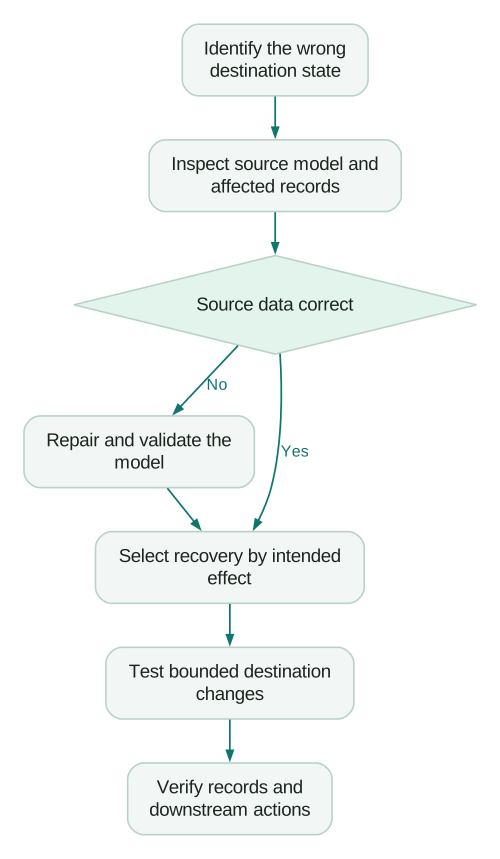
Choose recovery from the desired destination state. Ask whether you need to repair missing attributes, resend failed events, remove stale membership or establish a new baseline. Those are different incidents.
For a shared audience, obtain an inventory of every writer before clearing it. For event delivery, determine which events were accepted already and how the destination handles duplicates. For attributes, check the matching key and the impact of repeating updates.
Maintain a recovery note with the affected model version, run range, records, action and validation query. That note should allow another operator to understand what happened without inferring it from screenshots.
7. Changing identity logic without planning the migration
Change data capture depends on stable identity across runs. Hightouch compares mapped columns for ordinary destinations, while custom destinations such as HTTP Request consider every column. Changing the chosen primary key or the calculation of its values can alter how records are classified across runs. CDC behavior
An identifier change is therefore a migration. Before replacing an email-based key with an internal customer ID, produce a mapping between the two and identify collisions, missing matches and destination records that will need repair.
Do not combine the key change with a large eligibility rewrite and a new destination mapping if you can avoid it. Separating changes makes unexpected additions and removals easier to attribute.
Compare old and proposed outputs by business entity before publishing. Count entities that are unchanged, newly included, excluded and unmatched. Review examples from every group, including the largest or most valuable accounts. Equal total counts do not prove equal membership.
The metric contracts guide provides a useful pattern for documenting meaning and version changes. Apply the same discipline to activation attributes such as lifecycle stage or customer value.
8. Monitoring the green status instead of the business result
A completed run can coexist with rejected rows, stale source data or a destination workflow that never used the output. Monitor each layer separately.
Hightouch's current alerting documentation distinguishes an alert in the app from a notification sent to subscribed recipients. Advanced alerting requires enablement. Size and duration triggers need configuration, and notifications follow trigger state changes rather than repeating for every run. Sync alerting
Configure alerts around your use case. A weekly audience should not be judged by the same inactivity threshold as a frequent transactional feed. A successful run with no changed rows may be normal for a stable customer segment but suspicious for an active purchase-event stream.
Track four observations: when the source became ready, when Hightouch ran, which records the destination accepted and when the business action occurred. If a customer receives an outdated offer, those timestamps help identify where the delay originated.
Assign a primary owner and backup to each critical alert. Test the notification route with a controlled failure. An alert configuration nobody has received is still an unverified assumption.
9. Assuming the approval toggle controls every change
Hightouch's Business-tier approval flows cover models and syncs. Audiences publish immediately under that flow, while journeys and Native Delivery campaigns use separate approval settings. Whether a particular user must obtain approval depends on their role; publishing permissions can allow direct publication. Approval flows
Review the effective role, not just the workspace toggle. Test with an account representing the actual operator. Confirm that a person who should only draft cannot publish the change independently.
The approval should contain evidence: output differences, affected destinations, example records, downstream effects and a recovery plan. “SQL looks correct” is not enough when a filter changes who receives a campaign.
What should the launch checklist contain?
Use one bounded production use case to establish the operating pattern before adding many more. The Hightouch pricing guide covers the related workload and cost inventory.
Checklist
- The row grain and destination matching identity are documented separately.
- Null and duplicate keys fail the source acceptance checks.
- New, changed, unchanged and removed records have verified outcomes.
- Unknown values are distinguishable from intentional clears.
- Eligibility tests include channel exclusions and suppression cases.
- Unexpected empty or sharply reduced models stop for investigation.
- Recovery is selected according to its effect on destination state.
- Alert recipients and response ownership have been exercised.
- Required approval behavior has been tested with the operator's role.
- Destination records and downstream actions match the accepted fixtures.
Keep these fixtures after launch. They are a compact regression suite for the next schema change, new source system or revised lifecycle rule. A dependable activation setup makes its assumptions inspectable instead of burying them in a successful job history.
Questions people ask
Why can a completed Hightouch sync still be wrong?
Completion describes execution, not the meaning of the data or the receiving workflow's outcome. Inspect accepted and rejected records, matching, eligibility and the resulting destination state. A wrong source rule can execute perfectly.
Should I use customer ID as every model's primary key?
Only when one row genuinely represents one customer. Subscription, order and event models need identifiers at their own grain. Fix an ambiguous model before relying on downstream rejection behavior to protect it.
Can I safely retry every record after an incident?
That depends on the operation and destination behavior. Repeating attribute updates, creating records and emitting events can have different effects. Identify what was accepted already and test a bounded recovery before processing the full affected population.
Should empty audiences always stop activation?
No. An empty audience may be a correct business result, but an unexpected empty result deserves investigation. Define the expected range and intentional-empty procedure for the particular workflow rather than imposing one universal threshold.
Who should own a Hightouch implementation?
Give the data team ownership of model correctness and a business operator ownership of the destination action, with explicit incident responsibilities. The launch decision needs both perspectives. A technically valid field is not useful if nobody knows when or how to act on it.
Sources
- Model primary key requirements, accessed 8 September 2026.
- Sync types and modes, accessed 8 September 2026.
- Field mapping, accessed 8 September 2026.
- Syncs overview and removal behavior, accessed 8 September 2026.
- Resync, reset CDC, or clear and fill, accessed 8 September 2026.
- Change data capture, accessed 8 September 2026.
- Configure sync alerts, accessed 8 September 2026.
- Approval flows, accessed 8 September 2026.
Written by
Jafrin Akter AloData Engineer and Co-founder, martechdevs
Jafrin Akter Alo is a data engineer and co-founder of martechdevs, where the team has delivered 74+ martech, data and growth stack implementations.