
Reverse ETL to Salesforce: Match Accounts, Control Writes and Verify Results
Reverse ETL to Salesforce writes warehouse-computed signals onto the CRM records that teams use. Start with known accounts and a small set of warehouse-owned fields. Establish the matching key, permitted operation, field access and automation effects before connecting the source. Then reconcile every attempted row and read the resulting values back from Salesforce; an accepted job alone does not prove a correct sales workflow.
On this page
What should reverse ETL change in Salesforce?
Reverse ETL should deliver the minimum useful context for a defined sales, service or lifecycle action. An account-health status, active-seat count and reason for qualification are useful when someone knows how to respond to them.
For an initial business-to-business SaaS workflow, keep current product signals on the Account if that is where the sales team works. Use a related custom object when the real grain is a subscription, workspace or historical observation. Copying every workspace value into one Account field can overwrite meaningful distinctions.
| Required context | Candidate Salesforce location | Design question |
|---|---|---|
| Current account health | Owned Account fields | Which team acts, and how old may the evidence be? |
| Workspace-level usage | Related custom object | Can one account have several independently changing workspaces? |
| Subscription state | Subscription-grain object or approved account summary | Which subscription controls the account summary? |
| A one-time product milestone | Explicit event or activity path | What stable occurrence key prevents duplicate actions? |
Keep salesperson notes, ownership and manually maintained qualification out of broad automated mappings. The CRM property ownership guide helps assign a writer to each field. The reverse ETL operating model explains the general delivery contract; this guide covers Salesforce's matching, write and acceptance boundaries.
Our warehouse-to-CRM implementation service scopes the model, Salesforce fields, automation and operating evidence together. For the same workflow in another CRM, see product data in HubSpot.
Which route should you evaluate first?
Evaluate a managed reverse ETL connector when repeatable delivery and operating controls are the main need. Evaluate Data 360 when access to external data within its supported experiences can satisfy the use case. Choose a custom API job only when the team can own its complete lifecycle.
| Route | What it supplies | What the pilot must establish |
|---|---|---|
| Managed reverse ETL | Source querying, mapping and destination operations | Exact modes, matching, removal, failures and field outcomes |
| Data 360 federation | Supported access to external warehouse data, with optional acceleration | Required Salesforce experience, freshness, permissions and commercial scope |
| Custom Bulk API 2.0 job | A controlled asynchronous record-write path | Credential operation, file preparation, complete row results and recovery |
Hightouch defaults to the original Bulk API. Bulk API 2.0 is opt-in except for Insert; REST is another option. Confirm the route before benchmarking. Hightouch Salesforce configuration.
RudderStack's Salesforce Bulk Upload destination supports upsert only. If the requirement forbids creating Accounts, do not assume a general “sync contacts” label gives the same protection as an update-only operation. Inspect the supported destination mode before selecting the tool. RudderStack Salesforce Bulk Upload.
Data 360 federation and acceleration solve a different part of the problem. Live access queries external data; acceleration caches data for performance. The connection alone does not define which ordinary Account field should be written or which CRM automation should fire. Demonstrate the intended user experience and any required write path. Salesforce Data 360 architecture.
Price the applicable consumption model. Salesforce's federation billing guidance distinguishes Data Services credits, Flex Credits and license-specific exceptions; credit price depends on the contract. Its Data Services examples use 70 credits per million rows accessed and 2,000 per million rows cached, but those example multipliers are not a universal quote for every license. Include external warehouse work and the actual query/cache pattern. Federation billing considerations.
For a custom Bulk API 2.0 job, the lifecycle includes creating the job, uploading a correctly formed CSV, marking the upload complete, inspecting final processing status and retrieving successful, failed and unprocessed records. Keep all three result populations. Salesforce bulk-upsert walkthrough.
Use reverse ETL tools compared by operating behavior for a broader shortlist. A route that only displays the signal can be sufficient if no CRM field or automation needs changing.
How should warehouse rows match Salesforce records?
Use a stable source identity with a verified mapping into the correct Salesforce object and org. A company name is unsuitable as a fallback for a missing key, and an email address can change or refer to a different record type.
A dedicated text field such as Warehouse_Account_ID__c can hold an opaque warehouse account key. Decide whether the field must be both External ID and Unique. Salesforce documents them as distinct settings: External ID supplies an external reference, while Unique prevents duplicate stored values. Without uniqueness, concurrent upserts can create duplicate external-ID values. External ID versus Unique.
Check both populations before enabling the sync: unique keys in the source model and unambiguous matches in Salesforce. A valid source table can still point to two CRM records created before the constraint existed. Resolve those cases through the CRM owner's matching process; do not pick whichever result appears first.
Keep key formatting explicit. Preserve leading zeros, account scope and the agreed case rule. Salesforce's SOAP upsert guidance describes case-insensitive matching when the Unique field uses the case-insensitive option. Test the exact field configuration and API route rather than lowercasing every identifier by habit. Salesforce external-ID matching.
Hightouch requires appropriate external-ID matching for upserts and does not support using the Salesforce record ID for that mode; its Update mode can use the Salesforce ID. That is a connector-specific rule. Salesforce's REST external-ID resource separately supports an updateOnly parameter to prevent creation and rejects ambiguous matches. Hightouch matching rules, Salesforce REST upsert behavior.
Retain the warehouse key, Salesforce ID, object and org in the mapping record. Use the 15-character and 18-character Salesforce ID guide when data moves through case-insensitive tools. After a merge, review the surviving record and the old mapping before resuming; a missing retired ID must not silently create a new Account.
What must Salesforce permit before the first write?
The integration identity needs access to the intended records, objects and editable fields. Authentication success only establishes that the identity logged in; it does not establish that every mapped write is allowed.
Salesforce's API security model limits clients to the objects and fields accessible to the logged-in user. Use a dedicated identity with the required access rather than testing as an administrator and assuming the production identity behaves the same way. Salesforce API security. Connector requirements can add setup permissions: Hightouch also requires View Setup and Configuration. Hightouch access requirements.
- List the target object, record types and exact field API names.
- Identify the fields owned by the warehouse and exclude protected human-owned fields.
- Inspect object, field and record access for the actual integration user.
- Check field types, required values, restricted picklists and noneditable fields.
- Inventory validation rules, duplicate controls and relevant flows or triggers.
- Run a small sandbox cohort through the same operation and permissions intended for production.
Salesforce's Describe resource exposes object and field metadata. Use it alongside Object Manager to verify names and relationships instead of copying field labels into a CSV header. sObject Describe. The Salesforce field-permissions guide covers access failures in more detail.
Do not map a computed formula into a field that cannot be written. If Salesforce owns the calculation, sync its approved inputs; if the warehouse owns the result, use a suitable writable field with a clear name and definition. A field appearing on a page layout does not prove that the integration may edit it.
Which operations and empty-value rules are safe for the first release?
Start with updating existing records and only the approved field set. Enable creation, events or deletion after their business effects and recovery rules are explicit.
| Operation | Appropriate use | Control to require |
|---|---|---|
| Update existing | Enrich known Accounts or Contacts | Missing match is an exception, not implicit creation |
| Upsert | Maintain owned entities where creation is approved | Unique key, required fields and record ownership |
| Insert | Record a genuine new occurrence | Stable occurrence identity and replay behavior |
| Delete | Execute a reviewed removal requirement | Exact affected population and consumer consequences |
Hightouch Archive deletes Salesforce records returned by the model; it does not preserve a historical copy. Configure model-row removal behavior separately. Salesforce destination modes and removal.
For example, a source model containing only qualified accounts needs a way to clear a previous qualification when an account exits. Removing an account from that query should not delete the Salesforce Account. A model containing every managed account with an explicit status can make the intended state transition clearer.
Distinguish omitted fields from intentional clears. Salesforce Bulk CSV updates ignore empty values; #N/A requests a null value. CSV values are not automatically trimmed. Test those rules against the field type before publishing a file. Salesforce CSV value rules.
RudderStack's Salesforce destination explicitly converts a mapped null to #N/A, while an absent field produces an empty cell that preserves the existing value. A missing upstream measure must therefore be classified before the connector maps it into a clear. RudderStack null handling.
For a product-qualified signal, use known positive, known negative and unknown evidence states. Decide how unknown evidence affects the salesperson's action. Retaining a stale positive value without showing its age can be as misleading as clearing a legitimate one.
How do you stop a field sync from repeating business actions?
Test the Salesforce automation that runs around the write, not just the field value afterward. Repeating an intended state can leave the field unchanged while a poorly scoped automation creates another task or message.
Record-triggered flows can update records before or after save and run custom validation rules. Their behavior depends on the trigger and execution path. Salesforce also documents limits on accessing external data during a synchronous save path. Record-triggered flow considerations.
Use a test record to exercise first qualification, an unchanged replay, loss of qualification and requalification. Agree which of those transitions should create a sales task. Keep a stable action key when the same qualification episode can be delivered more than once.
Inspect any flows that rewrite a mapped field or alter ownership. Flow ordering can organize flows with the same trigger type, but it cannot reorder an after-save action ahead of a before-save flow or Apex trigger. It also does not directly control associated asynchronous paths. Salesforce flow-order rules.
For parent-child writes, make the dependency explicit. A Contact-to-Account relationship needs the correct existing parent identity, not a guessed company-name match. Prove the parent result before sending dependent children, and preserve the rows that could not be safely matched.
A later source version can arrive before an earlier retry. Prevent the old retry from restoring an obsolete signal through a supported ordering rule or by rebuilding the retry from current approved state. Do not turn a timestamp comparison into a promise that the connector automatically performs conditional updates.
What does a reconciled Account sync look like?
Reconcile each processing stage with its own denominator and keep row outcomes mutually exclusive. The number of valid model rows is not the number of successful Salesforce writes.
Consider a hypothetical model of 8,000 Accounts with four warehouse-owned product fields and a separate external-ID match. Fifty rows fail key checks, leaving 7,950 valid rows. Of these, 600 have a meaningful change; 7,350 do not need writing.
| Stage | Records | Meaning |
|---|---|---|
| Source model | 8,000 | Complete candidate population |
| Quarantined before sending | 50 | Missing or duplicated identity evidence |
| Valid model rows | 7,950 | Eligible for change detection |
| Changed and attempted rows | 600 | Intended Salesforce operations in this run |
| Accepted on the first attempt | 594 | Transport results requiring state verification |
| Rejected by validation | 5 | Correct the payload or approved rule before retry |
| Pending retry after a lock error | 1 | Not yet counted as delivered |
The attempted population reconciles as 594 + 5 + 1 = 600. If the pending row later succeeds, the final population becomes 595 accepted and five rejected. Do not report 601 attempts as 601 distinct accounts, or count the same row as both pending and accepted in the final snapshot.
This Python 3 helper validates one normalized outcome snapshot. The sets contain your stable attempted-row keys after vendor results have been mapped back to the input. It does not call Salesforce or interpret an API response for you. For a final result, require no pending rows. Final reconciliation still permits reported rejections; it does not label them successful. Repair critical failures or explicitly approve a narrower release scope before the recurring workflow proceeds.
def reconcile_outcomes(attempted, accepted, rejected, pending, *, final=False):
    if not isinstance(final, bool):
        raise TypeError("final must be a boolean")

    def keys(values):
        if not isinstance(values, (list, tuple)):
            raise TypeError("Supply a list or tuple of row keys")
        if any(not isinstance(v, str) or not v or v != v.strip()
               for v in values):
            raise ValueError("Row keys must be nonempty unmodified strings")
        if len(values) != len(set(values)):
            raise ValueError("Duplicate key within an outcome category")
        return set(values)

    expected = keys(attempted)
    ok, bad, waiting = map(keys, (accepted, rejected, pending))
    if ok & bad or ok & waiting or bad & waiting:
        raise ValueError("A row appears in more than one outcome category")
    observed = ok | bad | waiting
    if observed != expected:
        raise ValueError("Missing or unexpected row outcomes")
    if final and waiting:
        raise ValueError("Pending rows prevent final reconciliation")
    return {
        "attempted": len(expected), "accepted": len(ok),
        "rejected": len(bad), "pending": len(waiting),
    }


assert reconcile_outcomes(
    ["a", "b", "c"], ["a"], ["b"], ["c"]
) == {"attempted": 3, "accepted": 1, "rejected": 1, "pending": 1}
Store the attempt history separately from this current outcome snapshot. Retain the source model version, mapping version, job ID, row key, intended operation and result. A row-level timeout can be ambiguous; inspect its current destination state before replaying an action that cannot be safely repeated.
For Bulk API 2.0, inspect successful, failed and unprocessed result resources after processing rather than accepting an upload acknowledgement as completion. Bulk job results.
How should you read Salesforce values back after the sync?
Read the attempted or accepted identities directly and compare the warehouse-owned fields against the approved model version. A filter on the integration user's last-modified records can miss changes later touched by another flow or user.
The following SOQL example assumes the named custom fields exist on Account. Substitute your tested field API names and controlled keys. Run it through an authorized query tool using the intended read permissions; it is a readback example, not an instruction to modify production.
SELECT Id, Warehouse_Account_ID__c,
       Product_Active_Seats__c, Product_Health__c,
       Product_Qualified__c, Product_Signal_As_Of__c
FROM Account
WHERE Warehouse_Account_ID__c IN ('acct-001', 'acct-002')
Compare nulls, zero, false, allowed picklist values and effective timestamps explicitly. Check both a known positive and a known negative signal. If 50 sampled accepted records all match, record that sample result; it does not prove all 595 accepted records or every possible automation path is correct.
Where the consequence justifies it, reconcile all affected records within the supported API budget. Keep mismatches visible and identify whether they began in the source model, mapping, write processing or a competing Salesforce automation. Use Salesforce API limit diagnostics when deciding the readback and recovery schedule.
One subtle result-file problem deserves attention: Salesforce documents that CSV headers with incorrect API-name capitalization can leave field values blank in Bulk API 2.0 result files even when the record write succeeds. Preserve the original payload and inspect the actual record before treating a blank result-file field as an intentional source clear. Bulk result-file field-name behavior.
How should you investigate rejected Salesforce rows?
Classify the rejection before deciding to retry. A temporary lock, invalid value and ambiguous identity require different repairs; repeated submission is not a general resolution strategy.
If your own runner uses Bulk API 2.0, the job-results and retry guide shows how to separate failed, unprocessed and unexplained rows before another write.
| Error or symptom | First check | Repair to validate |
|---|---|---|
INSUFFICIENT_ACCESS_OR_READONLY | Effective object, field and record access | Grant only required access or remove the unsupported mapping |
INVALID_FIELD_FOR_INSERT_UPDATE | Is the target field editable? | Map a writable field or the approved calculation inputs |
DUPLICATE_EXTERNAL_ID | Source and destination key uniqueness | Resolve ambiguous identity before further writes |
UNABLE_TO_LOCK_ROW | Concurrent jobs and repeated target keys | Reduce contention and retry only the affected current intent |
ApiBatchItems Limit exceeded | Applicable Bulk API allocation and competing jobs | Reduce demand or wait for the relevant reset |
| Validation or restricted-picklist failure | Exact value, record type and active rule | Correct the payload or approved business configuration |
The error names and diagnostic categories are documented in Hightouch's Salesforce troubleshooting guide. Keep the exact API message and a redacted row reference in the exception record.
Do not disable validation across the object just to clear an error queue. A rule may be exposing an invalid business transition. If an intentional integration exception is required, make its scope explicit and test both the permitted and still-forbidden cases.
Lower parallelism when contention is demonstrated, and inspect the account hierarchy or related records being locked. A smaller payload alone may not solve two processes updating the same parent. The Salesforce implementation guide covers the surrounding automation and ownership failures.
What should pass before the sync is left running?
Release the recurring sync only after identity, write permissions, row outcomes and the resulting Salesforce workflow pass together. Keep a failed gate from publishing an empty model that accidentally removes valid customer context.
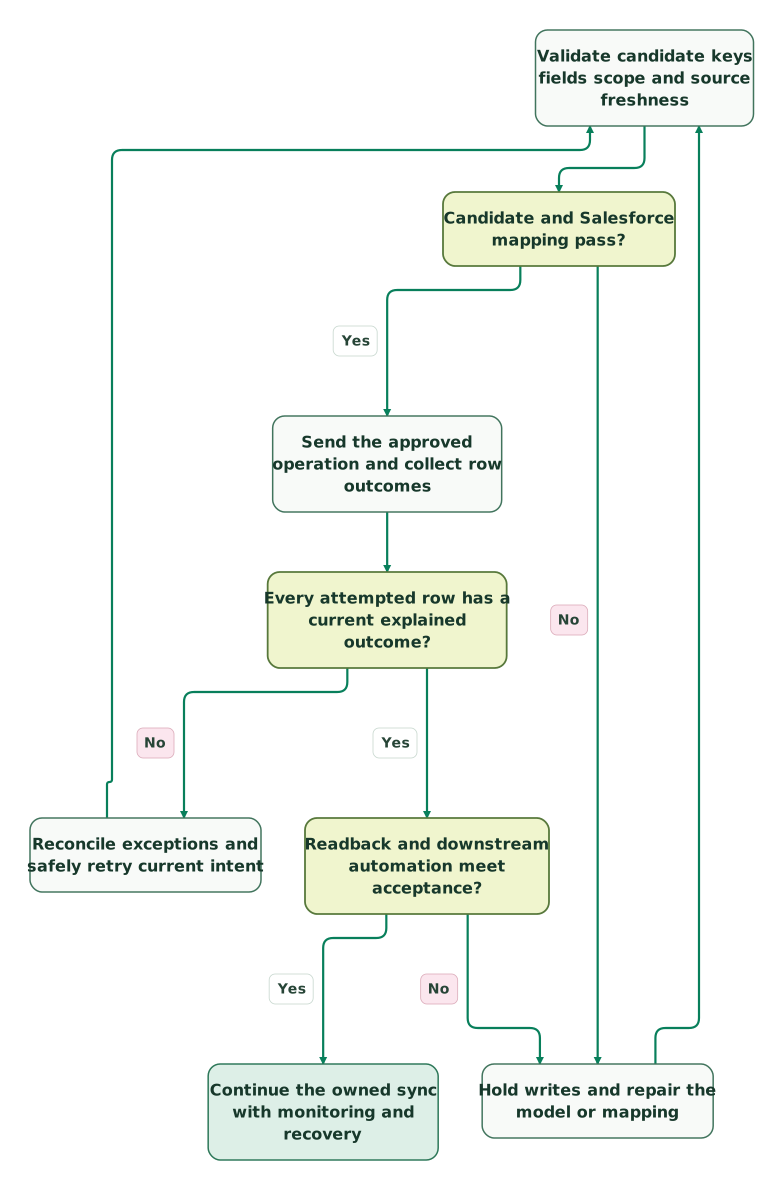
Read diagram as text
- Validate candidate keys fields scope and source freshness to Candidate and Salesforce mapping pass?.
- Candidate and Salesforce mapping pass? to Hold writes and repair the model or mapping: No.
- Hold writes and repair the model or mapping to Validate candidate keys fields scope and source freshness.
- Candidate and Salesforce mapping pass? to Send the approved operation and collect row outcomes: Yes.
- Send the approved operation and collect row outcomes to Every attempted row has a current explained outcome?.
- Every attempted row has a current explained outcome? to Reconcile exceptions and safely retry current intent: No.
- Reconcile exceptions and safely retry current intent to Validate candidate keys fields scope and source freshness.
- Every attempted row has a current explained outcome? to Readback and downstream automation meet acceptance?: Yes.
- Readback and downstream automation meet acceptance? to Hold writes and repair the model or mapping: No.
- Readback and downstream automation meet acceptance? to Continue the owned sync with monitoring and recovery: Yes
Checklist
- The action, target grain and field owners are written down.
- Warehouse keys and destination matches are unique and correctly scoped.
- Creation and deletion are enabled only where explicitly required.
- Actual integration permissions and editable field types are verified.
- Required fields, record types, validation and automation pass the fixture.
- Null, omitted, zero, false and removal cases behave as intended.
- Retries preserve current intent and do not duplicate tasks or messages.
- Attempted, accepted, rejected and pending records reconcile.
- Readback confirms the affected values and the intended business outcome.
- An owner can stop, repair and resume the path without losing evidence.
For a disputed existing sync, get the $99 martech audit with the field contract and one failed account trace. For a defined first implementation, request a detailed warehouse-to-Salesforce scope covering matching, automation acceptance and operating handover.
Keep reading
Browse all Data Warehouse guides
 CRM & Lifecycle
Salesforce Implementation Checklist: From Scope to a Working Release
Plan a Salesforce rollout with owners, migration rehearsals, permissions, integration tests, UAT, cutover and recovery gates before approving the release.
Jafrin Akter AloLast updated 14 min read
 CRM & Lifecycle
Salesforce to HubSpot migration: plan, field mapping and cutover checklist
Plan a Salesforce to HubSpot migration: phases, a field mapping template, load order, Smart Transfer limits, reconciliation checks and a safe cutover.
Jafrin Akter AloLast updated 21 min read
 CRM & Lifecycle
Salesforce Implementation Mistakes That Break Revenue Operations
Avoid Salesforce failures in identity, migration, automation and permissions. Use a worked won-deal handover and an evidence-based release checklist.
Jafrin Akter AloLast updated 10 min read
Data warehouse & CDP
See the implementation scope, deliverables and acceptance checks.
Questions people ask
Should every workspace in our product create a Salesforce Account?
Only if a workspace is the business entity your Salesforce process treats as an Account. Several workspaces can belong to one commercial customer, so automatic creation can fragment ownership and pipeline reporting. Model the relationship first, then choose an account summary or related custom object. Keep the creation policy distinct from a recurring update of usage on an existing account.
Can an Account owner edit a warehouse-managed health field?
Define whether manual edits are allowed and what they mean before opening the field. A temporary override usually needs its own value, reason, owner and expiry so the next sync does not silently erase it. Keep the computed signal identifiable and let the operating process resolve conflicts deliberately. Do not give the warehouse and sales team competing authority over an unexplained shared field.
Does a successful retry prove the earlier failure caused no harm?
No, it proves only the outcome established by the retry and subsequent checks. The original attempt may have changed some records or triggered downstream work before failing. Inspect row results and relevant automation evidence, then reconcile the final state. Keep the failed attempt in the audit trail rather than replacing it with a green latest-run label that hides its effects.
What should happen when a salesperson cannot see a synced signal?
Check the record, field value, effective permissions and intended page or report separately. The integration user may have successfully written a field that the salesperson cannot view, or the user may be looking at a different account. Verify the actual consumer's experience with a controlled record. Transport success does not establish that the signal reached the person expected to act.
How should we retire a warehouse-owned Salesforce field?
Find the reports, flows, views and integrations that consume it before stopping the writer. Agree whether the final value should remain with an expiry, be cleared or be replaced by a new definition. Migrate the consumers and verify the replacement, then remove the obsolete mapping through a controlled change. Stopping the sync alone can leave an old signal looking current indefinitely.
Sources
- Hightouch Salesforce destination
- RudderStack Salesforce Bulk Upload
- Salesforce Data 360 architecture
- Salesforce federation billing considerations
- Salesforce Bulk API 2.0 upsert walkthrough
- Salesforce External ID and Unique field settings
- Salesforce upsert and external-ID case behavior
- Salesforce REST external-ID upsert
- Salesforce API security
- Salesforce sObject Describe
- Salesforce Bulk CSV value rules
- Salesforce record-triggered flow considerations
- Salesforce flow execution order
- Salesforce Bulk result-file field-name behavior

Written by
Jafrin Akter AloData Engineer and Co-founder at Martechdevs and Growth and Analytics Partners
Jafrin writes practical guides to marketing technology, customer data, analytics and AI workflows. Martechdevs is a Growth and Analytics Partners company.