
Amplitude MCP server: setup, permissions and useful AI workflows
Data Engineer and Co-founder, martechdevs
Published 11 min read
Amplitude MCP can help a product or growth team move from a question to an analysis, then preserve the result in a chart or dashboard. It can also modify the definitions that other people rely on. Set up the connection around a specific job, verify its access and check the evidence before letting a useful assistant become an unattended editor.
Last updated: 21 September 2026.
Decide which job the connection should do
The Amplitude MCP server reads and writes analytics content, experiments, cohorts and taxonomy. It is available to external MCP clients including Claude, Cursor and Codex.
Start with a job that has a recognisable finished state. “Explain the difference between this week's activation funnel and the previous comparable cohort” is specific enough to review. “Find growth opportunities” can generate an impressive amount of text without resolving a decision.
Three useful starting jobs are:
- Reproduce an existing report, explain its definition and investigate one material change.
- Prepare a draft dashboard or cohort from an agreed measurement specification.
- Compare instrumentation code and the tracking plan, then propose a documented repair.
These jobs require different permissions and evidence. Reading a chart is different from saving a cohort that a lifecycle team might later sync into messaging. Repairing an event description is different from changing the code that emits the event.
Choose the job first. Then decide what access the assistant needs to complete it.
Check organisation access and roles
MCP is enabled by default for organisation users. Admins can restrict it under Settings → Content Access → MCP. Tool visibility does not prove permission: calls are checked per project. The MCP guide documents these controls.
The RBAC reference distinguishes Use MCP (read) for search, retrieval and queries from Use MCP (write) for creating, updating or deleting content. Read access is required to use the server. Have the administrator check your actual role and the controls available under your plan.
For an analysis pilot, begin with the required read access. If the pilot later needs to save reviewed outputs, grant the relevant write capability deliberately. Do not assume an organisation administrator's title or a visible tool list tells you exactly what a particular call can do.
Record four things before setup: the authorised identity, project IDs, permitted jobs and person responsible for reviewing changes. This makes a permission error diagnosable and prevents “someone connected an assistant” from becoming the entire access record.
Connect Claude Code with the correct data region
Amplitude provides a remote HTTP endpoint for US data and a separate endpoint for EU residency. The Claude Code setup page documents OAuth authentication and these commands.
For a US project:
claude mcp add -t http -s user Amplitude "https://mcp.amplitude.com/mcp"For an EU project, use this instead:
claude mcp add -t http -s user Amplitude "https://mcp.eu.amplitude.com/mcp"Choose one according to where the project's data resides. -s user makes the configuration available across your Claude Code sessions. Use -s local when you want the connection scoped to the current project directory.
Start Claude Code, open /mcp and complete the Amplitude OAuth flow. Then ask for the accessible projects, including IDs. Select the intended project before querying its data.
A project list confirms the basic connection. Your acceptance check should go further: retrieve a known chart, compare its definition and result with Amplitude, and record any discrepancy. A successful login does not prove that an analysis uses the intended timezone or population.
Check dashboard filters explicitly. Amplitude's MCP troubleshooting guidance warns that retrieving a chart from a dashboard may use the chart's defaults rather than saved dashboard filters. Compare the actual returned filters with the dashboard before explaining a discrepancy as a change in customer behaviour.
Connecting through Claude's browser or desktop app
In Claude, open Settings → Connectors → Browse, find the verified Amplitude connector and complete OAuth. Team and Enterprise workspaces need an owner to enable the connector first. Each member then connects their own account. The Claude connector guide gives the current steps.
That guide says the directory connector uses the US server and directs EU customers to their Amplitude account team before connecting. Do not assume the listed connector automatically selects EU residency. The manual Claude Code setup above has an explicit EU endpoint.
If the OAuth page keeps spinning after approval, check the client's actual connection state and try project discovery. Amplitude documents this browser behaviour; a spinning page alone does not establish that authorisation failed.
Load only the tool detail the task needs
Amplitude consolidated its MCP tool surface into broader operations in August 2026. Its release note describes action-based tools and the retirement of advertised legacy names. An old tutorial's tool name may therefore be the problem, even when the connection itself works.
For supported full-catalog clients, append ?discovery=progressive to the endpoint. Discover in this order: get_amplitude_context, list_tool_categories, get_category_tools, then describe_tool for the selected operation. ChatGPT's curated subset excludes progressive discovery and replay tools. These are current server-specific limitations.
For example, the US progressive URL is:
https://mcp.amplitude.com/mcp?discovery=progressiveAsk the assistant to inspect the current schema before constructing arguments. This avoids filling a request with parameters remembered from an older tool version.
Progressive discovery is a loading strategy. It does not create a read-only connection, improve the event data or guarantee a fixed percentage reduction in your bill. Measure the actual workflow in your chosen client, including the extra discovery calls and review time.
Make business context visible to the client
AI Context lets you define company and project terminology, metrics and analysis preferences. Put the rules that affect decisions into concise text: which project is production, how activation is measured, which events are deprecated and how internal activity is identified.
get_amplitude_context returns organisation and project text for the selected project, but MCP does not return uploaded reference-file contents. Put essential definitions in text instructions; do not assume a spreadsheet uploaded for in-product Agents reached the external client. See the MCP context guidance.
Ask the assistant to repeat the applicable definitions and identify conflicts before analysing. This is particularly useful when a team changes its activation milestone but an old dashboard still uses the previous event.
For a release investigation, provide the release identifier, exposure definition, relevant event names, known tracking changes and the time at which rollout started. A release date alone cannot establish which users actually received the feature.
Keep these notes linked to the maintained tracking plan. Copying a stale definition into more places increases confidence without increasing accuracy.
Workflow one: investigate a funnel without inventing a cause
Start from a saved chart whose owner agrees with its definition. Ask the assistant to inspect the underlying events, filters, counting unit, conversion window and date boundaries before explaining movement.
Use this adaptable prompt:
Investigate the change in the approved trial-to-first-export funnel. Begin with the saved chart and show its definition. Compare fully observed cohorts using the same conversion window and timezone. Return entry and completion counts, relevant segments and missing-property coverage. Check for instrumentation changes around the release. Distinguish measured differences from hypotheses and recommend the smallest next check that would resolve the leading hypothesis. Do not change the chart.
Suppose a fictional analysis finds more export-button clicks but fewer completed exports. That supports examining the path between intent and completion. It does not establish that the new button caused failures. The assistant should look for evidence such as changed eligibility, service errors, event-delivery gaps or a different customer mix.
Ask for evidence that could disprove its preferred explanation. If it blames one browser, request that browser's eligible count and comparison rate, plus whether the same tracking change affected other browsers. A persuasive story built around six users should not receive the same weight as a pattern reproduced across the relevant population.
Preserve the query and the unresolved questions. A product manager should be able to turn the output into an investigation task without recreating the conversation.
Workflow two: repair an event definition and its implementation
“Add an event” can refer to two separate changes. Registering a tracking-plan event through MCP changes the definition. Sending observed behaviour still requires application instrumentation and an ingestion path. Amplitude's Claude Code instrumentation guide makes this distinction and documents additional tracking-plan permissions for writes.
Consider a fictional export workflow. The team wants to measure successful exports, but its current event fires as soon as someone clicks Export. A better name alone will not repair the measurement.
Prepare a contract such as this original planning record:
event: Export Completed
owner: reporting product team
trigger: backend confirms the export artifact is ready
person_identifier: stable internal user ID
business_identifier: export_id
workspace_context: workspace_id
required_properties:
  - export_format
  - export_id
  - workspace_id
exclude:
  - button clicks
  - failed jobs
  - cancelled jobs
retry_rule: retain the same event identity for the same completion
new_export_rule: use a new identity for a separate completed export
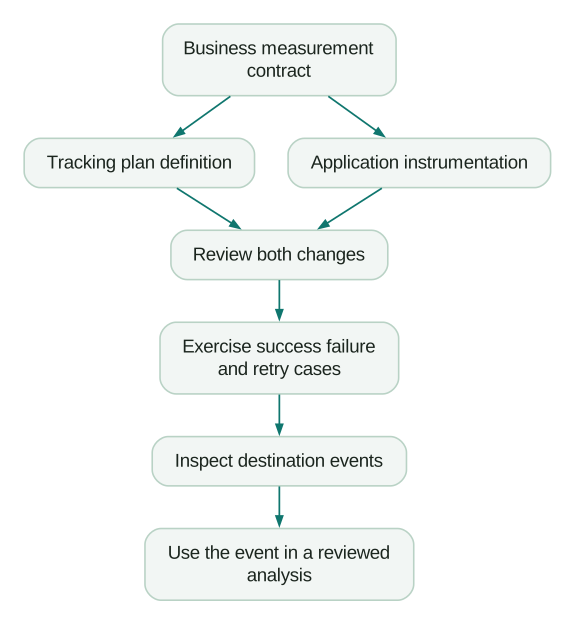
This is a measurement contract, not an Amplitude request body. Have the assistant compare it with the existing code and tracking plan, then prepare the changes for review.
The definition change should document the trigger and allowed fields. The code change should emit after confirmed completion, preserve identity on retries and avoid emitting for failures. Keep event ownership clear when both frontend and backend code can observe the same job.
For direct HTTP V2 ingestion, Amplitude documents insert_id deduplication with the same device_id within seven days. Event timestamps use milliseconds since epoch. Its HTTP V2 reference is the implementation source; a business export_id property alone is not that deduplication mechanism.
Review the actual delivery design rather than assuming a short API deduplication window replaces durable job state. A delayed replay or a new ID generated on every retry can defeat the intended counting rule.
Test four business cases before relying on the new event:
- A successful export produces one completion for that export.
- Retrying delivery for the same completion does not produce a second business completion.
- A failed or cancelled export produces no completion event.
- A second, separate successful export produces another completion.
Then inspect the destination data with approved test identifiers. A merged pull request and an updated tracking plan are useful checkpoints, but neither proves the production event arrived with the right identity and properties.
Workflow three: create content people can maintain
Before saving a dashboard or cohort, ask for a proposed definition and intended owner. Include the business question, refresh expectations and any downstream use.
A cohort named “At risk” is too ambiguous to maintain. A definition specifying the eligible customers, observed behaviour, lookback period and exclusions gives the lifecycle team something it can inspect. It also makes it easier to spot when a data outage would suddenly classify half the customer base as inactive.
Save the approved object, reopen it and verify that its filters match the proposal. Confirm its sharing and naming. If it feeds activation elsewhere, validate the destination's consent, suppression and exit rules separately. Membership in an analytical cohort does not establish permission to send a message.
Treat experiments and feature flags as a separate operating decision. Reviewing an experiment result, creating a draft configuration and changing a live rollout have different consequences. A broad request to “improve conversion” should be broken into specific, reviewable actions with an owner for the release.
MCP, Amplitude Agents and the plugin serve different workflows
Custom Agents run saved instructions with selected tools and optional schedules inside Amplitude. Global Agent supports ad hoc exploration; specialised agents cover defined jobs. External connectors can extend those agents into other systems, while Amplitude MCP exposes Amplitude to an outside client.
Use an external client when the work needs approved repository context or a wider investigation already taking place there. Consider an in-product agent for a repeatable workflow whose definitions and audience are established in Amplitude. Scheduling a weak analysis only makes its mistakes arrive regularly; validate a manual run first.
The official Amplitude plugin repository adds reusable analysis and instrumentation skills. It is optional for a manual MCP connection. If you add it, inspect the enabled connections afterwards. Amplitude's instrumentation guide notes that the plugin bundles a US server, which EU users should disable when retaining their explicit EU connection.
AI Controls governs in-product Agent settings and inbound connectors. Its Audit tab covers Global Agent and Wave conversation threads, with other agent types excluded. Do not describe that tab as a complete record of every external MCP operation. Decide where your chosen client's activity and approved changes will be recorded.
Evaluate cost through useful completed work
Amplitude's current pricing page includes AI Agents and MCP across its listed plans, including Free. The Free plan currently includes two million events per month; product capabilities and volumes still vary by plan. Check your contract and the external AI client's costs separately.
For a pilot, record how long a person takes to obtain and verify an answer, how often the result needs correction and whether it changes a decision. Count the time spent repairing context or definitions as part of the workflow.
A fast first answer that needs extensive checking may be less useful than a narrower, reproducible result. Expand access when the pilot reliably completes the selected job and someone owns its maintenance.
Checklist
- Organisation access and the actual read/write role are checked.
- The data region and client connection route agree.
- A known chart is reproduced successfully.
- Tool schemas are discovered from the current server.
- Essential context is visible as text in the client.
- Analysis distinguishes observations, hypotheses and missing evidence.
- Tracking-plan changes and event delivery are verified separately.
- Saved content has an owner and a clear definition.
- Live experiment or rollout changes have a specific release decision.
- Cost and review effort are measured against a completed job.
If the pilot exposes ambiguous events, inconsistent identity or missing release context, our product analytics implementation work helps resolve those inputs. The product analytics setup guide provides a starting checklist you can use with your own team.
Questions people ask
Can Amplitude MCP work with Cursor or Codex?
Yes. Use the current setup instructions for the chosen client and verify project access after authentication. A workflow available in one client may differ in another, so confirm the tools it actually exposes before promising the same result.
Why can I read data but not change the tracking plan?
Read access does not grant every write operation. Ask the administrator to check the MCP write permission, the relevant Amplitude Data permission and project scope. Keep the proposed change available for review while the access issue is resolved.
Does connecting MCP start tracking my website?
No. Your application needs the appropriate SDK or ingestion integration. Review event triggers, identities and delivery independently from the MCP connection, then verify observed events in the intended project.
Do I need the Amplitude plugin?
No. A manual connection can support your own workflow. Add the plugin when its reusable skills help with recurring analysis or instrumentation, then review its configuration and any bundled connections.
Should I automate a weekly product report immediately?
First run it manually against a known period. Check its definitions, exclusions, source links and handling of missing data. Schedule it once the output is reliable, and assign someone to maintain the context as the product changes.
Sources
- Amplitude MCP server
- Amplitude RBAC permissions
- Amplitude MCP in Claude Code
- Amplitude MCP in Claude
- Consolidated MCP tools release
- Amplitude AI Context
- Amplitude instrumentation with Claude Code
- Amplitude HTTP V2 ingestion
- Amplitude Custom Agents
- Amplitude AI plugin repository
- Amplitude AI Settings and Controls
- Amplitude pricing
Written by
Jafrin Akter AloData Engineer and Co-founder, martechdevs
Jafrin Akter Alo is a data engineer and co-founder of martechdevs, where the team has delivered 74+ martech, data and growth stack implementations.