Customer journey tracking: follow one customer from first click to revenue
Data Engineer and Co-founder at Martechdevs and Growth and Analytics Partners
Last updated 17 min read
Customer journey tracking records the milestones someone reaches across your website, product, customer relationship management (CRM) system and billing platform, with the identifiers needed to connect them. Start with one journey and one counting unit. Then verify each handoff, preserve missing evidence and reconcile the final outcome. A complete-looking timeline is useful only when its records belong to the same person or account.
What is customer journey tracking?
Customer journey tracking creates an evidence trail of actual milestones, each with a source, identifier and occurrence time. It lets you answer questions such as which accounts activated after signup, how long qualified opportunities took to pay, and where the connection between two systems broke.
Journey mapping describes the intended or researched experience. Nielsen Norman Group defines a journey map around the process someone follows to achieve a goal. Tracking records the observable events within that experience; journey analytics examines their sequence, timing and outcomes.
The useful output is one row per milestone occurrence, linked to a person or account where the evidence supports that relationship. Keep the original record accessible. A sales-stage change, a product event and a paid invoice should not become indistinguishable rows labelled “conversion.”
Which journey and stages should you track first?
Choose one journey with a business decision and an owner, then define the evidence for entering each stage. For a small business-to-business (B2B) software company, signup to first paid account is often a manageable starting scope. Use choosing which customer journey to improve first when several teams want different outcomes.
The following is an illustrative B2B software-as-a-service (SaaS) journey. Your process may skip a stage or take a different route.
| Milestone | Entry evidence | Authoritative system | Counting unit |
|---|---|---|---|
| First observed visit | An eligible recorded landing or referral | Website collection | Observed browser/person until a supported account link exists |
| Return visit | A later eligible visit linked to the same supported measurement identity | Website collection | Observed browser/person, with identity limits preserved |
| Signup or demo request | Successful account creation or accepted request | Product backend or form receiver | New trial account or qualified enquiry, explicitly separated |
| Activation | Completion of the defined valuable product action | Product backend/event model | Account or workspace, according to the product |
| Opportunity or product-qualified account | Accepted commercial stage or approved qualification rule | CRM or governed account model | Commercial account |
| Paid | The agreed first-payment or service-start condition | Billing and contract records | Commercial account |
| Renewal or expansion | Completed renewal or qualifying increase | Billing and contract records | Account and the relevant contract/subscription |
Which evidence should define a stage?
Use a completed action. A pricing-page visit does not establish a signup, an email click does not establish activation, and a created invoice does not establish payment. Write each milestone event into a tracking plan with its producer, required identifiers and acceptance example.
For offline steps, record what actually happened: a completed demo, an accepted sales opportunity or a signed contract. Keep the activity time, the time someone logged it, and the contact/company association. A booked call and a completed call should remain separate evidence.
Should you count people or accounts?
Choose the unit that reaches the business outcome. Five invited colleagues can belong to one paying account. If activation is an account milestone, count the account once when its rule is first satisfied; retain individual events for diagnosis.
Person-level acquisition and account-level revenue can coexist, but they need an explicit relationship and effective dates. Do not assign one contract's full revenue independently to every member's browsing path.
Our analytics and tracking implementation starts with these definitions and the handoffs that must preserve them. The first deliverable should be a journey you can trace, with totals its business owner can reconcile.
Where does each stage's data live?
Each system holds a different part of the journey. Name its responsibility before expecting an analytics dashboard to know everything.
- Advertising platforms: campaign activity, click identifiers, spending and platform-attributed outcomes.
- Website analytics: observed sessions, campaign parameters and configured key events.
- Product analytics: instrumented product actions and their supported identity relationships.
- CRM: contacts, companies, opportunities, activities and commercial-stage history.
- Billing: customers, subscriptions, invoices, payments and their actual state changes.
- Support: issues, commitments and resolutions that explain progress or friction.
A tool receiving one of these records does not automatically receive the other systems' identifiers or history. Treat each boundary as a small integration contract: what key travels, where it is stored, and what proves that the receiving record matched correctly.
How do you carry the customer from one tool to the next?
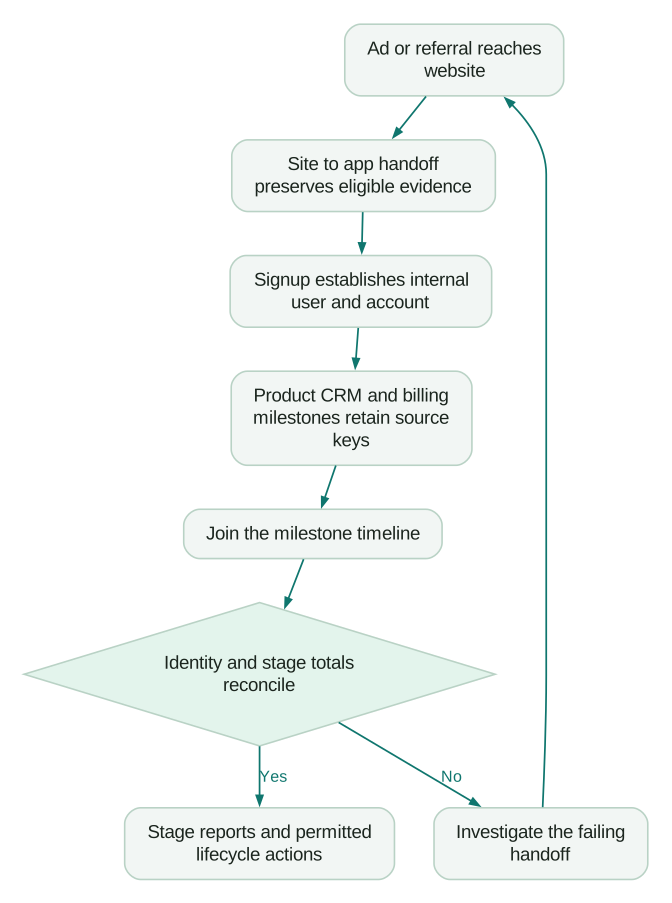
Carry the evidence available at each handoff, then replace temporary browser identity with an authenticated internal relationship when it becomes available. Campaign parameters explain acquisition; analytics linking preserves a measurement session; an internal account ID connects the commercial journey. Those jobs require different keys.
How do UTMs and click IDs reach the landing page?
Keep campaign parameters through every redirect and validate the final landing URL. Google Ads auto-tagging adds a Google click identifier, or GCLID, to an eligible ad-click URL. Redirects must preserve it. Consistent UTM naming rules make source, medium and campaign interpretable when they are available.
Test the route a buyer takes, including link shorteners, tracking redirects, regional routing and the final application URL. A correct URL in the campaign builder does not prove that its parameters survived the route.
Browser storage also has limits. WebKit's detailed 24-hour link-decoration rule caps JavaScript-created cookies when a domain classified for cross-site tracking caused the navigation and the final URL has a query or fragment. This is conditional; the presence of any UTM is not enough by itself.
WebKit also describes deleting script-writable storage after seven days of Safari use without interaction with the site. Both restrictions appear in its living tracking-prevention guidance.
Keep acquisition evidence only through the permitted collection and storage design. A source value missing after storage expiry should remain unknown. Moving it to a different storage mechanism is not a substitute for respecting the visitor's choice and the applicable policy.
How does the marketing site connect to the app domain?
Use the supported cross-domain configuration when the website and app should share Google Analytics 4 (GA4) measurement. Google's cross-domain guide passes analytics identifiers through the _gl linker parameter; redirects can remove it. Verify the decorated destination URL and the receiving measurement setup, including the relevant shared tag configuration.
The linker is a short-lived navigation mechanism, not the durable person or account key. Test an actual click through the site-to-app route; a copied old URL can produce a different result. Check that the app retains the permitted acquisition payload it needs as well as receiving the analytics linker. _gl alone does not populate your CRM's custom campaign properties.
Use the GA4 cross-domain setup and its acceptance test for configuration detail. Keep this journey check focused on whether the signup still connects to the intended visit and source evidence.
What acquisition evidence should you capture at signup?
Capture separate snapshots of the first eligible observed acquisition and the touch associated with signup. Store the permitted source, medium, campaign and available click identifiers with the new internal user/account record, plus when and how they were captured.
Keep those snapshots separate from a current latest-touch field. The first observed source and signup-touch snapshot should survive later CRM imports. A maintained latest-touch field can change when a later eligible interaction occurs, under an explicit update rule. It should not change simply because a contact list was imported yesterday.
Define missing values deliberately. A consent-denied visit, an expired browser identifier, an untagged link and a broken redirect are different explanations for missing acquisition evidence. Record the known reason rather than turning every missing source into direct traffic.
Keep the CRM's own original-source field as a cross-check, with its vendor definition intact. Your custom acquisition snapshots and that field may answer different questions. Do not overwrite either until the responsible owner has reconciled the discrepancy.
How do anonymous visits connect to known users?
Use the analytics tool's supported identity call with a stable internal user ID at signup and login. GA4 User-ID must avoid prohibited personally identifiable information and stay within 256 characters; the supported logout behaviour clears the user ID rather than assigning one shared guest identity.
Segment Identify carries known and anonymous identity context. Mixpanel's simplified identity guidance requires an event after identifying the user to establish the device/user link. Follow the identify and merge rules for the actual analytics platform, including shared devices and account switching.
How does the user connect to CRM records?
Maintain the relationship among the internal user, workspace/account, CRM contact and CRM company, and associate commercial opportunities with the correct company. HubSpot's lifecycle guidance describes enabled automatic updates moving stages forward; record stage-entry history instead of reconstructing the journey from today's label. Use identity resolution across systems for ambiguous or changing relationships.
How does the customer connect to billing?
Store the internal account reference on the appropriate billing object and retain the billing ID in your crosswalk. Stripe metadata supports this reference but must not contain sensitive data; application programming interface (API) responses expose it with secret-key requests rather than publishable-key requests. Customer metadata does not automatically propagate to every subscription or invoice, so inspect the actual object's relationship when joining an outcome.
How do you build the journey timeline in one place?
Build a milestone history with stable occurrence identifiers, source references and both business and ingestion times. Aggregate it to the chosen reporting unit only after identity and event meaning have been validated.
An illustrative timeline contract could use these fields. They are proposed model fields, not a vendor's required schema.
| Field or field group | Meaning | Validation |
|---|---|---|
milestone_id | Stable identifier for this occurrence | A repeated delivery does not create another milestone |
person_id, account_id | Supported internal relationships | Unmatched or ambiguous links stay explicit |
stage, stage_definition_version | Named business milestone and its rule | The producer emits evidence for that completed condition |
occurred_at, ingested_at | When it happened and when the model received it | Late arrival does not silently change event order |
source_system, source_record_id | Origin and drill-through reference | The source record supports the stated milestone |
| Acquisition snapshots | First observed and signup/converting-touch evidence | Snapshot timing and missing-source reasons remain visible |
A CRM deal ID alone is not a unique milestone ID: the same deal can change stage repeatedly. Retain the source change/event reference or a justified revision key. For a first-conversion report, deliberately select the first qualifying occurrence rather than deleting subsequent history.
Which reports should the timeline produce?
Start with stage conversion, time between stages, conversion by captured acquisition channel and the share of outcomes with unknown source. Each report needs a cohort entry rule, follow-up window, counting unit and source-completeness check.
For conversion, divide accounts that reached the next stage by eligible accounts at the starting stage. For time between stages, state which accounts completed both stages and report their count with the median. Customers who have not progressed are still important; dropping them from conversion reporting would make the journey look better than it is.
Platform attribution windows are separate from the journey's historical coverage. For Search and Display, Google's conversion-window guide describes a 30-day default when the conversion window is not customized; inspect the actual action and campaign scope. Window changes apply going forward, so save the setting used for each report rather than silently comparing different policies.
When are CRM reports enough?
CRM reporting can be enough when the journey is primarily website-to-sales and the required milestone dates live there. HubSpot's latest and cumulative time-in-stage properties require Professional or Enterprise and update after an exit from the stage. Check that the property represents the question you intend to answer.
GA4 alone does not supply missing CRM and billing history. Its retention controls distinguish standard-property event retention options of two or fourteen months from standard aggregated reports; explorations and funnel reports depend on retained event data. Plan the history you need before it disappears.
Use a warehouse when recurring product/billing joins, account history or several consuming teams justify it. The single customer view provides a current operating summary; the journey timeline preserves the sequence behind that summary.
What does a month of 1,000 signups reveal?
A journey report should expose both customer progression and measurement gaps. In this hypothetical example, 1,000 first signups each create one distinct trial account. Invited colleagues and repeat signups are excluded, and every account has a complete 30-day follow-up window. Assume the accounts reaching payment progressed through the listed stages in order.
| Stage | Accounts reaching the stage | Conversion from the previous stage | Conversion from signup |
|---|---|---|---|
| Signup | 1,000 | Not applicable | 100% |
| Activation | 300 | 30% | 30% |
| Accepted opportunity | 90 | 30% | 9% |
| First paid account | 40 | 44.4% | 4% |
The calculations are 300 / 1,000, 90 / 300 and 40 / 90. A cohort report should not compare this month's signups with payments from unrelated older accounts merely because both occurred in the same calendar month.
In the synthetic timing data for this example, the 300 activated accounts have a median two days from signup to activation. The 90 opportunities have a median five days from activation to opportunity, and the 40 paid accounts have a median seven days from opportunity to paid. These medians describe different completing populations; adding them does not establish the median end-to-end journey.
What changes when the acquisition handoff is repaired?
In the same hypothetical fixture, 640 signups retain a first-observed source and 360 are unknown. The broken site-to-app redirect drops campaign parameters and the linker, and those 360 records have no other permitted acquisition evidence. Missing _gl alone would not establish that every signup source is unknown; inspect what the signup receiver actually stored.
To isolate the measurement effect, replay the same synthetic inputs after repairing the handoff. Suppose 200 previously unknown records now retain their paid-search source, while 160 still have no eligible source evidence.
| First-observed source | Before repair, accounts | After synthetic replay, accounts | Change |
|---|---|---|---|
| Paid search | 250 | 450 | +200 |
| Organic search | 220 | 220 | 0 |
| Partner referral | 170 | 170 | 0 |
| Unknown | 360 | 160 | -200 |
| Total | 1,000 | 1,000 | 0 |
Unknown source falls from 36% to 16%, a reduction of twenty percentage points. All 1,000 signups, 300 activations, 90 opportunities and 40 paid accounts remain the same. The repair improves attribution coverage in this controlled example; it creates no additional demand.
In production, a redirect repair improves future collection. Historical sources can be restored only where retained evidence supports a governed backfill. Do not rewrite old unknowns to paid search because the new measurement produces a higher paid-search share.
Which tools do you need for customer journey tracking?
Choose tools according to the missing evidence and operating responsibility. Adding another platform is useful when it closes a specific gap.
- GA4 plus a CRM: start here for a website-led sales journey whose important downstream stages are captured in the CRM.
- Mixpanel, Amplitude or PostHog: add product analytics when meaningful in-product milestones and behaviour need analysis. Compare product analytics tools against the actual event and identity requirements.
- BigQuery or Snowflake: use a warehouse for recurring product, billing and CRM joins, preserved history and shared governed models.
- Segment or RudderStack: evaluate shared collection and routing when several destinations need consistent events and identities. A composable CDP still needs an owner for matching and destination behaviour.
A small team may begin with a controlled export and one reconciled timeline. Expansion should follow a demonstrated recurring need, with the source and destination responsibilities remaining explicit.
How do you test every handoff before trusting the journey?
Run controlled journeys with expected identifiers and milestones, then inspect the receiving records. Start with synthetic identities and an environment that cannot send unintended customer messages.
| Controlled journey | Evidence to inspect | Failure to expose |
|---|---|---|
| An eligible paid click through Safari | Final landing parameters, permitted stored source, signup snapshot and internal account link | Redirect loss or an unsupported assumption about browser persistence |
| Organic entry crossing from the site to the app | Cross-domain configuration, decorated click, receiving session and captured acquisition evidence | A new unconnected app session or missing signup source |
| Direct signup followed by a deal and payment | Internal user/account IDs, CRM associations and the billing reference | A successful payment attached to the wrong or unmatched account |
Test consent-allowed and consent-denied paths separately, plus logout/account switching and a delayed delivery. Record the expected absence as well as the expected row. A design that collects an identifier despite a denied state has not passed merely because the join works.
For the reporting period, reconcile distinct accounts and milestone totals against the authoritative systems. Use Stripe-to-CRM revenue reconciliation to check payments and account joins. Save unexplained differences as failures; deleting mismatches until totals agree conceals the problem.
Where does journey tracking usually break?
Investigate the handoff where evidence first becomes missing or changes meaning. The final dashboard often exposes a problem created much earlier.
| Symptom | Likely boundary to inspect | Repair and acceptance check |
|---|---|---|
| Paid signups appear as direct or unknown | Campaign redirect and signup capture | Preserve permitted parameters and inspect the stored signup snapshot |
| Site activity separates from app activity | Cross-domain setup and receiving tag | Trace the actual decorated click and resulting measurement IDs |
| One person looks like several users | Identification timing or unstable key | Apply the platform's supported identity sequence and test login/logout |
| Old commercial stages seem to disappear | Current-state fields used as history | Retain dated stage changes and the approved reporting rule |
| Revenue multiplies across people | Company/workspace and deal associations | Aggregate at the declared account grain before joining |
| Payments have no journey | Missing billing crosswalk or metadata on the wrong object | Resolve the actual billing object's internal account relationship |
| Conversion rises after excluding difficult rows | Internal traffic, missing source or unmatched identities hidden from the denominator | Retain explicit exclusions and reconcile the eligible cohort |
How should privacy and consent shape the implementation?
Apply the visitor's recorded choice and the approved purpose at collection and downstream use. Google's Consent Mode documentation distinguishes basic implementation, where tags wait for consent, from advanced behaviour that can send consent-aware cookieless pings. Choose and test the behaviour your implementation and policy require.
Keep personal information out of analytics URL parameters and GA4 User-ID values. An internal ID can still connect data to a person, so replacing an email address does not make every subsequent join or use appropriate. Limit access to the relationship map and keep required removals consistent across consuming systems.
Use the Consent Mode v2 guide and cookie-banner implementation checks for the technical setup. Have the responsible privacy owner or counsel confirm the collection, retention and use rules for your markets and purposes.
What should you do once the journey is connected?
Use the timeline to improve a specific decision, with its evidence and uncertainty intact. Marketing attribution models allocate credit across the observed path; they do not establish the causal effect of each interaction. Lifecycle journeys use qualifying milestones to trigger appropriate help, while product usage in HubSpot gives sales maintained account context.
When the commercial outcome is reliable, send qualified leads and revenue back to Google Ads and Meta through the supported route. Keep matching, consent, outcome time and accepted-import evidence distinct from the journey report itself.
Checklist
- One journey has a counting unit, named stages and evidence for each transition.
- Campaign parameters survive the actual redirect route under the permitted collection design.
- Site-to-app linking and acquisition snapshots are tested separately.
- First-observed, signup-touch and current latest-touch values have distinct update rules.
- Supported identity calls connect known users without creating a shared guest identity.
- Account, CRM and billing relationships have stable keys and visible exceptions.
- Milestone history preserves occurrence time, receipt time and source references.
- Repeated deliveries cannot create duplicate milestone occurrences.
- Cohort counts and payments reconcile with the authoritative systems.
- Unknown source and incomplete follow-up remain visible.
- Consent, denied collection, logout and restricted access have expected test results.
Want a second pair of eyes on your stack? Book a free audit, or request a scoped tracking implementation quote with the journey, handoffs and reconciliation checks included.
Questions people ask
What should happen when a buyer forwards a campaign link to a colleague?
Keep the campaign evidence on the resulting visit, but do not treat the link as proof that both visitors are the same person. A forwarded URL can carry acquisition parameters to a different browser and user. Establish any shared commercial account through a supported relationship after identification, and retain the individual milestones so account-level reporting does not erase the distinction between the two people.
Can a salesperson backdate a call that was logged late?
Record the supported time the call occurred separately from the time it was entered. Preserve who supplied the correction and its evidence, and mark uncertain timestamps rather than inventing precision. The corrected occurrence time can help describe the customer journey, while the logging time explains when the business actually knew about it. Historical operational decisions should not silently inherit information recorded afterward.
How should a partner introduction relate to an employee's earlier website visit?
Retain both pieces of evidence with their source and time, then apply the account's agreed acquisition or attribution rule. A partner introduction and an employee's web visit can describe different parts of the same buying process. Do not overwrite the partner record with a browser source merely because it arrived through an automated integration. Explain which evidence determines each report and keep the other accessible.
How do we track a buying group that never creates a product account?
Use the CRM's commercial account and supported contact relationships as the journey unit, with milestones such as completed discovery, accepted opportunity and contract or payment outcome. Product signup and activation can remain outside that journey when they are not part of the sales motion. Keep the evidence for each association and avoid assigning unrelated contacts to an account solely because their email domains look similar.
What should we report when a first visit predates the tracking implementation?
Report the first observed milestone within the available history and state that earlier acquisition evidence is unavailable. A later direct visit should not be relabelled the customer's true first exposure. Import older records only when their provenance, identifiers and permitted use support the relationship, and keep their original precision. Preserve an unknown-acquisition category so improving coverage does not require inventing the missing beginning of the journey.
Sources
- Nielsen Norman Group: Journey Mapping 101.
- Google Ads: About auto-tagging.
- WebKit: Tracking prevention.
- Google Analytics: Cross-domain measurement.
- Google Analytics: User-ID.
- Twilio Segment: Identify specification.
- Mixpanel: Simplified identity management.
- HubSpot: Use lifecycle stages.
- Stripe: Metadata.
- Google Analytics: Data retention.
- Google: Consent Mode concepts.
- Google Ads: Conversion windows.
- WebKit: Intelligent Tracking Prevention2.2 and link-decoration conditions.
- WebKit: Seven-day script-writable storage rule.
- Google: Cross-domain linker and parameter lifetime.

Written by
Jafrin Akter AloData Engineer and Co-founder at Martechdevs and Growth and Analytics Partners
Jafrin writes practical guides to marketing technology, customer data, analytics and AI workflows. Martechdevs is a Growth and Analytics Partners company.