
Amplitude Implementation Mistakes: Identity, Sessions and Funnels
The most damaging Amplitude implementation mistakes mix up three different questions: who performed an action, which session contained it and which business journey it belongs to. Validate those separately. Then check timestamp units, retry identifiers, account context and funnel filters. An event appearing in a user stream confirms receipt, but does not prove that your activation or retention report is correct.
On this page
A sudden drop in conversion after an analytics release can mean a product problem. It can also mean the backend success event lost its session ID, the frontend changed its user identifier or a funnel now requires an uninterrupted sequence.
We start with the business outcome, then check identity, session context and the report’s counting rule. A known journey gives each check an expected result. Choose one account, perform a controlled sequence and compare the application record with the raw event stream before adjusting dashboards.
For teams configuring product analytics, the implementation deliverable should include that evidence. A list of events that arrived is not an acceptance test for the decisions those events will support.
Which identifier should Amplitude use for the person and account?
Amplitude resolves people from device, user and Amplitude IDs. Use a stable authenticated user ID and keep the workspace separate. Amplitude identity model.
If five colleagues share one workspace ID as their user_id, their activity can appear to belong to one person. If one person receives a new user ID every login, the same activity can look like many people. Both failures distort adoption, although the total event count may remain plausible.
Define the identifiers before implementation:
- The user key identifies one authenticated person and remains stable across sessions.
- The device key describes the software development kit’s (SDK’s) device or browser context.
- The account key identifies the workspace or organization in which the action happened.
- A business-object key identifies the document, order or project involved.
Use stable application identifiers rather than mutable names. Inconsistent IDs can inflate monthly tracked users (MTUs) on MTU-billed plans; compare Amplitude’s billing unit and cross-project identity requirements. Define account switching separately for people in several workspaces.
Amplitude’s account reporting requires instrumented groups. Event-level groups sent through the HTTP application programming interface (API) apply to that event, while other identification mechanisms associate users with groups. Choose the mechanism that preserves the intended context instead of assuming every future action belongs to the last company selected. Account reporting setup.
The HTTP V2 reference lists groups for Growth or Enterprise with the Accounts add-on. Confirm that entitlement before relying on account reporting.
| Identifier or field | Represents | Mistake it prevents |
|---|---|---|
Stable user_id | One authenticated person | Counting each login as a new person |
device_id | Device or browser analytics context | Confusing shared-device state with account identity |
| Workspace group | Account context under the chosen group model | Combining unrelated customer workspaces |
export_job_id or report ID | One business object or occurrence | Joining the start of one job to the completion of another |
For a workspace-switching application, test an operation in workspace A immediately followed by an operation in workspace B. Inspect both event payloads. The report should not assign the first operation to B merely because B is the user's current workspace.
How do you test logout, shared browsers and second devices?
Test the entire identity transition, including activity after logout and the next person’s login. A successful login test alone does not establish separation on a shared browser. Test the full transition from anonymous browsing to user A, logout, anonymous activity and user B.
For Browser SDK 2, Amplitude documents reset() as clearing the user ID and replacing the device ID. Use the behavior appropriate to your identity and logout policy. Do not repeatedly reset the SDK during normal page navigation. Browser SDK identity and storage behavior.
The test should answer two separate questions. Does activity after logout follow the intended anonymous policy? Does user B's authenticated activity remain separate from user A's?
A reset is not a way to delete previously collected data, and it is not a substitute for permission controls in your application. Treat it as a change in the analytics identity context.
Also test the same authenticated user on a second device. A fix that prevents shared-browser contamination by generating a new user ID every time simply creates fragmentation elsewhere.
Record the identity state with each test step. If you only compare a final profile count, you may miss a wrongly attached action inside an otherwise correct-looking profile. Our identity merge guide explains why identity should be treated as a set of explicit rules rather than an incidental SDK feature.
Why can a backend event appear without a session?
A backend event can have the correct user and still belong to no session. Under Amplitude's documented default session model, HTTP events need an explicit session ID to participate in session reporting; -1 marks an event as out of session. The session ID represents session start in epoch milliseconds. Session tracking.
This is often appropriate. A scheduled renewal or overnight import does not become user engagement because the backend emitted an event. However, an immediate server-confirmed action may need the originating browser session for a session-based journey report.
Define a handoff contract for those actions. At request time, the browser can provide its analytics context to the application. The server validates the authenticated user independently, performs the operation and attaches the relevant context to its event. Never use a client-supplied analytics user ID as authorization.
Keep the original context with asynchronous work when that association is meaningful. Do not look up whichever session the user happens to have hours later. If the relationship is no longer a useful session relationship, report the operation through its business-object ID instead.
A payload review that catches the common field errors
This illustrative HTTP V2 event represents a server-confirmed report export five minutes after a session began. IDs and values are synthetic. The timestamps are milliseconds, and the reserved session field sits at the event's top level:
{
  "api_key": "REPLACE_WITH_PROJECT_API_KEY",
  "events": [
    {
      "user_id": "user_42017",
      "device_id": "device_bf56a",
      "event_type": "report_export_succeeded",
      "time": 1791936300000,
      "session_id": 1791936000000,
      "insert_id": "report_export_job_817_complete",
      "groups": {"workspace": "workspace_180"},
      "event_properties": {
        "export_job_id": "job_817",
        "format": "csv"
      }
    }
  ]
}
Amplitude deduplicates the same device and insert identifier within seven days. Preserve an occurrence's identifier when retrying it; give a new operation a new identifier. HTTP V2 reference.
Persist this occurrence’s original context through retries, inspect the delivery response and use the project’s correct regional endpoint. Record the ingestion outcome separately from the completed export so missing analytics delivery remains repairable. A field named session_id buried inside event_properties is ordinary context rather than the reserved field required here.
Why does a property filter change session duration?
Amplitude documents that User Sessions property filters apply to events before those events are grouped into sessions. Session length is computed using the matching event data. This can make a narrowly filtered report answer a different question than its title suggests. User Sessions interpretation.
Consider this fictional browser journey within one default session. Times use the same timezone; the comparison measures observed event spans in minutes.
| Time | Event | surface value | Retained by surface=reports? |
|---|---|---|---|
| 09:00 | Workspace opened | workspace | No |
| 09:02 | Report opened | reports | Yes |
| 09:04 | Report edited | reports | Yes |
| 09:12 | Colleague invited | members | No |
The observed first-to-last span is 12 minutes. Only the middle two events have surface=reports, spanning two minutes. A filter that removes the workspace and invitation events has removed evidence about the wider journey.
The practical question is whether you want “time represented by report-related events” or “length of sessions that included a report action.” Those are different analytical specifications. Neither automatically measures active attention, because a user may leave the tab idle between events.
Save an unfiltered version of the session report next to the filtered version during QA. Compare the retained events, not only the final duration. If a product decision depends on engaged time, define what evidence of engagement the metric requires rather than naming a first-to-last span “time spent working.”
Which funnel settings match the actual business journey?
Amplitude's funnel documentation distinguishes any order, this order and exact order. Exact order excludes intervening events. Its segmentation filters apply to the first funnel event; filters on later steps must be attached to those steps. Holding a property constant also changes the counted unit to user-property combinations. Funnel calculation rules.
Suppose your intended journey is “start a report and export that same report within one hour.” A user starts report A, opens a help panel and exports report B.
A simple ordered user funnel can connect the start and export even though they refer to different reports. An exact-order funnel can reject a legitimate same-report journey merely because the help panel occurred in between. Both configurations can be wrong for your intended question.
Build the following fictional fixture for the same-report, one-hour business question. The expected result is your acceptance rule; configure the chart to reproduce it.
| Case | Event sequence | Time to export | Should qualify? |
|---|---|---|---|
| 1 | Start A, export A | 10 minutes | Yes |
| 2 | Start A, open help, export A | 20 minutes | Yes |
| 3 | Start A, export B | 10 minutes | No: different report |
| 4 | Start A, export A | 61 minutes | No: outside the window |
The implementation needs a report identifier on both steps and a chart definition that preserves it. Use ordered steps with the intended continuity rule; requiring exact order would incorrectly exclude case 2 because the help event intervenes.
Then decide whether the denominator counts people who tried exporting or report attempts. A person who starts two reports is one person and two opportunities for an export. Do not compare the resulting percentages without identifying that denominator.
Use the fixture whenever the funnel changes. It is easier to catch an unintended setting change with four known journeys than with a dashboard containing thousands of users.
Which property value belongs to a historical event?
Amplitude records event and user properties at event time. A later user-property value is not automatically the value that belonged to an earlier event. Chart property behavior.
This matters for plan, role and eligibility. A person who becomes an administrator on Friday was not necessarily eligible for an administrator feature on Monday. Segmenting a historical action requires the context relevant to that action.
Write the intended meaning into the property name and definition. role_at_action is easier to reason about than an ambiguously sourced role. For revenue or eligibility histories that originate elsewhere, specify the authoritative system and effective timestamp.
When context is missing, distinguish unknown from false. A missing eligibility field should not automatically become “not eligible,” and a missing plan should not automatically become “free.” Those substitutions can move the worst-instrumented users into a real business segment and mislead prioritization.
Use a tracking plan to record the owner, type, allowed values and timing rule for each decision-critical property. The property list is useful only when its semantics survive implementation and reporting.
In what order should you diagnose an Amplitude report?
Diagnose the application outcome first, then the payload, identity, session and report definition. The SaaS product analytics setup with acceptance gates gives the wider release sequence. Start at the application record: did the operation actually succeed? Then inspect the emitted payload, identity, timestamp and business-object context. Check receipt before interpreting the chart.
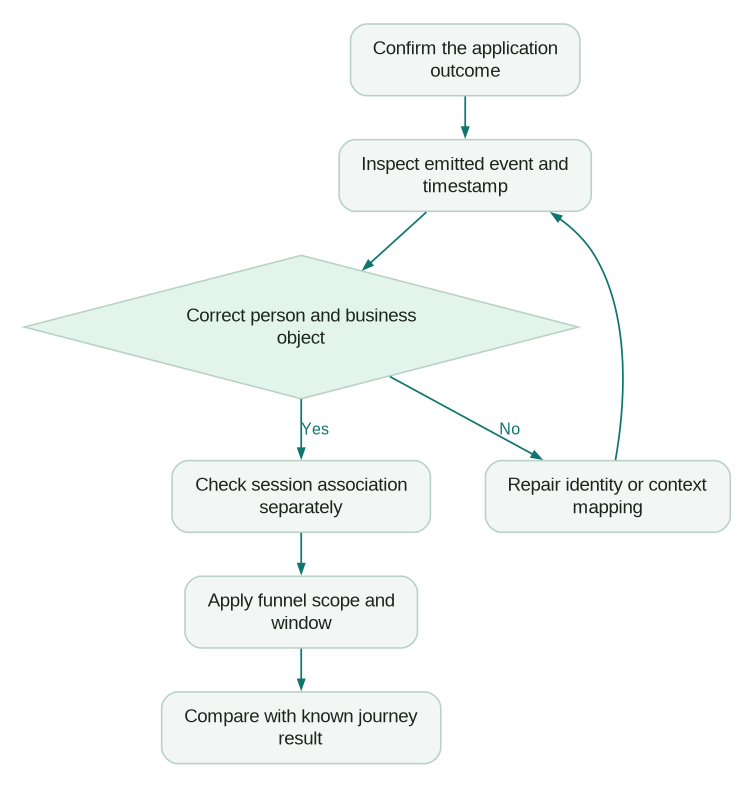
Read diagram as text
- Confirm the application outcome to Inspect emitted event and timestamp.
- Inspect emitted event and timestamp to Correct person and business object.
- Correct person and business object to Repair identity or context mapping: No.
- Repair identity or context mapping to Inspect emitted event and timestamp.
- Correct person and business object to Check session association separately: Yes.
- Check session association separately to Apply funnel scope and window.
- Apply funnel scope and window to Compare with known journey result
If the payload is correct but the chart differs, inspect filters, grouping, event ordering, timezone and the available observation window. If the payload is wrong, changing the dashboard may hide the symptom while leaving other reports corrupted.
Release acceptance should preserve a small, repeatable set of evidence:
Checklist
- Anonymous, authenticated, logout and second-user transitions have expected identities.
- Workspace switching preserves the workspace of each operation.
- Session-associated and deliberately out-of-session backend events are distinguishable.
- Retry tests retain the same occurrence identifier and do not invent new operations.
- The four report-export journeys produce the intended inclusion results.
- Filtered session reports explain which events remain in the calculation.
- Missing context stays visible rather than being silently assigned to a real segment.
Run these checks after SDK upgrades, authentication changes and major workflow releases. The maintenance goal is to preserve trustworthy questions as the product changes, not simply to keep the ingestion endpoint busy.
At Martechdevs, we connect the tracking plan, implementation and reports so product decisions use the intended people, accounts and outcomes. Get the $99 martech audit or request a detailed Amplitude implementation scope with the journey and report you need to reconcile.
Keep reading
Browse all Product Analytics guides
 Martech AI
Amplitude MCP server: setup, permissions and useful AI workflows
Connect Amplitude MCP to Claude, check read and write access, use progressive discovery and build reliable analytics, tracking-plan and dashboard workflows.
Jafrin Akter AloLast updated 13 min read
 Product Analytics
Migrating from GA4 or Heap to Mixpanel or Amplitude
Plan a reliable analytics migration with export checks, identity mapping, stable import IDs, historical backfills, parallel reporting and a cutover checklist.
Jafrin Akter AloLast updated 15 min read
 Product Analytics
Amplitude Pricing in 2026: Plans, MTU Billing, Enterprise Quotes and Startup Offers
Amplitude pricing in 2026: Free covers 2M events, Plus scales to 70M events or 700K MTUs, Growth and Enterprise are quoted. Plan limits, MTU math, quote prep.
Jafrin Akter AloLast updated 15 min read
Amplitude implementation
See the setup scope, acceptance checks and handover.
Questions people ask
Why does a session crossing midnight appear on the previous day?
Amplitude assigns a session to the date when it started, so a session beginning before midnight can belong to the previous day even when later events occur after midnight. Include the start date when checking that session in a chart. Compare session counts with event counts only after aligning their date rules; the same activity can legitimately appear in different daily buckets. Session-date rules.
Do we need explicit Start Session and End Session events for session length?
Amplitude can derive session boundaries and length from session IDs without adding those derived events to event-volume usage. Explicitly enabling tracked Start Session and End Session events is a separate choice, and those tracked events count toward the monthly event allowance. Enable them when an analysis needs the occurrences themselves, then check volume and properties rather than assuming they are required for ordinary duration reporting. Session events.
What happens if a backend sends very short user identifiers?
The HTTP V2 endpoint normally requires user and device IDs of at least five characters and can remove an ID that is too short. If neither usable identifier remains, the event can be rejected. A documented minimum-length override exists, but first establish whether the short value is a legitimate stable identifier or an instrumentation error. Inspect the response before retrying unchanged data. Identifier validation.
Why can a Redshift export contain more user IDs than the Amplitude chart?
Amplitude applies its merged-user mapping when querying dashboards, while its guidance says raw Redshift event records do not receive that mapping. Counting distinct raw Amplitude IDs can therefore differ from the resolved-user count. Decide which identity definition the warehouse report needs and preserve the mapping needed to reproduce it; do not “correct” valid events merely to force two differently scoped counts to match. Merged-user mapping.
What should we do if an event timestamp precedes its supplied session start?
Flag the relationship for investigation and compare the original occurrence record, client clock and captured session context. The payload may contain a unit conversion error, a later session attached to an older queued job, or an incorrect source timestamp. Repair the responsible producer and define any historical correction deliberately. Moving the event time forward simply to make the sequence look plausible can corrupt other reports.
Sources

Written by
Jafrin Akter AloData Engineer and Co-founder at Martechdevs and Growth and Analytics Partners
Jafrin writes practical guides to marketing technology, customer data, analytics and AI workflows. Martechdevs is a Growth and Analytics Partners company.