
PostHog MCP for marketers: funnels, UTMs and campaign questions
Data Engineer and Co-founder, martechdevs
Last updated 11 min read
PostHog MCP lets a marketer ask an AI assistant to inspect traffic, investigate a funnel and connect campaign activity to product behaviour. The value comes from asking a question with a defined outcome and checking the data behind the answer. A connection cannot recover campaign information you never collected or turn attributed conversions into proof that an ad caused a sale.
Last updated: 9 September 2026.
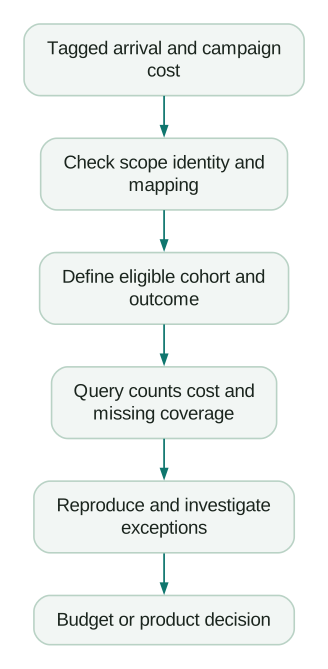
Start with a question that changes a marketing decision
Good first questions are narrow enough to verify. Which landing pages lose visitors before signup? Are campaign parameters surviving the redirect to the product? Which acquisition cohort reaches the first meaningful product outcome?
Write the question in terms of a decision. A growth manager deciding whether to increase a campaign budget needs acquisition cost and customer quality. A product marketer reviewing a new page needs to know whether eligible visitors understand the offer and complete the intended next step.
Agree on the unit before asking the assistant. Sessions, people, workspaces and purchases describe different things. If several people can join one paying workspace, counting successful people as new customers can overstate acquisition.
Use the customer journey guide when the team cannot agree which progression matters. Once the journey is clear, MCP can make investigating it easier.
Connect the hosted server
PostHog's hosted MCP endpoint is https://mcp.posthog.com/mcp. Authentication routes the connection to the account's US or EU region. The MCP overview provides the supported client options and the installer:
npx @posthog/wizard mcp addChoose the intended client in the wizard and follow authentication. This installs the MCP connection. Check your existing analytics collection separately; a connector setup is not evidence that the site's events are arriving.
For a manual Claude Code connection, PostHog documents:
claude mcp add --transport http posthog https://mcp.posthog.com/mcp -s userThen open /mcp in Claude Code and complete the browser sign-in. See the Claude Code setup page.
Start by asking the assistant to identify the active organisation and project. Select a known insight, retrieve its definition and compare its result with the PostHog interface. This gives you a baseline before introducing new event mappings or attribution rules.
If the baseline differs, resolve the project, time range, timezone, filters and data freshness first. Rephrasing the business question will not repair a query pointed at the wrong project.
Restrict the connection to the work you need
PostHog supports readonly=true to exclude write tools and project_id to pin the session. Pinning a project removes organisation/project switching tools. Its advanced setup guide documents these controls.
For an analysis connection, a configuration URL could look like this. Replace the illustrative project ID with the real one before adding it to your client's MCP settings:
https://mcp.posthog.com/mcp?readonly=true&project_id=12345Verify the resulting project context and available operations. Keep the underlying account's permissions appropriate as well. Session configuration should support your access policy, not become its only record.
The server offers CLI mode through an exec tool and a mode exposing individual tools. Most clients default to CLI mode; Cursor defaults to tools mode. A short initial tool list therefore need not indicate a broken installation. The same setup guide explains discovery and overrides.
You can filter by features or exact tools names. When combined, these filters form a union: either match exposes a tool. Do not expect the second filter to narrow the first. For a tightly scoped workflow, inspect the resulting tool list rather than judging access from the URL's appearance.
Keep separate, clearly named connections for projects you use regularly. That makes it easier to notice a wrong environment before an answer enters a campaign review.
Learn the small part of the tool catalog your job needs
The current tool reference includes read-data-schema for discovery, insight-query for a saved insight, query-funnel for funnel analysis, query-web-stats for web breakdowns and execute-sql for SQL. Ask the client to inspect the current schema before it builds a request.
A useful opening prompt is:
Confirm the project and inspect the schema relevant to acquisition and signup. Identify the events and properties available for the proposed journey. Show the mapping, missing fields and a known saved insight we can compare against. Keep the investigation read only and do not retrieve individual profiles unless a specific diagnostic needs them.
Prefer a saved definition when it already answers the question. If the assistant creates a new query, preserve its settings or SQL with the answer. Another person should be able to reproduce the calculation without relying on the assistant's explanation.
Diagnose UTMs at the right scope
PostHog records campaign parameters on events, person profiles and session entry properties. Those scopes are not interchangeable. Under the default identified-profile behaviour, initial person properties can be backfilled when the person identifies; latest campaign person properties are not backfilled from earlier anonymous arrivals. The UTM documentation describes these conditions.
That distinction explains a common investigation. A tagged landing page can have the expected event properties while a later profile's latest source is empty. An assistant querying only the profile may conclude that the campaign was untracked, even though the landing event contains the evidence.
Ask for a field inventory with scope, example values, coverage and capture timing. State whether you want the source of the current session, the first known acquisition source or a campaign association captured at the business conversion. A field called utm_source does not answer all three questions.
Use a controlled journey to inspect collection:
- Open a tagged campaign URL with an approved test browser and identity.
- Follow the real redirect and landing-page path.
- Complete signup or the relevant business action.
- Inspect landing, session and conversion data separately.
- Return through another source and check which fields change.
For each step, record the expected value and observed value. Include the selected consent state and whether identification has happened. Do not fill missing values with “Direct” simply to make the chart look complete.
Normalise inconsistent source names through a documented rule. Preserve enough raw evidence to distinguish an alias such as google_ads from a collection defect. A prettier report that hides missing campaign data makes the next diagnosis harder.
Build a funnel that represents the journey
Use events for completed actions, not vague page names or button intentions. For a trial product, the progression might be eligible landing visit, account creation and first successful integration. Confirm that each event exists and that identities connect the stages appropriately.
PostHog supports sequential, strict and any-order funnels. Inserting an extra event as a step requires another action; it is not equivalent to adding a filter to an existing step. Funnel breakdown attribution also matters: choosing a later specific step can exclude people who never reach it. See the funnel documentation.
Ask for the proposed definition before running the analysis:
Analyse eligible visitors entering the campaign landing page during the agreed period, then signup and first successful integration within seven days. Confirm whether the data supports person-level or workspace-level measurement. Show event mappings, exclusions, ordering, timezone and the breakdown's property scope. Include entry counts, counts at each step and unknown campaign values. Preserve people who drop off before later steps when calculating the original entry-cohort rate.
If you want to compare mature cohorts, allow everyone the full observation period. If you want an early signal during a launch, label it as progress at a fixed cohort age. Do not compare a campaign's first two days with a competitor cohort that has had a month to convert.
Use replay or event-level inspection to investigate a specific drop-off. Check a relevant sample for a hypothesised problem, such as an error after Connect. A recording can show that an issue occurred; a handful of recordings cannot establish its prevalence across the entire campaign.
Connect campaign cost with the right outcome
PostHog's Marketing Analytics is currently an opt-in beta. It combines configured marketing sources with conversion goals and supports campaign-name or campaign-ID matching, manual campaign mappings and source mappings. Its setup guide explains the required configuration.
Check which identifier your campaign URLs carry. If utm_campaign contains a stable campaign ID but the report matches against a display name, fix the mapping before explaining a low conversion count. Check currencies and source-sync coverage too; missing cost data can make a campaign look artificially efficient.
Column definitions distinguish ad-platform reported conversions from conversion goals defined in PostHog. Reported ROAS uses the ad platform's reported conversion value divided by cost. Keep the origin of those values visible in every answer.
Consider this fictional, fully observed acquisition cohort in USD:
campaign_id,spend_usd,new_trial_workspaces,activated_workspaces
campaign_alpha,3200,80,24
campaign_beta,2400,40,20
Assume the spend is assigned to these acquisition cohorts using the same documented rule, the workspace identifiers are deduplicated and every workspace has the full activation window. This is an illustrative cohort calculation, not a claim that the native dashboard automatically creates this exact report.
Alpha costs $40 per trial and approximately $133.33 per activated workspace. Beta costs $60 per trial and $120 per activated workspace. Alpha looks better when the team stops at trial acquisition. Beta looks better on the selected activation outcome.
Neither result tells you which campaign creates more profitable customers. The next evidence might be paid conversion, gross margin, retention or whether the observed difference persists with more data. Choose the next measurement according to the budget decision, rather than adding every available metric to the report.
Keep unattributed outcomes visible. If 18 of 100 new workspaces lack a usable campaign mapping, your campaign comparison covers 82% of the cohort. Do not distribute the missing 18 proportionally and present the result as observed truth.
Attribution assigns credit under a rule. It does not measure the extra purchases caused by spending. The attribution and incrementality guide explains which evidence you need for that causal question.
Understand when MCP work can create AI charges
Connecting and calling MCP tools is free, but some tools invoke LLMs inside PostHog and may incur PostHog AI spend. Underlying product usage and your external assistant's costs remain separate. The MCP overview makes that distinction.
PostHog AI pricing currently provides 500 credits per organisation per month free, then charges $0.01 per credit. AI SQL assistance and survey-response summaries are among the documented credit-consuming features. Usage varies with the work; there is no reliable fixed “one marketing question” price.
For example, surveys-summarize-responses-create is a current summary operation in the tool catalog. Treat a request to summarise responses differently from merely retrieving an existing result. Check the actual feature's charging rules before running a large batch.
PostHog requires organisation-admin approval for AI data processing; disabling it removes tools that use internal LLM processing. That control is described in AI access settings. It does not mean an external AI client stops processing the ordinary query results you return to it.
Do not infer billing solely from a tool's name. For example, AI evaluations have their own rules: LLM judges use your provider key, while local sentiment and code evaluations have no LLM cost; evaluation runs still count toward AI Observability usage. Those are different charges from a blanket PostHog AI-credit assumption.
An illustrative 1,200-credit month would leave 700 paid credits after the unused 500-credit allowance, costing $7 for that AI-credit usage. If other work already consumed the allowance, the calculation changes. It excludes analytics usage and external-model charges.
Set the actual billing limit and inspect usage after a bounded pilot. PostHog warns that credit usage can take up to 24 hours to appear on billing pages, so an immediate zero is not proof that a batch cost nothing.
When to use PostHog AI instead
PostHog AI is the assistant inside PostHog. It can use project data, attached context and memory to investigate and create content. It is a natural place to work when you are already reviewing an insight in the product.
Use MCP when your investigation belongs in another approved assistant or needs context from related work there. The important choice is where the team can inspect and maintain the answer. Keep the metric definition consistent across both interfaces.
Before saving a dashboard, changing an attribution mapping or updating a campaign-facing object, review the proposed change and its effect on existing reports. Preserve the old definition and the reason for the new one. A rate that changes because the query changed is different from a rate that changes because customers behaved differently.
A practical first-week checklist
- One campaign or funnel decision is written down.
- The account, region and project are confirmed.
- Analysis access is scoped and the resulting tool list is checked.
- One existing insight reproduces correctly.
- UTM fields are identified by event, person or session scope.
- A controlled tagged journey has been inspected end to end.
- The funnel has an explicit counting unit and observation window.
- Campaign mappings, cost coverage and currency are checked.
- Unknown attribution remains visible in the result.
- The team checks AI usage and review effort before expanding the workflow.
If campaign context disappears between the website, signup and product, our product analytics implementation work can help map and verify that journey. You can also use the tracking-plan guide to define the events and fields with your own team before changing tools.
Questions people ask
Is PostHog MCP free?
The connection does not have a separate MCP fee. Check internal AI-feature usage, underlying product billing and your external assistant separately. A free connection does not make every workflow free.
Does the same server URL work for EU data?
PostHog routes authentication according to the account's region. After sign-in, verify the selected project. Use separate, clearly labelled connections if you regularly work across accounts or regions.
Why does a campaign appear on an event but not the latest person profile?
Event, session and person properties have different capture and update rules. Inspect identification timing and the specific property you queried. Preserve the observed event evidence while diagnosing the profile field rather than treating an empty field as proof that the campaign was never tracked.
Can the assistant tell me which campaign to scale?
It can help assemble the evidence. Give it the business outcome, observation window, cost definition and decision constraints. Check data coverage and uncertainty, and separate attributed performance from causal lift before making a large budget change.
Should I let MCP update my dashboards?
Start with analysis. When a saved output is useful, review its definition, owner and sharing before granting the access needed to create or edit it. Reopen the result and verify its settings; a convincing chat response is not a check of the saved dashboard.
Sources
Written by
Jafrin Akter AloData Engineer and Co-founder, martechdevs
Jafrin Akter Alo is a data engineer and co-founder of martechdevs, where the team has delivered 74+ martech, data and growth stack implementations.