
Connect Marketing Data to ChatGPT: Four Ways and How to Check the Answers
Connect marketing data to ChatGPT through approved file exports, an official plugin, a marketing connector or a custom Model Context Protocol (MCP) service. Choose the route that can retrieve the evidence your decision needs. Then verify account access, definitions and calculations against a known report before using the answer to change spending or customer activity.
On this page
Start with one question: which campaigns produced qualified leads, why did a funnel rate change, or where do two reports disagree? Give ChatGPT the evidence for that question and a clear output to produce. Asking it to “analyse our marketing” invites a broad answer with an unclear basis.
If the systems disagree about customers or revenue before ChatGPT is involved, start with our AI-ready marketing data service. A connection can retrieve a conflicting definition perfectly and still produce an answer nobody can use.
Which connection route should you use?
Use exports for a bounded investigation, an official plugin for a supported application, a marketing connector for several advertising sources, or a custom MCP service for maintained tools and warehouse models. These are purchasing and operating choices; a marketing connector may itself use MCP underneath.
| Route | Best starting situation | What you must maintain |
|---|---|---|
| Approved exports | One investigation with fixed inputs | Export settings, data cutoff and calculation files |
| Official application plugin | One application already owns the required records | Connected identity, permitted actions and application access |
| Marketing connector | Several channel accounts need regular comparisons | Connector subscription, account coverage and metric mapping |
| Custom MCP or warehouse service | The question depends on your own joins and definitions | Reporting models, authentication, service availability and query limits |
For a one-off comparison, attach the approved structured exports and request a reproducible calculation file. ChatGPT's file guidance covers attaching inputs and reviewing generated files. Keep the source snapshot with the report so a later refresh cannot silently change its evidence.
For an application plugin, OpenAI's current plugin flow separates installation from service authorization. Install the intended publisher's plugin, connect the appropriate service account and select it with @ in the conversation. Confirm the account behind the connection before asking a business question.
For cross-channel work, evaluate a connector's actual fields and history before choosing it. For custom models, use the warehouse route below. Paying for another interface makes sense only if it removes a recurring reporting constraint.
What access and costs should you confirm first?
Check the exact plugin or custom-MCP option in the intended ChatGPT account and workspace. The official pages do not establish one complete plan matrix for every connection route. A vendor saying “works with ChatGPT” does not settle your workspace entitlement or administrator restrictions.
In a ChatGPT workspace, admins decide which roles can use or install each plugin and which roles can use MCP server connections. OpenAI's workspace plugin controls say a member can use an MCP server's tools only when both the plugin and the server are available to their role. Ask the workspace admin before planning around a route. The source system can add its own approval step; HubSpot's is covered in the next section.
Budget separately for the assistant subscription, connector entitlement, warehouse queries or hosted service, and the person who maintains the definitions. Check whether a trial includes the accounts and destinations you will use after purchase. Existing staff review time is capacity consumption; a new subscription or contractor invoice is additional cash expenditure.
How do you connect HubSpot and verify its scope?
Use HubSpot's official connector for customer relationship management (CRM) records and keep its permitted actions explicit. HubSpot's setup guide allows Super Admins and users with App Marketplace Access to connect without prior app approval. Other users need the administrator's approved connector, data and installer access. Users remain subject to their HubSpot permissions; newly approved data permissions require reconnection.
Verify one known deal's ID, owner, amount and stage before requesting a pipeline analysis. The connector supports writes and bulk creation or updates of up to ten records at a time. HubSpot says custom validation rules, including pipeline-stage and association-label rules, are not applied by this connector. Keep analytics access narrow, and separately validate any intended change. Sensitive Data settings can also restrict engagement coverage.
Use the HubSpot MCP setup guide for connection checks. Compare HubSpot's native AI and reporting routes when the question can be answered entirely inside the CRM.
How do you connect GA4 and Google Ads?
For Google Analytics 4 (GA4), Google's Analytics MCP introduction describes a read-only server that cannot change Analytics configuration. Its official repository documents a locally launched process, Google credentials and reporting tools, plus an HTTP mode and opt-in write tools. That setup does not itself create a connection inside ChatGPT on the web.
For a recurring ChatGPT workflow, choose a compatible hosted connector or have an engineer expose the approved server through a supported connection route. Evaluate the actual property access, report fields, freshness and retrieval limits. Do not assume every integration carrying a GA4 label returns the same data.
For an occasional investigation, export the exact GA4 report you want to analyse. Save the property, dates, time zone, dimensions, metrics and filters with the file. A screenshot can help explain a discrepancy, but a structured export is more useful for recalculation.
If the question only needs the selected Analytics property, GA4's Ask Advisor is another route worth checking before setting up an external connection. Keep its in-product analysis separate from measuring visits through the AI Assistant acquisition channel.
Reading GA4 through an assistant is a separate job from tracking visits referred by AI assistants.
The Google Analytics MCP setup guide covers the Google-side prerequisites. Once connected, compare one metric for one complete day before introducing channel breakdowns or cross-system joins.
Google Ads
Google's current Google Ads MCP repository documents both local credential-based operation and a server deployment using Streamable HTTP with OAuth support. It exposes account discovery, resource metadata and search tools, plus asset and label write tools that are on by default, with configurable tool namespaces. These are implementation capabilities, not a claim that the repository installs itself as an official one-click ChatGPT plugin.
Confirm the customer account, manager-account context where applicable, currency and reporting time zone. Ask for stable campaign IDs alongside names. Two accounts can use the same campaign name, and a renamed campaign should not become a new identity in your analysis.
Before comparing spend with CRM outcomes, specify the conversion action or CRM outcome you mean. “Conversions” without a definition can combine a different set of events from the one your team uses to qualify leads.
For setup details, use the Google Ads MCP guide. Keep credentials in the connection or server configuration, not in a prompt or an uploaded reporting file.
How do marketing connectors combine channel data?
A connector places another service between the source platforms and ChatGPT. Check what that service can retrieve, transform and retain before treating its output as a common reporting layer.
Supermetrics' current setup guide describes a ChatGPT connection through its selected team and authorized marketing sources, including Google Ads, Meta Ads, LinkedIn Ads and GA4. New users can start a trial; existing subscribers may need to add the AI chats destination. Its September guide says supported campaign changes are available through Supermetrics for Claude, while its ChatGPT route is for analysis. Verify the current action list before enabling either.
Dataslayer documents a Plugin Directory route: install its plugin, sign in to an active Dataslayer account and authorize the connection. It requires at least one connected data source. Its current instructions no longer require manually adding an MCP server.
Use the same acceptance questions for either vendor:
- Does the entitlement cover the required advertising accounts and historical period?
- Are spend, conversions and attributed revenue source fields or transformed fields?
- Which time zone and currency does each returned value use?
- How are pagination, empty responses and partial failures exposed?
- What source refresh delay and attribution restatement window apply?
- Which parties retain results, logs or indexed data, and for how long?
What about Meta Ads and LinkedIn Ads?
The Supermetrics route above explicitly lists both. Authorize each intended account, then keep each platform's attributed conversions separate until you have agreed a cross-channel measurement rule. Two platforms can claim the same purchase; adding their attributed revenue does not create a deduplicated business total.
For Meta's own tool path, use the Meta Ads MCP setup and controls guide. Confirm the current client support and asset permissions there rather than assuming a connector vendor's ChatGPT compatibility proves the official Meta server uses the same connection flow. Keep campaign and budget changes outside the first analysis workflow.
When should you use a custom MCP connection?
OpenAI's current custom MCP server guide uses ChatGPT on the web: open Plugins, add a custom MCP server, configure its connection and authentication, then install the resulting plugin. Workspace restrictions apply. Supported remote transports include Server-Sent Events (SSE) and streaming HTTP; select the route your server actually implements.
A browser session cannot start an arbitrary pipx command on your computer merely because you paste a local client configuration into the chat.
There is also a private-network option. OpenAI's Secure MCP Tunnel documentation describes a customer-run client that can reach a private MCP server over stdio or HTTP without giving that server a public listener. Tunnel permissions in the Platform organization and custom-MCP access in the ChatGPT workspace are separate. The tunnel must be associated with the intended workspace.
Choose a managed connection path with an owner. Compare reporting MCP connectors such as Funnel and Supermetrics before taking on a custom hosting route. For a private deployment, the owner must keep the tunnel or service available, maintain credentials and verify the client-server combination. Protocol support alone does not establish that a particular Google server, authentication flow and ChatGPT workspace have been tested together.
When should ChatGPT query the warehouse?
Use the warehouse when the question needs established joins and business definitions across sources. A model such as one row per acquired account with a defined paid-conversion date is easier to check than a fresh join across raw CRM, event and invoice tables on every request.
Google's remote BigQuery MCP documentation provides the endpoint https://bigquery.googleapis.com/mcp and distinguishes permissions to call MCP tools, run jobs and read data. It includes an execute_sql_readonly tool, while other tools and permissions can permit broader operations. Its documented result limit is 3,000 rows, so aggregate within the approved query rather than treating a returned sample as the whole dataset.
Google's ChatGPT-specific OAuth setup specifies a ChatGPT Business subscription for this Google/Google Cloud remote-server route. The documented redirect URI is https://chatgpt.com/connector_platform_oauth_redirect; use the current client instructions and workspace requirements instead of borrowing the callback from a Claude configuration.
Record the project paying for jobs separately from the dataset being queried. Limit the connection to approved reporting resources, and test that unrelated data is inaccessible. The BigQuery MCP guide covers the wider setup and cost controls.
For recurring work, use the warehouse AI analyst design to define maintained questions, access and evidence requirements.
Other warehouses need their own supported authentication and tool configuration. The useful shared pattern is a maintained reporting model, scoped access and an answer that includes its query or source evidence. For a Snowflake environment, compare Snowflake Cortex and CoWork inside the warehouse with the external chat route before adding another interface.
What should the analysis contract define?
Before you analyse marketing data with ChatGPT, give it the information that would let another analyst reproduce the answer:
- Decision: the action the report is intended to inform.
- Scope: account, property, dataset and included population.
- Time: reporting dates, time zone, outcome window and data cutoff.
- Definitions: event names, lifecycle criteria, attribution rule and currency.
- Evidence: source files or tool results, queries, counts and known limitations.
- Output: calculations, unresolved issues and recommended checks.
Keep the numerator, denominator and exclusions in a marketing metric contract. Choose a source of authority for each measure. Use the ad platform for the defined ad-spend figure, the agreed analytics report for its behavioural measure, and the approved CRM model for the qualification outcome. Explain differences before trying to make totals agree. Use the seven checks for AI-ready marketing data to separate tracking, identity, metric and access failures before revising the prompt. Keep these definitions in shared context files, with an owner and a reference to the maintained calculation.
Verify the connection and one known report before combining sources. A failed retrieval or reconciliation needs a correction or an explicit gap, and the calculation must remain reproducible before the report owner uses it for a decision.
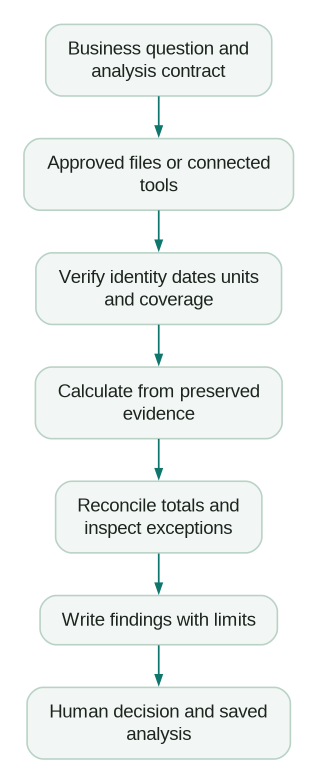
Read diagram as text
- Define one question and the analysis contract to Account identity tools and access verified?.
- Account identity tools and access verified? to Correct the connection or use an approved export: No.
- Correct the connection or use an approved export to Account identity tools and access verified?.
- Account identity tools and access verified? to Retrieve one known metric with dates units and counts: Yes.
- Retrieve one known metric with dates units and counts to Coverage and source totals reconcile?.
- Coverage and source totals reconcile? to Resolve the retrieval or definition gap: No.
- Resolve the retrieval or definition gap to Retrieve one known metric with dates units and counts.
- Coverage and source totals reconcile? to Calculate from the preserved source evidence: Yes.
- Calculate from the preserved source evidence to Joins units and arithmetic check out?.
- Joins units and arithmetic check out? to Correct the calculation and repeat the check: No.
- Correct the calculation and repeat the check to Calculate from the preserved source evidence.
- Joins units and arithmetic check out? to Review findings with limits and save the analysis: Yes
How do you verify that a connected answer is complete?
To check that ChatGPT is reading the right numbers, start with one fixed metric for a complete period and reconcile it with the source interface or an approved report. A successful response establishes neither account coverage nor correct business interpretation.
| Check | Evidence to keep | What a mismatch means |
|---|---|---|
| Account identity | Account, property or project ID beside its name | Wrong account, shared identity or missing access |
| Reporting definition | Metric, filters, attribution rule and included population | Two valid reports may answer different questions |
| Time and money | Dates, time zone, cutoff and currency | Boundary, freshness or conversion differences |
| Retrieval completeness | Total rows, pagination, limits and failed tool calls | Returned rows may be a partial result |
| Calculation | Query or executable calculation plus reconciled totals | Correct retrieval can still produce incorrect analysis |
For the BigQuery MCP route described above, the documented 3,000-row result limit makes completeness a concrete concern. Aggregate in the warehouse and return reconciliation counts. Asking the assistant to sum whatever rows arrived can conceal a truncated result.
Check freshness before calling a difference an error. A connection that queries the source when you ask returns its current state, while an export or an indexed sync keeps the state from when it was taken. The source may also still be processing recent days: Google says GA4 data processing can take 24 to 48 hours and report figures can change during that time. Compare a day outside that window and note the retrieval time beside each number.
Keep an exception log with the source total, retrieved total, difference, suspected cause and resolution. An unresolved mismatch stays visible in the decision memo. Only expand to cross-channel joins after the single-source check passes.
What does a checked campaign analysis look like?
The following fictional files describe two campaigns in one USD account. All reporting dates use Coordinated Universal Time (UTC). They are simplified exports created for this example, not results from a connected account.
Ad spend covers 1–30 September 2026. GA4 counts the specified demo_request key event during the same period. CRM leads were created during September, deduplicated under an agreed person-level rule and assigned to their first recorded paid campaign. The CRM qualification window is seven days after lead creation, with data checked through 10 October. Every September lead therefore has the full observation window.
The illustrative ads.csv contains already-normalized USD amounts:
campaign_id,campaign_name,spend_usd
101,Brand Search,1200
202,Category Search,4800
The illustrative ga4.csv counts events, not unique leads:
campaign_id,demo_request_key_events
101,60
202,80
The illustrative crm.csv retains leads without a usable campaign ID:
campaign_id,leads_created,qualified_within_7_days
101,40,10
202,50,20
unallocated,8,2
Ask ChatGPT to analyse those three files with this original prompt:
Use only the attached files and the stated definitions. Validate column types and unique campaign rows. Join campaign aggregates by campaign_id, retain unmatched rows, and show all totals before calculating ratios. Calculate spend per GA4 demo-request key event, CRM qualification rate and spend per attributed qualified lead for campaigns 101 and 202. Report campaign-allocation coverage and the unallocated counts. Do not treat events as unique people, invent attribution for missing IDs or claim that the results prove incremental revenue. Include the calculations and a reproducible output file.The expected arithmetic is:
- Brand Search: $1,200 ÷ 60 = $20 per key event; 10 ÷ 40 = 25% qualification; $1,200 ÷ 10 = $120 per attributed qualified lead.
- Category Search: $4,800 ÷ 80 = $60 per key event; 20 ÷ 50 = 40% qualification; $4,800 ÷ 20 = $240 per attributed qualified lead.
- Across the files: $6,000 spend, 140 key events, 98 CRM leads and 32 qualified leads.
- Campaign allocation covers 90 of 98 CRM leads, approximately 91.8%. Eight leads and two qualified leads remain unallocated.
Do not divide 32 by 140 and label the result a lead qualification rate. One number counts CRM people meeting a defined outcome; the other counts GA4 events. The example supplies no person-level mapping that makes those populations equivalent.
Do not distribute the unallocated leads across campaigns in proportion to spend. That would replace missing evidence with an assumption and make the output appear more complete than it is.
The spend-to-qualified-lead ratios are descriptive under the stated period and attribution rule. They do not establish what would happen if you moved budget. Brand Search may be capturing demand created elsewhere; this dataset cannot settle that question. Review intent, coverage and marginal performance, and use an appropriate experiment when the decision requires evidence of incremental impact.
Which prompts make recurring investigations reproducible?
Ask for reconciled evidence, a stable population and a decision memo with visible limitations. These original prompt patterns define the work; use them with the account, period and metric contract established above.
Find the reporting discrepancy before explaining it
Compare the two supplied reports for the same account and dates. First list differences in metric definition, time zone, attribution, included records, data cutoff and filters. Reconcile the totals using the available rows. Keep each unexplained difference visible and identify the additional evidence needed. Do not choose a preferred total just because one is larger or appears in the dashboard.This is useful when finance and marketing disagree. It makes the definition conflict inspectable before the assistant starts explaining business performance.
Investigate a funnel change with a stable denominator
Use the approved funnel definition and two fully observed cohorts. Show the number eligible for each step, the number completing it within the outcome window, and the exclusions. Compare by the agreed acquisition segment. Separate a change in segment mix from a change within a segment. If the necessary user or account mapping is unavailable, explain what cannot be calculated.Keep the cohort and observation window in the saved report. A newer cohort with less time to convert should not silently be compared with a mature one.
Produce a weekly decision memo
Use this week's verified analysis files. Write a short memo with the three most consequential changes, the evidence for each, unresolved measurement issues and the decision each finding could inform. Separate observations, hypotheses and proposed actions. Link to the source output for every number. Do not edit campaigns, budgets or CRM records.The prompt describes the intended work. Actual tool permissions must enforce the access boundary; a sentence in a prompt does not disable a write-capable connection.
Can ChatGPT change campaigns or CRM records?
Some connections expose write tools. For custom MCP, OpenAI documents confirmation by default for writes, respects readOnlyHint, and treats a missing hint as write-capable. A remembered tool decision can apply within the conversation; a new or refreshed conversation prompts again. Custom MCP approval behaviour.
Use supported workspace action controls to allow read-only operations or a selected action set. Where changes are intentional, tie approval to the exact account, records, values and expiry. The AI agent approval workflow guide explains that contract and the checks immediately before a write. A prompt asking for analysis alone does not remove write permissions from the underlying connection.
Why do answers drift from your dashboards?
Find the layer that disagrees before rewriting the prompt. A duplicated event needs a tracking fix; two definitions of revenue need a shared calculation; an omitted refund policy needs maintained business context.
| Symptom | Investigate first | Useful next step |
|---|---|---|
| Duplicate customers or events | Tracking and identity rules | AI-ready marketing data checks |
| Different revenue or conversion totals | Metric definition, grain and exclusions | A semantic layer for AI |
| Correct figures, unsuitable recommendation | Missing operating rules and decisions | Document the missing martech context |
Keep the shared rules in versioned marketing context files, with owners and links to maintained calculations. When the same exception keeps requiring a person to reconcile several tools, assess building versus buying a marketing agent. Repetition is evidence of an operating requirement; it does not automatically justify a custom build. An agent that monitors accounts after the sale is one defined use case when adoption, billing and support evidence must inform the same decision.
Does the same connection work in Claude?
Check the exact client, authentication route and exposed tools. A common MCP server can still behave differently across clients. Claude's connector guidance offers per-tool or group settings for Always allow, Needs approval and Blocked, subject to organization controls. Custom remote connectors are available across plans, with one on Free; managed authentication can change who performs authorization. Confirm the connected identity instead of assuming every user signs in separately.
Use the marketing MCP server directory to compare documented paths, then put reusable instructions in Claude skills for marketing. A skill can explain which metric to request and how to check it; source permissions and action controls enforce access.
What data-handling checks belong before rollout?
OpenAI's workspace plugin controls separate plugin availability, connected-service access, action controls and authenticated identity. They also distinguish indexed sync from non-synced retrieval. Neither mode replaces normal conversation-retention controls.
For Business, Enterprise and Edu customers, that guidance states that information accessed through these connections is not used for model training. The connected service's own scopes, retention and residency policies also apply. This does not mean every vendor in the path has the same policy or that no data is retained.
For the first analytics workflow, use only the fields needed for the decision. Aggregated campaign results usually do not require customer email addresses. Confirm which personal or shared identity runs the connection, and test access with a representative team member rather than relying only on an administrator's successful session.
Save the report specification, input cutoff, queries or exports and accepted output. Record missing rows and failed tools. If a retrieval fails, rerun the retrieval or report the gap; do not let a plausible answer substitute for the unavailable data.
What should pass before the report becomes recurring?
The report should reproduce a known result, expose missing coverage and preserve enough evidence for another analyst to check it. Use this checklist before scheduling the workflow or sharing its recommendations.
Checklist
- Choose one decision and an existing report to reconcile against.
- Verify the integration publisher and connected account identity.
- Confirm available tools, source permissions and action controls.
- Fix the date range, time zone, currency and outcome window.
- Define every numerator, denominator and attribution rule.
- Retrieve one known record or small report before combining systems.
- Check row coverage, unmatched IDs, duplicate keys and totals.
- Preserve the calculation and distinguish evidence from hypotheses.
- Have the report owner review the result before it informs a change.
- Recheck the workflow when schemas, connectors or definitions change.
If the same definition, identity or connection problems keep returning, get the $99 martech audit with one example report and its source totals. For a scoped implementation, request an AI-ready data scope covering the required accounts, models and operating owner.
Keep reading
 Tracking & Attribution
Are ChatGPT Ads Worth It? A Budget Test for SaaS and DTC Brands
Decide whether ChatGPT ads deserve a test. Check eligibility, auction costs, qualified outcomes, contribution and stopping rules before increasing spend.
Jafrin Akter AloLast updated 16 min read
 Tracking & Attribution
OpenAI Ads Conversion Tracking: Set Up the ChatGPT Ads Pixel and Conversions API
Track ChatGPT ads conversions with the OpenAI Measurement Pixel and Conversions API: load it through GTM, share event IDs, pass oppref and test each event.
Jafrin Akter AloLast updated 15 min read
 Martech AI
Customer Context Layer: Making Golden Context Useful for a Small SaaS
Make Golden Context useful with clear customer facts, company rules, ownership and freshness. Build one reliable AI workflow before buying another platform.
Jafrin Akter AloLast updated 12 min read
AI readiness score
Check your tracking, data, context and access before connecting an agent.
Questions people ask
How can an agency keep two clients out of the same analysis?
Use separate authorized account scopes and saved analysis workspaces, then verify identity before each run. Include a deliberate negative test: the analyst for one client should be unable to retrieve the other's known record. Keep shared credentials and reusable templates under review. Copying a prompt between clients must never silently reuse the previous client's connection, exports or cached results.
What should a zero-row tool response mean in the report?
Treat it as an unresolved retrieval result until you distinguish an empty population from missing access, unsupported filters or a failed request. Check a known record and a broader valid period, then record the tool status. Report zero only when the query successfully covered the intended population and returned no matching records. Otherwise, mark the measure unavailable.
How do we reproduce last month's answer after the connector refreshes?
Save the approved input snapshot or query result, query text, definitions, cutoff and calculation with the decision memo. A live rerun may include refunds, late conversions or corrected records that were unavailable originally. Keep both versions when restating a result and explain the change. Reproducing the earlier decision requires its earlier evidence, even when today's figure is more complete.
Can we replace email addresses with internal customer IDs?
Often, a stable internal identifier is sufficient for the join, so the analysis does not need the email address. Confirm that the identifier is consistent across the approved inputs and retain the lookup only where authorized. Replacing an email with a persistent ID does not automatically make the data anonymous. Keep access, retention and permitted-purpose controls appropriate to the underlying records.
What should happen when a connector renames or removes a field?
Stop the dependent calculation until the field mapping and meaning are checked. A renamed label may preserve the same measure, while a replacement field can change units, exclusions or attribution. Compare a fixed historical period, update the analysis contract and retain a change note. Add that case to the recurring validation so an unavailable column cannot become an invented value.
Sources
- OpenAI: plugins in ChatGPT.
- OpenAI: work with files.
- HubSpot connector for ChatGPT.
- Google Analytics MCP introduction.
- Google Analytics MCP repository.
- Google Ads MCP repository.
- OpenAI: add a custom MCP server.
- OpenAI: Secure MCP Tunnel.
- Google: remote BigQuery MCP.
- Google: configure MCP in an AI application.
- OpenAI: workspace plugin controls.
- Supermetrics: connect Claude or ChatGPT to marketing data.
- Dataslayer: connect MCP to ChatGPT.
- Anthropic: connectors in Claude.
- Google Analytics Help: data freshness.

Written by
Jafrin Akter AloData Engineer and Co-founder at Martechdevs and Growth and Analytics Partners
Jafrin writes practical guides to marketing technology, customer data, analytics and AI workflows. Martechdevs is a Growth and Analytics Partners company.