
Google Ads MCP server: setup, access changes and useful reporting workflows
Google’s official Ads MCP server lets compatible AI applications query Google Ads accounts through the Ads API. The current release also ships asset and label write tools, switched on by default, so turn them off if you want a read-only connection. Setup requires an authorised Google identity and an approved Google Cloud project. Since 9 September 2026, API access levels belong to the Cloud project rather than a developer token, which changes how older setup guides should be read.
On this page
The server can retrieve campaign data and help prepare an investigation. It cannot establish whether a tracked conversion became a paying customer unless that outcome is represented in the data it can access. Compare official MCP servers across paid media, CRM and analytics when the investigation needs evidence from another system.
That makes conversion definitions the first check. If the account treats an early lead and a paid sale as interchangeable success signals, the assistant’s recommendations will inherit that choice. Our analytics and conversion tracking work connects those signals to the business outcomes the team wants to improve.
What changed with developer tokens in September 2026?
Google moved API access management to Google Cloud projects. Its developer-token sunset guide says developer tokens were sunset on 9 September 2026 and that servers now ignore the token header.
The relevant project is the one associated with the OAuth credentials or service account used for the request. API access levels still apply. An old approved token does not establish production access for an unrelated or newly created project.
When a tutorial starts with “get a developer token,” check its date and client-library version. Google’s client-library documentation explains that older libraries can still require a non-empty token value during local validation even though the API ignores it. Updating the software and checking the project’s access level addresses the actual configuration.
For an access error, record the project used to issue credentials and inspect its Google Ads API access status. Changing a project label in a prompt cannot change which project issued those credentials.
What can the official MCP server do?
Google’s MCP integration guide still calls the server strictly read only, with three tools for account discovery, metadata lookup and reporting through the Google Ads API. The official repository has moved on. Version 0.0.6 adds create_asset, upload_video_asset, manage_labels and manage_label_associations, and the bundled tools_config.yaml turns all four on.
None of the seven tools changes bids, budgets or campaign status. The four write tools use a two-step Propose and Confirm flow: the first call validates the change and returns a checksum, and the change only goes through when a second call repeats the same parameters with that checksum. The repository says that second call should follow your approval, so keep your client’s approval prompts on.
The read tools are useful for:
- Preparing campaign performance summaries.
- Investigating spend and conversion changes.
- Checking which accounts the authenticated identity can access.
- Inspecting available reporting fields before building a query.
- Producing a proposed action list for a paid media manager to review.
A tool that returns a report and a tool that changes a campaign have different authority. If your connected server offers budget or status updates, identify the publisher and implementation, because Google’s repository lists no such tools.
How do you set it up?
Prepare the Google identity and project, then configure the MCP client to start the server. Use the official repository for the current package and supported authentication options.
Prepare account and API access
Confirm the following before adding the client configuration:
- The Google Cloud project has the Google Ads API enabled and the required production access level.
- The Google identity can access the intended Ads account.
- The credential flow includes the Google Ads API scope.
- If access goes through a manager account, the manager context is configured correctly.
- The local runtime and package runner required by the repository are installed.
The target advertising account and the manager account have different roles. The target is the account you want to report on. The manager provides the access path when applicable.
Add the local command
This example shows the repository-based local configuration for a client using an mcpServers block. Replace the placeholders and use your client’s documented configuration location:
{
  "mcpServers": {
    "google-ads-mcp": {
      "command": "pipx",
      "args": [
        "run",
        "--spec",
        "git+https://github.com/googleads/google-ads-mcp.git",
        "google-ads-mcp"
      ],
      "env": {
        "GOOGLE_APPLICATION_CREDENTIALS": "/absolute/path/to/credentials.json",
        "GOOGLE_PROJECT_ID": "your-project",
        "GOOGLE_ADS_LOGIN_CUSTOMER_ID": "your-manager-account-without-hyphens",
        "GOOGLE_ADS_MCP_TOOLS_CONFIG": "/absolute/path/to/tools_config.yaml"
      }
    }
  }
}
Omit the manager setting if your access path does not require it. The last setting points to the tools file in the next step. Keep credentials outside shared files. For repeatable team use, pin a reviewed release or commit and document upgrades rather than silently following repository changes.
The repository also describes hosted deployment. That creates a service your team must secure and operate; it is a separate decision from starting a local process for one analyst.
Turn off the write tools
The package enables every tool by default. For a reporting connection, save a tools_config.yaml with the two write categories off:
namespaces:
  customers: true
  search: true
  metadata: true
  labels: false
  assets: false
Google’s repository gives labels: false and assets: false as the strictly read-only setup. If GOOGLE_ADS_MCP_TOOLS_CONFIG points to a missing file, the server refuses to start. Without that setting, it uses a tools_config.yaml in its working directory if there is one, then the bundled file with everything on. After connecting, ask the client to list its tools and confirm that only the customers, search and metadata tools appear.
Test account selection before reporting
List accessible accounts, select the intended customer and request a small report. Ask for the account currency and reporting time zone alongside it. A correct campaign name and a familiar spend total provide a useful first check.
If the account list appears incomplete, inspect the manager hierarchy and permissions. Do not grant broader access until you understand which part of the path is missing.
What is happening behind the prompt?
The assistant retrieves a scoped report, checks whether the account and data support the question, and prepares an evidence-backed recommendation. Correct a failed access or reporting check before relying on the output.
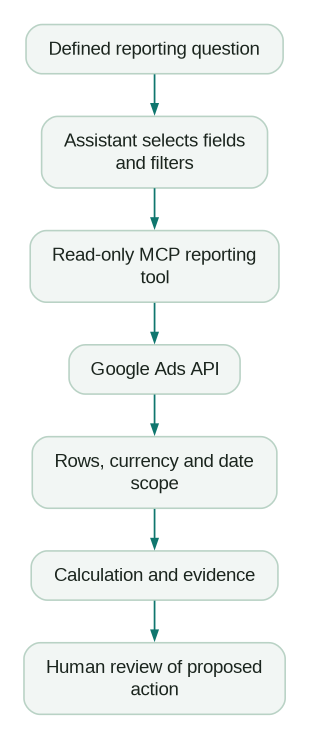
Read diagram as text
- Define the reporting question and conversion to Access and read-only tool scope correct?.
- Access and read-only tool scope correct? to Fix project, identity, manager or tool scope: No.
- Fix project, identity, manager or tool scope to Access and read-only tool scope correct?.
- Access and read-only tool scope correct? to Run a scoped Google Ads API report via MCP: Yes.
- Run a scoped Google Ads API report via MCP to Account and familiar spend agree?.
- Account and familiar spend agree? to Check account, currency, time zone, fields and units: No.
- Check account, currency, time zone, fields and units to Run a scoped Google Ads API report via MCP.
- Account and familiar spend agree? to Retrieval and periods fit the question?: Yes.
- Retrieval and periods fit the question? to Correct scope, filters or missing rows: No.
- Correct scope, filters or missing rows to Run a scoped Google Ads API report via MCP.
- Retrieval and periods fit the question? to Calculate with the query and supporting evidence: Yes.
- Calculate with the query and supporting evidence to Human review of the proposed action
The query is part of the evidence. Keep it with the answer so another person can check whether the selected fields represent the intended metric.
Google Ads Query Language, or GAQL, is the language used to select Ads resources, metrics and segments. Google’s GAQL overview describes how those parts fit together.
An illustrative campaign query is:
SELECT
  campaign.id,
  campaign.name,
  metrics.impressions,
  metrics.clicks,
  metrics.cost_micros,
  metrics.conversions,
  metrics.conversions_value
FROM campaign
WHERE segments.date BETWEEN '2026-09-01' AND '2026-09-30'
ORDER BY metrics.cost_micros DESC
LIMIT 100
Replace the dates for your analysis. The limit makes this a bounded inspection, so the result must be described as the top returned campaigns if the account has more. Use a complete retrieval method before calling it an account total.
The Google Ads metric reference defines the fields and compatible resources. Cost reported in micros needs division by 1,000,000 to express the account’s currency units. Conversion value follows the values and conversion actions configured in the account.
Which reporting workflows are worth automating first?
Choose a workflow with stable definitions and a person who can check the result. An assistant is useful when it reduces retrieval and calculation effort without hiding the assumptions.
For the ChatGPT connection and reconciliation steps, see how to analyse Google Ads data in ChatGPT. When the report also needs Meta and CRM outcomes, compare cross-channel reporting through an MCP connector.
Budget pacing
Ask for spend over a defined period, the intended monthly budget and a projection with its assumptions. Keep shared budgets, recent budget edits and incomplete days visible.
Google’s average daily budget guidance says most campaigns can be billed up to twice the average daily budget on a day, with a monthly limit generally based on 30.4 times that budget. An average daily budget is therefore a poor substitute for a strict daily operational alert threshold.
If your team wants an alert above a chosen spend level, define that as a monitoring rule. Explain how often it runs and how late the data can arrive.
Conversion movement
Compare two complete periods using the same conversion selection. Show spend, conversions, conversion value and the effect of delayed outcomes.
A recent period may gain conversions as delayed outcomes are recorded. Avoid comparing a mature historical window with yesterday’s incomplete picture and calling the difference a trend.
Campaign investigation
Ask the assistant to identify the largest absolute changes before looking at percentage changes. A campaign moving from one to two conversions has a large percentage increase and limited evidence.
Then inspect the relevant device, network or other available breakdown. Keep each follow-up tied to a question raised by the previous result.
If inconsistent campaign names obscure the comparison, use the campaign naming convention skill to lint an approved export and draft a registry that keeps platform IDs intact.
Measurement review
Ask which conversion actions contribute to the selected performance metric and whether their values represent revenue, a proxy or a fixed lead value. Pair that with a review of the collection path.
The offline conversion guide explains how later CRM or billing outcomes can improve the signal available for reporting and bidding.
What should a useful prompt say?
Specify the account, complete periods, success measure and evidence. Require a clear boundary between findings and recommendations.
Compare the last two complete calendar months for the selected account. Use the same campaign scope and conversion definition in both. Show spend, conversions, conversion value and cost per conversion. Identify the largest absolute changes, flag incomplete retrieval or recent measurement changes, and include the query used. Prepare recommendations for review without making changes.
For an investigation, add:
For each recommendation, name the observed fact, the possible explanation, the evidence still missing and the smallest check that would help confirm it.
That last instruction prevents the analysis from ending at “optimise the campaign.” It gives the paid media manager something they can act on without accepting an unsupported causal claim.
For search-term cleanup, the negative keyword workflow skill can analyze an approved export, check conflicts with converting terms and draft negatives for human approval.
How do you calculate whether performance is commercially useful?
Connect the advertising metric to the value of the outcome. A low lead cost can still be expensive if few leads become paying customers.
Illustrative example: two campaigns each spend $2,000. One produces 100 leads and the other produces 40. Their costs per lead are $20 and $50.
Suppose the first campaign produces two new customers and the second produces four after the same follow-up window. Their advertising costs per acquired customer are $1,000 and $500. The ranking changes once the outcome is defined as a customer.
That still leaves customer value and margin. If the second campaign’s four customers each contribute an assumed $300 in gross profit over the measured period, their combined $1,200 does not yet cover the $2,000 advertising spend. Later retention might change the result, but it needs observed or explicitly modelled evidence.
An MCP report can retrieve campaign spend. It needs connected and matched business outcomes to complete this calculation. Our guide to Google Ads and GA4 conversion differences covers another common source of conflicting performance totals.
What changes when you use a server that can write?
The review needs to cover money, campaign state and downstream effects. An approval should show the exact account, affected campaigns, current settings and proposed settings.
This now applies to Google’s own server for assets and labels, as well as to third-party and custom servers. Our recommended workflow for any write-capable server is:
- Retrieve the current state.
- Prepare a bounded change list.
- Check campaign type, shared settings and recent changes.
- Show the expected business effect and uncertainty.
- Obtain approval for that exact change list.
- Apply the change and read back the resulting state.
- Record the action and a supported recovery path.
Use paused drafts for new campaigns where the platform and workflow support them. Budget controls should be enforced by the tool or destination configuration as well as described in the prompt. Define how retries avoid applying a change twice. Meta's Ads MCP server, which exposes campaign-editing capabilities, provides a concrete comparison of account rules and client approvals.
The MCP security checklist covers the surrounding permission and approval tests. Reporting access can remain useful while write access is assessed separately.
What should you check before trusting the output?
- The Google Cloud project has the intended API access level.
- The connected identity and manager path are correct.
- The report targets the intended advertising account.
- Currency and reporting time zone are included.
- The selected conversion actions match the business question.
- Dates and filters are consistent across periods.
- Cost units are converted correctly.
- Row limits and incomplete results are disclosed.
- Recent periods are assessed for delayed outcomes.
- Recommendations identify the evidence still needed.
- The server’s actual tools match the approved read or write scope.
At Martechdevs, we build the data access, definitions and working instructions behind repeatable AI workflows. Start with the free AI readiness checklist, or explore an AI assistant built around your approved workflows.
Keep reading
 Tracking & Attribution
Google Ads conversion diagnostics: "setup is incomplete" and "needs attention" explained
Diagnose incomplete setup, inactive tags and enhanced-conversion alerts. Verify campaign goals, event delivery, offline uploads and the 2026 API changes.
Jafrin Akter AloLast updated 15 min read
 Tracking & Attribution
HubSpot Google Ads Integration: 7 Checks for Missing Leads and Conversions
Fix HubSpot Google Ads integration problems across account access, tracking templates, native lead forms, lifecycle events, conversion values and campaign goals.
Jafrin Akter AloLast updated 12 min read
 Tracking & Attribution
Why Google Ads and GA4 conversions do not match, and how to reconcile them
Google Ads and GA4 count conversions on different dates, models and rules. Align them step by step, check third-party estimates and report one number.
Jafrin Akter AloLast updated 14 min read
AI readiness score
Check your tracking, data, context and access before connecting an agent.
Questions people ask
Can the official server pause campaigns or change bids?
No. The write tools in Google’s repository cover assets and labels only. If a connection exposes bid or status changes, inspect that specific server’s implementation and publisher. Require an explicit write policy before using it on live spend.
Do I still need a developer token?
Google sunset developer tokens on 9 September 2026. Current access management uses the Google Cloud project associated with your credentials. Older client libraries may still perform local token validation, so check their version and configuration guidance.
What is the official server URL?
The local setup launches a process and does not use a shared public endpoint. If your team deploys a hosted version, it has the endpoint and authentication configured for that deployment. Use the official guide for the chosen mode.
Why can I authenticate but not query production accounts?
Successful login proves identity, while production API access and account permissions are separate checks. Inspect the credential-owning project’s access level and the Google Ads account hierarchy. Save the exact error before changing configuration.
Can I use it for free?
The official repository supplies software you can run. Your AI client, hosting and engineering time can still cost money, and API limits still apply. Assess the complete reporting workflow rather than the connector alone.
Sources
- Google, Developer-token sunset guide, 2026.
- Google, Ads API client libraries, current documentation
- Google, Google Ads MCP integration guide, current documentation
- Google, Google Ads MCP repository
- Google, Google Ads Query Language overview
- Google, Ads API metric reference
- Google, About average daily budgets, current help

Written by
Jafrin Akter AloData Engineer and Co-founder at Martechdevs and Growth and Analytics Partners
Jafrin writes practical guides to marketing technology, customer data, analytics and AI workflows. Martechdevs is a Growth and Analytics Partners company.