
BigQuery MCP server: Google's remote service, MCP Toolbox and the controls you need
Data Engineer and Co-founder, martechdevs
Last updated 10 min read
Google's remote BigQuery MCP server connects an AI application to BigQuery metadata and SQL tools at https://bigquery.googleapis.com/mcp. MCP Toolbox for Databases provides a separate, configurable server you run yourself. Choose the remote service for managed access; consider Toolbox when you need narrowly defined business tools. Both require deliberate control over data access, query costs and answer quality.
Last updated: 10 September 2026.
The first successful query is a small milestone. The harder question is whether the assistant can consistently answer “which channels produce retained customers?” without joining the wrong records, reading unnecessary personal data or scanning your entire event history.
That depends on the data model and the interface you expose.
Start with the business question and the approved dataset
Write one question the connection must answer. For example:
For customers acquired last quarter, how many became paying accounts within 30 days, grouped by our approved acquisition channel definition?
This requires acquisition dates, an account identifier, a payment definition and a complete observation window. A connector cannot supply missing decisions about those fields.
For a first deployment, expose a reviewed reporting dataset containing only the columns needed for that question. A compact account_acquisition model is easier to reason about than raw event exports, billing tables and CRM snapshots with overlapping identifiers.
If those joins are still being debated, warehouse design and implementation will determine more of the outcome than your choice of MCP client.
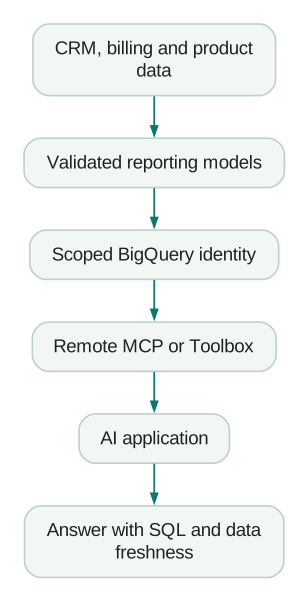
Keep the SQL and freshness evidence alongside the answer. Otherwise reviewers are being asked to trust a conclusion without knowing what population it describes.
Remote BigQuery MCP versus MCP Toolbox
The remote service runs on Google's infrastructure. Your AI application connects to its endpoint using Google authentication. The service exposes tools for resource discovery and SQL execution. Remote BigQuery MCP documentation.
This is the simpler operating model when your main requirement is controlled access to existing BigQuery reporting data. You still own identity design, client configuration and the quality of the data returned.
MCP Toolbox for Databases is an open-source server with prebuilt database tools and configurable tools. Its configuration can define sources, parameters and SQL statements for a particular business operation. You operate the server, manage its version and decide which tools are exposed. Toolbox repository.
That extra responsibility can be worthwhile for a tool such as get_paid_conversion_by_cohort, where callers supply a date range and an approved segment. A reviewed query behind that tool reduces the number of business definitions the model must reinvent.
A team can also use both: general exploration for authorised analysts and narrow reporting tools for a larger marketing team. Keep those access profiles visibly different.
Set up the remote service with three separate permissions in mind
Google identifies three relevant roles: MCP Tool User (roles/mcp.toolUser), BigQuery Job User (roles/bigquery.jobUser) and BigQuery Data Viewer (roles/bigquery.dataViewer). They cover MCP calls, query jobs and data reads respectively. Enabling the BigQuery API enables the remote MCP service. Required roles and setup.
The practical distinction matters:
- An identity might be allowed to call MCP but unable to read a dataset.
- It might read metadata yet lack permission to run a query job.
- It might run jobs in one project while reading authorised data in another.
Record the billing project separately from the data project. Otherwise a successful connection can charge a project the team did not intend to use.
Ask your administrator to scope data access to the approved resources. Granting project-wide data visibility merely to remove a setup error expands the connection beyond the business question.
Use an agent identity whose purpose and owner are recorded. Avoid building a recurring workflow around an employee's broad administrator access.
Connect Claude or another compatible application
For the remote service, use the BigQuery endpoint and the client's supported Google OAuth configuration. Google's application guide provides client-specific setup, including OAuth client details and redirect requirements for Claude. Follow that flow for the application you actually use; a local stdio configuration and a hosted web connector require different setup. Configure MCP in an AI application.
Your connection record should contain:
Server: BigQuery remote MCP
Endpoint: https://bigquery.googleapis.com/mcp
Identity owner: analytics operations
Job project: approved-query-project
Allowed reporting dataset: approved-data-project.marketing_reporting
Permitted work: metadata inspection and reviewed read queries
Cost control owner: cloud administrator
These are example names, not resources that already exist. Replace them with your actual configuration.
After authentication, request the dataset list, then metadata for one approved table. Only then run a small query whose result you already know. This sequence makes it clear whether a failure comes from authentication, resource access or SQL.
Block write-capable tools and test the denial
The remote server exposes execute_sql_readonly as well as the broader execute_sql. The latter can run write statements when the underlying permissions permit them. Prefer the read-only tool for analysis. BigQuery MCP tool reference.
Google supports IAM policies that restrict MCP calls using tool attributes. Its deny-policy example blocks tools that are not marked read only. The control applies to MCP access in addition to permissions on the underlying resources. A denied tool can still appear in the tool list, so visibility is not proof that execution is allowed. MCP IAM controls.
For a reporting deployment, have the administrator configure the policy at the intended scope and verify it using a non-production test. Also confirm that the identity lacks unnecessary write permissions through other paths.
Keep three acceptance results:
- A permitted query against the reporting dataset succeeds.
- A query against an excluded dataset fails.
- A write-capable action is denied in a disposable test environment.
Do not test destructive statements against a live business table. A test should demonstrate a boundary without making production data the experiment.
Read access still needs limits. A report can disclose personal data even when it never changes a row. The internal MCP server guide explains how to build business tools that return only the information the workflow needs.
Put cost controls below the prompt
“Keep this cheap” gives the assistant an intention. It does not place a hard limit on a query job.
For BigQuery's on-demand model, use appropriate daily query quotas and, where the execution path supports it, a maximum-bytes-billed limit. Use partition filters and selected columns to reduce processing. A LIMIT 10 clause on a non-clustered table does not, by itself, reduce the bytes scanned. Capacity-based pricing needs reservation and workload controls instead. Google's cost-control guidance.
Check the actual tool schema before claiming a control is available in your MCP request. A setting supported by the BigQuery API is not automatically exposed by every MCP tool. The current read-only tool reference is the place to inspect its accepted inputs. Read-only execution schema.
If the tool cannot enforce a requirement your team considers essential, move that requirement into a supported execution wrapper or use a different path. Do not invent a configuration field and assume it works.
A useful operating policy also limits investigation depth. For example, permit an initial aggregate query and two follow-ups before an analyst reviews the next step. The exact number is your team's choice. The purpose is to stop an unbounded loop of slightly different queries from becoming the default analytical method.
Log query jobs, the asking user and the business question. A cost alert is easier to investigate when it can be traced to an actual workflow.
Understand the result limit before trusting a total
Google's setup guide documents a maximum of 3,000 returned rows and a default query-processing limit of three minutes. The tool reference also describes job completion and result pagination. Check the deployed tool schema and response fields before assuming a response contains every row. Service limitations, result handling.
A safe reporting pattern aggregates in SQL and returns a small result. Ask for totals computed by BigQuery across the full filtered dataset, rather than asking the model to add up an arbitrary chunk of downloaded records.
For example, 18 channel rows with counts and revenue are more useful than the first 3,000 customer records when the question is channel performance. The smaller result also reduces unnecessary exposure of individual customer information.
Require the assistant to state whether results are complete, paginated, sampled or limited. If it cannot tell, the answer should preserve that uncertainty.
A worked cohort query with a defined grain
Suppose a fictional SaaS company maintains marketing_reporting.account_acquisition. The model has exactly one row per account, an acquisition date, a standardised channel and the date of its first successful payment.
The analyst wants the 30-day paid conversion rate for accounts acquired in August. This illustrative query uses a curated model that your team would need to create and validate:
SELECT
  acquisition_channel,
  COUNT(*) AS acquired_accounts,
  COUNTIF(
    first_paid_date >= acquisition_date
    AND first_paid_date < DATE_ADD(acquisition_date, INTERVAL 30 DAY)
  ) AS paid_within_30_days,
  SAFE_DIVIDE(
    COUNTIF(
      first_paid_date >= acquisition_date
      AND first_paid_date < DATE_ADD(acquisition_date, INTERVAL 30 DAY)
    ),
    COUNT(*)
  ) AS paid_conversion_rate
FROM `your-project.marketing_reporting.account_acquisition`
WHERE acquisition_date >= DATE '2026-08-01'
  AND acquisition_date < DATE '2026-09-01'
GROUP BY acquisition_channel
ORDER BY acquired_accounts DESC;
The window includes day zero through the date before day 30. Use your agreed definition consistently and ensure payment data is complete through every account's observation window.
Imagine paid search produces 240 acquired accounts and 36 paying accounts, while organic search produces 100 and 20. The rates are 15% and 20%. Paid search contributes more paying accounts; organic has a higher conversion rate. Neither result establishes which channel has better economics without acquisition costs, account value and a defensible attribution method.
Before accepting the result, test the model's grain. If CRM associations created two rows for some accounts, COUNT(*) inflates the population. Replacing it with a distinct count may hide the duplication while leaving other measures wrong. Fix the model and explain the relationship that created the extra rows.
This is where a small governed dataset pays off: the team can test one definition and reuse it across dashboards and agents.
Querying the GA4 export needs additional care
The GA4 export is event-level data. It is not the curated account model in the example above. Session, user and revenue questions each need their own definitions and joins.
Before asking an assistant to analyse an export, provide the property identifier, date range, relevant event names, identity assumptions and freshness status. If a question depends on a logged-in account identifier, establish whether that identifier was actually collected and how it maps to your business systems.
Do not let the assistant silently equate a browser identifier with a customer or a purchase event with a retained order. Also ask it to inspect the schema rather than guessing nested field names from memory.
The GA4 BigQuery export guide covers the implementation and interpretation details. For questions that only need GA4's reporting surface, the Google Analytics MCP server may be a simpler starting point.
When Toolbox earns its extra maintenance
Toolbox becomes attractive when the same business question recurs and its allowed inputs can be defined clearly.
For example, a get_channel_cohort_report tool could accept a start date, end date and approved region. Its implementation can reject excessive date ranges, query a fixed reporting model and return the model version and freshness timestamp with the result.
The benefit comes from this constrained contract. Merely running a generic SQL tool locally does not give you those protections.
Google documents a prebuilt BigQuery Toolbox setup using a local executable, stdio transport and a BIGQUERY_PROJECT environment variable. Treat that as a starting configuration, then review the resulting tool set and identity before use. BigQuery with MCP Toolbox.
For a maintained deployment, pin the reviewed release, assign an update owner and keep test questions alongside the configuration. Run those questions again when the SQL, schema or tool version changes. A connector update should not quietly redefine a metric.
Launch checklist
- One business question and its metric definition are written down.
- The reporting model has a tested grain and documented joins.
- Job project, data project and data location are recorded.
- The identity can access only the necessary resources.
- Read-only execution and denied access have been tested.
- Cost limits are enforced through supported controls.
- Result completeness and query completion are checked.
- The answer includes SQL, filters and data freshness.
- Someone owns revocation, usage review and version updates.
- A known-answer query passes before colleagues use the connection.
At Martechdevs, we build the data access, definitions and working instructions behind repeatable AI workflows. Start with the free martech AI audit, or explore an AI assistant built around your approved workflows.
Questions people ask
Can the BigQuery MCP server write data?
The broader SQL tool can perform writes when permissions allow them. Use the read-only tool and enforce the intended boundary with IAM and underlying resource permissions. A natural-language instruction alone is insufficient.
Which IAM roles does it need?
The documented starting roles are MCP Tool User, BigQuery Job User and BigQuery Data Viewer. Scope the grants to the resources and projects required for your workflow, with an administrator reviewing the final access design.
Is the remote server free to use?
A connection does not eliminate BigQuery processing, storage or other service costs, and the AI application may charge separately. Estimate the actual workload and review job costs during the pilot.
Is a BigQuery skill the same as a BigQuery MCP server?
A skill can describe the workflow, approved models and validation steps. The MCP server supplies tools for accessing BigQuery. They can work together, but installing instructions does not create data access or enforce permissions.
Should a marketing team use remote MCP or Toolbox?
Use the remote service when managed access to reviewed BigQuery data meets the requirement. Consider Toolbox when you need a custom tool contract and can maintain it. Make the decision with a real reporting task and a permission test.
Sources
- Google: use the BigQuery MCP server. Accessed 10 September 2026.
- Google: BigQuery MCP tool reference. Accessed 10 September 2026.
- Google: read-only execution schema. Accessed 10 September 2026.
- Google: control MCP use with IAM. Accessed 10 September 2026.
- Google: configure MCP in an AI application. Accessed 10 September 2026.
- Google: estimate and control BigQuery costs. Accessed 10 September 2026.
- MCP Toolbox for Databases repository. Accessed 10 September 2026.
- Google: connect BigQuery with MCP Toolbox. Accessed 10 September 2026.
Written by
Jafrin Akter AloData Engineer and Co-founder, martechdevs
Jafrin Akter Alo is a data engineer and co-founder of martechdevs, where the team has delivered 74+ martech, data and growth stack implementations.