
MCP servers for marketing: 11 official options and how to choose your first connection
Data Engineer and Co-founder, martechdevs
Last updated 10 min read
Useful marketing MCP servers connect the AI application you already use to CRM, advertising, analytics or lifecycle data. Official options now exist across HubSpot, Google Analytics, Google Ads, Meta, BigQuery, Snowflake, Mixpanel, Amplitude, Clay, Customer.io and Salesforce Marketing Cloud Engagement. Choose by the workflow, available permissions and data quality. A larger tool catalog is rarely the most useful starting criterion.
Last updated: 9 September 2026. Each vendor entry below was checked against its own documentation on this date.
A marketing team can connect five platforms and still fail to answer one basic question: which campaigns generated customers who stayed? The missing pieces are often a common identifier, an agreed definition of revenue and enough history to measure retention.
MCP makes systems accessible to an assistant. The value comes from giving that assistant a specific job with a verifiable result.
Choose a workflow before choosing a server
Start with a task you repeat and can already check manually.
For a demand-generation team, that might be a weekly account-level pipeline review in HubSpot. For a growth team, it might be diagnosing a signup funnel in Mixpanel. For an ecommerce team, it might be comparing Meta campaign performance against a trusted order model.
Write the task in this form:
Question: Which part of the trial funnel changed last week?
Source: Approved production analytics project
Definition: Existing saved funnel, same filters and conversion window
Output: Change by step, affected segments and report links
Actions: Reporting only
Reviewer: Growth operations
If the source or definition is missing, resolve it before adding more connections. Martechdevs' AI-ready data work focuses on that foundation: identities, usable models and definitions that support a real business question.
CRM and paid media connections
1. HubSpot
HubSpot provides a remote MCP server and client-specific connector routes. Current documentation includes read and write capabilities, with access determined by permissions and the integration. Use the official client setup for the application you are connecting. HubSpot developer documentation.
A useful first job is an evidence-backed pipeline review: deals approaching their close date, missing next steps and owner follow-up requirements. Require record IDs and source links so the output can become a reviewed work list.
Delay bulk property updates until you have checked how your workflows react to those changes. Updating a seemingly harmless field can enrol contacts in automation.
The HubSpot MCP setup guide separates the connection paths and provides prompts for a controlled first workflow.
2. Google Analytics
Google's official Analytics MCP project is a local, experimental server for reading Analytics data. It uses Google credentials and Analytics APIs, rather than a universal hosted URL that you paste into any web application. Google Analytics MCP repository.
Start with a saved reporting question: sessions and key events by a defined acquisition dimension over two completed periods. Specify the property, timezone and exact metric names.
Keep user, session and event scope distinct. An assistant can confidently compare metrics that answer different questions unless the request makes their meaning clear.
The Google Analytics MCP guide covers local setup and alternatives for teams that need a hosted connection.
3. Google Ads
Google's official Ads MCP implementation currently supports read-only reporting. Its deployment options include a local process and self-hosting; account access follows Google Ads API requirements. Google Ads MCP documentation.
A strong first task is a campaign comparison that includes spend, the selected conversion actions and conversion value. Add the account currency and reporting dates to every result.
Do not rank lead-generation campaigns solely by cost per lead when sales acceptance or customer conversion varies substantially. Give the assistant the downstream outcome model, or have it state that the evidence stops at the lead.
The Google Ads MCP guide covers the current access setup and a bounded reporting query.
4. Meta Ads
Meta operates a hosted server at https://mcp.facebook.com/ads. Its documented capabilities include reporting and campaign management. Asset permissions and the controls available to the business determine what the connected agent can do. Meta's server overview.
Begin with a read-only performance review and a draft action list. Use account IDs, attribution settings and the selected conversion event in the report.
Campaign creation, creative editing and publication need separate review. Treat an attractive preview as one part of approval; budget, destination, audience and schedule also need checking.
The Meta Ads MCP guide explains the advertiser and developer setup paths, account rules and drafting workflow.
Warehouse and product analytics connections
5. BigQuery
Google provides a managed remote server at https://bigquery.googleapis.com/mcp. Its tools include metadata access and read-only or broader SQL execution. MCP Toolbox for Databases is a separate configurable option for teams operating their own server. BigQuery MCP documentation.
A useful first question combines data already joined in an approved reporting model, such as paid conversion by acquisition cohort. Avoid making every user session an exercise in rediscovering raw database relationships.
Query cost and result completeness deserve explicit tests. A short returned answer does not imply a small scan or a complete underlying result.
6. Snowflake
Snowflake supports managed MCP server objects that expose configured tools. The endpoint is specific to the account, database, schema and server name. Access also depends on privileges for the underlying objects. Snowflake-managed MCP documentation.
This is useful when the team has governed revenue or customer models and wants to make a narrow set of questions accessible. Start with a semantic definition that analysts already trust.
Inspect every tool added to the server. A server exposing a business report has a different risk profile from one exposing a procedure that changes data.
Our Snowflake MCP guide covers the connection in more depth.
7. Mixpanel
Mixpanel's hosted MCP server supports analysis, saved content and data-management tools. Its regional endpoints include US, EU and India. Some tool groups remain beta. Mixpanel MCP documentation.
Use it to investigate a defined funnel or retention question, then save the evidence in a report colleagues can reproduce. Event definitions and identity rules must be supplied alongside the question.
Do not treat this as a purely read-only connection: the current catalog contains operations that create or modify content and metadata. A pilot should explicitly limit which of those are available.
Mixpanel currently enables MCP by default on Free and Growth and disables it by default on Enterprise; administrators can change the setting. Check the actual workspace before connecting a client. Mixpanel AI access policy.
8. Amplitude
Amplitude's remote server exposes analytics, taxonomy and content tools with OAuth access. It supports reads and writes; its documentation distinguishes the account-data server from a separate public documentation server. The US endpoint is https://mcp.amplitude.com/mcp, with a separate EU endpoint. Amplitude MCP documentation.
A practical starting task is explaining a change in a saved product funnel while preserving the original filters and conversion window. Ask for alternative explanations that require additional evidence.
Editing a tracking plan or experiment configuration deserves a different permission and approval policy from reading a chart. Keep that distinction visible when granting access.
Enrichment and lifecycle connections
9. Clay
Clay's MCP supports find-and-enrich tools and enabled functions. Its platform connection endpoint is https://api.clay.com/v3/mcp. Administrators can manage access and credit limits for users. Clay connection documentation, MCP administration.
Choose a bounded research job, such as enriching a small reviewed account list with a clearly defined qualification criterion. Return the source and date for each factual finding.
Estimate credit use before scaling. An enrichment function that is affordable for 20 accounts can become expensive when an agent repeats it across several thousand records or retries without checking previous results.
Keep the list-generation decision separate from permission to contact the people found.
10. Customer.io
Customer.io's remote MCP server supports reading workspace information and managing lifecycle work. Its official endpoints include US and EU regions, and the documentation warns that connected tools can return information about people in the workspace. Customer.io MCP setup.
A useful first job is reviewing one lifecycle journey: entry conditions, exclusions, message sequence and exit behaviour. The result should identify specific campaign objects and a proposed correction list.
Before enabling sends or campaign changes, test suppression, audience counts and transactional versus marketing intent. A good message sent to the wrong population is still a bad outcome.
11. Salesforce Marketing Cloud Engagement
Salesforce has a generally available, hosted MCP server for Marketing Cloud Engagement. It exposes Engagement capabilities such as data extensions and journeys. Access combines the installed package's scopes with the user's permissions, and the endpoint is specific to the tenant and package. Salesforce announcement, setup documentation.
Begin by inspecting a journey's configuration or documenting the data extensions it depends on. Require a reviewed change plan before allowing the assistant to alter active marketing operations.
Salesforce has several MCP products. A developer tooling server, a CRM data server and the Marketing Cloud Engagement server are different choices. Confirm the exact product before following a connection tutorial.
Also relevant: Braze, with feature-specific availability
Braze documents an official MCP tool catalog containing reporting and modification operations. Several campaign, segment and Operator tools are restricted to their respective beta programs. Braze's available functions.
For an existing Braze team, that makes a reporting or campaign-inspection pilot worth evaluating. It does not establish that every account can create and launch campaigns through the server today.
Use the tools actually enabled in your workspace as the acceptance boundary. Plan limitations, beta enrolment and role permissions can all change the answer.
How to connect a remote server in Claude Code
For a remote HTTP server that supports the client's authentication flow, Claude Code uses a command in this form:
claude mcp add --transport http SERVER_NAME SERVER_URLThen use /mcp to inspect and authenticate the connection. Some vendors need additional OAuth configuration or a different setup path. Local servers use a command and arguments instead of a remote URL. Claude Code MCP documentation.
Complete four checks before calling the setup finished:
- The intended account or project is visible.
- The tools match the approved workflow.
- A known-answer query agrees with the source platform.
- An operation outside the intended scope is denied.
Record the configuration location and owner. A connection installed for one project should not unexpectedly become available in every unrelated project a colleague opens.
How to evaluate a community server
An official server has a clear vendor relationship. That helps with provenance, but you still need to evaluate its permissions and behaviour. A community server needs the same checks plus a closer review of its maintainer and distribution.
Before installation, inspect the actual package, source repository, update history and requested access. Confirm that the endpoint you are using belongs to the provider you evaluated.
Review how it handles tokens, logs and outbound network calls. If you cannot explain where customer data goes, the evaluation is unfinished.
Pin the reviewed version when the workflow depends on locally installed code. Define who approves updates and how the acceptance questions will be rerun after a change.
The MCP security checklist turns this into a repeatable review. Repository stars and a polished demo are insufficient evidence of safe operation.
Worked example: three connections, one revenue question
Consider a fictional 18-person SaaS company using Google Ads, HubSpot and BigQuery. Its growth lead wants to identify campaigns that create customers with good early retention.
The team first connects Google Ads and HubSpot independently. It can retrieve campaign spend and closed-won deals, but it has no reliable mapping between campaign interactions and accounts. The assistant can produce two reports; it cannot yet produce the requested joined conclusion.
The next step is a warehouse model with account IDs, acquisition rules, payment dates and retention observations. The team validates a sample of records and exposes a cohort report through BigQuery.
Now the weekly workflow has a clear sequence: inspect ad spend, retrieve the approved cohort report, flag missing mappings, then draft questions for the growth meeting. Budget recommendations remain subject to review.
Suppose 70 of 500 acquired accounts lack the required channel mapping. The report should disclose the 14% unknown share and show whether it is concentrated in a particular period. Silently discarding those accounts would make the comparison look more complete than it is.
The lesson is practical: add a connection when it closes an evidence gap. If the gap is an undefined join, solve the join.
Rollout checklist
- Select one recurring task with a known manual result.
- Check the official documentation and account-level availability.
- Distinguish hosted, local and self-hosted deployment.
- Record regional endpoint, identity, owner and data scope.
- Separate read access from write-capable tools.
- Define metric names, date windows and exclusions.
- Check tool, enrichment and warehouse costs.
- Run known-answer and denied-access tests.
- Preserve source links or query details with the output.
- Expand only after the first workflow is useful and reproducible.
At Martechdevs, we build the data access, definitions and working instructions behind repeatable AI workflows. Start with the free martech AI audit, or explore an AI assistant built around your approved workflows.
Questions people ask
Which MCP server is best for marketers?
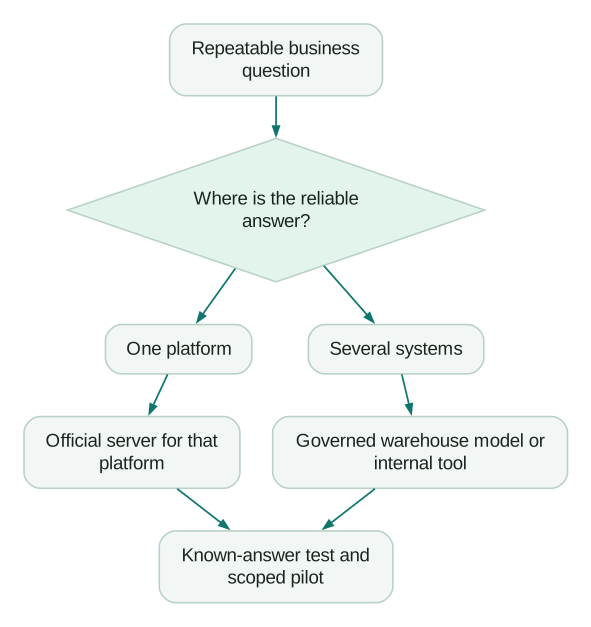
The best first connection is usually the platform holding a reliable answer to a recurring question. Start with a narrow workflow in that platform, then add other systems when the question requires them.
Can marketing MCP servers write as well as read?
Many can. The official Google Analytics and current Google Ads implementations focus on reads, while several CRM, advertising and lifecycle servers expose writes. Check the current tool catalog and the permissions of the connected identity.
Are all official servers generally available?
No. Availability can differ by server, feature, plan, region and account. A generally available connection may still contain beta tools. Verify the specific operation you intend to use.
Is there an official Salesforce Marketing Cloud MCP server?
Yes, for Marketing Cloud Engagement. Use its specific setup documentation and tenant/package endpoint. Do not substitute a different Salesforce MCP server simply because the product name looks familiar.
Do we need a separate internal MCP server?
Consider one when the workflow needs governed data from several systems, narrower business tools or controls your existing connectors cannot provide. The internal MCP guide explains the design and maintenance tradeoffs.
Sources
- HubSpot remote MCP documentation. Accessed 9 September 2026.
- Google Analytics MCP repository. Accessed 9 September 2026.
- Google Ads MCP documentation. Accessed 9 September 2026.
- Meta Ads MCP overview. Accessed 9 September 2026.
- BigQuery remote MCP. Accessed 9 September 2026.
- Snowflake-managed MCP. Accessed 9 September 2026.
- Mixpanel MCP. Accessed 9 September 2026.
- Amplitude MCP. Accessed 9 September 2026.
- Clay MCP connection and administration. Accessed 9 September 2026.
- Customer.io MCP. Accessed 9 September 2026.
- Salesforce Marketing Cloud Engagement MCP setup. Accessed 9 September 2026.
- Braze MCP functions and beta restrictions. Accessed 9 September 2026.
- Claude Code MCP configuration. Accessed 9 September 2026.
- Mixpanel AI access policy. Accessed 9 September 2026.
Written by
Jafrin Akter AloData Engineer and Co-founder, martechdevs
Jafrin Akter Alo is a data engineer and co-founder of martechdevs, where the team has delivered 74+ martech, data and growth stack implementations.