
HubSpot MCP server: remote setup for Claude, ChatGPT and Claude Code
HubSpot's remote MCP server connects AI assistants to CRM records, activities and supported marketing tools under the signed-in user's access. You can use the official Claude or ChatGPT connector, connect Claude Code, or build your own client. Start with a read-only question you can verify in HubSpot, then test one proposed change before granting broader write access.
On this page
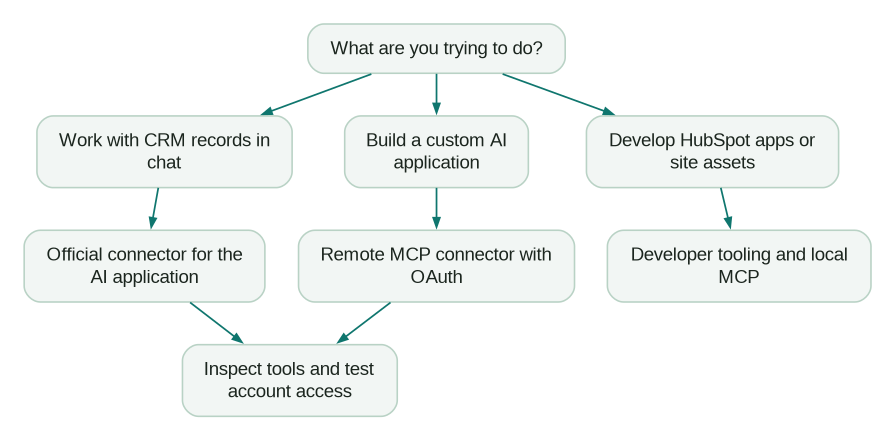
Which HubSpot connection fits your work?
Use the packaged connector when a marketer or sales operator wants to work inside Claude or ChatGPT. Use Claude Code when CRM context belongs alongside a technical project. Build a custom OAuth client when you need to own the application's authentication, interface or operating controls.
The remote server is different from HubSpot's local Developer MCP server, which helps build applications and CMS assets. HubSpot says its official Claude, ChatGPT, Microsoft Copilot and Gemini connections use the remote server. HubSpot's remote MCP overview
| Your job | Starting point | First acceptance check |
|---|---|---|
| Review a sales pipeline in chat | Official Claude or ChatGPT connector | One known deal matches its CRM record |
| Combine CRM context with development work | Claude Code HTTP connection | Correct account and available tools |
| Build an internal AI application | Custom OAuth client | Each user authenticates with the intended permissions |
| Develop HubSpot applications or CMS assets | Developer MCP server | Development tools match the project |
A scoped CRM assistant implementation should define the records, permitted actions and acceptance checks before connecting a production account. A successful connection is only the first step. The useful result is a repeatable workflow with a defined population, reliable evidence and an accountable owner. Our marketing MCP guide explains where CRM access fits with analytics and lifecycle systems; a comparison of CRM MCP servers helps when you are choosing between platforms.
Start with a known-record and cohort check under the intended account and tools. Keep the result read only unless one supported change is explicitly approved; a changed record or failed validation requires a fresh review before execution.
Read diagram as text
- Choose the CRM question account and tools to Known record and cohort checks pass?.
- Known record and cohort checks pass? to Resolve account scope or selection errors: No.
- Resolve account scope or selection errors to Choose the CRM question account and tools.
- Known record and cohort checks pass? to Prepare evidence and any proposed change: Yes.
- Prepare evidence and any proposed change to One supported change explicitly approved?.
- One supported change explicitly approved? to Keep the result read only: No.
- One supported change explicitly approved? to Re-read the record and test client validation: Yes.
- Re-read the record and test client validation to Value and required checks still valid?.
- Value and required checks still valid? to Stop and review the new state: No.
- Stop and review the new state to Prepare evidence and any proposed change.
- Value and required checks still valid? to Apply and inspect the record and workflows: Yes
What can the HubSpot MCP server read and change?
The remote server can read and change CRM records and supported content, with tools limited by the account, scopes and client. HubSpot made the remote server generally available on 13 April 2026, with a corrected announcement on 15 April. It is available across HubSpot accounts and uses OAuth 2.1 with PKCE. The launch announcement is useful history, but its original tool inventory is no longer the complete capability list. HubSpot's GA announcement
The current remote-server reference includes these groups. Available tools remain conditional on account access, granted scopes and the client.
| Data or task | Read | Documented changes |
|---|---|---|
| Core CRM, leads and custom-object records | Yes | Create and edit |
| Calls, emails, meetings, notes and tasks | Yes | Create and edit |
| Landing pages, website pages and blog posts | Yes | Create, edit and publish |
| Campaigns and marketing emails | Yes | Campaign changes; email drafts |
| Pipelines and properties | Supported tools | Pipeline changes; custom properties |
| Revenue objects | Some in beta | Eligible quote operations in beta |
| Conversations | Restricted access | Check the actual tool inventory |
If Sensitive Data is enabled, activities and conversations are unavailable through MCP; this restriction does not change standard CRM API access. Inspect get_user_details for the tools actually available to the authenticated account. Current remote-server reference
This distinction changes how you evaluate risk. A tool that can publish a page has a different consequence from a tool that retrieves a company record. Give content publishing its own acceptance test: correct page, correct domain, correct publication status and an identified person who can reverse an unwanted change. Do not include publishing in the first CRM pilot just because it appears in the tool list.
Likewise, access to a custom-object record does not prove that its relationships make sense. A workspace attached to the wrong company can produce a confident but incorrect account summary. Check the custom-object model before asking an assistant to use it for renewal decisions.
Which features need a paid HubSpot tier?
Marketing, content, support and revenue capabilities have Hub-specific gates, while basic CRM access spans HubSpot tiers. Verify the relevant tool in your account; this is a capability table, not a subscription price quote.
| Capability | HubSpot requirement described by the product page | Pilot acceptance check |
|---|---|---|
| Basic CRM reading, writing and activity logging | All tiers | Retrieve a known record under the operator's role |
| Campaign management and attribution | Marketing Hub Professional or Enterprise | Confirm the expected campaign tools and population |
| Landing or site page creation and content analytics | Marketing Hub Professional or Enterprise | Inspect the intended domain and publication state |
| Conversations inbox | A paid Hub | Test the permitted inbox and missing-data handling |
| Help Desk access | Service Hub Starter, Professional or Enterprise | Retrieve an allowed ticket's support context |
| Quote and revenue functions | Revenue Hub Professional or Enterprise | Confirm the required operation is actually available |
The official Claude connector also requires a paid Claude subscription. That requirement is separate from HubSpot's tier. HubSpot's Claude feature and tier guide
Do not purchase an upgrade based on a generic promise that “AI can access HubSpot.” Name the required action, identify the tool, confirm the tier and test the user permissions. A team that only needs deal summaries should not price the project as if it requires campaign attribution or quote creation.
How do you connect HubSpot to Claude?
In Claude, open Settings → Connectors → Browse, choose HubSpot and connect the intended account. Review the requested permissions. HubSpot's setup guide requires Claude Pro, Max, Team or Enterprise. An installer needs Super Admin or App Marketplace Access, or prior approval from a Super Admin. Set the connector's write tools to Needs Approval; Always allow can permit edits without a confirmation. HubSpot's Claude setup guide
For the first read, choose a deal whose owner, stage and amount you already know. Ask for the record ID, record link, requested fields and missing fields. Open the returned link and compare the values directly. This establishes whether you connected the right account and whether the assistant is retrieving evidence rather than filling gaps.
A useful first prompt is:
In HubSpot, find deal ID [ID]. Return its owner, pipeline, stage, amount, currency and close date, with the record link. Show missing values as missing. Do not change anything or infer fields that were not returned.
Keep the initial scope narrow. “Analyse our pipeline” is difficult to validate because the assistant must choose both the population and the interpretation. A known record separates connection quality from analytical judgment.
How do you connect HubSpot to ChatGPT?
Open Settings → Apps, select HubSpot and choose Connect. Authenticate, select the correct HubSpot account and approve the intended access. HubSpot describes this connection as available across its tiers with an OpenAI account; workspace app controls can still determine whether you can enable it. Configure write tools to request approval before using them. HubSpot's ChatGPT setup guide
Use the same known-record test as Claude. Include “HubSpot” in the request and require record links. If the answer comes from a document or a previous conversation instead of a live tool response, it has not passed the connection test.
For broader analysis, specify the pipeline, date range, time zone and fields. Require a statement of how many records were retrieved and whether more results remain. The ChatGPT marketing analytics guide covers the wider discipline of reconciling an AI answer against its source data.
Claude and ChatGPT do not have identical validation behavior
The current provider-specific guides document a meaningful difference:
| Write behavior | Claude connector | ChatGPT connector |
|---|---|---|
| Conditional property and pipeline-stage rules | Applied | Custom validation rules not applied |
| Association-label validation | Not applied | Not applied |
| Bulk create or update | Up to 10 records at a time | Up to 10 records at a time |
These details come from the respective Claude and ChatGPT guides. Do not assume that a rule enforced in one client protects the same operation in another.
Build a controlled test around a record that intentionally lacks a required stage field. Record whether the operation is rejected, accepted or unavailable. Then inspect the actual CRM result. Never use a live customer opportunity to discover that your expected validation is absent.
How do you connect HubSpot to Claude Code?
Add HubSpot as an HTTP server in the project, then authenticate through Claude Code. Anthropic documents the provider-specific /anthropic endpoint; this command uses local scope:
claude mcp add --transport http hubspot --scope local https://mcp.hubspot.com/anthropicOpen Claude Code and run:
/mcpComplete the browser authentication and check the connected server. Local scope makes this configuration private to you in the current project; user scope would expose it across your projects. The command configures a connection, not proof that authentication or a CRM operation succeeded. Claude Code MCP documentation
Use Claude Code for marketing for the surrounding project workflow, then package a bounded CRM review with HubSpot slash commands.
Use a project containing the metric definitions, property dictionary and permitted workflow instructions. These documents help the assistant distinguish your business rules from field names. They should not contain copied access tokens or a full export of customer data merely for convenience.
A useful technical task is to compare the CRM property definitions with a proposed integration mapping. Ask the assistant to report unknown fields, incompatible types and missing identifiers before it proposes code. Avoid combining schema discovery with unrestricted record updates in one prompt.
How do Copilot, Gemini and custom clients connect?
Use the official connectors for Copilot and Gemini, and register an OAuth application for a custom client. The packaged connections share the remote service, but client capabilities and interface controls can differ. Check their current connection instructions rather than assuming Claude's menus or approval behavior applies.
For Microsoft Copilot, HubSpot's agent setup guide requires a Microsoft 365 Copilot license or the Copilot Chat add-on with an eligible Microsoft 365 license, and a Microsoft 365 admin adds the HubSpot agent under Agents → All agents in the admin center. To test before rollout, use the agent's Users tab to limit who can install it, then have one pilot user run the known-record test from the Claude section. If you instead add HubSpot's server to a Copilot Studio agent as a Model Context Protocol tool, run the known-record and denied-record checks in the Test your agent panel before publishing. Microsoft describes that panel as design-time validation that does not replicate every published channel behavior. Copilot Studio MCP tools, Copilot Studio test panel
Use an isolated HubSpot test account, synthetic records and a test user for that pilot. HubSpot allows developer test accounts for apps and integrations; create one under Development → Testing → Test Accounts. Its configurable-account guide lets you select Hub tiers rather than rely on the default Enterprise trials. A feature working in an Enterprise trial does not establish eligibility on your production tier.
Confirm that the intended test account can be selected and authorized through the actual Copilot connection before using it as the test environment. HubSpot's Copilot setup page lists all products and plans, but does not explicitly promise installation in every developer test account. If that account is unavailable or rejected, confirm an eligible isolated account or sandbox with the administrator and HubSpot support; keep the known-record and denied-record checks there before any production rollout.
For custom clients, use Development → MCP Connectors to register the application and redirect URI. Configure its credentials and PKCE, then connect through Streamable HTTP to the HubSpot MCP server URL, https://mcp.hubspot.com. HubSpot's custom-client integration guide
Keep credentials in the application's secret management, and ensure each person connects the intended account. A shared administrator identity makes it harder to understand who was allowed to do what. When HubSpot introduces new connector scopes, reinstall the connector to grant them, then repeat the known-record test. An existing connection does not automatically gain the new access.
If your CRM is Salesforce, use the Salesforce hosted MCP setup. The client application, server selection and access model differ; swapping the hostname in a HubSpot command is not a migration plan.
For a broader shortlist, compare CRM MCP servers by client support, allowed operations and administrative controls.
How do you make a pipeline review reproducible?
Define the population, fields, decision rule, evidence and permitted action to make a pipeline review reproducible. Consider a weekly overdue-deal review.
Use HubSpot deals in pipeline [ID], excluding closed stages. Find deals with close dates before [date] in [time zone]. Retrieve deal ID, owner, stage, amount, currency, close date, last activity date and next step. Return at most 50 records, ordered by close date then ID. State whether more records remain. Separate missing dates from overdue dates. Link each record. Propose follow-up tasks but do not create or update anything.
The date boundary avoids an ambiguous “overdue.” The pipeline removes unrelated sales processes. Stable ordering makes repeated samples comparable. The retrieval limit makes incomplete coverage visible. Separating missing dates prevents the assistant from inventing an overdue status where the field is empty.
Use a small fixture before trusting the report:
| Test record | Source condition | Expected treatment |
|---|---|---|
| A | Open, close date yesterday | Include as overdue |
| B | Open, close date tomorrow | Exclude from overdue cohort |
| C | Closed lost, close date yesterday | Exclude because stage is closed |
| D | Open, no close date | Report separately as missing |
| E | Open, amount missing | Include if overdue; leave amount unknown |
If the result includes A and E, excludes B and C, and separates D, the selection rule is working for those cases. It does not prove the full pipeline is correct. Repeat the check across pagination, restricted records and a second owner before expanding access.
Twenty prompts worth adapting
These prompts are starting points. Add your account-specific pipeline, dates, identifiers and retrieval limits before using them. When a reviewed prompt becomes recurring work, package it as a Claude marketing skill with its inputs and acceptance checks.
- Find open deals with past close dates and show the source dates.
- Find deals without an owner and group them by pipeline.
- List open deals with no next step, keeping missing and blank values visible.
- Compare stage distribution for two explicitly defined snapshots, if those snapshots exist.
- Find deals whose amount is missing; do not replace missing values with zero.
- Identify companies with several open opportunities and list every deal ID.
- Find contacts without a company association and explain the retrieval coverage.
- Identify suspected duplicate companies by domain without merging them.
- Show properties whose values conflict with the agreed lifecycle definition.
- List records with missing external customer IDs before an integration project.
- Summarize a named account using linked deals, tickets and available activities.
- Prepare a renewal meeting brief, distinguishing recorded facts from open questions.
- Find unresolved tickets for accounts in a specified renewal window.
- List available activities for an account, ordered by date, with source links.
- Identify accounts where a required decision-maker relationship is missing.
- Draft a task for each verified overdue deal, without creating the tasks yet.
- Propose corrected property values with old value, new value and reason.
- Draft an account note that cites the records used to produce it.
- Check a proposed import mapping against available CRM properties.
- Compare today's retrieved records with an approved snapshot and report changes only.
Historical questions need historical data. If the tool only returns current values, prompt 4 cannot reconstruct last month's stage distribution. Ask for an explicit limitation and use a stored snapshot instead. Our CRM data hygiene guide helps define the underlying field rules.
How should you review CRM changes?
Before allowing a write, require the record ID, current value, proposed value, reason and expected side effects. Re-read the record immediately before applying the approved change. If another person has changed it since the proposal, stop and review the new state.
For example, a proposed next-step update may have been sensible at 09:00. At 09:10 a rep adds a negotiated follow-up. Applying the old proposal at 09:15 would overwrite newer work. A prompt asking the assistant to “be careful” does not provide an atomic concurrency guarantee; the integration needs an appropriate precondition or a fresh review when the state differs.
After the write, inspect the saved record and relevant workflows. A property edit may trigger task creation, lifecycle automation or a notification. A correct field value with an unwanted downstream effect is still a failed rollout. The AI approval workflow guide explains how to separate proposal, approval and execution.
The agent write safety skill can structure the proposal, exact approval, execution in small batches and fresh readback around those HubSpot changes.
Which questions need data outside HubSpot?
A CRM connection cannot calculate trustworthy MRR, churn risk or customer lifetime value from data it cannot retrieve. A hypothetical 15-person SaaS team might have opportunity amounts in HubSpot, subscriptions in billing and product usage in a warehouse. A deal amount does not establish the current recurring subscription amount; a quiet activity feed does not establish product inactivity.
First identify the authoritative data for the question. If HubSpot contains a maintained recurring-revenue field, ask when and how it was refreshed. If billing owns revenue, reconcile against billing. If adoption depends on workspace activity, join the customer identifiers and define the observation window. Our HubSpot AI guide separates useful CRM tasks from broader data requirements.
Evaluate the pilot with a small operating model. Suppose the manual review takes 100 minutes each week. The assisted process takes 35 minutes of review and 15 minutes of upkeep. Net time saved is 50 minutes. At an illustrative internal rate of USD 60 per hour, that is USD 50 per week before software and implementation costs. These are planning assumptions, not observed client results.
If the assistant saves collection time but adds 90 minutes of correction, the workflow has not improved. Measure review time, incorrect records, incomplete retrievals and unwanted changes alongside speed.
What should pass before the first HubSpot rollout?
The HubSpot pilot should prove correct retrieval, controlled changes and a measurable improvement over the manual workflow. Keep the evidence for these checks:
Checklist
- Record the connected account, user, client and intended workflow.
- Confirm one known CRM record matches the retrieved fields and link.
- Inspect the actual available tools and exclude unnecessary writes.
- Verify tier eligibility for every required marketing or revenue operation.
- Test missing fields, restricted records and an incomplete result set.
- Confirm the chosen client enforces the validation rules you rely on.
- Review one proposed change and compare the saved result with the proposal.
- Check whether the change triggered another workflow or notification.
- Record a rollback method and the person responsible for exceptions.
- Compare review effort and error rates with the manual process.
Use the agent write safety skill to scope the HubSpot tools, prepare the proposed change and check saved values and side effects after approval.
For help choosing the first workflow, start with the free AI readiness checklist. If you already know the systems and intended actions, get a detailed AI agent implementation scope with the data boundaries, approval rules and acceptance tests included.
Keep reading
 CRM & Lifecycle
Salesforce to HubSpot migration: plan, field mapping and cutover checklist
Plan a Salesforce to HubSpot migration: phases, a field mapping template, load order, Smart Transfer limits, reconciliation checks and a safe cutover.
Jafrin Akter AloLast updated 21 min read
 CRM & Lifecycle
HubSpot implementation: a phased plan, template and launch checklist
Implement HubSpot in five phases: scope, data model, migration, integrations and launch. Includes a plan template, a worked example and a go-live checklist.
Jafrin Akter AloLast updated 22 min read
 CRM & Lifecycle
HubSpot API Guide: Service Keys, Contacts, Pagination and Limits
Connect to the HubSpot API with Service Keys or OAuth. Read contacts, follow pagination, handle rate limits and avoid duplicate writes with current endpoint examples.
Jafrin Akter AloLast updated 12 min read
AI readiness score
Check your tracking, data, context and access before connecting an agent.
Questions people ask
When should we stop a HubSpot MCP pilot and review its access?
Stop the pilot if it retrieves the wrong account, proposes changes outside the agreed scope or cannot explain incomplete results. Preserve the relevant record IDs, tool responses and connection details without copying unnecessary customer data. Resolve the access or selection error, then repeat the known-record test before resuming the workflow.
Can we reuse an older generated account brief for a renewal decision?
Use it as a dated reference, then refresh the records that can change the decision. Check opportunity state, open support work and the freshness of any billing or product-usage fields. Keep the previous brief so changes are visible, but do not present its conclusions as current merely because its wording still sounds plausible.
What should a HubSpot brief show when a requested field is unavailable?
Label the field unavailable and explain whether the tool omitted it, access was restricted or the source record itself was empty. Retain the record link and retrieval time so an owner can investigate. Do not substitute a similarly named property or turn a missing amount into zero to finish the summary.
Can I use it with a free HubSpot account?
Basic CRM access is available across HubSpot tiers, but paid product features remain gated. The official Claude connector separately requires a paid Claude plan. Confirm both subscriptions against the exact operation you need; a free HubSpot account does not make every connected feature free.
How much should a team budget for a pilot?
Separate the AI client's subscription, any HubSpot upgrade, implementation effort and ongoing review. Start with a workflow whose baseline effort you can measure. Use the time-saving calculation above with your own assumptions, then include the cost of correcting errors and maintaining the connection.
Sources
- HubSpot: Remote MCP server overview
- HubSpot: Remote MCP general availability announcement
- HubSpot: Integrate with the remote MCP server
- HubSpot: Claude connector setup
- HubSpot: Claude connector features and tiers
- HubSpot: ChatGPT connector setup
- Anthropic: Claude Code MCP documentation
- HubSpot: Agent for Microsoft Copilot setup
- Microsoft: Connect a Copilot Studio agent to an existing MCP server
- Microsoft: Test your agent in Copilot Studio
- HubSpot: Account types and developer test accounts
- HubSpot: Configurable test accounts

Written by
Jafrin Akter AloData Engineer and Co-founder at Martechdevs and Growth and Analytics Partners
Jafrin writes practical guides to marketing technology, customer data, analytics and AI workflows. Martechdevs is a Growth and Analytics Partners company.