
GA4 AI: Ask Advisor, AI Assistant Traffic and Answers You Can Check
Data Engineer and Co-founder, martechdevs
Last updated 11 min read
GA4 can help you investigate performance with AI and measure visits from AI assistants. Those are separate jobs. Before you ask why growth changed, decide whether you need an explanation of your existing data, a report on AI referrals or evidence from systems outside Analytics. That choice determines which tool to use and whether its answer can support a business decision.
Last updated: 12 October 2026.
What does GA4 AI actually include?
Start with the question you need answered:
- Explain a change inside GA4: use Ask Advisor to investigate the selected property.
- Find noteworthy changes: inspect the homepage's AI summaries, then investigate the underlying report.
- Measure visits associated with AI assistants: use the AI Assistant acquisition channel.
- Work with GA4 inside another AI application: connect an appropriate reporting tool, such as Google's Analytics MCP server.
- Estimate future purchase or inactivity behaviour: check eligibility for GA4 predictive metrics.
These features solve different problems. A visit attributed to ChatGPT does not mean ChatGPT has access to your Analytics property. An explanation of declining sales does not establish what would happen if you changed your marketing budget.
Google introduced the broader Ask Advisor experience in May 2026. Its August update added homepage summaries and discussed campaign benchmarking against anonymized peers. That announcement also described visual dashboards as coming to Analytics later. Check actual availability before building a reporting process around an announced feature.
The homepage's AI Overviews summarize your Analytics data. Google's similarly named AI Overviews in Search answer search queries. Keep those meanings separate when discussing traffic with your team.
How to use Ask Advisor without accepting an unsupported explanation
Ask Advisor is Google's Gemini-powered conversational interface inside Analytics. The current help page labels it beta, specifies English-language availability and describes property questions, visualizations, report links and configuration lookups.
In an eligible property, open the Ask Advisor icon at the top right or choose it through Analytics search. You can also enter from supported chart cards. If the icon is missing, check whether you are customizing a report rather than viewing it.
Give it a small, answerable job first. “Improve our marketing” leaves the outcome, time window and evidence undefined. “Compare demo-request sessions from the same channel over two completed periods” gives you something to verify.
Here is an original starting prompt. Replace the dates, property and event with your actual reporting agreement:
Use property PROPERTY_ID and its reporting time zone. Compare 7–20 September 2026 with 21 September–4 October 2026, inclusive. For sessions classified as AI Assistant using Session default channel group, show sessions, sessions with at least one demo_request key event, and the session key event rate for demo_request. Confirm that this event exists and is marked as a key event. Show counts beside rates, state the filters and link to the supporting report. If a requested measure is unavailable, say so instead of substituting event count. Separate observed changes from possible explanations.
The two windows each contain 14 days and the same weekday mix. That helps comparison, but it does not control for a campaign launch, holiday, outage or tracking change. Add those facts when they are relevant.
Ask for the supporting rows before the recommendation. If the assistant cannot show how it reached a number, reproduce the request in a report or another supported reporting surface. An answer that cannot be checked should remain a lead for investigation.
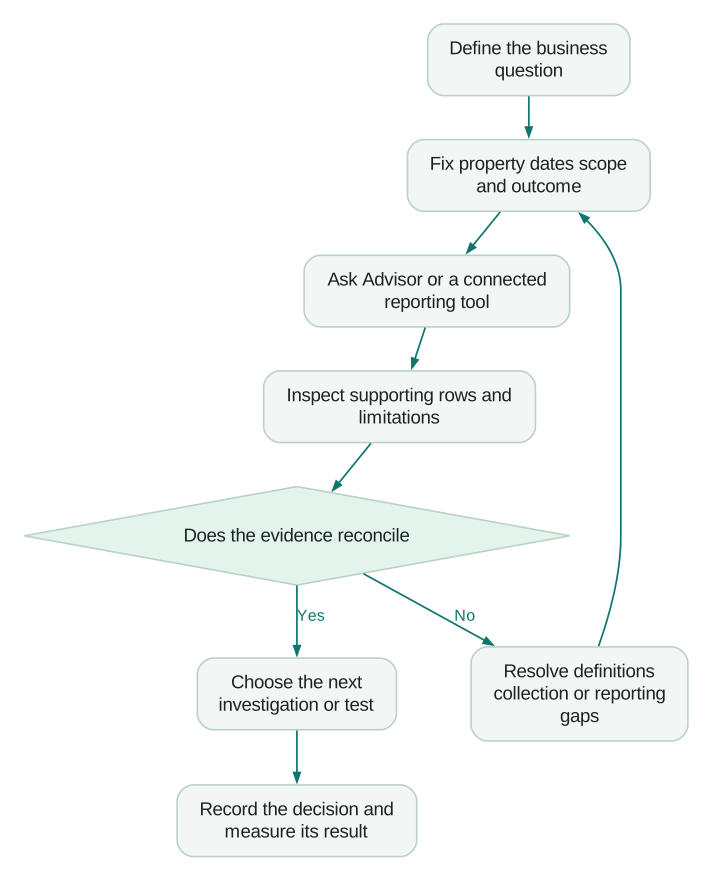
Keep the analysis inside its evidence boundary
The current Analytics help describes property-data answers as grounded in the selected property. Google's broader cross-product announcements do not establish that a particular chat has queried your CRM, billing system or every connected advertising account.
For a B2B team, “demo requests increased” and “qualified pipeline increased” are different findings. Ask which source supplied qualification, how leads were matched to companies and what happened to unmatched records. If those records were never queried, the assistant cannot establish pipeline quality from sessions alone.
Google's Ask Advisor data policy says prompts and generated answers are not used for model training, fine-tuning or evaluation, and chat logs are retained for 55 days. Those statements apply to that product. Review the separate data handling of any external AI client or connector you introduce.
What is the AI Assistant channel in GA4?
Google's May 2026 release notes describe automatic classification when a referrer matches a recognized assistant: medium becomes ai-assistant, campaign becomes (ai-assistant) and the traffic enters the AI Assistant channel. Examples named across Google's documentation include ChatGPT, Gemini and Claude.
The default channel definitions explicitly exclude Google's Search AI Overviews and AI Mode from AI Assistant. Their organic clicks belong under Organic Search. You cannot use the AI Assistant row as a total of all visits influenced by generative AI.
The useful reporting label is sessions classified as AI Assistant under GA4's rules. It avoids pretending that the report observes every assistant recommendation or every step in a buyer's research.
Build the first report at session scope
Open Traffic acquisition, choose Session default channel group and inspect AI Assistant. Add Session source/medium to identify the recorded sources. Keep the date range and relevant website filters fixed as you compare landing pages or devices.
Google's acquisition comparison distinguishes session acquisition from first-user acquisition. A person may first discover you through organic search and later return through an assistant. The source dimension you choose determines which part of that history the report describes.
For an initial review, save these fields:
- Reporting property, time zone and inclusive dates.
- Session-scoped channel and source definitions.
- Sessions and an explicitly selected business key event.
- The corresponding session key event rate.
- Landing pages, with query strings handled consistently.
- Known campaign, consent, tagging or website changes during the window.
Start with a few useful breakdowns. A report split by source, country, device, page, campaign and day can produce many tiny groups while making the underlying decision less clear.
What this channel misses
An assistant can recommend your product without sending a website visit. A person may read that answer, type your brand into a search engine later or share the recommendation with a colleague. GA4's channel report does not reconstruct that unobserved sequence.
Referrer and campaign information can also be missing. Google's direct-traffic guidance explains that direct/none indicates the absence of a clear source. It does not identify a hidden AI visit. Do not allocate a convenient percentage of Direct to AI without independent evidence.
Treat new or unexpected sources as a classification question. Inspect the recorded source and landing path, reproduce a visit where practical and document any custom rule you adopt. A broad rule matching every source containing ai can collect unrelated websites.
Do not promise a reconstructed historical baseline from the new channel. Compare periods with known measurement definitions, and annotate any classification changes. Our AI traffic tracking guide covers the broader reporting setup and its limits.
A worked example: more AI traffic, no more demo-request sessions
Consider this fictional SaaS report. The event demo_request is already a key event, both periods use the same filters, and the counts below represent observed sessions and event occurrences:
period,sessions,sessions_with_demo_request,demo_request_event_count
2026-09-07_to_2026-09-20,400,12,18
2026-09-21_to_2026-10-04,600,12,24
The calculations tell different stories:
- Sessions rose by 200, or 50%.
- Demo-request event occurrences rose from 18 to 24, or 33.3%.
- Sessions containing a demo request stayed at 12.
- The session demo-request rate fell from 3% to 2%, a decline of one percentage point or 33.3% relative.
Google's metric reference distinguishes key-event occurrences from the percentage of sessions containing a key event. Multiple event occurrences in a session explain why dividing 24 by 600 gives 4%, which is not the 2% session rate in this example.
The additional occurrences could reflect repeat submissions, legitimate repeated actions or duplicate instrumentation. These aggregate figures alone do not identify which explanation applies.
A useful next prompt is:
Keep the original periods and filters. Break sessions and the demo_request session rate down by landing page, then by recorded source. Show the contribution of each group to the change in sessions. Identify where small counts prevent a useful comparison. Propose checks for repeated demo_request events, but do not call them duplicates without event-level evidence.
Then inspect form delivery and CRM outcomes. Twelve sessions are not necessarily twelve people, twelve companies or twelve sales opportunities. Deduplicate and reconcile the actual request records before making a pipeline claim.
For the marketing manager, the immediate decision is whether the extra visits are reaching relevant pages and completing the intended action. For the founder, the next question is whether the resulting requests are commercially useful. Neither question is answered by celebrating a 50% traffic increase.
Can Claude, Gemini or ChatGPT ask GA4 questions?
Yes, with an appropriate authorized connection. Google's experimental Analytics MCP repository provides a local server using the Admin and Data APIs. Its documented tools retrieve property information and run reporting queries; setup requires Analytics access and a read-only OAuth scope. The repository includes Gemini configuration.
Use the Google Analytics MCP setup guide for the connection workflow and a small reconciliation test. An external client can be useful when you also need an approved campaign calendar or a maintained analysis procedure in the same session.
For ChatGPT, choose a compatible connection path. A local process does not become accessible merely because you mention it in a chat. OpenAI's current Secure MCP Tunnel documentation supports private servers over stdio or HTTP through its tunnel client, subject to separate Platform and ChatGPT workspace permissions. Hosted connectors have their own setup and access rules.
Before evaluating the writing quality of different assistants, give them the same question and evidence. A client with one reporting tool and a client with warehouse access are not comparable just because both answer in English.
For a cross-system analysis in ChatGPT, the marketing analytics connection guide walks through the setup and a campaign-cost example using separate ad, GA4 and CRM measures. Use it when qualification or revenue evidence sits outside the Analytics property.
Save the exact query or report definition with the result. This lets another person reproduce the analysis after you change models, clients or prompts.
AI does not remove GA4 reporting limitations
Google's reporting-surface comparison documents possible sampling and high-cardinality aggregation in the interface and Data API. BigQuery exports have different characteristics and omit some reporting additions. An API response is not automatically a complete raw-event extract.
Ask the tool to disclose available quality metadata and row limits. If it does not expose them, check the underlying reporting surface before treating a missing row as zero. Keep unknown values visibly unknown.
Also check recency. Google says processing can take 24–48 hours, with some updates arriving later. A fast conversational answer can still describe data that is changing. Use completed, sufficiently processed periods for decisions that do not require immediate intervention; label provisional monitoring separately.
What about GA4 predictive AI?
GA4 predictive metrics estimate purchase behaviour, revenue and inactivity for eligible properties. Over a seven-day period within the last 28 days, at least 1,000 returning users must meet the relevant purchase or churn condition and at least 1,000 must not. Model quality must also remain sufficient. Having 1,000 purchases by itself is not the qualification rule. Check the eligibility shown in the audience builder; meeting a count alone does not guarantee availability.
Its churn probability concerns whether a recently active user will be inactive over the next seven days. A paid account cancelling, reducing seats or failing a renewal payment is a different outcome. Define those outcomes in the systems that record them.
A small SaaS business with infrequent website visits should not interpret predicted website inactivity as subscription risk. Start with a simple account-level retention question and the appropriate product and billing evidence. The AI churn prevention guide explains how to connect a prediction to a useful intervention and test whether that intervention helps.
Likewise, a high purchase-probability audience does not establish that extra advertising will cause extra purchases. It may identify people likely to purchase anyway. Evaluate the incremental effect of the proposed action when that distinction affects spending.
A practical review checklist
- The question names a business outcome and a decision it could change.
- Property, time zone, dates and filters are recorded.
- Session, first-user and event-attribution scopes are not mixed accidentally.
- The selected key event exists and its firing behaviour has been checked.
- Counts accompany rates; repeated events are not treated as unique requests.
- Supporting reports or queries reconcile, with missing data left explicit.
- Recent processing, classification and tracking changes are considered.
- CRM or billing conclusions use evidence from those systems.
- Recommendations identify an owner, next check and success measure.
Take one recurring question through this process before expanding access or automating the report. If every review stalls on missing events or incompatible definitions, improve those first. Our analytics and tracking work starts with the measurement needed for the decision, so the assistant has something useful to analyze.
Questions people ask
Is Ask Advisor the same as the Google Analytics MCP server?
No. Ask Advisor is the in-product conversational interface. The experimental MCP server exposes Analytics reporting tools to compatible external clients. Choose based on the evidence and workflow you need, then verify the same underlying measures.
Does the AI Assistant channel include Google AI Mode?
No. Google's default definitions classify organic clicks from AI Mode and Search AI Overviews under Organic Search. AI Assistant covers recognized assistant traffic under its own rules, so that row should not be presented as all AI-influenced acquisition.
Why do I have AI referrals but no clear AI Assistant trend?
Check the date range, selected channel dimension, recorded source/medium and any custom grouping. A source may be unrecognized or lack usable referral information. Inspect the actual rows before changing classification, and do not infer hidden AI traffic from Direct alone.
Can AI tell me why conversions fell?
It can help locate and investigate a change. Establishing a cause needs more evidence: collection checks, campaign changes, product behaviour and sometimes a controlled test. Ask for supporting observations and competing explanations before acting on a confident narrative.
Should I use GA4 predictive churn for subscription retention?
Only if the predicted inactivity outcome is relevant to the specific decision. Subscription cancellation and revenue loss need their own definitions and evidence. Test whether acting on a signal improves retention rather than assuming a prediction is a retention strategy.
Sources
- Google, Introducing Ask Advisor.
- Google, August 2026 AI tools update.
- Google, Ask Advisor in Analytics.
- Google, How Ask Advisor uses data.
- Google, Analytics release notes.
- Google, Default channel group.
- Google, User acquisition versus traffic acquisition.
- Google, Understanding direct/none traffic.
- Google, Data API dimensions and metrics.
- Google, Experimental Analytics MCP server.
- OpenAI, Secure MCP Tunnel.
- Google, Reporting surfaces comparison.
- Google, Data freshness.
- Google, Predictive metrics.
Written by
Jafrin Akter AloData Engineer and Co-founder, martechdevs
Jafrin Akter Alo is a data engineer and co-founder of martechdevs, where the team has delivered 74+ martech, data and growth stack implementations.