
Snowflake AI explained: Cortex, CoWork, CoCo and the data work underneath
Data Engineer and Co-founder, martechdevs
Last updated 10 min read
Snowflake AI includes services for analysing structured data, searching documents, applying AI functions and running agents. Snowflake CoWork is the business-facing work experience previously called Snowflake Intelligence. CoCo is the current name used in the Cortex Code documentation for development and data work. For a marketing team, the right starting point is a trusted business question and the data needed to answer it.
Last updated: 2 September 2026.
“Can AI explain our pipeline?” sounds like a product question. It is also a definitions question. Pipeline can mean the current value of open opportunities, new opportunities created during a period or a historical snapshot at month-end. Each requires different logic.
Snowflake's AI services can help people access and work with data. Your team still has to decide which business meaning the answer should use. Martechdevs' warehouse implementation service builds the models and definitions that support those answers.
The product map, organised by the job
CoWork: the interface for business work
Snowflake's product page identifies CoWork as the successor name to Snowflake Intelligence. It provides an experience for working with agents and business information. Snowflake CoWork, CoWork documentation.
For a marketing leader, a useful task might be: explain the change in qualified pipeline using the approved revenue model and relevant account evidence.
The interface is only one part of that result. The configured agent needs suitable tools, access and definitions. A friendly chat window does not make an unmodelled database self-explanatory.
Cortex Agents: the workflow that selects and uses tools
Cortex Agents can plan a request and use configured tools across structured and unstructured data. Tools can include semantic analysis, search, custom functions and other supported capabilities. Cortex Agents overview.
Think of a renewal review. One tool returns account usage, another retrieves approved implementation notes, and the agent produces an evidence-backed summary. Those tools should have clear roles, rather than exposing every available object simply because the platform allows it.
Keep operational actions separate. Identifying a renewal risk and updating its CRM status should have distinct acceptance and permission rules.
Cortex Analyst: natural-language questions over structured data
Cortex Analyst supports text-to-SQL over business data described through semantic models or views. Snowflake's current documentation recommends moving new and existing analytical workflows towards Cortex Agents, which incorporates these capabilities. Cortex Analyst documentation.
The valuable preparation is a shared meaning for fields, relationships and metrics. For example, a semantic definition can specify which date represents acquisition and how a paid account is counted.
An analyst still needs to test the generated SQL and resulting population. A plausible query can be wrong because it uses a valid field with the wrong business meaning.
Cortex Search: retrieve relevant unstructured information
Cortex Search provides retrieval over indexed content, combining semantic and keyword-oriented techniques. A marketing or customer team might use it to retrieve product documentation, approved call notes or research. Cortex Search overview.
Retrieval helps locate evidence. It does not automatically establish how representative that evidence is. Three retrieved calls mentioning implementation delays cannot support a claim about the percentage of all customers experiencing delays.
For that question, define a corpus and an analytical method that accounts for the whole relevant population.
Cortex AI Functions: apply AI inside data processing
Snowflake exposes AI capabilities through functions for tasks such as classification, extraction and text generation. These can be used within data workflows instead of asking a person to process each record interactively. Cortex AI Functions.
A practical marketing example is classifying the stated reason a prospect declined a demo. Define the categories, preserve the source text and retain an “insufficient information” outcome. Forcing every ambiguous note into a confident category produces tidy but unreliable reporting.
Use a labelled sample to test the classification before processing the full dataset. Review whether errors cluster around a segment, language or note type.
CoCo: help building and maintaining data work
The current Cortex Code documentation calls the product Snowflake CoCo and describes Snowsight, desktop and CLI experiences. It supports development, analytics and administrative work, with capabilities varying by experience. CoCo overview.
For a data team, the useful task might be preparing a model change, investigating a slow query or explaining a transformation. Review generated code and permission changes through your normal engineering process.
The distinction from CoWork is the job being performed. A marketing manager asking a governed revenue question and an engineer modifying the revenue model need different access and review processes.
If the platform itself is new to your team, what Snowflake does explains storage, compute and the surrounding data workflow.
What to implement first
If your CRM, billing and product data are already modelled in Snowflake, start with one business question over that model. If they are still separate extracts with inconsistent account identifiers, start with the warehouse design guide.
For a first analytical agent, keep the architecture small:
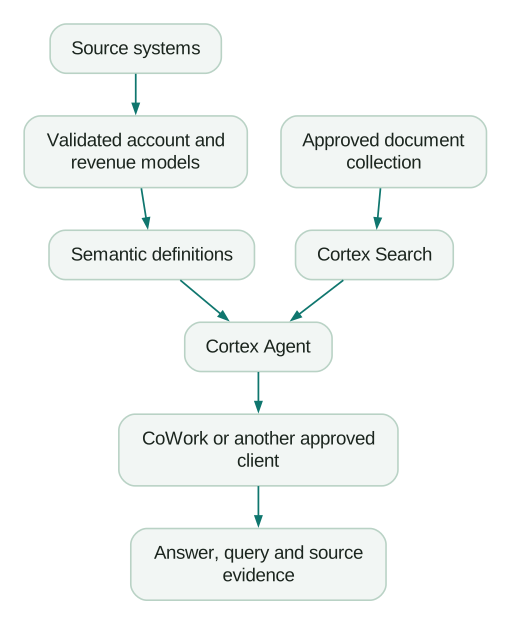
Add document retrieval only if the question requires it. A monthly revenue total does not need a search index of every sales call. Each added tool increases the work of testing access, answer quality and cost.
The AI-ready marketing data guide explains how identifiers and definitions shape the usefulness of the final answer.
Build a semantic contract for the first metric
Snowflake semantic views provide a way to describe business entities, relationships, dimensions and metrics. Semantic views overview.
For implementation, start by writing the metric in ordinary language before encoding it.
For example:
Metric: new qualified pipeline
Population: opportunities entering the qualified stage during the period
Value: amount recorded when qualification occurred
Currency: reporting currency after the approved conversion method
Exclusions: test opportunities and internal accounts
Channel: approved opportunity acquisition attribution
Unknowns: retained as a separate channel
Owner: revenue operations
This definition immediately exposes data requirements. If your warehouse only stores the latest opportunity stage and amount, you may be unable to reconstruct the historical value at qualification. The agent should not substitute today's value without saying so.
Write several questions that should use this metric and several that should not. “What is our open pipeline today?” needs a different definition. Testing only synonyms of the correct question leaves this boundary unexamined.
Worked example: explain a pipeline change without inventing a cause
Suppose a fictional B2B company records $600,000 of new qualified pipeline in August and $480,000 in September. The decline is $120,000, or 20%.
The approved channel breakdown shows a $90,000 fall in partner-sourced pipeline and a $30,000 fall in paid acquisition. The first useful answer is that partners account for 75% of the total decrease.
That is a contribution calculation, not a causal conclusion.
The agent then retrieves relevant partner account notes. Several mention delayed co-marketing events. A responsible answer separates the evidence:
- The warehouse establishes the size and location of the decline.
- The notes provide possible operational explanations for specific accounts.
- A comparison with planned events and qualification dates is needed to test whether those delays explain the wider movement.
Now suppose the data team discovers that $40,000 of September opportunities arrived late because an integration failed. The corrected September figure becomes $520,000 and the decline becomes about 13.3%.
An agent that ignores freshness can produce an elegant explanation of an ingestion problem. Include the model's last successful refresh and the latest source timestamp with the answer.
The right implementation produces a result that can be revised when new evidence arrives. It does not require the first answer to sound conclusive.
Permissions need to be tested for each tool
Snowflake's governance model is valuable, but the execution context of the configured tool matters. In particular, Cortex Search services use owner's rights. Granting access to a search service therefore needs a review of the content that service exposes. Cortex Search access model.
Do not assume a search result will inherit every row-level restriction a user experiences when querying a source table directly. Review the documented behaviour of the service and test with the intended roles.
For each tool, record:
- The role or identity used during execution.
- The objects and data it can reach.
- The fields returned to the caller.
- Whether it can change data or invoke an external system.
- The evidence retained for auditing the request.
Use a non-production dataset containing examples that one role should see and another should not. Check both permitted results and denied access.
Also review model and regional availability before choosing a capability. A feature shown in documentation may require an account setting or an availability condition that your deployment does not meet.
How Snowflake AI billing works
Snowflake distinguishes AI Credits from Platform Credits. Its current published AI Credit rates are $2 for global routing and $2.20 for specified regional routing configurations, before applicable discounts. The service's consumption rate determines how many credits a workload uses. Those dollar figures are not the price of one prompt. Snowflake AI pricing.
A complete cost estimate should include:
- Model usage for reasoning and generation.
- The warehouse work needed to run SQL or custom tools.
- Search indexing, refresh and serving requirements.
- Storage and any additional services used by the workflow.
- Human review and maintenance.
The standalone Cortex Analyst API and Analyst invoked through Agents have different billing models. Snowflake's pricing guide also makes clear that executing generated SQL adds warehouse charges. Feature pricing details.
Avoid using one successful prompt as the cost forecast for production. Longer conversations, ambiguous requests and repeated tool calls can change consumption.
Measure a representative question set, including difficult cases and follow-up questions. Report the cost distribution as well as the average. A small number of expensive investigations can dominate the bill.
A cost-per-accepted-answer model
Use this planning formula:
Cost per accepted answer =
  AI usage + incremental data-service costs + review labour
  --------------------------------------------------------
                  accepted answers
For an illustrative monthly pilot, suppose AI usage costs $90, incremental warehouse and search costs $160, and review takes eight hours valued internally at $40 per hour. The total is $570.
If 150 answers are accepted for the intended business use, the cost is $3.80 per accepted answer. If only 75 are accepted, the same spend becomes $7.60 per accepted answer.
These are hypothetical operating figures, not a Snowflake quote. Their purpose is to show why answer quality belongs in the cost calculation.
Compare that cost with the existing workflow. Also measure whether faster answers change a decision. Saving five minutes on an unused report may be less valuable than resolving a recurring data dispute before a weekly revenue meeting.
Test answer quality before widening access
Snowflake provides evaluation capabilities for Cortex Agents. Use platform tooling where it fits, supported by a test set your business owners can understand. Agent evaluations.
Include five kinds of questions:
- Questions with a known numerical answer.
- Questions requiring a specific join or exclusion.
- Ambiguous questions that should trigger clarification.
- Questions with insufficient or stale data.
- Questions the user's role must not be allowed to answer.
Score more than factual correctness. Check the source, population, metric definition, completeness and handling of uncertainty.
Keep failures as regression cases. If the agent once counted contacts as accounts, that distinction should remain in the test suite after the immediate fix.
Version the semantic model, instructions and tool configuration together. Otherwise a behaviour change can become difficult to trace to its cause.
When Snowflake AI is a poor first purchase
A small team whose useful data lives in one CRM may get a faster result from that CRM's native reporting or a scoped connector. Moving data into a warehouse has an ongoing cost in ingestion, modelling and ownership.
Snowflake becomes more compelling when important questions repeatedly cross systems, the company needs durable history or the team already has governed models there.
Use the data warehouse decision guide if the underlying platform choice is still open. If the data is already in Snowflake and the goal is access from an external assistant, the Snowflake MCP guide covers that interface.
Implementation checklist
- Choose a recurring question and define an accepted answer.
- Confirm source freshness, identity mapping and historical coverage.
- Write the metric definition and validate its SQL.
- Select only the tools required for the workflow.
- Review each tool's execution context and data exposure.
- Test permitted, denied, ambiguous and unanswerable requests.
- Include query or source evidence in the output.
- Measure all incremental service costs.
- Assign owners for definitions, evaluation and cost review.
- Expand access after the pilot meets its agreed criteria.
At Martechdevs, we build the data access, definitions and working instructions behind repeatable AI workflows. Start with the free martech AI audit, or explore an AI assistant built around your approved workflows.
Questions people ask
What is Snowflake Cortex?
Cortex is the family name associated with several Snowflake AI services, including functions, search and agents. Choose the service around the work required rather than treating Cortex as one interchangeable feature.
Is Snowflake Intelligence now CoWork?
Yes. Snowflake's current product page identifies Snowflake Intelligence as Snowflake CoWork. Older guides may still use the previous name.
What is Cortex Code or CoCo?
The current documentation uses Snowflake CoCo for the agent experience supporting data development, analytics and related work through Snowsight, desktop and CLI interfaces. Review the capabilities and availability of the specific experience you intend to use.
Can Snowflake AI answer marketing attribution questions?
It can query and explain an attribution model you have defined and populated. It cannot recover identifiers you never collected or turn an observational attribution rule into proof of incrementality.
Does one AI credit equal one answer?
No. Credits measure service consumption under the applicable rate schedule. An answer can involve model usage, several tool calls and warehouse queries, each contributing to the total cost.
Sources
- Snowflake CoWork product page and documentation. Accessed 2 September 2026.
- Cortex Agents. Accessed 2 September 2026.
- Cortex Analyst. Accessed 2 September 2026.
- Cortex Search. Accessed 2 September 2026.
- Cortex AI Functions. Accessed 2 September 2026.
- Snowflake CoCo. Accessed 2 September 2026.
- Semantic views. Accessed 2 September 2026.
- Snowflake AI pricing. Accessed 2 September 2026.
- Cortex Agent evaluations. Accessed 2 September 2026.
Written by
Jafrin Akter AloData Engineer and Co-founder, martechdevs
Jafrin Akter Alo is a data engineer and co-founder of martechdevs, where the team has delivered 74+ martech, data and growth stack implementations.