
HubSpot AI in 2026: Breeze, Agent Hub, credits and what to implement first
Data Engineer and Co-founder, martechdevs
Last updated 10 min read
HubSpot AI combines an assistant, task-specific agents, custom agent building and shared business context. Agent Hub is the place to manage that work; Breeze Assistant remains the conversational interface. The cost depends on your subscription, feature eligibility and credit-consuming actions. For a small team, the best first use case is a frequent task with reliable source data and a measurable review process.
Last updated: 9 October 2026. Dollar examples use HubSpot's published USD credit rate and exclude subscriptions, taxes and implementation costs.
The useful buying question is specific: can this agent complete a defined job well enough that the saved work exceeds the cost of reviewing and maintaining it?
That question cuts through the product names. It also prevents a common mistake: buying more automation while the CRM still contains conflicting lifecycle stages, obsolete help content and no clear record owner.
How the main HubSpot AI pieces fit together
Breeze Assistant is the conversational surface for asking questions and getting work done with HubSpot context. HubSpot's September update added more visible context and ways to call custom agents from the assistant. September product updates.
Agent Hub brings agent management and building into a common area. The live product page currently lists access for Starter, Professional and Enterprise customers. Access to the hub does not mean every agent or capability is included in every edition. Agent Hub product page.
Agent Builder is the custom-agent creation experience. Context Home holds business knowledge that HubSpot AI can use, including brand and company context. Context Home.
HubSpot Credits meter specific actions. An included feature, an included credit allowance and an unlimited-use feature are three different things.
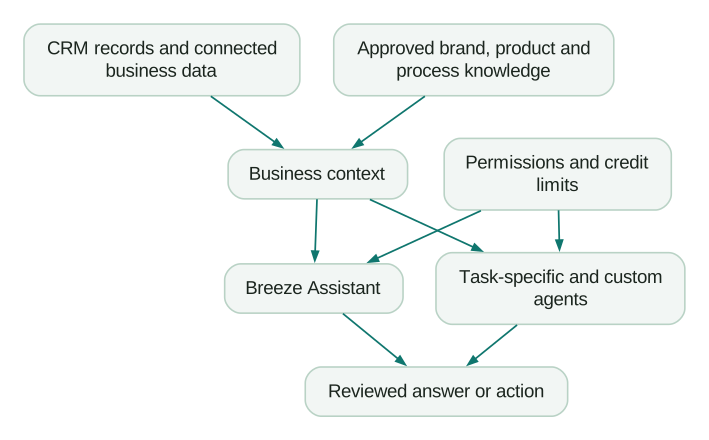
The shared foundation is the practical work. CRM and lifecycle implementation should establish identities, ownership, stage definitions and automation behaviour before an agent starts operating across them.
Which agent fits which problem?
Customer Agent: repetitive questions with maintainable answers
Customer Agent responds using the content and configuration you provide. HubSpot also supports reply recommendations that a human support rep can review without deploying the agent directly to a live channel. Those recommendations do not consume Customer Agent credits. Customer Agent documentation.
A strong starting scope is a set of common questions with stable answers: how to access a feature, where to find a setting or which documented process applies.
Before deployment, identify the questions that must be handed to a person. Examples include an account-specific exception, an ambiguous entitlement or a request that needs information the agent cannot verify.
The knowledge source should include both the standard answer and the boundary. A help article that says “contact us for exceptions” is incomplete unless the agent knows how to perform that handoff.
Prospecting Agent: research and outreach preparation
The key input is your definition of a qualified account or contact. Without it, the agent can produce personalised messages for people your sales team should never pursue.
Write down positive fit criteria, exclusions, evidence requirements and the outreach owner. Then review the first batch for factual accuracy and commercial relevance.
Separate three outcomes in your reporting: a lead recommended for outreach, a lead accepted by sales and a lead that becomes an opportunity. Only the first is the relevant published billing unit for Prospecting Agent; the others determine whether the expense is useful. HubSpot's credit rate sheet.
Data Agent: bounded questions about records
Data Agent can help answer questions using CRM and other available information. A useful request asks for a specific field or assessment with supporting evidence, such as the implementation deadline mentioned in recent account interactions. Data Agent product description.
Avoid vague enrichment objectives such as “improve this record.” Decide which property should change, the acceptable evidence and how conflicting sources should be handled.
For a field that affects routing or scoring, keep an original value, a proposed value and the evidence. That makes correction possible without reconstructing what happened from memory.
Content, campaign and nurture agents: useful only with an approved brief
HubSpot's catalog includes content and campaign-related agents, with several capabilities labelled beta. Verify availability in your portal before planning a process around them. Product and Services Catalog.
Give these workflows the same inputs you would give a capable marketer: audience, offer, supported claims, exclusions, tone examples and a clear next action.
A generated sequence still needs checks for suppression, audience overlap and exit criteria. Otherwise the agent can improve an individual message while the overall lifecycle experience becomes repetitive or contradictory.
The lifecycle journey guide provides a way to design the sequence around customer behaviour.
What HubSpot AI costs
The current catalog lists additional credits at $0.01 each. Text-based Customer Agent resolutions consume 50 credits, Prospecting Agent outreach recommendations consume 100, and Data Agent responses for one record consume 10. That corresponds to $0.50, $1 and $0.10 respectively before included credits. Custom agents consume action units, so one complete run can use multiple credits. Current rate sheet.
Use the billing event exactly as defined. “One lead recommended” is different from one reply, meeting or customer. Likewise, a billed support resolution is a platform-defined event, not an independent guarantee that the customer is satisfied.
HubSpot evaluates qualifying Customer Agent replies using a 72-hour handoff window. Lead qualification can also count as a resolution, and a later reopened conversation can produce further credit usage. Resolution rules.
These rates describe the main Hub-based catalogue. HubSpot also offers a flexible seats-and-credits model to selected accounts; use the applicable rate sheet and quote for that model. Included credits depend on the subscription and are not simply added together across every hub. Check the allowance shown in your account and the commitments in your order.
For the broader seat, hub and contact-cost questions, use the HubSpot pricing guide. Keep the agent's usage budget separate so you can see whether the workflow earns its place.
Worked example: estimate agent usage before launch
Consider a fictional 12-person company planning one month of AI use:
- 500 text-based Customer Agent resolutions.
- 120 Prospecting Agent outreach recommendations.
- 400 Data Agent responses for individual records.
At the published rates, the planned consumption is:
Customer Agent: 500 × 50 = 25,000 credits
Prospecting Agent: 120 × 100 = 12,000 credits
Data Agent: 400 × 10 = 4,000 credits
Total planned consumption = 41,000 credits
Suppose this particular account has 3,000 included credits available for those tasks and no other credit-consuming work. The remaining 38,000 credits have a list-price equivalent of $380. The invoice still depends on the account's purchasing method, other consumption and contract.
Now test the economics. If the support pilot saves six minutes of human work per accepted resolution, 500 accepted resolutions represent 50 hours. If reviewing the conversations, maintaining content and investigating errors takes 15 hours, the net saving is 35 hours.
At an assumed internal labour value of $30 per hour, that time is worth $1,050. These are planning assumptions, not observed HubSpot results. They show which quantities the pilot must measure.
For prospecting, suppose sales accepts only 30 of the 120 recommendations. The agent-usage cost equivalent is $4 per accepted lead before review labour. That is more useful than celebrating a $1 billing unit without checking lead quality.
Run the model again with a lower acceptance rate and higher review time. If the business case fails under a modest deterioration, keep the pilot narrow until the evidence improves.
Set spending controls before enabling recurring work
HubSpot supports account and feature credit limits, along with different ways to handle usage beyond an allowance. Credit settings can affect whether activity pauses, incurs overages or expands a purchased capacity commitment. Unused credits expire at the end of the usage period. Managing HubSpot Credits.
Check the actual settings in the portal. Older guides may describe defaults that differ from the current account experience.
For each agent, assign a monthly budget and a business owner. Decide what should happen when the budget is reached. If a support agent stops receiving new conversations, the human handoff must still work.
Also inspect the trigger. A recurring action applied to every record can consume far more than an occasional manual request. Test with a small population and inspect the recorded usage before expanding the enrolment rule.
A useful budget record is simple:
Workflow: answer approved account research questions
Eligible population: current target accounts only
Maximum monthly consumption: team-approved amount
Owner: revenue operations
Pause behaviour: queue requests for manual review
Review measure: accepted answers and minutes saved
The budget becomes a design constraint, rather than an unpleasant discovery after the workflow is running.
Make Context Home operationally useful
Context Home is useful when the stored knowledge resolves decisions the agent would otherwise guess. HubSpot describes it as shared context for recommendations, content and agent actions. Context Home product documentation.
Start with a small set of maintained material:
- Your ideal customer profile and explicit exclusions.
- Product descriptions, approved claims and current offer rules.
- Lifecycle and qualification definitions.
- Tone examples with explanations of why they work.
- Escalation rules and the person responsible for each exception.
Every item needs an owner and review date. An outdated pricing document can create more damage than having no pricing document if the agent treats it as authoritative.
Give conflicting information a resolution rule. For example, the signed contract governs a customer's entitlement, while the public pricing page explains the current standard offer. The agent should not merge the two into an invented compromise.
The context engineering guide includes practical file structures and examples you can adapt beyond HubSpot.
A four-week pilot for a small team
Week one: establish the baseline. Pick one queue or task. Measure volume, completion time, error rate and the reason humans intervene. Assemble a test set that includes ordinary cases and important exceptions.
Week two: run with human review. Compare agent output against approved answers. Classify failures: missing knowledge, conflicting data, poor instruction, permission problem or unsupported action. Fix the cause instead of adding a longer prompt for every symptom.
Week three: allow bounded operation. Expand only the cases that passed. Keep clear escalation and spending limits. Sample successful-looking results as well as obvious failures; a confident wrong answer may never generate a technical error.
Week four: make a continuation decision. Calculate cost per accepted result, net time saved and operational maintenance. Review downstream outcomes such as reopened support conversations or sales acceptance.
A pilot can be successful even if it proves that only one slice of the work should be automated. That is a useful implementation decision.
Native HubSpot agents, MCP or a custom agent?
Use a native agent when its supported workflow fits the job and most of the required context already lives in HubSpot.
Use the HubSpot MCP connection when your team wants to work from an external AI application and the exposed tools meet the requirement. The AI application's permissions, retention and review settings then become part of the operating design.
Consider a custom agent when the question depends on warehouse data, billing logic or product behaviour that the native workflow cannot handle cleanly. Include maintenance, testing, monitoring and ownership in the comparison.
For example, “summarise this deal” is a plausible native task. “Explain why renewal risk increased using product adoption, contract terms and unresolved implementation milestones” may require a more deliberate data model and workflow.
A custom implementation is worthwhile when that extra work solves a recurring, valuable problem. It is difficult to justify purely to avoid a small usage charge.
Implementation checklist
- Define one task, its input population and an accepted result.
- Verify the feature's edition, seat and beta requirements.
- Check the current billing unit and expected monthly volume.
- Set account and feature spending limits.
- Review knowledge sources for conflicting or outdated material.
- Confirm what fields and actions the agent can access.
- Test escalation and credit-exhaustion behaviour.
- Measure review time and downstream quality.
- Assign an owner for content, permissions and monthly costs.
- Expand only after the pilot meets the agreed acceptance criteria.
At Martechdevs, we build the data access, definitions and working instructions behind repeatable AI workflows. Start with the free martech AI audit, or explore an AI assistant built around your approved workflows.
Questions people ask
Is Breeze being renamed to Agent Hub?
The names describe different parts of the current experience. Agent Hub is the management and building area, while Breeze Assistant remains the conversational assistant. Check the specific feature rather than treating every older Breeze reference as the same product.
Can Starter customers use Agent Hub?
The live Agent Hub page currently includes Starter access. Individual agents still have their own eligibility requirements; Customer Agent's documentation lists Professional and Enterprise subscriptions. Confirm the specific capability in your account.
How much do Customer Agent and Prospecting Agent cost?
Their published text-resolution and outreach-recommendation rates correspond to $0.50 and $1 respectively at the current USD credit price. Included credits, other usage, subscriptions and purchasing terms affect the final bill.
What is HubSpot's AI Search Grader?
It is a free, one-time check of how selected AI answer engines represent a brand. Treat its output as a diagnostic sample and inspect the underlying answers; it does not establish your total market visibility or guarantee future recommendations. AI Search Grader.
Is HubSpot AI worth it for a small team?
It can be when a repeated task has reliable inputs and the accepted output saves more work than review and maintenance consume. Run that calculation for one workflow before upgrading the wider stack.
Sources
- HubSpot Agent Hub. Accessed 9 October 2026.
- HubSpot September 2026 product updates.
- HubSpot Product and Services Catalog. Accessed 9 October 2026.
- Understand Customer Agent. Accessed 9 October 2026.
- Manage HubSpot Credits. Accessed 9 October 2026.
- Context Home. Accessed 9 October 2026.
- Data Agent. Accessed 9 October 2026.
- AI Search Grader. Accessed 9 October 2026.
Written by
Jafrin Akter AloData Engineer and Co-founder, martechdevs
Jafrin Akter Alo is a data engineer and co-founder of martechdevs, where the team has delivered 74+ martech, data and growth stack implementations.