
Meta Ads MCP server: connect your account and keep campaign changes under control
Meta's Ads MCP server, often called Meta MCP or the Facebook Ads MCP server, connects compatible AI clients to reporting and campaign-management tools at https://mcp.facebook.com/ads. It can change live advertising assets. Start with one account, a reproducible report and explicit write controls; agencies building apps for other businesses also need the appropriate app review.
On this page
A paid social manager asks an assistant why purchases fell. The assistant retrieves campaigns, compares creative performance and suggests moving budget. That sequence contains three different jobs: retrieving data, explaining a change and authorising an action. Each needs its own evidence.
The connection makes the first job faster. The next two depend on measurement quality, business context and the limits you put around execution.
What does the official server provide?
Meta hosts the endpoint and exposes permission-scoped tools for advertising work. The official overview groups them into reporting, ad management, catalogs, signals, help, experiments and activity logs, and Meta's get-started guide covers app setup and connecting clients such as Claude Code and ChatGPT. For the wider stack, see MCP servers for Google Ads, GA4 and other marketing tools.
Meta's developer announcement documents campaign, ad-set and ad creation, editing and deletion; custom-audience changes; catalogs and product sets; performance reports; signal diagnostics; help searches; and A/B or conversion-lift studies. Tools are rolling out gradually. Ask the connected client to list what your identity can actually use.
| Workflow | Example output | Boundary to test |
|---|---|---|
| Reporting | Campaign results with account and query settings | Only intended accounts and periods are readable |
| Asset changes | A campaign, audience or catalog change | Allowed operations, target IDs and publication path |
| Signal investigation | A finding about purchase-event health | Diagnostics do not themselves repair collection |
| Experiments | A proposed test or study configuration | Eligibility, spend and approval before launch |
| Activity review | Account change history | The relevant action appears with a usable reference |
The server sits between the AI application and Meta's business systems:
Prove account access and report reconciliation before preparing changes. A recommendation or draft is not publication approval: keep it unpublished until the exact assets, budget and change list have been reviewed.
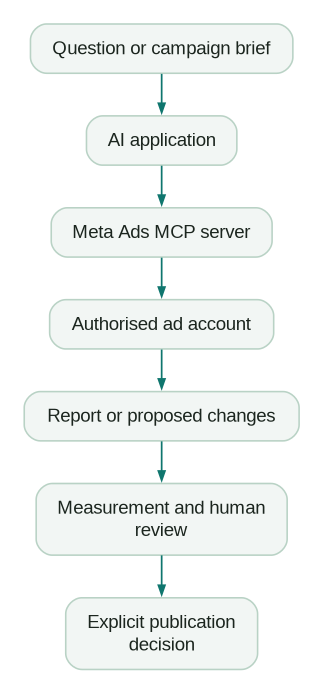
Read diagram as text
- Select the account identity and available tools to Permitted reads and denied actions pass?.
- Permitted reads and denied actions pass? to Correct permissions and repeat the access test: No.
- Correct permissions and repeat the access test to Select the account identity and available tools.
- Permitted reads and denied actions pass? to Reproduce one report in Ads Manager: Yes.
- Reproduce one report in Ads Manager to Settings and reported evidence reconcile?.
- Settings and reported evidence reconcile? to Investigate reporting or measurement differences: No.
- Investigate reporting or measurement differences to Reproduce one report in Ads Manager.
- Settings and reported evidence reconcile? to Prepare the report or exact change proposal: Yes.
- Prepare the report or exact change proposal to This publication is explicitly approved?.
- This publication is explicitly approved? to Keep the report or draft unpublished: No.
- This publication is explicitly approved? to Apply the approved change and verify the log and state: Yes
The diagram separates a proposal from permission to publish. Configure the actual account and client to preserve that separation.
For teams whose purchase events, transaction values or browser and server events disagree, tracking implementation and QA should happen before automated optimisation. A fluent explanation of unreliable data still sends you towards the wrong decision.
Which connection route should you choose?
Choose between the supported advertiser connection and an integration using your own Meta developer app. Owning an app is not universally required: Meta's current setup guide directs advertisers without one to its supported-client flow.
| Route | What you own | First check |
|---|---|---|
| Supported advertiser client | Your account authorisation and client permissions | The client offers the official Meta connection for your assets |
| Your own developer app | App setup, redirect configuration, permissions and token lifecycle | The app's use case and access level match the businesses served |
| Independent connector | Provider access, commercial terms and revocation | The endpoint and data-handling contract belong to that provider |
Creating an app is useful when your custom integration needs it. It is unnecessary ceremony when the supported advertiser route already covers the job. Confirm the selected client's current connection instructions rather than copying a setup screen from another product.
For either route, record the business portfolio and ad account IDs before connecting. Display names are a weak safeguard when an agency manages several accounts with similar names.
How do you connect using your own Meta app?
Add the “Create & manage ads with ads MCP server” use case to your app and configure authentication for the chosen client. The developer setup guide describes OAuth through Facebook Login for Business, with the client's redirect URL, and a user-token route using an Authorization bearer header.
Verify the current permission requirements and actual consent prompt for that connection. Meta's published setup versions differ on token scopes and system-user instructions; this guide uses the common OAuth/user-token path without prescribing a universal scope list. Record the granted permissions and asset access. A reporting request in a prompt cannot prevent a write that the connection otherwise permits.
For Claude Code with your own app, Meta documents this connection pattern:
claude mcp add --transport http --client-id YOUR_META_APP_ID meta-ads https://mcp.facebook.com/adsReplace the command's placeholder with your app ID. Complete the client's authentication flow and inspect the resulting tools before using them. The command establishes a connection; it does not prove that access is correctly scoped.
Keep access tokens out of prompts, screenshots and shared configuration. An app ID and an access token serve different purposes. A token can authorise requests and must be handled as a secret.
Start with a simple acceptance sequence:
- List accessible ad accounts.
- Confirm the intended account ID, currency and timezone.
- Retrieve one completed reporting period for that account.
- Reproduce the same report in Ads Manager using the same settings.
- Check that an account outside the intended scope is unavailable.
Do this before asking for recommendations. It is easier to find a scope error in a single-account report than in a persuasive narrative built from several accounts.
Where should account rules and client approvals be enforced?
Enforce asset restrictions through Meta where available, and review the client's remaining tool permissions separately. A prompt asking for approval cannot replace either control.
The rules documentation remains explicit about limited availability. Rules can deny asset actions and constrain budget increases or ceilings. A configured rule must be active to be enforced. The programmatic surface uses ads-api.facebook.com and currently documents v25.0, not the ordinary Graph host.
The announcement's portfolio-scale controls do not mean one batch request: the detailed guide says there is no batch endpoint, so automation makes one call per rule per asset. Its support for system-user tokens applies to that rules API. Do not infer that every token type works identically on the MCP authentication endpoint.
Before a reporting pilot, inspect the available rules and confirm which writes they block. If the necessary control is unavailable, restrict or remove write tools in the client and test that boundary before using the connection.
For a reporting pilot, define a concrete policy:
- The agent can read one account and its relevant reporting data.
- Campaign, targeting, creative and delivery changes are blocked wherever the platform supports that restriction.
- The client requires confirmation for any remaining write-capable tool.
- A failed access test stops the pilot until the permissions are corrected.
- Every proposed action includes the account ID and affected object IDs.
Later, a drafting workflow can allow a narrow set of operations while keeping publication and budget changes separately controlled. The MCP security checklist explains how to test those boundaries instead of relying on a reassuring tool description.
Does an agent-created draft require a separate publishing decision?
Yes. The review should identify the exact draft, affected assets and financial exposure before anything publishes. Meta's October announcement describes agent-prepared work arriving as Ads Manager drafts and requiring explicit approval to publish. This announcement does not prove the same flow has reached every account and client; verify it in your connected workspace.
A useful approval packet includes:
- Account, campaign, ad set and ad IDs.
- The existing value and proposed value for every change.
- Objective, optimisation event, audience and placements.
- Budget, currency, schedule and expected maximum exposure.
- Creative preview, destination URL and UTM parameters.
- The evidence behind the proposal and a condition for reviewing it.
“Improve this campaign” leaves too much unstated. “Prepare a paused draft using approved creative B, preserve these placements and show the full change list” is reviewable.
A draft also needs operational ownership. Assign someone to approve, reject or expire it. Otherwise an old promotion can sit around until someone publishes it after the offer or inventory has changed.
What should a reporting prompt specify?
Use a request that pins down the population and comparison:
For ad account ACCOUNT_ID, compare 1 to 14 September with 15 to 28 September 2026. Use the same attribution setting and account timezone. Report spend, purchases, purchase value and cost per purchase by campaign. State the event, currency, exclusions and unavailable fields. Separate observations from possible explanations. Do not change anything.Then ask for a second pass:
Identify the three largest contributors to the change in total purchases. Show the arithmetic. Check whether those campaigns also changed spend, delivery, creative or destination. Return object IDs and the evidence still needed.Contribution analysis prevents a common distraction: the largest percentage movement can belong to a tiny campaign. A drop from two purchases to one is 50%; a drop from 400 to 320 has a much greater effect on the account.
Keep the returned report with the query settings. A screenshot of the assistant's conclusion is insufficient for someone who needs to reproduce the numbers next week.
Can reconciliation change which campaign appears to win?
Yes, because platform-attributed purchases and retained orders can describe different outcomes. Consider a fictional store comparing two campaigns over the same completed period.
Hypothetical amounts are USD for one fixed reporting period. Retained orders mean completed, non-refunded orders under a separate internal association model; these are not incrementality results.
| Campaign | Spend USD | Meta purchases | Reported cost per purchase USD | Retained orders |
|---|---|---|---|---|
| A | 2,400 | 80 | 30.00 | 50 |
| B | 1,800 | 45 | 40.00 | 40 |
A looks cheaper on Meta purchases. Internal cost per retained order is USD 2,400 ÷ 50 = USD 48 for A and USD 1,800 ÷ 40 = USD 45 for B, reversing the ranking.
This does not establish that Meta's attribution is wrong or that B caused more incremental sales. The internal association method may miss cross-device activity, and both campaigns may receive credit under different models. It establishes that the team needs to understand the gap before using a single reported metric as its budget rule.
A useful agent output would contain three layers:
- The platform report with its attribution settings.
- The order reconciliation with its matching method and unmatched share.
- A recommendation that names the uncertainty and proposes the next test.
For example: hold the larger reallocation until duplicate purchase events and refunds are checked, while preparing a controlled creative test. That is a defensible next step. Calling B the proven winner goes beyond the evidence.
Before equating platforms, check why Meta and GA4 conversions disagree. The Meta Conversions API setup guide covers the event and deduplication work that makes this comparison more useful.
How do you keep campaign changes interpretable?
Change one testable decision at a time and preserve the previous state. An agent can generate more recommendations than a team can evaluate. That creates a new operating problem: overlapping changes make it harder to explain the next result.
Before accepting an edit, capture the previous state, the hypothesis and the observation period. If you change audience, creative, offer and budget together, the next report cannot isolate which decision mattered.
Use a change log with six fields:
Object ID:
Change and previous value:
Reason and supporting report:
Approver:
Time applied:
Review date and success measure:
Set the review period according to your conversion delay and available volume. A universal “wait exactly three days” rule does not fit both low-priced ecommerce and a service business with a long buying cycle.
Also distinguish reversal from recovery. Restoring yesterday's budget does not undo spend already incurred or make the measurement history disappear. The review should happen before the action has that consequence.
Should you use Meta’s official server or Pipeboard?
Use Meta's official server for a direct first-party route; evaluate an independent provider when its workflow or support fills a specific gap. The official endpoint is operated by Meta. Pipeboard is a separate provider with an independently maintained Meta Ads MCP implementation and its own hosting, tool set and operating model. Its repository describes reporting and management capabilities over Meta's APIs. Pipeboard project.
| Decision | Official Meta route | Independent provider such as Pipeboard |
|---|---|---|
| Operator | Meta hosts its endpoint | Provider operates or distributes its implementation |
| Job fit | Direct Meta reporting and available management tools | Verify the provider's exact reports and supported actions |
| Access review | Meta assets plus the chosen client's permissions | Also inspect provider credentials, storage, logs and revocation |
| Commercial review | Check client subscription and any applicable service terms | Check provider plan, usage limits and support alongside client costs |
Pipeboard's repository currently promotes a hosted remote route and cross-platform tooling. Treat its claims as provider documentation, not an independent benchmark or a reason to assume Meta lacks the same feature. Do not paste tokens into prompts or shared links.
Test both against the same small acceptance case if the choice is commercially meaningful. Tool counts are a poor proxy for a reliable reporting workflow. For reports spanning other channels, compare cross-channel reporting connectors and their reconciliation requirements.
Do agencies need app review?
Yes, when their app manages data for other businesses. Meta's developer announcement instructs agencies and partners in that situation to submit the app for review and request Advanced Access for ads_mcp_management. A business using a supported client for its own assets does not need to create and submit its own app merely to use that route.
An employee's successful connection to one account does not establish permission to serve unrelated clients. Keep a per-client record of the authorising identity, business portfolio, permitted assets, app or provider, review status and revocation owner.
For adjacent workflows, Google's official repository exposes retrieval tools, plus asset and label write tools that are on by default; the Google Ads MCP guide explains how to keep that route read-only. Google Ads MCP repository.
If the job spans several channels, compare the reporting route and shared metric definitions before adding more endpoints. Third-party options in the ChatGPT marketing analytics guide have their own authentication and operating scope.
What should pass before the connection goes into regular use?
Release the connection only after a scoped report reconciles and prohibited actions are demonstrably unavailable.
Checklist
- Choose the supported advertiser flow or document why a custom app is required.
- Verify the official endpoint or the independent provider's identity.
- Record account IDs, currency, timezone and reporting settings.
- Grant only the permissions required for the first workflow.
- Confirm which platform rules are available and active.
- Test both permitted reads and denied access.
- Reconcile one report against Ads Manager.
- Require an inspectable change list before any write.
- Separate draft approval from publication approval.
- Test revocation and assign an owner to the connection.
At Martechdevs, we build the data access, definitions and working instructions behind repeatable AI workflows. Start with the free AI readiness checklist, or request a detailed AI workflow implementation.
Keep reading
 Martech AI
MCP security checklist for marketing and RevOps teams
Review an MCP connection before sharing business data. Check identity, permissions, prompt injection, data exposure, write approvals and recovery.
Jafrin Akter AloLast updated 10 min read
 Martech AI
MCP vs API vs Zapier: How Marketing Ops Should Choose
Choose APIs, MCP, Zapier or scripts for marketing ops. Compare workflow fit, task costs, retries, duplicate handling and the judgment each job actually needs.
Jafrin Akter AloLast updated 11 min read
 Martech AI
Google Ads MCP server: setup, access changes and useful reporting workflows
Set up Google's Ads MCP server with current Cloud project access and its write tools off. Includes reporting prompts, a GAQL example and validation checks.
Jafrin Akter AloLast updated 11 min read
AI readiness score
Check your tracking, data, context and access before connecting an agent.
Questions people ask
Is Meta MCP the official Facebook Ads MCP server?
The names usually refer to Meta's hosted Ads MCP server at https://mcp.facebook.com/ads. A similarly named community project may be a different implementation. Verify the endpoint, operator and authorisation screen before connecting. Access to Facebook or Instagram advertising assets still depends on the identity, permissions and tools enabled for that account.
Why can one connected account expose fewer tools than another?
Meta says tools are rolling out gradually, and the connected identity also determines asset access. Compare the actual tool list and permissions before diagnosing a missing feature as a client failure. Record the account ID, connection route and unavailable operation. A successful reporting request does not establish that campaign editing or experiment tools are enabled.
Can I reuse a reporting approval to let the agent edit campaigns?
No. Reading a report and changing a campaign have different consequences. Agree the permitted action, target IDs, previous and proposed values, spend limit and publication decision before enabling writes. Keep the approval tied to that change, and verify the resulting state. An earlier request to analyse performance is not blanket permission to modify live advertising.
Will signal diagnostics repair duplicate purchase events?
Diagnostics can point to a problem, but the collection and delivery paths still need investigation. Check event identity, browser/server deduplication, purchase value and retries using controlled orders. After a fix, verify receipt and the resulting counts separately. Do not assume an agent's explanation corrected the implementation or recovered events that were never collected.
Is autonomous budget management necessary to get value from MCP?
No. A repeatable reporting workflow can be useful without any spending authority. Start with a completed-period comparison that reconciles to Ads Manager and names the evidence behind its conclusions. Consider wider authority only when the team can bound exposure, review exceptions and verify actions. Keep conversion delay and measurement uncertainty visible in every recommendation.
Sources

Written by
Jafrin Akter AloData Engineer and Co-founder at Martechdevs and Growth and Analytics Partners
Jafrin writes practical guides to marketing technology, customer data, analytics and AI workflows. Martechdevs is a Growth and Analytics Partners company.