
dbt Semantic Layer and Snowflake Semantic Views: Setup, Cost and AI Queries
The dbt Semantic Layer uses MetricFlow to turn maintained metric definitions into queries across supported analytics tools. Snowflake semantic views keep business definitions inside Snowflake for semantic SQL and Cortex workflows. Choose the system your team can maintain and your consumers can actually query, then test the same numbers, permissions and difficult questions before adding an AI interface.
On this page
dbt Semantic Layer: MetricFlow, setup and pricing
The hosted dbt Semantic Layer starts with Starter; these USD list prices exclude warehouse compute, excess usage and optional products.
| dbt plan | Public platform price | Queried metrics per month | Relevant boundary |
|---|---|---|---|
| Developer | Free | No hosted integration entitlement | Local metric development is a separate route |
| Starter | $100 per developer per month | 5,000 | One project; up to five developers |
| Enterprise | Custom quote | 20,000 | Caching and multiple credentials |
| Enterprise+ | Custom quote | 20,000 | Enterprise features plus additional deployment controls |
Sources: dbt plan prices and allowances, Starter developer limit, Semantic Layer availability.
MetricFlow builds SQL from declared metrics, dimensions and entity relationships. The hosted layer supplies the service and integration path around that engine. MetricFlow itself is available under Apache 2.0; running it locally does not include access to dbt's managed APIs or consumer integrations. MetricFlow licence, hosted and local capabilities.
For an implementation, start with the business decision. A founder reviewing recurring revenue needs a different calculation from a finance team reconciling collected cash. Our AI-ready data work defines those distinctions, tests the source models and connects the approved query route. An AI interface should inherit that work rather than become another place to define revenue.

Queried metrics and the monthly bill
A queried metric is a usage unit, rather than a unique metric name in your catalogue. A successful API request that executes or renders SQL counts for each metric it calculates, including requests returning no rows. Metadata requests and unsuccessful queries are excluded. Compiling a query can count even when the resulting SQL is never executed. dbt usage definition.
This changes the budget for a frequently refreshed dashboard or agent. In a worked example, assume each refresh requests three metrics once, runs eight times daily and operates for 30 days. That produces 720 queried metrics. Ten identical workloads produce 7,200. Separate compile requests, additional tool calls and retries that succeed can add usage; a dashboard count alone cannot establish the bill.
Two Starter developers cost $200/month before other charges. The ten-workload example exceeds the included metric allowance by 2,200 units. Its planning formula is therefore $200 plus 2,200 multiplied by the account's confirmed excess-metric rate, plus warehouse compute and any other usage. The public plan table does not establish one excess-metric rate for every contract, so obtain that figure before approving the budget. Plan allowances.
Starter seats are charged upfront and usage in arrears; Enterprise terms follow the order form. An existing subscription may have different entitlements. Billing arrangements. For transformation builds, developer licences and optional State or AI charges, use the separate dbt Cloud pricing guide.
dbt Semantic Layer setup
Configure the deployed project and its query identity before connecting a spreadsheet, dashboard or agent.
- Choose a supported data platform and a qualifying dbt account. The setup guide lists Snowflake, BigQuery, Databricks, Redshift, Postgres and Trino. Complete a successful run in the deployment environment that will serve the metrics.
- In Account settings, open Projects, select the project and configure its Semantic Layer deployment environment.
- Create the warehouse credential and attach a service token with the required Semantic Layer Only and Metadata Only permissions. Starter permits one credential per project with multiple service tokens; Enterprise tiers support multiple credentials.
- Pass the host, environment ID and token to the approved integration through its secure configuration. Keep tokens outside the repository and article examples.
These administration requirements and credential limits come from the Semantic Layer setup guide. A shared service credential represents that credential's warehouse access. It does not automatically inherit every business user's identity.
Now build the metric and validate its meaning:
- Define the source model's grain, metric, aggregation time and supported dimensions. Add uniqueness and null checks to the real business key.
- Configure a time-spine model covering the periods the metric must answer. MetricFlow uses that date structure for time-based calculations; use the project's supported configuration. Time-spine requirements.
- Parse the project, validate the definitions and inspect a compiled query against a known-answer dataset.
- Run the query, compare the result with an independently calculated reference, then deploy the reviewed definitions and test the real consumer. The dbt quickstart covers the artifact and deployment sequence.
A first MetricFlow definition
This illustrative model contains one eligible paid order per row. Its upstream transformation has already excluded cancelled orders and applied the agreed refund policy. order_amount_usd is a USD amount, and order_date is a date in the agreed reporting timezone. Those decisions belong in the source model and its tests.
For dbt v1.12 and later, the semantic configuration sits inside the model definition. Earlier versions use a different YAML structure; use the version selector before adapting an older project. Semantic-model specification.
models:
  - name: fct_paid_orders
    semantic_model:
      enabled: true
    agg_time_dimension: order_date
    columns:
      - name: order_id
        entity:
          name: order
          type: primary
      - name: order_date
        granularity: day
        dimension:
          type: time
    metrics:
      - name: paid_order_value_usd
        label: Paid order value USD
        description: Sum of eligible paid order amounts in USD
        type: simple
        agg: sum
        expr: order_amount_usd
In a configured dbt platform project, use the supported dbt sl command route. The qualified dimension name uses the order entity declared above. MetricFlow commands.
dbt parse
dbt sl validate
dbt sl query --metrics paid_order_value_usd --group-by order__order_date --compile
dbt sl query --metrics paid_order_value_usd --group-by order__order_date
For two eligible orders of $120 and $80 on the same day, the expected daily result is $200. A duplicate $120 row produces $320 and should fail the source-grain check. Declaring a primary entity does not remove that duplicate. MetricFlow chooses joins from the declared graph; your data must satisfy those declarations. MetricFlow join rules.
dbt Semantic Layer integrations
dbt lists integrations for Power BI, Tableau, Google Sheets, Excel, Hex, Omni and other tools. Sigma is labelled preview in the integration directory. Use the connector's own instructions and test the required dimensions, authentication and refresh behaviour. An integration appearing in the directory does not prove that every existing dashboard calculation transfers unchanged. Available integrations.
For an AI consumer, dbt's remote MCP server exposes separate semantic, discovery and SQL toolsets, with configuration to disable selected tools or toolsets. Restrict the available route to the task. A connection to dbt alone does not establish that every answer used an approved metric. Remote MCP configuration.
Snowflake semantic layer: semantic views and Cortex
Snowflake semantic views define logical tables, relationships, dimensions, facts and metrics as schema objects. They can serve direct semantic queries and provide business context to Cortex. This fits a team whose trusted data, access controls and principal consumers already live in Snowflake. Semantic views overview.
The distinction between storage and meaning matters. A warehouse holds analytical data; a semantic view describes how selected data should be interpreted. It cannot repair missing source records, incorrect identities or a model that mixes incompatible grains. The data warehouse versus database guide explains the underlying storage decision.
Snowflake semantic-view setup
- Select a small business domain and inspect the actual tables, columns and keys. Start with the same known-answer fixture used for the source model.
- Create the semantic view with SQL, or draft it through Semantic View Autopilot and review the definition before deployment. Creation syntax, Autopilot workflow.
- Give the intended role the required parent-object access and
SELECTon the semantic view. Direct querying does not requireSELECTon its underlying tables. Test the full role and warehouse path. Semantic-view privileges. - Query an approved metric with compatible dimensions. Compare totals, empty periods and restricted-user results before adding Cortex.
- Add the view to the intended Cortex tool or Analyst request, then inspect the generated query and returned evidence for the same questions.
The following example assumes an existing ANALYTICS.MARTS.FCT_PAID_ORDERS with the same grain and columns as the dbt example. Replace the illustrative database, schema and model names with reviewed objects. The creator needs the documented schema and underlying-object privileges. CREATE SEMANTIC VIEW.
CREATE SEMANTIC VIEW ANALYTICS.MARTS.PAID_ORDER_METRICS
  TABLES (
    orders AS ANALYTICS.MARTS.FCT_PAID_ORDERS
      PRIMARY KEY (order_id)
  )
  DIMENSIONS (
    orders.order_date AS order_date
  )
  METRICS (
    orders.paid_order_value_usd AS SUM(order_amount_usd)
  );
The direct semantic query names the view, metric and dimension explicitly. It should return the same $200 daily total for the two-order fixture. SEMANTIC_VIEW query syntax.
SELECT *
FROM SEMANTIC_VIEW(
  ANALYTICS.MARTS.PAID_ORDER_METRICS
  METRICS orders.paid_order_value_usd
  DIMENSIONS orders.order_date
);
Semantic SQL and AI-generated SQL
Direct semantic SQL and an AI-generated query are separate execution paths. Snowflake explains that Cortex Agents can read semantic definitions and generate SQL against physical tables. Inspect the actual query rather than assuming every answer calls SEMANTIC_VIEW(...). Snowflake execution overview.
That distinction also affects performance tuning. Semantic-view materializations can accelerate supported semantic SQL. They do not accelerate Cortex queries that bypass that route and execute physical SQL directly against the underlying tables. Confirm the query path before paying to maintain an aggregate that the consumer never uses. Semantic-view materializations.
Budget the AI request and SQL execution separately. Standalone Cortex Analyst charges use successful processed messages; invocation through Cortex Agents has token-related charging. Executing generated SQL incurs additional warehouse cost. Apply the current service-consumption rates and your account's credit price to the actual route. Cortex Analyst cost considerations.
dbt on Snowflake and native semantic views
Using dbt to build Snowflake tables does not make MetricFlow definitions and Snowflake semantic views interchangeable. Snowflake recommends its Semantic View dbt Package for managing native semantic views in a dbt pipeline, and explicitly distinguishes that package from direct integration with dbt Labs' MetricFlow layer. dbt Projects on Snowflake best practices.
Choose one maintained definition for each intended business meaning. If two systems must expose it, designate the authoritative implementation and run parity tests after every change. A shared repository helps review; it cannot by itself guarantee identical aggregation, permissions or consumer behaviour.
Metric contracts and snapshot errors
A useful semantic definition specifies population, grain, time, currency, permitted dimensions and ownership. A formula alone leaves too many business choices to the person or AI asking the question. Use a metric contract to distinguish recurring revenue, invoiced amounts, bookings and collected cash.
Consider this fictional dataset with one row per workspace and UTC snapshot date. The amounts are already normalized monthly recurring revenue in USD under an agreed policy.
| Snapshot date | Workspace | Plan | MRR, USD |
|---|---|---|---|
| 2026-10-11 | A | Starter | 100 |
| 2026-10-11 | B | Team | 200 |
| 2026-10-12 | A | Starter | 120 |
| 2026-10-12 | B | Team | 240 |
Closing MRR is $300 on the first date and $360 on the second. Summing every row gives $660, which does not answer the closing-MRR question. The change is $60, or 20%. The fixture provides no evidence about cash received.
For this complete fixture, a reference query is:
SELECT SUM(mrr_usd) AS closing_mrr_usd
FROM workspace_daily
WHERE snapshot_date = '2026-10-12';
Remove workspace B's second-day row and that query returns $120. Taking each workspace's latest available row instead returns $320 by combining two different dates. Neither number establishes the complete second-day balance. A missing record must remain distinguishable from a genuine zero.
Snowflake provides non-additive dimensions for snapshot-style metrics. The selected ordering and partitioning determine which values contribute. Test incomplete snapshots explicitly; the presence of a non-additive setting does not establish that all expected workspaces arrived. Non-additive metric behaviour.
Give historical segment membership the same attention. A workspace moving from Starter to Team can alter a historical report if the query joins today's plan rather than the plan recorded at the snapshot. Decide which question the metric serves and name the rule in its description.
AI query paths and acceptance checks
An AI answer needs a supported metric, the right scope and an authorized identity. Keep a governed metric-query route for established questions and a separately controlled exploratory route for questions outside that catalogue.
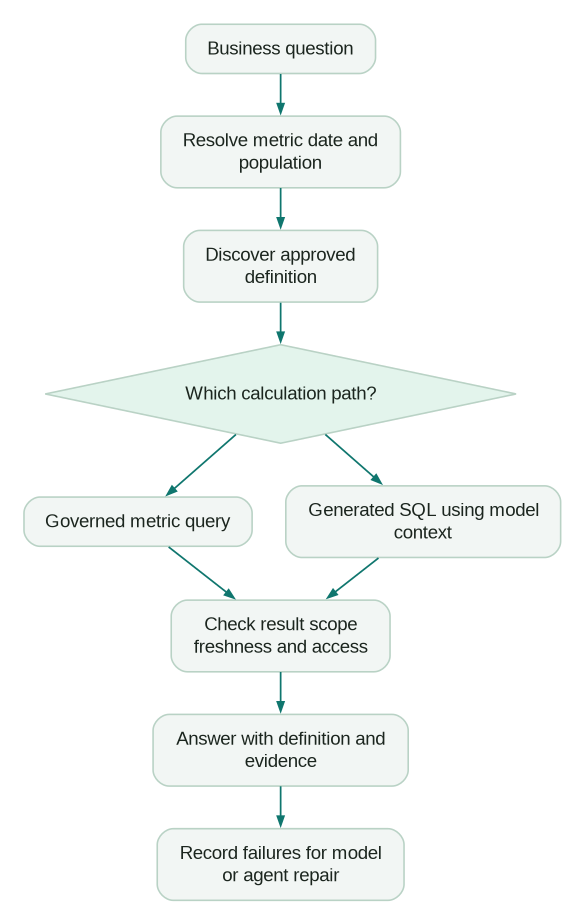
Read diagram as text
- Business question and scope to Approved metric coverage.
- Approved metric coverage to Governed metric query: Yes.
- Approved metric coverage to Exploration permission: No.
- Exploration permission to Scoped exploratory SQL: Yes.
- Exploration permission to Clarification or model request: No.
- Governed metric query to Reference and access checks.
- Scoped exploratory SQL to Reference and access checks.
- Reference and access checks to Successful validation.
- Successful validation to Answer with metric and evidence: Yes.
- Successful validation to Model or query correction: No.
- Model or query correction to Approved metric coverage
The repair path repeats metric selection and validation. A failed total should not be rewritten into confident prose, and an unsupported breakdown should not become an invented join. Preserve the metric name, version, period, filters, query path and source freshness with each operational answer.
Use a fixed acceptance pack with a result or expected refusal for each case:
| Test | Expected outcome | Failure owner |
|---|---|---|
| Two eligible orders at $120 and $80 | $200 for the selected day | Source model or metric definition |
| Duplicate order key | Release blocked until uniqueness is repaired | Data pipeline owner |
| Two-day MRR request | Explicit closing or average policy; no unqualified $660 total | Metric owner |
| Missing workspace snapshot | Incomplete result identified | Data pipeline owner |
| Restricted user and shared service identity | Each follows its authorized access boundary | Access owner |
| Unsupported dimension | Explanation or approved model change | Semantic-model owner |
| Ambiguous revenue request | Clarification between defined revenue concepts | Agent and business owner |
Run these cases through the physical model, semantic query and AI interface separately. If the source is wrong, prompt changes cannot repair it. If the source is correct but a metric joins twice, fix the semantic definition. If both are correct but the agent selects collected cash for an MRR question, fix selection and context.
Avoid unrestricted shared credentials as a shortcut around consumer permissions. Inspect exposed metadata as well as rows, because descriptions can disclose sensitive commercial rules. Snowflake's direct view permissions and dbt's service-token credential mapping require route-specific testing, even when the same users appear in the final chat application.
LookML, Cube and the existing reporting estate
Keep a working semantic implementation when it already meets the consumer and governance requirements. Looker's standard conversational route selects fields, filters and limits, then lets Looker compose the query using LookML. A team with maintained Explores should test that route before rebuilding the same definitions elsewhere. Looker conversational analytics. The Looker pricing guide separates platform and user costs for that evaluation.
Cube offers a separate semantic platform with application and embedded-analytics interfaces. It is worth evaluating when those delivery requirements justify another service and model owner. Test the needed access, query and refresh paths with the same metric fixture. Cube introduction.
| Team situation | First option to test | Runner-up | Evidence needed |
|---|---|---|---|
| dbt team serving several analytical consumers | dbt Semantic Layer | Narrow reporting views | Required connectors and maintained definitions |
| Snowflake team building a Cortex workflow | Snowflake semantic views | dbt Semantic Layer on Snowflake | Query path, access and known-answer tests |
| Looker team with trusted Explores | Existing LookML | Separate layer for a specific consumer gap | Same definitions through the intended interface |
| Product team embedding governed analytics | Cube evaluation | Existing platform's supported interface | Customer isolation, latency and total operating cost |
These are starting choices by architecture, rather than a universal tool ranking. A platform adds value when it reduces a demonstrated inconsistency or delivers a required consumer. Another catalogue with no clear owner usually increases the reconciliation work.
Semantic-layer implementation checklist
- Each metric has a named business owner and an explicit population, grain, time and currency rule.
- Physical source keys and completeness checks pass before semantic queries run.
- dbt plan, credential limits and queried-metric allowance match the proposed workload.
- The consumer calls the intended semantic or exploratory query path.
- Known totals, duplicate keys, missing snapshots and ambiguous terms have expected outcomes.
- Permitted, restricted and service identities have separate access tests.
- A definition change includes affected consumers, historical-value policy and regression checks.
- Operating ownership includes usage, freshness, failures and credential rotation.
Use the marketing data audit skill to organize source and reconciliation checks. For delivery help, our warehouse and CDP implementation service covers the models, while the AI-ready data scope covers definitions, permissions and acceptance tests. Start with the smallest set of business questions that will change a real decision.
Keep reading
 Martech AI
Customer Context Layer: Making Golden Context Useful for a Small SaaS
Make Golden Context useful with clear customer facts, company rules, ownership and freshness. Build one reliable AI workflow before buying another platform.
Jafrin Akter AloLast updated 12 min read
 Martech AI
AI-Ready Marketing Data: What It Means and the Seven Checks
AI-ready marketing data is tracked once, joined by shared IDs, defined once and reachable through controlled access. Run the seven checks in fix order.
Jafrin Akter AloLast updated 13 min read
 Martech AI
Context Engineering for Marketing and RevOps: The Six Files Your Agent Needs
Context engineering gives marketing AI your metric definitions, naming rules, ICP, playbooks and brand claims. Copy six file templates and test them.
Jafrin Akter AloLast updated 16 min read
AI readiness score
Check your tracking, data, context and access before connecting an agent.
Questions people ask
Can an open-source MetricFlow pilot replace a dbt Semantic Layer subscription?
A local MetricFlow pilot can validate definitions and query behaviour without buying the hosted service. Production access through dbt's managed APIs and integrations requires the qualifying account and configuration. Decide which route the intended consumer needs before comparing cost, and include operation, authentication and support work when assessing a self-managed approach. Hosted versus local capability.
Does one dashboard refresh count as one dbt queried metric?
The count follows the metrics requested, so one refresh can consume several queried metrics. A successful request for three metrics counts three; successful SQL compilation can also count. Estimate actual calls, metrics per call and refresh frequency, including agent activity. Keep metadata requests and unsuccessful requests separate when reconciling usage. Usage calculation.
Can dbt and Snowflake share one semantic definition automatically?
Do not assume automatic equivalence between MetricFlow and Snowflake semantic views. Snowflake's dbt package manages its native objects inside a dbt workflow, which is a different integration from executing MetricFlow metrics. If both serve users, designate the authoritative meaning and test totals, time behaviour and permissions in each consumer after a change. Snowflake's package guidance.
Which result should win when the semantic layer and a dashboard disagree?
Reconcile both against an independently reviewed business definition and a small set of source records. Neither result wins solely because of its interface. Compare the population, dates, timezone, refund policy, joins and data freshness. Assign the discrepancy to the source model, metric or dashboard calculation, then add the case to the regression pack before changing the published number.
What is the safest first metric for an AI reporting rollout?
Choose a decision-relevant metric with a clear owner, a stable grain and a result that can be checked from known records. A well-defined order count may be a better first release than a disputed revenue measure. Include one restricted-access case and one unsupported question so the rollout proves that the workflow handles boundaries as well as successful answers.
Sources
- dbt Labs: Pricing.
- dbt Labs: Starter account permissions.
- dbt Labs: Semantic Layer FAQs.
- dbt Labs: Open-source MetricFlow.
- dbt Labs: Usage and queried-metric billing.
- dbt Labs: Plans and billing.
- dbt Labs: Administer the Semantic Layer.
- dbt Labs: MetricFlow time spine.
- dbt Labs: Semantic Layer quickstart.
- dbt Labs: Semantic-model specification.
- dbt Labs: MetricFlow commands.
- dbt Labs: Join rules.
- dbt Labs: Available integrations.
- dbt Labs: Remote MCP configuration.
- Snowflake: Semantic views overview.
- Snowflake: CREATE SEMANTIC VIEW.
- Snowflake: Semantic View Autopilot.
- Snowflake: Semantic-view SQL and privileges.
- Snowflake: SEMANTIC_VIEW query syntax.
- Snowflake: Semantic-view materializations.
- Snowflake: Cortex Analyst.
- Snowflake: dbt Projects best practices.
- Google Cloud: Looker conversational analytics.
- Cube: Introduction.

Written by
Jafrin Akter AloData Engineer and Co-founder at Martechdevs and Growth and Analytics Partners
Jafrin writes practical guides to marketing technology, customer data, analytics and AI workflows. Martechdevs is a Growth and Analytics Partners company.