
Salesforce Web-to-Lead: Setup, Spam and Missing Leads
Salesforce Web-to-Lead turns a website form submission into a Lead using HTML generated from your org. It suits a straightforward enquiry form when you can monitor rejected requests, manage spam and verify the resulting records. Start with the generated field names, a deliberate duplicate policy and a tested owner fallback. A working submit button or thank-you page does not establish that the right person received a usable Lead.
On this page
What does Web-to-Lead handle, and what must the website own?
Web-to-Lead handles Lead creation from submitted form fields; the website still owns the form experience and the source context it collects. Treat capture, record creation and sales follow-up as separate checks.
| Stage | What to establish | Evidence to retain |
|---|---|---|
| Website input | The visitor can submit the intended fields and choices | Form version, selected values and a permitted submission reference |
| Salesforce intake | The request creates the expected Lead or has a diagnosed failure | Lead ID or a specific error and recovery decision |
| Assignment | The record reaches the intended user or queue | Actual Owner, assignment rule and fallback result |
| Sales follow-up | Someone accepts and handles the enquiry | A defined acceptance step and an overdue-enquiry check |
For a new org, settle the field contract and access prerequisites in the Salesforce implementation checklist first. Keep the public form small. Every optional attribution field adds another mapping to maintain; every required business field needs a useful explanation when the visitor cannot supply it.
How do you generate the form without breaking its field names?
Generate Web-to-Lead HTML in the target Salesforce org and preserve each control's submitted name. Changing a visible label is different from changing the key Salesforce receives.
- Open Setup → Web-to-Lead with Customize Application permission. Enable the feature and select the Default Lead Creator.
- Choose Create Web-to-Lead Form, select fields and set the return URL.
- Include reCAPTCHA with the correct key pair.
- Copy the generated HTML, preserving submitted names while styling the controls.
- Keep that generated version for future field comparisons. See Salesforce's form-generation instructions.
For a custom Lead field, create the field, select it in the generator and use the resulting input element. A Salesforce API name such as Captured_GCLID__c is not interchangeable with the generated form key, which can look like 00N.... Regenerate the relevant HTML after adding fields, and compare it with the deployed form. Salesforce's additional-field procedure describes this workflow.
Use actual field types and allowed picklist values. If State and Country/Territory picklists are enabled, reproduce their dependency in the website: the public HTML does not inherit the Salesforce UI's dependent controls. A state without the matching country can prevent creation. A page layout also does not write your website's validation logic. Salesforce's intake-error guide identifies these failures.
Decide which fields your business genuinely requires. Salesforce documents [not provided] values for missing Company and Last Name in Web-to-Lead; Company has different behavior when Person Accounts are enabled. Do not rely on missing text to stop poor enquiries. The example below intentionally requires Company, Last Name and Email as a B2B form policy. Salesforce's placeholder-field explanation covers the native behavior.
Who owns the Lead, and who receives intake errors?
The active Lead assignment rule determines the owner of a Web-to-Lead record, while the Default Lead Creator is a separate operational setting. When no assignment entry matches, Salesforce uses the Default Lead Owner; without an active assignment rule, web leads also use that fallback. Configure a monitored destination, not an employee whose access may disappear. Salesforce setup guidelines explain these defaults.
The Default Lead Creator receives creation-error emails and needs Modify All Data, Send Email and Access Activities, supplied together through a profile or permission set. Review this privileged user deliberately. It does not give the website an administrator login. See Salesforce's creator requirements.
Test one matching route and one unmatched route, then inspect the resulting Owner. An assigned queue still needs a pickup process. The lead-routing guide covers rule order, queue acceptance and what should happen when nobody takes the enquiry.
How should hidden fields carry UTMs, the GCLID and landing context?
Hidden fields should carry a small, explicitly mapped source record, with optional attribution allowed to be absent. They are user-controlled form inputs, so they cannot establish permission, verified identity or trustworthy ownership.
Define whether each field means first touch or submission touch before populating it. Keep source values separate from the Lead Source picklist unless you have an explicit mapping into valid picklist options. Use the UTM convention and registry skill to maintain campaign naming and ownership. Use the GCLID capture guide for consent, persistence and preserving the click ID through later form navigation.
| Field purpose | Example form key | Handling rule for this exercise |
|---|---|---|
| UTM source, medium and campaign | 00N000000000001 through 00N000000000003 | Optional strings, at most 100 characters each |
| Captured GCLID | 00N000000000004 | Optional opaque value, at most 255 characters; preserve case and punctuation |
| Clean landing page | 00N000000000005 | Optional example-domain URL without query, fragment or credentials |
| Submission reference | 00N000000000006 | Fixed synthetic reference used only to compare local checks |
| Product-update choice | 00N000000000007 | Separate optional unchecked checkbox; checked value is 1 |
These custom field identifiers and all length checks in the exercise are synthetic design choices, not a field-capacity reference or mappings for your org. Substitute the actual generated controls and field capacities in a real implementation. Do not truncate a click ID to make it fit or repeatedly decode it. Form encoding must preserve its original value when Salesforce receives the decoded field.
Allow an enquiry with no marketing attribution. If an optional source value fails validation, choose a documented production policy that can omit the invalid value and record a diagnostic without silently inventing attribution. The local exercise reports the problem so you can see it. A real source-capture design must also cover consent changes and cross-page behavior; the fixed values below do not implement those features.
Keep raw query strings and personal form values out of analytics events. Separately define what Salesforce should retain after conversion; the lead-conversion guide covers the mapping into Account, Contact and Opportunity fields.
What does a complete local form check look like?
The following standalone HTML file checks a synthetic field contract and prepares an encoded body locally. It has no Salesforce endpoint, real org ID or CAPTCHA integration. Save it as form-demo.html to inspect the exercise; its submit handler prevents transmission, and its content security policy disallows form destinations and connections.
The check rejects renamed or duplicate controls, missing business values, oversized fields and unsafe landing context. It preserves click-ID punctuation and leaves the optional marketing checkbox unchecked. Its email rule checks a simple format, not deliverability. The form uses novalidate so its own messages are visible; production browser validation and Salesforce validation still require their own tests.
<!doctype html>
<html lang="en">
<head>
  <meta charset="utf-8">
  <meta name="viewport" content="width=device-width, initial-scale=1">
  <meta http-equiv="Content-Security-Policy"
        content="default-src 'none'; script-src 'unsafe-inline'; style-src 'unsafe-inline'; form-action 'none'; connect-src 'none'; base-uri 'none'">
  <title>Local Web-to-Lead contract exercise</title>
  <style>
    body { font: 1rem/1.5 system-ui; max-width: 40rem; margin: 2rem auto; padding: 1rem; }
    label { display: block; margin-top: 1rem; }
    input:not([type="hidden"]):not([type="checkbox"]) { display: block; width: 100%; box-sizing: border-box; padding: .5rem; }
    button { margin-top: 1rem; padding: .6rem 1rem; }
    pre { white-space: pre-wrap; overflow-wrap: anywhere; }
  </style>
</head>
<body>
  <h1>Local form check</h1>
  <p>Synthetic exercise only. Nothing is sent to Salesforce.</p>
  <form id="lead-demo" method="post" novalidate>
    <input type="hidden" name="oid" value="LOCAL_DEMO_ONLY">
    <input type="hidden" name="retURL" value="https://example.invalid/thanks">
    <label>First name <input name="first_name" maxlength="40" value="Demo"></label>
    <label>Last name <input name="last_name" maxlength="80" required value="Visitor"></label>
    <label>Company <input name="company" maxlength="255" required value="Example Company"></label>
    <label>Email <input name="email" type="email" maxlength="80" required value="demo@example.invalid"></label>
    <!-- These custom field identifiers are synthetic, not your org's mappings. -->
    <input type="hidden" name="00N000000000001" value="google">
    <input type="hidden" name="00N000000000002" value="cpc">
    <input type="hidden" name="00N000000000003" value="demo_campaign">
    <input type="hidden" name="00N000000000004" value="TEST_MixedCase+09">
    <input type="hidden" name="00N000000000005" value="https://example.invalid/demo">
    <input type="hidden" name="00N000000000006" value="demo-submission-001">
    <label><input type="checkbox" name="00N000000000007" value="1"> Send product updates (optional)</label>
    <button type="submit">Check locally</button>
  </form>
  <pre id="result" role="status" aria-live="polite"></pre>
  <script>
    function prepareDemo(entries) {
      const limits = {
        first_name: 40, last_name: 80, company: 255, email: 80,
        '00N000000000001': 100, '00N000000000002': 100,
        '00N000000000003': 100, '00N000000000004': 255,
        '00N000000000005': 255, '00N000000000006': 100
      };
      const allowed = new Set([...Object.keys(limits), 'oid', 'retURL', '00N000000000007']);
      const fields = new Map();
      const errors = [];
      for (const [name, value] of entries) {
        if (!allowed.has(name) || fields.has(name) || typeof value !== 'string') {
          errors.push('Unexpected, duplicate or non-text form control');
          continue;
        }
        fields.set(name, value);
      }
      for (const name of [...Object.keys(limits), 'oid', 'retURL']) {
        if (!fields.has(name)) errors.push('Missing control: ' + name);
      }
      for (const name of ['first_name', 'last_name', 'company', 'email']) {
        if (fields.has(name)) fields.set(name, fields.get(name).trim());
      }
      for (const name of ['last_name', 'company', 'email']) {
        if (!fields.get(name)) errors.push('Required value: ' + name);
      }
      for (const [name, maximum] of Object.entries(limits)) {
        if ((fields.get(name) || '').length > maximum) errors.push('Value too long: ' + name);
      }
      if (!/^[^\s@]+@[^\s@]+\.[^\s@]+$/.test(fields.get('email') || '')) errors.push('Check email format');
      if (fields.get('oid') !== 'LOCAL_DEMO_ONLY' ||
          fields.get('retURL') !== 'https://example.invalid/thanks') errors.push('This exercise must stay local');
      const click = fields.get('00N000000000004') || '';
      if (/\s/.test(click)) errors.push('Click ID contains whitespace; do not trim it');
      const submission = fields.get('00N000000000006') || '';
      if (!/^[A-Za-z0-9_-]+$/.test(submission)) errors.push('Invalid demo submission reference');
      if (fields.has('00N000000000007') && fields.get('00N000000000007') !== '1') errors.push('Unexpected checkbox value');
      const landing = fields.get('00N000000000005') || '';
      if (landing) {
        try {
          const url = new URL(landing);
          if (url.origin !== 'https://example.invalid' || url.username || url.password || url.search || url.hash) {
            errors.push('Use the clean demo landing URL');
          }
        } catch { errors.push('Invalid landing URL'); }
      }
      if (errors.length) return {ok: false, errors};
      return {
        ok: true,
        body: new URLSearchParams(fields).toString(),
        fieldNames: [...fields.keys()],
        submissionReference: submission
      };
    }
    const form = document.getElementById('lead-demo');
    const result = document.getElementById('result');
    form.addEventListener('submit', event => {
      event.preventDefault();
      const checked = prepareDemo(new FormData(form).entries());
      result.textContent = checked.ok
        ? JSON.stringify({stage: 'local_validation_only', fields: checked.fieldNames,
                          reference: checked.submissionReference, sent: false}, null, 2)
        : checked.errors.join('\n');
    });
  </script>
</body>
</html>
A successful local result says local_validation_only and sent: false. It displays the field names and a synthetic reference, not the person's values. The fixed reference is useful for this exercise only: it neither generates unique production requests nor prevents duplicate Lead creation.
For deployment, start again from the target org's generated form and its complete CAPTCHA markup. Do not turn this exercise into a live integration by changing only the org ID. Check the actual field names, action, return URL, security policy and error handling together. Salesforce applies validation rules before creating Web-to-Lead records; client-side acceptance cannot override those rules.
How do you control spam without blocking valid enquiries?
Keep Salesforce's supported reCAPTCHA integration intact, then test both accepted and rejected paths on the actual form. Salesforce supports reCAPTCHA v2, not v3, for Web-to-Lead. A visually similar widget or a v3 score integration is not a drop-in replacement. Salesforce's version support note makes the distinction explicit.
Test the configured domain and key pair, an expired challenge, a missing response and a valid submission. Include keyboard use and the visitor's path when verification cannot load. The generator's Enable server fallback option permits traffic when Google's verification servers are unavailable, so choose its availability-versus-abuse tradeoff deliberately. Salesforce's generated CAPTCHA settings explain that fallback.
Browser-only honeypots, submit-button disabling and field checks can improve the experience, but an attacker can bypass your page. If traffic needs server-side rate controls, durable request receipts or additional abuse checks, design a backend or evaluate a form service. Put the same difficult cases through that route before adopting it: legitimate repeated enquiries, accessible verification, network interruption and a CRM rejection.
What happens after the daily Web-to-Lead limit is reached?
The default Web-to-Lead allowance is 500 Leads per day. Excess requests enter a pending queue shared with Web-to-Case, with 50,000 combined requests as the queue limit. Pending requests consume a later day's allowance; reaching the queue limit causes rejection and loss rather than unlimited buffering. Salesforce sends notifications for the first five rejected submissions after that queue limit. Salesforce's pending-queue guidance describes the limits and recovery options.
The daily allowance resets at midnight UTC. Increasing a limit during the day does not immediately process pending requests. A queued Lead's CreatedDate reflects record creation, so it can be later than the visitor's submission time. Salesforce says the pending queue cannot be cleared; a temporary daily-limit increase requires Support. Those distinctions matter when a burst of spam is mixed with genuine enquiries.
Monitor the gap between permitted request records and created Leads, with an owner for investigating it. Do not keep resubmitting an unknown request while it may still be pending. For planned high-volume intake, compare a controlled integration against the separate Salesforce API limits before directing more traffic at it.
How should duplicate and repeat submissions be handled?
Web-to-Lead can be blocked by Salesforce duplicate rules, including a rule set to Allow with Alert. An automated form cannot confirm the alert dialog that a Salesforce user would see. Salesforce documents both Block and Allow with Alert as blocking paths, and describes a deliberately scoped Allow and Report without Alert option when the business wants to retain matching enquiries. Salesforce's duplicate-rule guidance explains the configuration.
Do not disable duplicate protection across the org to repair one form. Agree what should happen in three different cases: the same request is transmitted twice, an existing person makes a new enquiry, and two people happen to share the matching attributes. A duplicate rule addresses record matching; it does not by itself provide a request receipt or determine whether the new enquiry is legitimate.
A Unique custom submission-reference field can cause a repeated value to fail, but that is not an idempotent success response containing the earlier Lead ID. Salesforce lists unique-field conflicts among Web-to-Lead errors. If the website needs to recover safely after a timeout, keep the request state and the CRM outcome in a system that can answer whether that exact request already succeeded.
How do you diagnose a missing Lead after a thank-you page?
Start with the submitted request and Salesforce's record or error evidence, rather than assuming the thank-you page confirms creation. Salesforce defines retURL as the page used to redirect the visitor after submission; that setting is not a record-level acknowledgment. Its field-generation instructions describe the return URL.
| Observation | First check | Acceptance evidence |
|---|---|---|
| Button changes state but no request leaves | Website handler, failed validation or blocked CAPTCHA | A permitted request with the expected control names |
| Submission occurred but no Lead is found | Target org, error mailbox, duplicate/validation rules and pending-limit notices | A specific record, rejection or diagnosed pending state |
| Lead exists with missing source data | Actual generated custom-field names and submitted values | Read-back matches the permitted source values |
| Lead exists under the wrong owner | Active assignment entries and Default Lead Owner | Matching and fallback routes both reach their intended destination |
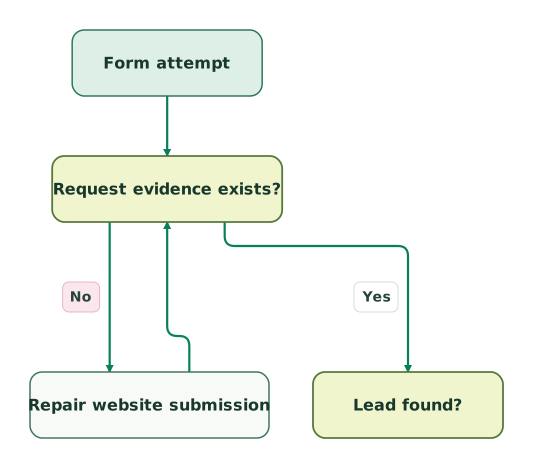
Use this sequence when a request's outcome is uncertain. After repairing a failure, repeat the affected check before counting the handoff as complete:
Establish the website request
The Lead-found decision is shared with the next view; a browser click alone does not establish that Salesforce received a request.
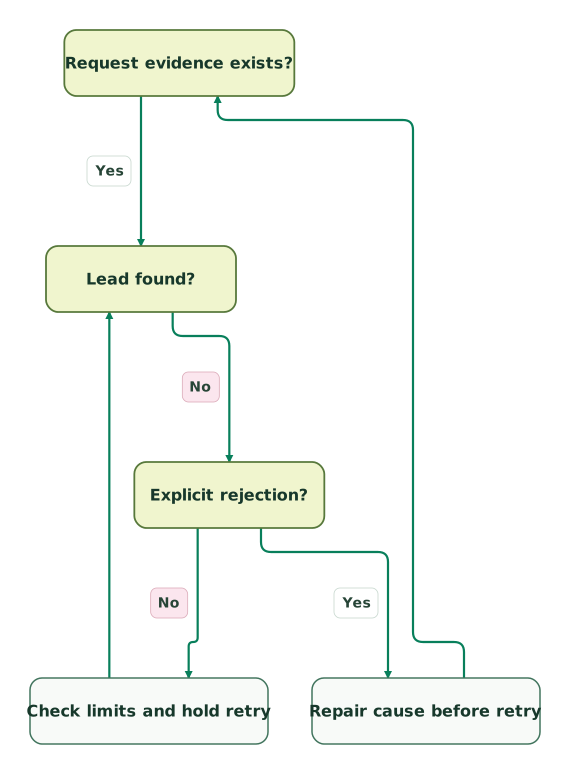
Resolve a missing Lead
This view repeats the request-to-record connection for context. The no-rejection branch does not assert that a request is pending.
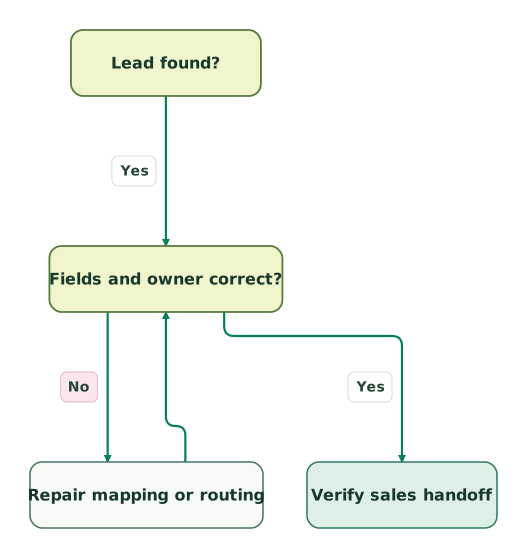
Verify fields and ownership
The missing-Lead branch belongs to the preceding view; this view follows the same yes connection into read-back and ownership validation.
Read diagram as text
- Form attempt to Request evidence exists?.
- Request evidence exists? to Repair website submission: No.
- Request evidence exists? to Lead found?: Yes.
- Lead found? to Explicit rejection?: No.
- Explicit rejection? to Repair cause before retry: Yes.
- Explicit rejection? to Check limits and hold retry: No.
- Lead found? to Fields and owner correct?: Yes.
- Fields and owner correct? to Repair mapping or routing: No.
- Fields and owner correct? to Verify sales handoff: Yes.
- Repair website submission to Request evidence exists?.
- Repair cause before retry to Request evidence exists?.
- Check limits and hold retry to Lead found?.
- Repair mapping or routing to Fields and owner correct?
Absence of an error is not proof of a queued request. The hold branch means investigate before retrying; it does not label an unknown submission as accepted. Search the correct org with a permitted reference, account for any automation that moves or converts the Lead, and compare submission timing with intake notices.
The Default Lead Creator's error email can identify a validation or unique-field failure, although Salesforce may redact the detailed reason. Inspect the relevant rule and reproduce it with controlled test values. Salesforce's unique-field troubleshooting article describes that limit. Use generated debug and debugEmail controls only in a controlled test and remove them from the public form; they are email-debugging controls, not a guarantee that the test creates no records.
Keep analytics stages explicit: submit attempt, provider acceptance where available, CRM creation and sales acceptance. The B2B form-conversion tracking guide explains how to avoid counting a revisited thank-you URL or a button click as a new qualified enquiry.
When is the REST API or a form service a better fit?
Use a backend integration when the website needs a durable request receipt, controlled retry handling or a clear CRM error response. Salesforce REST record creation returns the new record's ID on success, which gives the backend something concrete to store against the request. See Create a Record.
That route also needs authentication, credential protection, allowed-field validation, request storage and an explicit retry policy. Do not put a Salesforce access token in public form JavaScript. Preserve assignment deliberately: REST supports Sforce-Auto-Assign, with active rules used by default when the header is omitted. Verify the intended behavior rather than assuming a new intake route inherits all the old form decisions. Salesforce's assignment-rule header documents the options.
A form service may provide an easier editor and request history, but require a demonstration of its Salesforce failure handling before choosing it. Check field types, duplicate behavior, retained submissions, replay controls and how a visitor is informed of a failed handoff. If HubSpot already owns form capture, compare the HubSpot Forms API workflow rather than creating two unrelated intake systems for the same form.
What should pass before the form is released?
Release Web-to-Lead after a controlled set of valid and invalid enquiries proves the field, error and ownership paths. Use a permitted test environment and identifiable synthetic records; do not load-test a shared production intake limit.
Checklist
- Record the target org, generated form version, field keys and permitted values.
- Check the Default Lead Creator's required access and monitored error mailbox.
- Verify required business fields, optional attribution and unchecked marketing choice.
- Test missing, invalid and oversized values without silently truncating identifiers.
- Confirm supported reCAPTCHA, configured domain, failure path and fallback choice.
- Exercise a duplicate-rule match and a Unique-field conflict under the intended policy.
- Read back a created Lead's fields, matching assignment route and unmatched owner fallback.
- Separate redirect visits from CRM creation in analytics and reconciliation.
- Assign responsibility for limit notices, unknown outcomes and safe retries.
- Remove debug controls and verify the final deployed form again.
How can Martechdevs help verify the intake path?
Martechdevs can help implement the form mapping, source capture, Salesforce rules and reconciliation needed to make the handoff reviewable. Bring the generated HTML, field contract, example failures and intended owner routes to the scoping discussion. For help with that work, request a detailed Salesforce implementation scope.
Keep reading
Browse all CRM & Lifecycle guides
 CRM & Lifecycle
Salesforce Lead Conversion: Field Mapping, Campaigns and Duplicate Checks
Map Salesforce Lead fields, preserve campaign and click context, avoid duplicate Accounts, and verify conversion results and reporting with local examples.
Jafrin Akter AloLast updated 16 min read
 Tracking & Attribution
GCLID Tracking: Capture the Click ID and Keep It Through Your CRM
Keep Google click IDs through redirects, consent, forms and CRM changes. Map HubSpot or Salesforce fields, test each handoff and verify conversion delivery.
Jafrin Akter AloLast updated 14 min read
 CRM & Lifecycle
Lead routing for small teams: ownership, rules and reliable handoffs
Build reliable lead routing in HubSpot or Salesforce. Define ownership, fallback paths and response clocks, then compare native routing with software costs.
Jafrin Akter AloLast updated 11 min read
Salesforce consulting
See the implementation scope, deliverables and acceptance checks.
Questions people ask
Can several landing pages use the same Web-to-Lead setup?
Yes, several pages can use a form generated for the same Salesforce org, while carrying different permitted source context. Maintain a form-version inventory so a custom-field change does not leave one old page silently dropping values. Test each deployed variant, including embedded and mobile forms, and use an explicit page or campaign mapping instead of trusting arbitrary hidden values to determine ownership.
Do UTM values automatically create Salesforce Campaign membership?
No. A UTM campaign value is source text unless you explicitly map it to Salesforce campaign behavior. Web-to-Lead supports Campaign_ID and member_status; supply a valid pair for the target org and verify the resulting membership. Keep that mapping separate from the visitor's editable query parameters. Salesforce's campaign-association guidance describes the fields; do not rely on an omitted status producing the intended result.
Can Web-to-Lead update the existing Contact behind an enquiry?
Treat Web-to-Lead as Lead intake, not as a general update or upsert interface for existing Contacts. Decide how a repeat enquiry should be related to the existing person before automating that follow-up. Where updates are required, use an integration with an explicit matching key, permitted fields and an auditable outcome. An email match alone should not grant a public visitor unrestricted control over an existing record.
How should the original submission time survive an intake delay?
Store a separately defined submission timestamp when the business needs to distinguish request time from Salesforce creation time. Record its source and timezone, and use a trusted server receipt when that precision matters; a hidden browser timestamp is editable. Retain only the evidence you need to reconcile the request. Do not overwrite CreatedDate or infer the visitor's original action time from a later queued record.
Is an unchecked marketing checkbox the same as a complete consent record?
No. An unchecked checkbox simply leaves that choice unselected in the local example; it does not establish the full consent history your business needs. Define the purpose, wording version, capture time and withdrawal handling for the relevant communication. Keep the enquiry response separate from optional product updates, then verify how both selected and unselected values arrive in Salesforce before connecting either to downstream messaging.
Sources
- Salesforce: Generate Leads from Your Website with Web-to-Lead
- Salesforce: Guidelines for Setting Up Web-to-Lead
- Salesforce: Add fields to Web-to-Lead
- Salesforce: Web-to-Lead creation errors
- Salesforce: Missing Company and Last Name values
- Salesforce: Validation Rule Considerations
- Salesforce: Supported reCAPTCHA version
- Salesforce: Daily limits and pending queue
- Salesforce: Duplicate rules blocking Web-to-Lead
- Salesforce: Unique-field and validation errors
- Salesforce: Web-to-Lead debug emails
- Salesforce: Associate a Web-to-Lead with a campaign
- Salesforce REST API: Create a Record
- Salesforce REST API: Assignment Rule Header

Written by
Jafrin Akter AloData Engineer and Co-founder at Martechdevs and Growth and Analytics Partners
Jafrin writes practical guides to marketing technology, customer data, analytics and AI workflows. Martechdevs is a Growth and Analytics Partners company.