
UTM naming conventions that keep GA4 clean
Data Engineer and Co-founder, martechdevs
Last updated 9 min read
A useful UTM convention defines a small set of source and medium values, a stable campaign ID, readable campaign names and a clear purpose for content labels. Build it around the reports and joins you need. Then validate generated links before launch, because a consistent naming scheme can still consistently send traffic into the wrong GA4 channel.
Last updated: 24 September 2026.
One campaign can become six rows when different people tag it as fall_launch, Fall-Launch, octoberlaunch and three other variations. More seriously, a paid social campaign can appear organic when its medium does not identify paid traffic.
Both problems start before the visitor reaches the website. The repair belongs in the campaign creation process, supported by a small registry that everyone uses.
Give every parameter one job
Use these fields as your standard record:
- Source: the platform or publisher that sent the visit, such as
linkedinorpartner_digest. - Medium: the distribution method, such as
paid_social,emailorreferral. - Campaign ID: a stable identifier that remains useful if the campaign's display name changes.
- Campaign name: a readable label for the initiative.
- Source platform: the platform managing the traffic, where relevant to the tagging plan.
- Content: the creative, placement or link variant you want to compare.
- Term: the keyword or other deliberately defined term-level distinction.
Google documents these parameters and their reporting uses in its campaign URL guide. Do not put the audience, channel, creative and campaign into every field. Redundant strings are harder to maintain and rarely improve analysis.
For a fictional October webinar, a campaign registry might contain:
campaign_id: cmp_2026_104
campaign_name: 2026_10_pipeline_webinar
owner: lifecycle_team
landing_page: https://example.com/pipeline-webinar
start_date: 2026-10-20
conversion: webinar_registration
The same initiative can run through LinkedIn ads, an owned newsletter and a partner placement. Its campaign identity stays stable while source, medium and content describe each link.
Martechdevs' analytics and tracking work connects this naming layer to collection, CRM attribution and reporting. A clean URL is useful only if its information survives the rest of that path.
Use a short allowed-values list
Start with the channels you actually operate. For example:
LinkedIn advertising: linkedin / paid_social
Facebook advertising: facebook / paid_social
Instagram advertising: instagram / paid_social
Owned newsletter: newsletter / email
Partner newsletter: partner_digest / email
Organic LinkedIn post: linkedin / social
Non-paid partner website: partner_name / referral
Affiliate placement: affiliate_name / affiliate
SMS campaign: product_updates / sms
Display placement: publisher_name / display
These are recommended conventions for this template, not the only values GA4 accepts. Keep publisher names specific enough to identify the relationship. Using partner for every publisher removes a distinction you will later need.
For manually tagged traffic, GA4's Paid Social rule combines a recognised social source with a paid medium pattern. paid_social fits that pattern. Email and Referral have their own recognised medium values. Default channel rules are case insensitive, even though raw parameter values can remain distinct in reporting. GA4 default channel definitions.
Avoid inventing a medium for every campaign objective. leadgen, boost and awareness describe something about the campaign, but they do not reliably express the distribution channel. Put the objective in your campaign registry or a consistently defined campaign-name component.
Do not assume that every incorrect medium produces Unassigned. A recognised social source can still satisfy an organic rule. That failure is easy to miss because the traffic has a plausible channel label. Use the diagnostic sequence in fixing GA4 Unassigned traffic to inspect the underlying values rather than trusting the label alone.
Keep campaign names readable and IDs stable
A practical name format is:
year_month_offer_or_initiative
2026_10_pipeline_webinar
Add market, product or audience only when it changes a decision:
2026_10_pipeline_webinar_ukAvoid building a name with ten compulsory components because future reporting might need them. Maintain additional metadata beside the campaign ID. A separate market field is easier to filter and validate than repeatedly extracting the eighth segment of a long string.
Use platform-generated campaign IDs where they are needed for advertising joins. If you also maintain a cross-channel initiative ID, keep a mapping between the two. One initiative can contain several platform campaigns, so forcing every platform to share the same identifier can hide useful detail.
Renaming a campaign should be a controlled change. Preserve its ID and record the old and new names with effective dates. Otherwise, historical spend and session data can drift apart when one system updates the name and another retains the earlier value.
Plan for cost imports before choosing names
GA4 campaign data imports depend on matching collected campaign values with imported data. Google's guidance calls for consistent campaign IDs, sources, media and names, with exact matching where required. Its automated third-party integrations also have constraints around multiple source/medium pairs for one platform. Campaign data import requirements.
This creates a practical design test: can one row of spend data join unambiguously to the traffic it funded?
Suppose a fictional advertiser uses facebook/paid_social for half its ads and fb/cpc for the other half. Both can look understandable to a human. A connector configured for only one pair can still leave part of the campaign unmatched.
Choose the import route and naming contract together. If existing campaigns already use several pairs, document their mapping before changing new links. A clean future convention does not automatically repair historical joins.
GA4's current Source Platform processing also uses source and paid-medium information to classify third-party advertising. For example, Meta-related sources paired with recognised paid media can map to Meta Ads. Non-paid traffic can be labelled Unlabeled in this dimension. That label is different from Unassigned in channel reporting. Source Platform processing.
Google Ads: preserve auto-tagging
For a linked Google Ads and GA4 setup, auto-tagging supplies platform-specific information that a handful of manual parameters cannot replace. Keep it enabled when required by the integration and preserve its click identifiers through redirects.
When both tagging methods are present, GA4 generally uses the auto-tagged classification. Google's documentation also describes fallback situations where an unusable click identifier causes cross-channel dimensions to derive from the manual parameters. If you provide manual tags, make the relevant set complete rather than adding only a campaign name. Manual and automatic traffic-source tagging.
Do not copy Universal Analytics advice about a manual-tagging override setting into GA4. Google's current guidance explicitly distinguishes the products. Google Ads auto-tagging.
Also avoid defining success as “every Google Ads click appears under Paid Search.” Campaign type and network matter. Performance Max, for example, can belong to Cross-network. Check whether the classification fits the campaign, rather than forcing every Google source into the same channel.
Meta and other ad platforms: test the resolved URL
Dynamic placeholders reduce manual work, but only if the platform expands them as expected. Use the destination platform's supported syntax and inspect the URL from an actual test or preview flow.
The important distinction is between a template and a resolved value:
Template: campaign parameter contains a platform placeholder
Resolved: campaign parameter contains the actual campaign ID or name
A literal placeholder arriving in GA4 is a tagging failure. So is a campaign-name placeholder that resolves differently from the name used in a cost import.
Choose whether Facebook and Instagram should remain separate sources. Keeping them separate supports placement analysis; using one shared Meta source supports aggregation but removes that distinction from the source field. Whatever the choice, keep it compatible with your reporting and import configuration.
Avoid silently changing a mature account's source values in the middle of a reporting period. Record the cutover date and provide a reporting mapping so analysts can compare periods without mistaking a naming change for a channel shift.
A copyable registry and bulk builder
Create a CSV named campaign_links.csv with these columns. Add one row per outbound campaign link:
landing_url,utm_source,utm_medium,utm_campaign,utm_id,utm_source_platform,utm_content
https://example.com/pipeline-webinar,linkedin,paid_social,2026_10_pipeline_webinar,cmp_2026_104,linkedin,founder_video_a
https://example.com/pipeline-webinar,newsletter,email,2026_10_pipeline_webinar,cmp_2026_104,customer_io,hero_button
The following Python template reads that file and writes generated URLs to a new CSV. It preserves ordinary query parameters, replaces existing UTM parameters and keeps a URL fragment in the correct position. Review the source/medium pairs against your registry before using the output; this is a URL builder, not a complete GA4 classification engine.
import csv
from urllib.parse import parse_qsl, urlencode, urlsplit, urlunsplit

required = ("utm_source", "utm_medium", "utm_campaign", "utm_id")
fields = (*required, "utm_source_platform", "utm_content", "utm_term")
allowed_media = {"paid_social", "cpc", "email", "social", "referral",
                 "affiliate", "sms", "display"}

with open("campaign_links.csv", newline="", encoding="utf-8-sig") as file:
    rows = list(csv.DictReader(file))

output = []
for line, row in enumerate(rows, start=2):
    values = {key: (row.get(key) or "").strip() for key in fields}
    if any(not values[key] for key in required):
        raise ValueError(f"Row {line}: missing required campaign field")
    if values["utm_medium"] not in allowed_media:
        raise ValueError(f"Row {line}: medium is outside the allowed list")
    url = urlsplit((row.get("landing_url") or "").strip())
    if url.scheme != "https" or not url.netloc:
        raise ValueError(f"Row {line}: expected an absolute HTTPS URL")
    query = [(key, value) for key, value in parse_qsl(
        url.query, keep_blank_values=True
    ) if not key.lower().startswith("utm_")]
    query.extend((key, value) for key, value in values.items() if value)
    tagged = urlunsplit((url.scheme, url.netloc, url.path,
                        urlencode(query), url.fragment))
    output.append({**row, "tagged_url": tagged})

if output:
    with open("campaign_links_tagged.csv", "w", newline="",
              encoding="utf-8") as file:
        writer = csv.DictWriter(file, fieldnames=list(output[0]))
        writer.writeheader()
        writer.writerows(output)
Do not automatically lowercase a whole URL. Its path, existing parameters or opaque identifiers may be case sensitive. Apply your naming convention to the fields your team owns before generating the URL. Preserve platform IDs exactly.
The builder deliberately replaces every existing utm_ parameter, including fields outside the template. Use it on ordinary landing URLs you control. Rewriting a signed URL can invalidate its signature, so signed or vendor-generated links need their provider's supported tagging method.
Validate the journey after the link
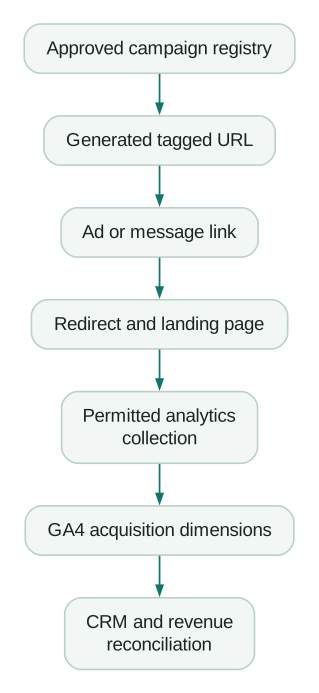
First, click the link from its real distribution context. Confirm the landing page retains the expected values after redirects. A valid URL in a spreadsheet does not prove that an email tracking service or shortener preserves it.
Second, inspect the first permitted analytics request. If consent delays collection, verify the campaign context survives until collection can begin. Our Consent Mode v2 guide explains the timing checks.
Third, inspect the relevant report after processing. Session acquisition and first-user acquisition answer different questions; a returning user's first acquisition will not necessarily become the campaign just clicked. Compare like-for-like dimensions.
Finally, submit the intended conversion and confirm the CRM captures the acquisition fields according to a defined policy. Keep first-touch and latest-touch values separate when both are needed. A single field overwritten on every form submission cannot answer both questions.
Keep these values out of UTMs
Never put email addresses, phone numbers or other personal identifiers into campaign parameters. URLs can reach analytics, browser history, logs and other systems. Google's Analytics guidance specifically addresses avoiding personally identifiable information in collected URLs and parameters. Google's PII prevention guidance.
Do not use UTMs on ordinary internal navigation. Measure an internal banner with an event and a placement property. Adding acquisition tags to your own navigation can pollute campaign context and complicate attribution.
Do not add a random identifier to every click merely to make each URL unique. Campaign reporting needs useful categories. Unbounded content values make analysis harder and can increase high-cardinality reporting problems.
Launch checklist
- Source and medium use an approved pair.
- Campaign ID is stable and names follow the registry.
- Content describes a meaningful creative or placement difference.
- Auto-tagging and click identifiers remain intact where required.
- Dynamic placeholders resolve before reaching the site.
- Redirects preserve the expected parameters.
- Consent timing does not discard campaign context.
- Cost-import values match the collection convention.
- CRM capture and overwrite rules are documented.
- No personal information or internal navigation UTMs are present.
At Martechdevs, we implement tracking from the customer action through the records used in reporting and optimisation. Start with the free martech AI audit, or explore an AI assistant built around your approved workflows.
Questions people ask
Should all UTMs be lowercase?
Use lowercase for the human-authored labels your convention controls. Preserve opaque platform IDs and other case-sensitive values. Lowercasing the entire destination URL is unsafe because paths and unrelated query parameters may have different rules.
Is paid_social a valid GA4 medium?
Yes, it matches the paid-medium pattern used with recognised social sources. The source and other applicable classification rules still matter. A valid medium by itself does not guarantee every link reaches the channel you intended.
Which fields should our template require?
Require source, medium, campaign name and campaign ID for this workflow. Include source platform where relevant and content when comparing variants. The requirements should support your reporting and imports rather than producing empty placeholders for unused fields.
Can new UTMs repair old GA4 data?
They improve future collection. Historical cleanup may require a custom channel group or a documented reporting transformation, and missing original information may be unrecoverable. Preserve raw history so the transformation remains explainable.
How often should we review the convention?
Review it when adding a channel, changing a cost-import integration or finding unexpected source/medium combinations. A short recurring exception report is more useful than repeatedly rewriting a naming document nobody checks at launch.
Sources
- Google Analytics: campaign URL parameters. Accessed 24 September 2026.
- Google Analytics: default channel groups. Accessed 24 September 2026.
- Google Analytics: campaign data import. Accessed 24 September 2026.
- Google Analytics: Source Platform. Accessed 24 September 2026.
- Google Analytics: manual and automatic tagging. Accessed 24 September 2026.
- Google Ads: auto-tagging. Accessed 24 September 2026.
- Google Analytics: avoiding PII. Accessed 24 September 2026.
Written by
Jafrin Akter AloData Engineer and Co-founder, martechdevs
Jafrin Akter Alo is a data engineer and co-founder of martechdevs, where the team has delivered 74+ martech, data and growth stack implementations.