
HubSpot Forms API: Fix Missing Submissions, Consent and Attribution
A reliable HubSpot Forms API integration needs three things to survive the handoff: the submitted fields, the context of the visit and the choices the visitor actually made. Then the application must distinguish HubSpot accepting a submission from a network timeout, a rejected payload or a later CRM automation failure.
On this page
Start troubleshooting with the response from the actual submission request. A thank-you message rendered by your website proves very little if your code displays it before checking HubSpot's response.
This guide covers custom forms sending submissions to HubSpot. For deciding which commercial outcome to measure after acceptance, use the B2B form conversion tracking guide. If you want the forms and HubSpot set up for you, see our HubSpot implementation.
Which HubSpot API should a custom form use?
Use a form-submission endpoint when the intended outcome is a submission against a HubSpot form; use the form-management API when you need to create or edit the form definition.
If Salesforce is the intended receiving CRM, evaluate Salesforce Web-to-Lead intake under its own field, validation and assignment rules.
When the job is to record a product or billing occurrence, follow the HubSpot custom-event workflow to define its event type, CRM record and retry key.
The form-management guide explicitly directs submission data to a separate endpoint. A form definition describes the fields and settings. A submission is one visitor's completed request. HubSpot Forms API guide.
HubSpot exposes two submission routes:
| Route | Intended calling environment | Main implementation decision |
|---|---|---|
| Unauthenticated submission | Browser requests using the supported cross-origin endpoint | Public input validation and abuse controls |
| Authenticated submission | A backend holding the integration credential | Credential handling, queueing and delivery monitoring |
The unauthenticated route supports cross-origin AJAX. The authenticated route requires authentication and provides higher rate limits. Both target a specific account and form. Unauthenticated submissions, authenticated submissions.
Keep private credentials on the server. If your current browser code needs a private app token to submit, revisit the selected endpoint and architecture before publishing it.
Choose the backend path when you need durable receipts, controlled retries or integration with your own application. Choose the browser path when its simpler operating model meets the requirement. A backend still needs the visitor context explicitly forwarded from the page; moving the request to a server does not manufacture browser identity.
What should you capture before investigating a missing submission?
Capture the destination, response and local occurrence identifier before changing mappings or resubmitting the same lead.
A useful diagnostic record contains:
- Intended HubSpot account and form.
- Your application's submission identifier.
- Actual HTTP status, response body and content type.
- Whether the request came from the browser or a backend.
- Names of submitted fields, with personal values redacted.
- Whether allowed browser context was present.
- The visitor's consent selections and the configuration version.
- Whether the local request was new or a retry.
Keep request bodies containing personal data out of general analytics and shared error dashboards. A restricted operational record can retain the information required to resolve the request without exposing every field to everyone who can inspect a deployment log.
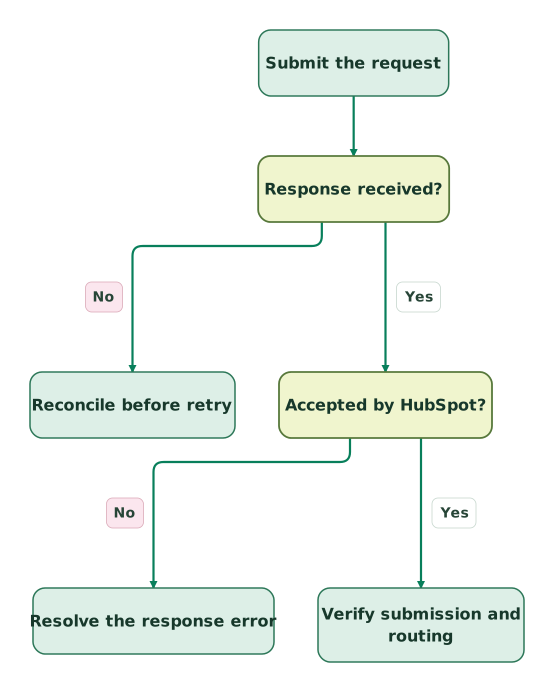
Read diagram as text
- Submit the request to Response received?.
- Response received? to Reconcile before retry: No.
- Response received? to Accepted by HubSpot?: Yes.
- Accepted by HubSpot? to Resolve the response error: No.
- Accepted by HubSpot? to Verify submission and routing: Yes
A timeout leaves delivery uncertain. A visible rejection gives you a specific correction to make. An accepted response moves the investigation to the submission record and downstream behavior.
How do you build a payload that matches the HubSpot form?
Build the payload from the published form's internal field names and rules, then add only the context and consent data the integration can support.
The form-definition endpoint exposes fields, required flags, object types, validation and configuration. Compare that definition with the custom form rather than relying on labels copied from a screenshot. Get a form definition.
For example, a visible label “Work email” may map to the internal property email. Changing the label does not justify changing the API name.
This illustrative JSON shows the fields and page-context portion of a demo-request payload. It assumes the destination form includes those fields. Complete the form's actual privacy requirements separately; the example intentionally makes no consent claim.
{
  "fields": [
    {
      "name": "email",
      "value": "integration-test@example.com"
    },
    {
      "name": "firstname",
      "value": "Integration test"
    }
  ],
  "context": {
    "pageUri": "https://www.example.com/request-demo",
    "pageName": "Request a demo"
  }
}
The submission schema separates fields, context, legalConsentOptions and optional submittedAt. The timestamp uses milliseconds; values more than one month old are rejected. The optional skipValidation flag is deprecated, so a new integration should correct validation failures instead of depending on that flag. Submission request schema.
Before sending, compare these parts:
| Payload part | Check | Common implementation error |
|---|---|---|
| Field name and object | Match the destination definition | Sending a display label as the API name |
| Required values | Validate the user's actual input | Omitting a field recently made required |
| Select values | Use the configured internal option | Sending a translated display label |
| Submission time | Preserve the actual occurrence time when supplied | Sending seconds in a millisecond field |
| Page context | Use the real, approved submission-page context | Sending the backend URL or a generic homepage |
| Consent data | Reflect the configured notice and visitor choice | Hardcoding an opt-in for every submission |
Treat form changes as integration changes. A marketer adding a required dropdown can alter the contract even when the website code stays unchanged. Keep a named owner for reviewing the mapping whenever the form definition changes.
How do you preserve attribution without inventing browser context?
Pass the visitor's permitted HubSpot cookie and page context from the page where the form was submitted, and keep unavailable context explicitly unavailable.
The hubspotutk cookie represents the browser identity used in HubSpot form association. In the submission payload, the corresponding context field is hutk. The names differ, so a field named context.hubspotutk is not a substitute for the documented schema. HubSpot's cookie reference, submission context schema.
A backend cannot recover that cookie merely from the person's email. If your design permits using it, forward the value from the browser at submission. Keep the same browser context attached to its own request through the queue. Never reuse a staff member's cookie, generate a pretend cookie or share one value across all visitors.
Use pageUri for the page address in this API schema. HubSpot's form troubleshooting material also discusses missing page names and addresses, but the submission endpoint's field spelling is the one the payload must follow.
A valid submission can lack page history when cookie context is absent or blocked. That narrows the diagnosis: check the collection and association path before changing contact creation. HubSpot form-submission troubleshooting. The tracking-code diagnostic guide covers the browser side.
Define which URL parameters are safe to retain. Campaign identifiers can be useful, while personal details or authentication tokens in a URL should never become routine attribution context. Capture approved acquisition fields with the UTM naming rules, and distinguish initial acquisition from the page where the current request occurred.
Use the UTM convention and registry skill to specify the approved campaign fields and test that their values survive the landing page, form and CRM handoff.
For paid-search leads, follow the GCLID from the landing page into the CRM, including hidden-field prepopulation and the acquisition record attached to each submission.
If the backend includes a visitor IP, obtain it through a trusted proxy configuration. Do not mistake the integration server's outbound IP for the visitor's address, or trust an arbitrary forwarded header from the public internet.
How should the API represent processing and communication consent?
Represent each configured permission separately and preserve the exact choice made by the visitor.
HubSpot distinguishes notice or consent for processing personal data from subscription-specific communication consent. The available form configurations include implicit processing consent, separate consents and legitimate-interest notices. Account privacy settings can affect which checkboxes are required. An unchecked communication box on a later submission is also not automatically a withdrawal of an earlier subscription. HubSpot form privacy options.
The integration owner and privacy owner should agree on the mapping before implementation:
| Decision | Evidence the integration needs | What to verify in HubSpot |
|---|---|---|
| Processing basis | The configured notice or actual required selection | Processing information on the contact |
| Communication preference | The specific subscription choice | The correct subscription status |
| Browser tracking | The applicable browser consent state | Permitted context included or omitted |
| Later withdrawal | A distinct withdrawal action | The relevant preference changes |
Do not use one “consent” Boolean for all four jobs. A request for a product demonstration does not tell the API which newsletters the visitor selected, and a tracking cookie does not record a marketing-email preference.
Use legalConsentOptions according to the submission endpoint and your configured form. Do not copy the form-definition object's privacy configuration into a submission unchanged: a definition describes the form, while a submission records the visitor's action.
Store the notice version and selected options with your operational receipt where appropriate. This makes a later mapping failure diagnosable without guessing what the person saw. Have the policy owner approve wording and required choices; the implementation should preserve that decision faithfully.
Which errors should stop a retry and which need a delayed retry?
Correct a rejected request before resending it, and use a controlled retry policy for rate limits or temporary failures.
HubSpot's submission reference distinguishes success, validation errors and rate limiting. Read the returned error message instead of treating every failure as “HubSpot unavailable.” Submission responses.
A practical response policy is:
| Observation | Local state | Next action |
|---|---|---|
| Confirmed accepted response | Accepted by HubSpot | Store the receipt and verify downstream results |
| Validation rejection | Needs correction | Fix the field or form rule before another attempt |
| Authentication or permission failure | Integration blocked | Repair credentials or access on the backend |
| Rate-limit response | Delayed retry | Apply bounded backoff and inspect queue growth |
| Timeout or connection loss | Delivery uncertain | Reconcile before deciding whether to retry |
| Unexpected response format | Needs inspection | Preserve status and safe error details |
A successful HTTP response from your own backend is insufficient if the backend swallowed HubSpot's error. Give the frontend an explicit state: accepted locally and pending delivery, accepted by HubSpot, or failed. The wording should match the promise your service actually makes.
Likewise, parsing JSON must not decide whether the submission succeeded. An error page or plain-text intermediary response can make JSON parsing fail before your code records the HTTP status. Capture the status and content type first, and retain a bounded, redacted error sample for investigation.
For a durable backend, save the local request before attempting delivery. Retry the same local occurrence rather than creating a new business request for every attempt. Do not assume the HubSpot endpoint offers idempotency behavior that your integration has not established.
An ambiguous timeout deserves special handling. A request can reach HubSpot even when the response never reaches your server. Reconcile the destination and your receipt ledger, or use an explicitly documented at-least-once delivery policy with duplicate review.
Why can a form submission be accepted but still disappear from the sales workflow?
A recorded submission, a new contact and a workflow enrollment are separate outcomes with different settings.
For the wider sales handoff, define which product signals belong in HubSpot and what action each signal should support.
Repeated submissions from the same email can update an existing contact while preserving several submission activities. A deleted contact can also leave the submission count higher than the visible contact count. HubSpot's submission and contact checks.
Review HubSpot contact matching and duplicate prevention when the submission reaches the wrong existing record or creates an unexpected duplicate.
Review the form's submissions and spam area before concluding that the API lost the request. HubSpot's spam controls can affect contact creation and downstream treatment. Manage spam submissions.
One specific compatibility check deserves attention: HubSpot says submissions through the form-submission API are not accepted when CAPTCHA is enabled on that destination form. Choose a supported embedded-form flow with its protection, or design appropriate abuse controls for the custom API flow before changing the setting. HubSpot CAPTCHA and API limitation.
Do not disable protection on a live acquisition form as a casual debugging step. Use a controlled test form and have the responsible team approve the replacement control.
After acceptance, check contact association, workflow eligibility, owner assignment and notification delivery independently. The lead-routing guide helps turn the accepted request into accountable follow-up. A form can be technically delivered while the commercial handoff still fails.
For the stage-setting part of that handoff, use the HubSpot lifecycle stages guide to define the transition, its owner and the correction path.
How do you reconcile API delivery before releasing the form?
Reconcile distinct local submissions with their destination outcomes, then test the failure states that could hide a real lead.
Consider this hypothetical batch of 12 locally accepted requests. Eight have confirmed HubSpot acceptance, one has a validation rejection, two are queued after rate limiting and one timed out without a response. Delivery coverage is 8 ÷ 12, or 66.7%, while four requests still need resolution. The timed-out request belongs in an uncertain state until reconciled.
If one queued request later succeeds, coverage becomes 9 ÷ 12, or 75%. The denominator remains 12 because a retry is another delivery attempt for an existing occurrence.
Use the receipt identifier as the reconciliation unit. Email alone cannot distinguish two genuine requests by the same person.
Before release:
Checklist
- The account, destination form and published field definition match.
- Invalid input produces a useful response without a false success message.
- An accepted request appears in the intended form and contact history.
- Existing contacts can make a genuine second request.
- Allowed cookie context survives any proxy or queue.
- Missing tracking context does not become fabricated attribution.
- Consent selections map to the correct permissions and subscriptions.
- Rate limits, timeout uncertainty and exhausted retries have owners.
- Spam controls and CAPTCHA compatibility match the chosen integration.
- The final CRM owner and follow-up action are checked.
For custom forms spanning your application, HubSpot and advertising measurement, scope an analytics implementation around these acceptance cases. The useful deliverable is a traceable request from the customer's action to the team's response.
Keep reading
Browse all Tracking & Attribution guides
 CRM & Lifecycle
HubSpot Webhooks: Verify Requests, Prevent Duplicate Actions and Recover Missed Updates
Build a dependable HubSpot webhook receiver: choose the right app model, verify signatures, store batches safely and recover without duplicate actions.
Jafrin Akter AloLast updated 14 min read
 Tracking & Attribution
HubSpot Google Ads Integration: 7 Checks for Missing Leads and Conversions
Fix HubSpot Google Ads integration problems across account access, tracking templates, native lead forms, lifecycle events, conversion values and campaign goals.
Jafrin Akter AloLast updated 12 min read
 CRM & Lifecycle
Product usage data in HubSpot: build a reliable PQL and sales workflow
Bring useful product signals into HubSpot with stable account IDs and clear ownership. Compare events, properties and sync routes before building workflows.
Jafrin Akter AloLast updated 14 min read
HubSpot implementation
See the implementation scope, deliverables and acceptance checks.
Questions people ask
Can a queued form submission use the time when it was retried?
Preserve the original occurrence time when supplying a submission timestamp. A retry is a delivery attempt, not a fresh customer action. Check the endpoint's supported submission-age window before replaying an old queue. If the record is too old for that route, choose a supported recovery method and preserve the actual history instead of making an old lead look new.
Should a form API failure prevent account registration?
That depends on the product's acceptance contract. If your application can create the account independently, retain the registration and queue its CRM handoff with visible delivery status. If HubSpot acceptance is a required part of the transaction, explain the failure and provide a recoverable retry. Decide this explicitly so a marketing integration cannot silently discard an otherwise valid signup.
Can a custom form simply reuse the embedded form's success event?
A custom API form should emit success from its own confirmed acceptance path. HubSpot's embedded-form events belong to the supported embed implementation and editor generation. Do not synthesize an embedded callback name and assume another script will interpret it correctly. Define a clear application event and document whether it means local acceptance, HubSpot delivery or later qualification.
What should happen if someone changes a dropdown option after release?
Treat the option change as a schema change that may affect submissions already in progress. Review the internal value, frontend choices, queued records and reporting labels together. Test both the previous and new values under the intended transition policy. Keep rejected older payloads visible so the team can repair legitimate requests without silently replacing what the person selected.
Is it safe to log the full HubSpot response for every request?
Log only what is needed to diagnose delivery, with access and retention appropriate to the data. Responses and error details can contain submitted values. Prefer the status, safe error category, correlation information and your local receipt identifier in routine logs. Keep sensitive payload inspection restricted, and never send the raw form body to a general website analytics event.
Sources

Written by
Jafrin Akter AloData Engineer and Co-founder at Martechdevs and Growth and Analytics Partners
Jafrin writes practical guides to marketing technology, customer data, analytics and AI workflows. Martechdevs is a Growth and Analytics Partners company.