
AppsFlyer Implementation Mistakes: Attribution, Events and Revenue
Data Engineer and Co-founder, martechdevs
Last updated 10 min read
AppsFlyer implementation problems usually cross boundaries: an install reaches the platform without the expected identity, a purchase arrives through two senders, or a deep link opens the app without reaching the intended screen. Validate installation, customer identity, event ownership, revenue and routing separately. Then reconcile one controlled journey from the original click to the business outcome and partner reporting.
Last updated: 11 September 2026.
An event visible in a dashboard proves only part of the integration. It does not prove that the event belongs to the intended installation, represents settled revenue or reached an advertising partner with the right meaning.
This guide focuses on mobile apps using the AppsFlyer SDK, with server-to-server events where appropriate. The exact APIs depend on platform, framework and SDK version. Use the diagnostic sequence below to identify the broken boundary before changing campaign settings.
Mistake 1: approving the integration after seeing an app open
Write a release acceptance specification with separate evidence for installation, attribution, business events, revenue and deep linking. A successful SDK connection should not approve all five.
For a controlled acquisition journey, record the app build, operating system, test device, permission state, link used, expected destination and expected outcome. Keep test identifiers in a restricted QA record rather than copying production customer data into tickets.
AppsFlyer's marketer testing guide provides install, event and deep-link testing workflows. Its SDK Integration Tests page requires a collected device identifier, which affects how an iOS non-ATT test is performed. Follow the applicable procedure rather than treating a missing test-viewer result as proof that all measurement failed. AppsFlyer integration testing
Our analytics and tracking implementation work separates these acceptance conditions so a team can tell whether it has an SDK problem, an attribution problem or an event-definition problem. Each requires different evidence and usually a different owner.
An install test should use the documented registered test-device process. Repeatedly uninstalling and reinstalling on an ordinary device is not a reliable substitute for a controlled attribution test.
Mistake 2: confusing customer identity with installation identity
Your account ID answers who the customer is in your system. The AppsFlyer ID associates measurement with an app installation. Treating either as a universal substitute for the other breaks joins, especially when a person has multiple devices or reinstalls.
AppsFlyer's mobile S2S documentation requires appsflyer_id and uses it to associate events with the relevant installation. Maintain the mapping needed by the business event rather than selecting an arbitrary installation attached to the customer. AppsFlyer mobile S2S events
For example, a customer might subscribe on an iPhone and later sign in on an Android tablet. A renewal from the billing backend needs an explicit association policy. “Use whichever device logged in most recently” silently changes attribution when device activity changes.
Store the mapping with enough context to inspect the decision: your opaque customer reference, app identifier, AppsFlyer ID, platform, time observed and the transaction or subscription association. Limit access and retention according to the purpose of the data.
CUID timing matters too. AppsFlyer documents that setting it after SDK start associates it with subsequent events, not earlier ones. It also warns that waiting for a CUID can block sending if that ID never becomes available. AppsFlyer CUID guidance
Do not hold first-launch measurement indefinitely while waiting for someone to register. Decide what anonymous use means, when an account reference becomes available and how the two states are related. Use a non-identifying internal reference rather than a raw email address.
Mistake 3: waiting for an ATT prompt that never appears
On iOS, permission behavior belongs in the implementation specification. Test authorized, denied and unresolved states as separate journeys. A single consenting developer device cannot represent all three.
AppsFlyer's iOS integration guide says to use waitForATTUserAuthorization only when the application intends to request tracking authorization. The wait is configured before SDK start, with a timeout appropriate to when the prompt appears. AppsFlyer iOS integration
The practical failure is often a mismatch between product design and engineering assumptions. The SDK waits at launch, while the product only shows the prompt after a tutorial that some users never finish. Alternatively, the SDK starts before the intended wait is configured.
Draw the actual sequence: app launch, SDK configuration, permission request if applicable, response or timeout, SDK transmission and first meaningful business event. Record timestamps in a debug build. Check that the app remains usable if the user leaves early or declines permission.
ATT is not a switch that guarantees complete attribution, and a denied permission is not a reason to manufacture a replacement identifier. Work within supported measurement methods and the permissions actually granted. The mobile attribution guide explains why different measurement paths should be interpreted separately.
Mistake 4: assuming duplicate protection covers every sender
A common revenue defect starts with a sensible idea: send a purchase from the app for speed and from the backend for reliability. Without an ownership rule, one transaction becomes two events.
AppsFlyer documents a short-window duplicate mechanism for identical SDK in-app events. It explicitly says S2S in-app events are not deduplicated by that mechanism. Do not rely on the SDK rule to protect backend retries or a combined SDK and S2S design. AppsFlyer in-app events
Give each business outcome one authoritative reporting path. The app can report checkout interaction while the verified billing path reports a completed transaction. Those are different events with different purposes.
For backend delivery, maintain your own delivery ledger keyed to a stable business occurrence, such as a store transaction reference. A retry should reuse the same logical occurrence. A renewal should have its own occurrence, even though it belongs to the same subscription.
Do not assume an event_id field automatically provides platform-wide idempotency. Partner deduplication and AppsFlyer ingestion are separate contracts. If a network also receives a direct integration, validate that network's supported deduplication path before running both.
There is another important branch: AppsFlyer warns that when ROI360 store revenue is in use, separately sending in-app purchase events produces duplicate revenue. Confirm which revenue product and connector are active before adding a manual event. ROI360 store revenue
Mistake 5: counting purchase intent as revenue
Define the state transition that earns the revenue event. A paywall view, checkout request, pending payment and verified charge are different states. A return to the app after a store dialog does not, by itself, prove a completed transaction.
For manually reported in-app revenue, AppsFlyer uses af_revenue; its guidance also distinguishes gross revenue from an optional net revenue value. Use the field for an actual revenue-generating business event, and document what the amount includes. AppsFlyer revenue parameters
Use one currency policy across the event producer and reconciliation report. Keep the original transaction currency available, and do not sum different currencies as though they were interchangeable. If the finance comparison includes store fees or taxes while the event does not, label the difference before calling it a tracking defect.
Here is an illustrative test ledger, not vendor sample data:
- Transaction
qa_tx_101is verified for USD 12.00. - Transaction
qa_tx_102is verified for USD 20.00. - The delivery attempt for
qa_tx_101is retried after a timeout. - A USD 7.00 checkout remains pending and is not counted as recognized purchase revenue under this test's rule.
- A USD 5.00 partial refund is confirmed against
qa_tx_102.
The expected gross verified purchases are USD 32.00, with USD 5.00 refunded and USD 27.00 remaining before any fees or tax adjustments. There are two purchase transactions, not three. A duplicate USD 12.00 purchase would inflate gross purchases to USD 44.00. Counting the pending checkout as well would produce USD 51.00.
Run this fixture through the revenue mechanism your app actually uses. If ROI360 owns the store lifecycle, test that path and its generated events rather than adding a parallel manual refund flow. The ledger is the expected business outcome; the vendor-specific event mapping must be verified against the selected integration.
Mistake 6: losing event meaning in S2S formatting and timing
A valid HTTP request can still carry the wrong business meaning. Check the installation association, event timestamp, revenue representation and payload shape independently.
AppsFlyer's S2S guide specifies a stringified eventValue and unformatted numeric revenue values. It also documents time-handling rules that can assign arrival time to sufficiently late events. An overnight queue must therefore be tested against those rules rather than assumed to preserve arbitrary historical occurrence times. S2S formatting and timestamps
Keep both occurrence time and delivery time in your internal ledger. They answer different questions: when the customer acted and when the integration delivered the evidence. Alert on queue age before delayed delivery becomes an unexplained reporting shift.
Use a payload validation step before transmission. Reject missing installation references, malformed amounts, unknown currencies and events that do not belong to the selected app. Keep failures visible in a retry or quarantine queue rather than silently substituting empty values.
Also distinguish reporting dates. AppsFlyer's S2S guide notes that the overview dashboard's date range relates to install date for LTV reporting, while event raw reports use event date. Comparing them without aligning the question creates apparent missing revenue that may simply sit in a different cohort.
Mistake 7: treating deep linking as attribution reporting
A deep link has a product job: open the intended content safely. Attribution has a measurement job: describe the source of the acquisition or engagement under the available rules. Test them separately.
For new users, AppsFlyer's iOS Unified Deep Linking documentation limits the returned deferred deep-link parameters to deep_link_value and deep_link_sub1-10; other attribution parameters can be null. Do not make the route depend on receiving a campaign name through that callback. iOS Unified Deep Linking
Define an allowed route contract. For a promotional lesson link, the app might accept a known lesson reference and an approved offer reference. It should handle missing content, expired offers, a logged-out user and a user who already owns the product.
Test a new installation and an already installed app. Then test an unavailable destination. The fallback should be an intentional useful screen, not a crash or a blank view. Validate that the customer reaches the content after authentication if authentication is required.
Keep secrets and sensitive customer data out of marketing links. A route value is an instruction to the application, not a place to store a customer profile.
How do you isolate the failure before a campaign launch?
Trace one known transaction forward. Do not begin by adjusting attribution windows to make totals resemble a network dashboard.
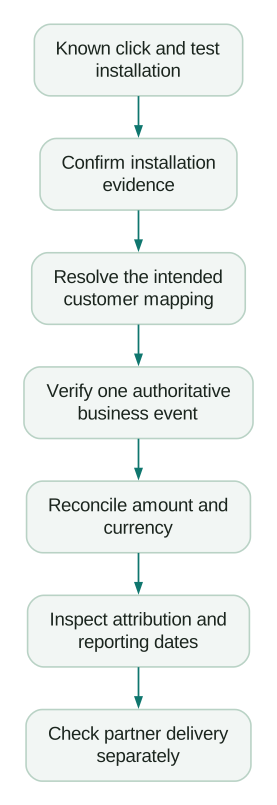
At every boundary, record expected versus observed evidence and the responsible system. If the app never reports the verified outcome, investigate application instrumentation. If the backend reports it twice, investigate delivery ownership. If AppsFlyer has the event but the partner does not, investigate the partner mapping and sharing configuration.
A disciplined tracking plan should include event trigger, owner, amount definition, transaction reference and destination. The AppsFlyer versus Adjust comparison is useful when selecting an attribution platform, but an implementation defect should be diagnosed before treating a vendor change as the fix.
Before release, require evidence for the following:
Checklist
- The registered-device install test follows the intended acquisition path.
- CUID timing and installation mapping are explicit for anonymous and signed-in use.
- ATT decline, timeout and early exit leave the app usable with documented measurement behavior.
- Each verified transaction has one authoritative revenue sender.
- The USD 32.00 gross and USD 5.00 refund fixture reconciles without counting retries or pending checkout.
- S2S queue delays and report date semantics are understood.
- New-user and existing-user deep links reach the intended screen or a safe fallback.
Retain the test build, configuration version and acceptance record. When a later release changes onboarding, payments or identity, rerun the relevant journey rather than assuming the earlier integration approval still covers it.
Questions people ask
Why do S2S events appear as organic?
Check that the event uses the correct AppsFlyer ID and relates to the intended installation. Also inspect delivery ordering and the applicable attribution rules before changing campaign settings. An event arriving with the wrong installation reference cannot be repaired by adding a campaign label to a dashboard.
Does AppsFlyer automatically deduplicate purchases?
The answer depends on the reporting path. The documented SDK in-app duplicate mechanism does not cover S2S events, while ROI360 store revenue has its own transaction processing. Design one authoritative revenue path and test retries instead of assuming every event is protected.
Should I wait for login before starting measurement?
Only after considering what happens to users who never log in. Waiting for a CUID can prevent events from being sent if the ID never arrives. Define anonymous behavior and association timing explicitly rather than sacrificing first-launch evidence accidentally.
Why does a working deep link return no campaign name?
The deferred deep-link callback is not a complete attribution report. For new users, AppsFlyer's iOS UDL documentation limits which parameters it returns. Route using the supported deep-link values and retrieve attribution through the appropriate reporting interface.
Should revenue match the finance ledger exactly?
It should reconcile to the same defined scope, currency and time basis. Gross purchases, refunded amounts, store proceeds and recognized accounting revenue can legitimately differ. Explain those differences with a transaction ledger before treating the residual discrepancy as a measurement failure.
Sources
- AppsFlyer SDK integration testing for marketers, accessed 11 September 2026.
- AppsFlyer mobile S2S events, accessed 11 September 2026.
- AppsFlyer Customer User ID guidance, accessed 11 September 2026.
- AppsFlyer iOS SDK integration, accessed 11 September 2026.
- AppsFlyer in-app events overview, accessed 11 September 2026.
- AppsFlyer ROI360 store revenue, accessed 11 September 2026.
- AppsFlyer iOS Unified Deep Linking, accessed 11 September 2026.
Written by
Jafrin Akter AloData Engineer and Co-founder, martechdevs
Jafrin Akter Alo is a data engineer and co-founder of martechdevs, where the team has delivered 74+ martech, data and growth stack implementations.