
Zendesk Implementation: What Goes Wrong and How to Fix It
A reliable Zendesk implementation gives each ticket a clear owner, a useful classification and a tested path to resolution. Conflicting rules, unnecessary fields, stale replies and incomplete integrations can break that path. Build the workflow around real customer requests, prove it with test tickets, then add automation and AI with explicit ownership and cost controls.
On this page
A billing ticket lands with technical support. An agent reassigns it, but the next update sends it back. A macro promises a refund under an old policy. Meanwhile, the account manager sees no warning before sending an expansion email to that customer.
These Zendesk setup mistakes are connected. Routing, content and customer context were configured separately, without testing the complete support journey. Fixing them requires tracing what happens to a ticket from arrival through resolution and downstream updates. If the fixes point to a different platform, compare Zendesk alternatives and competitors first. If Freshdesk is the likely replacement, weigh a focused Zendesk repair against a Freshdesk move.
What should the first Zendesk implementation cover?
Start with one complete path from customer request to resolution and the downstream record your team needs. Review a sample covering ordinary questions, urgent failures, billing disputes, account access and exceptional cases. For each request, identify the information required to act, who can resolve it, when it should escalate and what the customer needs to hear. Use the Zendesk Jira integration checks when the resolution depends on an engineering issue.
Turn that into a small implementation scope. A single brand with one inbox, one language and two support groups has different work from a migration involving several brands, channels, historical tickets and custom applications.
Martechdevs' customer support automation connects support context to customer records and lifecycle workflows. If ticket data already exists in several systems, use the stack audit to establish which system owns status, account identity and outbound messages before introducing another sync.
The first deliverable should be a working path for a representative ticket. Buying more features does not tell an agent who owns a disputed invoice. Triage customer-blocking failures before cosmetic configuration changes:
| Symptom | First evidence | Owner of the repair decision |
|---|---|---|
| An urgent ticket has no stable owner | Ticket events, group changes and applicable rules | Support operations lead |
| A reply promises the wrong policy | Macro text, actions and current policy | Policy owner with support administrator |
| A customer cannot reach a human | AI transcript and receiving-agent context | Support lead with AI owner |
| Sales acts without support context | Source ticket and downstream account state | CRM integration owner |
Why do additional triggers create routing conflicts?
Triggers can overwrite a legitimate assignment when overlapping rules remain eligible. Zendesk ticket triggers evaluate conditions when a supported ticket is created or updated. They do not run on AI agent tickets; test that surface’s routing and handoff separately. They run in order, and one trigger's changes can make another trigger eligible. A trigger that has already fired does not keep firing within that same cycle. Conflicts can still produce unexpected assignments or repeated activity across subsequent updates. Zendesk's trigger guide.
Start the repair with one failing ticket. Read its event history and list the rules and integrations that changed its group, status, priority or tags. Distinguish a rule being evaluated from a rule actually changing the record.
Then make each rule's scope explicit: creation or update, relevant request type, current state and intended result. Put classification before routing where routing depends on classification. Add a condition that makes a one-time action ineligible after it succeeds.
For example, a welcome notification can set an acknowledgement marker and require that marker to be absent. A routing rule can act on a newly classified request while leaving an agent's later deliberate reassignment intact. These are design patterns; choose actual conditions supported by your ticket workflow.
Test a created ticket, an agent reassignment and a later unrelated update. The intended owner must survive the latter two unless the business rule deliberately changes it. Document precedence when two legitimate rules could apply. “VIP customer” and “security incident” may both be true. The business must decide which queue owns that combination before an administrator encodes the answer.
Which ticket fields should agents actually complete?
Require fields only when they change routing, entitlement, reporting or the next action. Every required field adds a decision. Remove duplicate meanings such as three different ways to describe the same customer tier.
Separate what must be known at intake from what becomes clear during investigation. A customer can usually describe the symptom before an agent knows the root cause. Forcing a precise root-cause value at ticket creation encourages guesses that later appear as reliable reporting data.
Use a controlled vocabulary for fields used in reports. Define an “unknown” or “needs review” path where uncertainty is legitimate. Give one owner responsibility for adding new options and consolidating synonyms.
Treat views as work queues with a purpose. An agent should be able to explain what qualifies a ticket for the view, who works it and when it leaves. A growing list of overlapping views can conceal neglected tickets because everyone assumes someone else is watching them.
Test the empty and ambiguous cases: missing account, unknown product, multiple matching organizations and a request that fits no existing category. A queue that only works for clean records will fail during the busiest shifts.
How do you stop macros from repeating an old policy?
Give each sensitive macro a policy owner, a review date and an acceptance ticket. Macros save time only while their wording and actions remain correct. A useful macro review covers the public reply, private notes, ticket-field changes, placeholders, links and any instructions the agent must complete before sending it.
Assign a policy owner and review date to sensitive replies such as refunds, cancellation, account access and data handling. The support lead can own the library while finance or product owns the underlying policy.
Zendesk supports organizing, editing, cloning and deactivating macros. Deactivation removes a macro from agents' active choices without requiring immediate deletion. Use that to retire superseded versions while preserving a controlled rollback option. Zendesk's macro-management guide.
Give each active macro a specific situation. “Billing: duplicate charge under investigation” is easier to apply correctly than “Billing reply 7.” Test it against a ticket with missing optional fields so a blank placeholder does not produce a broken response.
Track whether the reply helps resolve the request. A high application count says that agents found the macro, but tells you little about correctness, repeat contacts or the work still required after sending it.
What should you do before the 2027 AI agent migration?
Test affected experiences before migration. Zendesk's notice gives these windows, with no universal removal day.
| Experience | Forced migration starts | Important scope |
|---|---|---|
| Remaining AI agents - Essential | January 2027 | Exceptions apply |
| Remaining legacy AI agents | Beginning of February 2027 | Exceptions apply |
| Previously purchased AI agents - Advanced | Outside this notice | Check the account's actual product history |
The notice lists bot builder, answers and intents as legacy AI agent functionality, so a Zendesk legacy bot migration planned for 2027 falls under the legacy window that starts in early February 2027, subject to the notice's exceptions.
Maintenance mode began on 31 August 2026 after the 23 June announcement. Existing automated-resolution overage settings remain in effect, but upgraded capabilities can change usage and costs. A migration deadline is therefore also a workflow and budget review.
Inventory the actual agents, flows and channels in your account. Record which published experiences depend on the affected functionality, who owns them and what happens if they become unavailable. A product label in an old project document is insufficient evidence of the current configuration.
Rebuild and test the essential customer journeys first. Include authentication, knowledge answers, escalation, language handling and any action that changes an external record. Preserve a human route during the transition.
Do not use “the new bot answers the happy-path question” as acceptance. Test a customer who repeats the question, rejects the answer, changes the subject, cannot authenticate or needs a human. Verify that the receiving agent gets the context needed to continue.
Compare resolution reporting and costs before and after migration. A change in classification or capabilities can change the reported automation rate without an equivalent improvement in the customer experience.
How should you budget AI without confusing conversations and resolutions?
Identify the account's billing model, then forecast its billable outcomes. Zendesk has documentation for both its earlier automated-resolution platform and the resolution tiers introduced in May 2026. Existing customers can remain on the earlier model until they move. Apply only the allowance and overage rules for that model. Zendesk's account-identification guide. The pricing guide explains how each Zendesk AI billing model counts resolutions and how the allowance affects the forecast.
Under the tier model, assisted escalations and contained resolutions do not consume the resolution allowance; verified resolutions do. The terminology has specific definitions, including a verification process. A conversation ending without another message is not sufficient evidence that you should count it as a billable verified resolution. Zendesk's resolution-tier documentation.
For the earlier platform, plan allocations, purchased usage and overage settings determine the commercial result. Zendesk describes options to allow overage or pause relevant functionality at the limit. Confirm the equivalent controls for your own account. Earlier automated-resolution platform.
Build the budget from the contract and measured usage. This is a hypothetical monthly planning example in USD, with an assumed marginal rate rather than a Zendesk price; no included allowance, minimum commitment or tax is applied.
| Input or result | Amount | Meaning |
|---|---|---|
| Eligible conversations in the month | 2,000 | Pilot population |
| Assumed verified-resolution rate | 35% | Must be measured under the account's model |
| Verified resolutions | 700 | 2,000 × 0.35 |
| Assumed USD per verified resolution | 1.20 | Replace with the applicable contract rate |
| Modelled usage value USD | 840 | 700 × 1.20 before allowances or commitments |
The rate at which customers receive a useful answer and the rate at which a vendor counts billable resolutions are separate checks. Keep both visible.
Then measure quality alongside cost. How many customers return with the same unresolved issue? Which intents cause escalation? What is the human work left after the AI handoff? A cheaper automated answer that creates a second support request can increase total service cost.
Which Zendesk and HubSpot integration fits the workflow?
Choose the connector by the required objects, direction and history. Zendesk's documented Support for HubSpot integration sends ticket events and chat transcripts to the HubSpot contact timeline. Its setup creates triggers for ticket creation, resolution and CSAT submission. That integration's documented limitations should not be generalized to every Zendesk-HubSpot connector. Zendesk's HubSpot integration guide.
HubSpot's separate Data Sync listing includes mappings for users to contacts, organizations to companies, and tickets to tickets. The listing specifies one-way ticket sync, says archived tickets do not sync and describes optional conversation transfer through Smart Transfer. The listing requires Data Hub Starter or higher for custom field mappings. Its general two-way description does not override the stated one-way ticket limitation. HubSpot's Zendesk Data Sync listing.
Choose by the object and workflow you need. A sales representative viewing a contact's ticket history has a different requirement from an account-health calculation based on every unresolved ticket across the customer's organization. For a Salesforce connection, use the eight native integration checks to distinguish missing cases, failed customer matches and stale sidebar context.
Test one account with two contacts and several tickets. Change a ticket status, change the contact email and create a ticket without an obvious company association. Check the result in the exact HubSpot report or workflow that will consume it. Specify the billing and product fields agents need before treating the integration as complete. The Zendesk–HubSpot integration guide expands this into connector selection, record matching, history and a runnable ticket-reconciliation check.
Specify conflict ownership, sync direction and historical coverage. The product-data integration guide explains why stable account identifiers and explicit field ownership matter when operational tools share customer context.
Which checkpoint explains a delayed external update?
Trace the attempted write before attributing the delay to Zendesk. A Retool button or CRM workflow may update a local state, queue a job, run on a schedule or send an immediate API request. Those designs have different completion signals. If the request fails at authentication, use the Zendesk OAuth and API-token migration checks to separate credentials, permissions and renewal failures.
Changes made through Retool reach Zendesk only when a write query runs and Zendesk accepts it. Retool runs write requests such as POST and PUT manually, from an event handler such as a button click or from query.trigger(), while a Retool Workflow can run the same write on a schedule or from a webhook. Read queries can rerun automatically on page load or when a referenced value changes, so after a successful write, the Retool table may keep showing the old value until its read query runs again. Retool query run behavior, Retool Workflow triggers.
For Retool or any other tool, work through these checks in order:
- Capture the source action time, intended Zendesk subdomain, ticket ID, field and value.
- Confirm that the tool sent the request, rather than only updating its own screen or queue.
- Inspect the response and any asynchronous job status for the endpoint used.
- Read the destination ticket and its available event/audit history. Compare the exact field, not just a cached table in the sending tool.
- Check whether a later trigger or integration changed the field again. A successful write followed by an overwrite needs a different repair from a request that never succeeded.
Zendesk's current rate-limit reference gives the following Suite limits for Support API requests. Units are requests per minute, not tickets completed per minute.
| Suite plan | Requests per minute | Interpretation |
|---|---|---|
| Team | 200 | Shared API capacity; endpoint limits still apply |
| Growth or Professional | 400 | Plan allowance does not remove ticket-update limits |
| Enterprise | 700 | Inspect response headers for actual remaining capacity |
| Enterprise Plus | 2,500 | High-volume rate included |
The High Volume API add-on raises qualifying accounts to 2,500 requests per minute; it does not add 2,500 to the base rate. Update Ticket also has limits of 30 updates per ten minutes per user per ticket, and 100 updates per minute per account, or 300 with High Volume. HTTP 429 responses include Retry-After in seconds.
If the same integration identity repeatedly updates one ticket, raising the overall account limit will not necessarily solve the narrower limit. For example, 31 planned updates to one ticket inside ten minutes exceed the documented per-user/ticket allowance even if the account has hundreds of requests left. Combine unnecessary field writes and obey the actual retry response.
Set an explicit completion status in the sending tool: queued, sent, rejected, confirmed or overwritten after confirmation. Preserve the response and retry count. Do not show a customer-facing “synced” state solely because a button was clicked.
Why can adding seats change more than one invoice line?
Adding a Support seat can increase every attached product that requires seat parity. Zendesk's seat-purchase process varies by account type. Review all affected line items before approving an order. Zendesk's seat-management instructions.
Compare current Zendesk plan and add-on prices with the actual proposed order. For an old or negotiated subscription, request the proposed order and compare it with the current agreement. Check unit prices, quantities, term end dates, discounts, usage allowances and renewal conditions. Do not assume every seat addition forces a plan migration, or that the existing discount automatically extends to every new item.
Hypothetical seat-change example, in USD per month before tax. These assumed unit rates illustrate seat parity and are not Zendesk list prices.
| Order line | Added seats | Assumed USD per seat/month | Monthly increase USD |
|---|---|---|---|
| Base product | 3 | 80 | 240 |
| Add-on requiring matching seats | 3 | 30 | 90 |
| Total | 3 | 110 combined | 330 |
The added monthly commitment is USD 330. The three people are counted once; the two billable line items explain the total. Replace the assumed rates and parity rule with the actual order.
Control who can buy seats and who can approve the budget. Separately review user roles so occasional contributors receive suitable access without being assigned unnecessary product capabilities.
What implementation order exposes problems early?
Release one complete support workflow first. Introduce AI after customer context, knowledge and human handoff pass their acceptance checks.
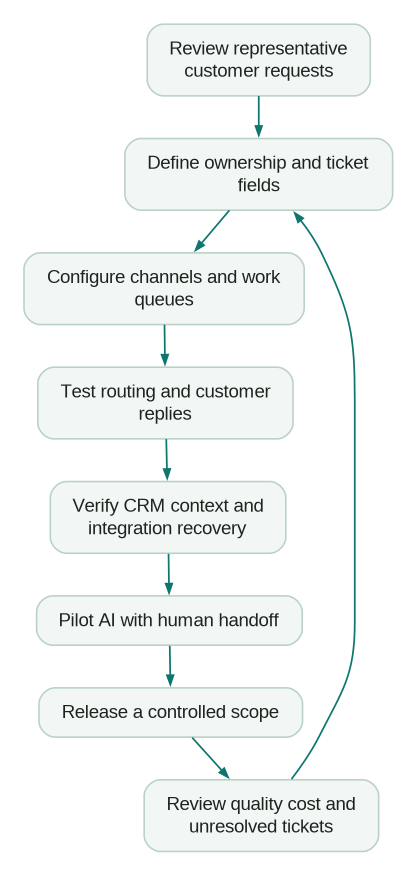
Read diagram as text
- Review representative customer requests to Define ownership and ticket fields.
- Define ownership and ticket fields to Configure channels and work queues.
- Configure channels and work queues to Test routing and customer replies.
- Test routing and customer replies to Verify CRM context and integration recovery.
- Verify CRM context and integration recovery to Pilot AI with human handoff.
- Pilot AI with human handoff to Release a controlled scope.
- Release a controlled scope to Review quality cost and unresolved tickets.
- Review quality cost and unresolved tickets to Define ownership and ticket fields
Use acceptance gates rather than an invented standard timeline:
- Approve the request types, owners and ticket-field definitions.
- Prove channel intake and ordinary-user access.
- Run routing and macro tests, including reassignment and missing values.
- Confirm CRM context, failed writes and recovery.
- Pilot AI with escalation, billing and stop conditions.
- Train the support team and release a limited scope with an incident owner.
Estimate the time for those gates against migration volume, channels, languages, approvals and custom development. Keep unresolved tests visible in the release decision.
Make release decisions depend on evidence. A target date is useful for coordinating people, but it cannot prove that urgent tickets reach the on-call team.
What must pass before Zendesk goes live?
A representative ticket must reach the correct owner, receive a valid response and preserve its context through integrations and AI handoffs. Run these checks with ordinary roles and permitted test data.
Checklist
- Every channel creates the expected ticket with a reachable customer identity.
- Ordinary, urgent and ambiguous requests reach a named owner.
- A deliberate agent reassignment survives subsequent updates where intended.
- Required fields can be completed honestly at the stage they are requested.
- Active macros reflect current policy and handle missing optional values.
- Customer notifications occur at the intended moments without duplication.
- The selected HubSpot connector moves the required objects and associations.
- Integration failures are visible and have a safe retry or recovery procedure.
- Affected Essential and legacy AI agents have completed a tested migration before their January or early February 2027 migration window.
- Human escalation preserves context and remains available when AI stops.
- AI billing model, allowance, overage behaviour and owner are recorded.
- Seat changes have been checked across all affected products and add-ons.
Keep the test cases after launch. Reuse them when changing routing, adding a channel, migrating an AI agent or replacing a connector. A small set of representative tickets is more valuable than a configuration checklist that nobody can connect to actual customer behaviour.
At Martechdevs, we connect CRM, product and billing data to the customer workflows your team needs to run. Start with the free AI readiness checklist, or request a detailed scope for the Zendesk repair. If the next step is automation, an AI assistant built around your approved workflows needs the same identity, access and handoff tests.
Keep reading
Browse all CRM & Lifecycle guides
 CRM & Lifecycle
Zendesk and Intercom Migration: Move Conversations and Attachments Safely
Move Zendesk tickets or Intercom conversations with their attachments, authors and private notes. Compare import limits and use a cutover acceptance checklist.
Jafrin Akter AloLast updated 12 min read
 CRM & Lifecycle
Salesforce Zendesk Integration: 8 Checks for Missing or Wrong Data
Diagnose Salesforce Zendesk sync failures with eight checks for permissions, matching, case creation and stale context, plus a practical reconciliation query.
Jafrin Akter AloLast updated 14 min read
 CRM & Lifecycle
Zendesk Jira Integration: Setup and 6 Problems to Fix
Set up Zendesk Jira integration, fix missing issues and field updates, control comment visibility, and verify the support-to-engineering handoff.
Jafrin Akter AloLast updated 12 min read
Customer support automation
See the implementation scope, deliverables and acceptance checks.
Questions people ask
How long does a Zendesk implementation take?
Scope and acceptance work determine the schedule. Estimate channels, ticket model, migration, integrations, access review, AI handoffs, training and rollout separately. A single inbox has different dependencies from a multilingual migration with custom applications. Use the pilot's unresolved test cases to refine the estimate instead of treating a vendor demo or a successful import as readiness.
Why don't changes made in another tool show up in Zendesk straight away?
The tool may queue or batch writes, the API may reject a request, or another rule may overwrite a successful change. Check the actual response, ticket state and event history. For a 429, respect Retry-After and inspect both account and per-ticket limits. Refreshing a cached external screen does not prove that Zendesk received or retained the update.
How do we fix a messy existing setup?
Preserve the active configuration, then choose a high-impact failure that can be reproduced with a test ticket. Trace routing, fields, replies and connected systems before changing rules. Repair one workflow, test its ordinary and exceptional cases, and release a controlled change. Keep essential customer notifications and human escalation working while retiring duplicate rules or outdated content.
When do Zendesk's legacy AI agents have to be migrated?
Zendesk starts forced migration of remaining Essential AI agents in January 2027 and legacy agents in early February 2027, with exceptions. Previously purchased Advanced accounts are outside this notice. Identify the actual experience in your account and test its replacement before the relevant window. Existing overage settings remain, while resolution usage and associated costs can change.
Should we hire a Zendesk implementation partner?
Bring in help when migration, integrations, permissions or unclear ownership exceed what the internal team can maintain. Ask for a workflow map, configuration record, test cases, recovery procedure and administrator handover. Compare a partner, a hire and a freelancer against those deliverables. Decide who owns changes after launch before accepting the proposal.
Sources
- Zendesk: Ticket trigger behaviour.
- Zendesk: Organise and manage macros.
- Zendesk: Essential and legacy AI agent migration.
- Zendesk: Identify the automated-resolution model.
- Zendesk: Automated resolution tiers.
- Zendesk: Earlier automated-resolution platform.
- Zendesk: Support for HubSpot integration.
- HubSpot: Zendesk Data Sync app.
- Zendesk: Add agent seats.
- Zendesk: API rate limits.
- Retool: Configure query run behavior.
- Retool: Configure triggers in Retool Workflows.

Written by
Jafrin Akter AloData Engineer and Co-founder at Martechdevs and Growth and Analytics Partners
Jafrin writes practical guides to marketing technology, customer data, analytics and AI workflows. Martechdevs is a Growth and Analytics Partners company.