Zendesk AI Pricing: Automated Resolutions, Allowances and What a Month Costs
Data Engineer and Co-founder at Martechdevs and Growth and Analytics Partners
Last updated 16 min read
Zendesk AI pricing depends on your account’s billing model. The earlier model has included automated resolutions, then published rates of USD 1.50 committed or USD 2 pay as you go. Newer resolution tiers use a currency allowance and account-specific rates. Copilot is a separate seat charge. Identify the model before forecasting a month or comparing another AI agent.
The difficult part is matching a resolved customer request to the unit on your invoice. A forecast can be mathematically correct and still use the wrong allowance, expiry period or definition of a resolution. This guide separates those decisions. For the underlying help desk subscription, see every Zendesk plan and add-on price.
Which AI billing model is your Zendesk account on?
Check the account’s allowance dashboard and order form first. A public rate card does not establish which model, transition date or negotiated price applies to your account.
Zendesk introduced resolution tiers on 18 May 2026. Its upgrade guidance describes 30 days’ notice, negotiated pricing during the transition and new rates at an applicable upgrade or renewal. Its sample invoices contain placeholder prices. Do not copy those numbers into a forecast.
| Account evidence | Budget unit | What finance needs |
|---|---|---|
| Earlier automated resolutions platform | A resolution allocation and any purchased packs | Remaining allocation, expiry and excess-resolution rates |
| Resolution tiers and allowances | Currency spent on chargeable resolutions | Monthly allowance, applicable tier rates and transition date |
| Forethought AI agents plan | Separately contracted allowance and usage | Its order form and overage commitment |
Only the account owner and billing admins can see the newer financial allowance dashboard. Ask them to reconcile it with the operational admin’s usage view before approving a pack or stop setting.
The commercial model also needs a working service model. An AI agent that cannot identify an account, read the relevant entitlement or pass the conversation to the right queue may turn a promising demo into extra handling work. Customer relationship management (CRM) and lifecycle implementation should establish those inputs and escalation rules before you expand coverage.
How much does an automated resolution cost on the earlier model?
The published earlier-model rates are USD 1.50 for committed resolutions and USD 2 for pay-as-you-go usage. Apply them only after confirming that your account still uses that model.
Earlier-platform allocations checked 18 October 2026. Units are resolutions per paid agent per month, pooled for the applicable annual allocation; these are not currency allowances.
| Earlier-platform plan | Included resolutions per agent/month | Important boundary |
|---|---|---|
| Team | 5 | Current Suite and Support plans |
| Growth or Professional | 10 | Applicable plan family |
| Enterprise | 15 | Current Suite and Support plans |
The default allocation is capped at 10,000 resolutions a year; light agents do not increase it. Legacy Support plans can have AI access without an included allocation. Allocations expire annually or at term end, with special handling for nonstandard terms. Committed packs start at 100 resolutions, and overage is billed monthly regardless of the subscription term. These details come from Zendesk’s earlier-platform documentation.
Public localized prices checked 18 October 2026. Resolution prices are per billable resolution; Copilot is per agent per month, paid yearly. Taxes and negotiated discounts are excluded.
| Published currency | Committed resolution | Pay-as-you-go resolution | Copilot seat |
|---|---|---|---|
| USD | 1.50 | 2.00 | 50 |
| EUR | 1.50 | 2.00 | 50 |
| GBP | 1.30 | Confirm GBP quote | 40 |
The US, German and UK pages support these figures. The UK page displays its pay-as-you-go figure in US dollars alongside a GBP committed rate. That is not evidence of a GBP 2 rate.
How do currency allowances change the calculation?
Use the account’s currency balance and contracted tier rates. Do not deduct an annual pool of resolution units from a monthly currency allowance.
Default allowances checked 18 October 2026. Amounts below are USD per paid seat per month, before the annual default-allowance cap.
| Plan family | Monthly default allowance per seat | Applies to |
|---|---|---|
| Team | 2 | Suite and Support |
| Growth or Professional | 5 | Suite |
| Enterprise or Enterprise Plus | 10 | Suite |
| Professional or Enterprise | 2 | Support |
The included allowance has a USD 5,000 annual cap; it is not a cap on your invoice. Unused monthly allowance does not carry forward, and light agents are excluded. Forethought AI agents plans have no default allowance; without Suite or Support, an allowance must be purchased through sales. These rules are in Zendesk’s allowance documentation.
For a larger account, use the dashboard’s actual available allowance and contract calendar. Do not assume that multiplying a monthly seat figure by twelve overrides the annual cap. Separate the included allowance from any purchased balance in your worksheet so that a promotional credit cannot silently become a recurring budget assumption.
Which conversations become billable resolutions?
Under the tier model, a verified resolution draws on the allowance; an assisted escalation or contained resolution does not. A conversation ending is only one step in deciding whether it is billable.
The tier definitions distinguish these outcomes:
| Recorded tier | What happened | Allowance impact |
|---|---|---|
| Assisted escalation | AI helped, then a human completed the work | No draw |
| Contained resolution | Conversation ended without a human request, but the verification check failed | No draw |
| Verified resolution | A large language model check confirmed resolution after the conversation ended | Chargeable |
For these evaluations, email ends 72 hours after the first email; messaging ends two hours after the first message, extendable to 72 hours through support; voice ends at hangup. Do not replace these channel windows with your own inactivity assumption.
On the earlier platform, only conversations that were not escalated are evaluated. Its documentation also warns that email AI agents need the appropriate automation trigger: otherwise human replies may be missing from conversation logs and resolutions can be counted incorrectly. Treat that trigger as a billing control, not just an integration detail.
Before a pilot, label a small test set yourself: successful self-service, unanswered question, requested human, human intervention and repeat contact. Compare those labels with recorded outcomes. Keep customer success and billing classification separate; a vendor’s verified result is useful evidence, but your team still needs to check whether the underlying problem stayed solved.
What happened to Answer Bot pricing?
Answer Bot used a different legacy meter, so an old bundle cannot be converted into modern AI-agent pricing by changing its name. Zendesk now calls its customer-facing automation AI agents; that is the product to investigate when searching for Zendesk chatbot pricing.
On legacy Support and Support Suite, a customer confirming that an article closed the request counted as a resolution; messaging Web Widget resolutions did not. Every 100 Answer Bot application programming interface requests counted as one resolution. Extra bundles lasted for the remaining contract term and renewed unless cancellation was arranged.
Zendesk’s historical illustration is a 50-resolution bundle bought in month ten of a twelve-month term: USD 50 for each of three remaining months, or USD 150. This is an example explaining a legacy commitment, not a current price offer. Keep old bundle obligations in the migration worksheet until the vendor confirms how they end or convert.
What changes when Essential and legacy AI agents migrate in 2027?
Zendesk schedules automatic migration of unmigrated Essential accounts in January 2027 and legacy AI agents from February 2027, with some exceptions. Previously purchased Advanced accounts are excluded from this particular notice.
Zendesk’s migration notice was announced on 23 June 2026 and put the old functionality into maintenance on 31 August. It warns that resolution counts and costs can change, while existing overage settings remain in place. Do not plan around an older removal date copied into a third-party article.
Export a baseline before migration. Compare matched issue types, brands and channels afterward, with contact volume and staffing recorded for each period. A holiday spike is not evidence that the new agent became more expensive per equivalent request. Review both the share classified as billable and the share that returns to a human later.
Use the Zendesk implementation checks to retest integrations, routing and escalation. Product migration and billing-model migration are separate changes; write down each effective date rather than assuming one automatically proves the other happened.
How much does Copilot add to the bill?
Copilot is a separate charge for assistance used by human agents. It does not replace the customer-facing AI-agent resolution budget.
The public annual-billing prices are in the currency table above. Zendesk’s add-on guide lists Copilot for Suite Professional and above, or Support with Knowledge Professional or above. Confirm how many seats your agreement requires; the public pages do not settle whether your proposed subset is purchasable.
For ten licensed seats at the published USD rate, the additional commitment is USD 500 per month equivalent, or USD 6,000 per year. Keep this as a separate line from autonomous resolutions, with its own adoption test: are the licensed agents using it, and does it reduce handling effort without increasing corrections?
Some eligible plans include limited Copilot features without the add-on: five pooled uses per agent per month, capped at 500 uses per instance. The limited-usage documentation explains that boundary. It is not the same entitlement as unrestricted paid Copilot access.
How do you forecast a normal month and a busy one?
Forecast billable outcomes from your pilot, then apply the correct allowance period. Ticket volume alone does not give you either number.
The examples below are hypothetical budgets, checked 18 October 2026. They exclude help desk seats, Copilot, tax, implementation and ongoing maintenance. They are not quotes from Zendesk or Martechdevs.
Earlier model: follow the annual pool through time
Assume ten Suite Professional agents, a fresh full-year allocation and 1,000 AI conversations each month. If 40% become billable, that is 400 resolutions per month and 4,800 per year. The included pool is 10 × 10 × 12 = 1,200. It runs out at the end of month three.
USD; twelve-month hypothetical with unchanged earlier-model rates. Committed cost assumes all purchased units are usable within their term.
| Period or event | Billable resolutions | Paid resolutions after allocation | AI usage cost |
|---|---|---|---|
| Months 1–3 combined | 1,200 | 0 | USD 0 |
| Months 4–12 combined | 3,600 | 3,600 | USD 5,400 committed or USD 7,200 pay as you go |
| One busy month after exhaustion | 600 | 600 | USD 900 committed or USD 1,200 pay as you go |
A busy month replacing a normal 400-resolution month adds 200 paid resolutions: USD 300 or USD 400. It does not receive another fresh 100-resolution monthly allowance. That distinction is why a monthly-average spreadsheet can hide the jump in invoices after the initial pool runs out.
Newer model: subtract currency, not resolution units
Assume the same ten Suite Professional seats have a USD 50 monthly default allowance. For illustration only, assume a negotiated rate of USD 1.50 per verified resolution. This is a modelling input, not a verified public tier price.
USD per month; hypothetical tier rate, checked arithmetic 18 October 2026. Both examples remain below the annual default-allowance cap.
| Month | Verified resolutions | Gross usage at assumed rate | After USD 50 allowance |
|---|---|---|---|
| Normal | 400 | 600 | 550 |
| Busy | 600 | 900 | 850 |
Twelve normal months would cost USD 6,600 after those monthly allowances. Replace the assumed rate and available allowance with the values from your account before using the forecast for approval.
Choose a commitment using the low-volume case
At the earlier public rates, buying N committed resolutions costs 1.50 × N. Paying for U actual resolutions as you go costs 2 × U. Commitment is cheaper when U exceeds 75% of N, assuming unused units expire without value. At exactly 75%, the two costs are equal.
For a 1,000-resolution pack, 600 used costs USD 1,500 committed versus USD 1,200 pay as you go. At 900 used, the same commitment saves USD 300. Use expected paid demand after the included allocation, not total AI volume, when deciding whether the pack is likely to be consumed.
A higher resolution rate can increase the AI invoice while reducing handling work. Judge that tradeoff against repeat contact, customer impact and actual staffing decisions. The account context an AI agent needs determines which requests you can safely include in the pilot; it is not a guarantee of savings.
How do you stop overage without stranding customers?
Choose a stop only when a staffed human queue can absorb the work. Otherwise, your budget control can become an unanswered-customer problem.
On the allowance model, allowing overage is the default. Disabling it pauses paid AI at the limit and routes work to humans; Forethought plans do not permit that change. Zendesk’s usage guidance describes warnings at 80% and again after the limit is exceeded. A warning is not a hard spending cap.
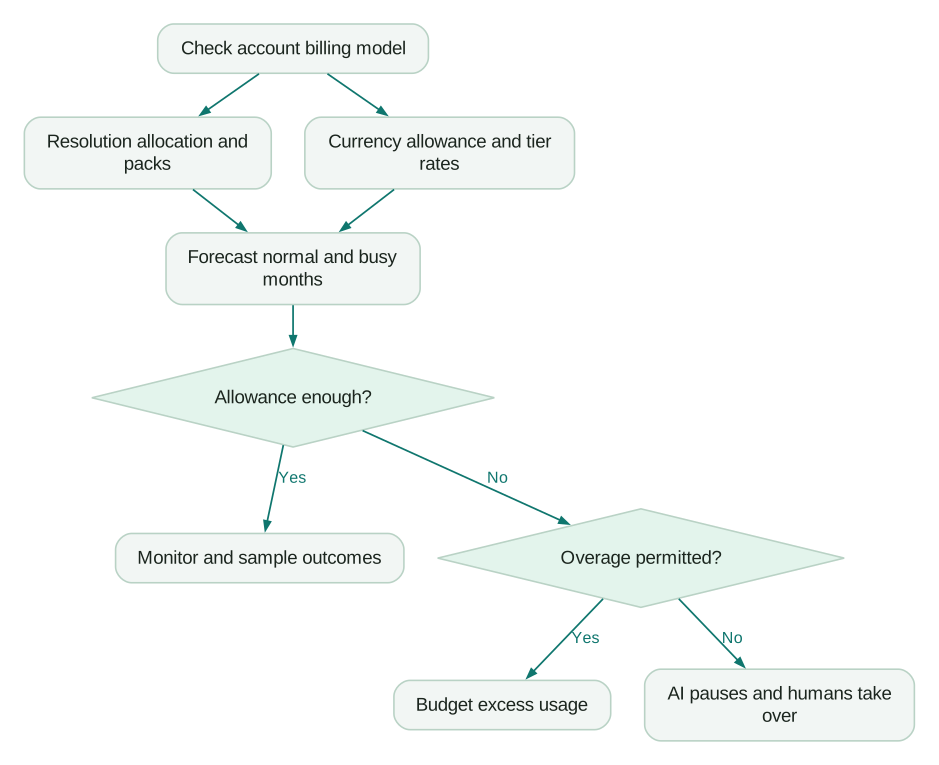
Name an owner for the alert and a deputy for absence. Decide what they can change without waiting for a procurement meeting. For a forecast spike, the options might be adding budget, limiting a low-value automation or scheduling more coverage. Use the account’s actual permitted controls, especially on Forethought agreements.
Then test the AI handoff before launch: an unresolved request should reach a named queue with identity, issue summary, attempted steps and relevant account context. Measure queue age during the test. A successful routing event does not prove the receiving team has capacity.
How do you audit charges against real conversations?
Reconcile the billable record to a conversation, then inspect whether the customer’s issue was resolved. Counting rows alone cannot establish service quality.
The resolution-usage export includes ticket ID, tier, channel group, brand, resolution timestamp and cost. The operational dashboard itself does not display prices. Deleting a ticket does not reverse consumption; disputed tier assignments go through Zendesk Customer Support. Keep the source record until the issue is investigated rather than trying to “fix” the invoice by removing evidence.
A practical monthly review has four steps:
- Save the export, invoice and effective price agreement for the same period. Record any transition date, credit or pack purchase separately.
- Reconcile counts and costs by tier, channel and brand. Investigate missing or repeated identifiers before assuming they represent extra customer requests.
- Sample billed cases across common, expensive and escalated issue types. Read the answer, attempted action and later customer contact; record why your assessment differs from the billing classification.
- Send disputed examples with the ticket identifier, timestamp, expected classification and supporting conversation evidence. Track the vendor’s decision separately from an assumed credit.
Use AI answer and action traces to connect the customer-facing exchange with the context and actions behind it. Keep the audit narrow enough to repeat monthly: a named sample owner and a short unresolved-issues log are more useful than an abandoned dashboard.
Is Zendesk AI cheaper than Fin running on Zendesk?
It depends on the account model, committed volume and which outcomes each product bills. A lower unit price is not a like-for-like service comparison.
The Fin for Zendesk guide lists USD 49 monthly including 50 resolutions, then USD 0.99 each, with no Fin seat charge and an unspecified minimum resolution commitment. Its general pricing page presents a broader per-outcome offer. Confirm the Zendesk-specific order form rather than assuming that either headline removes the minimum commitment.
The following is arithmetic for an identical assumed billable count, not a prediction that both products will classify the same conversations identically. It uses the earlier Zendesk model, ten Suite Professional agents, a fresh 1,200-resolution annual allocation and unchanged rates for twelve months.
USD monthly equivalents over twelve months; checked 18 October 2026. Zendesk invoices can rise after the annual pool is exhausted. Fin figures exclude any additional minimum-commitment obligation. Existing Zendesk seats are required in both cases and excluded; so are Copilot and deployment costs.
| Assumed billable resolutions/month | Zendesk committed | Zendesk pay as you go | Fin for Zendesk |
|---|---|---|---|
| 300 | 300.00 | 400.00 | 296.50 |
| 3,000 | 4,350.00 | 5,800.00 | 2,969.50 |
For the first row, Zendesk’s annual paid count is 300 × 12 − 1,200 = 2,400. Fin’s monthly illustration is 49 + (300 − 50) × 0.99 = 296.50. The second row uses the same formulas. A new-tier Zendesk account needs its own currency-allowance calculation instead of these columns.
Run both candidates against the same issue mix and approved knowledge. Ask each vendor to classify resolved requests, requested humans, configured handoffs, reopened cases and failed actions under the exact deployment you are buying. Intercom-hosted outcome rules should not be silently applied to Fin on Zendesk.
Use these scenario decisions:
- Stay with native Zendesk AI when its tested workflows, escalation and account-specific cost meet your requirements with less maintenance.
- Pilot Fin on Zendesk when response quality or deployable workflows justify an additional integration, and its minimum commitment fits the low-volume case.
- Delay either expansion when identity, knowledge or human handoff is unreliable. A larger usage commitment does not repair those failures.
The Intercom pricing guide covers Fin’s wider commercial context. Compare support AI billing units before dividing total cost by outcomes, and use Intercom vs Zendesk if the underlying help desk is also under review.
What should the trial and second-year budget include?
Use the trial to test workflow quality, then budget the next year from the paid agreement rather than extending an introductory offer indefinitely.
Zendesk’s standard 14-day trial includes Copilot, with AI access for evaluation and capabilities that can vary. Its startup programme describes a six-month baseline and partner-linked extensions. Eligibility, seat count and offer length vary; get the approved terms in writing. Neither a trial nor startup acceptance proves unlimited production AI usage.
For year two, remove one-time setup but retain knowledge maintenance, integration ownership, outcome sampling and any continuing support contract. Restore full seat and add-on charges when a promotion ends. Reforecast paid resolutions using the new allowance calendar, and replace an expiring tier rate with the renewal quote.
For example, the earlier-model 4,800-resolution annual workload above still implies USD 5,400 committed usage only if the same allocation and rate remain available. Ten paid Copilot seats add USD 6,000, giving USD 11,400 for those two AI lines before help desk seats and operating work. A migration to currency allowances invalidates that shortcut; calculate the renewed agreement instead.
What should you check before approving the AI budget?
Approve the commercial commitment and the operating fallback together. Finance needs a bounded bill; customers need a working next step when automation stops or fails.
Checklist
- Record the account billing model and its effective date.
- Confirm paid seats, available allowance and expiry from the account.
- Save applicable rates, commitment minimums and renewal terms.
- Forecast a normal month, busy month and lower-than-expected adoption.
- Check pack utilization after the included allocation is consumed.
- Confirm permitted overage controls and staff the fallback queue.
- Assign usage-alert owners and test escalation with real account context.
- Validate email intervention detection and channel timing.
- Schedule migration checks and a monthly outcome sample.
- Rebuild the budget when promotions or billing models change.
If the uncertain part is the context, integration or measurement rather than the calculator, start with a free martech AI audit. For a defined implementation, request a scoped CRM and lifecycle quote covering the data access, escalation and evidence needed to operate it.
Questions people ask
How should finance handle a switch between billing models midyear?
Keep two forecast periods with the vendor-confirmed effective date between them. Reconcile the old allocation and purchased packs before starting the currency-allowance calculation. Ask how unused commitments, credits and already-billed usage are treated; do not invent a conversion rate. Save that written answer with the invoice so the next budget owner can reproduce the change without relying on an old spreadsheet.
How should we allocate a shared AI bill across brands?
Use an agreed allocation rule before comparing brand performance. Direct usage can follow the export’s brand and cost fields; shared commitments, credits and maintenance need a separate policy. Keep unused commitment visible instead of hiding it inside another brand’s unit cost. Review the rule when routing changes, because a brand label alone may not identify who benefited from the work.
Which test conversations should remain outside a live pilot?
Keep deliberately broken, repetitive and destructive scenarios in the supported testing environment. Zendesk excludes documented legacy-agent tests in Admin Center from counts; confirm your deployment’s testing terms. Production monitoring is different from a test feature. Label any authorized live test and its expected billing treatment so it does not distort your real customer sample or forecast.
Can we count reduced handling time as cash savings immediately?
No. Recovered agent time is capacity until you identify an actual spending change, such as avoided overtime or a hire that is no longer needed. Keep that economic value separate from invoice savings. Include the human effort spent reviewing answers, maintaining knowledge and handling reopened requests, then compare those costs with the work your pilot demonstrably removed.
Should Copilot and autonomous AI share one success target?
Give them related but separate targets. Copilot should improve the work of licensed human agents, while autonomous AI should complete appropriate requests with an acceptable escalation path. Track adoption and handling effort for the former, and durable resolution plus fallback quality for the latter. Combining them into one automation percentage can hide an unused seat purchase or extra human correction work.
Sources
- Zendesk: US pricing and trial details (accessed 18 October 2026).
- Zendesk: UK pricing (accessed 18 October 2026).
- Zendesk: German pricing (accessed 18 October 2026).
- Zendesk: Earlier automated resolutions platform (accessed 18 October 2026).
- Zendesk: Automated resolution tiers (accessed 18 October 2026).
- Zendesk: Managing resolution allowances (accessed 18 October 2026).
- Zendesk: Upgrading to resolution allowances (accessed 18 October 2026).
- Zendesk: Managing resolution usage (accessed 18 October 2026).
- Zendesk: Essential and legacy migration dates (accessed 18 October 2026).
- Zendesk: Legacy Answer Bot resolutions (accessed 18 October 2026).
- Zendesk: Product add-ons (accessed 18 October 2026).
- Zendesk: Limited Copilot features and usage allowance (accessed 18 October 2026).
- Fin: Fin for Zendesk explained (accessed 18 October 2026).
- Fin: Pricing (accessed 18 October 2026).
- Zendesk: Startup programme (accessed 18 October 2026).

Written by
Jafrin Akter AloData Engineer and Co-founder at Martechdevs and Growth and Analytics Partners
Jafrin writes practical guides to marketing technology, customer data, analytics and AI workflows. Martechdevs is a Growth and Analytics Partners company.