
Zendesk Pricing: Seats, AI and the Full Operating Cost
Data Engineer and Co-founder, martechdevs
Last updated 8 min read
Zendesk pricing combines agent seats, optional products and usage charges, so the advertised seat price is only the starting point. For an accurate budget, identify your support package, confirm which AI billing model applies to your account, and model both normal demand and a busy month. Keep implementation and ongoing administration visible alongside software spend.
Last updated: 13 October 2026.
There is a particularly important complication in the current pricing: Zendesk documents both traditional automated-resolution billing and an evolved resolution-allowance model. A cost estimate can use genuine published numbers and still be wrong if it mixes the two.
This guide gives you a practical buying and forecasting method. Prices below are public USD list prices checked on the date above, not a negotiated quote or a claim about your existing contract.
What are the current published seat prices?
The public customer-service pricing page displays these prices per agent per month, paid yearly:
- Support Team: USD19.
- Suite Team: USD55.
- Suite Professional: USD115.
- Suite Enterprise + Copilot: contact sales.
The comparison section lists monthly-billed prices of USD25, USD69 and USD149 respectively for the first three plans. Featured annual-billing add-ons include Copilot at USD50 per agent per month, Workforce Engagement Bundle at USD50, and Contact Center at USD83. Zendesk pricing.
Annual billing describes a commitment and payment basis, not permission to cancel after a month at the displayed monthly equivalent. Confirm taxes, currency, term, discounts and renewal conditions in the actual order.
For an existing account, inspect its subscription summary instead of replacing the contract with today's list price. Zendesk's Admin Center shows subscribed products, plan details, billing cycle and full-agent seat quantities; self-service accounts also show item costs. Managing subscriptions.
If the price is difficult to interpret because several systems supply customer and billing context, CRM and lifecycle implementation can help define the required service operation before buying additional capacity.
How should you choose the package before calculating seats?
Write one paragraph describing the service you intend to run: channels, operating hours, specialist queues, response commitments and the systems agents must access.
An email-led support operation and a contact centre can require different products even with the same headcount. Buying the cheapest plan first and adding every missing requirement later makes cost comparison harder.
Separate requirements into three groups:
- Necessary to serve customers safely and meet existing commitments.
- Useful improvements whose value you can test.
- Features that sound attractive but have no current owner or use case.
Use the first group to find the minimum viable package. Evaluate the second through a pilot. Leave the third outside the initial proposal.
Specify roles as well as headcount. A frontline agent, a manager reviewing reports and an occasional internal collaborator may require different access. Have Zendesk confirm the permitted role and seat treatment for each proposed user; do not assume a limited role can perform full-agent work.
Support customer context helps identify the data agents need. Paying for a richer workspace will not repair an integration that supplies stale subscription status.
Why must you identify the AI billing model first?
Zendesk's documentation explicitly distinguishes accounts using traditional automated-resolution pricing from accounts using resolution usage and resolution allowance dashboards. The documentation also describes notices before an account transitions. Check the model shown in your Admin Center and service order. Account-specific resolution documentation.
Do not add an old included-resolution count to a new currency allowance. They are different budget structures.
The transition documentation warns that prices shown in its example invoices are placeholders. It also says tier pricing for new accounts during the transition is negotiated. Those illustrations cannot establish your unit price. Resolution allowance transition.
Ask for a written answer to these questions:
- Which model will the account use at purchase?
- Will it change during the proposed contract?
- What usage or currency is included?
- What is the committed rate and what is the overage rate?
- Which channels or AI products have separate treatment?
- What happens to unused allowance?
- Where can billing and support owners inspect the same underlying usage?
A proposal without these answers is incomplete even if it has a total annual price.
What does the resolution-allowance model count?
The current tier documentation distinguishes assisted escalation, contained resolution and verified resolution. Assisted escalation and contained resolution do not consume the allowance described there. Verified resolution requires the interaction to pass the platform's verification process. The evaluation window depends on the channel. Automated resolution tiers.
That is a billing definition. Your operational definition of a solved customer problem may also consider repeat contact, reopenings, incorrect actions and satisfaction.
Under the allowance model, Zendesk documents a currency pool with plan-dependent defaults. For example, Suite Professional includes USD5 per paid agent seat per month, while Suite Enterprise includes USD10. Light agents are excluded from that allocation calculation. Monthly defaults do not carry over, and the documented maximum default allowance is USD5,000 per year. Check the account's subscription for its actual allowance. Managing resolution allowances.
Avoid turning those defaults into a promised number of resolutions without the applicable rates. If a quote uses different rates by channel or tier, the same monetary allowance can support different volumes.
For a multi-brand business, record which brand generates the usage. A shared budget can hide a fast-growing brand until another team's planned capacity disappears.
A worked seat and AI budget
Consider an illustrative team with ten full agents evaluating Suite Professional under annual billing.
Its base seat cost is ten multiplied by USD115, or USD1,150 per month equivalent. Across twelve months, that is USD13,800. Adding Copilot for all ten at the published annual-billing rate contributes USD500 per month equivalent, making the combined seat-related total USD19,800 per year.
This calculation assumes those products are bought separately at the displayed list rates. A negotiated bundle can differ.
Now keep the AI usage calculation in a separate worksheet. Suppose the account uses the allowance model and has the documented Suite Professional default, giving ten multiplied by USD5, or USD50 of monthly default allowance.
Do not subtract USD50 from a count of conversations. Apply it to the monetary usage charge under the contract.
For illustration only, imagine the confirmed proposal prices a particular category of billable resolutions at USD1.20 each and the forecast is 800 such resolutions in a month. Gross usage would be USD960. After the assumed USD50 default, USD910 remains to be funded by committed allowance or overage.
USD1.20 is a hypothetical rate for teaching the calculation, not a Zendesk price claim. Replace it with the rate and commercial treatment on your own proposal.
If a busy month produces 1,200 of those outcomes, gross usage becomes USD1,440 and the amount beyond the same default becomes USD1,390. The additional 400 outcomes increase gross usage by USD480.
The point is to show sensitivity to demand. A single average-month figure cannot explain the effect of seasonal peaks or a newly automated issue type.
What happens when you stop overage?
A budget control can move work rather than remove it.
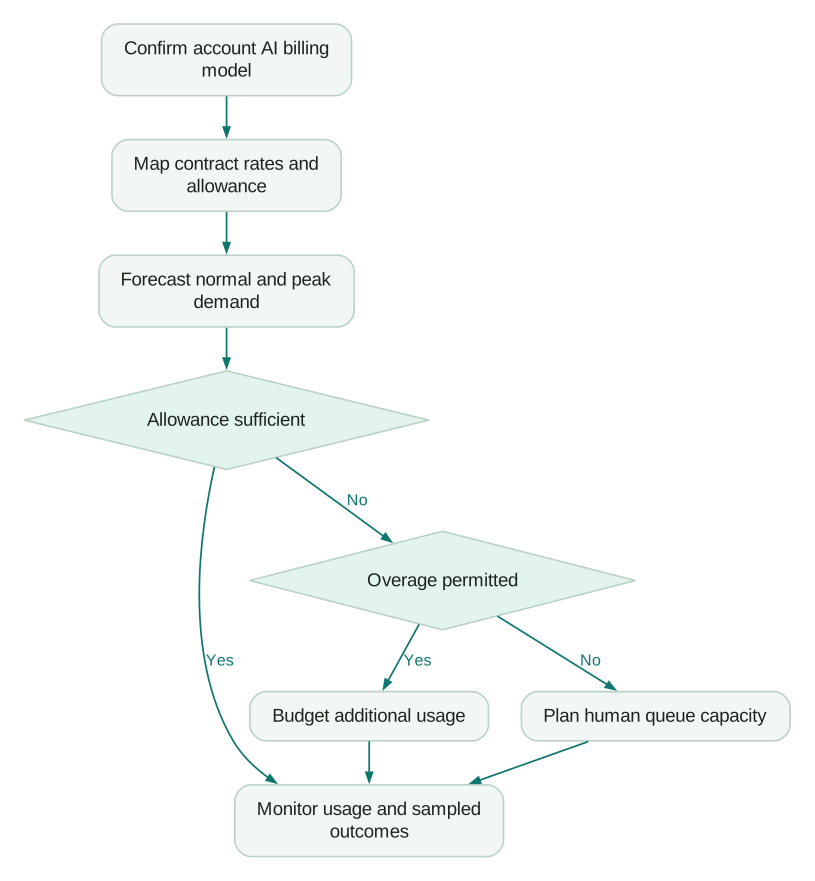
For applicable allowance accounts, Zendesk documents an option to pause functionality requiring paid resolutions when the allowance runs out. More requests then reach human agents. Its documentation notes a different restriction for Forethought plans, where the overage option cannot be changed in the same way. Allowance and overage controls.
Before selecting a hard spending boundary, model the support consequence. Who receives additional requests, how long can the queue grow, and which customer expectations change?
For example, an illustrative team might have capacity for 80 extra cases over a weekend. If pausing automation could send 250 additional cases to that team, a spending cap alone is not a complete operating plan.
Options include purchasing suitable additional capacity, restricting automation to selected issue types before the peak, staffing the fallback queue, or changing the service promise transparently. Decide before the limit is reached.
How do you audit the bill against actual work?
Keep finance and support connected through the resolution records.
Zendesk's resolution usage documentation describes inspecting contributing tickets and exporting records with information such as ticket ID, tier, channel group, brand, timestamp and cost. It also explains that deleting a ticket does not reverse consumption. Resolution usage management.
Use the export to investigate a sample, not only to total a column. Select cases across brands, channels and issue types. Compare the assigned category with the conversation and any backend action result.
If the vendor's assigned tier appears wrong, retain the identifiers and use the documented support process. Do not “clean up” the evidence by deleting the conversation.
Track a separate measure for customers who contact you again about the same issue. That makes the cost analysis useful to support leadership even when the billing calculation is technically correct.
Intercom versus Zendesk explains why cross-vendor outcome metrics need this additional care.
Which costs are easy to leave out?
The initial implementation may include identity mapping, historical migration, knowledge cleanup, routing design, integrations and reporting changes. These are project tasks with owners and acceptance criteria, not an unexplained setup percentage.
Ongoing costs include integration maintenance, knowledge ownership, workflow administration and reviewing automated actions. A platform can reduce repetitive replies while increasing the importance of those tasks.
Keep telephony, messaging and other consumption outside the base-seat total until the proposal states what is included. Zendesk publishes a wider set of add-ons with differing prerequisites and commercial arrangements. Product add-ons.
The Zendesk alternatives guide is useful if the complete operating model exceeds your budget. Compare an equivalent service operation, rather than a fully configured Zendesk proposal against another vendor's entry-level card.
What should you approve before signing?
Use a short commercial specification linked to the operating design.
Checklist
- Each required channel and capability maps to a named product and plan.
- Full agents and limited collaborators have explicit role definitions.
- Currency, billing term, taxes and renewal treatment are documented.
- The applicable AI billing model and transition terms are confirmed.
- Included allowance, committed usage and overage are separate line items.
- The peak-demand scenario includes human capacity if automation pauses.
- The team can trace sampled billed outcomes to underlying conversations.
- Implementation deliverables and recurring administration have owners.
A good quote should let you change an input and understand the consequence. If adding agents, adding a channel or increasing automation creates an unexplained jump, resolve it before committing.
Questions people ask
Is Zendesk billed per agent or per conversation?
The base subscription and AI usage can use different units. Build separate calculations and combine them only after confirming the package and account-specific terms.
Does the seat price include unlimited AI resolutions?
Do not assume that it does. Identify the billing model and included allowance, then apply the usage rates in your service order.
Can we use published example invoices to forecast AI pricing?
No. Zendesk labels prices in its transition examples as placeholders, so obtain the applicable commercial rate. The examples can explain structure without establishing price.
Will a spending cap reduce our support workload?
It may shift requests from automation to the human queue. Forecast that transfer before relying on the cap during a busy period.
Should we buy annual billing immediately?
Compare the commitment with the confidence you have in your operating design. A pilot that exposes missing integrations or channel requirements can be more valuable than locking in a discount before the scope is understood.
Sources
- Zendesk customer-service pricing. Accessed 13 October 2026.
- Zendesk: Managing subscriptions. Accessed 13 October 2026.
- Zendesk: Account-specific resolution resources. Accessed 13 October 2026.
- Zendesk: Transition to resolution allowances. Accessed 13 October 2026.
- Zendesk: Automated resolution tiers. Accessed 13 October 2026.
- Zendesk: Managing resolution allowances. Accessed 13 October 2026.
- Zendesk: Managing resolution usage. Accessed 13 October 2026.
- Zendesk: Product add-ons. Accessed 13 October 2026.
Written by
Jafrin Akter AloData Engineer and Co-founder, martechdevs
Jafrin Akter Alo is a data engineer and co-founder of martechdevs, where the team has delivered 74+ martech, data and growth stack implementations.