
Zendesk API Authentication: Fix 401s and Migrate API Tokens to OAuth
Fix Zendesk API authentication by identifying the credential type, account and failed request before changing permissions. A 401 usually means Zendesk cannot authenticate the caller; a 403 points to authorization. For new Support integrations, use OAuth. Existing API-token integrations also need a migration path because Zendesk is retiring those credentials, including the ability to create replacements.
On this page
An integration that reads tickets successfully today can still fail on its next token renewal. It can also write under the wrong administrator, or pass a read-only check while its production update remains forbidden. Treat authentication as a continuing contract between an application, an account, an identity and a set of permitted operations.
The repair should leave you with three concrete answers: which request failed, which identity it used and what evidence proves the replacement can run the intended workflow. The Zendesk implementation guide covers the wider customer support automation workflow; this guide concentrates on the credentials that keep its integrations running.
Can you still create or use a Zendesk API token?
Existing eligible accounts can use active Support API tokens during the migration window, but new-token creation ends on 27 October 2026. All remaining tokens stop working on 30 April 2027. Build replacements around OAuth instead of depending on another static token.
| Product deadline | What changes | Operational consequence |
|---|---|---|
| 28 July 2026 | Tokens unused for 30 days deactivate; another 60 days deactivated leads to deletion. Accounts created from this date cannot create or use API tokens | Infrequent jobs need attention even before the final retirement |
| 27 October 2026 | Existing accounts cannot create new API tokens through the interface or API | A broken credential cannot be replaced by creating another API token |
| 30 April 2027 | Remaining tokens are permanently deactivated | OAuth migration must already be complete |
These changes affect Support API tokens used by Ticketing, Help Center and Voice. They do not mean that every credential in Chat or Messaging is being removed. Check the actual authentication mechanism. Zendesk's retirement announcement.
Start with the jobs nobody notices until they fail: quarterly exports, a dormant recovery script, a webhook callback and a contractor-built sync. Record the owning team, destination account, credential reference, last successful business operation and replacement plan. A scheduled task that starts successfully is not evidence that its Zendesk request succeeded.
Is the failure a 401, a 403 or a different error?
Read the HTTP status and structured error from the exact failing endpoint. Do not rotate credentials for every unsuccessful response.
| Observed response | First check | Repair direction |
|---|---|---|
| 401 at a resource endpoint | Account subdomain, header scheme, missing credential, expiry or revocation | Correct authentication; renew only when the failure justifies it |
| 403 at a resource endpoint | User role, token scope, brand access, IP rules and account status | Correct the specific authorization gap |
400 with invalid_scope while requesting a token | Requested scopes versus the client's allowed scopes | Repair the grant request or approved client configuration |
| 429 | Response Retry-After and applicable endpoint limits | Wait as instructed; changing authentication does not add capacity |
Sandbox and production credentials are not interchangeable. An OAuth token sent as Basic authentication is also a different error from a valid Bearer token that lacks write access. Zendesk's 401 and 403 troubleshooting guide.
The client-scope rejection happens during token issuance; the resource-level 403 happens later. Keeping those stages separate avoids asking an administrator to widen permissions for a malformed token request. OAuth migration scope guidance.
Zendesk expresses Retry-After in seconds. Put rate-limit handling on its own path, with a bounded retry budget and queue visibility. Zendesk API rate limits.
Capture the method, sanitized path, account, status, error code, credential version reference and correlation ID. Exclude Authorization headers, client secrets and token response bodies from ordinary logs. Preserve enough evidence to reproduce the failure without turning an incident record into a credential store.
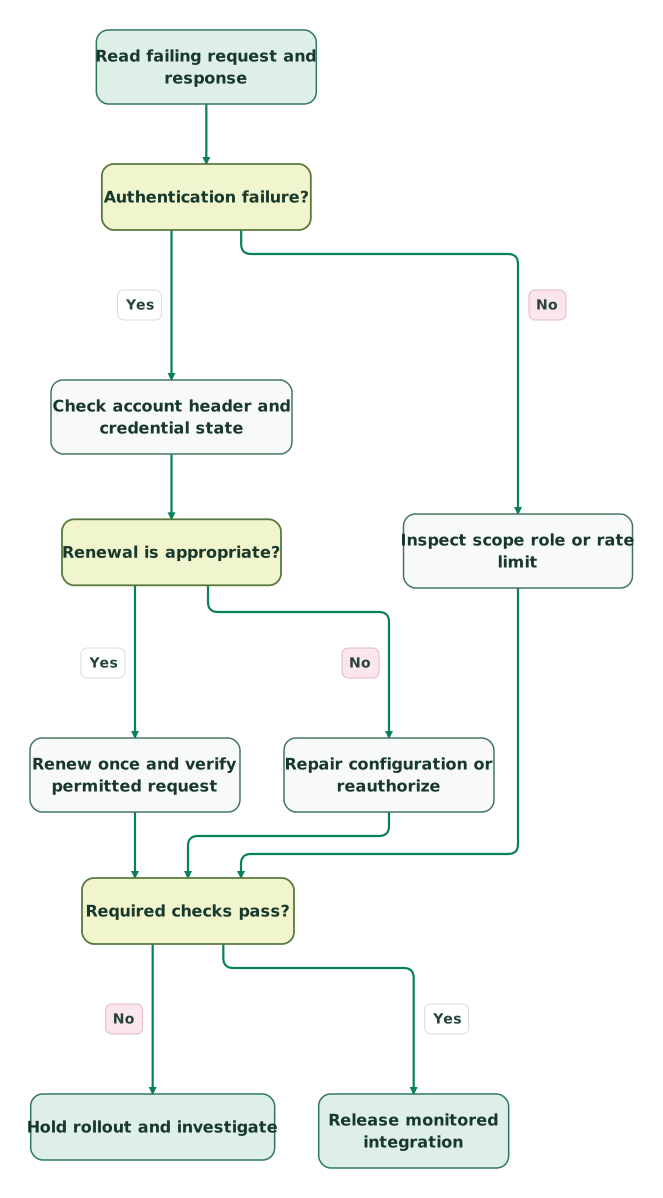
Read diagram as text
- Read failing request and response to Authentication failure?.
- Authentication failure? to Check account header and credential state: Yes.
- Check account header and credential state to Renewal is appropriate?.
- Renewal is appropriate? to Renew once and verify permitted request: Yes.
- Renewal is appropriate? to Repair configuration or reauthorize: No.
- Authentication failure? to Inspect scope role or rate limit: No.
- Renew once and verify permitted request to Required checks pass?.
- Repair configuration or reauthorize to Required checks pass?.
- Inspect scope role or rate limit to Required checks pass?.
- Required checks pass? to Hold rollout and investigate: No.
- Required checks pass? to Release monitored integration: Yes
Which OAuth flow should your integration use?
Choose the flow by the required acting identity and where the application can protect a secret. A background process does not automatically justify running as the administrator who created its client.
| Integration requirement | Suitable flow | Identity and renewal consequence |
|---|---|---|
| Act for a particular approving user | Authorization code | Requests use that user's access; expiring tokens use refresh-token renewal |
| Browser or mobile application without protected secret storage | Authorization code with PKCE | Public clients require PKCE; keep client secrets out of distributed code |
| Trusted server process without interactive approval | Confidential client credentials | Acts as the OAuth client's associated user; obtain another access token when it expires |
Client credentials do not return a refresh token. Authorization-code integrations must preserve the approving user's identity rather than assuming the client creator owns every resulting token. Zendesk OAuth flow guidance.
For internal automation, choose and document the account responsible for the integration before creating the client. Inspect the author shown on a test change and the access available to that account. An accurate audit trail matters when support staff need to distinguish a human reply from a sync-generated update.
A product distributed to multiple Zendesk customers requires global OAuth. An internal integration is a different deployment model. Do not solve a multi-customer installation by collecting customers' API credentials. Zendesk authentication requirements.
How do you request and use the right OAuth credential?
Create the appropriate OAuth client, request explicit resource scopes, then send its access token in a Bearer header. The grant endpoint is POST /oauth/tokens; the older POST /api/v2/oauth/tokens creation endpoint is no longer available. OAuth Tokens API notice.
In Admin Center, use Apps and integrations → APIs → OAuth clients. The grant's client_id is the client's Identifier, not an assumed numeric record ID. Register the exact callback for authorization-code flows and validate returned state before exchanging the code. OAuth client registration.
For a confidential internal service that only reads tickets, the grant request has this shape. Replace the placeholders through protected configuration; never commit actual secrets.
{
  "grant_type": "client_credentials",
  "client_id": "YOUR_CLIENT_IDENTIFIER",
  "client_secret": "YOUR_CLIENT_SECRET",
  "scope": "tickets:read",
  "expires_in": 1800
}
Send that JSON to https://YOUR_SUBDOMAIN.zendesk.com/oauth/tokens with Content-Type: application/json. Use the Zendesk account's actual subdomain and a trusted destination configuration. The grant response and subsequent API request are separate exchanges. Grant-type endpoint reference.
GET /api/v2/tickets.json HTTP/1.1
Host: YOUR_SUBDOMAIN.zendesk.com
Authorization: Bearer YOUR_ACCESS_TOKEN
Accept: application/json
Test a resource and operation that the approved scope actually covers. A convenient diagnostic endpoint requiring unrelated permissions can produce a misleading failure. Conversely, reading tickets does not demonstrate that ticket updates or user changes are permitted.
For an existing legacy API-token request, Basic authentication encodes email/token:API_TOKEN. The /token suffix belongs to the username. That format helps diagnose the old integration; it is not the target design for its replacement. OAuth access tokens belong in the Bearer scheme. Zendesk header formats.
How do scopes and user permissions work together?
An OAuth scope limits the token's permitted operations; it does not grant the underlying user additional Zendesk rights. Treat user access and token scope as separate checks. OAuth permissions.
Write an endpoint inventory before requesting scopes. For example, a job reading tickets and updating users has different needs from one posting ticket comments. Review the exact endpoint, HTTP method, resource population and business purpose. Then request the smallest supported set covering those operations.
Avoid a broad read write request simply because it makes a demonstration work. A tickets:read token is deliberately insufficient for ticket writes. Test that boundary as part of acceptance, using permitted test data and a harmless planned negative case. Resource-specific scopes.
Changing a client's allowed scopes does not retroactively restrict existing active or refreshed tokens. Reassess existing grants when tightening the policy; a saved client setting alone is not evidence that old access disappeared. Also check client-credentials ownership: those tokens stop working if the client creator loses the required access, whereas authorization-code tokens act for their approving users. Zendesk client configuration and ownership rules.
Use the CRM property-ownership method to decide which integration may change each business field. Permission to update a ticket is broader than permission, in your operating model, to overwrite a human's escalation decision.
How should an integration handle token expiry and rotation?
Schedule renewal before expiry and serialize credential replacement. Authorization-code refresh rotates both tokens and invalidates the old pair; client-credentials renewal requests another access token with the client credentials. Grant-type lifecycle.
New OAuth clients created on or after 30 April 2026 default to a 30-minute access token and 30-day refresh token where that flow issues one. Older clients require an explicit access-token expiry to obtain refresh behaviour. Do not infer the lifecycle from the existence of an OAuth client alone. Zendesk migration guide.
Zendesk also specifies 1 April 2027 as the refresh-flow adoption deadline for existing local, non-global OAuth clients. That is a separate migration from Support API-token retirement. OAuth application requirements.
The following Python helper validates a token response before it becomes a local credential lease. It accepts only the two initial grant flows covered here and requires an exact scope match to the application's approved set. A 60-second renewal margin and a two-day maximum accepted lifetime are this helper's explicit limits. The function sends no requests and does not establish whether Zendesk will authorize an endpoint.
from dataclasses import dataclass, field
from math import isfinite
from typing import Optional

@dataclass(frozen=True)
class TokenLease:
    access_token: str = field(repr=False)
    refresh_token: Optional[str] = field(repr=False)
    renew_at: float

def token_lease(payload, *, expected_scopes, grant, received_at):
    if grant not in ("authorization_code", "client_credentials"):
        raise ValueError("unsupported grant")
    if not isinstance(payload, dict):
        raise ValueError("token response must be an object")
    if (not isinstance(expected_scopes, frozenset)
            or not expected_scopes
            or any(not isinstance(s, str) or not s or any(c.isspace() for c in s)
                   for s in expected_scopes)):
        raise ValueError("provide a nonempty approved scope set")
    scope = payload.get("scope")
    if not isinstance(scope, str) or set(scope.split()) != expected_scopes:
        raise ValueError("returned scopes differ from approved scopes")
    token_type = payload.get("token_type")
    if not isinstance(token_type, str) or token_type.lower() != "bearer":
        raise ValueError("expected a Bearer token")
    access = payload.get("access_token")
    refresh = payload.get("refresh_token")
    def credential_ok(value):
        return (isinstance(value, str) and bool(value)
                and value.isascii() and all(33 <= ord(c) <= 126 for c in value))
    if not credential_ok(access):
        raise ValueError("invalid access-token shape")
    if grant == "authorization_code" and not credential_ok(refresh):
        raise ValueError("expiring authorization-code flow needs a refresh token")
    if grant == "client_credentials" and refresh is not None:
        raise ValueError("unexpected refresh token for client credentials")
    ttl = payload.get("expires_in")
    if type(ttl) is not int or not 300 <= ttl <= 172800:
        raise ValueError("expires_in must be an integer from 300 to 172800")
    if (type(received_at) not in (int, float)
            or not 0 <= received_at <= 1000000000000
            or not isfinite(received_at)):
        raise ValueError("received_at must be a finite timestamp from 0 to 1e12")
    return TokenLease(access, refresh, received_at + ttl - 60)
Supply a timestamp from your controlled application clock immediately after the response. The helper's timestamp ceiling of 1e12 is a local input guard. It suppresses secrets in its object representation, but that does not encrypt storage or make arbitrary logging safe. Store credentials in protected storage and persist the actual refresh-token expiry separately when supplied.
With received_at=1000 and expires_in=1800, this policy schedules renewal at 2740, sixty seconds before the calculated expiry. A token response without the expected scope, an empty credential or a Boolean masquerading as a numeric lifetime is rejected before the application adopts it.
For multiple workers, put a lock around renewal for the same credential record. Read the current generation under that lock, renew once, then persist the new pair and increment the generation before workers resume. A compare-and-swap write prevents an old worker from overwriting newer credentials, but does not prevent two remote refresh attempts; the lock must cover the exchange too.
If the network fails after Zendesk may have rotated the pair, repeatedly submitting the old refresh token is not recovery. Hold dependent work, inspect the durable credential record and recover authorization if the replacement cannot be retrieved. Keep queued business operations separate from the credential-renewal transaction.
A 401 whose error body identifies invalid_token can justify one bounded renewal attempt. A second failure needs investigation. A 403 needs an access review, and a failed write with an uncertain outcome needs reconciliation before replay. Zendesk renewal guidance.
What must pass before you retire the old credential?
Prove renewal, restricted access and the business result, then remove the old credential from every consumer. Successful token issuance alone is not a cutover gate.
If the credential serves a replacement project, check the Zendesk export and migration requirements before retiring source access.
| Acceptance case | Expected result | Evidence to retain |
|---|---|---|
| Approved read | Intended record is returned under the correct account | Sanitized request, credential version and record ID |
| Approved write | Only the intended field changes under the intended actor | Before/after state and audit attribution |
| Deliberately excluded operation | Access remains denied | Status and approved scope/role matrix |
| Expired access token | Correct flow renews, then resumes a bounded operation | Renewal generation and subsequent response |
| Two workers need renewal | One coordinated exchange; stale state cannot overwrite the replacement | Lock and generation test results |
| Failed renewal or missing replacement | Work pauses visibly without losing queued operations | Alert, queue state and recovery owner |
| Old credential removed | Every scheduled and event-driven consumer uses the replacement | Consumer inventory and monitored executions |
Run these tests against the integration's actual account and least-privileged operating identity. Use an explicit test record for writes, check downstream notifications first and inspect the resulting Zendesk history. A test that only asserts HTTP 200 misses unintended field changes and attribution.
For a webhook that calls back into Zendesk, identify where token renewal will run. A static header field is not an automatic renewal mechanism. Zendesk points to action flows or middleware for applicable use cases; its announced future native webhook OAuth support should not be treated as an already delivered feature. Webhook migration guidance.
Checklist
- Every credential consumer has an owner and destination account.
- Grant flow matches the required identity and secret-storage environment.
- Actual granted scopes and user permissions cover only approved operations.
- Renewal and concurrent-worker tests pass.
- Failure alerts preserve useful context without exposing credentials.
- Queued writes have a reconciliation path for uncertain outcomes.
- Infrequent jobs have been exercised before the old credential is retired.
- Cutover does not depend on creating another retiring API token.
If several systems share one undocumented credential, start with the $99 martech audit. Martechdevs' CRM and lifecycle integration work can map those dependencies, implement renewal and validate the support workflow before the old access disappears.
Keep reading
Browse all CRM & Lifecycle guides
 CRM & Lifecycle
Zendesk Implementation: What Goes Wrong and How to Fix It
Fix Zendesk routing, fields, macros, CRM sync and AI handoffs. Includes the 2027 AI agent migration dates, AI billing checks and a launch checklist.
Jafrin Akter AloLast updated 15 min read
 CRM & Lifecycle
Zendesk AI Pricing: Automated Resolutions, Allowances and What a Month Costs
Check which Zendesk AI billing model applies, compare resolution allowances and Copilot, and forecast normal months, busy months and renewal costs.
Jafrin Akter AloLast updated 16 min read
 CRM & Lifecycle
Zendesk Pricing in 2026: Plans, Add-Ons, AI Charges and Worked Bills
Zendesk costs $19 to $115 per agent a month billed yearly, $25 to $149 monthly, plus AI and add-ons. Compare every plan, GBP and EUR prices and worked bills.
Jafrin Akter AloLast updated 17 min read
Customer support automation
See the implementation scope, deliverables and acceptance checks.
Questions people ask
Can I recover an API token that has already been deleted?
A permanently deleted API token is not a credential you can recover by fixing its header. Use the integration inventory to find every consumer, then configure OAuth and replace the stored reference. If a token is only deactivated, check its actual status and applicable grace period, but keep the migration focused on a supported replacement rather than extending dependency on the retiring token.
Can a Zendesk API token be restricted to one agent?
Pairing a Support API token with an agent email does not bind that credential exclusively to the agent. Zendesk warns that these tokens can impersonate account users, including administrators. OAuth gives you an identity-and-scope model, but you still need to verify the acting user's permissions and the token's granted operations. Avoid sharing one broad credential between unrelated integrations.
Why does the request work in a server script but fail in a browser?
Browser requests add cross-origin restrictions and a different secret-exposure boundary. Zendesk supports OAuth-authenticated CORS requests, while API-token authentication does not support that route. Use the appropriate public-client flow or a protected backend. Do not place a confidential client secret in browser code merely because the equivalent server request succeeded, and inspect browser-specific errors separately from API authorization failures.
Does a successful token response prove that all CRM sync operations will work?
No. Token issuance proves that the grant succeeded, not that every endpoint, record or business operation is authorized. Test each required read and write with the intended operating identity. Include a prohibited operation that should remain denied, inspect the resulting actor and field changes, and confirm that downstream automation did not produce duplicate messages or overwrite a human decision.
Should we create one OAuth client for all our internal Zendesk jobs?
Separate clients are useful when jobs have different owners, permissions, environments or retirement schedules. They let you change one integration without coupling every consumer to the same credential lifecycle. Keep the design maintainable: record each client's purpose, owning team, scopes, acting identity and renewal process. Client separation does not replace field ownership, least-privileged user access or monitoring of the actual business result.
Sources
- Zendesk: API-token retirement announcement.
- Zendesk: Troubleshooting 401 and 403 errors.
- Zendesk: Migrating API tokens to OAuth.
- Zendesk: API rate limits.
- Zendesk: OAuth authentication flows.
- Zendesk: Security and authentication.
- Zendesk: OAuth Tokens API.
- Zendesk: OAuth application configuration.
- Zendesk: OAuth Tokens for Grant Types.

Written by
Jafrin Akter AloData Engineer and Co-founder at Martechdevs and Growth and Analytics Partners
Jafrin writes practical guides to marketing technology, customer data, analytics and AI workflows. Martechdevs is a Growth and Analytics Partners company.