
Customer context in support: billing and product data inside Intercom or Zendesk
Data Engineer and Co-founder, martechdevs
Last updated 12 min read
A customer asks why their export stopped working. The support agent sees a name, an email and three previous conversations. The useful information is elsewhere: which workspace they mean, whether exports are included, whether the latest job failed and whether an incident is already open. Customer context should put those answers beside the conversation, with enough provenance to trust them.
Last updated: 13 October 2026.
Start with the decision an agent needs to make
“Sync customer data to support” is too broad to implement well. Start with a recurring question, then identify the evidence needed to answer it.
For a SaaS business, these are useful starting points:
- “I paid but cannot use the feature.” Check the relevant invoice, payment state, purchased entitlement and actual access provisioned in the product.
- “My integration stopped.” Check the affected workspace, connection state, last successful job, latest failure category and any relevant public incident.
- “Why did you charge this amount?” Check the invoice period, currency, line items and subsequent credits or refunds.
- “Can I add another teammate?” Check the workspace limit, seats already used and the requester's permission to change the subscription.
- “Is this bug fixed?” Check the specific affected capability and approved customer-facing issue status.
Pick one frequent ticket family first. For each field, finish this sentence: “The agent needs this because it changes _____.” Remove fields that have no answer.
A lifetime-value score might inform internal account planning. It usually does little to diagnose a failed export. Putting both at the top of the panel makes the useful information harder to find.
Model the person, workspace and conversation separately
A person can belong to several workspaces with different subscriptions. A billing contact may never use the product. An agency employee might contact support about one of several clients.
The support request therefore needs three identities: the requester, the affected workspace and the conversation or ticket. Store the mapping to your product and billing systems explicitly. An email address can help find a candidate record; it should not decide which company's invoices that person can access.
If your identities already disagree across systems, resolve that mapping before adding more fields. Our single customer view guide explains how to connect records without pretending every person, account and subscription is the same entity.
Use each field at its proper level:
- Person: product user ID, language and verified contact information.
- Workspace: product workspace ID, subscription reference, plan, usage and support entitlement.
- Membership: the person's role in this particular workspace. Avoid one global “admin” flag for someone who is an owner in one account and a guest in another.
- Conversation: affected workspace, issue category and the evidence used for this diagnosis.
Intercom distinguishes people, company, conversation, ticket and temporary attributes. Its current documentation also says Fin Tasks support people, company, conversation and temporary attributes, but not ticket attributes. Choose the scope that your actual workflow can use; do not assume every field visible to a teammate is available in every Fin feature. Intercom attribute guide.
For historical reporting, retain a small conversation snapshot such as plan at request time and incident reference. Keep it distinct from the current account state. Otherwise, upgrading an account today can make last month's support workload appear to have come from today's plan.
Define a small context contract
For the failed-export example, the first panel could contain the workspace, export entitlement, last successful export, latest failure category, usage allowance and relevant incident status. Billing details become necessary only if access or payment is part of the diagnosis.
Each data group needs an owner, source, refresh rule and interpretation. “Last payment” is incomplete without an amount, currency, timestamp and reference. “Usage: 840” is incomplete without the unit and measurement period.
The following is an illustrative response from a support-context service for a fictional reporting product. It is a design contract, not an Intercom or Zendesk API payload. The service has already checked the requester's access to the selected workspace before returning it.
{
  "workspace_id": "ws_example_42",
  "requester_role": "billing_admin",
  "billing": {
    "lookup_status": "ok",
    "source": "billing_service",
    "observed_at": "2026-10-13T09:02:00Z",
    "subscription_status": "active",
    "latest_invoice_status": "open",
    "latest_invoice_amount_due_minor": 12900,
    "currency": "USD"
  },
  "product": {
    "lookup_status": "ok",
    "source": "product_service",
    "observed_at": "2026-10-13T09:01:00Z",
    "exports_enabled": true,
    "exports_used": 840,
    "exports_limit": 1000,
    "usage_period_start": "2026-10-01T00:00:00Z",
    "usage_period_end_exclusive": "2026-11-01T00:00:00Z",
    "last_export_result": "connection_expired"
  },
  "incidents": {
    "lookup_status": "unavailable",
    "last_successful_check_at": "2026-10-13T07:00:00Z"
  }
}
Here, the amount due is $129.00 in USD, and usage is 84% of the stated allowance. Neither fact explains the failed export. The connection error is the useful lead. The incident lookup failed, so the panel must not say “No known incidents.”
The response deliberately separates billing from product access. Stripe documents that an active subscription can coexist with unpaid invoices, including invoice-based collection. Its status-resolution settings also affect which outstanding invoices govern subscription status. Inspect the relevant invoice and your product's access state before telling a customer that everything is paid or enabled. Stripe subscription lifecycle.
Keep these interpretation rules beside the field definitions. Without them, a cleaner panel can make a wrong answer look more authoritative.
Choose between stored attributes and a live lookup
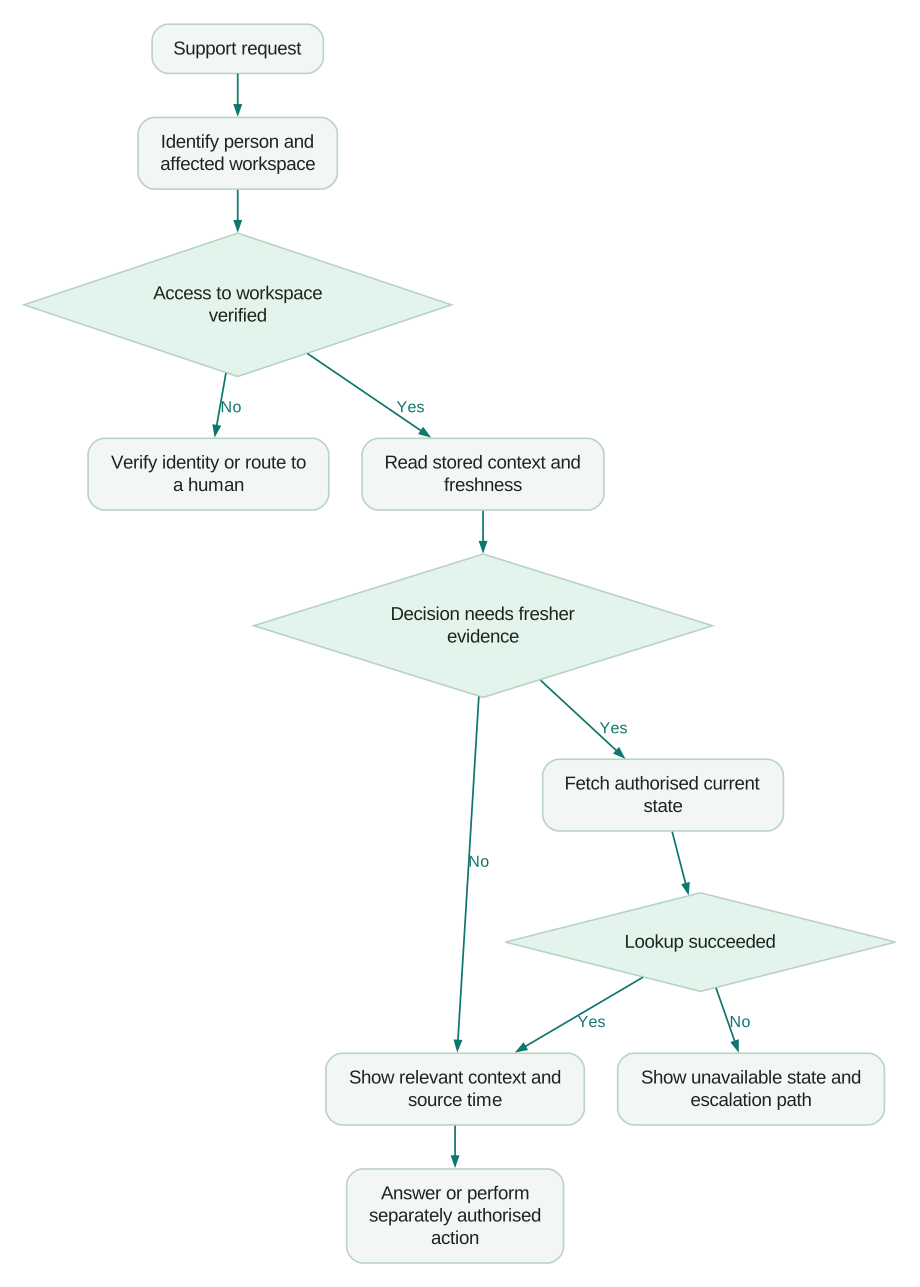
Use stored support attributes for information that agents need to scan or use in routing: workspace ID, support tier, onboarding stage or a recent usage summary. Use a live lookup for information whose correctness matters at the moment of the answer, such as whether an invoice was just paid.
A warehouse is useful when a field combines multiple systems, such as the number of successful reports produced by an account in the last seven complete days. An operational API is usually a better starting point for the current state of one payment. Do not put a nightly transformation in the critical path of a customer who paid five minutes ago.
The reverse ETL guide covers how curated warehouse records reach operational tools. For support, add freshness and failure behaviour to that design:
- Publish the source observation time as well as the destination sync time. A successful sync can deliver old data.
- Define the acceptable age for each decision. A weekly usage trend and an invoice-payment answer need different rules.
- Keep “unknown,” “unavailable” and a confirmed negative result distinct.
- Give stale fields a visible status and a way to refresh or escalate.
- Assign one authoritative writer to each stored field, or define explicit conflict rules.
For example, an internal policy might permit yesterday's usage trend for account planning while requiring a fresh billing lookup before discussing an unpaid invoice. Those are business decisions to document, not universal refresh intervals.
Prevent older events from restoring older state
Billing events are useful refresh signals, but arrival order is not a reliable business timeline. Stripe says webhook events can arrive out of order or more than once. Its documentation specifically warns against using an event's second-resolution creation timestamp to establish order or deduplicate deliveries. Track event IDs and retrieve current objects when needed. Stripe webhook delivery behaviour.
For a context panel, a practical design is to treat a relevant event as a request to refresh the affected account. Serialize refreshes per account, or apply a concurrency rule that prevents an older in-flight response from overwriting a newer one. Reconcile periodically so a missed refresh does not leave the panel wrong indefinitely.
The success condition is accurate current context. Counting received webhooks will not establish that.
Put the context into Intercom
Create the required custom attributes before attempting to populate them. Intercom requires existing attribute definitions for integration updates. Its custom data attributes accept scalar values rather than arbitrary nested objects, so do not paste the example response into one CDA. Map selected fields deliberately and keep detailed live results in the appropriate connector or app experience. Intercom custom data attributes.
Start with a known product account and one support conversation. Verify the person-to-company mapping, then inspect each value in the Inbox. An integration returning a successful status is not evidence that the right company appears beside the right conversation.
For a Fin lookup, configure a Data connector against a narrowly scoped endpoint. Specify when to use it, the required inputs and the response fields needed for the answer. Intercom provides API testing and preview tooling; it also notes that Fin AI Answers are unavailable in test workspaces. Plan an appropriately restricted end-to-end test rather than assuming a connector preview proves the whole Fin conversation works. Data connector setup.
Verify the customer as well as the integration
An API token can establish that Intercom is calling your service. It does not, by itself, establish that the person in the conversation may read the requested account's data.
Intercom's API-design guidance recommends verified identifiers and protected identifying attributes, with authorization enforced by your backend. Apply that to the selected workspace: the server should verify membership and the required role before returning billing information. A customer typing a workspace ID into chat is not proof of access. Intercom API design guidance.
Current Intercom authentication settings distinguish connector API credentials from customer authentication, which must be enabled for each relevant connector. A per-user connector token is also separate from the Messenger intercom_user_jwt. Configure the documented token flow and channel rules explicitly; web Messenger verification does not establish that an email conversation has passed the same check. Data connector authentication.
For an AI answer, return the minimum verified facts and the permitted next step. A payment failure might justify directing an authorized billing admin to the billing page. It should not give every workspace member access to the company's invoice history.
Put the context into Zendesk
Use organization fields for account-level data and user fields for person-level data. Put the affected workspace and diagnostic snapshot on the ticket where appropriate. If your business relationship does not map cleanly to one Zendesk organization, preserve the explicit product workspace relationship instead of forcing all memberships into one field.
Zendesk supports custom fields on users, organizations, tickets and custom objects. Its user and organization custom fields are team-member-only, while administrators can expose ticket fields to end users. Review visibility before copying internal diagnostics into a ticket field or message placeholder. Zendesk custom fields.
The Agent Workspace customer-context panel already brings together requester information and interaction history. Additional profiles and events from other applications require the relevant setup. Inspect what agents already have before building a second timeline containing the same tickets. Zendesk customer context.
For Stripe information, one available route is the third-party Stripe by Zenplates marketplace app. Its listing describes access to subscriptions, payments and invoices, alongside optional operational actions such as refunds. Treat that as an app to evaluate against your requirements, not a claim that native Zendesk fields automatically contain Stripe data. Start with the read access needed for diagnosis and assess action permissions separately. Stripe by Zenplates listing.
A sidebar app visible to a human agent is also not proof that your AI agent can read the same information. Test the actual AI integration and its authorization boundary. “The data is in Zendesk” is too vague to establish which component can use it.
Make the next step specific and reversible where possible
The failed-export example should lead to a response such as:
“Exports are enabled for this workspace, and you have 160 exports left in this month's allowance. The latest export failed because the source connection expired. Reconnect that source, then retry the export. I couldn't verify the incident feed, so I can't rule out a wider issue yet.”
Use this wording only if the product genuinely supports that recovery path. The point is the progression: establish relevant facts, explain the likely cause, give the next step and state what remains unknown.
Do not let a diagnostic lookup silently become a billing mutation. Refunds, plan changes and account cancellation need their own authorization, business rules and outcome verification. A repeated action request must not create a second financial effect. Record what the system actually completed before announcing success.
For known bugs, expose an approved explanation, affected capability and current workaround. Internal speculation about a release date should not become a promised delivery date simply because an AI agent can read the issue tracker.
Test the cases that produce confident wrong answers
A realistic acceptance test should include:
Checklist
- One person belongs to two workspaces with different plans, and the conversation selects the intended workspace.
- A removed member cannot retrieve account details using an old conversation or cached association.
- A shared billing email does not automatically merge unrelated customers.
- A recently paid invoice refreshes correctly even when an older event arrives later.
- The billing lookup succeeds while the incident lookup fails, and the answer preserves that difference.
- An absent value displays as unknown rather than zero, unpaid or no incident.
- Usage shows its unit, period and observation time, including the renewal boundary.
- A person without billing permissions receives an appropriate path to the account administrator.
- Human-visible app data is tested separately from AI-visible connector data.
- Retries, timeouts and partial action failures do not produce duplicate changes or false success messages.
Use test accounts with deliberate differences. If every fixture has the same plan, one workspace and a paid invoice, a broken identity join can look correct.
Measure whether the context improves resolution
Review the original ticket family before and after rollout. Track how often the required context was available, how often it was fresh enough, how often the agent had to ask for information already held by the business and how often the issue reopened.
Separate system coverage from ticket outcomes. A populated plan field is a data-delivery measure. A correct diagnosis is a service-quality measure. A conversation marked resolved is not enough if the customer returns because the export still fails.
Keep the denominator stable: tickets requiring this context, not every ticket in the inbox. Compare similar issue types and customer cohorts. If staffing, incident volume or product behaviour changes during rollout, account for that before crediting the panel with faster resolution.
Once one ticket family works, expand using the same contract. The customer journey mapping guide can help connect these support moments to onboarding, renewal and expansion without treating every support interaction as an upsell opportunity.
If support repeatedly searches product, billing and CRM tools for the same answers, our CRM and lifecycle implementation work can connect the required fields and operational workflows. Bring a sample of recurring tickets and the decisions agents cannot currently make; that is a more useful starting point than a list of integrations to install.
Questions people ask
What customer context should appear in support tickets?
Show the identified person, affected account, relevant product or billing state, source and freshness. Add only fields that help diagnose, route or resolve that ticket family. Account-wide financial data should depend on the requester's permissions, not merely their presence in a conversation.
How do support agents see billing data in Intercom?
They can use deliberately mapped attributes for a concise account summary and an appropriate app or Data connector for current details. Create the field definitions, verify identity and company associations, and test the actual conversation. A stored plan label is insufficient for answering whether a particular invoice was paid.
Can Zendesk display custom data from Stripe?
Yes, through a configured integration, app or custom implementation. Decide which values belong in structured Zendesk fields and which should be fetched live. Evaluate the specific integration's matching, visibility and action permissions rather than assuming every Stripe customer record belongs to the requester.
Does an AI support agent need the entire customer record?
Usually it needs a small, authorized response tied to the task: the relevant state, what that state means and the allowed next step. More data creates more opportunities to select an unrelated workspace, expose internal information or repeat an outdated fact. Keep detailed source records accessible through controlled lookups where necessary.
Should the warehouse be the source for all support context?
Use it for useful combined or historical measures when its refresh cadence fits the decision. Use operational systems for rapidly changing facts that need confirmation now. Both routes should expose freshness and failure states, and both need an explicit mapping to the affected customer account.
Sources
- Intercom: attribute types and Fin availability
- Stripe: subscription lifecycle and statuses
- Stripe: webhook delivery and duplicate handling
- Intercom: create and track custom data attributes
- Intercom: set up Data connectors
- Intercom: design APIs for Data connectors
- Intercom: Data connector authentication
- Zendesk: custom fields and field types
- Zendesk: customer context in Agent Workspace
- Zendesk Marketplace: Stripe by Zenplates
Written by
Jafrin Akter AloData Engineer and Co-founder, martechdevs
Jafrin Akter Alo is a data engineer and co-founder of martechdevs, where the team has delivered 74+ martech, data and growth stack implementations.