
Zendesk vs Freshdesk: Compare the Right Plans, AI Bill and Renewal Cost
Zendesk versus Freshdesk is a choice between complete support configurations, not two starting prices. For a new email-led team, start by testing Freshdesk against Zendesk Support. For chat and messaging, compare Freshdesk Omni with Zendesk Suite. Then price the required routing, service commitments, AI usage and renewal year. Keep an existing platform when a focused repair costs less than moving the same unresolved process elsewhere. On published annual prices, Freshdesk's ticketing plans cost $19, $55 and $89 per agent a month and Freshdesk Omni costs $29, $79 and $119, against $19 for Zendesk Support Team and $55 and $115 for Zendesk Suite Team and Suite Professional.
On this page
Which helpdesk should a small team shortlist first?
Shortlist Freshdesk for an email-led operation with a tight budget; shortlist Zendesk Suite when a unified service operation, its required workflows and existing integrations justify the package. Let a representative ticket test decide the final purchase.
Martechdevs provides paid support and CRM implementation. The recommendation here follows the required workflow and total operating cost. A cheaper subscription is useful only when agents can keep the service promises made to customers. For the platforms themselves, see Zendesk consulting and customer support automation.
| Team situation | First configuration to test | Runner-up | What decides |
|---|---|---|---|
| Two founders handling email while validating demand | Freshdesk Free Program | Zendesk startup offer, if eligible | The actual free term and affordable paid configuration afterward |
| Three to ten agents with a straightforward email queue | Freshdesk Growth | Zendesk Support Team | Required fields, ownership, reporting and administrator effort |
| Email support with several service policies and escalations | Freshdesk Pro | Zendesk Suite Professional | Whether each customer commitment works on the purchased tier |
| Ten to twenty-five agents using chat and messaging | Freshdesk Omni | Zendesk Suite | Channel handovers, routing, context and full usage bill |
| Phone-heavy support with complex queue requirements | Zendesk Suite plus the required voice configuration | Freshdesk Omni plus Voice | Number, routing, recording and usage requirements in the quote |
| An established Zendesk operation with painful configuration | Repair the current setup first | A bounded Freshdesk migration | Measured operating improvement after migration cost and risk |
These are evaluation priorities, not promises that one product is always easier or more capable. If neither operating model fits, use the broader Zendesk alternatives shortlist.
Zendesk
- Best for: A team whose support workflow and integrations benefit from a coordinated Suite configuration, especially when the existing operation already depends on Zendesk.
- Pros: Suite combines several support channels; higher plans add more control. A team can retain its established customer history while improving the setup.
- Cons: The inexpensive Support package is not the complete Suite. Plan upgrades, AI and voice usage can change the expected saving.
- Free tier and startup offer: The ordinary trial is temporary. Eligible new startups can receive an approved free term; price the paid continuation before accepting it.
- Choose it if: The intended users pass the service and integration tests, and the complete configuration has a defensible two-year cost.
- Skip it if: The required work is simple email support and the additional configuration provides no demonstrated benefit.
Freshdesk and Freshdesk Omni
- Best for: Teams that can choose a clear email-first or cross-channel configuration and want to evaluate the corresponding paid tier directly.
- Pros: Freshdesk offers a focused email helpdesk; Omni provides the broader channel route. The time-limited Free Program can help a two-person email team begin.
- Cons: Freshdesk Pro and Omni Pro are different purchases. Session charges can accrue without a resolved customer problem, and the Free Program does not cover Omni.
- Free tier and startup offer: The Free Program ends after six months. Treat any separate startup discount as unconfirmed until Freshworks approves the exact product, term and renewal.
- Choose it if: Its lowest sufficient tier handles your actual handovers and service rules, and the ongoing bill remains affordable after promotions.
- Skip it if: The trial needs exclusions or manual workarounds for a mandatory customer obligation.
Do not infer a capability from a vendor's product-family name.
Which Zendesk and Freshdesk products should you compare?
Compare email helpdesks with email helpdesks, then compare cross-channel packages separately. Freshworks explicitly distinguishes email-first Freshdesk from Freshdesk Omni's unified email, chat and social inbox. Both have Growth, Pro and Enterprise tiers. Freshworks product definitions
The following public list rates are USD per agent per month on annual billing, before taxes, usage and add-ons. Enterprise quotes and negotiated agreements can differ. A monthly equivalent is not permission to cancel an annual commitment after one month.
| Product | Entry configuration | Next configuration | Higher configuration |
|---|---|---|---|
| Zendesk | Support Team: $19 | Suite Team: $55 | Suite Professional: $115; Suite Enterprise + Copilot quoted |
| Freshdesk | Growth: $19 | Pro: $55 | Enterprise: $89 |
| Freshdesk Omni | Growth: $29 | Pro: $79 | Enterprise: $119 |
Sources: Zendesk USD pricing, Freshdesk pricing and Freshdesk Omni pricing.
The equal $55 prices in the middle do not establish equal products. Freshdesk Pro is the email helpdesk; Zendesk Suite Team adds messaging, live chat and telephony. The published Zendesk table lists SLA policies on Suite Professional, not Suite Team. Zendesk plan comparison
For a new Freshdesk account, its SLA guide describes one default policy in Freshdesk and two in Omni. Additional policies and escalation alerts require Pro or above. A requirement for separate premium and standard customer promises can therefore change the tier immediately. Freshdesk SLA policy rules
Start the evaluation with a short requirements register: required channels, customer groups, service promises, agent roles, integrations and reporting questions. Mark a feature mandatory only when someone can explain the customer or operating consequence of losing it.
What does phone support add to either bill?
Price phone support as a complete operating channel, including its seats, numbers and consumption. A checkmark beside telephony does not mean calls and every contact-center function are included without further charges.
Freshdesk Omni's Voice add-on is available across its paid plans and has a separate seat allocation. Its feature guide places IVR, carrier integration and several advanced calling functions on Pro or Enterprise. The displayed price and allocation depend on the subscription. Freshdesk Omni Voice availability
Zendesk's usage report separates calls, transcriptions, recordings, texts and phone numbers. A number can keep generating a monthly charge even when nobody calls it. Zendesk voice charges
Give both vendors the same call requirements: countries, inbound versus outbound volume, numbers to port, queue rules, recording policy and expected simultaneous agents. Require each proposal to identify the paid product handling every requirement. Do not add a separate chat subscription merely because another comparison combined older Freshworks products that way.
How much do seats cost over two years?
Calculate the paid seat baseline before adding AI, discounts or claimed productivity savings. This makes a change in product scope visible.
For a constant team and unchanged annual list rate, two-year seat cost = agents × monthly-equivalent rate × 24. The following USD totals contain no promotion, AI usage, Copilot, voice, tax, migration or administration cost. Each year contributes half the stated total. They are arithmetic scenarios, not quotes or claims of feature equivalence.
| Configuration | 3 agents over 24 months | 10 agents over 24 months | 25 agents over 24 months |
|---|---|---|---|
| Zendesk Support Team or Freshdesk Growth | $1,368 | $4,560 | $11,400 |
| Zendesk Suite Team or Freshdesk Pro | $3,960 | $13,200 | $33,000 |
| Freshdesk Omni Growth | $2,088 | $6,960 | $17,400 |
| Freshdesk Omni Pro | $5,688 | $18,960 | $47,400 |
| Zendesk Suite Professional | $8,280 | $27,600 | $69,000 |
For ten agents, Omni Pro's seat baseline is $8,640 below Suite Professional across two years. That is the available difference before feature gaps, usage and implementation work. It is not a guaranteed project saving.
Keep a separate row for ongoing administration. As a hypothetical sensitivity test, six additional administrator hours a month at an assumed internal cost of $60 an hour total $8,640 over two years. This does not claim either product requires those hours. It shows why the person maintaining rules should participate in the trial.
Zendesk lists month-to-month rates of $25, $69 and $149 for Support Team, Suite Team and Suite Professional. Compare the actual monthly quote on both sides if annual commitment is unacceptable. Zendesk billing options
Freshdesk's subscription guide says downgrades take effect after the current billing cycle. Read the proposed cancellation, seat-reduction and renewal terms before treating the annual equivalent as a flexible monthly expense. Freshdesk subscription changes
Why are AI sessions and resolutions different costs?
A Freshdesk session measures a time-bounded interaction; a Zendesk automated resolution measures a qualifying outcome under the account's billing model. Count each vendor's units separately, then judge useful customer outcomes using the same review criteria.
Freddy's chat window is twenty-four hours; its email window is seventy-two hours from the first email. Chat AI is available in Omni, while email AI is available in both products. New paid accounts receive 500 sessions once; additional packs contain 100 sessions for $49. Freddy AI add-on and session rules
The 500-session allocation is not a monthly refill. Purchased session validity follows the payment cycle. Budget packs for the actual cycle and round up whole packs rather than multiplying every possible workload by $0.49 and assuming fractional purchases. Freshdesk session validity
For chat-session planning, Freshworks' session FAQ adds two purchasing traps: paid packs replace remaining complimentary sessions, and purchased pack quantities renew unless reduced. Previewing the agent can also consume sessions. Check those settings before treating unused trial capacity as extra paid capacity. Chat-session purchase and renewal rules
Zendesk requires an additional check: identify whether the account still uses the earlier resolution-count model or has moved to resolution allowances. The earlier model includes plan-based resolution quantities, with an annual cap; it remains relevant to accounts that have not moved. Earlier Zendesk resolution model
Under resolution tiers, assisted escalations and contained resolutions do not consume the allowance. Verified resolutions do. The allowance is a currency balance: Suite Team receives $2 per full agent seat per month and Suite Professional receives $5. The default allowance is capped at $5,000 a year, and unused monthly amounts do not roll forward. Resolution tiers, allowance rules
Do not subtract five free resolutions and a dollar allowance from the same usage. Capture the account's applicable meter, unit rate, allowance, commitment and overage setting. Our Zendesk AI pricing guide covers that distinction in more depth.
| Billing input | Freshdesk/Freshdesk Omni | Zendesk | Evidence to retain |
|---|---|---|---|
| Usage population | Sessions in the applicable window | Qualifying resolutions or tier costs | The account's usage export |
| Included balance | Remaining one-time sessions | Applicable count or currency allowance | Opening balance and expiry rules |
| Additional purchase | Whole session packs | Applicable commitment or overage | Order form and billing settings |
| Service outcome | Independently reviewed solved problem | Independently reviewed solved problem | Same quality and follow-up criteria |
Use the support AI cost framework to include human follow-up and repeated requests. Neither a session nor a vendor's billing decision automatically establishes that the customer received an accurate, durable answer.
How do you compare AI spend on the same workload?
Hold the workload and success assumptions constant while allowing each billing meter to behave differently. Never present every attempted conversation as a verified resolution.
Consider a hypothetical mature billing period with 300 paid Freddy sessions and no included balance remaining. Three packs cost $147. If 180 cases pass your independent resolution review, that is about $0.82 of AI session spend per accepted resolution. If only thirty pass, the same spend is $4.90 per accepted resolution.
For comparison, assume an earlier-model Zendesk account whose included quantity is exhausted, paying the published $2 pay-as-you-go rate. At 180 billable resolutions, the charge is $360; at thirty, it is $60. Zendesk also lists a $1.50 committed rate, but a committed purchase has different volume obligations. These rates are not automatically a quote for a resolution-allowance account. Zendesk published resolution rates
| Hypothetical result from the same 300 interactions | Freddy session cost | Earlier-model Zendesk pay-as-you-go cost | Meaning |
|---|---|---|---|
| 180 accepted resolutions, assumed also billable in Zendesk | $147 | $360 | Session pricing is lower for this assumed outcome |
| 30 accepted resolutions, assumed also billable in Zendesk | $147 | $60 | Paying only for qualifying outcomes is lower here |
| No accepted resolutions | $147 | $0, if none qualify for billing | A zero AI bill does not mean customers were helped |
This example excludes seats, human work, add-ons, tax, unused commitments and all remaining allowances. It assumes the independent accepted count equals Zendesk's billable count solely to isolate the arithmetic. In a real evaluation, reconcile those counts rather than assume equality.
For a resolution-allowance account, use its quoted tier cost and applicable currency balance instead. For an annual Freddy purchase, calculate the entire annual session population and expiry boundary; do not reset a consumed trial allocation every month in a spreadsheet.
Should you buy Copilot for every agent?
Buy agent assistance only for a defined task and an eligible configuration. Test the paid package's behavior rather than treating an AI-branded trial feature as a permanent entitlement.
Zendesk advertises Copilot at $50 per agent per month on annual billing. Its current product and add-on references identify Professional-level eligibility; confirm the exact purchased combination before adding Copilot to a Team-plan estimate. Zendesk Copilot pricing, Copilot eligibility
Freshdesk lists Freddy Copilot at $29 per selected agent per month on annual billing for Pro and Enterprise. It can be assigned to a subset of agents. Freshdesk Copilot terms
For a hypothetical ten-agent team purchasing assistance for all ten, the annual add-on arithmetic is $6,000 at the Zendesk list rate and $3,480 at the Freddy rate. Those figures exclude the qualifying base subscription. Get the required Zendesk licence quantity in writing rather than assuming the same selective-seat arrangement as Freshdesk.
Ask agents to summarize a long case, draft a policy-sensitive response and recover after an incorrect suggestion. Measure correction effort and whether the answer cites the right customer context. A fast wrong reply can create more work than writing the response manually.
What happens after the free or startup period?
Choose a free offer only if the paid configuration is acceptable when the offer ends. Record the term, seat limit, exclusions and renewal quote as part of the purchase decision.
Freshdesk's Free Program covers up to two agents for six months and excludes Omni. Trial-to-Free changes can remove higher-tier configurations. After upgrading to a paid plan, the current Free Program guidance says you cannot return to Free; exceeding its agent limit without resolving the account can lead to suspension and deletion after ninety days. Freshdesk Free Program
Zendesk's startup programme is for qualifying new customers: tech-enabled businesses under ten years old, bootstrapped or funded no later than Series B, with fewer than 250 employees; companies with fifty or more need a partner referral. The normal accepted term is six months, with qualifying partner arrangements extending up to two years. It covers up to fifty Suite Professional agents, but Talk/Voice is excluded during the trial. The approved term controls. Zendesk startup eligibility and exclusions
The table below shows illustrative service cost, not invoice timing. It assumes constant headcount, a six-month free term, no further discount, and the stated annual-equivalent rate for subsequent service. Taxes, usage and add-ons are excluded.
| Scenario | Year-one service cost | Year-two service cost | 24-month service cost |
|---|---|---|---|
| 2 Freshdesk agents, then Growth at $19 | $228 | $456 | $684 |
| 3 approved Zendesk startup agents, then Suite Professional at $115 | $2,070 | $4,140 | $6,210 |
| 10 approved Zendesk startup agents, then Suite Professional at $115 | $6,900 | $13,800 | $20,700 |
| 25 approved Zendesk startup agents, then Suite Professional at $115 | $17,250 | $34,500 | $51,750 |
Cash can leave earlier than that allocation suggests. If annual invoices begin in month seven and renew in month nineteen, a three-agent Suite Professional example pays $4,140 at each invoice, or $8,280 within the first twenty-four months. Part of the second invoice buys service beyond the comparison window. Use the actual renewal order form for cash planning.
Do not apply the two-agent Freshdesk Free Program to a three-agent team. Do not budget two free Zendesk years until the extended offer is approved. Any separate Freshworks startup credit or discount should remain outside the baseline until its current award and applicable product are confirmed.
Which trial cases reveal the meaningful differences?
Run the same support obligation through both shortlisted configurations, including an awkward handover and a later customer reply. Keep the intended paid tier visible throughout the test.
For a hypothetical subscription business, use a customer who reports an incorrect invoice on Friday, sends another message through chat, waits for finance, receives an answer and returns with a related question. The purpose is to compare continuity, access and obligations rather than how attractive an empty queue looks.
| Test | What the agent must accomplish | Failure worth recording | Acceptance evidence |
|---|---|---|---|
| Cross-channel contact | Find the same customer and active issue | Duplicate or incorrectly merged identity | Correct requester, account and linked work |
| Finance handover | Obtain help without exposing private discussion | Customer sees an internal note | Intended visibility and next owner |
| Service deadline | Apply the customer's actual promise | Wrong calendar, priority or policy | Expected deadline and escalation |
| AI failure | Recognize uncertainty and reach a human | Incorrect answer quietly treated as complete | Human ownership and complete context |
| Later reply | Continue the obligation with useful history | Reply arrives in an abandoned queue | Reachable owner and prior evidence |
A real SLA test needs more than a configured duration. Zendesk requires the system Priority field for an SLA to apply; a similarly named custom field does not substitute. Freshdesk applies business hours through the ticket's group, and its current guide limits additional business-hour schedules to Pro and above. Zendesk SLA prerequisites, Freshdesk business-hour rules
Also test what stops the response timer. Freshdesk distinguishes an agent reply or public note from an automation's Send Reply action. A dashboard improvement caused by a different clock is not evidence of faster human help. Freshdesk response-time behavior
Use the support customer-context guide to define which billing and product facts agents need, their freshness and who may see them. Have the future administrator change a rule and diagnose a failed connection during the trial. Their maintenance task is part of product fit.
What must survive migration in either direction?
Preserve customer obligations and usable history, then prove that an agent can continue the work. An imported ticket count is only one check.
Zendesk's normal CSV export omits comments and descriptions. Its administrative export tools are unavailable on Team plans, although REST API export remains available; standard account exports also exclude AI agent tickets. Freshdesk's ordinary ticket export omits the complete conversation and archived history, directing that need to an account export. Zendesk export boundaries, Freshdesk ticket-export boundaries
Build a sample manifest of tickets, requesters, companies, comments, attachments, custom fields and public/private visibility. Keep old-to-new record identifiers and explicit exceptions. Test the destination's attachment access and late replies before ending access to the old system.
Move one controlled channel or queue first. Avoid sending two acknowledgements or allowing both platforms to own the same active conversation. Record which routing, mail, integration and automation changes need reversal if the pilot fails.
If the main problem is conflicting triggers or incomplete customer context, compare repairing Zendesk's implementation with the migration. For work that does need a move, request a detailed support integration scope with the channel inventory, the history to keep and sample failure cases.
What evidence should approve the final choice?
Approve the configuration when it passes the required service cases and its complete renewal cost is funded. Repeat the relevant tests whenever a cheaper package removes a required feature.
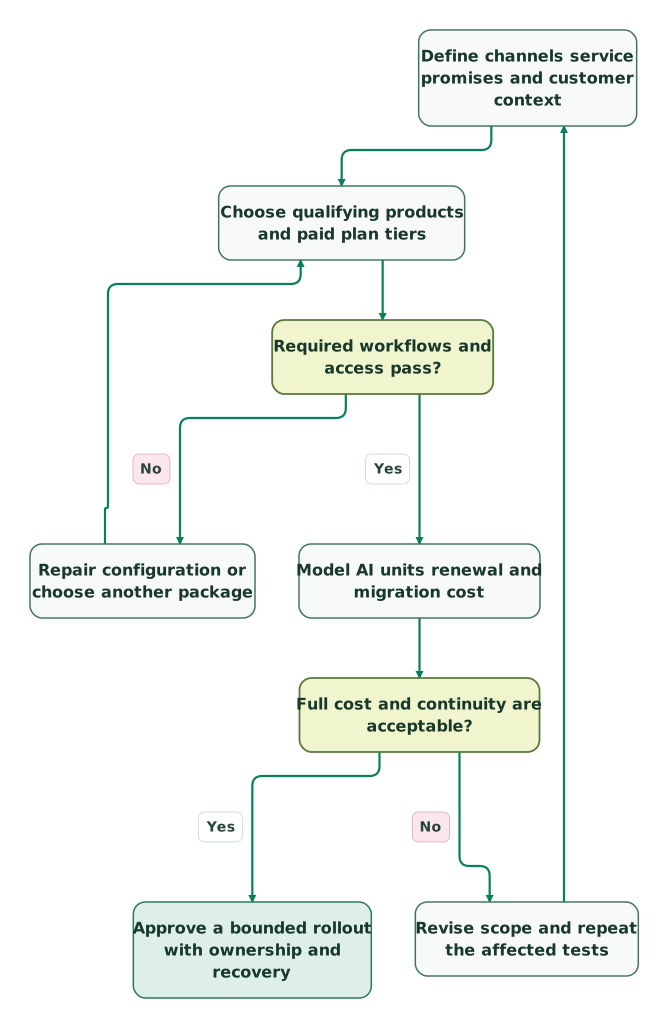
Read diagram as text
- Define channels service promises and customer context to Choose qualifying products and paid plan tiers.
- Choose qualifying products and paid plan tiers to Required workflows and access pass?.
- Required workflows and access pass? to Repair configuration or choose another package: No.
- Repair configuration or choose another package to Choose qualifying products and paid plan tiers.
- Required workflows and access pass? to Model AI units renewal and migration cost: Yes.
- Model AI units renewal and migration cost to Full cost and continuity are acceptable?.
- Full cost and continuity are acceptable? to Revise scope and repeat the affected tests: No.
- Revise scope and repeat the affected tests to Define channels service promises and customer context.
- Full cost and continuity are acceptable? to Approve a bounded rollout with ownership and recovery: Yes
Checklist
- Product names and paid tiers match the actual channels.
- Required SLA rules and user permissions work on that tier.
- Voice seats, numbers and usage are priced separately where required.
- AI billing uses the account's actual unit and allowance model.
- Trial balances are not repeated as monthly benefits.
- Copilot eligibility and licensed users are confirmed.
- Year-two service cost and invoice timing are both affordable.
- Historical conversations and attachment access survive the chosen route.
- The future administrator can maintain and diagnose the configuration.
- Rollout scope, success evidence and recovery owner are agreed.
Keep reading
Browse all CRM & Lifecycle guides
 CRM & Lifecycle
Zendesk AI Pricing: Automated Resolutions, Allowances and What a Month Costs
Check which Zendesk AI billing model applies, compare resolution allowances and Copilot, and forecast normal months, busy months and renewal costs.
Jafrin Akter AloLast updated 16 min read
 CRM & Lifecycle
Zendesk Pricing in 2026: Plans, Add-Ons, AI Charges and Worked Bills
Zendesk costs $19 to $115 per agent a month billed yearly, $25 to $149 monthly, plus AI and add-ons. Compare every plan, GBP and EUR prices and worked bills.
Jafrin Akter AloLast updated 17 min read
 CRM & Lifecycle
Zendesk Implementation: What Goes Wrong and How to Fix It
Fix Zendesk routing, fields, macros, CRM sync and AI handoffs. Includes the 2027 AI agent migration dates, AI billing checks and a launch checklist.
Jafrin Akter AloLast updated 15 min read
CRM & marketing automation
See the implementation scope, deliverables and acceptance checks.
Questions people ask
How should a two-person team evaluate a third occasional support agent?
Price the third person's actual role and usage before relying on a two-seat offer. A temporary contributor may need a paid seat, an eligible day pass or a collaboration role, depending on the task and selected plan. Verify what that role can view and change. Sharing one agent login obscures accountability and does not establish a valid purchasing arrangement.
Should a migration decision include the value of existing helpdesk knowledge?
Yes. Inventory the useful macros, customer relationships, routing rules and reporting definitions your team already maintains, then estimate the work to reproduce or deliberately retire them. Separate that value from obsolete configuration. A clean new queue may feel easier because it lacks years of accumulated decisions, but important service obligations still need a working home after the move.
Can the same customer generate several AI billing units for one unresolved problem?
Yes, the counting boundary can differ from your business definition of one problem. A customer may return after a session window or contact another channel. Track a stable issue reference alongside each vendor's usage record, then review repeat contacts and final outcomes. Use that reconciliation to forecast cost instead of assuming one customer, one conversation and one resolved issue are interchangeable.
How should founders compare a free offer with a cheaper paid alternative?
Compare the configuration after the free term, then add the temporary discount as a separate scenario. Include the users, channels, usage and integrations required when the business grows. A free offer can be valuable, but it should not create a renewal bill the company cannot sustain or a migration dependency that makes leaving more expensive than the original saving.
Is Freshdesk cheaper than Zendesk?
At the top published tiers, yes. Freshdesk Enterprise costs $89 per agent a month on annual billing against $115 for Zendesk Suite Professional, while the entry plans match at $19 and the middle plans at $55. For chat and messaging, compare Freshdesk Omni at $29, $79 or $119 with Zendesk Suite, then add AI and phone costs before deciding.
Sources
- Freddy chat-session purchase and renewal rules
- Freshworks product and subscription definitions
- Zendesk USD plans and add-on pricing
- Freshdesk plans, Copilot and session validity
- Freshdesk Omni plans
- Freshdesk SLA policies and response behavior
- Freshdesk Omni Voice add-on scope
- Zendesk voice usage charges
- Freddy AI add-ons and session definitions
- Earlier Zendesk automated-resolution model
- Zendesk resolution tiers
- Zendesk resolution allowances
- Zendesk Copilot eligibility
- Freshdesk Free Program
- Zendesk startup eligibility and exclusions
- Zendesk SLA prerequisites
- Freshdesk business-hour rules
- Zendesk account-export coverage
- Freshdesk ticket-export coverage

Written by
Jafrin Akter AloData Engineer and Co-founder at Martechdevs and Growth and Analytics Partners
Jafrin writes practical guides to marketing technology, customer data, analytics and AI workflows. Martechdevs is a Growth and Analytics Partners company.