
Zendesk Jira Integration: Setup and 6 Problems to Fix
A dependable Zendesk Jira integration connects a customer ticket to the engineering issue that can resolve it, then returns useful progress without exposing private discussion or closing the wrong ticket. Start by identifying the installed app and version. Prove linking, field updates, workflow notifications and comment visibility separately before allowing the integration to change customer-facing work.
On this page
An issue visible in the sidebar proves that a link exists. It does not prove that the engineering status is current, that a comment reached the intended audience or that an agent knows what to do next. The acceptance test should follow one customer problem through those decisions.
Our customer support automation treats this as an operating handoff: support owns the customer conversation, engineering owns the defect, and the integration carries explicitly agreed facts between them.
Which Zendesk Jira integration are you configuring?
Identify the publisher, hosting type and installed version before using a setup tutorial. This guide covers Zendesk Support for Jira, published by Zendesk. A similarly named third-party connector has its own permissions, commercial terms and synchronization behavior.
If the decision is whether to replace the support platform, use the Zendesk alternatives comparison to distinguish that project from an engineering handoff.
Zendesk's integration update removed the migration path to its newer integration and called for relisting the original app. Existing users should continue normally; customers already on V2 should remain there while Zendesk provides next steps. A newer-sounding tutorial is therefore insufficient reason to reinstall a working connection.
Zendesk also offers a separate Jira connector for action flows, with create, get, edit and transition actions. Its configuration and entitlement checks belong to the action-builder route. Do not assume that installing it creates the same sidebar links, field mappings or workflow behavior described below.
Record the app identifier, Jira site, Zendesk subdomain and support contact in the change record. Keep screenshots of the current settings before editing. If the installed interface differs from the documented route, resolve the version with the vendor before changing authentication or replacing the app.
What does the integration cost and require?
The Atlassian Marketplace listing identifies Zendesk's app as free. Budget the underlying Jira and Zendesk subscriptions, any extra account capacity, setup and ongoing administration separately. A free connector does not include the labor to repair field definitions or maintain the handoff.
Zendesk supports Jira Cloud and Data Center, but excludes the Jira Cloud mobile app from this integration's support. Installation requires administrators in both products. Its setup requirements also cover Jira group membership, project permissions, the Reporter field and browser storage access. Check the listed requirements against the actual account rather than borrowing an administrator's personal session.
Use the Zendesk pricing guide to account for support seats and other products. Third-party integrations should be quoted independently; an app with the same destination names can provide a materially different scope.
What information should cross the support-to-engineering boundary?
Send the minimum evidence engineering needs to reproduce the problem, plus enough identity for support to track the correct issue. Avoid copying the entire customer conversation merely because a connector permits it.
A practical mapping contract separates shared facts from operating authority:
| Information | Owner of the meaning | Intended destination use |
|---|---|---|
| Customer-visible symptom and reproduction | Support, checked with the customer | Engineering can reproduce the reported problem |
| Engineering issue and investigation state | Engineering | Support can explain the next action accurately |
| Customer commitment or promised follow-up | Support | Agent retains the obligation regardless of engineering status |
| Fix verification evidence | Product or engineering release owner | Support can verify whether this customer's case is resolved |
| Account impact summary | Named customer or operations owner | Prioritization uses an agreed measure rather than ticket volume alone |
For each mapped field, write the allowed values, direction and conflict decision. Use CRM field ownership rules when another system also updates that value. A support urgency and an engineering scheduling priority can both be valid without meaning the same thing.
Do not put credentials, unrestricted logs or sensitive attachments into a shared description. Give engineering a controlled reference to the relevant evidence where that is the approved workflow. The customer-context guide explains how to make billing and product information useful without flooding every surface with every field.
How do you set up a first working handoff?
Prove one representative ticket and one engineering project before enabling wider synchronization.
- Identify the app, accounts, hosting and responsible administrators. Resolve any V2 migration question first.
- Agree the allowed project and the fields needed to reproduce one problem. Record the expected ordinary-agent access.
- Install and authenticate the Zendesk-published app through the Marketplace route in the setup guide, then save its display settings.
- Create or link a test issue from a controlled support ticket. Confirm the customer reference, issue identity and responsible teams.
- Enable only the field mappings required for that handoff. Test each direction with an explicit expected value.
- Add the intended engineering-transition notification. Start with an internal support note while the release process is being proved.
- Exercise the failure cases below, then have both teams accept the result and its recovery instructions.
Zendesk's usage guide distinguishes creating an issue, linking an existing issue and notifying a linked issue. Its Copy fields from this ticket action copies the subject and latest comment, not additional custom fields. A populated issue description therefore cannot establish that your custom mapping ran.
Keep the test ticket's notifications controlled. The purpose of the rehearsal is to inspect a known action, not to discover afterward that a synthetic escalation emailed a real customer.
1. Why can an agent not find or create the Jira issue?
Check project visibility, the issue creation form and the identity performing the action before treating the failure as a broken connection. Use the same project and issue type that failed for the agent; success in an unrelated test project proves little.
By default, all projects are available through the integration. Jira administrators can restrict the project list. Those restrictions change issue creation and linking search, but leave previously linked issues untouched and do not directly govern the other administrator-controlled sync features. Project restrictions.
Compare an allowed and restricted project using the ordinary role. Record whether the failure is an absent project, an empty user selector, a rejected required field or an issue created under an unexpected reporter. Each points to a different repair.
If the reporter changes, Zendesk identifies two checks: the selected reporter's Modify Reporter permission and whether the Reporter field is present on the relevant creation screen. Reporter troubleshooting. Correct the applicable scheme or screen with the Jira owner, then repeat the same agent action.
2. Why do fields stop syncing even though the issue is linked?
Inspect mapping compatibility, exact values and the number of records trying to write each target. A successful link and a valid field update are different acceptance results.
The field-sync rules allow one direction per mapped field, not bidirectional synchronization of the same field. Values are case-sensitive, including trailing spaces. One invalid mapping can block the whole mapped-field update. Custom ticket status fields are unsupported. Multiple linked records cannot converge on one destination field through this feature. Closed Zendesk tickets also cannot accept updates.
Use the integration's error report to identify the rejected mapping, then test a single controlled value. Keep the original value and error alongside the correction so another administrator can repeat the diagnosis.
For example, suppose three customers report the same defect. Engineering needs one defect record, while support must retain three customer obligations. Do not make three separate customer urgency values compete for one engineering priority field. Define one escalation owner to make that prioritization decision, and use links to retain the individual cases.
The field-sync guide permits one source record to feed multiple linked destinations. Previously created records require an edit or update before newly configured syncing applies. Removing mappings stops subsequent synchronization; it does not restore earlier values. Reconcile the affected records before assuming a disabled mapping has rolled back its changes.
3. Why do Jira Cloud changes never reach Zendesk?
Check the field-sync webhook before repeatedly rebuilding the mapping. Zendesk's Jira Cloud webhook instructions require an administrator to create the webhook manually for this integration.
Copy the account-specific webhook URL from Field Mapping. Configure it as enabled with the documented labels = jira_escalated filter, issue-updated and issue-deleted events, and the request body included. Use the URL generated for your connected account rather than one copied from another environment.
Then change one mapped value on a linked test issue. Check the matching destination record and the integration error report. If only one project or class of issue fails, compare its label, mapping and update path with the passing specimen. A fresh global reinstall is a poor first response to a failure limited to one field or project.
Retain a small regression case after repair. Changes to labels, project templates or integration ownership can otherwise reintroduce the same gap without anyone noticing until a customer asks for an update.
4. Why does a Done issue not update the support ticket?
Check the workflow transition that actually ran and the ticket's required fields. Jira status and customer resolution should be deliberately connected, not assumed equivalent.
Zendesk's workflow-update guide configures a post function on a transition, not on a status. It can add a note, change ticket status or add tags. The draft must be published, and its post-function ordering matters. A post function cannot solve a ticket with empty required fields; deleting tags is unsupported.
Reproduce the exact route into Done. Two transitions can reach the same status while only one carries the notification. Record the route, expected note, target ticket and actual result.
Make engineering completion create a review obligation for support first. A fix may be merged but not released to the affected customer, or the customer may need a configuration change. Have the support owner confirm the customer outcome before declaring the case solved. Keep that ownership explicit in the implementation acceptance checklist.
5. Why did an engineering comment become customer-visible?
Treat the audience of a cross-system comment as a release control. A comment appropriate for engineering discussion may be unsuitable for a customer email.
Zendesk's comment-sharing controls distinguish public replies from private notes. A public Jira-to-Zendesk reply can notify the requester and copied end users. The app offers a setting to disable all public comments to Zendesk. Linked Jira views can expose public and private support conversation content, so a private support note should not be assumed invisible to engineering.
Test an internal note and a deliberately public reply separately, using controlled recipients. Confirm the chosen ticket when one issue has several linked tickets. Include an attachment and sensitive-field specimen with harmless test content to prove the sharing boundary.
Agree a customer-safe message before enabling any automated public reply. Avoid forwarding raw investigation notes, uncertain release promises or another customer's identifying details. If a connector change can alter the audience, make that change subject to the same review as a customer communication template.
6. Why did the integration fail after an administrator left?
Inspect the accounts that installed and operate the integration before changing mappings. Offboarding can remove the authority that an otherwise unchanged connection depends on.
The optional dedicated Zendesk integration user consumes an available agent seat. Zendesk says both that user and the installing administrator must remain active with administrator rights for the integration to function. Integration account requirements.
Include these dependencies in the administrator's handover. Name the team that owns access review, app support and the next incident. Follow the vendor-supported ownership procedure before suspending the departing identity; then retest creating, linking, field updates and notifications.
Do not share a former employee's credentials as a continuity plan. Use the approved account and access process, record who can authorize changes, and retain a working recovery route that does not depend on one person's availability.
What should an eight-ticket acceptance test prove?
Use a deliberately small case set that covers different paths rather than eight copies of one successful ticket. Use the following eight-case release fixture.
| Case | Controlled condition | Evidence required |
|---|---|---|
| Normal escalation | One ticket, one allowed project | Correct issue identity and accountable owners |
| Existing defect | Another ticket reports the same defect | Approved link and distinct customer follow-up |
| Required field | One required value intentionally absent | Clear failure without an unexplained partial outcome |
| Field mismatch | Invalid test value in one mapping | Failure located and repaired with retained evidence |
| Permission boundary | Restricted project or ordinary role | Intended visibility enforced |
| Workflow route | Alternate transition into the final state | Expected internal update or documented exclusion |
| Communication audience | Internal note and public-reply specimen | Only the approved recipients receive each message |
| Account continuity | Supported ownership-change rehearsal | The operating handoff still passes afterward |
Keep a ledger with one row per expected ticket-to-issue relationship and another for each expected update. If eight tickets should produce seven new issues and one link to an existing issue, count those outcomes separately. Eight visible issue keys alone could conceal a duplicate creation and a missing existing link.
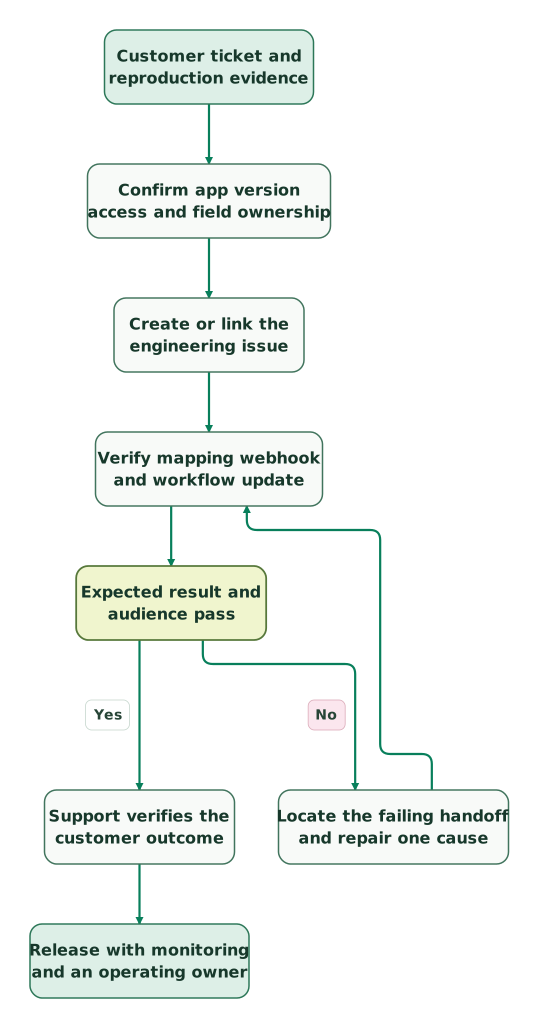
Read diagram as text
- Customer ticket and reproduction evidence to Confirm app version access and field ownership.
- Confirm app version access and field ownership to Create or link the engineering issue.
- Create or link the engineering issue to Verify mapping webhook and workflow update.
- Verify mapping webhook and workflow update to Expected result and audience pass.
- Expected result and audience pass to Locate the failing handoff and repair one cause: No.
- Locate the failing handoff and repair one cause to Verify mapping webhook and workflow update.
- Expected result and audience pass to Support verifies the customer outcome: Yes.
- Support verifies the customer outcome to Release with monitoring and an operating owner
What should you monitor after launch?
Monitor unresolved handoffs and customer obligations, not just whether the app is connected. Keep the initial release small enough that an owner can reconcile every escalation.
Useful operational measures include escalations without an issue, issues without an acknowledged engineering owner, failed field updates, engineering completion awaiting support review and customers promised a follow-up that has not happened. Define a due interval from your support process rather than inventing a universal sync service level.
Checklist
- App publisher, version, connected accounts and migration position are recorded.
- Ordinary-agent and restricted-project cases pass.
- Each shared field has one authority and a tested mapping.
- Webhook and workflow-transition changes produce the intended update.
- Comment recipients and attachments stay inside the approved audience.
- Customer resolution is verified separately from engineering completion.
- The operating accounts, incident owner and recovery steps are documented.
- Ticket links and expected updates reconcile for the release sample.
If the two teams cannot explain who owns the next action, repair that process before adding more synchronization. Bring the failing specimen to the $99 martech audit, or scope a support-to-engineering integration when the mappings, access and acceptance work need a delivery owner.
Keep reading
Browse all CRM & Lifecycle guides
 CRM & Lifecycle
Zendesk Implementation: What Goes Wrong and How to Fix It
Fix Zendesk routing, fields, macros, CRM sync and AI handoffs. Includes the 2027 AI agent migration dates, AI billing checks and a launch checklist.
Jafrin Akter AloLast updated 15 min read
 CRM & Lifecycle
Zendesk AI Pricing: Automated Resolutions, Allowances and What a Month Costs
Check which Zendesk AI billing model applies, compare resolution allowances and Copilot, and forecast normal months, busy months and renewal costs.
Jafrin Akter AloLast updated 16 min read
 CRM & Lifecycle
Zendesk Pricing in 2026: Plans, Add-Ons, AI Charges and Worked Bills
Zendesk costs $19 to $115 per agent a month billed yearly, $25 to $149 monthly, plus AI and add-ons. Compare every plan, GBP and EUR prices and worked bills.
Jafrin Akter AloLast updated 17 min read
Customer support automation
See the implementation scope, deliverables and acceptance checks.
Questions people ask
Should a security incident use the normal support-to-engineering handoff?
Use a restricted incident route when the report contains sensitive evidence or requires a smaller response group. Reference the approved incident record from ordinary customer communication without copying its full contents. Confirm who may see the ticket, issue and attachments before linking them. The routine product-bug workflow should not become the default disclosure path for credentials or a suspected breach.
How should customer impact influence engineering priority?
Define an impact measure that distinguishes affected accounts, severity, workarounds and commercial obligations. Several tickets from one account should not automatically outweigh fewer reports of a critical failure. Keep support's impact evidence beside engineering's delivery decision, with a person authorized to resolve disagreement. Ticket volume is useful context, but it should not silently become the prioritization policy.
What should happen when a customer says the fix did not work?
Preserve the earlier reproduction, release reference and validation result, then record the customer's new evidence. Decide whether the symptom is the same defect, a regression or a separate issue before creating another engineering record. Keep the customer follow-up assigned while that decision is made. Reopening the investigation should not erase the history of what was previously promised and tested.
How can a team change its escalation taxonomy safely?
Version the mapping and define how existing escalations will be interpreted before renaming categories or changing required fields. Rehearse a sample of open cases, including records with old values, and agree on the owner of exceptions. Keep the earlier categories available in historical reporting where needed. A cleaner new form is insufficient if it makes current engineering work impossible to reconcile.
What evidence belongs in an integration support request?
Include the installed app and hosting type, affected project, action, time, redacted record references and expected outcome. Show the first failing checkpoint and one comparable passing case. Provide screenshots of relevant settings without secrets or customer content. Ask for a specific repair and retest the original scenario after it is applied, rather than closing the request because authentication now succeeds.
Sources
- Zendesk: Integration direction and V2 migration update.
- Atlassian Marketplace: Zendesk Support for Jira.
- Zendesk: Setup and integration-account requirements.
- Zendesk: Using the integration and comment sharing.
- Zendesk: Project restrictions.
- Zendesk: Reporter permission and creation-screen troubleshooting.
- Zendesk: Field syncing requirements and limitations.
- Zendesk: Jira Cloud webhook configuration.
- Zendesk: Workflow transitions and ticket updates.
- Zendesk: Jira connector for action flows.

Written by
Jafrin Akter AloData Engineer and Co-founder at Martechdevs and Growth and Analytics Partners
Jafrin writes practical guides to marketing technology, customer data, analytics and AI workflows. Martechdevs is a Growth and Analytics Partners company.