
Martech stack audit: trace the data, check the bill and build a useful fix list
Data Engineer and Co-founder, martechdevs
Last updated 9 min read
A martech stack audit checks what your tools cost, who owns them and whether customer data reaches the places that need it accurately. Start with a tool and connection inventory, then trace a few important customer journeys from source to report and action. The output should be an ordered fix list with evidence, owners and acceptance criteria, plus clear renewal decisions.
Last updated: 13 October 2026.
A subscription invoice shows what you bought. It cannot show whether the right customers enter an onboarding journey, whether a connector stopped updating last month or whether two dashboards calculate revenue differently. Those questions require testing the paths between tools.
What should a martech audit cover?
Cover commercial commitments, customer data, measurement, integrations, access and operating responsibility. Keep the scope tied to the decisions your team needs to make so the audit does not become an inventory that nobody acts on.
Choose a small set of workflows to investigate first. For a SaaS company, that might be lead to opportunity, trial to activation and subscription to renewal. For ecommerce, it might be ad click to order, order to refund and first purchase to repeat purchase.
Martechdevs' integration service addresses the connections and models behind those workflows. The stack architecture guide explains the layers; this article gives you a practical audit process and copyable templates.
Step 1: agree on the questions and evidence
Define what the audit must establish before collecting exports. “Review HubSpot” is too broad. “Can sales distinguish paid, active and stalled trial accounts without opening Stripe?” gives the investigation a testable outcome.
For each question, name the business owner, required systems and evidence. Use invoices and order forms for commitments, usage reports for capacity, configuration exports for automation and actual records for data accuracy.
Record access limitations. If a billing administrator has not supplied the order form, label renewal terms unknown. If a connector hides rejected records, do not interpret a green status as proof that every expected update arrived.
A useful evidence note contains a date, source, observation and consequence. For example: “On 12 October, 18 of 120 sampled paid accounts lacked a Stripe customer ID in the CRM; account-level billing updates cannot reliably match these records.” That is an illustrative note format, not a finding about your company.
Step 2: inventory tools and real commitments
Build the inventory from more than one source. Compare card and procurement records with single sign-on applications, connected apps, browser tags, warehouse jobs and the tools team members use directly.
Use this CSV header as the starting template:
tool,purpose,business_owner,technical_owner,plan,billing_unit,monthly_equivalent,committed_term_end,notice_deadline,active_users,paid_seats,critical_workflows,evidence_dateCalculate monthly equivalent consistently. Divide an annual subscription by twelve for comparison, but keep its payment date and non-cancellable commitment separately. Usage charges should have a recent average and a plausible high case, not a single convenient month.
Compare paid seats with roles that need the paid features. A viewer, administrator, seller and service account may have different licensing needs. Confirm reassignment rules before assuming an inactive seat can simply be transferred or removed.
For credits, contacts and events, record what causes consumption and when the count resets. Our HubSpot pricing guide illustrates why seat price alone can miss contact tiers, onboarding and AI usage.
Step 3: map the connections that perform real work
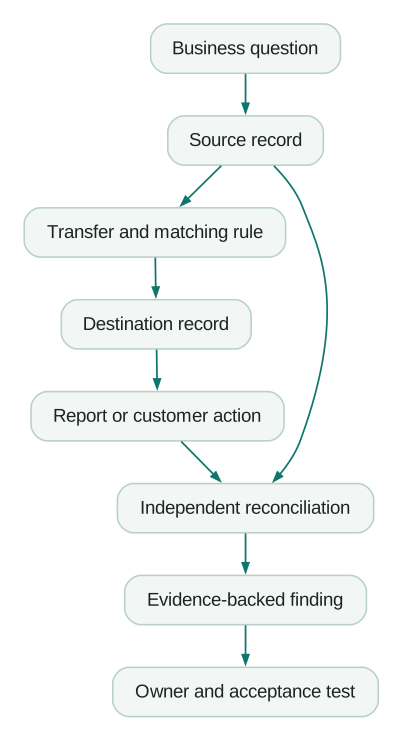
Map data transfers as directional relationships. “Stripe connected to HubSpot” omits what moves, which direction it moves and which system wins when values disagree.
Use a second CSV:
source,destination,objects_or_events,match_key,fields_owned_by_source,schedule,expected_delay,last_success,failed_records,alert_owner,replay_method,consent_or_suppression_ruleFor each connection, inspect one successful record, one exception and one update to an existing record. If it handles deletions or removals, test that behaviour separately. Creating a record correctly says little about what happens when a customer cancels or changes account membership.
HubSpot's Connected Apps documentation, updated in August 2026, describes connection status and activity views that can support this work. Some app types omit particular status or activity fields, so supplement the interface with source and destination evidence where needed.
Step 4: trace identity through the customer journey
Pick representative examples that exercise the model: a new prospect, an existing customer, a person in two accounts, a refunded order and a record with missing attribution. Use synthetic or appropriately restricted test records where practical.
Write the identifiers at every step. A SaaS journey might include anonymous browser ID, application user ID, account ID, CRM contact ID, CRM company ID and Stripe customer ID. The audit should explain how each joins to the next and where the mapping is stored.
Watch for email used as the sole durable key. An address can change, and a shared domain cannot establish that two records belong to the same paying account. Twilio Segment's Identify specification provides a reference for using stable user identifiers.
Check ownership conflicts too. If a warehouse writes lifecycle stage while a CRM workflow writes the same field from different rules, the result may oscillate. Assign one authority for the field or use separate fields that describe the separate concepts.
Step 5: test measurement against a source you can inspect
Reconcile important events with the system that establishes the underlying fact. For purchases, compare unique transaction IDs, amounts, currencies, refunds and timestamps. For leads, distinguish a submitted form from an accepted CRM record and a sales-qualified opportunity.
Do not start by demanding identical totals across GA4, ad platforms and billing. They can differ because of identity, consent, reporting date, attribution and population. Start with the expected observable records and explain the gap by category.
Google's DebugView documentation explains how to inspect test events and parameters. It also notes that privacy controls or denied Analytics-cookie consent can affect visibility, and that DebugView performs limited attribution analysis. Use it to inspect event behaviour, then use the appropriate reports for acquisition analysis.
For each event, record what should trigger it, required parameters and whether duplicate transmission can occur. Test a refresh, a back-button visit and a retry. Use the Google Ads versus GA4 guide when the disputed number is a conversion total.
Step 6: inspect automation at the point of action
Check the state immediately before an email, CRM task or audience update executes. A customer can become ineligible after entering a workflow but before reaching its final step.
Inspect entry, re-entry, waiting periods, suppression, exit and error handling. A complete test covers payment during a delay, unsubscribe during a delay, duplicate source events and a destination outage. Confirm that replaying an event does not create the same task or message twice.
Stripe's webhook documentation makes duplicate delivery and event ordering explicit. Use that as a practical reminder: incoming event delivery is not a guarantee that actions should execute once in the order they arrive.
For AI connections, record the server or app, installation owner, authorised data, available write actions and logging. Test a question against an independently known answer before treating a fluent response as a validated report.
Step 7: identify overlap without deleting useful capability
Compare the jobs people actually perform. Two tools with similar marketing labels may serve distinct users or requirements. Two products with different labels may both maintain the same audience and create unnecessary reconciliation.
For a removal candidate, document the replacement workflow, missing features, migration effort, data export, contract timing and rollback. Exporting historical records does not automatically preserve dashboards, automation or permissions.
Estimate the net saving. If a $300 subscription saves ten hours of monthly work, removing it can be expensive. If a rarely used $300 add-on duplicates a workflow already maintained elsewhere, the saving may be straightforward after a controlled cutover.
Include infrastructure waste. Google's BigQuery cost-control guidance covers query estimation and controls such as maximum bytes billed. Check the billing model and workload before assuming a budget alert stops spending; notification and enforcement are different controls.
Step 8: turn findings into an ordered fix list
Write each finding as a specific condition, consequence and acceptance test. “Improve tracking” cannot be closed objectively. “Send one confirmed purchase event per order ID, with matching amount and currency across the agreed test set” can.
Use this finding template:
Finding ID:
Observed condition and evidence:
Affected workflow and population:
Customer or business consequence:
Proposed change:
Owner and dependencies:
Effort and recurring cost:
Acceptance test:
Rollback or recovery:
Target date and follow-up measure:
Prioritise active customer harm and material data loss first, then measurement needed for current decisions, then manual-work savings and commercial optimisation. Within a group, compare impact, confidence and effort. Avoid multiplying arbitrary scores into a number that looks more precise than the evidence.
What would a completed audit recommendation look like?
Consider an illustrative 20-person SaaS business with a $400 monthly overlapping reporting subscription and eight hours of monthly reconciliation at $65 an hour. Assume investigation shows that a maintained account model can replace the duplicate report and save six of those hours.
The proposed work costs $4,500 upfront and adds $100 a month in software plus two hours of maintenance at $65. Estimated monthly benefit is $400 plus $390, minus $230, or $560. Simple payback is about eight months.
That estimate depends on the subscription being cancellable and the six hours actually disappearing. If the contract has nine months left, show both cash timing and eventual recurring savings. Do not claim immediate savings from a cancellation that cannot yet take effect.
The acceptance test should reconcile account counts and revenue definitions, verify the users can perform their reporting jobs and confirm the old subscription is no longer required. Review the realised saving after the change instead of treating the business case as proof.
Can AI help run the audit?
AI can organise evidence, identify missing fields and draft findings from approved exports. It should distinguish observed facts from hypotheses and should not receive credentials or unnecessary customer records.
Use this reusable prompt with sanitised inventories and configuration notes:
Review the supplied tool inventory, connection map and test evidence.
For each finding, cite the exact supplied evidence and its date.
Separate observed defects, unresolved questions and improvement ideas.
Identify missing owners, renewal deadlines, identity rules and replay methods.
Propose an acceptance test and a dependency order for each change.
Do not invent usage, savings, vendor features or contract terms.
Do not change any system or send any message.
Use the output to plan checks. Verify each finding against the actual configuration and a representative customer journey before treating it as established.
A checklist for handing over the audit
- Tool inventory reconciled with invoices and actual usage.
- Contract dates and notice deadlines backed by order forms.
- Critical connections mapped with direction, identity and ownership.
- Representative customer journeys traced through source and destination.
- Measurement differences explained by category.
- Automation tested for changed eligibility, duplicates and failures.
- Access and AI connections reviewed for their actual permissions.
- Removal candidates include migration and recovery plans.
- Findings have evidence, owners, acceptance tests and dependencies.
- Savings distinguish immediate cash, future cash and staff capacity.
- A follow-up date checks whether the changes delivered the intended result.
At Martechdevs, we build and document the connections between customer data, reporting and the next operational action. Start with the free martech AI audit, or explore an AI assistant built around your approved workflows.
Questions people ask
How long does a martech stack audit take?
It depends on access, the number of critical workflows and the depth of testing. A small inventory review can be brief, while tracing identity and reconciling several systems takes longer. Scope the questions and required evidence before estimating the work.
How often should we audit the stack?
Review costs and critical connection health regularly, and revisit the architecture when the business changes. A major renewal, new product, new region or new sales motion is a useful trigger. Keep the inventory current so each review does not start from scratch.
Is a stack audit mainly about cutting subscriptions?
Subscription savings are one possible result. The audit also checks whether customer actions, reports and automations work as intended. A small paid integration can be a better outcome than a cheaper setup with more manual work and missed updates.
Can we audit without a warehouse?
Yes. Use source exports, configuration records and carefully selected test journeys to inspect the important flows. A warehouse may become a recommendation if repeatable cross-system reconciliation has a clear benefit and an owner.
What should we send an implementation partner?
Share the scoped questions, inventory, connection map, evidence and prioritised findings. Include acceptance criteria so both sides know what completion means. Provide access through appropriate accounts and permissions rather than placing credentials in the audit document.
Sources
- HubSpot, Manage your connected apps, August 2026.
- Twilio Segment, Identify specification, checked October 2026.
- Google Analytics, Monitor events in DebugView, checked October 2026.
- Stripe, Webhook endpoint guidance, checked October 2026.
- Google Cloud, Estimate and control BigQuery costs, checked October 2026.
Written by
Jafrin Akter AloData Engineer and Co-founder, martechdevs
Jafrin Akter Alo is a data engineer and co-founder of martechdevs, where the team has delivered 74+ martech, data and growth stack implementations.