
Claude Code for marketing: a practical first workflow for non-engineers
Data Engineer and Co-founder, martechdevs
Last updated 10 min read
Claude Code can help marketers inspect files, transform campaign data, validate URLs, prepare reports and build repeatable workflows. You can describe the task in plain English, but you still need to define the result and review it. Start with a copied export and a local output file. Add live systems after the workflow is useful and its permissions are understood.
Last updated: 21 September 2026.
The first worthwhile task is often unglamorous. You have a spreadsheet of campaign URLs, inconsistent UTMs and a launch approaching. You need a checked file, a clear exception list and confidence that nothing disappeared during cleanup.
That is a good fit for an agent that can work with files and run validation. It is also easy to judge: either the output preserves the records and applies your rules, or it does not.
What Claude Code adds to a marketing workflow
Claude Code can read project files, edit them, run commands and use connected tools. It is available through several supported interfaces, including the terminal and development environments. Claude Code overview.
The useful change is continuity. A workflow can use the same brand guidance, naming convention and validation script each time it runs. The result can be saved as a file that a colleague can inspect.
You do not need to become a software engineer to begin. You do need enough understanding to answer three questions:
- What input is the agent using?
- What can it change?
- How will you know the output is correct?
If the work crosses CRM, analytics and advertising tools, Martechdevs builds custom marketing agent workflows around those questions and the underlying data definitions.
A real example, with the claim kept in context
Anthropic describes growth marketer Austin Lau building workflows for creative variations and Google Ads copy despite having no prior coding experience. The company reports a reduction from roughly 30 minutes per ad to 30 seconds in that workflow. Anthropic's marketing case study.
That is a vendor-reported example, not a general benchmark for marketing productivity. Its useful lesson is the choice of task: repetitive production steps with known inputs, formatting requirements and human review.
Apply the same logic to your work. Find a repeated operation where the mechanics are tedious and the acceptance criteria are clear. Copying approved text into many variants, checking URLs or preparing a standard report can be easier to validate than asking an agent to run an entire acquisition strategy.
Install and start in a dedicated project folder
Use Anthropic's current installation instructions for your operating system. For a Mac that already uses Homebrew, the documented command is:
brew install --cask claude-codeCheck the installation:
claude --versionThen open a dedicated folder and start Claude Code. The first session guides you through authentication. Supported account routes include Claude subscriptions and separately billed API access, so confirm which route your organisation intends you to use. Official quickstart.
For the example below, create a folder named marketing-utm-review and put these items inside:
marketing-utm-review/
  inputs/
    campaign-urls.csv
  context/
    utm-rules.md
  outputs/
Use a copy of the export. Keep the original available for reconciliation.
Choose a small first dataset without customer personal data. Campaign IDs, destinations and campaign metadata are enough for a URL-quality exercise.
Your first task: a UTM audit with an exception file
Suppose campaign-urls.csv contains these columns:
campaign_id,destination_url,utm_source,utm_medium,utm_campaign,utm_content
launch_01,https://example.com/demo,LinkedIn,paid_social,october_demo,creative_a
launch_02,https://example.com/demo,linkedin,paid_social,october_demo,creative_b
launch_03,https://example.com/demo,newsletter,email,october_demo,
These are fictional records. The missing utm_content may be acceptable for the newsletter or may need correction, depending on your convention. The agent should follow the documented rule instead of treating every blank field as the same error.
Write utm-rules.md in plain English. Define approved sources and mediums, whether creative IDs are required by channel, how to handle existing URL parameters and which values must remain unchanged.
The UTM naming convention guide provides a fuller model. For a first run, keep the policy small enough that you can manually verify the results.
Start in Plan mode and ask:
Read the CSV and UTM rules. Explain the columns, count the rows and identify ambiguities before editing. Propose a validation plan. The required outputs are a reviewed CSV, an exceptions CSV and a short QA note. Preserve every input row and campaign ID. Do not upload or publish anything.
Plan mode is designed for exploration without editing source files. Permission behaviour depends on the configured mode and settings, so inspect the current mode rather than assuming the initial default. Claude Code permissions.
Review the plan, then authorise the local work you want performed.
Ask for deterministic checks where the rules are deterministic
An AI model is useful for interpreting the task and explaining exceptions. A script is better suited to applying the same exact validation to every row.
Ask Claude Code to generate and run checks for:
- Input and output row counts.
- Preservation of campaign IDs and destinations.
- Required fields by channel.
- Approved source and medium values.
- Existing query parameters and fragments.
- Duplicate query parameter names.
- Correct URL encoding.
The resulting QA note should say which checks passed and which records need a decision. It should not claim a clean file when some values were guessed.
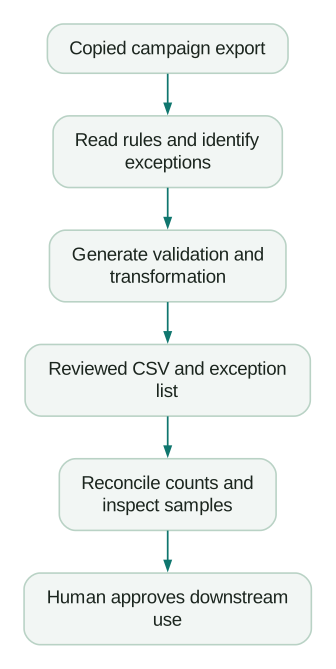
A separate exception file is useful because it preserves the difference between a mechanical correction and a business decision. Lowercasing an approved platform identifier may be mechanical. Reassigning an unknown campaign to a channel requires context.
Worked example: catch a URL change that looks harmless
Imagine a fictional export with 120 rows. The agent produces 117 output rows after removing what it calls duplicates.
That is a failed run if the requirement was to preserve all input rows. Three rows might represent separate creative placements pointing to the same destination. A repeated URL does not prove the record is redundant.
A second issue appears in a destination that already contains ?plan=annual. Appending another question mark before the UTM parameters would create a malformed query string for the intended purpose. The transformation needs to parse and merge parameters correctly.
The reviewer checks:
- All 120 campaign IDs are represented.
- Existing destination parameters remain intact.
- New UTM parameters are added once.
- Ambiguous records are flagged without being removed.
The useful output is therefore more than a cleaned spreadsheet. It includes the script, the decisions and the checks needed to rerun the task next month.
Save one or two tricky records as examples for future validation. That is how a one-off task becomes a dependable workflow.
Add project context before adding more prompts
Claude Code supports project instructions through CLAUDE.md and related memory mechanisms. Use them for stable rules that apply across tasks. Project memory documentation.
A short marketing project file might contain:
# Marketing operations project

Read the relevant context file before applying a business rule.
Preserve source exports and write results to outputs/.
Keep unknown values visible; do not invent missing business data.
Include row counts and validation results with transformed files.
Use approved voice examples when drafting copy.
Live system changes require the configured review process.
These instructions guide behaviour. They do not replace file permissions or tool-level controls.
Keep task-specific details out of the general file. This month's promotion dates belong in the campaign brief; otherwise they may accidentally influence a future campaign.
The context engineering guide includes six focused files for metrics, data, naming, customer fit, playbooks and brand guidance.
Five useful weekly jobs after the first workflow works
1. Prepare a performance report from approved exports
Give the agent the metric definitions, reporting dates and source files. Require calculations to be reproducible and distinguish findings from explanations.
Ask it to flag mismatched periods or currencies before combining data. A report should not merge weekly spend with monthly revenue simply because the columns look compatible.
2. Validate ad variants against a brief
Provide the current offer, approved claims, destination and format requirements. Have the agent generate variants and run exact checks for the constraints that can be tested mechanically.
Review meaning separately. A character-count pass does not establish that the claim is accurate or the message fits the audience.
3. Review a CRM cleanup proposal
Use an export to identify missing owners, inconsistent stages or suspicious duplicates. Require an explanation for each proposed change and preserve source IDs.
Start with a proposal file. Merging records or changing lifecycle properties can affect integrations and workflows, so the live action needs more than a plausible match.
4. Audit a lifecycle sequence
Supply the entry rule, exclusions, exit conditions and messages. Ask for contradictions, missing customer context and overlaps with other journeys.
The useful output is a prioritised correction list tied to specific steps. “Make the emails more personalised” is too vague to implement.
5. Maintain a competitor evidence brief
Ask for current primary sources, dated observations and clearly separated inferences. Preserve the page links and the relevant plan or product context.
A competitor's enterprise capability should not be compared with your entry-level offer without explaining the difference. Recheck facts when the brief is reused.
Which plugins and connectors are worth evaluating?
Anthropic publishes a marketing plugin in its knowledge-work plugins repository, covering tasks such as content, campaign planning, voice review and reporting. It is designed primarily for Cowork and also works in Claude Code. Review its current installation instructions and included connectors before enabling it. Official marketing plugin.
Mixpanel documents a Claude Code plugin that adds guided workflows to its MCP connection. It can be useful when the task depends on product analytics, but the connected account's permissions still matter. Mixpanel MCP and plugin guidance.
Clay's plugin installs skills and a CLI for its supported workflows. Clay distinguishes that interface from MCP for Reps, with its own access and credit controls. Do not assume a tutorial for one applies to the other. Clay plugin documentation.
Install a plugin because it supports a task you intend to run. Review its instructions, scripts, dependencies and network access. A bundle can add far more capability than its short description suggests.
Connect live data one system at a time
MCP servers give Claude Code tools for interacting with external systems. The marketing MCP guide lists official options and important differences between them.
For the first live connection, use the narrowest access that supports a known reporting task. Compare the answer against the source platform before adding another system.
For example, the HubSpot MCP guide can help you retrieve a scoped pipeline review. Once that works, decide whether billing or product data is actually needed for the next question.
Keep system IDs in the output. A recommendation attached to “Acme” is ambiguous when the CRM contains multiple companies with that name. Record identifiers let a reviewer verify the intended target.
Day-one permission choices
For a first project, use a dedicated folder, copied inputs and a mode that lets you review consequential actions. Inspect /permissions and the documented permission modes. Do not enable broad permission bypass simply to remove friction from a task you are still learning. Permission configuration.
When the agent proposes a command you do not understand, ask it to explain the files affected, any network destination and how the result will be checked. The explanation should describe the specific command's effect.
Use approved authentication flows for connected services. Keep credentials out of prompts and project documents. If a workflow needs a secret, have the technical owner configure the supported credential mechanism.
The MCP security checklist becomes useful as soon as the project can access live customer or account data.
Measure the workflow after review time
Record the old completion time and the new time, including preparation, corrections and review.
Suppose a hypothetical URL audit previously took 90 minutes. The new workflow takes 10 minutes to prepare, 15 minutes to run and inspect, and 20 minutes to resolve exceptions. The net saving is 45 minutes, not 80.
Also record defects found after approval. A fast workflow that creates extra downstream cleanup may be more expensive overall.
Promote the workflow to a reusable skill only after the steps are stable. The marketing skills guide explains how to package instructions, examples and checks for repeat use.
First-workflow checklist
- A dedicated project folder contains copied inputs.
- The output and acceptance criteria are explicit.
- Relevant business rules are available as maintained context.
- The current permission mode is understood.
- Unknown values become exceptions rather than guesses.
- Counts, identifiers and key transformations are reconciled.
- A reviewer checks representative and difficult cases.
- Live publishing or system changes have a separate decision.
- The workflow, inputs and validation evidence can be rerun.
- Net time saved includes review and maintenance.
At Martechdevs, we build the data access, definitions and working instructions behind repeatable AI workflows. Start with the free martech AI audit, or explore an AI assistant built around your approved workflows.
Questions people ask
Can non-coders use Claude Code?
Yes. Plain-language instructions can drive file and tool workflows. You still need to understand the business rules and review effects you authorise, especially once live systems are connected.
Is Claude Code only useful for writing code?
No. File inspection, data transformation, validation and repeatable reporting can be useful marketing tasks. Code may be part of how the work is completed even when the deliverable is a CSV or report.
Is there an official marketing plugin?
Yes. Anthropic's knowledge-work plugins repository includes a marketing plugin. Inspect its current capabilities and configuration before use, and adapt it to your actual brand and operating rules.
Should I connect HubSpot on day one?
Only if the first task needs live CRM access and the scope is clear. A copied export is often enough to establish the workflow and identify the checks it needs.
How quickly can I get a useful result?
A small file-validation task can produce a useful first result in one session. Installation, authentication, data quality and the complexity of the rules determine the timing. Judge success by a verified output rather than a promised number of minutes.
Sources
- Claude Code overview. Accessed 21 September 2026.
- Official quickstart. Accessed 21 September 2026.
- Permission configuration. Accessed 21 September 2026.
- Project memory. Accessed 21 September 2026.
- Anthropic's growth marketing case study. Accessed 21 September 2026.
- Anthropic marketing plugin. Accessed 21 September 2026.
- Mixpanel MCP and plugin documentation. Accessed 21 September 2026.
- Clay plugin, CLI and API documentation. Accessed 21 September 2026.
Written by
Jafrin Akter AloData Engineer and Co-founder, martechdevs
Jafrin Akter Alo is a data engineer and co-founder of martechdevs, where the team has delivered 74+ martech, data and growth stack implementations.