
Salesforce MCP: Hosted Servers, Claudeforce and a Practical First Workflow
Data Engineer and Co-founder, martechdevs
Last updated 11 min read
Start with a Salesforce question someone already spends time answering. Which open opportunities need an owner review this week? Which accounts have unresolved support cases before renewal? Connect enough data to answer that question, make the answer verifiable, and measure whether the team actually uses it. That is a better first project than giving an assistant every CRM action and hoping a workflow appears.
Last updated: 1 October 2026.
Salesforce now has several MCP surfaces. Choosing one means separating the product you use, the work you want done, your permissions and the commercial terms. A connection that reads opportunities is different from a connection that activates a Marketing Cloud journey. Both can appear inside an AI assistant.
Choose the Salesforce Surface That Matches the Work
Salesforce's hosted MCP overview describes OAuth-based access to CRM records and business logic, including custom tools backed by Flows, Apex and named queries. Calls use the authenticated user's permissions. Existing field security and record sharing still matter.
For a RevOps team, distinguish these options:
- Hosted Salesforce MCP servers: connect a compatible assistant to a chosen set of Salesforce capabilities. Useful when an admin wants to select the server and configure access.
- Salesforce in Claude, under Claudeforce: Salesforce's September announcement describes a packaged beta with 37 sales skills. This is a product experience to evaluate, not another name for every manually configured MCP connection.
- Agentforce Coworker: an assistant in the Lightning interface that can use specialised Agentforce agents. Consider it when the work and users already sit inside Salesforce.
- Marketing Cloud Engagement MCP: a separate connection for Engagement data extensions, journeys, content and related operations.
The AIforce launch announcement places Salesforce in Claude in beta and describes additional marketing, service and other skills as future additions. Confirm current availability for your region and agreement before choosing a rollout date.
My recommendation: shortlist by the work surface people already use. A sales team working in Claude may benefit from the packaged experience. An admin testing a narrowly defined record review may prefer a manually configured hosted server. A lifecycle marketer operating Journey Builder needs the Engagement connection. Do not make users adopt three interfaces to complete one task.
Check Edition, API Access and Billing Separately
Salesforce's API Catalog documentation lists Developer, Enterprise, Performance and Unlimited Editions in Lightning Experience. An admin can find Salesforce servers through Setup, API Catalog, then MCP Servers. Check the actual org before building around a server you cannot enable.
A small team on another edition should not assume an internal MCP server solves the eligibility problem. A custom connector still needs legitimate access to the underlying API. Salesforce's REST API requirements distinguish org-level API access from user permission; Professional Edition can add API access, but that does not establish entitlement to the hosted MCP product.
Use three separate questions in procurement:
- Can this org use the selected hosted server and the underlying product capability?
- Can the intended user access the required objects, records and fields?
- Which charges apply to the selected workflow, including Salesforce usage and the external AI client?
An answer to one does not answer the other two.
What Salesforce MCP Costs Right Now
The hosted overview says the service is intended for customers with Flex Credits and server usage may be billed. The more detailed AIforce impact notice, published 17 September 2026, targets November for new agent registration and billing controls. It says the Headless Platform Interaction multiplier is still unannounced and this agentic usage is not yet metered, with 30 days' notice before metering starts. The planned model covers successful registered-agent calls through MCP or direct APIs; it leaves traditional integration pricing unchanged.
The linked Flex Credits rate card, dated 31 August 2026, still shows TBA for Headless Platform Interaction. It lists other chargeable usage types separately. An unknown future interaction rate does not make every action, query or AI service free today.
Ask for the applicable rate card and notice dates before signing off a recurring workflow. Record the external assistant subscription, underlying product usage, admin maintenance and any usage-based charges separately. Do not turn an unannounced multiplier into a made-up monthly estimate.
For planning, count tool calls as well as completed requests. One request can discover schema, read several records, retrieve related cases and repeat a failed query. Track those steps during a pilot, then apply actual contracted rates where relevant. A price per user alone will not describe that workflow's operating cost.
Begin With a Server That Can Only Read
The standard server reference separates SObject Reads, Mutations, Deletes and All. Mutations supports create and update without delete. Standard servers have fixed tool sets; an administrator enables them, rather than editing their tools into a new bundle. Some other servers, including Headless 360, are explicitly labelled beta.
For an opportunity review, select SObject Reads. Salesforce's read-only server documentation supports schema discovery, querying, search and related-record retrieval without creating, updating or deleting records.
Its documented endpoints are:
Production:
https://api.salesforce.com/platform/mcp/v1/platform/sobject-reads

Sandbox or scratch org:
https://api.salesforce.com/platform/mcp/v1/sandbox/platform/sobject-reads
Choose the environment deliberately. Name the connector so a user can tell which org it reaches before starting a conversation.
Read-only access still needs a suitable user. An administrator who can see every account is a poor stand-in for a rep who can see only a territory. Test with the role that will actually use the workflow.
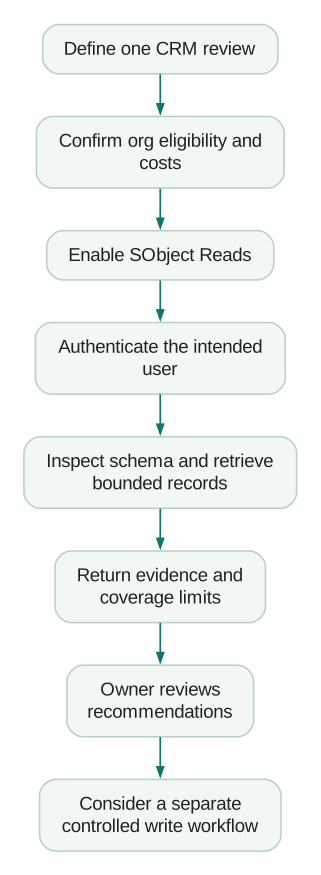
Connect the Hosted Server to Claude
Salesforce's client connection guide requires an External Client App for this manual connection. A legacy Connected App is not interchangeable. Agentforce Vibes has a separate auto-enabled path.
Configure the Salesforce Side
Enable the chosen server in API Catalog. Then use External Client App Manager to create the OAuth application. Salesforce's External Client App instructions specify mcp_api and refresh_token scopes and JWT-based access tokens for named users. For Claude.ai and Claude Desktop, the documented callback is:
https://claude.ai/api/mcp/auth_callbackSave the consumer key for the client configuration. New apps can take up to 30 minutes to become operational. Configure access policies for the intended users and the actual client; follow the documented security settings rather than copying settings from an unrelated integration.
Keep an owner for the app, its permission policy and its revocation procedure. Otherwise a successful pilot can become a connection nobody knows how to remove when a contractor leaves.
Configure the Claude Side
In Salesforce's current Claude setup instructions, open Customize, Connectors, Add, then Add custom connector. Supply the selected server URL. Choose your own OAuth client and paste the External Client App's consumer key as the client ID. The documented default leaves the client secret blank unless your authorization server requires one. Connect and complete the Salesforce authorization.
Start with a small, known record lookup. Compare its returned fields with what the same user can see in Salesforce. Do this before asking the model for a pipeline narrative: it is much easier to diagnose a missing field than a plausible but incomplete executive summary.
If authentication fails, check the environment, server activation, callback, scopes, app propagation and user access in that order. Broadening permissions at random can conceal the original configuration error.
Build a Useful Opportunity Review
The first output should support a decision someone owns. Here is an original example for a weekly sales-manager review:
Review open opportunities owned by the specified team in two cohorts:
overdue close dates, and close dates from today through 30 calendar days
after today, inclusive. Use the org's agreed reporting timezone and state
the exact dates. Keep the cohorts separate in the output.

Inspect the available schema first. Use the documented open/closed field
and the team's real next-step and activity fields. Do not guess API names.

Return a bounded first page of up to 50 records per cohort, ordered by
close date and a stable record identifier. Show record ID, owner, stage,
amount and currency, close date, next step, and evidence for each flag.

Flag a missing next step, overdue close date, or missing recent activity
separately. Confirm the team's definition of recent activity before querying.

State the exact filters, retrieval time, fields unavailable to this user,
and whether the result is partial. Do not call a first page a team total.
Do not change records, create tasks, or send messages.
An overdue opportunity falls outside a strictly future-only close-date window. The separate cohorts keep those deals visible while preserving a useful upcoming-close view. Showing each cohort's first page also prevents a large backlog of overdue deals from hiding every upcoming opportunity.
Agree on the selection rules before saving the prompt, including treatment of missing close dates and any deliberately excluded parked deals. Define how to continue if either cohort exceeds the initial bound. Keep the retrieval cap visible; it limits this review's coverage, not the number of opportunities in the CRM.
Separate Missing Evidence From a Negative Finding
Suppose the assistant cannot read an activity field. It should report activity unavailable, not no recent activity. If a user cannot see an account, that account's absence is not proof it has no open opportunities.
For every flag, ask for the source record and the rule that produced it:
- Missing next step: the configured field is readable and empty.
- Overdue close date: the opportunity is open and its close date precedes the agreed as-of date.
- Recent activity unknown: the required evidence was inaccessible, incomplete or not collected.
- Owner review needed: a human decision is required; no automatic stage change follows from the flag.
This gives a manager a queue they can work through. A paragraph saying the pipeline needs attention does not.
Compare Like-for-Like Amounts
Use an explicit currency policy. Do not sum USD and EUR amounts into one unlabeled total. Do not turn missing amounts into zero without identifying them. If the comparison report uses converted currency, the assistant's result must use the same basis and conversion assumptions.
An illustrative review finds 12 flagged opportunities among 40 records returned. That is 30% of the retrieved records. If another 60 matching records remain unread, the review has covered 40% of the 100 matching records, and 30% is not yet the flag rate for the full cohort.
Neither percentage is revenue at risk. A record can have a missing next step because someone failed to update the CRM while the buyer remains engaged. The owner must establish the commercial consequence.
The same principle belongs in your broader CRM data hygiene process: make the meaning of a flag clear enough that two operators take the same next step.
Add Writes Only After the Review Works
A useful read workflow can later prepare a proposed change. Keep the proposal separate from execution and identify the exact record, current value, proposed value, reason and reviewer.
This is an original planning record, not a Salesforce API request:
{
  "example_only": true,
  "record_id": "REPLACE_WITH_VERIFIED_OPPORTUNITY_ID",
  "field_api_name": "NextStep",
  "observed_value": null,
  "proposed_value": "Owner to confirm the procurement meeting date",
  "reason": "The readable next-step field was empty during review",
  "approval_status": "pending",
  "execution_status": "not_attempted",
  "precondition": "Re-read the record and require the approved old value"
}
Before execution, re-read the field. If a rep has added a next step since the review, stop and reconcile instead of overwriting their work. A stronger implementation performs the change with a server-side concurrency precondition; a manual re-read alone does not eliminate the gap between checking and writing.
In a sandbox, test validation rules, automation and downstream effects. A field update may be technically accepted while triggering a process nobody intended for this use case. Verify the record after the write and record individual outcomes when a batch only partly succeeds.
Keep sending email, activating campaigns and changing commercial terms outside a generic CRM-cleanup request. Each needs a defined business rule and an accountable owner.
Marketing Cloud Engagement Has Its Own Setup
Use the Engagement setup guide for an Installed Package with an API Integration component of type Public App. Select the scopes needed for the task, obtain the tenant and client identifiers, replace the temporary callback with the documented callback, and configure the matching US or EU MCP endpoint. This is a separate setup from the CRM External Client App above.
The setup page says server location affects latency and the MCP server does not store accessed data. That statement does not determine the data-processing terms of the external AI client you connect.
Salesforce's Engagement GA explanation states that access requires both the package scopes and the user's permissions. Marketing Cloud API limits still apply.
For a first lifecycle workflow, request an inventory of the data extensions and journey definitions relevant to one onboarding programme. Ask for identifiers, field definitions and dependencies. Do not export subscriber rows when the question only concerns schema.
Then compare the inventory with the intended journey:
- Which business unit owns it?
- What qualifies someone to enter?
- Which identity links the entry data to the intended subscriber?
- Which events stop further messages after activation?
- Where are consent and suppression decisions applied?
- Which dependencies could break if a field is renamed?
The Engagement tool reference identifies required scopes and distinguishes read-only, destructive and asynchronous operations. An accepted asynchronous request still needs a status check. A destructive annotation describes the operation; it does not establish that your business approved it.
Use the inventory to resolve a concrete lifecycle problem, such as the stopping rules in an onboarding email sequence, before expanding access to campaign execution.
Reconnect Old Beta Integrations Deliberately
Salesforce's beta-to-GA migration guide requires updated endpoint URLs, enabled servers, the GA scopes and renewed authorization. Existing beta tokens do not work against the GA service. The External Client App itself can be reused.
Inventory every client using an old v1-beta.2 URL. Update the endpoint and MCP scope configuration, reauthorize the user, and compare a known result with Salesforce. If the OAuth application serves other consumers, review those dependencies before removing their scopes; isolate the MCP configuration when necessary.
Treat the announced Agentic Identity rollout as a separate future migration. The beta-to-GA steps do not prove that you have satisfied later registration requirements.
Salesforce MCP Launch Checklist
- One named user owns the decision this workflow supports.
- The selected product, org edition and commercial terms are verified.
- Production and test connections have unmistakable names.
- The initial server and user permissions match the required read scope.
- Known, restricted and absent records produce distinguishable results.
- Date rules, currency, pagination and unavailable fields are visible in the output.
- The team can verify every review flag against a source record.
- Any write has explicit proposed values, concurrency handling and post-write verification.
- App ownership, revocation and usage review have an operational owner.
- Current rate-card and registration notices are checked before release.
If the review repeatedly fails because objects, ownership and lifecycle rules are unclear, fix those foundations through your CRM and lifecycle implementation. If the required workflow crosses Salesforce, billing and product data, scope an internal MCP connection around that specific decision. More tools will not compensate for an undefined customer model.
Questions people ask
Which Salesforce MCP Server Should a Small Team Start With?
For a CRM review, start by checking whether the org supports the hosted product, then evaluate SObject Reads with the intended user's access. If the main task is operating Engagement journeys, use that product's separate connection. Choose by the job and available permissions, not the size of the tool catalogue.
Is Claudeforce the Same as a Custom Salesforce MCP Connection?
No. Claudeforce includes the packaged Salesforce in Claude experience. A manually configured connection is something your admin sets up against a selected hosted server. Compare the actual workflow coverage, availability and operational control before choosing between them.
Does Salesforce MCP Bypass Field-Level Security?
The hosted platform documentation says calls respect the authenticated user's access. That also means answers can be incomplete for users with narrower visibility. An assistant should disclose that scope instead of presenting accessible records as the entire company dataset.
Can an Internal MCP Server Avoid Salesforce Licensing Restrictions?
An internal server still needs authorised access to the underlying API and product capabilities. It adds implementation and maintenance work. Check API entitlement and current agentic-usage terms before treating custom development as a cheaper route.
Should We Enable Record Updates in the First Pilot?
Only if updates are essential to the defined pilot and their consequences are understood. A record-review pilot can deliver value without them. Establish accurate selection, evidence, ownership and measured usefulness first; then introduce a narrow change workflow with an independently verifiable result.
Sources
- Salesforce hosted MCP overview
- Salesforce AIforce and Claudeforce launch
- Manage MCP servers in API Catalog
- REST API editions and permissions
- Understand AIforce impact
- Flex Credits rate card, 31 August 2026
- Standard MCP server reference
- SObject Reads reference
- Connect MCP clients
- Create an External Client App
- Configure Claude
- Marketing Cloud Engagement MCP setup
- Marketing Cloud Engagement MCP general availability
- Marketing Cloud Engagement MCP tools
- Hosted MCP beta-to-GA transition
Written by
Jafrin Akter AloData Engineer and Co-founder, martechdevs
Jafrin Akter Alo is a data engineer and co-founder of martechdevs, where the team has delivered 74+ martech, data and growth stack implementations.