CRM MCP servers compared: HubSpot, Salesforce, Attio, Pipedrive, Zoho and Dynamics 365
Data Engineer and Co-founder at Martechdevs and Growth and Analytics Partners
Last updated 14 min read
HubSpot, Salesforce, Attio, Pipedrive, Zoho CRM and Dynamics 365 publish official MCP connections. They differ in what they can change, which AI clients they support and how usage is limited or billed. Start with the CRM that already holds your records, choose a narrowly scoped read workflow and verify its output before allowing the assistant to update customer data.
Which CRMs have an official MCP server?
All six CRMs below have vendor-published MCP options, checked on 17 October 2026. Official means the CRM vendor maintains the connection; it does not mean every operation is read-only, available on every subscription or appropriate for every user. For other systems, see our marketing MCP server guide.
| CRM | Useful starting surface | Important boundary |
|---|---|---|
| HubSpot | Remote CRM server or official AI-client connector | Sensitive Data blocks activity and conversation data |
| Salesforce | Hosted SObject Reads server | Reads, create/update and deletes are separate server choices |
| Attio | Hosted workspace MCP | Inspect the actual tool set and workspace entitlement |
| Pipedrive | Native remote MCP | Plan token allowances and existing visibility rules apply |
| Zoho CRM | Data Insights server | Other servers can modify records, modules and workflows |
| Dynamics 365 Sales | Sales MCP plus Dataverse where required | Sales assistance and record CRUD use distinct connections in setup |
If the underlying field ownership or lifecycle rules are unclear, our CRM and lifecycle implementation work addresses those prerequisites before automating updates.
HubSpot: a remote server for CRM records
HubSpot's remote MCP became generally available on 13 April 2026 for all accounts. HubSpot's release notice. Its current scope extends beyond ordinary record updates: it can edit custom-object records, manage pipelines, create properties, publish content, update campaigns and prepare marketing email drafts. Sensitive Data settings block activity and conversation data through MCP. OAuth with PKCE and the connected user's permissions still apply. After connecting, run get_user_details to inspect the tools available for that account, subscription and granted scopes; check the client's actual tool inventory too. Current HubSpot permissions and tools.
- Best for: a HubSpot team preparing pipeline reviews or proposing record updates in its existing assistant.
- Pros: vendor-hosted access and packaged connectors for major AI clients.
- Cons: activity restrictions or missing scopes can leave a plausible account summary incomplete.
- Free tier and startup offer: the server is available to all accounts; the notice does not establish a separate MCP startup award or unlimited access to paid HubSpot features.
- Choose it if: the required records and permissions already live in HubSpot.
- Skip it if: the question primarily needs billing or product evidence that is absent from the CRM.
The documented base URL is https://mcp.hubspot.com. HubSpot recommends its official Claude, ChatGPT, Copilot or Gemini connector for ordinary end-user work; custom integrations use the remote-server developer path. Follow our HubSpot MCP setup guide for the client-specific details. HubSpot connection documentation.
Salesforce: choose the server before choosing tools
Salesforce's hosted servers authenticate per user and enforce object permissions, field security and sharing. The standard catalogue separates SObject Reads, Mutations, Deletes and All. Standard servers are disabled until an administrator enables them; their tool sets are fixed. A read-only opportunity review should start with Reads rather than the full CRUD surface. Salesforce's server catalogue.
- Best for: Salesforce organizations needing explicit control over which platform operations an external assistant can use.
- Pros: separate server scopes and support for custom business logic through approved platform tools.
- Cons: org eligibility, app setup and commercial terms need an administrator's involvement.
- Free tier and startup offer: the hosted overview targets Flex Credit customers; verify entitlement rather than assuming a free developer org proves production availability.
- Choose it if: Salesforce is the system of record and the chosen server covers a defined job.
- Skip it if: you are using a local developer server merely because its installation tutorial is easier.
The hosted overview describes OAuth and compatible clients. Salesforce in Claude, announced under Claudeforce, is a separate packaged beta described in the September announcement. The local Salesforce DX MCP server has a documented end-of-life date of 2 November 2026. Official DX repository.
Use our Salesforce MCP guide to distinguish those surfaces and configure the intended hosted server.
Attio: workspace records, tasks and pipelines
Attio's hosted endpoint is https://mcp.attio.com/mcp, with OAuth sign-in as an Attio user. Its official app describes contact and company searches, notes, tasks, list and pipeline updates, reports and comments. It provides Claude and ChatGPT directory instructions and supports other compatible clients such as Cursor. Attio's official MCP app.
- Best for: teams already using Attio's flexible workspace to manage accounts and follow-up work.
- Pros: direct sign-in and useful task, note and pipeline operations.
- Cons: the app page is not a complete entitlement, deletion-tool or audit-retention specification.
- Free tier and startup offer: no MCP-specific free allowance or startup award is stated on that app page; confirm your workspace's plan terms.
- Choose it if: the workflow uses the Attio lists and records your team already maintains.
- Skip it if: the required operation is not present in the authenticated tool inventory.
For the broader CRM choice, use Attio versus HubSpot. MCP availability is one integration requirement, not a reason to restart a CRM evaluation from scratch.
Pipedrive: sales work through a native connection
Pipedrive launched its native MCP server on 30 June 2026. It supports searching records, creating and updating deals, contacts and activities, with the connected user's access and actions recorded in the change log. Pipedrive's launch announcement.
- Best for: a sales team using Pipedrive for pipeline management and follow-up activities.
- Pros: native OAuth setup and a documented change log.
- Cons: plan token allowances still constrain usage; a natural-language request can involve several operations.
- Free tier and startup offer: MCP is included across Pipedrive plans, subject to plan tokens and optional additional tokens; that does not make the underlying CRM subscription free.
- Choose it if: the task is a supported search, update or activity in your current pipeline.
- Skip it if: you require an unverified operation such as deletion without inspecting the available tools.
Pipedrive's Claude instructions use https://mcp.pipedrive.ai/mcp. Its feature page documents token metering and client support; the Claude setup guide provides the connection path.
Zoho CRM: separate records from configuration
Zoho provides four prebuilt servers. Data Insights is read-only. Data Operations supports record create, read, update and delete. Module Customization changes modules, fields and layouts; Workflow and Process Automation changes automation configuration. OAuth actions inherit the user's CRM permissions, and calls consume normal API credits. Zoho's MCP overview.
- Best for: Zoho teams that can choose a server matching a precise reporting or administration job.
- Pros: a dedicated read-only option and explicit separation of operational areas.
- Cons: enabling customization or workflow tools expands the possible effect beyond an individual record.
- Free tier and startup offer: no separate MCP promotion is documented in the overview; existing API-credit and CRM entitlement rules apply.
- Choose it if: the selected server's scope matches the task and the connected role is appropriately limited.
- Skip it if: a read-only reporting job would receive all four servers simply for convenience.
Zoho documents setup for Cursor, Claude Desktop, VS Code and Windsurf. Use its generated setup for the selected server and organization instead of copying an endpoint for a different server type.
Dynamics 365 Sales: sales assistance and Dataverse records
Microsoft's Sales MCP offers sales research, opportunity insights, summaries and email drafts. Its connection instructions separately add Dataverse for record CRUD. Copilot Studio and GitHub Copilot in VS Code are documented; Claude Desktop is explicitly unsupported in the current instructions. Sales MCP overview and connection guide.
- Best for: Dynamics teams building sales workflows in Microsoft's documented agent environments.
- Pros: sales-specific tools alongside a separate Dataverse route for records.
- Cons: client support and environment administration differ from a simple Claude directory connection.
- Free tier and startup offer: AI tools consume Copilot Studio credits unless the applicable Sales licence grants the documented exception; confirm the exact licence.
- Choose it if: your environment, licence and client match the supported setup.
- Skip it if: the plan assumes a working Claude Desktop connection without vendor support.
The Sales URL includes the environment ID: https://agent365.svc.cloud.microsoft/mcp/environments/<EnvironmentID>/servers/msdyn_SalesMCPServer. Dataverse uses https://<OrgURL>/api/mcp. These are placeholders to resolve from your environment, not credentials to paste into a public chat.
How do writes, approvals and audit trails differ?
A record edit, a deletion and a schema change need different controls. Moving one deal to another stage can trigger work; changing the definition or automation behind that stage can affect many records. Choose access based on the consequence of the operation.
| Operation | Documented examples | Appropriate first test |
|---|---|---|
| Read records | Zoho Data Insights; Salesforce Reads | Match an allowed record and reject an inaccessible one |
| Create or update | HubSpot, Attio, Pipedrive; Salesforce Mutations | Show old/new values, approve, then read back |
| Delete records | Zoho Data Operations; Salesforce Deletes/All; Dataverse CRUD | Verify exact tool and permissions in an isolated test environment |
| Change structure or rules | HubSpot pipelines/properties; Zoho customization/workflow servers; approved Salesforce custom tools | Review affected schema, automation and rollback before execution |
The HubSpot, Attio and Pipedrive pages checked here describe read/create/update uses without establishing a complete absence of delete tools. Treat deletion as unverified until you inspect the current authenticated inventory. An announcement's silence is not a durable permission boundary.
Client approvals are a second control, not a replacement for CRM permissions. Anthropic warns that Allow always permits unsupervised tool use. Its Research mode can call connector tools without further approval and recommends disabling write tools for that mode. Claude's connector guidance.
For a write, preserve the record ID, before/after values, requesting user, approving user, tool name, execution time and result. Pipedrive documents a change log; for other CRMs, check the enabled history or audit facility and its retention rather than claiming every MCP request is automatically captured. Keep a workflow execution record where the CRM log does not explain why a change was requested.
Which AI client should you use?
Use the vendor-documented connection for the client your team already works in, then test the authenticated tool set. Directory availability and protocol compatibility are different: a custom MCP connection may require an administrator or a different subscription even when the server is technically compatible.
| CRM | Documented client route | Check before rollout |
|---|---|---|
| HubSpot | Official Claude, ChatGPT, Copilot and Gemini connectors | Connector-specific tools and permissions |
| Salesforce | Compatible MCP clients and separate Salesforce in Claude beta | Hosted server, org entitlement and OAuth app |
| Attio | Claude/ChatGPT directories; compatible custom clients | Intended workspace and actual tools |
| Pipedrive | Claude/ChatGPT guides; custom MCP clients | Token allowance and user visibility |
| Zoho CRM | Claude Desktop, Cursor, VS Code, Windsurf | Correct prebuilt server and organization |
| Dynamics 365 Sales | Copilot Studio or GitHub Copilot in VS Code | Environment access; Claude Desktop limitation |
Claude's custom connectors are available on its listed plans, including one custom connector on Free. Organization owners control connector enablement in managed workspaces. Verify the current client settings rather than assuming a user's successful personal connection proves company-wide availability. Claude plan and administration guidance.
What does each CRM connection cost to run?
Budget the CRM entitlement, metered operations, AI client and upkeep separately. “No separate MCP fee documented” is narrower than “the workflow is free.” The current vendor sources establish these commercial boundaries, checked on 17 October 2026. The table identifies billing units and contract checks; it does not assign an unverified monthly price:
| Connection | Meter or commercial boundary | Input needed before budgeting |
|---|---|---|
| HubSpot | All-account availability; existing subscription gates capabilities | Required tools and eligible subscription |
| Attio | App page does not specify an MCP rate | Written workspace entitlement and usage terms |
| Pipedrive | Plan tokens plus purchasable additional tokens | Tokens consumed by one complete review |
| Zoho CRM | Existing API credits and limits | Credits per workflow and capacity shared with integrations |
| Dynamics 365 Sales | Feature-based Copilot Studio credits; licence exceptions | Exact tools, licence and applicable credit rates |
| Salesforce | Flex Credit entitlement and applicable server/agent terms | Confirmed metering start and rate before forecasting |
Salesforce's September AIforce notice targets November for registration and new billing controls. It says the Headless Platform Interaction multiplier will be announced and describes advance notice before metering. Do not turn an unannounced rate into a forecast or assume unrelated paid services are free. Salesforce's billing notice.
For an illustrative workload, eight reps each run a weekly review requiring 15 tool calls. That is 8 × 15 = 120 calls a week, or 120 × 52 ÷ 12 = 520 calls per average month. Discovery, pagination, retries and verification can add calls. Instrument a pilot, map each operation to the vendor's actual charging rule, then apply confirmed prices. One tool call is not necessarily one API credit, token or AI action.
Which server should you start with?
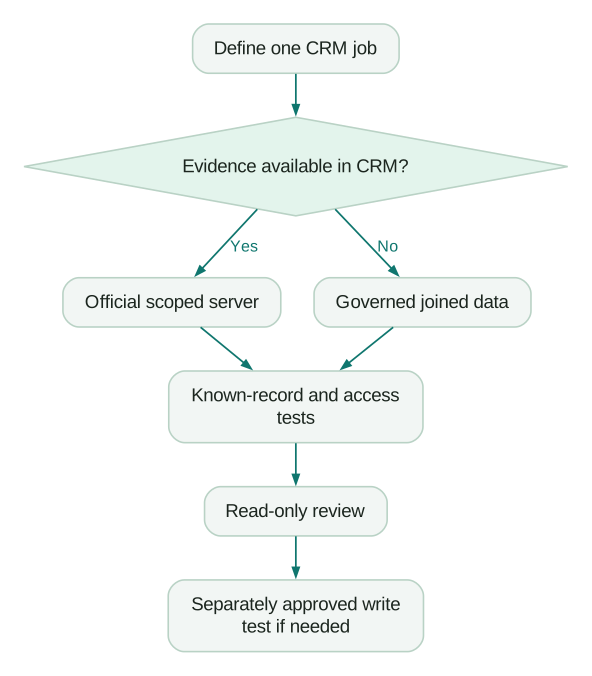
Our recommendation is the official server for the CRM that is already your system of record, initially with read-only access. Switching CRMs solely for MCP adds migration and adoption costs to a problem that may only require a connector.
- A small sales team: start with the existing CRM's pipeline review. A second CRM connector is a weaker fit unless it holds evidence the job needs.
- A Salesforce organization with strict change control: start with SObject Reads; evaluate a separate controlled mutation workflow later.
- A Zoho reporting team: start with Data Insights. Customization servers are a weaker fit for ordinary reporting because they grant a broader job surface.
- A Dynamics team committed to Microsoft agents: use the documented Sales/Dataverse setup. Claude Desktop is currently a weaker fit because Microsoft lists it as unsupported.
- An agency: maintain separate client connections, owners and prompts. Test that each response names the intended account before returning records.
For CRM operations versus enrichment tools, use our MCP guide for GTM engineering. Clay and Apollo solve different parts of that workflow.
How do you test a CRM MCP server before the team uses it?
Use a known record and a defined output so you can distinguish connection success from operational correctness. This is a proposed acceptance method, not a claim that we tested these six servers against customer accounts.
- Define the job. Specify account, object, pipeline, date field, timezone, currency and exclusions.
- Connect the intended role. Use the permissions of the actual operator, not an all-access admin as a substitute.
- Compare one known record. Check IDs, values, associations and missing fields against the CRM UI.
- Test a denied record. Confirm that inaccessible records and fields remain unavailable rather than being inferred.
- Check completeness. Ask for pagination, retrieval caps and the number of unread matches.
- Test any required write separately. Use an approved disposable record, show the exact change, approve it and read it back.
- Inspect side effects. Check workflows, validation, duplicate rules, notifications and downstream syncs. Trigger behaviour can depend on the tool and API path; do not assume every write fires every automation.
- Revoke and reconnect. Confirm who can remove access and what happens when the token or user is revoked.
Use the MCP security checklist to document the permissions and client data-handling review.
How should two CRMs be compared during a migration?
Compare matched record sets before interpreting different totals. A count difference alone does not prove missing syncs: filters, permissions, duplicate records and update timing can all change it.
Consider a fictional 60-person SaaS company moving from Salesforce to HubSpot. Both queries use the same open-deal definition, cutoff and mapped IDs. Salesforce returns 140 deals; HubSpot returns 126. A record-ID reconciliation confirms all 126 are matched and 14 Salesforce deals are absent from the destination. Only with that evidence can the team call the gap missing destination records.
| Check | Result | Interpretation |
|---|---|---|
| Source deals | 140 | Fixed eligible source population |
| Matched destination deals | 126 | IDs present in both scoped sets |
| Confirmed missing destination records | 14 | IDs to investigate before comparing revenue |
| Missing fraction of source | 14 ÷ 140 = 10% | Share of eligible source IDs still absent |
| Matched coverage | 126 ÷ 140 = 90% | Coverage of this scope, not proof of field accuracy |
A useful prompt makes that reconciliation explicit:
Compare the open-deal sets in the named Salesforce and HubSpot accounts
at the supplied cutoff. Use the approved pipeline/stage mapping and
source-record ID bridge. State the filters and access limits first.

Return matched IDs, source-only IDs, destination-only IDs and duplicate
mappings. Show counts by currency and missing amount. Do not add the
CRM totals together, convert currencies without a supplied rate, or
change records. If the ID bridge is missing, stop before claiming a
sync gap and return the mapping needed for the comparison.
The 14 records are a repair queue, not a reason for the assistant to recreate deals automatically. Diagnose their causes using the HubSpot and Salesforce sync guide, then repeat the comparison after the approved repair.
When is a CRM MCP server insufficient?
A CRM server is insufficient when the question needs evidence that the CRM does not hold reliably. Deal value is not necessarily paid revenue; a lifecycle stage is not a churn prediction; a last-login field is not a complete activation history.
For those questions, join approved billing, product and CRM data at a defined customer or account grain. Expose the resulting metrics through a governed internal MCP server, with source timestamps and definitions available to the assistant. Keep CRM writes separate from analytical conclusions until an owner has reviewed the proposed action.
Before a routine rollout, confirm the following:
Checklist
- The job, account and output owner are named.
- The official server, status, endpoint and check date are recorded.
- CRM entitlement, metering and AI-client access are confirmed.
- Allowed and denied record tests match the intended role.
- Partial results, currencies and unknown values are visible.
- Write tools require the intended approval and side effects have been tested.
- Revocation, audit records and the next review date have owners.
If the pilot reveals conflicting definitions or unstable syncs, request a CRM implementation quote. For a broader martech AI agent, start with a workflow audit and one report the team already trusts.
Questions people ask
Which CRM MCP servers can delete records?
Zoho documents deletion in Data Operations, Salesforce separates Deletes and All from its read-only server, and Dataverse provides CRUD capabilities. The HubSpot, Attio and Pipedrive pages checked here do not establish a complete deletion inventory. Inspect the current tools and effective permissions before treating any connection as unable to delete records.
Can Claude update my CRM without asking each time?
Yes, when the enabled tool and its approval settings allow that behaviour. Anthropic's guidance says Allow always permits unsupervised tool use, and Research can invoke connector tools automatically. Keep write tools disabled for Research and use explicit approval for operational updates. CRM-side permissions should still limit the connected user's possible actions. Claude connector guidance.
Can I connect two CRMs in one conversation?
A client that supports multiple connectors can use separate authenticated connections in one conversation, subject to its plan and workspace controls. Name each account and compare mapped records using identical filters. Never sum two migration copies as independent pipelines, and do not call a difference a sync failure until the record IDs have been reconciled.
Should I use a community CRM MCP server from GitHub?
Start with the official server when it covers your task. A community server needs a review of its code, maintenance, permissions and credential handling before it receives CRM access. A familiar repository name or a large tool list does not prove that it is appropriate for your customer data or change-control requirements.
Will an MCP update trigger CRM workflows?
It can, depending on the changed fields, CRM rules and the specific API or tool behaviour. Inspect workflow enrollment, validation, notifications and downstream syncs before permitting updates. Test one approved disposable record and check the resulting automation history. Do not assume that every API write triggers all workflows, or that an MCP write bypasses them.
Sources
- HubSpot: Current remote-server permissions and tools
- HubSpot: Remote MCP general availability
- HubSpot: Using the remote MCP server
- Salesforce: Standard server catalogue
- Salesforce: Hosted MCP overview
- Salesforce: AIforce and Salesforce in Claude announcement
- Salesforce: DX MCP end of life
- Salesforce: AIforce billing notice
- Attio: Official MCP app
- Pipedrive: MCP launch
- Pipedrive: MCP features and token limits
- Pipedrive: Claude connection
- Zoho: MCP servers and API-credit use
- Microsoft: Dynamics 365 Sales MCP overview
- Microsoft: Sales and Dataverse connections
- Anthropic: Custom connectors and approvals

Written by
Jafrin Akter AloData Engineer and Co-founder at Martechdevs and Growth and Analytics Partners
Jafrin writes practical guides to marketing technology, customer data, analytics and AI workflows. Martechdevs is a Growth and Analytics Partners company.