
Warehouse Audiences: Activate Customer Data in Google Ads, Meta and HubSpot
Audience activation sends a defined set of warehouse customers into advertising, customer relationship management (CRM) or messaging tools, with rules for adding and removing members. Marketers can manage everyday audiences after the data team prepares trusted models, identifiers and permissions. Prove both entry and exit behaviour, then measure destination eligibility and business outcomes separately from a successful sync.
On this page
What action should your warehouse audience support?
A warehouse audience is a reproducible set of people or accounts selected from business data. Activation takes that selection into a destination where someone can act on it: advertising, lifecycle messaging or a sales workflow. For a partner who needs analytical access to an approved dataset, the Snowflake data sharing guide covers reporting shares, recipient permissions and offboarding.
Those destinations have different identities and different rules. A company in your warehouse is not an email address that Google can match. A HubSpot contact ID is useful inside one HubSpot account, but it is not a universal advertising identifier. Resolve those relationships before promising that one Structured Query Language (SQL) query will work everywhere. Our startup identity resolution guide explains that groundwork. See the wider set of data activation routes before assuming every destination needs the same audience contract.
A warehouse and customer data platform (CDP) implementation should deliver an owned audience definition and verified destination behaviour. Start with a small set of audiences where the intervention is clear.
Trial users who have not reached their first useful outcome
Define the activation milestone and the time window. For a product where a useful first result normally takes several days, an initial hypothesis might be trial age seven through fourteen days, no activation, no paid subscription and no unresolved blocking support issue.
The message should help with that missing outcome. Someone stuck connecting a data source needs connection guidance or assistance. A generic discount ignores the problem and can reward people who would have paid anyway.
Exit on activation, payment, expiry of the window or loss of permission. Choose the window from your actual journey data; seven days is an example, not a SaaS standard.
Customers whose economics you want more of
Build a seed around observed contribution and retention, with a comparable observation period. Ninety-day gross margin after refunds is a more explicit definition than a field called high_ltv that nobody owns.
Keep recent customers separate from customers with a full ninety-day history. Otherwise tenure does the selecting for you. Exclude fraud, employees, test accounts and unprofitable exceptional orders. Treat predicted lifetime value as a model estimate with a version and evaluation date.
A good seed describes the commercial outcome you want. It does not prove that an advertising platform can find more of those customers profitably. Test that proposition separately.
Former customers with a credible reason to return
Segment by the reason they left and the relevant change since then. A missing integration that now exists gives you a concrete message. An unresolved service failure calls for customer recovery work before an automated win-back campaign.
Distinguish voluntary cancellation from failed payment. Do not send a discount sequence to someone whose account is already in a payment recovery workflow. Exclude reactivated customers promptly and set a cooldown after the last attempt.
For all three audiences, name the owner, intervention, success event, exit conditions and destination. If those fields are vague, building the sync is premature.
Who qualifies, who has permission and who can be matched?
A member must satisfy the business rule, the approved destination use and the identifier requirements separately:
- Business eligibility: does this person satisfy the journey definition?
- Destination permission: may this data be used for this purpose in this destination now?
- Addressability: do you have a supported, usable identifier for that destination?
Permission should come from your approved policy and recorded preferences. A SQL developer should not infer advertising permission from an email address being present. Unknown permission should not silently become permission granted.
Google's Customer Match policy permits customer information collected in a first-party context and requires the applicable disclosures and consent. Buying a prospect list does not make it eligible because you loaded it into Snowflake. For Meta, have the policy owner confirm the permitted purpose, applicable platform terms and removal process before enabling the destination.
Keep the permission evidence and policy version internally. Send the destination's required signals accurately; accepting platform terms is not a substitute for a customer's permission. Avoid exporting sensitive attributes simply because they improve a model's predictive power.
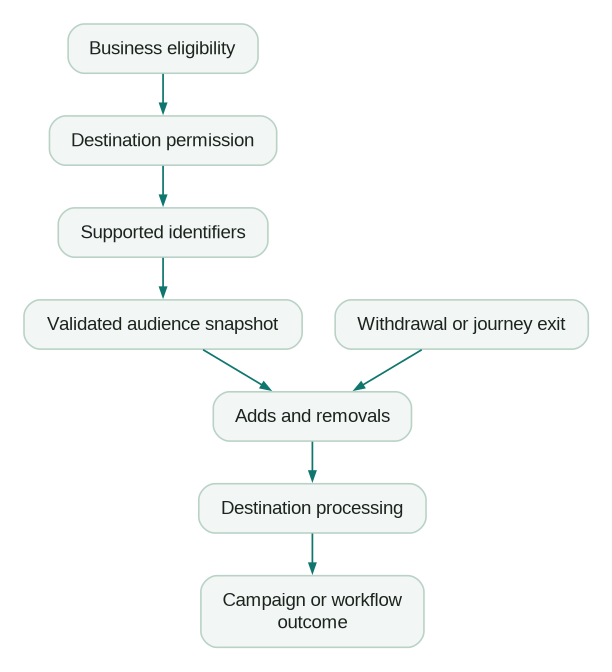
Read diagram as text
- Business eligibility to Destination permission.
- Destination permission to Supported identifiers.
- Supported identifiers to Validated audience snapshot.
- Validated audience snapshot to Adds and removals.
- Adds and removals to Destination processing.
- Destination processing to Campaign or workflow outcome.
- Withdrawal or journey exit to Adds and removals
Can marketers build warehouse audiences without engineering?
Yes, for everyday audience changes within an approved model; the data team still owns the initial setup and ongoing model reliability. When marketing cannot use warehouse data directly, each new audience becomes another integration request. Self-service is useful when a marketer can change the business conditions without also redefining identity, consent or source truth.
What the data team sets up first
Hightouch Customer Studio is available on Business tier plans. Its setup connects the warehouse and destinations, configures a schema around a parent such as customers or accounts, and relates records, events and traits. Journeys require the Lightning sync engine. Customer Studio setup.
Keep permission, suppression and identity mappings in reviewed models. Document the grain and what an unknown value means. The composable CDP data model behind audiences explains those shared foundations. The work continues when upstream fields or policies change; initial setup is not a promise of permanent independence from data engineering.
What marketers can then manage
In Hightouch, marketers can preview visual conditions, save reusable templates, inspect audience overlap, sync members and build journeys with waits, branches and exits. Confirm which Hightouch features need a Business plan against the quoted package rather than assuming basic Reverse ETL includes Customer Studio.
Other self-serve audience builders provide similar access through different prerequisites. This table identifies setup boundaries, not a claim that the products are interchangeable.
| Audience builder | Required foundation | Marketer's working surface | Commercial boundary |
|---|---|---|---|
| Hightouch Customer Studio | Parent model, relationships and destinations | Visual conditions, previews, journeys and insights | Business tier; confirm requested capabilities |
| Segment Linked Audiences | Profiles Sync, Data Graph and warehouse permissions | Profile and entity conditions sent to configured destinations | Business with Engage access and the Linked Audiences add-on |
| Fivetran Activations Audience Hub | Prepared datasets and identifiers | Visual segments, comparisons and activation | Documentation names Enterprise; confirm current account entitlement |
Segment's current Linked Audiences guide requires Profiles Sync and a Data Graph; a trait must reach the warehouse before the builder can use it. Its limits page identifies the Engage add-on requirement. A connection to the warehouse alone is insufficient.
Fivetran's Audience Hub documentation describes visual segmentation and comparison. Its one-click ad activation uses person entities, mirrors membership removals and sends audiences daily; use its classic sync configuration when those defaults do not fit. Activation behaviour. Verify the current package during the Census-to-Fivetran transition rather than assuming ingestion-plan access grants every audience feature.
Where AI agents fit and who approves their output
Hightouch Agents query exposed warehouse models and can turn a request into draft audience conditions. Its documentation requires explicit user approval and saving before creating or changing outputs, with feature, table, column and row-level access controls. The overview does not state a universal Agents plan entitlement; confirm it for your account. Agents governance.
Treat a prompt to an AI audience builder, such as “find trials that need help”, as a draft request. The reviewer still needs to specify activation, payment exclusions, the time window, permission, destination and exits. Compare proposed membership against known examples, including paying customers and people with unknown permission. Use marketing-agent evaluation and approval steps for agent actions when the proposed system can initiate customer-facing work.
Saving an audience definition and publishing a destination sync are separate decisions. Require the appropriate approval at each boundary; a plausible natural-language explanation does not establish correct membership or successful delivery.
Guardrails that make self-service dependable
Require a named destination owner, a preview before the first send, expected size bands, current permission filters and explicit exits. A minimum-size alert only reports a condition unless an actual release control stops the write. Verify the chosen behaviour by testing an empty valid audience and an incomplete upstream load separately.
Keep the last accepted definition and the evidence needed to explain a change. If a new field joins at the wrong grain, a visually simple condition can duplicate or broaden membership. Test that change with the data owner before exposing it to every marketer.
When evaluating a warehouse-native claim, inspect the queries, data copies and permissions used during a trial. Ask what happens when warehouse access is revoked and whether preview, publication and removal still behave as represented.
How do you build an audience snapshot you can explain?
Create one reviewed audience model and separate destination outputs. That keeps the business definition consistent while preserving channel-specific permission and identifier requirements.
Here is an illustrative selection query; its inclusion and exclusion cases are checked with a local fixture, not a live ad-platform upload. Its input contains one current row per person for a business with one relevant trial account per person. If people belong to multiple accounts, define eligibility at the membership or account level first; do not let an inactive secondary account override a paid primary relationship.
The boolean fields must be populated from validated source data. trial_age_days uses a documented UTC calendar-day definition. Identifier flags mean a usable destination key exists, not that a match has been confirmed.
WITH eligible AS (
    SELECT *
    FROM audience_person_snapshot
    WHERE snapshot_date = DATE '2026-10-18'
      AND trial_age_days BETWEEN 7 AND 14
      AND has_activated IS FALSE
      AND is_paying IS FALSE
      AND is_deleted IS FALSE
      AND has_blocking_issue IS FALSE
)
SELECT person_id, 'google_ads' AS destination
FROM eligible
WHERE google_ads_allowed IS TRUE
  AND has_google_match_key IS TRUE

UNION ALL

SELECT person_id, 'meta_ads' AS destination
FROM eligible
WHERE meta_ads_allowed IS TRUE
  AND has_meta_match_key IS TRUE

UNION ALL

SELECT person_id, 'hubspot_email' AS destination
FROM eligible
WHERE hubspot_email_allowed IS TRUE
  AND hubspot_contact_id IS NOT NULL;
This produces internal membership keys. It deliberately leaves contact details out of the result. A controlled destination mapping step retrieves only the identifiers needed for the approved use. The HubSpot branch represents an email journey; an internal sales task would need its own eligibility and permission definition. Validate a nonempty, existing HubSpot contact ID upstream: the query's null check alone cannot reject an empty string or create a missing contact.
Before exporting, assert uniqueness of (person_id, destination), completeness of the source snapshot and freshness of billing, product and permission inputs. A missing billing load must not turn a paying customer into a trial user. Null state fields fail the explicit boolean checks, but completeness checks are still necessary: missing rows can look like legitimate audience exits.
Keep the snapshot time, rule version, member count and exclusion counts. Store a useful reason for each exclusion, such as already paid, activation completed, missing identifier or permission unavailable. That makes a shrinking audience explainable without browsing personal data in job logs.
How do you activate warehouse audiences in Google Ads?
Use Google Data Manager for a supported native connection, or the current eligible API route when the workflow needs custom delivery. Confirm account access and permitted campaign use before building the audience.
Built-in BigQuery or Snowflake connection
Google Ads supports a direct BigQuery connection for Customer Match. Select the prepared project, dataset and table, map the fields and create the customer list. Authorized views have additional requirements, including restrictions on external-table sources. Review the documented permission grants before connecting a broad dataset; a dedicated activation dataset makes that review easier.
The Snowflake connector currently uses an account identifier, username and programmatic access token. Use an account role restricted to the approved activation data. Follow the connector's current network requirements and manage token rotation. A generic password-based tutorial is not the current setup guide.
These native connections can be a sensible first implementation when Google is your only destination and daily updates meet the business requirement. They do not remove the need to validate audience membership or campaign settings.
API or managed activation tool
For most new Customer Match integrations, Google requires the Data Manager API as of 1 April 2026. Existing eligible Google Ads API integrations can continue. Do not start a new build by copying an old OfflineUserDataJobService tutorial without checking eligibility. See Google's current migration notice.
Use a managed activation tool when shared monitoring, multiple destinations, retry handling and membership changes justify its cost. Use a custom integration when you have a specific requirement and an owner for its ongoing operation. Our reverse ETL guide covers matching, ownership, retries and destination readback. Keep these responsibilities explicit even when an audience builder hides the underlying SQL.
With the Data Manager API, a returned request ID is the beginning of verification. Google's results guide directs you to inspect processing diagnostics, resolve affected records and then retrieve the updated audience. Contact-based audiences expose an overall match-rate field. Keep processing failures separate from matching outcomes.
Check account eligibility before promising targeting
Google's policy currently distinguishes access to Observation and exclusions from access to Targeting. Targeting requires ninety days of Google Ads history and more than USD 50,000 in lifetime spend, alongside the account's compliance and payment requirements. Verify the actual account's available features before designing a small startup's retargeting plan around Customer Match.
There is also a separate list-size requirement. Google's audience troubleshooting guide currently specifies at least one hundred active users in the last thirty days for Search, Display and YouTube, with a legacy caveat for lists last uploaded before February 2024. Uploaded rows are not the same as active users. Inspect each network's eligibility status rather than treating one hundred warehouse contacts as sufficient.
What must a Meta audience integration actually write?
A Meta audience integration must manage customer-list membership in the intended ad account. Use a customer-list Custom Audience destination, with an explicit audience ID and owning ad account. A connector called “Meta Conversions” may send conversion events without managing customer-list membership. Confirm the object it writes to before assuming it supports this use case.
Meta's official Business SDK includes separate user addition and removal operations and handling for already-hashed data. Establish whether your connector expects raw or normalized, hashed identifiers. Hashing something twice will not improve matching. Preserve the source identifier in its protected system and test transformations with synthetic values.
Do not copy Google-specific normalization rules into a Meta transformation without checking the actual destination contract. Likewise, a Conversions API event-matching score is not a customer-list audience match rate. Our Event Match Quality guide explains what that event diagnostic measures.
Document how the media buyer uses the resulting audience: inclusion, exclusion, seed or a suggestion in a broader campaign. Inspect the actual campaign controls and expansion settings. A warehouse segment named trial_only does not, by itself, enforce trial-only delivery.
Build the acceptance record around submitted operations, processing results and the aggregate diagnostics actually available to your account. Avoid designing reconciliation around an assumed export of individual matched people. A destination receipt and an estimated audience size establish different things.
Should HubSpot or the warehouse own segment membership?
Choose one membership owner: the warehouse for an explicit delivered set, or HubSpot filters for a dynamic segment. HubSpot now calls lists “segments.” Its Lists API guide describes three processing types: MANUAL, DYNAMIC and SNAPSHOT. A warehouse-managed membership set fits MANUAL; a HubSpot-managed set can use DYNAMIC filters over synchronized properties. SNAPSHOT processes initial filters and then behaves as a manually maintained set.
Choose one owner. Do not try to update a dynamic segment's membership while its filters are independently deciding who belongs. The API permits direct membership changes only for MANUAL and SNAPSHOT types. Its membership reference also specifies that records must already exist; an ignored unknown contact ID is not successful contact creation.
For an email journey, reconcile membership separately from send eligibility. Check subscription state, suppression, the workflow's enrollment rules and the record's marketing-contact handling before launch. An audience sync should not silently change those settings to make its counts look better.
Use warehouse-owned property names where appropriate, such as warehouse_trial_stage, so sales users can see the origin of the value. Confirm what happens when it becomes empty and how an existing workflow stops or changes course. Leaving a segment and cancelling a previously scheduled action are separate acceptance checks.
How do you remove people when they stop qualifying?
Compare the new valid snapshot with the last successfully applied membership state. Members in the new set only require addition. Members in the previous set only require removal. Members in both remain, with identifier changes handled explicitly.
For example, a previous set of A, B and C and a new set of B, D and E implies two additions, two removals and one retained member. Record success per operation. If removing C fails, retry C; do not mark the entire new snapshot applied and forget that discrepancy.
Google's Data Manager API reference provides audience removal operations as well as ingestion. Equivalent exit behavior must be configured and verified in whichever connector you choose. An add-only integration is insufficient for a changing trial cohort.
Handle these cases explicitly:
- An empty valid audience needs its intended removals applied.
- An empty result caused by a failed source load needs investigation, not automatic replacement of the live audience.
- A known withdrawal needs a removal path even when the normal audience model is unavailable.
- An identifier change may require removal using the previously submitted key as well as addition using the new key.
- Deleting a warehouse row must not destroy the only information needed to request its downstream removal before that request is handled under your retention policy.
Keep withdrawal processing separate from promotional audience growth. A delayed upstream model should not become an excuse to keep using data after the permitted use has ended.
How do you choose an audience refresh schedule?
Choose the schedule from the acceptable delay in entry and exit, then include upstream and destination processing time. Google's built-in Data Manager connection scheduling currently allows a maximum scheduled import frequency of daily. Updating a source table every five minutes will not make that scheduled connection run every five minutes.
Segment Linked Audiences supports manual runs, fixed intervals from 15 minutes to daily, and selected days and times. A long-running audience does not overlap another scheduled run; the next run waits for completion. Profiles Sync and warehouse freshness remain upstream constraints. Linked Audience scheduling.
Where the selected connector supports it, trigger delivery after upstream completion and quality checks rather than hoping unrelated schedules align. Recheck the latest permission state close to release and preserve a withdrawal path when ordinary model refreshes fail.
For a slowly changing high-value seed, daily refresh might be adequate. For a trial-to-paid transition, stale membership can waste spend and create a poor experience. Evaluate an API or connector with a suitable update schedule, then measure the platform's processing delay too. Faster submission is not a promise of immediate audience changes.
Measure end-to-end time from the business event to confirmed destination processing. Track the separate delays: event arrival, model completion, sync start, request processing and usable audience state. A job that ran on time using yesterday's billing data is still late for the customer.
Set a failure response as well as a freshness target. If exits cannot be trusted, the campaign owner needs a way to pause the affected use. Repeatedly restarting an apparently successful sync is not a recovery plan.
Which audience counts show where activation is failing?
Track business eligibility, permission, addressability, acceptance, matching and serving eligibility as separate stages. There is no defensible universal match-rate benchmark. Your identifiers, customer population, geography, permission coverage and platform activity determine the available audience.
The following hypothetical Google audience uses people as the planning unit. It is not a client result or a universal reconstruction of platform reporting.
| Stage | People in the illustration | Share of business cohort | What a loss means |
|---|---|---|---|
| Business definition | 6,000 | 100.00% | Starting eligible population |
| Destination permission | 4,000 | 66.67% | Approved use is missing for some people |
| Usable identifiers | 3,900 | 65.00% | Addressability gap |
| Accepted records | 3,800 | 63.33% | Delivery or formatting errors |
| Illustrative matched people | 1,900 | 31.67% | Platform matching gap |
| Active and network-eligible | 1,200 | 20.00% | Serving eligibility differs from matching |
The illustrative match step is fifty percent of accepted records. The active audience is twenty percent of the original business cohort. Those figures answer different questions. This is a teaching example, not an observed client result or a reconstruction formula for every platform's reporting.
Investigate the largest meaningful loss. Missing permission is not a formatting defect. Rejected records need error analysis. Low matching needs an identifier-quality review. A matched but ineligible list needs platform eligibility checks. Limited delivery after that involves campaign configuration, budget, auction conditions and message relevance.
Where appropriate, send outcomes back as conversions, with the correct event definition and permission. Conversion delivery and incrementality are separate measurements.
Then measure commercial effect. In an illustrative randomized pilot with one thousand eligible people per group, eighty treatment customers versus sixty control customers purchasing produces a two-percentage-point difference, or twenty additional purchases at that group size. With $1,200 media cost and $200 allocated operating cost, the point estimate is $70 per incremental customer.
That estimate still needs an uncertainty assessment and a suitable outcome window. Predefine the randomization unit, avoid cross-group exposure through other campaigns and compare contribution over the same period. If the sample is too small for a decision, report that. Platform-attributed conversions alone cannot establish that the audience caused incremental sales.
What should pass before you launch the audience?
Launch when the definition, permissions, delivery and exits pass documented checks. If there is no maintained source model yet, establish the case for a warehouse and activation path before buying an audience builder.
Checklist
- The audience has one business owner, a useful intervention and a measurable outcome.
- Entry, exit, re-entry and cooldown rules are documented.
- Destination permission is current and distinct from identifier availability.
- Snapshot completeness, identity grain and key uniqueness are checked.
- Adds, removals, identifier changes and failed-operation retries are verified.
- Actual account eligibility and campaign use match the plan.
- Workflow exits and scheduled actions have been checked separately.
- Freshness is measured from the business event through destination processing.
- A campaign owner can stop the affected use when membership becomes unreliable.
- The first pilot measures a commercial outcome, with an appropriate comparison.
If the obstacle is connecting product behavior, billing, CRM identity and destination permissions, start with the audience contract. Bring it to the $99 martech audit, or request a detailed audience implementation scope. Where the underlying activation events are unreliable, analytics and tracking implementation is the earlier step. An accurately delivered audience is only useful when its members actually need the message.
Keep reading
Browse all Data Warehouse guides
 Data Warehouse
Snowflake Implementation: Plan the Phases, Price the Work and Connect Your Sources
Plan a Snowflake implementation in phases: security, ingestion, models, BI and handover, with current credit rates, cost lines and timeline drivers.
Jafrin Akter AloLast updated 16 min read
 Data Warehouse
BigQuery Implementation Mistakes: Fix Missing Data, Cost Surprises and Unreliable Reports
Fix missing GA4 exports, location mistakes, sandbox limits and costly raw scans with BigQuery diagnostics, reconciliation checks and recovery steps.
Jafrin Akter AloLast updated 14 min read
 Data Warehouse
dbt Implementation Mistakes: Fix Stale Models, Incremental Errors and Fragile Deployments
Fix stale dbt models, incremental errors, schema backfills and fragile deployments with practical tests, build-cost checks and a reliable handover plan.
Jafrin Akter AloLast updated 15 min read
Data warehouse & CDP
See the implementation scope, deliverables and acceptance checks.
Questions people ask
Can two regional teams reuse the same warehouse audience definition?
They can share a definition when its fields, purpose and permission assumptions fit both regions. Keep regional eligibility and destination restrictions explicit rather than relying on a shared audience name. Test known inclusions and exclusions for each region, assign local ownership and version changes. A reusable template should reduce repeated work while preserving the checks required by each actual use.
How should a temporary support suppression expire?
Give it a reason, an owner and a condition that removes it after the underlying issue is resolved. A fixed timeout can restart promotion while a serious issue remains open; a permanent flag can suppress customers long after recovery. Test both paths with the support workflow and log the change. Keep this operational suppression separate from a person's continuing permission preferences.
Can experiment assignments remain fixed after audience members become ineligible?
Keep the original assignment for analysis while applying current eligibility and permission rules to delivery. A customer who converts or withdraws permission should stop receiving the affected intervention even if they remain in the experiment's original group. Record the exit and its timing. This separates the comparison you planned from the customer contact that is still appropriate to perform.
How should you estimate the warehouse cost of self-service previews?
Measure a representative preview against the warehouse's own query and billing records, then repeat it with the joins and audience size marketers will use. Include repeated previews during editing as well as scheduled production runs. Ask the platform owner to set an appropriate operating limit and review expensive patterns. A convenient visual builder can still initiate substantial warehouse work.
How do you retire an audience without disrupting other workflows?
Find every campaign, suppression rule and automation that uses it before disabling the sync. Agree which memberships must be removed, which evidence must remain and who verifies the destination state. Removing an audience does not automatically delete CRM records or cancel scheduled messages. Retire those dependent actions deliberately, and keep an owner until the last consumer has been checked.
Sources
- Google: Customer Match policy.
- Hightouch: Customer Studio setup.
- Twilio Segment: Linked Audience scheduling.
- Twilio Segment: limits page.
- Fivetran: Audience Hub documentation.
- Fivetran: Activation behaviour.
- Hightouch: Agents governance.
- Google: direct BigQuery connection.
- Google: Snowflake connector.
- Google: current migration notice.
- Google: results guide.
- Google: audience troubleshooting guide.
- Meta: official Business SDK.
- HubSpot: Lists API guide.
- HubSpot: membership reference.
- Google: Data Manager API reference.
- Google: connection scheduling.

Written by
Jafrin Akter AloData Engineer and Co-founder at Martechdevs and Growth and Analytics Partners
Jafrin writes practical guides to marketing technology, customer data, analytics and AI workflows. Martechdevs is a Growth and Analytics Partners company.