
Mixpanel vs Amplitude API: Ingestion, Export and Query Limits Compared
Choose between the Mixpanel and Amplitude APIs by the job: sending events, exporting raw records, retrieving calculated reports or maintaining a warehouse copy. Those routes have different credentials, plan gates, date boundaries and failure behavior. Both platforms can support substantial event pipelines, but a successful request is only useful when its records, identities and reporting meaning can be reconciled.
On this page

Which API route fits the work you need to do?
Select the route before comparing request limits. An ingestion endpoint, a raw export and a funnel query do not return interchangeable evidence.
| Required job | Mixpanel route | Amplitude route | Acceptance question |
|---|---|---|---|
| Send server events or history | Import API | HTTP V2 or Batch Event Upload | Were the intended events accepted with correct IDs and time? |
| Download raw event records | Raw Event Export | Export API | Is the complete requested population present? |
| Retrieve calculated analysis | Query API | Dashboard REST API | Does the result match the saved analytical definition? |
| Maintain warehouse data | Data Pipelines add-on | Warehouse destination such as Snowflake | Are events, identity changes and late data maintained? |
Use the broader Mixpanel versus Amplitude comparison for product selection, or other Mixpanel alternatives for a wider shortlist. Here the decision is whether the actual API contract fits your pipeline and the plan you will keep after any introductory offer.
Our product analytics implementation work establishes the event and identity contract before building these connections. Exporting a badly defined event more reliably does not make the resulting metric correct.
Mixpanel
- Best for: A team wanting raw event access with an explicit report-query and managed-export purchasing decision.
- Pros: Ingestion and raw export access are listed across plans; the deduplication key is explicit, and paid Data Pipelines can carry identity mappings.
- Cons: Report-query access has a paid-plan gate. Raw exports need their own duplicate handling, and managed-feed latency differs from chart availability.
- Free tier and startup offer: Free includes 1M monthly events. Eligible startups can receive a year with Data Pipelines and other add-ons; price the required paid continuation separately.
- Choose it if: The raw or calculated output passes your known-answer tests and the complete recurring package is affordable.
- Skip it if: The implementation assumes a free Query API or a managed-feed freshness guarantee that the package does not provide.
Amplitude
- Best for: A team comfortable separating upload-time raw export, project-timezone reports and its selected warehouse destination.
- Pros: Separate ingestion, export and report APIs support distinct jobs; the standard Snowflake route provides event and merged-ID outputs.
- Cons: Export size and availability limits affect checkpoint design. A generic API entitlement does not include every specialized API or managed destination.
- Free tier and startup offer: Free includes 2M monthly events. Its qualifying startup offer provides a Growth year; check whether the paid destination plan retains every API dependency.
- Choose it if: The required endpoint, identity model and delivery route work under the account's actual entitlements and budget.
- Skip it if: The design equates a downloaded upload-time slice with an event-time chart or treats a best-effort export cadence as an SLA.
The general plan claims come from Mixpanel pricing and Amplitude pricing. The endpoint and destination boundaries below are the conditions behind the recommendation.
Which plans expose the APIs you need?
Check the named endpoint or destination, not a general “APIs included” label. Permissions and project access still matter after a plan qualifies.
| Capability | Mixpanel | Amplitude | Purchase check |
|---|---|---|---|
| Event ingestion and raw export | Listed across Free, Growth and Enterprise | General developer APIs listed across plans; Export reference states no separate plan gate | Confirm the actual project and credentials |
| Calculated report queries | Query API on Growth and Enterprise | Dashboard REST is separately documented | Run the specific required report query |
| Continuous managed export | Data Pipelines paid add-on on Growth/Enterprise | Exact destination and contractual entitlement govern | Name the product and included data types |
| Specialized profile/cohort access | Check the required query route | User Profile API is Enterprise; Behavioral Cohorts API is a Growth/Enterprise add-on | Do not infer from generic SDK access |
Mixpanel API plan table, Amplitude plan table, Amplitude Export reference.
For a small team, prioritize the route that fits the actual operating job:
| Scenario | First evaluation | Runner-up | What decides |
|---|---|---|---|
| Occasional raw export within a free allowance | Both raw export APIs | A managed feed if recovery becomes costly | Complete intervals, identities and maintenance effort |
| Scheduled calculated reports with no paid Mixpanel plan | Amplitude's required report endpoint | Mixpanel Growth Query API | Actual access and the known analytical answer |
| Recurring Snowflake data with merged-user output | Amplitude standard Snowflake export | Mixpanel Data Pipelines | Quoted entitlement, late data and identity coverage |
| Portable raw data plus profile/identity delivery | Mixpanel Data Pipelines | Amplitude's suitable destination | Required destination and accepted freshness |
These are pilot priorities, not an assertion that every endpoint or destination is free. For a finance or customer-health dependency, evaluate the complete recurring delivery contract.
Use Mixpanel pricing and Amplitude pricing for the wider subscription model. The API choice should survive the next billing period, not just the first demonstration.
How do ingestion size, count and rate limits differ?
Apply request-size, event-count and throughput limits independently. Staying below the event count does not establish that a payload fits the byte limit.
| Endpoint | Request boundary | Relevant rate boundary | Failure handling to design |
|---|---|---|---|
Mixpanel /import | Up to 2,000 events; prose specifies 10 MB uncompressed | Project ingestion budget | Inspect per-event validation, including partial acceptance |
| Amplitude HTTP V2 | Growth/Enterprise: under 1 MB and fewer than 2,000 events | Separate project and user/device limits | Follow the endpoint's rejection details |
Amplitude /batch | Up to 2,000 events and 20 MB serialized JSON | Up to 1,000 events/second per user or device | Partition busy identities and inspect throttling scope |
Mixpanel recommends strict=1; a 400 can still contain accepted events alongside failed records. Its reference also contains a 2,097,152-byte 413 example beside the 10 MB prose limit. Start with an operational batch cap below 2 MiB and test larger batches against your project before increasing it. Mixpanel import contract
Amplitude's Free HTTP V2 guidance recommends at most ten events per batch, with fewer than 100 batches and no more than 1,000 events per second. Ten is a recommendation, not the Growth/Enterprise batch limit. The HTTP API project ceiling and the per-user/device throttle are separate controls. Plus is not named in that plan-specific paragraph; confirm its allowance rather than borrowing another tier's limit. Amplitude HTTP V2 limits
Batch Event Upload uses a different per-user/device rate, averaged over a recent window. Its daily anti-abuse handling can reject batches containing a device or user that exceeds the applicable rolling quota. Do not apply HTTP V2's small-batch guidance to Batch as though they were one endpoint. Amplitude Batch contract
Both Amplitude ingestion APIs can keep accepting events while dropping user-property updates when an Amplitude ID exceeds 1,800 such updates per hour. Verify property freshness separately from event acceptance. User-property update limit
Mixpanel's project ingestion limit is 2 GB of uncompressed JSON per minute, described as roughly 30,000 events per second. The event estimate depends on payload size; it is not extra capacity on top of the byte budget. Mixpanel rate limits
Before increasing concurrency, measure serialized UTF-8 bytes, largest event size, busy-identity concentration and accepted versus rejected records. Compression can reduce network transfer without changing an uncompressed limit.
Which identifiers make retries reliable?
Give each real event a stable event identifier and preserve it across retry attempts. Do not create a new ID merely because a network request timed out.
Mixpanel's analytical deduplication uses event name, distinct_id, timestamp and $insert_id. Other properties are not part of that key. Raw exports can still contain duplicates, and compaction is not a dependable upsert mechanism. Mixpanel deduplication behavior
Amplitude recommends insert_id and ignores a repeated value on the same device_id within the documented seven-day scope. User/device IDs normally need at least five characters; shorter IDs can be removed, leaving an invalid event if neither usable ID remains. The minimum is configurable. Amplitude identity and retry rules
Keep three concepts separate:
| Identity | Purpose | Example decision |
|---|---|---|
| Application event ID | Identifies one real occurrence | Retry the same occurrence with the same key |
| User/device identity | Determines which actor performed it | Preserve anonymous-to-known relationships |
| Export row identity | Identifies a returned source record | Deduplicate repeat downloads without erasing separate real events |
A delivery key is not automatically a permanent warehouse primary key. Namespace it by project and the source's relevant identity dimensions. Retain the original row and an explicit duplicate classification rather than silently discarding records whose keys unexpectedly collide.
Amplitude exports use $insert_id, while its HTTP and Batch inputs use insert_id. A raw export is therefore not a ready-to-reimport request body. Map the fields and preserve event time deliberately. Amplitude backfill format
Use the identity-merge guide and Mixpanel/Amplitude migration plan when transferring history between products. A correct ingestion count can still hide two copies of one person.
Which hosts and credentials should the worker use?
Select authentication and host for the specific API and project region. A public ingestion token should not be treated as a general-purpose data-reading credential.
Mixpanel recommends service accounts with project/workspace roles and Basic authentication using their username and secret. Raw export requests using a service account require project_id; its export specification lists data, data-eu and data-in hosts for the corresponding regions. Mixpanel service accounts, official export specification
Amplitude ingestion uses api2.amplitude.com or api.eu.amplitude.com. Its Export and Dashboard REST requests instead use amplitude.com or analytics.eu.amplitude.com, with project API key and secret for Basic authentication. Ingestion hosts, report authentication
Store read credentials outside browser code, restrict their project access and keep them out of job logs. A worker receiving an authorization error should verify its region, project and credential scope before retrying. Adding more parallel workers does not create more project quota.
How do the raw export windows differ?
Amplitude exports UTC upload-hour ranges; Mixpanel's raw endpoint uses inclusive date boundaries with timezone behavior dependent on the project's history. Establish that contract before comparing daily counts.
| Export property | Amplitude | Mixpanel | Implementation consequence |
|---|---|---|---|
| Returned format | ZIP containing JSON lines | JSON lines | Validate the archive or stream, not just HTTP status |
| Window | Inclusive UTC start and end hours | Inclusive from_date and to_date dates | Do not share one date-window helper blindly |
| Important size control | 4 GB export limit | Optional limit caps returned events at up to 100,000 | A capped response can be incomplete by design |
| Timestamp handling | Selection by server_upload_time | Request timezone and output precision need verification | Preserve event time separately |
Amplitude allows up to 365 days per request, subject to its size cap, and describes an export-availability delay. A recent 404 does not prove no events arrived. If a single hour exceeds 4 GB, its guidance points to S3 export. Amplitude export windows and availability
For Mixpanel, leave limit unset when the job requires the complete eligible population. Use time_in_ms=true when millisecond precision matters. Verify legacy projects with known events on both sides of midnight, then record the confirmed request timezone in the worker configuration. Mixpanel raw export parameters
A late event makes the difference concrete: an action occurring on Monday but uploaded to Amplitude on Wednesday belongs in Wednesday's upload-time extraction. The warehouse can later group it under Monday's event time. Re-exporting only Monday's upload window would not discover it.
How would you plan a month containing 15 million events?
Size a representative export and reserve request capacity before choosing daily or hourly windows. Event count alone cannot establish response size or runtime.
For an illustrative thirty-day month, 15M events average 500,000 a day and about 20,833 an hour. At an assumed 1,000 serialized bytes per event, that is about 500 MB per day before archive overhead or compression. Real distributions can have large bursts, variable properties and late arrivals; measure a representative and a busy interval.
| Planned route | Requests for 30 days | Quota comparison | Additional constraint |
|---|---|---|---|
| Amplitude daily upload windows | 30 | Below the default 360/hour count | Each response must fit the export size limit |
| Amplitude hourly upload windows | 720 | Uses 2 × 360-request budgets | No more than four concurrent by default |
| Mixpanel daily date windows | 30 | Half its 60/hour allowance | Also respect three/second and concurrency limits |
Amplitude documents four concurrent exports and 360 requests/hour per project API key, subject to overrides. Mixpanel documents sixty raw exports/hour, three/second and up to 100 concurrent per project. Amplitude export limits, Mixpanel project limits
The arithmetic does not promise a two-hour elapsed runtime for 720 requests. Budget windows, request duration, file transfer, retries and shared workers determine the actual schedule. Reserve headroom for other jobs instead of spending the whole limit on the first backfill.
The following original Python helper plans non-overlapping Amplitude request ranges. Its input interval is start-inclusive and stop-exclusive; output parameters use inclusive hours. It only plans windows of up to twenty-four hours and rejects hours inside a two-hour safety delay. Longer observed delays still require the worker to wait.
from datetime import datetime, timedelta, timezone


def amplitude_export_windows(start, stop, now):
    values = (start, stop, now)
    if any(not isinstance(v, datetime) or v.utcoffset() is None
           for v in values):
        raise ValueError("Use timezone-aware datetimes")
    start, stop, now = (v.astimezone(timezone.utc) for v in values)
    if any(v.minute or v.second or v.microsecond for v in (start, stop)):
        raise ValueError("Start and stop must align to UTC hours")
    if stop < start:
        raise ValueError("Stop must not precede start")
    ready_before = (now - timedelta(hours=2)).replace(
        minute=0, second=0, microsecond=0
    )
    if stop > ready_before:
        raise ValueError("Requested hours are inside the safety delay")
    while start < stop:
        next_start = min(start + timedelta(hours=24), stop)
        yield {
            "start": start.strftime("%Y%m%dT%H"),
            "end": (next_start - timedelta(hours=1)).strftime("%Y%m%dT%H"),
        }
        start = next_start
The helper makes no network request, checks no entitlement and does not certify data completeness. Its output still needs size-aware splitting, credential selection, retries and reconciliation. Advance an upload checkpoint only after the complete response has been validated and durably loaded.
Keep a job ledger with project, region, requested interval, date basis, attempt, HTTP result, file count, bytes, parsed rows, distinct event keys and completion state. An empty result needs a confirmed mature interval and correct scope; it should not be inferred from a failed download.
How do report-query limits differ from export limits?
Budget calculated reports separately from raw extraction. Report complexity can consume a quota even when only a small JSON response comes back.
Mixpanel's Query API returns calculated report results and supports user/profile-related endpoints. Its project limits are five concurrent queries and sixty/hour. Query API purpose, Mixpanel query limits
Amplitude Dashboard REST uses the project timezone and a query-cost model: days × conditions × query-type weight. Retention has weight eight; funnels use twice the number of funnel events before applicable group-by adjustments. Its documented limits include five ordinary concurrent requests, 1,000 cost per five minutes and 108,000 cost/hour. User Activity/User Search have separate ten-concurrent and 360/hour limits. Amplitude query budgets
For an original example, a thirty-day retention query with two counted conditions costs 30 × 2 × 8 = 480. Two such queries total 960; a third within the same five-minute budget would bring the total to 1,440. Adding a worker does not fix that budget exhaustion. The cost unit is a quota measure, not USD.
Retain the actual chart definition, filters, date range, timezone and query parameters alongside the result. A saved chart edited between runs can legitimately return a different answer. Do not present two queries against changing data as a single immutable snapshot.
For an analyst asking questions interactively, the Amplitude MCP guide and Mixpanel MCP guide cover another access path. A scheduled production export still needs an explicit operating contract; MCP versus API explains that choice.
When is a managed warehouse feed the better choice?
Use a managed feed when recurring delivery, identity updates and operational ownership justify the package. Evaluate the exact feed's behavior instead of assuming it inherits the raw API's limits or the dashboard's speed.
Mixpanel Data Pipelines
Data Pipelines is a Growth/Enterprise add-on that exports events, profiles and identity mappings. Hourly delivery has a twenty-four-hour allowance from ingestion; the daily delivery window starts the next calendar day in project time. Its SLA allows another twenty-four hours for late data. Raw and Schematized pipelines need sync enabled to export late arrivals automatically; incremental JSON pipelines export them as they arrive. The thirty-day trial is daily-only, lacks data synchronization and backfills only one preceding day. An initial backfill’s from_date must be within the past six months. Mixpanel Data Pipelines
Test a late event and a changed identity during the trial, then compare that observed scope with the paid contract. A daily trial without data synchronization cannot demonstrate every paid late-arrival behavior.
Amplitude Snowflake export
The standard Snowflake destination writes events and MERGE_IDS tables; each project permits one destination per data type. Micro-batches typically run every ten minutes on a best-effort basis, with visibility commonly around twenty minutes and variable timing. Amplitude recommends key-pair authentication and a dedicated loading warehouse. Its separate Snowflake Data Share route is a paid add-on for eligible tiers. Standard Snowflake export, Snowflake Data Share
Where enabled, the standard export can also send transformation and custom-event definitions. These are definitions, not automatically transformed event rows, and the connection test does not validate every permission required for that separate configuration export. Configuration-export boundary
Include compute, storage, credentials and downstream model ownership in either design. Preserve the raw event plus the identity crosswalk needed to reproduce person or account analysis. The warehouse-native analytics guide addresses the different choice of analyzing warehouse data without assuming another copied dataset is required.
How do you prove the export is complete and useful?
Reconcile source identities and expected intervals, then explain differences from analytical reports. A matching row total can hide missing and duplicated events, while a different total can reflect legitimate deduplication or time boundaries.
| Layer | Check | Example failure to expose |
|---|---|---|
| Request coverage | Every intended interval has a completed manifest entry | A failed hour was treated as empty |
| Transport | Complete ZIP or stream parses successfully | A partial download returned some readable rows |
| Event identity | Stable source keys and duplicate classification | The retry doubled rows in the warehouse |
| Time semantics | Upload, event and report-time boundaries are explicit | A late Monday event is missing from Wednesday extraction |
| Person/account model | Identity mappings and historical account context agree | Anonymous and known activity becomes two people |
| Analytical meaning | Filters, hidden events and custom definitions match | Raw rows are compared to a filtered chart |
Mixpanel explicitly warns that raw exports are not deduplicated like analytical reports. Apply the intended four-field deduplication logic to the warehouse copy, and inspect conflicting payloads rather than assuming later ingestion is a supported correction mechanism. Raw-export duplicate handling
For Amplitude, preserve exported row identity, project and the original event identifiers. Repeated downloads must not create extra rows, but two genuine events with different source row identities should not be collapsed merely because the application reused a key incorrectly. Treat that as a data-quality exception.
Before calling the warehouse complete, test an ordinary event, an exact retry, a late event, two events near midnight, an identity merge and an intentionally missing interval. Keep the expected outcome beside the fixture. Use data quality metrics to track unresolved records and stale partitions by both count and business effect.
What should retries, backfills and renewal budgets include?
Separate a transient transport failure from invalid data, missing access and exhausted quota. Then budget the ingestion work that recovery or migration may create.
For 429 or transient server/network failures, use bounded backoff with jitter and respect Retry-After when supplied. Coordinate the shared project budget. Repair invalid credentials or payloads before retrying, and split oversized requests without changing the event IDs. Preserve per-record outcomes when a batch can partially succeed.
Amplitude's backfill guide warns that historical user properties can overwrite current properties; $skip_user_properties_sync changes that behavior. Historical uploads also count toward event volume. Its MTU guidance treats backfills as import-month usage, so obtain the account-specific calculation before a large migration. Amplitude backfill behavior, MTU billing
Mixpanel counts historical imports in the current period on ingestion-time billing, while legacy event-time contracts differ. Its published twenty-percent Data Pipelines surcharge example concerns additional ingestion on the specified 1M Growth plan; it is not a universal quote for every warehouse contract. Mixpanel import and add-on billing
Mixpanel's startup programme includes a 1B-event annual pool and Data Pipelines for twelve months. Applicants must be under five years old, have raised no more than USD 8 million, and have neither held a paid plan nor redeemed another Mixpanel offer. Start collecting data within ninety days of acceptance. Mixpanel startup terms
Amplitude's Growth year is available to eligible startups with fewer than twenty employees and less than USD 10 million raised. Its renewal FAQ describes a usage-based quote before expiry and alumni discounts on annual Plus and Growth plans. Get the retained API and destination entitlements in that quote. Amplitude startup terms
Keep the import month, steady-state month and post-offer year as separate budget scenarios. A cheaper renewal plan still needs to support every required endpoint and destination, alongside the warehouse's operating cost.
What should approve the final API design?
Approve the design when the required job, entitlement, data semantics and failure recovery have passed a bounded test. Choose the managed route when its complete contract is a better fit than maintaining your own export worker.
This decision path covers extraction and calculated reporting. Ingestion also needs the validation and retry checks described above.
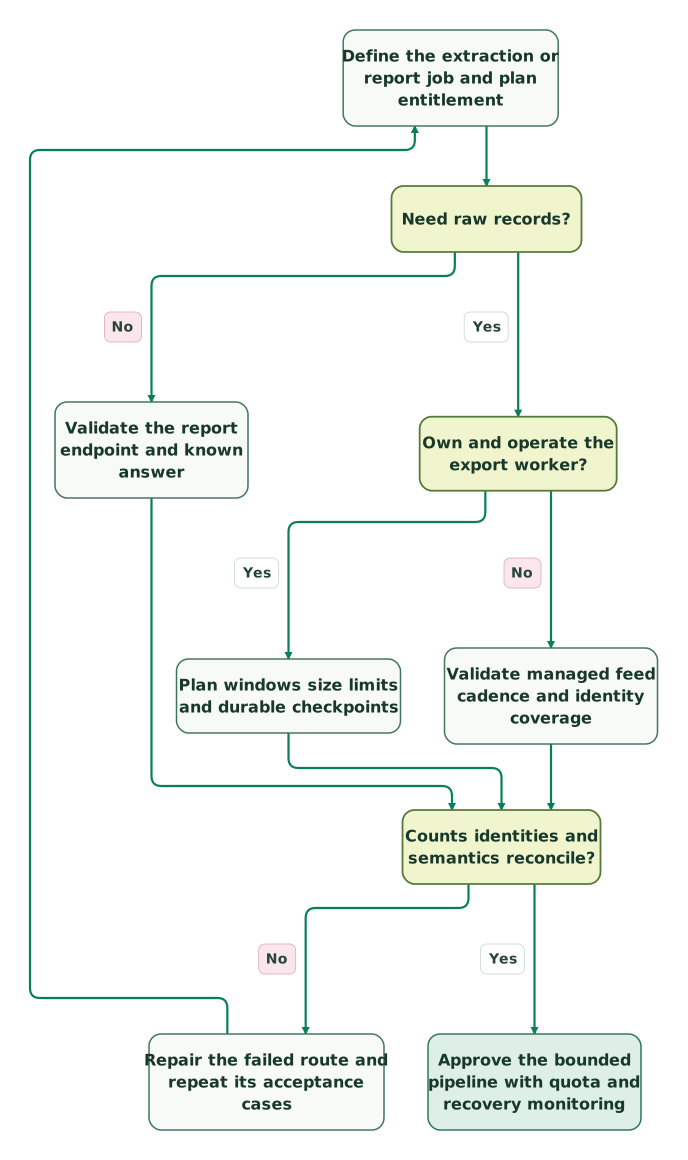
Read diagram as text
- Define the extraction or report job and plan entitlement to Need raw records?.
- Need raw records? to Validate the report endpoint and known answer: No.
- Need raw records? to Own and operate the export worker?: Yes.
- Own and operate the export worker? to Plan windows size limits and durable checkpoints: Yes.
- Own and operate the export worker? to Validate managed feed cadence and identity coverage: No.
- Validate the report endpoint and known answer to Counts identities and semantics reconcile?.
- Plan windows size limits and durable checkpoints to Counts identities and semantics reconcile?.
- Validate managed feed cadence and identity coverage to Counts identities and semantics reconcile?.
- Counts identities and semantics reconcile? to Repair the failed route and repeat its acceptance cases: No.
- Repair the failed route and repeat its acceptance cases to Define the extraction or report job and plan entitlement.
- Counts identities and semantics reconcile? to Approve the bounded pipeline with quota and recovery monitoring: Yes
Checklist
- Ingestion, raw export, report queries and managed feeds are distinguished.
- The selected plan and endpoint-specific credentials are confirmed.
- Event IDs remain stable across retries and imports.
- Serialized payload bytes and busy-user limits are measured.
- Partial acceptance and rejected rows are retained explicitly.
- Export windows use the correct time basis and mature intervals.
- Workers share the actual request and query-cost budgets.
- Complete files and record identities are checked before advancing state.
- Late data, merges and analytical definitions have been reconciled.
- Import and post-offer costs are budgeted separately.
For a recurring feed that joins product behavior to CRM or billing, request a detailed warehouse and CDP implementation scope. The $99 martech audit can start with one failed export window or a report whose source records do not reconcile.
Keep reading
Browse all Product Analytics guides
 Product Analytics
Mixpanel Pricing in 2026: Growth Tiers, Add-ons and What Your Team Will Pay
Mixpanel is free up to 1M events a month. On Growth, 5M events cost $613 a month or $438 billed yearly, up to 20M. See add-ons, overages and team budgets.
Jafrin Akter AloLast updated 16 min read
 Product Analytics
Amplitude Pricing in 2026: Plans, MTU Billing, Enterprise Quotes and Startup Offers
Amplitude pricing in 2026: Free covers 2M events, Plus scales to 70M events or 700K MTUs, Growth and Enterprise are quoted. Plan limits, MTU math, quote prep.
Jafrin Akter AloLast updated 15 min read
 Product Analytics
Mixpanel Implementation Mistakes: Identity, Events and Counting Rules
Debug Mixpanel identity splits, duplicate events, stale properties and misleading funnels, with a tested retry-payload example and user-versus-job fixture.
Jafrin Akter AloLast updated 11 min read
Product analytics
See the implementation scope, deliverables and acceptance checks.
Questions people ask
Should an exporter advance its checkpoint after receiving HTTP 200?
Only after the complete response has been validated and durably loaded under the job's contract. A successful status does not prove the download finished, every archive member parsed or the destination committed its rows. Record the interval, file manifest and reconciliation result together. If the worker fails before completion, retry the same scope without creating duplicate warehouse records.
Can an application's event ID be the only warehouse uniqueness key?
Use it only after validating its uniqueness across the actual project and producer scope. Different environments or producers can reuse a value, and a broken sender can attach one ID to several genuine events. Preserve the source's row identity and relevant project dimensions. Classify unexpected collisions instead of silently dropping records merely because one convenient field matches.
How should teams handle events arriving after a business report closes?
Retain both the event timestamp and the ingestion or upload timestamp, then apply a documented restatement policy. Extract using the source's actual change or upload boundary, and assign the event to the analytical period separately. Notify the metric owner when a material late arrival changes a closed result. Rewriting a checkpoint to hide the difference loses useful provenance.
Is a larger allowed export window always more efficient?
No. A larger window can reduce request count while increasing response size, retry cost, memory pressure and the amount of work repeated after failure. Measure representative and busy periods, then choose windows that fit the endpoint and your worker. Keep recovery practical. A small request budget is only one part of the total extraction cost.
What should change when an API credential is rotated?
Identify every job and connection using the credential, deploy the replacement through the approved secret store and verify the required project access. Test a bounded read or write appropriate to each job before retiring the old credential. Check scheduled runs afterward. A successful authentication test alone does not establish that every export, report or managed destination still has its required permissions.
Sources
- Mixpanel plan and API entitlements
- Amplitude plan and API entitlements
- Amplitude Export API
- Mixpanel Import API
- Amplitude HTTP V2 API
- Amplitude Batch Event Upload
- Mixpanel rate limits
- Mixpanel event deduplication
- Amplitude backfill behavior
- Mixpanel service accounts
- Mixpanel official export specification
- Amplitude Dashboard REST API
- Mixpanel raw export parameters
- Mixpanel Query API
- Mixpanel Data Pipelines
- Amplitude standard Snowflake export
- Amplitude Snowflake Data Share
- Mixpanel raw export and duplicates
- Amplitude MTU billing
- Mixpanel billing rules
- Mixpanel startup programme
- Amplitude startup programme

Written by
Jafrin Akter AloData Engineer and Co-founder at Martechdevs and Growth and Analytics Partners
Jafrin writes practical guides to marketing technology, customer data, analytics and AI workflows. Martechdevs is a Growth and Analytics Partners company.