
Intercom Alternatives: Choose Around the Work You Need to Keep
The right Intercom alternative depends on which jobs you currently use it for: customer support, in-app assistance, outbound engagement, AI resolution or account context. Compare alternatives against those jobs before comparing seats. A cheaper helpdesk can become an expensive replacement when onboarding messages, identity handling and product integrations must be rebuilt elsewhere.
On this page
An email-led business, a product-led software-as-a-service (SaaS) company and a Shopify retailer can all use Intercom, but they need very different replacements.
What are you actually replacing?
Replace a defined set of customer jobs. Inventory each workflow with its triggers, audience and owner. Include support conversations, knowledge articles, proactive messages, customer attributes, automated actions and reporting exports.
For each, choose one outcome: reproduce it, redesign it, retire it or move it to another system. “We probably do not use that” is not a decision until the owner checks.
Our customer support automation starts with the workflow and its data dependencies. The inbox is one part of the replacement; authentication, account context and outbound journeys also need owners.
Intercom's published packaging combines support seats with separately metered capabilities and plan-dependent features. Therefore, export your actual usage and current contract before deciding that another vendor's starting price represents savings. Intercom pricing. Use Intercom's current seat and Fin pricing to separate the recurring seat, AI and additional messaging lines before building the replacement budget.
A useful boundary document might say:
- Keep customer support email, authenticated in-app support and account history.
- Move onboarding campaigns to the existing lifecycle platform.
- Retire an unused survey.
- Retain product event collection in the application.
- Replace AI answering only after a separate quality evaluation.
This creates a testable replacement scope. It also prevents the project from turning into an unplanned rewrite of the entire customer journey.
Which alternatives deserve a place on the shortlist?
Shortlist by the dominant customer job, then test the required package. The comparison below is a scope map using public product and pricing references; it does not rank the products by unmeasured quality.
| Candidate | Work to evaluate first | Commercial boundary | Trial that matters |
|---|---|---|---|
| Zendesk | Structured support queues and channels | Agent seats, package and AI/usage terms | Reassignment, reopening and specialist handover |
| Help Scout | Shared-inbox collaboration and knowledge | Paid users, free-plan limits and AI add-on | An unfamiliar agent continues a real case correctly |
| Freshdesk | Ticket-led support | Helpdesk tier, channels, AI sessions and integration tasks | Routing works on the intended paid package |
| HubSpot Service Hub | Support tied to existing CRM relationships | Required products, seat types and usage | Service sees the right account context with the right permissions |
| Gorgias | Ecommerce order and return workflows | Ticket volume, AI interactions and user allowances | A permitted order exception completes without lost context |
Zendesk: investigate when support operations drive the decision
- Best for: A support operation whose difficult work is routing, ownership and cross-channel continuity.
- Pros: A broad service platform can support a structured escalation and knowledge workflow.
- Cons: Required governance, channels and AI billing still depend on the actual package.
- Free tier and startup offer: The public trial is 14 days; check eligible startup terms separately in the pricing guide.
- Choose it if: Your difficult queue and handover cases pass on the proposed configuration.
- Skip it if: The apparent saving leaves essential product engagement unassigned.
Zendesk's service platform describes the channel and operational scope. Its pricing page identifies the proposed plan and trial; compare what Zendesk costs with AI resolutions at the same workload before choosing the replacement. For the opposite move, see Zendesk alternatives and competitors.
The practical evaluation is whether your cases become easier to own and resolve. Ask the vendor to demonstrate an issue that moves from frontline support to a specialist, remains visible to the customer and returns to the correct queue when the customer replies.
Do not use a clean, single-message example. Use a real anonymised case with attachments, internal notes, reassignment and a reopened status.
If proactive product engagement is important, separately account for it. A strong support replacement does not automatically reproduce every onboarding campaign. The focused Intercom versus Zendesk comparison explores that boundary. If you plan to keep Fin, use the Intercom–Zendesk integration guide to verify workspace type and escalation ownership.
Help Scout: investigate when the shared inbox is the centre of work
- Best for: A team whose main need is clear shared-inbox collaboration and accessible knowledge.
- Pros: Current paid plans include workflows and service-level agreement (SLA) capabilities, with routing by tier.
- Cons: Free-plan scope and advanced paid controls should not be treated as the same package.
- Free tier and startup offer: The current Free plan lists five users, one Inbox, one Docs site and 100 contacts per month.
- Choose it if: Agents can resolve representative cases with the required context and collaboration controls.
- Skip it if: Essential work depends on integrations or permissions the intended plan cannot provide.
Help Scout's current plan page distinguishes one basic SLA policy on Standard from advanced workflows and round-robin routing on Plus. Its free contact allowance counts people helped by a team reply or AI answer, with multiple conversations for the same person counted once. Scope the actual workload rather than equating contacts with message count.
Your test should focus on how agents work together: duplicate replies, ownership changes, internal discussion and retrieval of customer context. Ask an agent to pick up a case they have never seen and explain what must happen next.
Check which external systems appear in the sidebar, how fresh that data is, and whether the integration merely displays information or allows changes. Read access to an order is a different capability from safely cancelling it.
Freshdesk: investigate a ticketing-led replacement, with channel scope explicit
- Best for: A team centred on organized ticket handling and controlled routing.
- Pros: The helpdesk packages provide a concrete ticket-workflow starting point.
- Cons: Additional channels, AI sessions and connector tasks can change the complete bill.
- Free tier and startup offer: The published 14-day trial uses Enterprise; evaluate the paid tier you intend to keep.
- Choose it if: The required channel and escalation design works without unpriced components.
- Skip it if: The shortlist assumes the email-service package includes every omnichannel requirement.
Freshdesk's current pricing page separates support tiers and add-ons, including AI sessions and connector activity. Its published Freshdesk plans are presented around email service and helpdesk capabilities; other Freshworks products and omnichannel packaging should be scoped separately. Freshdesk pricing and plan scope.
This makes it a candidate when the core requirement is organised ticket handling. The evaluation should expose the full channel design: which product handles web chat, which handles voice, how those interactions become tickets, and which contract covers them. If Zendesk is the other finalist, see which Freshdesk and Zendesk packages to compare for email and chat.
Request a demonstration using your actual routing rule: for example, premium accounts in a particular region going to a technical queue during office hours, then to a fallback queue afterwards.
Count connectors and automation usage in the proposal. A small base-seat difference can be overwhelmed by the supporting systems required for a complete workflow.
HubSpot Service Hub: investigate when shared CRM context is the priority
- Best for: A business already maintaining meaningful customer and commercial relationships in HubSpot.
- Pros: A shared customer platform can reduce duplicate account-context work.
- Cons: Seat, product and permission requirements still need explicit verification.
- Free tier and startup offer: Free CRM tools are available; verify the paid Service Hub rights required by the actual helpdesk workflow.
- Choose it if: The support process improves by using the maintained CRM relationships.
- Skip it if: A support switch would trigger an unwanted company-wide CRM migration.
HubSpot's Service Hub page describes the helpdesk, knowledge and customer-success scope. Confirm which commercial model and edition your proposal uses; a product card should not override the entitlements in an existing contract.
The strongest evaluation case is an organisation already using HubSpot for meaningful sales and customer records. Ask a support agent to find the commercial relationship, understand the issue and notify the account owner without creating a second inconsistent customer record.
Avoid assuming “same platform” means “same permission.” Test what support can see and edit, which paid seats are needed and how sensitive commercial information is restricted.
If HubSpot is not already your system of record, include CRM migration and governance in the decision. Otherwise, a support replacement can quietly become a much larger organisational change.
Gorgias: investigate when support revolves around ecommerce orders
- Best for: A retailer whose support cases depend on orders, returns and ecommerce context.
- Pros: Its ecommerce integration focus makes those cases a useful evaluation starting point.
- Cons: Ticket and automated-interaction volume can rise independently of headcount.
- Free tier and startup offer: A trial is offered; no ongoing free production entitlement is assumed in the budget.
- Choose it if: The intended commerce integration and permissions complete your difficult order cases.
- Skip it if: The core problem is product-workspace access or telemetry that needs a different context design.
Gorgias lists ecommerce integrations including Shopify, BigCommerce, Magento and WooCommerce. The current pricing page separates ticket and automated-interaction allowances and lists user limits: three on Starter and 500 on the higher listed self-service plans. Voice calls and text messages have separate volume considerations. Gorgias pricing and integrations.
Test a realistic order exception: a partially fulfilled order, a requested address change, or a return involving a subscription purchase. Verify the action permitted by your actual ecommerce integration and permissions. Do not infer that listing an integration means every order mutation is supported.
Gorgias would need a different justification for a business-to-business (B2B) SaaS product whose support depends on workspace permissions and product telemetry. Ecommerce fit is a reason to investigate, not a universal recommendation.
How do you compare AI without comparing incompatible numbers?
Start with the same question set, knowledge version and allowed actions. Include answerable questions, missing information, ambiguous requests and requests that should reach a person.
Keep a separate result for answer correctness, successful task completion, appropriate escalation and chargeable usage. A vendor's billable resolution definition is not your customer-success definition.
For example, define a comparison test set containing 60 synthetic cases, with an expected outcome for each case.
| Case type | Cases | Expected evidence |
|---|---|---|
| Knowledge answer | 25 | Answer is correct and supported by the approved content |
| Account-specific question | 15 | Authorized account facts are retrieved and used correctly |
| Human decision required | 10 | The case reaches the appropriate person with context |
| Insufficient or conflicting information | 10 | The system asks for clarification or escalates without inventing facts |
This is an illustrative evaluation design, not a recommended universal distribution. Weight your production issue mix separately so that a deliberately difficult test set does not become a misleading forecast.
Do not score human escalation as failure when escalation is the intended result. Equally, do not count a confident answer as success when it invents an account entitlement.
Store the expected outcome before running the test. Otherwise, reviewers can unconsciously excuse whichever output looks polished.
What does a complete replacement budget show?
A lower subscription only creates savings after the replacement work is included. Imagine a six-agent SaaS team using Intercom for support, onboarding messages and account context. Its proposed cheaper helpdesk covers support, while an existing lifecycle tool can take onboarding.
The team should compare two complete designs:
- Retain Intercom and clean up usage, routing and unnecessary seats.
- Move support, rebuild authenticated context, and transfer onboarding to the lifecycle tool.
The following are hypothetical USD planning inputs. They are not published vendor rates; replace them with the complete quotes for the actual scope. Taxes, financing, parallel operation and productivity changes are excluded.
| Budget line | USD amount | Timing |
|---|---|---|
| Gross licence saving | 400 | Per month |
| Additional integration maintenance | 150 | Per month |
| Net recurring saving | 250 | Per month |
| Migration work | 4,800 | One-time |
Simple payback is USD 4,800 / USD 250 = 19.2 months. First-year net cash change is 12 × USD 250 - USD 4,800 = -USD 1,800; a subsequent full year saves USD 3,000 if the assumptions hold. An overlap period would extend payback further.
If the new system also removes a repeated support bottleneck, that operational improvement may justify the move independently. Measure it with an observed handling-time or quality change during the pilot, rather than inventing a productivity percentage.
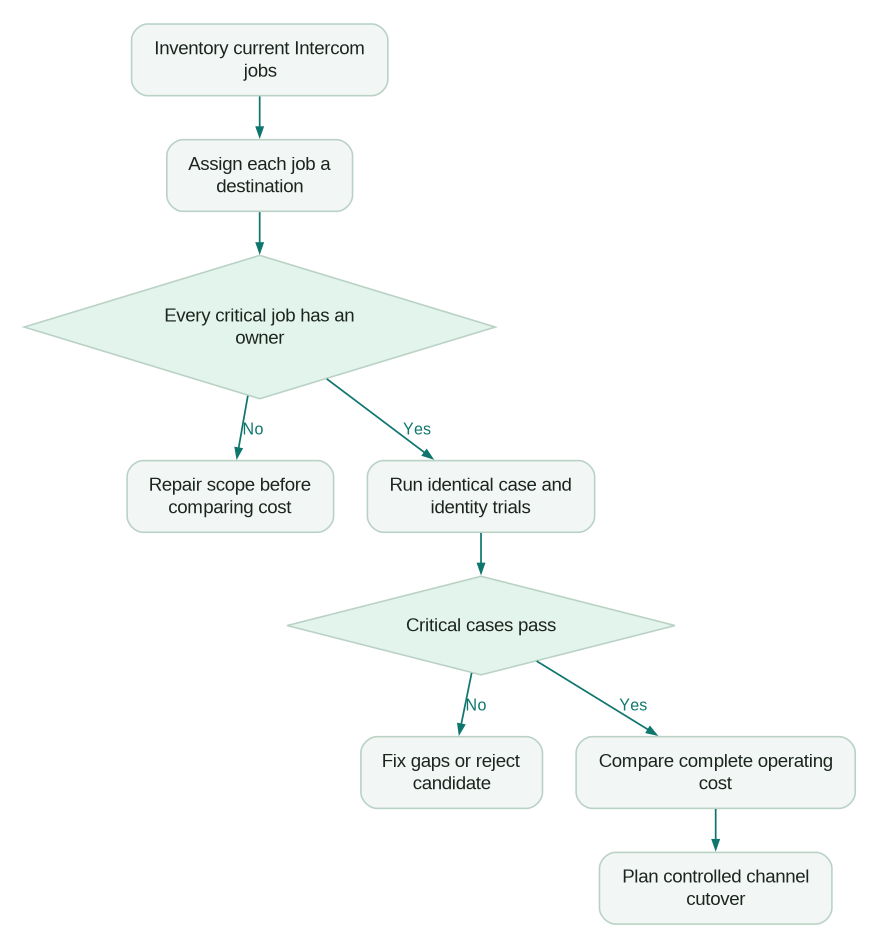
Read diagram as text
- Inventory current Intercom jobs to Assign each job a destination.
- Assign each job a destination to Every critical job has an owner.
- Every critical job has an owner to Repair scope before comparing cost: No.
- Every critical job has an owner to Run identical case and identity trials: Yes.
- Run identical case and identity trials to Critical cases pass.
- Critical cases pass to Fix gaps or reject candidate: No.
- Critical cases pass to Compare complete operating cost: Yes.
- Compare complete operating cost to Plan controlled channel cutover
The Intercom implementation guide provides identity and escalation cases you can reuse in this evaluation. A replacement should fix existing weaknesses rather than transport them into a new interface.
What must survive migration?
Preserve usable history, identity, permissions and active workflow state. History needs a retrieval plan; it may not need a perfect visual replica in the new inbox. Define which conversations must migrate, which remain in a searchable archive and how an agent finds them during an active case.
Preserve distinctions between public messages, internal notes, attachments and customer participants. A migration that changes visibility is more serious than a migration that changes formatting.
Carry over customer IDs, account relationships, suppression and opt-out states, active case ownership and knowledge URLs. If articles move, create a redirect plan so links in old replies still help customers.
Single customer view design is useful when multiple contacts or accounts are currently collapsed into one profile. Martech integration work should define which system owns each fact and how changes reach the support workspace. Clean that ambiguity before the new platform becomes another copy of it.
Avoid sending from both systems by accident. During cutover, record which system owns each channel and each outbound workflow. An overlap period needs explicit restrictions, not just two active subscriptions.
What should make you postpone the switch?
Postpone when the team cannot identify the owner of customer identity, when essential history cannot be retrieved, or when a critical channel has only been demonstrated through slides.
Before committing, complete these decisions:
Checklist
- Every active support and engagement workflow has a named destination.
- Authenticated customers keep the correct account and conversation context.
- Critical actions and human handovers pass documented trial cases.
- Historical internal notes remain internal.
- AI cost and quality use separate definitions.
- The cost model includes migration, overlap and integration maintenance.
- A channel-by-channel cutover owner can restore the previous route if needed.
Which option should different teams test first?
Use the dominant job to choose a first trial and a credible runner-up. These are scenario recommendations, not observed vendor performance rankings.
| Team or business model | First candidate | Runner-up | Reason to change the order |
|---|---|---|---|
| Small email-led support team | Help Scout | Freshdesk | Required routing or channel scope may favour the alternative |
| Structured multichannel operation | Zendesk | HubSpot Service Hub | Existing governed HubSpot context may make Service Hub a better fit |
| Ecommerce support built around orders | Gorgias | Zendesk with the required commerce integration | Verify the actual order actions and seasonal bill |
| Product-led SaaS using support and onboarding together | Retain and right-size Intercom | Specialist helpdesk plus a lifecycle tool | The split must preserve identity and journey rules at a justified cost |
Get the $99 martech audit to establish the replacement boundary, or request a detailed CRM and lifecycle migration scope with the workflow inventory, history requirements and acceptance cases.
Keep reading
Browse all CRM & Lifecycle guides
 CRM & Lifecycle
Intercom Pricing Explained: Plans, Seat Prices and Fin AI Costs
Intercom costs $29, $85 or $132 per seat a month billed yearly ($19 for new Essential customers), plus $0.99 per Fin outcome. See plans, add-ons and budgets.
Jafrin Akter AloLast updated 20 min read
 CRM & Lifecycle
Zendesk and Intercom Migration: Move Conversations and Attachments Safely
Move Zendesk tickets or Intercom conversations with their attachments, authors and private notes. Compare import limits and use a cutover acceptance checklist.
Jafrin Akter AloLast updated 12 min read
 CRM & Lifecycle
Intercom Implementation Mistakes: Identity, Inbox and Automation
Fix Intercom identity, account context, inbox ownership and Fin handovers with a practical launch scenario and release acceptance checklist.
Jafrin Akter AloLast updated 12 min read
Customer support automation
See the implementation scope, deliverables and acceptance checks.
Questions people ask
Can we keep Fin while moving the helpdesk to another platform?
Intercom offers Fin for existing helpdesks, with its own usage and minimum monthly commitment terms. Confirm that the specific destination and workflow are supported, then test knowledge, identity, escalation and billing before cutover. Preserving the AI provider does not automatically preserve every integration or conversation state. Price that route separately from an Intercom helpdesk subscription. Fin packaging
How can we move onboarding without changing who receives the messages?
Write down entry, re-entry, exit, suppression and timing rules before migrating content. Test a customer who converts mid-journey, opts out, changes account or receives a delayed event. Assign one sender during cutover and reconcile its eligible population with the old workflow. Use Customer.io versus Braze for lifecycle messaging when choosing the destination for those rules. If support remains in Intercom, the Intercom–Customer.io comparison shows how to divide message ownership and forecast the combined cost.
How should agents compare tools when they know one much better than the other?
Give both candidates equivalent configuration and training time, then use the same representative cases. Record completion, errors, context switching and follow-up work alongside agent feedback. Separate a temporary learning cost from a missing capability. A familiar interface can feel faster even when the replacement would perform better after training, while a polished demonstration can hide work the agent must perform later.
How should old email threads be tested after the inbox switch?
Test replies to representative pre-cutover emails in the proposed configuration. Check which system receives them, how the customer and original conversation are matched, and who owns any new ticket. Include a reply to a closed case and an old attachment thread. Keep the previous route available only under the agreed rollback plan, so an old message cannot silently reopen two active support paths.
How should outsourced support access be tested during a replacement?
Use the intended role on the proposed package and test what an external agent can view, change, export and escalate. Include a case involving sensitive commercial context and another belonging to a different account. Document offboarding and ownership of unresolved work. The test should establish the allowed boundary; a demonstration from a vendor administrator account is insufficient evidence of that role's access.
Sources

Written by
Jafrin Akter AloData Engineer and Co-founder at Martechdevs and Growth and Analytics Partners
Jafrin writes practical guides to marketing technology, customer data, analytics and AI workflows. Martechdevs is a Growth and Analytics Partners company.