
Intercom and Zendesk Integration: One Owner for Every Handoff
Intercom and Zendesk can work together through Inbox forwarding, a ticket-creation connector or Fin's dedicated Zendesk integration. Choose the route before building a sync: decide where the customer continues the conversation, which system owns the next reply and how a failed handoff is recovered. If you only want Fin on an existing Zendesk operation, you can keep Zendesk as the helpdesk without buying a second Intercom helpdesk for every agent.
On this page
When does running Intercom and Zendesk together make sense?
Keep both when they serve distinct operating needs, such as Intercom product conversations and Zendesk specialist queues, or during a controlled migration. If the requirement is simply an AI agent for Zendesk, evaluate Fin for Zendesk before committing to two helpdesks.
| Requirement | Route to evaluate | Primary operating owner |
|---|---|---|
| An Intercom agent occasionally forwards a case | Zendesk Support Inbox app | Explicit receiving Zendesk queue after acceptance |
| A defined Intercom workflow creates an escalation ticket | Data connector or custom adapter | Intercom until Zendesk receipt and ownership are confirmed |
| Zendesk remains the helpdesk and Fin answers customers | Fin for Zendesk | Zendesk ticketing and human support, with Fin controlling its configured AI stage |
| A temporary platform move | Bounded handoff plus an archive | One chosen system per open issue throughout cutover |
The Intercom versus Zendesk comparison helps choose a primary platform. This guide addresses the operating contract when both names remain in the stack. Start with the particular handoff that fails: a refund awaiting finance, a product bug reaching specialists or an unresolved AI conversation reaching a person.
Our customer support automation work starts with that ownership contract. Intercom implementation and Zendesk implementation then need to respect the same identity, routing and reply rules.
Which integration routes exist, and what do they actually sync?
The routes have different purposes. An app that forwards a conversation, a connector that creates a ticket and a native Fin channel integration do not provide the same ongoing behavior.
Intercom's Zendesk Support app
Intercom lists Zendesk Support among its first-party apps, and its Inbox guide describes forwarding Intercom conversations to Zendesk. Evaluate this for an agent-controlled handoff. Confirm the installed app's current entitlement and exactly which transcript parts, attachments and later replies it copies before relying on it. First-party app list, Inbox app capabilities.
Forwarding alone is not evidence of a complete two-way conversation sync. Write down where the customer's next message and the agent's next public reply will appear. If those steps need another action, include it in the operating procedure.
A Data connector or custom ticket handoff
Intercom publishes a Data connector recipe that creates a Zendesk ticket from a conversation. The recipe explicitly covers creation only; updating the Zendesk ticket requires another connector. It also describes mapping the returned Zendesk ticket ID back into Intercom. Ticket-creation recipe.
Use this route when you need a defined payload, routing conditions or a selected escalation event. Data connector creation and configuration require Can access developer hub permission. Intercom Advanced includes the Workflows builder used for automated routing; confirm the features in the actual workspace. Data connector permissions, Intercom plans.
Use current Zendesk OAuth guidance for a new implementation. Older connector examples still show password or API-token headers; Zendesk's current authentication documentation directs integrations toward OAuth. The Zendesk API authentication guide covers migration and renewal. Official authentication reference.
Fin for Zendesk
Fin has dedicated Zendesk ticket, messaging and Fin Messenger routes. Zendesk remains the system of record for the support operation. This is a different workspace/product path from an Intercom Suite workspace with its own Helpdesk and outbound features; adding an app to Intercom Suite does not automatically convert it into Fin for Zendesk. Fin integration overview, workspace and data-sync boundaries.
Avoid running a second custom ticket creator on a channel already managed by the Fin integration. Verify the native record and handoff first, then add only the behavior that is actually missing.
Which Fin channel and Zendesk edition do you need?
Choose between an asynchronous ticket and a live-agent handoff before buying the messaging capability. Fin's setup requires admin access to both the Fin workspace and Zendesk. Ticket and messaging connections are configured separately. Getting-started requirements.
| Route | Customer experience | Required integration boundary |
|---|---|---|
| Fin on Zendesk email/form tickets | Fin replies through the ticket's channel, then routes to people | Zendesk ticket connection, Fin agent identity and integration triggers |
| Fin Messenger with Create Zendesk ticket | Ends the Messenger session and creates a ticket with summary and collected data | Zendesk API connection; Sunshine is not required for this handoff option |
| Fin Messenger with Hand-off to Zendesk agent | A Zendesk agent continues the live conversation | Zendesk API and Sunshine capability |
| Fin on Zendesk Messaging | AI stage on supported messaging channels, then Zendesk human handling | Dedicated messaging connection and Sunshine entitlement |
Fin documents Sunshine access in Zendesk Suite Professional, Enterprise and Enterprise Plus, or as a separately purchased entitlement. That requirement belongs to the messaging/live-handoff route; it is not a reason to assume every ticket-only integration needs Suite Professional. Zendesk requirements, Messenger handoff options.
For Fin Messenger live-agent handoff or Determined by situation, Zendesk also requires Multiple Conversations to be enabled. Include that setting in the channel acceptance check. Messenger setup prerequisites.
The current setup starts from Connect with OAuth. Ticketing and Sunshine are distinct connections; the messaging guide also retains a Sunshine-specific App ID/key/secret section. Follow the connection method presented for that channel and workspace, and confirm any remaining Sunshine credentials with the provider rather than reusing a Support API token. Messaging setup.
For Zendesk tickets, Fin recommends a clearly identified agent account with a verified email and the Agent role so it can reply. Include that identity in the licence inventory. Limit initial assignment to the intended queue or test population. Ticket setup.
How do you stop the same customer being handled twice?
Give each logical support issue one customer-facing owner, and make the transfer conditional on receiving-system confirmation. A ticket existing somewhere is not the same as a staffed queue accepting responsibility.
Use a small handoff contract. The field names below are proposed integration fields, not native status names shared by both products.
| Contract field | Purpose | Writer |
|---|---|---|
| Logical issue ID | Joins the customer's issue across records | Handoff service or agreed case registry |
| Source conversation and target ticket IDs | Opens the actual records for investigation | Integration after verified readback |
| Reply owner | Identifies who may send the next customer-facing answer | Agreed routing controller or accepting team |
| Handoff state | Requested, pending confirmation, confirmed or failed | Integration, with an operational override process |
| Requested/accepted timestamps | Measures time waiting between systems | Source and receiving workflow respectively |
For a custom Intercom-to-Zendesk escalation, keep the Intercom owner accountable until the target requester, organization, group and ticket ID have been verified and the receiving queue has an owner. Then apply the documented transfer policy. Explain the next channel to the customer when the handoff changes from chat to email.
For native Fin, preserve the vendor's ownership controls. Its assignment trigger excludes cases already tagged fin-routed-to-team, and its update notification excludes Fin's own changes. Removing these guards can send a human-handled case back to Fin or create a notification loop. Fin's trigger guide permits adding conditions to the assignment trigger and warns against changing the integration's other behavior. Fin trigger contract.
Keep private notes private. The Zendesk Comments API defines public: false as an internal note, and notes that the initial privacy value can persist for later comments unless changed. Set visibility deliberately for each automated comment. A private note also does not prove that every configured trigger will remain silent; inspect notification rules before testing writes. Comment visibility.
How should a custom handoff recover from retries?
Persist the handoff intent before sending a create request, use a stable idempotency key and retain the target ticket ID after verification. Do not treat Zendesk's external_id as a uniqueness constraint: the API explicitly allows several tickets with the same external ID. Ticket identifiers.
Zendesk's ticket-creation API supports the Idempotency-Key header. Repeating the same body with the same key returns the cached response; changing the body with that key produces an error. The key expires after two hours. A replay after expiry can create another ticket, so an external-ID field and a retry loop are insufficient by themselves. Ticket-create idempotency.
The following local planner illustrates the decision boundary for a custom adapter. It sends no requests and is not code to paste into a Fin-managed channel. Save it as handoff.py. The 7,000-second retry cutoff, three-attempt budget and 2,500-character summary limit are conservative example policies, not Zendesk limits.
import hashlib
import json
import re

RETRY_WINDOW_SECONDS = 7000  # Local margin inside Zendesk's two-hour cache.
MAX_ATTEMPTS = 3            # Local policy, not a Zendesk limit.


def prepare_handoff(event, receipt=None, elapsed_seconds=None):
    """Plan a custom handoff. No HTTP call, database write or customer reply."""
    if not isinstance(event, dict):
        raise ValueError("Event must be an object")
    if event.get("origin") == "zendesk":
        return {"action": "ignore_reflected_event"}
    if event.get("origin") != "intercom":
        raise ValueError("Unsupported trusted source")
    if event.get("membership_verified") is not True:
        raise ValueError("Verify requester membership before preparing a handoff")
    for field in ("workspace_id", "conversation_id"):
        if not isinstance(event.get(field), str) or not re.fullmatch(r"[A-Za-z0-9_-]{1,64}", event[field]):
            raise ValueError("Invalid source ID")
    for field in ("generation", "requester_id", "organization_id", "group_id"):
        if type(event.get(field)) is not int or event[field] < 1:
            raise ValueError("IDs and generation must be positive integers")
    summary = event.get("summary")
    if not isinstance(summary, str) or not summary.strip() or len(summary) > 2500:
        raise ValueError("Provide a minimized summary of 1–2500 characters")
    if elapsed_seconds is not None and (type(elapsed_seconds) is not int or elapsed_seconds < 0):
        raise ValueError("Invalid elapsed time")
    key = "ic:{}:{}:{}".format(event["workspace_id"], event["conversation_id"], event["generation"])
    body = {"ticket": {
        "subject": "Intercom handoff " + event["conversation_id"],
        "requester_id": event["requester_id"],
        "organization_id": event["organization_id"],
        "group_id": event["group_id"],
        "external_id": key,
        "status": "open",
        "tags": ["intercom_handoff"],
        "comment": {"body": summary, "public": False}
    }}
    encoded = json.dumps(body, sort_keys=True, separators=(",", ":"), ensure_ascii=False)
    digest = hashlib.sha256(encoded.encode("utf-8")).hexdigest()
    request = {"method": "POST", "path": "/api/v2/tickets.json",
               "headers": {"Content-Type": "application/json", "Idempotency-Key": key},
               "body": body, "body_sha256": digest}
    if receipt is None:
        return {"action": "create_after_durable_reservation", "request": request}
    if not isinstance(receipt, dict) or receipt.get("key") != key:
        raise ValueError("Receipt belongs to another handoff")
    if receipt.get("body_sha256") != digest:
        return {"action": "hold_changed_body"}
    state = receipt.get("state")
    if state == "confirmed":
        ticket_id = receipt.get("ticket_id")
        if type(ticket_id) is not int or ticket_id < 1:
            raise ValueError("Confirmed receipt needs the verified ticket ID")
        return {"action": "link_existing", "ticket_id": ticket_id}
    if state == "rejected":
        return {"action": "repair_rejected_request"}
    if state == "pending":
        return {"action": "reconcile_inflight_attempt"}
    if state != "unknown":
        raise ValueError("Unsupported receipt state")
    if elapsed_seconds is None:
        raise ValueError("Unknown outcome needs elapsed time from the first attempt")
    attempts = receipt.get("attempts")
    if type(attempts) is not int or attempts < 1:
        raise ValueError("Unknown outcome needs an attempt count")
    if elapsed_seconds >= RETRY_WINDOW_SECONDS or attempts >= MAX_ATTEMPTS:
        return {"action": "reconcile_before_any_new_create"}
    return {"action": "retry_same_request", "request": request}
Save this complete fictional exercise as example.py beside it. The event is a normalized adapter input, not Intercom's webhook schema. The numeric requester, organization and group IDs are synthetic placeholders. generation identifies an intentionally new handoff; keep it fixed on retries rather than incrementing it when a response is missing.
from handoff import prepare_handoff

# Fictional, normalized adapter event; not a native Intercom webhook schema.
event = {
    "origin": "intercom",
    "workspace_id": "workspace_demo",
    "conversation_id": "conversation_demo_17",
    "generation": 1,
    "membership_verified": True,
    "requester_id": 9001,
    "organization_id": 8001,
    "group_id": 7001,
    "summary": "Synthetic case: export failed. Workspace membership checked; support must inspect the failed job."
}
first = prepare_handoff(event)
receipt = {
    "key": first["request"]["headers"]["Idempotency-Key"],
    "body_sha256": first["request"]["body_sha256"],
    "state": "unknown",
    "attempts": 1
}
print(first["action"])
print(prepare_handoff(event, receipt, elapsed_seconds=60)["action"])
print(prepare_handoff(event, receipt, elapsed_seconds=7200)["action"])
receipt.update(state="confirmed", ticket_id=6001)
print(prepare_handoff(event, receipt)["action"])
Run python3 example.py. It prints:
create_after_durable_reservation
retry_same_request
reconcile_before_any_new_create
link_existing
The planner prepares a POST /api/v2/tickets.json body with an internal summary and explicit identity/group IDs. A production executor must bind the source workspace to the intended Zendesk account, supply protected OAuth authentication, verify the real identity and membership, reserve the key atomically and persist the exact request before sending it. Populate origin from trusted integration provenance, not a customer-supplied field. A Boolean in a fixture does not perform authorization.
Persist the first-attempt time and attempts without resetting them on retries. The 7,000-second policy leaves 200 seconds inside the documented 7,200-second cache window. A confirmed receipt means the executor already checked the actual Zendesk record; the local function does not perform that readback or prove durable delivery.
When the outcome is uncertain beyond the retry window, reconcile before any new create. Query the saved ticket ID when available, or inspect all relevant external-ID matches with sufficient permissions and pagination. Zero visible matches under a restricted account is not proof that nothing was created. Multiple matches need an operator's decision. A changed payload is a new review problem, not permission to reuse the old key with different data.
How do you preserve the right customer and account context?
Map the person, the affected account and the support issue separately. The same email can belong to several workspaces, and a person's default organization may not be the account discussed in this conversation.
| Identity or context | Preserve | Check before handoff |
|---|---|---|
| Requester | Product identity and mapped Zendesk user ID | The requester is verified; email matching alone did not choose the account |
| Affected account | Product workspace and Zendesk organization | Current membership permits this context |
| Issue | Source conversation, logical issue and target ticket IDs | A retry or reply uses the existing relationship |
| Diagnostic evidence | Relevant facts, observation time and source reference | The summary contains the needed context without unnecessary private data |
For Fin Messenger, the documented setup compares its user_id with the Zendesk user's external_id. It can also select the Zendesk organization through a signed JWT company ID matching the organization's external ID, subject to user membership. That company mechanism applies to supported authenticated Messenger channels, not email. Requester and organization validation.
Fin maps Zendesk users to People data, tickets to Conversation data and organizations to Company data. Zendesk-sourced attributes are read-only in Fin and normally sync hourly. Organization multi-select and lookup fields are not supported by this sync. Set the workflow's collected/mapped attributes before the handoff step; do not assume every tag created in Fin will appear on the Zendesk ticket. Attribute synchronization.
Knowledge content is another boundary. Enable the Zendesk articles, documents and snippets Fin should use, with the intended audience. Historical tickets and private notes do not automatically become answer knowledge just because Zendesk is connected; distinguish the active ticket's context from the approved knowledge corpus. Zendesk knowledge sync.
Use the support customer-context guide for field freshness and account authorization. If CRM enrichment is also involved, keep the Zendesk–HubSpot mapping or Intercom–Salesforce mapping aligned with the same account identifiers and field ownership.
How do you report on support across both systems?
Report customer issues, handling work and vendor charges as separate measures. An Intercom conversation and its Zendesk ticket can represent one issue. A Fin outcome can still leave human work, while a ticket count can include AI-only visibility records.
Zendesk creates AI agent tickets for supported messaging conversations, including third-party bots. Messaging AI-only tickets have restricted behavior; most ordinary triggers and automations apply after human escalation, when the ticket becomes regular. Do not add another ticket creator merely because an agent-facing queue has not yet processed the AI record. AI agent ticket behavior.
For API reporting, the Tickets API's support_type_scope defaults to agent; use the intended all, agent or ai_agent scope deliberately. Keep the types distinguishable when reconciling totals. Ticket reporting scope.
In a fictional month of 1,000 Fin-involved support conversations, assume the outcomes are mutually exclusive and already classified under the applicable billing rules:
This workload uses service conversations over chat/email. It excludes voice and sales qualifications; Intercom's own outcome guide prices those scopes separately. Intercom channel outcome rules.
| Recorded outcome | Conversations | Billable Fin outcomes | Human work remains |
|---|---|---|---|
| Fin resolution | 400 | 400 | None assumed for this example |
| Successful configured Procedure handoff | 100 | 100 | Yes |
| Ordinary escalation to a human | 500 | 0 | Yes |
| Total | 1,000 | 500 | 600 conversations |
The example has a 40% resolution share and a 50% billable-outcome share. Calling all 500 billed conversations “resolved without a human” would hide 100 handoffs. Fin's platform outcome guide distinguishes configured Procedure handoffs from ordinary customer-requested or workspace-rule escalations and caps charges per conversation. Use invoice-adjusted outcomes, including relevant later reversals, rather than deriving a bill from a routing tag. Fin platform outcome definitions.
Keep the original customer-contact timestamp, handoff request, receiving acceptance and first receiving reply. Measure handoff waiting time separately from each platform's SLA clock. Choose a business-hours and timezone convention before comparing response times, and track reopened issues and duplicate public replies alongside throughput.
What would the same workload cost in each architecture?
Price the required seats and the same billable workload, then add channel usage, optional products and implementation separately. Fin's platform help describes a USD 49 monthly bundle including 50 outcomes, then USD 0.99 for additional outcomes. Its public pricing page also presents USD 0.99 per outcome with a 50-outcome minimum. Use the bundle calculation below only when that is the formula in your order; do not assume the two published formulations produce the same charge. Fin on an existing helpdesk does not require additional Intercom Helpdesk seats. Fin platform billing terms, Fin pricing.
Intercom Advanced lists USD 85 per full seat per month on annual billing; Zendesk Suite Professional lists USD 115 per agent on annual billing. Intercom billing terms, Zendesk USD pricing.
For this hypothetical comparison, five humans need Zendesk. The two-helpdesk option additionally licenses all five in Intercom Advanced for its workflow capabilities. Both columns reserve one extra full Zendesk agent seat for the integration identity, so six Zendesk seats are budgeted. This is a conservative staffing assumption, not a claim that Fin always forces an incremental sixth licence; confirm the usable identity and seat entitlement in the contract.
USD monthly equivalents before tax. Seat prices use annual commitments. Fin-on-Zendesk uses the published USD 49 bundle and overage formula; Fin with Intercom Helpdesk uses the chat/email USD 0.99 outcome rate.
| Cost component | Fin with Zendesk, $49 bundle | Intercom Helpdesk plus Zendesk handoffs |
|---|---|---|
| Six Zendesk Suite Professional seats × $115 | $690 | $690 |
| Five Intercom Advanced seats × $85 | $0 | $425 |
| 500 billable Fin outcomes under each stated formula | $494.50 | $495 |
| Software planning subtotal | $1,184.50 | $1,610 |
| Twelve-month projection at unchanged usage/rates | $14,214 | $19,320 |
The committed annual seat amounts are USD 8,280 and USD 13,380 respectively. Fin contributes USD 5,934 and USD 5,940 over twelve unchanged months under these formulas. Of the USD 425.50 monthly difference, USD 425 buys the additional Intercom helpdesk workflow and USD 0.50 comes from the stated Fin billing formulas. Neither is automatically an achievable operating saving when the second workflow or proactive engagement is still required.
Confirm the minimum and included quantity in the order. Under the platform-help bundle, the Fin-on-Zendesk calculation is 49 + (500 - 50) × 0.99 = USD 494.50. Do not add a USD 49 base fee to all 500 outcomes when the first 50 are included. If your agreement instead uses a straight USD 0.99 rate with a 50-outcome minimum, 500 outcomes would cost USD 495. Keep those formulas separate. Published platform billing terms.
For an outcome-volume sensitivity check, 1,000 billable outcomes would raise the monthly software subtotals to USD 1,679.50 and USD 2,105 under these formulas and unchanged seats. Reassess the human queue and staffing separately; the price calculation does not establish that the same team can handle a peak.
The example excludes voice, SMS/WhatsApp consumption, Copilot, other add-ons, migration and ongoing integration work. It uses Suite Professional for the selected Zendesk capabilities, not as a minimum for every ticket-only handoff. The detailed Intercom pricing, Zendesk pricing and support AI billing guide explain the wider budget. Never run two AI responders on the same path merely to compare their prices in production.
What should you check when a handoff fails?
Keep the source owner accountable, identify the first unconfirmed state and repair that boundary. Reconnecting everything or replaying every event can create a second problem before the first is understood.
| Symptom | First evidence to inspect | Recovery direction |
|---|---|---|
| No Zendesk ticket after a create timeout | Durable intent, same-key attempt history and target readback | Reconcile or replay within the supported window; never blindly create after expiry |
| Fin stops replying to an assigned ticket | Actual assignment, notify-Fin trigger and applicable public customer comment | Restore the expected routing/update path without broadening every trigger |
| Both AI and human reply | Current owner, handoff guard tags and competing assignments | Remove the conflicting responder path and retest one controlled case |
| Field value is missing | Source mapping and whether collection happened before handoff | Fix the specific mapping/order, then verify the target value |
| Integration was disconnected/reconnected | Expected versus actual Fin triggers and OAuth connection | Review recreated triggers, duplicates and overwritten customizations before resuming |
| API responds 429 | Endpoint limit and Retry-After | Respect the stated delay, preserve queue visibility and keep retries bounded |
Fin's ticket FAQ warns that reconnecting can recreate triggers and affect customizations. Its current Connect/OAuth guidance supersedes older FAQ steps that still say to create a new API token. Use the trigger comparison view and the documented channel setup, not a repeated disconnect as a default fix. Fin troubleshooting, current ticket connection, API rate-limit behavior.
Also separate closure meanings. Fin's inactivity closure can leave the Zendesk ticket in its existing status; it is not the same transition as Zendesk Closed. A reply can reopen a solved Zendesk ticket, while a reply to a closed ticket creates a follow-up. Preserve the relationship and choose the new issue owner rather than trying to reopen the closed record through a status mirror. Fin inactivity behavior, Zendesk solved versus closed.
How do you verify one bounded support workflow?
Use a dedicated test population and one issue family before expanding routing. For Fin, start with the channel's Test before going live path or a separate restricted test workflow. For a custom adapter, use synthetic identities and a controlled destination with notifications reviewed before any approved write. Do not substitute an agent's email for a customer when testing public customer-reply behavior.
| Test case | Required result | Evidence to retain |
|---|---|---|
| One valid handoff | Correct requester, organization, group and one active reply owner | Source IDs, target ID, visibility and acceptance record |
| Same create retried within policy | Same target ticket and same request identity | Request fingerprint, key, responses and readback |
| Unknown outcome after the cache window | Reconciliation, not a new blind create | Held attempt and reviewed target matches |
| Changed body under the old key | Hold for review | Before/after payload fingerprints |
| One requester in two accounts | Only the selected authorized account is attached | Membership and organization evidence |
| Internal handoff note | Internal content stays internal; no unintended notification | Comment privacy and triggered actions |
| Failed auth, mapping or handoff | Original owner remains responsible and alert is visible | Error class, queue state and recovery owner |
| Solved/closed follow-up | Correct reopen or new follow-up path with linked history | Lifecycle transitions and next owner |
The local code exercise checks its planning rules and payload shape. These acceptance cases still need the real channel, integration identity, routing rules and notification configuration before rollout; a local function cannot establish those vendor behaviors.
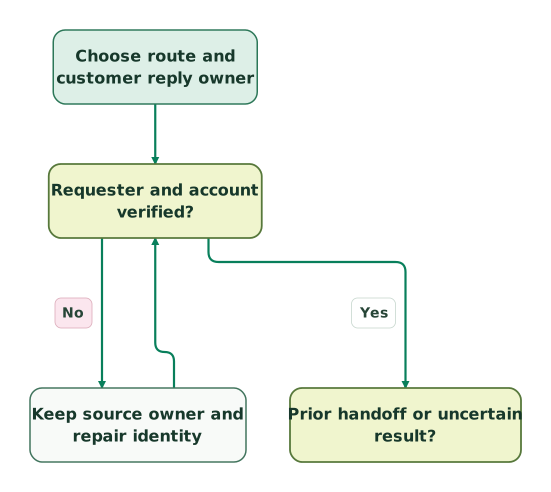
Verify the requester and account
The prior-handoff decision is shared with the next view. No creation is approved by an unverified identity.
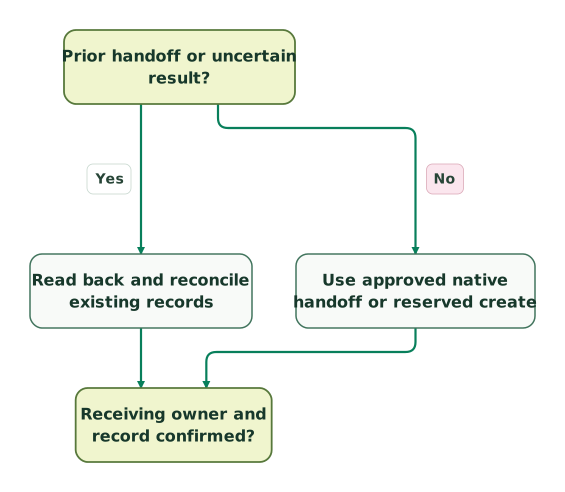
Choose recovery or a new handoff
The receiving-confirmation decision continues into the final view. An uncertain earlier request does not authorize a second blind create.
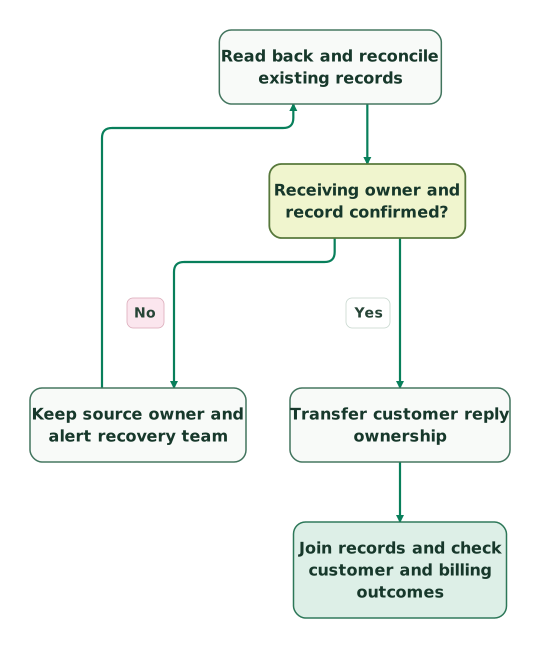
Confirm ownership before transfer
The read-back-to-confirmation connection is repeated for repair context; it is the same edge as in the preceding view.
Read diagram as text
- Choose route and customer reply owner to Requester and account verified?.
- Requester and account verified? to Keep source owner and repair identity: No.
- Keep source owner and repair identity to Requester and account verified?.
- Requester and account verified? to Prior handoff or uncertain result?: Yes.
- Prior handoff or uncertain result? to Read back and reconcile existing records: Yes.
- Prior handoff or uncertain result? to Use approved native handoff or reserved create: No.
- Read back and reconcile existing records to Receiving owner and record confirmed?.
- Use approved native handoff or reserved create to Receiving owner and record confirmed?.
- Receiving owner and record confirmed? to Keep source owner and alert recovery team: No.
- Keep source owner and alert recovery team to Read back and reconcile existing records.
- Receiving owner and record confirmed? to Transfer customer reply ownership: Yes.
- Transfer customer reply ownership to Join records and check customer and billing outcomes
When should you consolidate on one helpdesk?
Consolidate when the second inbox no longer serves a distinct customer or operational requirement, or when reconciliation and ownership work exceed its value. Keep it when a tested requirement still depends on it, and document that requirement explicitly.
Fin for Zendesk does not include the complete Intercom Helpdesk or outbound suite. Its Messenger setup also excludes using that same Fin Messenger for proactive support content such as tours and outbound messages. If those are why you retain Intercom, confirm the supported workspace and channel design before removing licences. Workspace scope, Fin Messenger limits.
For a migration, separate open issues from historical reporting. Choose where each open case continues, preserve old-thread reply handling and test the exit path. A complete-looking archive is not a working handoff for a customer who is still waiting.
What should pass before you expand the integration?
- The selected app, custom or Fin route matches the required customer channel.
- Required editions, agent identities, OAuth access and messaging entitlements are confirmed.
- Requester, account membership and field ownership survive the transfer.
- One customer-facing owner is active before and after the handoff.
- Duplicate, uncertain and expired-window attempts have a durable recovery path.
- Private notes, public replies and notifications follow the intended visibility rules.
- Reporting joins logical issues without conflating vendor records or billable outcomes.
- Expected and peak software budgets use the actual contract formula and seat count.
Bring one failed handoff, its source and target records, and the current routing rules when you request a detailed support automation scope. Those details make it possible to fix a concrete operating gap without adding another uncontrolled sync.
Keep reading
Browse all CRM & Lifecycle guides
 CRM & Lifecycle
Intercom vs Zendesk: Key Differences, AI, Pricing and Which to Choose
Intercom starts at $29 per seat and bills $0.99 per Fin outcome; Zendesk starts at $19 and bills $2 per AI resolution. Compare features, AI and fit.
Jafrin Akter AloLast updated 10 min read
 CRM & Lifecycle
Zendesk Competitors and Alternatives: 10 Help Desks Compared by Price and Fit
Freshdesk, Help Scout, Zoho Desk, Intercom, Front, Gorgias and 4 more Zendesk competitors, with prices per agent, free plans and the best pick by team.
Jafrin Akter AloLast updated 19 min read
 CRM & Lifecycle
Customer context in support: billing and product data inside Intercom or Zendesk
Connect billing and product data to Intercom or Zendesk with correct account identity, fresh context, useful fields and safe AI support workflows.
Jafrin Akter AloLast updated 14 min read
Customer support automation
See the implementation scope, deliverables and acceptance checks.
Questions people ask
Can Intercom integrate with Zendesk?
Yes. Intercom documents a Zendesk Support Inbox app for forwarding conversations, a Data connector recipe for ticket creation and dedicated Fin-for-Zendesk routes. They differ in ownership and ongoing synchronization. Choose the customer channel and receiving owner first, then verify which messages, fields, attachments and status changes the selected route actually transfers. Ticket creation alone does not establish a full two-way sync.
Can we use Fin with Zendesk without buying Intercom Helpdesk seats?
Yes. Fin is sold for an existing Zendesk helpdesk without additional Intercom helpdesk seats, with outcome-based pricing and minimum commitments. Zendesk licensing still applies, including the identity and messaging capabilities your setup requires. Fin for Zendesk is a different workspace path from Intercom Suite, so confirm the right product before purchasing. Its availability does not include every Intercom outbound or helpdesk feature.
Does a Zendesk handoff keep the customer in live chat?
It depends on the selected route. Fin's Create Zendesk ticket action ends the messaging session and creates a ticket with summary and collected data. Hand-off to Zendesk agent supports a live conversation and requires Sunshine capability as well as the Zendesk connection. A custom ticket-creation API call provides neither chat continuity nor reply synchronization automatically. Test the next customer message and agent reply explicitly.
Will using external_id stop duplicate Zendesk tickets?
No. Zendesk allows multiple tickets with the same external_id. Ticket creation supports an Idempotency-Key header, but its cache expires after two hours. Keep a durable handoff record, stable request body and verified target ID, and reconcile uncertain attempts before creating again outside the retry window. A timeout does not prove that the first ticket was never created.
Is every Fin handoff a billable resolution?
No. Fin distinguishes resolutions, successful configured Procedure handoffs and ordinary escalations. A Procedure handoff can be billable while a person still has work to do; default or workspace-rule escalations are treated differently. Record the vendor outcome and the customer's actual completion separately. Confirm the billing formula in the order, and use invoice-adjusted outcomes rather than treating every routing tag as a charge.
Sources
- Intercom: first-party apps
- Intercom: Inbox apps
- Intercom: create Zendesk tickets with Data connectors
- Intercom: Data connector permissions and setup
- Intercom pricing
- Zendesk: API authentication
- Fin: Zendesk integration overview
- Fin: Zendesk data synchronization
- Fin: Zendesk getting started
- Fin Messenger: Zendesk setup
- Fin: Zendesk Messaging setup
- Fin: Zendesk Tickets setup
- Fin: Zendesk triggers
- Zendesk: comment visibility
- Zendesk: Tickets API
- Zendesk: ticket-create idempotency
- Fin: Zendesk knowledge sync
- Zendesk: AI agent tickets
- Fin: platform outcome definitions and billing
- Fin pricing
- Zendesk USD pricing
- Fin: Zendesk Tickets troubleshooting
- Zendesk: rate limits
- Zendesk: solved versus closed tickets
- Intercom: chat and email outcome pricing
- Intercom: plan prices and annual billing

Written by
Jafrin Akter AloData Engineer and Co-founder at Martechdevs and Growth and Analytics Partners
Jafrin writes practical guides to marketing technology, customer data, analytics and AI workflows. Martechdevs is a Growth and Analytics Partners company.