
Intercom vs Zendesk: Choose Around Your Support Workflow
Data Engineer and Co-founder, martechdevs
Last updated 8 min read
Evaluate Intercom first when support happens inside your product and you want conversations, customer context and proactive messages to share a workflow. Evaluate Zendesk first when queues, specialist routing and a broader service operation drive the requirements. Both offer ticketing and AI. Choose after testing your difficult support cases, total operating cost and migration requirements in the specific plans you would buy.
Last updated: 13 October 2026.
A customer asks for a refund in chat, emails finance with more information, and returns three days later asking for an update. The platform needs to preserve the customer context, identify who owns the next action and show the customer what happened. That case is a more useful starting point than a feature count.
The recommendations here are implementation judgments based on current public documentation. They are not a claim that we ran a controlled performance benchmark in paid accounts. Use the test plan below to produce evidence from your own support workload.
Which operating model fits each platform?
Intercom organises work through conversations and tickets, including customer-facing tickets, linked back-office work and tracker tickets for issues affecting several customers. This makes it worth evaluating when a chat interaction regularly grows into a longer investigation. Intercom ticket model.
Zendesk's omnichannel routing supports work assignment using availability and capacity, with additional priority and skills behaviour depending on plan. Custom queues can direct work across primary and fallback groups. It is worth evaluating when the central problem is allocating work among several specialist teams. Zendesk custom queues.
Neither observation settles the purchase. An Intercom operation can require complicated back-office ownership. A small Zendesk team can work effectively with a simple queue. Put your actual constraints into a CRM and lifecycle implementation brief: channels, customers, team coverage, commercial promises and the systems agents need to consult.
Write down the action that currently fails. “We need better support” is too broad. “Refund requests wait because support cannot see whether finance approved them” produces a workflow, an integration requirement and a measurable test.
Can both handle work that takes several days?
Yes. Evaluate the handoff and customer visibility rather than assuming one is only chat and the other only tickets.
For Intercom, test a customer ticket with an associated back-office task. Keep customer-visible information separate from internal discussion. Intercom documents different sharing behaviour for customer, back-office and tracker tickets; an administrator must set the ticket types and fields deliberately. Ticket type configuration.
For Zendesk, test how the request changes groups, enters a queue and returns after an internal dependency completes. Its custom queues use the first matching queue, so ordering is part of the routing policy. Make a broad general-support rule compete with a narrow urgent-billing rule and inspect which wins. Queue matching.
In both trials, require a named owner while another team investigates. A pending dependency should still have an accountable customer-facing owner and a next-update date. Otherwise, changing platforms moves an ownership gap into a different interface.
What should you test before comparing AI claims?
Assemble an evaluation set from permitted, de-identified examples of your support questions. Include clear knowledge questions, ambiguous requests, missing account context, policy exceptions and cases that require a person to decide. Keep the expected response and permitted actions alongside each case.
An illustrative 40-case set might contain:
- Ten questions answerable from approved help content.
- Eight questions requiring authenticated account context.
- Eight operational requests requiring an approved system action.
- Six ambiguous requests that need clarification.
- Four policy exceptions requiring escalation.
- Four cases where a confident answer would be unsupported.
Those proportions are a starting design, not a representative sample of every support organisation. Replace them with your own case mix and preserve difficult cases when you repeat the test after changing knowledge or instructions.
Judge each result on correctness, useful completion, account isolation, safe handling of actions, appropriate escalation and quality of the handoff. Count reopened requests and follow-up work. A quick answer that causes another ticket has not removed the underlying support demand.
The support customer context guide explains the account and product information these tests need. Missing context can make two capable tools look equally weak.
Do both vendors charge for the same AI outcome?
No. Read the exact meter before applying one vendor's observed result rate to the other vendor's price.
Intercom's Fin documentation includes billable Procedure handoffs as well as resolutions. It also distinguishes sales qualification from other outcomes: the current chat and email documentation lists $9.99 for a qualification and $0.99 for the other listed outcome types. These figures apply to the documented Intercom channel scope; voice and custom agreements need separate confirmation. Fin outcome definitions.
Zendesk's resolution-tier documentation distinguishes assisted escalation, contained resolution and verified resolution. The first two do not consume the resolution allowance under that model. Accounts can be on different billing arrangements, so establish the one shown in your account and quote. Zendesk resolution tiers, Identifying the account's billing model.
Keep two columns in your own evaluation workbook: the vendor's billable result and your independently assessed customer outcome. They will not always match. Finance needs the first for cost; the support leader needs the second for service quality.
For example, an illustrative 1,000-case month could include 350 verified self-service completions, 150 useful information-gathering handoffs and 500 cases still requiring substantial agent work. Price each category using the applicable vendor definition. Calling all 500 AI-assisted cases “resolved” would obscure both remaining workload and the billing distinction.
How should you compare total cost?
Select plans that satisfy the same mandatory requirements, then calculate seats, AI usage, channels, add-ons and delivery work. A comparison between an entry plan and a higher plan with service commitments will mostly measure the difference in requirements.
Intercom's public plan page places Workflows and multiple team inboxes in Advanced, while Expert adds capabilities including SLAs and multibrand features. Zendesk separates email-focused Support from its broader Suite packaging. Confirm the current entitlement for every requirement at checkout or in the quote. Intercom plans, Zendesk plans.
Use this calculation for each shortlisted configuration:
First-year cost
= committed seat and add-on charges
+ expected usage charges
+ implementation and migration work
+ ongoing administration and quality review
+ temporary overlap with the old platform
Build a low, expected and peak usage case using your own incoming demand. Include a launch or outage month. A higher AI completion rate can increase usage charges while reducing agent handling time, so evaluate the net operational effect.
Suppose, illustratively, automation releases 60 agent hours in a month. That time has value if the team uses it to meet demand, reduce a backlog or avoid a justified hire. It does not automatically reduce payroll by 60 hours. Keep capacity value and cash savings separate in the business case.
The detailed Intercom pricing guide and Zendesk pricing guide break down their respective meters. Get both offers in the same currency and contract period, including taxes and any reseller-specific terms.
Which migration details can change the decision?
Inventory the things the team uses during a real case: contact identity, company relationship, conversation history, attachments, ticket status, internal notes, knowledge content, macros, routing rules and reporting definitions. Then determine what can be migrated, what must be rebuilt and what can remain in a searchable archive.
A particularly useful test is one person associated with two customer accounts. Ask the implementation team to show which account a conversation belongs to, which subscription the agent sees and which actions the agent can take. An email address alone may not provide enough context for a B2B product with several workspaces.
Plan open work separately from closed history. Decide where an unresolved request continues after cutover, how replies to old email threads are handled, and how the agent finds historical context. Keep a short overlap period with explicit ownership so two platforms do not respond to the same request.
Test export as part of evaluation. Take a representative closed case out of the platform and confirm you can reconstruct its sequence, ownership and outcome. A readable exit path has value before you need it.
How do you run a useful pilot?
Choose one queue or customer segment that includes your difficult cases but limits disruption. Give both products the same knowledge set, customer context and acceptance criteria. Restrict customer-facing actions until the team has validated account boundaries and escalation.
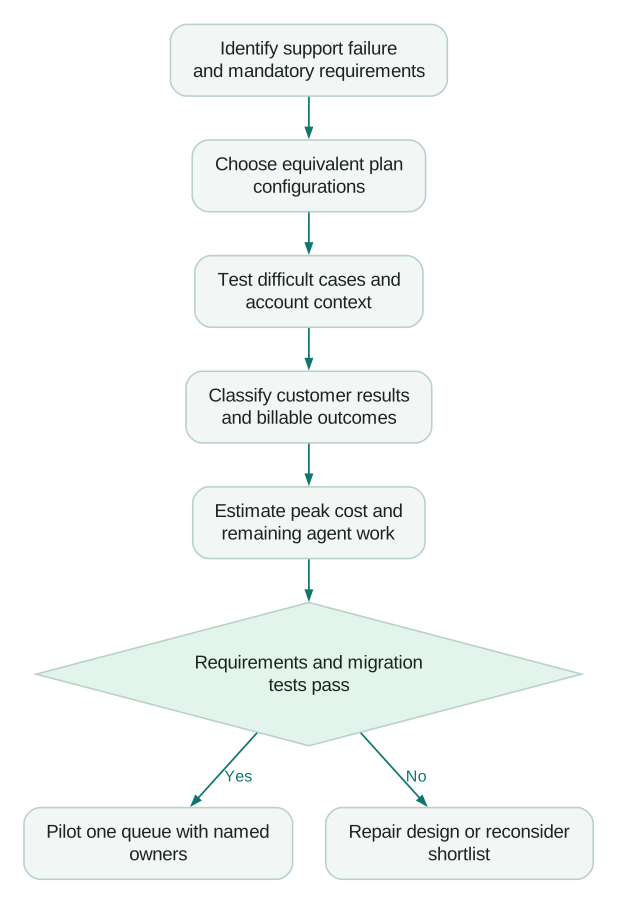
Record first response, time waiting for internal teams, time to useful completion, repeat contact and customer-visible mistakes. Define business hours and waiting states before comparing time metrics. A platform can appear faster simply because its default clock excludes different periods.
Test the fallback when the AI allowance is reached or an integration fails. Intercom documents hard limits and handover behaviour, including the possibility of slight timing differences around the limit. The pilot should prove that customers still reach a staffed queue. Intercom usage controls.
At the end, complete a decision record:
Checklist
- Document which required cases passed and retain unresolved cases.
- Assign the operating work that remains after migration.
- Price both the expected and peak configurations using the same workload.
An untested feature should remain an open item, even when the vendor's demonstration looked convincing.
Questions people ask
Is Intercom only for live chat?
Intercom also supports structured tickets and longer-running work. Test customer updates, internal collaboration and ownership against your actual process. A label such as “chat tool” is too coarse to determine whether it fits your support operation.
Is Zendesk too complicated for a small team?
Complexity depends partly on the rules, channels and integrations you choose to operate. A small team should trial the smallest configuration that meets its requirements and name the administrator who will maintain it. Avoid buying for hypothetical complexity several years away.
Which AI agent is better?
Use a shared evaluation set and judge customer outcomes, unsupported answers, action safety and handoff quality. Public product claims do not establish which agent performs best on your knowledge and account data. Repeat the evaluation after significant knowledge or workflow changes.
Can we keep Zendesk and use Fin?
Intercom offers Fin for use with an existing helpdesk, subject to the supported setup and commercial terms. Evaluate that option if your ticketing operation works and AI is the main requirement. Include the extra integration, ownership and reporting work in the comparison.
Should the cheaper seat price decide the purchase?
Calculate the configuration that meets the same requirements on both platforms. Usage, channel charges, administration and migration can materially change the result. A lower base price is useful only when the team can deliver the required customer workflow with it.
Sources
- Intercom tickets explained. Accessed 13 October 2026.
- Intercom ticket type configuration. Accessed 13 October 2026.
- Zendesk custom omnichannel queues. Accessed 13 October 2026.
- Intercom Fin outcomes. Accessed 13 October 2026.
- Zendesk resolution tiers. Accessed 13 October 2026.
- Zendesk billing model documentation. Accessed 13 October 2026.
- Intercom pricing. Accessed 13 October 2026.
- Zendesk pricing. Accessed 13 October 2026.
- Intercom usage controls. Accessed 13 October 2026.
Written by
Jafrin Akter AloData Engineer and Co-founder, martechdevs
Jafrin Akter Alo is a data engineer and co-founder of martechdevs, where the team has delivered 74+ martech, data and growth stack implementations.