
Intercom Implementation Mistakes: Identity, Inbox and Automation
Data Engineer and Co-founder, martechdevs
Last updated 8 min read
A reliable Intercom implementation must connect the correct person, trustworthy account context and an owned support process. Most expensive mistakes happen between those layers: duplicate users, stale entitlements, routing with no available owner, or automation that cannot safely hand over. Start with identity and escalation acceptance tests, then expand channels and AI coverage.
Last updated: 15 September 2026.
Installing Messenger proves that a visitor can open a conversation. It does not prove that a paid customer receives their contractual service, that another user cannot inherit the session, or that the support team can explain why an issue was closed.
For a launch or migration, the useful deliverable is a set of traceable conversations covering important failure paths, with someone responsible for each one. CRM and lifecycle implementation connects that work to the records and operational ownership behind the inbox.
What should be defined before installing the widget?
Write down four identifiers: the person in your application, the account they belong to, the Intercom contact, and the conversation. They represent different things.
A company administrator can leave an account while their personal login remains active. A consultant can belong to several clients. A shared billing email can receive messages for multiple employees. None of these cases becomes safe merely because two records share an email address.
Choose an application-issued, stable person identifier. Document how each source supplies it: application login, backend updates, imports and customer data pipelines. Keep an explicit mapping to Intercom contact IDs so historical cleanup does not depend on guessing which record is newest.
Intercom documents that differing user IDs can produce separate users despite matching emails. CSV imports with a new user ID also need care because identifier precedence can prevent matching an existing email-only record. Resolve these mappings before loading a customer list. Duplicate-user guidance.
For an account-based product, define which account a support request concerns. Being a known person is not proof of permission to view every company attached to that person. Your application must establish the permitted account context before exposing data or allowing an action.
Mistake 1: authenticating the application but leaving Messenger identity unprotected
Treat the support session as part of your authentication design.
Intercom's current Messenger Security guidance uses a server-signed JWT with a required user ID. Signing secrets belong on the server. Protected attributes should reject insecure Messenger updates, and application logout should call Messenger shutdown. The documentation distinguishes JWT lifetime from Messenger session cookie lifetime. Messenger JWT setup.
Do not assume a short token expiry automatically gives the entire support session the same expiry.
A practical engineering ticket should define:
- Which backend endpoint issues identity information.
- How the application session is validated before issuance.
- Which signed attributes influence routing or permissions.
- What happens on logout, session timeout and account switching.
- How rejected identity requests appear in monitoring.
Use two synthetic test users with different conversation histories. Sign in as the first, start a support request, log out, and sign in as the second in the same browser. Repeat with a timed-out application session and two tabs. The second person must not see the first person's support history.
This is a proposed acceptance test, not a claim that your installation has passed it. Record the actual results and application version before release.
Mistake 2: making every profile field equally trustworthy
A visitor's claimed plan, an agent's classification and your billing system's subscription status need different owners.
Let billing publish paid entitlement, the application publish the current account membership, and support maintain the conversation's issue category. Avoid letting a browser-supplied field overwrite a value used to grant premium support or execute a refund.
The CRM property ownership guide provides a fuller ownership model. The immediate question is: could changing this field alter what a customer can see, receive or request?
Add freshness to the design. A signed field can still be outdated. If a customer changed plan yesterday but your integration has been failing for two days, the signature does not fix the entitlement.
Define what happens when freshness is unknown. Uncertain support tier might route to manual verification. A financial action should query the authoritative backend before execution. The fallback should protect the customer without trapping them in a dead-end conversation.
Mistake 3: confusing a team inbox with an accountable owner
An assignment can be technically successful while nobody is working the queue.
Intercom supports workload settings that influence how conversations reach teammates, including capacity and assignment behaviour. These controls do not establish whether the selected team can meet a response promise. Workload management.
For every queue, define operating hours, primary team, fallback team and escalation threshold. Identify who checks unassigned work when normal routing cannot find capacity.
Avoid creating an inbox for every tag. An inbox should correspond to a real ownership boundary. If the same three people handle onboarding, billing and technical questions, three queues might help prioritisation, but they also create three places where work can hide.
Intercom lets teams configure their own office hours and reply times. Match the customer-facing expectation to the team that will actually receive the conversation. Team office hours.
Test a request immediately before closing time, during a regional holiday and after an agent becomes unavailable. A polished welcome message is little comfort if the actual queue waits until Monday.
Mistake 4: routing on an AI attribute before it exists
An automation diagram can depend on a value that has not yet been produced.
Intercom documents that Fin Attributes are detected when the Fin step runs; an earlier branch cannot rely on the new classification. Custom Answers-only configuration does not provide the same AI attribute detection. Fin Attributes in workflows.
Separate three kinds of information:
- Trusted facts already available, such as the authenticated account.
- Information explicitly collected from the customer, such as an affected order.
- Inferences produced during the conversation, such as an issue category.
Build a fallback for each missing value. Unknown language can route to a general queue. Unknown account membership should trigger verification. Unknown urgency should not silently become low priority.
Keep the routing reason in a conversation-level field or internal note where appropriate. Then a misroute can be traced to missing data, an incorrect rule or an incorrect inference.
Mistake 5: enabling escalation without designing the handover
Fin's escalation rules and guidance decide when a handoff happens; workflows define what happens afterwards. Bot-only configuration without a human routing target does not offer normal human escalation. Channel capabilities differ, so do not copy a chat design unchanged into voice or email. Fin escalation configuration.
Design the handover payload before writing the holding message. It should answer:
- What is the customer trying to achieve?
- Which account and resource are involved?
- Which verification has been completed?
- What has already been attempted?
- Is an action pending, completed or failed?
- Who owns the next response?
A friendly handoff sentence is not an assigned, actionable case.
If an automated action times out, keep its outcome as unknown until your backend resolves it. Retrying a refund or cancellation without checking the original request can create a second action. Support needs a request identifier and a way to inspect the authoritative result.
Support customer context explains which account and product signals make a handover useful.
A worked launch scenario: a billing dispute after hours
Consider an illustrative SaaS company with general support and a finance team available on weekdays.
A customer says they were charged twice. Account context is verified, but the payment lookup returns an unavailable response. The correct route is not “no duplicate payment found.” Unavailable data is not a negative finding.
Use this proposed sequence:
- Identify the customer and permitted account.
- Capture the invoice reference without requesting payment-card details.
- Attempt a read-only billing lookup.
- If unavailable, preserve the failure and request ID.
- Route a case to finance with a fallback owner.
- Show the actual reply expectation.
- Reconcile any later backend response before further action.
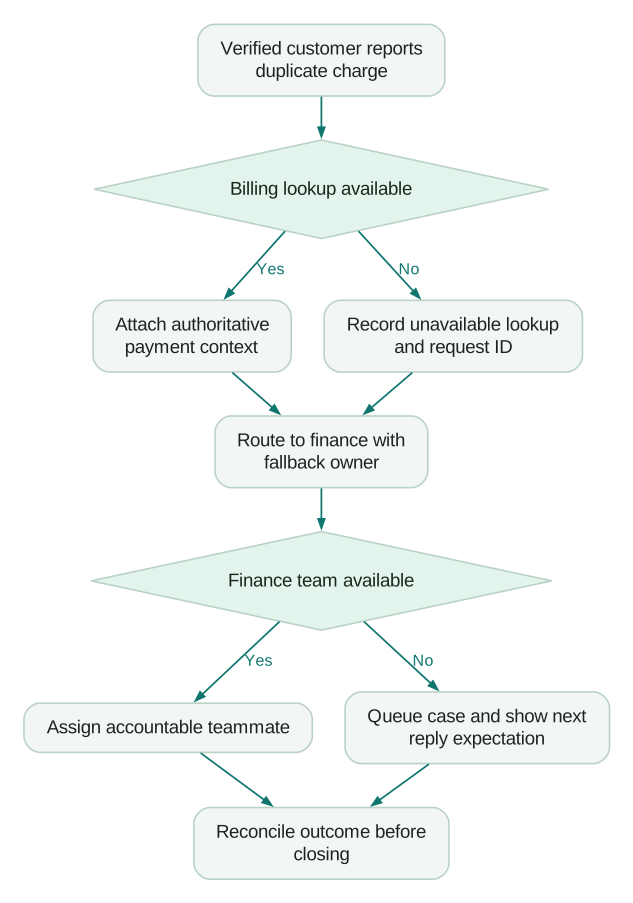
The product manager owns the allowed journey. Engineering owns identity and the lookup contract. Support owns queue coverage. Finance owns the refund decision. The diagram becomes useful when those responsibilities have named owners and observable outcomes.
Add two variations to the same scenario: a customer with no invoice reference, and a customer contacting support from an email address different from the billing contact. Neither should lead to an automatic denial or disclosure of another person's invoice. The missing information should change the verification path, while the request remains visible to an accountable team.
How should you measure a successful implementation?
Track failure signals alongside response speed.
Useful measures include conversations attached to an unexpected account, rejected identity requests, aged unassigned conversations, missing handover context, repeated contacts about the same issue, and reopened cases after automation.
Choose denominators carefully. A decline in human-handled conversations could mean effective self-service, fewer customers, or customers abandoning a broken escalation path. Review a sample behind the aggregate.
Keep cost visibility separate from quality. Intercom pricing explains how seats and usage affect the budget. A low cost per automated outcome means little if customers return to repeat the unresolved request.
Start with issues whose knowledge and ownership are reliable. Add higher-risk actions after you can trace a request from identity through execution to final resolution.
What should the release checklist contain?
Complete this checklist with evidence from your workspace, rather than marking it done because the feature exists.
Checklist
- Two users can share a browser without inheriting each other's support context.
- Imports and live updates resolve to the intended person identifier.
- Account switching preserves the correct access boundary.
- Missing or stale entitlement follows an explicit fallback.
- Every routing branch has an owned queue and after-hours path.
- AI-derived fields are consumed after the classification step.
- Escalated cases contain verification, attempted actions and an actionable next step.
- Timed-out actions can be reconciled before anyone retries them.
- A release owner can disable automation without removing human support.
Keep failed scenarios in the backlog. They are more useful than a launch checklist that records only installation steps.
Questions people ask
Does installing Messenger complete an Intercom implementation?
No. Installation establishes the interface, while implementation establishes identity, context, ownership and failure handling. Acceptance scenarios should cover those boundaries before expanding automation.
Should email be our permanent customer identifier?
Prefer a stable identifier issued by your application. Email changes, shared addresses and historical imports can make email-only matching ambiguous, so document the mapping before migration.
Can we use AI classification to route every conversation?
Use it where an inference is appropriate and provide a missing-value path. Permissions and financial entitlements should come from authoritative systems rather than a classification of what the customer wrote.
What should happen when a backend action times out?
Treat its result as unknown until the backend confirms the outcome. Preserve the request identifier and avoid triggering the same action again merely because the conversation needs a response.
How many workflows should we launch first?
Start with the smallest set covering important, well-understood issues and reliable handovers. Expand when the team can explain failed cases and operate existing routes consistently.
Sources
- Intercom: Duplicate users. Accessed 15 September 2026.
- Intercom: Messenger JWT authentication. Accessed 15 September 2026.
- Intercom: Workload management. Accessed 15 September 2026.
- Intercom: Team office hours. Accessed 15 September 2026.
- Intercom: Fin Attributes. Accessed 15 September 2026.
- Intercom: Escalation guidance and rules. Accessed 15 September 2026.
Written by
Jafrin Akter AloData Engineer and Co-founder, martechdevs
Jafrin Akter Alo is a data engineer and co-founder of martechdevs, where the team has delivered 74+ martech, data and growth stack implementations.