
Data Studio Pricing 2026, Formerly Looker Studio: Free, Pro at $9 and the Real Reporting Budget
Data Studio, called Looker Studio until April 2026, is free to create and view reports. Self-service Pro lists USD 9 per user per project a month, and only people who create, edit or manage Pro content need a licence. A 10-person team with three purchased licences in one project budgets USD 27 monthly or USD 324 over a year. Connector subscriptions, BigQuery usage and reporting work add separate costs; Supermetrics, for example, starts at EUR 39 a month billed yearly. Organization-wide MAU contracts use a different billing model.
On this page
Go to free versus paid, who needs a licence, team budgets or connector and BigQuery costs.
Is Data Studio still free after the Looker Studio rename?
Yes. Google renamed Looker Studio back to Data Studio in April 2026. The free version still lets you create and share reports. Existing reports continue to work through the rename; Looker remains a separate product with its own platform and user pricing. A different name on the sign-in page does not mean your free dashboards now require Pro. Google's naming announcement and Data Studio pricing.
These are separate billing models. The USD 9 figure is Google's public self-service planning rate; the subscription term and your agreement determine the actual charge.
| Route | Reporting licence | Who enters the bill |
|---|---|---|
| Data Studio | USD 0 | Creating and viewing ordinary shared reports has no Data Studio licence fee |
| Self-service Data Studio Pro | USD 9 per user per project per month | Purchased licences, including unused ones; count each subscribed project |
| Organization-wide Pro | Sales agreement based on monthly active users | Users who view, edit or otherwise interact with Pro content during the month |
The product pricing and subscription overview describe these different units. View-only sharing and a licence assignment are different decisions.
The product now lives at datastudio.google.com, and Google redirects lookerstudio.google.com there automatically. If your company proxy only allows approved external sites, your IT administrator needs to add the new domain; our troubleshooting guide covers reports that stop loading after the rename. The paid edition carries the new name too, so if you are looking for the Looker Studio Pro price, Google now lists it as Data Studio Pro at $9 per user per project per month. Google's rename notice and Google's announcement of the two editions.
Google's reporting product is separate from Microsoft's Azure Data Studio, which retired on 28 February 2026. That retirement does not change Google Data Studio's licence.
Free is a sensible starting point when a small team owns a few reports, ordinary sharing works and the underlying data is already usable. Pro becomes relevant when ownership, team management and delivery controls are operational requirements. Neither edition fixes duplicated revenue or conflicting definitions of an active customer.
Start by writing down the decision each report supports, who owns its definition and what happens when its refresh fails. If the hard part is joining product, billing, CRM and advertising data, our data warehouse and reporting service addresses that foundation alongside the dashboard. Buying more report licences before resolving the source data rarely addresses the actual work. For the reports themselves, see our Looker Studio (Data Studio) consulting.
What does Data Studio Pro cost?
Google publishes $9 per user per project per month and says pricing varies with subscription length. That is the public planning rate used below, in US dollars before applicable taxes. Google does not publish a complete alternative commitment-rate schedule on the product page, so verify the term and rate in your subscription before approving the budget. Google's pricing page.
Google also supports buying Pro through the Google Workspace Admin console, a route added on 5 February 2026. Confirm the subscription, linked project and billing account used by your organization. The product page supplies the public planning rate, rather than a separate Workspace-admin price. Release notes.
Who needs a Data Studio Pro licence?
For self-service Pro, count licence assignments to a project rather than everyone employed by the company. People who create, edit or manage Pro content need licences. People who only view shared reports do not need paid seats for that activity. Purchased seats can still be billed when unused, and putting somebody in a group assigned to the subscription can provision a licence automatically. Pro subscription overview and adding people to Pro.
Each subscription is linked to one Google Cloud project and its billing account. Pro users need managed Google Workspace or Cloud Identity accounts. Google Cloud project access alone does not assign a Pro licence. Subscription setup, user assignment.
What do teams of 5, 10, 25 and 50 people pay?
At USD 9 per paid user-project assignment, two maintainers in one project cost USD 18 a month, three cost USD 27 and seven cost USD 63. These examples keep view-only readers outside the Pro subscription. Annual amounts are twelve monthly charges, not a separate annual-discount quote.
Builders create reports, editors maintain them and readers only consume shared reports.
| Team size | Builders + editors + readers | Paid assignments | Monthly Pro cost, USD | Annual run rate, USD |
|---|---|---|---|---|
| 5 people | 1 + 1 + 3 | 2 | $18 | $216 |
| 10 people | 1 + 2 + 7 | 3 | $27 | $324 |
| 25 people | 2 + 5 + 18 | 7 | $63 | $756 |
| 50 people | 3 + 10 + 37 | 13 | $117 | $1,404 |
The 50-person company does not automatically owe $450 a month. Its illustrated bill is $117 because 13 people maintain the reports. Equally, a three-person agency can incur more than three assignments if those people maintain Pro content across multiple subscribed projects.
Three maintainers assigned to each of three Pro subscriptions, each linked to a different project, need nine assignments: 3 × 3 × USD 9 = USD 81 a month, or USD 972 over 12 months. Use Pro subscription projects for this count. Data-source and query-billing projects are separate inputs.
Suppose 13 distinct maintainers are divided between two Pro subscription projects, with one person assigned to both. There are 14 assignments: 14 × $9 = $126 a month, or $1,512 over 12 months. Project separation should follow ownership and access requirements. Consolidating unrelated clients merely to reduce assignments can create a much larger governance problem.
Does using a Google Group save licence costs?
A group simplifies administration; it does not turn several people into one seat. Google's setup instructions say membership drives automatic licence provisioning. Removing a user from the group revokes the licence and changes the billing count; suspending a Workspace account without removing it can leave the licence billed. Google's group-assignment instructions.
Keep a dedicated group for people who need Pro. Share reports with view-only audiences separately. Before renewing, reconcile purchased seats, group membership and actual editing responsibilities. An all-staff group is convenient for distribution but can be expensive when it is also the subscription assignment group.
Is organization-wide billing different?
Yes. Google also offers an organization-wide subscription through sales, measured in monthly active users. That model can count viewing and other interactions. Do not apply the self-service advice about free viewers to an MAU contract, or confuse assigning licences to a whole domain with purchasing organization-wide MAU pricing. Ask which model appears on the order form. Google's subscription models.
How should an agency arrange a client's subscription?
Keep the subscription in the client's organization and make access and billing ownership explicit. A user in the client's organization must initiate Pro for its project; a partner cannot initiate that subscription directly from a separate organization. The linked billing account can be a partner-managed reseller sub-billing account. Partner subscription rules.
After the client subscribes, its administrator can enable Trusted Organizations and assign licences to individual agency users. External Google Groups are excluded even with that feature enabled. Keep client continuity, data credentials and connector ownership in the handover. External-user assignment.
What are you buying with Pro?
Buy Pro when organization-owned content, team workspaces, delivery or security controls solve an operating requirement. It should remove a named ownership or delivery constraint, not merely change the badge on an existing dashboard. The Pro feature guide separates these capabilities from ordinary report creation.
| Capability | Free Data Studio | Data Studio Pro |
|---|---|---|
| Content ownership | Individual creator | Organization through a Google Cloud project; team workspaces |
| Schedules per report | One; no more than daily | Up to 200; hourly scheduling available, subject to ownership and permissions |
| Scheduled email quota: individual account | 200 recipients/day; 800/month | These daily/monthly quotas do not apply to Pro content |
| Scheduled email quota: Google Workspace | 500 recipients/day; 3,000/month | These daily/monthly quotas do not apply to Pro content |
| Send now, Google Chat and Slack delivery | Pro required | Available with the relevant setup and permissions |
| CMEK, customer-managed storage, data residency | Pro required | Available with their setup requirements |
| Conversational Analytics access | Available | Available; source permissions and data costs still matter |
| Technical support | Documentation and community | Requires Pro plus a Google Cloud support plan |
Scheduled delivery still allows no more than 50 recipient addresses per email schedule. Personal reports in Owned by me remain subject to the ordinary email quotas; upgrade the content itself to use the Pro behavior. If you downgrade, the oldest email schedule stays active and the others become inactive. Delivery limits and downgrade behavior.
Google made Conversational Analytics available to all Data Studio users on 16 April 2026 and announced general availability on 30 July, rolling out over the following week. Pro's CMEK, customer-managed storage and residency enhancements were released on 11 June. Those are already released capabilities, not future price promises. Pro also has specific Gemini authoring features; name the function you need before treating an AI label as a reason to upgrade. Release history, Pro features.
Team workspaces separate Manager, Content Manager and Contributor responsibilities. Check the role against the changes each operator needs to make.
Use a concrete acceptance test for each requirement:
- Ownership: a report remains manageable after its original creator leaves.
- Access: an editor can maintain the appropriate workspace without receiving broader access than needed.
- Delivery: the right recipients receive the right report on the intended schedule.
- Alerts: the rule is attached to a trusted metric, with an owner who can respond.
- Support: the purchased support arrangement covers the production issue you expect to escalate.
Pro alone does not include every support entitlement. Access to technical support requires both a Pro subscription and a Google Cloud support plan. Include that separate arrangement when a response commitment is part of the business case. Pro support requirements.
How should you use the 30-day trial?
Google offers a 30-day Pro trial with no user limit. Billing starts automatically after it ends; cancelling during the trial avoids the Pro subscription charge. Trial details.
Use the trial to test organizational ownership, workspace permissions and delivery with a representative report. In week three, review every assigned user and project. Decide which functions proved useful, remove unnecessary assignments and name the person responsible for the subscription before day 30. A trial that only changes the badge on an existing dashboard tells you little about whether Pro is worth paying for.
What costs sit outside the Pro licence?
A report has at least four possible cost layers: the reporting licence, connections to source systems, query infrastructure and operating work. Keep them separate so a cheaper licence does not conceal a more expensive pipeline.
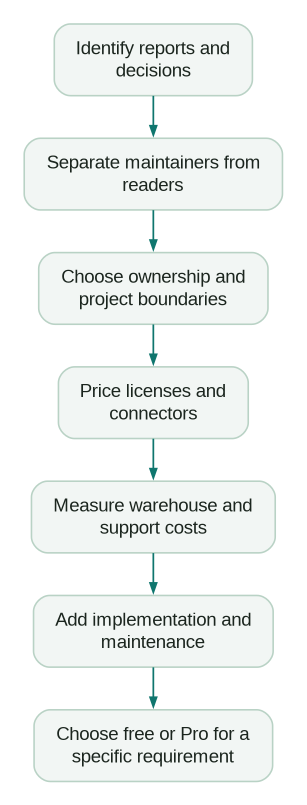
Read diagram as text
- Source systems to Connectors or ingestion.
- Connectors or ingestion to Prepared reporting data.
- Prepared reporting data to Data Studio reports.
- Data Studio reports to Decisions and delivery.
- Owners and access controls to Prepared reporting data.
- Owners and access controls to Data Studio reports
Connectors and source limits
A free Google connector can be sufficient for a simple Google Ads or GA4 report. Other data sources may require a partner connector, an API integration or warehouse ingestion. Partner packages can vary by destination, source type, connected accounts, refresh frequency and users. A package covering one advertising account is not equivalent to one covering 20 client accounts. Supermetrics' package structure.
The configurations below use each vendor's displayed currency before tax: EUR for Supermetrics and USD for Catchr. Supermetrics' yearly figures are monthly equivalents of an annual purchase; Catchr is shown on its monthly term. These packages cover different user, destination and account scopes. Keep currencies separate until you have an applicable exchange rate and quote.
| Connector package | Published starting price | Capacity to compare |
|---|---|---|
| Supermetrics Starter | EUR 49/month, or EUR 39/month billed yearly | One core destination; two sources; two accounts per source; one user |
| Supermetrics Growth | EUR 199/month, or EUR 159/month billed yearly | One core destination; seven sources; seven accounts per source; two users |
| Catchr Starter | USD 24/month, billed monthly | Three platforms; ten accounts; unlimited users |
Supermetrics still labels the relevant destination Looker Studio. Confirm the selected destination, currency and included sources/accounts in the quote; other Supermetrics package presentations can show different capacities. Additional users or capacity can change the starting price. Catchr's platform/account definitions also need checking against your source list. Supermetrics plans, Catchr plans.
For Supermetrics Starter, the displayed annual term is 12 × EUR 39 = EUR 468. Twelve monthly payments at EUR 49 total EUR 588, a difference of EUR 120 if that configuration fits for the whole year. A three-person Pro maintenance team does not automatically fit one Supermetrics user: price extra connector operators if the workflow needs them. Do not add these EUR amounts directly to a USD Pro budget.
For a single-currency example, the hypothetical 10-person team above pays USD 324 for three Pro licences over 12 months. If Catchr Starter's three-platform, ten-account allowance fits its reports, twelve monthly payments at USD 24 add USD 288. Together that is USD 612 a year before queries, storage and operating work. This is a run rate using unchanged monthly prices, not an annual-discount quote or an assertion that the connectors are interchangeable.
Before subscribing, list the sources and accounts each report needs. Ask whether the quoted package includes historical backfill and the desired refresh schedule. If an assistant will use those sources too, check MCP access through the same connectors as a separate entitlement decision. Confirm who owns the connection when an employee or agency leaves. Compare the connector with a warehouse route only after including ingestion, storage, query and maintenance costs on the warehouse side.
BigQuery queries and storage
Connecting Data Studio to BigQuery requires a project with billing enabled. Query processing and storage can incur charges, and the billing project can differ from the project containing the data. Google documents the required read and job-execution permissions, along with the connector's billing-project settings. BigQuery connector documentation.
Google's on-demand example rate for Iowa (us-central1) is USD 6.25 per TiB after the first free TiB each month. The Free Tier also includes 10 GiB of storage, with limits calculated per eligible billing account. Other projects can consume that allowance. Storage beyond it, capacity pricing and other services require their own budget. BigQuery pricing, Free Tier scope.
For a hypothetical report, assume 1,000 billed loads a month and 2 GB of total billed query data per load, using decimal GB. A load can run several queries; use their combined billed bytes. This is a workload assumption, not a claim that every report view triggers a paid query. Cached query results are not charged.
2 GB × 1,000 loads = 2,000,000,000,000 bytes
1 TiB = 1,099,511,627,776 bytes
Monthly usage = 1.818989 TiB
With 1 TiB of free allowance remaining:
(1.818989 - 1) × USD 6.25 = about USD 5.12| Hypothetical workload: 1,000 billed loads | Monthly query data | Free TiB still available | Query cost, USD |
|---|---|---|---|
| 2 GB per load | 1.819 TiB | 1 | $5.12 |
| Prepared data reduces each load to 50 MB | 0.0455 TiB | 1 | $0.00 |
| Same 2 GB loads; other work used the free allowance | 1.819 TiB | 0 | $11.37 |
The prepared-data row assumes a reduction to 50 MB per load; your query tests must establish whether that target is realistic. A summary table does not guarantee that result, and remaining storage, ingestion or transformation charges do not disappear when query charges fall to zero. Keep full precision in the calculation and round currency at the end.
An inexpensive report can become expensive when every filter change scans a large raw table. Use a reporting table at the grain the dashboard needs, partition it appropriately and make the date filter constrain the query. A view alone does not guarantee lower scan costs: its underlying query still matters. Our BigQuery pricing guide shows how to estimate the warehouse component, while the GA4 export guide explains what changes when you move reporting to exported events.
Credentials and permissions
Decide which identity queries the data: the source owner's credentials, the viewer's credentials or a supported service account. These modes change whose access is used; they are not interchangeable shortcuts around source permissions. Document the identity, its owner and the expected billing project before distributing the report. Google's data-credential guide.
A dashboard that works only while its builder is signed in is an unfinished handover. Test it as an intended reader, then test what happens when the original editor is removed. Keep permission design separate from the Pro seat calculation so neither accidentally becomes a substitute for the other.
Keeping the numbers trustworthy
Allow time for changed source fields, broken refreshes, new campaigns and metric changes. Write down the definition of revenue, refunds, time zones and the reporting date used for comparisons. Otherwise, a fast dashboard can distribute the wrong answer faster. Use marketing metric contracts to make those definitions reviewable.
Will Pro fix GA4 quota errors?
Pro does not increase the GA4 Data API quotas used by the direct GA4 connector. Google's Core quota limits distinguish standard Analytics properties from Analytics 360 properties as follows. These are API limits, not purchased Data Studio seats. GA4 Data API quotas.
| GA4 Core quota | Standard property | Analytics 360 property |
|---|---|---|
| Tokens per property per day | 200,000 | 2,000,000 |
| Tokens per property per hour | 40,000 | 400,000 |
| Tokens per project per property per hour | 14,000 | 140,000 |
| Concurrent requests per property | 10 | 50 |
A chart is not necessarily one token. Query complexity, rows, columns, filters and date range affect consumption. Several reports or tools using the same property can compete for the available quota. Increasing the number of Pro licences does not change that shared constraint.
First reduce avoidable work: duplicate charts, unnecessary dimensions, wide date ranges and simultaneous refreshes. Then decide whether a connector with appropriate caching or a prepared BigQuery dataset fits the reporting requirement. Analytics 360 has higher API limits, but buying it solely to rescue one inefficient dashboard may be disproportionate; evaluate its wider benefits and GA4 pricing.
A BigQuery report can also differ from GA4's interface because the data and modelling differ. Validate the business metric after changing the data path, not just whether the error banner disappeared.
How does the reporting budget change after year one?
One-time implementation drops out while licences, connectors, warehouse usage and maintenance continue. The following planning example uses six Pro assignments across two projects, a hypothetical connector allowance of $120 a month and $40 a month of warehouse usage. It assumes three internal maintenance hours a month valued at $75 per hour, plus a one-time $3,000 implementation allowance. Connector, warehouse, labour and setup amounts are assumptions, not supplier quotes or a martechdevs package price. All amounts below are USD, with monthly recurring costs and annual totals shown separately.
| Cost component | Monthly recurring, USD | Year one, USD | Year two, USD |
|---|---|---|---|
| Six Pro assignments at $9 | $54 | $648 | $648 |
| Connector planning allowance | $120 | $1,440 | $1,440 |
| Warehouse planning allowance | $40 | $480 | $480 |
| Internal maintenance: 3 hours × $75 | $225 | $2,700 | $2,700 |
| One-time implementation allowance | Not recurring | $3,000 | $0 |
| Total economic cost | $439 | $8,268 | $5,268 |
The recurring cash software/infrastructure budget is $214 a month or $2,568 a year. Internal time adds $2,700 of annual economic cost. The example assumes unchanged scope and rates in year two; refresh those assumptions at renewal rather than treating the figure as a price guarantee.
If a cleaner reporting model reduces maintenance from three hours to one, the recurring economic cost falls to $289 a month, saving $150 monthly or $1,800 annually. That is an assumption to test with time records, but it shows where the larger opportunity may be. Removing one unnecessary $9 seat helps; preventing repeated manual reconciliation can matter more.
For a scoped implementation budget, request a detailed Data Studio scope with the source list, report inventory and refresh requirements. Those inputs let us distinguish a report rebuild from a data-model or integration project.
When does Looker become the relevant comparison?
Looker has separate platform and user licensing. Google's pricing page describes Standard, Enterprise and Embed editions, with annual commitments of one to three years and custom prices. The Standard edition targets teams with fewer than 50 users; its published included-user allocation is not the same as buying 50 seats. The editions list ten Standard users and two Developer users, with other requirements priced through sales. Conversational analytics also has token allowances that need checking against the proposed usage. Looker pricing.
Consider Looker when a governed semantic model, embedded analytics or a centrally managed analytics platform is the actual requirement. Do not buy it because the old Looker Studio name makes the products sound like adjacent licence tiers. Compare the cost of modelling, development, administration and rollout alongside the contract. Compare Tableau, Power BI, Data Studio and Metabase at the same team size before committing to a different reporting platform.
How many complimentary Pro licences does a Looker contract include?
Confirm the entitlement in writing before budgeting Pro at zero. Google's offer terms and subscription overview currently give different counts.
| Eligible Looker arrangement | Count stated in the offer terms | Budget boundary |
|---|---|---|
| Looker (original) account | One Pro licence per associated Looker licence | Do not multiply the same licence by the number of instances |
| Looker (Google Cloud core) instance | 50 Pro licences per instance | Confirm the instance's eligibility |
| Customer-hosted and Powered by Looker user licences | Excluded by the terms | Do not assume complimentary Pro |
The overview still says eligible customers receive at least 1,000 and excludes original contracts signed after 1 August 2026 and Cloud core instances created after that date. The published terms instead state the quantities above. Ask Google to confirm the applicable count, dates and agreement for your organization; neither page alone resolves that mismatch.
The terms charge extra use at the current subscription list price, prevent transfers outside the organization and allow the offer to change with 30 days' notice. Keep the confirmed entitlement and paid excess separate in the renewal forecast.
Which route fits your team?
Start with the least complex route that meets the report's ownership, access and delivery requirements. Compare an alternative only when it addresses a specific missing capability.
| Situation | First route to evaluate | Alternative | What decides the fit? |
|---|---|---|---|
| Founder with a few Google-source reports | Free Data Studio | Pro when collaboration or ownership requires it | Named owner and ordinary sharing cover the initial job |
| Several report maintainers | Pro | Free if ordinary sharing still satisfies the requirements | Organization-owned content, roles and delivery controls |
| Agency managing client reporting | Client-owned Pro where required | Free reporting with separately governed data access | Client continuity, connector accounts and permitted external users |
| Governed enterprise or embedded analytics | Looker or a matched BI platform | Pro if the requirement is mainly report management | Semantic modelling, embedding and complete operating cost |
The general free edition and Pro trial are available routes. Budget a startup-specific discount only when an applicable written offer confirms it; do not assume Google Cloud startup credits pay this subscription. Check eligible services and the billing agreement.
If the required report experience is a poor fit, use our Data Studio alternatives guide. For deeper cost comparisons, compare Tableau's licence structure or Metabase's hosted and self-managed costs using the same number of builders, readers and data sources. Compare Data Studio and Power BI on the same marketing report when those are your two finalists.
How can you pay less without weakening the reporting?
Reduce unnecessary licence assignments and data work before removing controls the reporting team needs.
- Keep view-only audiences outside the Pro licensing group and reconcile purchased-but-unused licences.
- Remove suspended users from the licensing Google Group; suspension alone can leave the seat billed.
- Use as few subscribed projects as legitimate ownership and access boundaries allow. Keep separate clients appropriately separated.
- Stay on free while its ownership, sharing and delivery limits meet the requirement. Test the actual limit that would justify Pro.
- Match connector users, sources and accounts to the package, then compare monthly flexibility with the annual commitment.
- Reduce measured query scans with suitable reporting tables and date filters; check the resulting billable bytes.
- Review trial assignments before day 30 and retain only the capabilities the evaluation proved useful.
Pro will not repair slow queries, incorrect joins or conflicting business definitions. Diagnose that layer first using the Data Studio implementation checks, then decide whether the licence is part of the remedy.
What should you verify before paying for Pro?
Confirm the required licence assignments, data costs and access model with both the report owner and budget approver. Use the checklist to make those responsibilities explicit:
Checklist
- Record free, self-service Pro or organization-wide MAU as the chosen subscription model.
- Count assigned maintainers per project and check subscription-group membership.
- Confirm the public rate against the actual commitment and tax terms.
- List connectors, source accounts, refresh schedules and backfill needs.
- Identify the querying identity, source permissions and billing project.
- Test performance and quota behaviour on a representative report.
- Separate one-time implementation from recurring cash costs and internal time.
- Assign a renewal owner and review trial users before day 30.
If the bill is small but nobody trusts the reporting, start with the $99 martech audit. Bring one disputed dashboard and its source data. That makes the first discussion about a measurable reporting problem.
Keep reading
Browse all Data Warehouse guides
 Data Warehouse
Looker Studio vs Power BI: Reporting Costs, Sharing and the Migration Test
Compare Data Studio and Power BI for marketing: reader licences, real team costs, data models, AI requirements and a report pilot that checks the numbers.
Jafrin Akter AloLast updated 16 min read
 Data Warehouse
Data Studio Alternatives for Marketing and Revenue Teams
Compare Metabase, Power BI, Looker, Tableau and Superset using real reporting tasks, access tests, operating costs and a controlled migration plan.
Jafrin Akter AloLast updated 10 min read
 Data Warehouse
Data Studio Problems: Fix GA4 Quota Errors, Wrong Totals and Slow Reports
Fix Data Studio GA4 quota errors, inflated blend totals, wrong ratios and slow reports. Each quota message explained, with the limits and a release checklist.
Jafrin Akter AloLast updated 14 min read
Looker Studio dashboards
See the implementation scope, deliverables and acceptance checks.
Questions people ask
Is Data Studio free?
Yes. Data Studio's no-cost edition lets people create, share and view reports. Free reports have delivery limits, including one schedule per report and account-specific email quotas. A free report can still use paid connectors or trigger billable BigQuery work, so separate the reporting licence from its data costs. Pro is an upgrade for particular ownership, delivery and management needs. Google pricing.
How much does Data Studio Pro cost?
Google lists USD 9 per user per project per month for self-service Pro, with pricing dependent on subscription length. Three purchased licences in one project are USD 27 a month at that rate. Count assignments across projects and include unused purchased licences. Organization-wide MAU agreements use a different billing model, so confirm the unit and term in the order. Pro pricing.
Is Looker Studio Pro the same as Data Studio Pro?
Yes. Data Studio Pro is the renamed paid edition of Looker Studio. Google's April 2026 rename kept existing reports and assets in place, and the old product URL redirects to the new one. Looker itself remains a separate analytics platform with different licensing. Use the current Data Studio name when finding Pro controls, while recognizing that connector vendors may still use Looker Studio. Rename announcement.
Do report viewers need a Data Studio Pro licence?
On self-service Pro, someone who only views a shared report does not need a paid licence for that activity. However, assigning that person a subscription licence, including through a licensed Google Group, can still create a charge. Organization-wide MAU subscriptions use a different model that can count viewing. Google's subscription overview.
Does Data Studio cost money when it uses BigQuery?
The report can be free while BigQuery queries and storage create charges. On-demand analysis includes a first free TiB per eligible billing account each month; the example here uses Iowa's USD 6.25 per TiB above that allowance. Other projects may have used it already. Pro licences do not pay the query bill, and cached results differ from newly billed scans. BigQuery rates.
Sources
- Google: Data Studio product and pricing
- Google: Pro subscription models
- Google: Add people and groups to a Pro subscription
- Google: Pro features, support and trial
- Google: Data Studio naming announcement
- Google: GA4 Data API quotas
- Google: Connect Data Studio to BigQuery
- Google: Data credentials
- Google: Looker pricing
- Google: Complimentary Pro licence terms
- Supermetrics: Connector packages
- Google Cloud blog: Data Studio returns as new home for Data Cloud assets
- Google: Data Studio release notes
- Google: Scheduled delivery limits
- Google: BigQuery pricing
- Google: Free Tier scope and allowances
- Catchr: Connector plans
- Microsoft: Azure Data Studio retirement

Written by
Jafrin Akter AloData Engineer and Co-founder at Martechdevs and Growth and Analytics Partners
Jafrin writes practical guides to marketing technology, customer data, analytics and AI workflows. Martechdevs is a Growth and Analytics Partners company.