
Tableau Pricing: Calculate Roles, Editions and the Full Reporting Budget
Data Engineer and Co-founder, martechdevs
Last updated 9 min read
Tableau pricing depends on the product, edition, license mix and deployment model. A team budget should separate Creators, Explorers and Viewers, then add data preparation, warehouse queries, administration and any required capacity or services. The advertised monthly unit is billed annually, and the lowest Viewer rate is not the price of an entire working deployment.
Last updated: 9 October 2026.
A useful quote starts with the work each person must perform. Someone who builds and publishes a new data source needs a different capability from someone who reads the weekly revenue dashboard. Counting every employee at the lowest advertised rate understates the budget; assigning everyone an authoring license can overstate it.
Which Tableau product are you buying?
Tableau's current portfolio includes Cloud, Server and Next. Cloud is hosted, Server is self-managed, and Next is a separate offering built around Salesforce's platform. They have different operating and commercial implications. Tableau pricing overview.
Record the exact product and edition at the top of your estimate. A proposal that simply says “Tableau licenses” leaves too much unresolved.
For a marketing team, also state the intended output: internal campaign analysis, executive reporting or a customer-facing application. Those choices affect access, distribution and the implementation work required.
Our warehouse and reporting service scopes the data model, reports and operating responsibilities together. This matters because a license can provide the analytical tools while leaving the underlying revenue reconciliation and reporting definitions unfinished.
What are the current Cloud role prices?
As checked on 9 October 2026, Tableau Cloud's public USD role prices are:
- Standard: Creator $75, Explorer $42 and Viewer $15 per user per month, billed annually.
- Enterprise: Creator $115, Explorer $70 and Viewer $35 per user per month, billed annually.
- Cloud+ and the Tableau+ Bundle: contact sales for pricing.
Enterprise includes Data Management and Advanced Management capabilities beyond Standard. The detailed page distinguishes edition features from user-role capabilities. Tableau Cloud pricing.
Confirm currency, applicable taxes, contractual discounts and renewal terms in your actual quote. The listed unit rates are a starting point for calculation, not a guarantee that every commercial arrangement uses the same terms.
How should you classify Creators, Explorers and Viewers?
Tableau's licensing documentation distinguishes creating new workbooks and connections, browser-based authoring, and viewing or interacting with published content. Every deployment requires at least one Creator. License model documentation.
Build the role inventory from tasks rather than job titles. A marketing manager may only read reports, or may need to change an existing analysis. An analyst may work entirely from prepared sources, or may build new ones. Those are different requirements.
Use a short interview with each team:
- Which report do you use to make a recurring decision?
- Do you only filter it, or do you create and save a different analysis?
- Do you introduce new data sources or prepare data?
- Who publishes, maintains and replaces the original author?
- Which exports or scheduled deliveries are necessary?
Then demonstrate the proposed role with a test account. License entitlement, site role and content permissions need to support the task together. A purchased capability does not mean every user should receive every permission it could allow.
Maintain a second trained owner for critical reporting. The exact license mix should reflect that continuity requirement, not only the person who builds the first workbook.
A worked budget for a 37-person audience
Assume two Creators, five Explorers and thirty Viewers, all on the same Cloud edition. The following illustration uses the published rates, with no tax, discount, optional services or later contract changes.
Standard has a monthly-equivalent license subtotal of $810: $150 for Creators, $210 for Explorers and $450 for Viewers. Its annual license total is $9,720.
Enterprise has a monthly-equivalent subtotal of $1,630: $230, $350 and $1,050 respectively. Its annual total is $19,560. The difference is $9,840 annually.
The important decision is what the extra capability does for this deployment. Identify a required management, preparation or governance workflow and demonstrate it. Do not approve a higher edition merely because its feature list is longer.
Equally, do not price only the two authors at a higher edition while assuming everyone else remains on Standard in the same deployment. Edition rules must be checked at deployment level. The current Cloud pricing page describes a specific Cloud+/Tableau+ Bundle exception, which is not a general permission to mix any editions. Edition rules.
Record the accepted capability requirement alongside the financial difference. That makes the decision reviewable when the audience or requirements change at renewal.
When should you request capacity-based pricing?
Tableau Cloud's capacity model uses Viewer Blocks instead of individual Viewer licenses, while Creators and Explorers remain individually licensed. Capacity concerns concurrent activity, including visualization and background work; unlimited Viewer accounts do not imply unlimited simultaneous work. A deployment cannot combine capacity-based and role-based Viewer licensing. Cloud license models, capacity documentation.
Evaluate this option when the Viewer audience is broad or variable. Ask for a quote using both the account population and realistic activity patterns.
A hundred people opening a scorecard during a Monday meeting can create a different load from a hundred people visiting throughout the week. Scheduled refreshes and subscriptions may compete with the same busy period. A monthly user count alone does not describe that demand.
Give the vendor a workload profile containing peak report opens, typical report complexity, refresh schedules, scheduled distribution and expected growth. Ask what happens when the purchased capacity is saturated, how you observe it and what a capacity increase would cost.
Use a pilot to validate the busiest workflow. Do not infer performance from a quiet demonstration with one user. If your forecast is uncertain, document that uncertainty and agree how capacity will be reassessed after launch.
Does Tableau Server make the licenses cheaper?
The current Server page lists the same public Standard and Enterprise role rates shown above. It also offers a quoted compute-based model, licensing infrastructure in eight-core units while retaining Creator licensing. Server+ is quoted separately. Tableau Server pricing.
Server changes the operating model. Include infrastructure, backups, upgrades, monitoring, capacity planning and the people responsible for them.
A team that already operates comparable services may have an efficient path. A small marketing team without that support may take on substantial work that a license spreadsheet misses.
Ask for a recovery demonstration and an upgrade plan as part of the implementation proposal. Clarify who handles a failed refresh, an expired credential or an unavailable node. If the answer is “the marketing analyst will work it out,” the estimate probably omits an operational role.
The Server page also states that customers provide their own LLM for its Tableau Agent capabilities. If those capabilities are part of the proposed workflow, include the provider setup and usage budget rather than assuming hosting the BI application covers every dependency.
What does free Tableau Desktop cover?
Tableau distinguishes Desktop Public, Free and Professional editions. The current comparison describes Free Edition for local analysis, including business data that cannot be published publicly; Professional adds the paid sharing and Cloud/Server connection capabilities. Free Edition does not provide publishing to Cloud or Server or sharing packaged workbooks with other users. Desktop edition comparison.
This makes free local analysis useful for evaluating whether an analyst can answer the intended questions. It does not prove that the full team can receive and maintain those answers through the required distribution workflow.
Run two separate tests: can the analyst produce a correct analysis, and can the intended audience consume it securely and reliably? Budget for the second test before presenting the first as a complete deployment.
Do not move confidential business data into a public publishing workflow as a workaround for a missing collaboration budget. Select the edition and delivery method that match the actual audience and data.
What other costs belong in the proposal?
Separate the cost of Tableau from the cost of making the data useful.
Data preparation can include joining CRM, billing and advertising sources; defining customer identifiers; handling refunds; choosing currencies; and modeling reporting periods. Those decisions remain necessary regardless of the visualization tool.
Data operations can include connectors, warehouse compute, refresh infrastructure and monitoring. Report operations include ownership, permissions, scheduled delivery and changes when business definitions evolve.
For the 37-person Standard example, suppose the team additionally budgets $150 monthly for warehouse work, $120 for connectors and six maintenance hours at an assumed $75 hourly rate. These are hypothetical planning allowances, not vendor quotes.
The recurring monthly-equivalent budget becomes $1,530: $810 licenses plus $270 data costs and $450 labor. The annual recurring total is $18,360. If setup takes an assumed 40 hours at the same labor rate, the first-year total becomes $21,360.
This changes the purchasing discussion. The license is $9,720 of a modeled $21,360 first year. Reducing report maintenance or avoiding a duplicated data pipeline may matter more than negotiating a small percentage off a seat price.
Our approved implementation pricing starts at USD3,000; a full scope covering data warehousing, end-to-end visualization and activation can reach USD15,000. That is a scope-dependent service range, separate from Tableau and other vendor fees. A useful quote names the sources, reports, access rules, testing and handover included.
Use a metric contract and freshness SLA to keep that scope concrete. “Build a revenue dashboard” is not specific enough to establish whether refunds, late updates and currency conversion are included.
How do you compare a quote with another BI option?
Compare the same audience and completed workflow. A Tableau proposal with prepared data, training and support cannot be fairly compared with another tool's bare subscription price.
Normalize the quote into annual software commitment, recurring data and operating costs, one-time implementation and optional usage. State the assumptions behind each line.
Then test the work that justifies the choice. If the team needs flexible visual investigation, demonstrate that investigation with its own data. If it mainly needs a few stable scorecards, compare a simpler configuration using the Tableau alternatives guide.
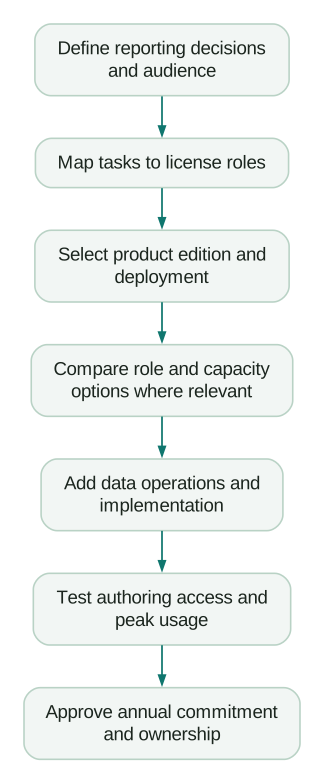
Keep the renewal question visible from the start. What evidence will show that the purchased roles and capabilities are still needed? Track actual tasks and reporting ownership, not only whether a user signed in once.
What should be confirmed before purchase?
- The quote names Cloud, Server or Next and the exact edition.
- Each license role maps to a demonstrated task and a named audience.
- Annual commitment, payment schedule, tax and renewal terms are clear.
- Edition and deployment restrictions are reflected in the license mix.
- Any capacity quote includes a tested workload and growth assumption.
- Connectors, warehouse, optional services and operational labor are budgeted.
- Setup includes metric definitions, access tests and handover.
- A second owner can maintain the critical reports.
Approve the budget when the full reporting workflow is understandable and testable. That is a stronger purchasing basis than a low monthly headline or a long list of capabilities the team has not used.
Questions people ask
Is Tableau billed monthly?
The current public commercial plans require an annual contract billed annually, even though role prices are displayed per user per month. Use the annual commitment in your approval request. Confirm any negotiated terms in the actual agreement.
Can we buy only Viewer licenses?
The documented deployment requirement includes at least one Creator. More broadly, someone must be able to create and maintain the data connections and content your audience depends on. Plan that ownership before selecting the cheapest role mix.
Is the lowest Tableau price a complete team budget?
No. A team can require multiple role types, a particular edition and costs outside the BI subscription. Calculate the completed workflow, including implementation and ongoing data operations.
Is capacity-based pricing always cheaper for a large audience?
A large account population is a reason to evaluate it, not proof of savings. Compare a written quote with your actual concurrent workload and operating requirements. Validate the busiest reporting period before committing.
What should we remove first if the estimate is too high?
Remove unused reports, duplicated pipelines and unnecessary capabilities after checking their dependencies. Do not remove required access controls or recovery ownership to reach a target price. If the core workflow remains too expensive, compare alternatives on the same scope.
Sources
- Tableau: Product and pricing overview. Accessed 9 October 2026.
- Tableau: Cloud pricing and edition rules. Accessed 9 October 2026.
- Tableau: License models. Accessed 9 October 2026.
- Tableau: Cloud capacity. Accessed 9 October 2026.
- Tableau: Server pricing and operating model. Accessed 9 October 2026.
- Tableau: Desktop edition comparison. Accessed 9 October 2026.
Written by
Jafrin Akter AloData Engineer and Co-founder, martechdevs
Jafrin Akter Alo is a data engineer and co-founder of martechdevs, where the team has delivered 74+ martech, data and growth stack implementations.