
BigQuery Pricing: Query Costs, Storage, GA4 Export and Budget Controls
Data Engineer and Co-founder, martechdevs
Last updated 11 min read
BigQuery costs depend on how much work your queries perform, how you buy compute and how you store data. For a marketing team, the biggest budgeting mistake is estimating from dataset size alone. A small dataset queried repeatedly can cost more than a large history that is rarely scanned.
Last updated: 29 September 2026.
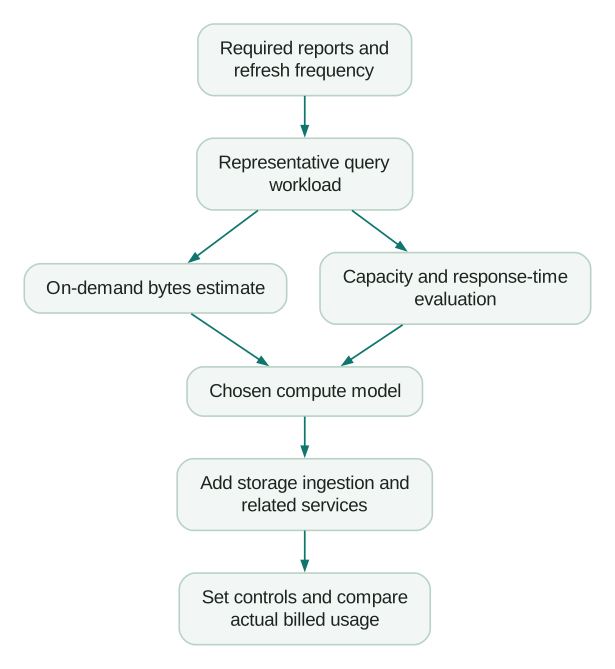
Start with the jobs behind your reporting: source loads, transformations, dashboard queries, analyst investigations and occasional backfills. Count each separately. Then add storage, ingestion and any other services the workflow uses.
You can build a useful estimate without predicting every query. You do need explicit assumptions, sensible limits and a way to compare the first bill with the plan.
The current rates need a location and a billing model
Google's BigQuery pricing page, checked with Iowa, us-central1 selected, lists on-demand analysis at $6.25 per TiB, after the first eligible TiB each month. The monthly storage allowance is 10 GiB.
For that location, the displayed monthly storage rates are $0.023 per GiB for active logical storage and $0.016 for long-term logical storage; physical storage is $0.04 and $0.02 respectively. The logical rates imply approximately 30% savings, despite the page's general wording about a roughly 50% long-term reduction.
Default pay-as-you-go slot-hour rates are $0.04 for Standard, $0.06 for Enterprise and $0.10 for Enterprise Plus. Select your actual region, currency and applicable discount before budgeting.
The units matter: one TiB is 1,024 GiB. Do not substitute decimal terabytes or treat a monthly storage allowance as a query allowance. Allocate free usage once across the eligible billing scope; do not award it again to every dashboard or project estimate.
On-demand pricing: estimate bytes billed across all jobs
For ordinary on-demand analysis at one regional rate, a simplified monthly estimate is:
query_cost = max(eligible_query_TiB - remaining_free_TiB, 0) * price_per_TiB
storage_cost = billable_GiB_months * applicable_storage_rate
total = query_cost + storage_cost + other_applicable_costs
Use billed query volume, including applicable minimums, rather than the number of rows returned. Split out operations with different pricing, such as particular model-training or external-service workloads. A universal rate applied to every job type can understate the bill.
For planning, break query volume into four lines: scheduled transformations, dashboard activity, ad hoc analysis and maintenance or backfills. Ask the owner of each line what changes its volume.
A dashboard can issue several queries per refresh. Date filters, interactions and refresh schedules may change how often those jobs run and how much data they scan. Observe the actual connector behaviour. Do not assume that one person opening one dashboard equals one query.
If the reporting models are still undefined, start with the marketing data warehouse design. Pricing raw events before deciding which summaries people need often produces an expensive version of an unclear reporting process.
Three monthly examples you can adapt
The following are original hypothetical scenarios, not customer bills. They use the Iowa rates above, ordinary on-demand analysis and active logical storage. Each is independent and assumes the full eligible query and storage allowances remain available. Storage volume stays constant for a full month.
They exclude ingestion charges, paid connectors, networking, BI, AI, taxes and implementation. Add those lines where applicable. Use the examples to understand the calculation, then replace their volumes with your own.
A small reporting workload: approximately $2.07
Assume 0.8 TiB of eligible monthly query volume and 100 GiB of active logical storage. Query volume remains within the allowance. Storage is 90 billable GiB-months at $0.023, or $2.07.
A low core warehouse bill is possible under these assumptions. It does not mean the whole analytics stack is free. Connector subscriptions, a BI licence or time spent maintaining identity rules may cost much more.
Recurring reporting with a backfill: approximately $105.02
Assume six TiB for transformations, 3.5 TiB for dashboards, two TiB for investigations and 4.5 TiB for a one-off backfill. That totals 16 TiB. After the one-TiB allowance, analysis costs $93.75.
With 500 GiB of active logical storage, 490 billable GiB-months cost $11.27. The subtotal is $105.02.
The backfill matters. Without it, the estimate would be $76.895 before rounding, or $76.90. Separate exceptional repair or migration work from the steady monthly run rate so finance can understand the change.
Frequent broad scans: approximately $415.62
Assume queries bill 60 TiB monthly and storage averages two TiB, or 2,048 GiB. Analysis costs $368.75 after the allowance. Storage adds $46.874, giving $415.624, rounded to $415.62.
Investigate repeated work before deciding that this needs a different pricing model. A broad scan refreshed eight times a day may be justified for one workflow and unnecessary for another. Tie the refresh interval to a decision someone actually makes.
Capacity pricing: buy the capacity your workload needs
BigQuery editions use reservations and slot capacity. The important quantity for a bill is the capacity charged over time, which need not equal the work a single query used.
Google's slot documentation explains that baseline slots are charged even when unused. Autoscaling bills scaled capacity, in 50-slot increments. Default scaling has a one-minute minimum; opt-in fluid scaling removes that duration minimum while retaining the increments. Read the settings on your reservation rather than assuming one rule applies everywhere.
For an original comparison, suppose a candidate configuration would require 3,000 billable Standard slot-hours monthly. At the listed rate, that is $120 for compute. Ordinary on-demand analysis reaches $120 at 20.2 TiB when a full one-TiB allowance is available.
That is an arithmetic comparison under fixed assumptions, not a universal switching threshold. You have not proved that 3,000 slot-hours can deliver your workload at its required speed. More concurrency, a different query mix or idle baseline capacity can change the result.
Compare actual outputs, completion times, queued work and charged capacity during a representative evaluation. Include month-end reporting and larger refreshes. Choose the edition for required capabilities as well as price, and read the commitment terms before treating a discounted card as an available rate.
A reservation can improve isolation and operating control even when its cheapest comparison is not on-demand. Conversely, an occasional workload may remain simpler to operate on-demand. Measure the benefit you are buying.
Logical versus physical storage changes the calculation
BigQuery stores compressed data in either case. The billing setting determines whether you pay for logical, uncompressed bytes or physical, compressed bytes. Physical billing separately includes time-travel and fail-safe storage; logical billing includes those protections in its base rate. The setting applies at dataset level. See Google's storage overview.
Compression alone therefore does not decide which model is cheaper. Consider an original example with all free storage already used elsewhere and all relevant bytes charged at active rates:
- Logical data occupies 1,000 GiB, producing a $23 monthly estimate.
- Current physical data occupies 200 GiB, initially suggesting $8.
- If another 400 GiB of billable historical physical data must be retained, the physical estimate becomes $24.
In that scenario, the apparent physical-storage winner becomes slightly more expensive. The break-even physical total is 575 GiB. Treat those figures as a demonstration of the variables, not a prediction of your compression or change rate.
The TABLE_STORAGE documentation gives the forecast fields. Active physical bytes already include time-travel bytes, so do not add them twice; fail-safe is separate. These views are snapshots. Your invoice reflects bytes retained over time, so a current size is only a forecasting input.
Review large rewrites, retention and recovery needs together. A full-table rebuild may retain much more changed data than an incremental update. Reducing recovery time purely for a lower estimate can create an unacceptable restoration problem.
Long-term storage depends on changes, not whether you read it
The pricing rules qualify unchanged tables or partitions for long-term storage after 90 consecutive days. Querying old data does not reset that clock; modifying it can. Individual partitions can qualify separately. Use the applicable long-term rate rather than assuming every storage model gets the same percentage reduction. Google's storage pricing rules describe the qualifying behaviour.
For marketing history, this makes the transformation pattern important. Replacing an entire historical table every day can prevent otherwise stable data from qualifying. A model that updates only affected dates may reduce repeated work while preserving older partitions.
Do not freeze incorrect history to protect a storage discount. If an attribution rule or payment definition changes, decide explicitly whether to restate earlier periods. Cost belongs in that decision, alongside comparability and correctness.
GA4 export: separate ingestion, storage and analysis
The GA4 export has downstream BigQuery storage and processing costs. Google's export documentation adds a streaming-export charge of $0.05 per GB. Streaming is a best-effort path and can contain gaps; daily tables are the preferred basis for stable daily analysis.
A hypothetical 200 GB streamed monthly adds $10 under that published rate, before storage and analysis. Do not convert event count into an exact bill using a fixed events-per-GB estimate. Your event payloads determine the volume.
Choose streaming because a workflow benefits from more recent data. If the team reviews paid acquisition each morning, paying for continuous arrival may add little unless another operational use exists. Also account for the queries and refreshes needed to consume the stream.
Keep intraday and completed daily data from being counted twice. When both are available, the reporting model needs a deliberate cutoff and replacement rule. Paying for faster data does not make every reporting field complete sooner.
Put three different controls in place
First, limit individual queries. BigQuery's cost-control guide documents dry runs and maximum_bytes_billed. For on-demand queries, a maximum-bytes setting can reject an estimated oversized query before execution. Clustered-table estimates can be conservative; row-level security can make dry-run estimates return zero. Do not interpret every zero as proof of zero cost.
Second, set a realistic daily query quota. Google's custom-quota documentation lists a default 200 TiB per project per day for on-demand queries and no default per-user limit. At the quoted analysis rate, 200 TiB represents $1,250 before free usage or discounts. This default is not a sensible budget for every small team.
Custom quotas are approximate safeguards, not exact monetary caps. They reset at midnight Pacific Time. The per-user setting applies separately to users and service accounts; it is not a custom allowance for one named individual. Keep critical scheduled work out of a shared quota that experimentation can exhaust.
Third, configure billing visibility and a response owner. An alerts-only budget does not stop BigQuery. Google now documents spend-cap budgets for selected services, but its current eligible-service list does not include BigQuery. Avoid assuming that a Cloud Billing feature available for an AI API also caps warehouse spending.
Write down what happens when an alert arrives: who investigates, which noncritical refreshes can pause and who approves a temporary quota change. A number in a console is only part of cost control.
A bounded GA4 query example
For a September event-count check, this original query names a narrow table prefix and an explicit suffix range. Replace the project and dataset with yours and confirm those daily tables exist:
SELECT
  event_date,
  event_name,
  COUNT(*) AS event_count
FROM `your-project.analytics_123456789.events_202609*`
WHERE _TABLE_SUFFIX BETWEEN '01' AND '30'
GROUP BY event_date, event_name
ORDER BY event_date, event_name;
With this prefix, the suffix is the two-digit day, not the whole date. Google's wildcard-table guide explains constant suffix filters. This example counts recorded events; it does not calculate deduplicated purchases, users or CRM leads.
Save it as september-events.sql. With the bq CLI installed and your own authorized project selected, this command requests a dry run. Replace the location to match your dataset:
bq --location=us-central1 query \
  --use_legacy_sql=false \
  --dry_run \
  < september-events.sql
After reviewing the estimate, a separate execution command can enforce an illustrative 100 GiB query allowance:
bq --location=us-central1 query \
  --use_legacy_sql=false \
  --maximum_bytes_billed=107374182400 \
  < september-events.sql
That allowance corresponds to approximately $0.61 of ordinary analysis at the stated rate before free usage. It is a limit for this execution path, not every query submitted by your BI tool. Set an appropriate value in each client or job configuration that runs production queries.
Avoid using LIMIT 100 as your cost-control strategy. On an unclustered table it does not reduce the data read. Use the table preview for inspection, and verify how column selection and date restrictions change the estimated scan.
The sandbox is for evaluation, not a retention plan
The current sandbox documentation describes a lifetime 10 GiB storage quota that deletion does not restore, one TiB of monthly query processing and automatic 60-day expiration for tables, views and partitions. Streaming, DML and Data Transfer Service are unavailable there.
This differs from simply enabling billing and remaining within eligible free usage. Before making an export operational, decide how long the business needs the data and verify the actual expiration settings. After a sandbox upgrade, review existing defaults; do not assume the history is now retained indefinitely.
Make the first month produce a better estimate
Record the billing project, location, job owner, purpose and expected frequency for each recurring workload. Then review the largest changes weekly. Separate more usage from a more expensive query and separate both from a changed billing configuration.
A useful optimisation preserves the output. Compare row counts, key totals, unknown attribution and freshness before accepting a cheaper model. A cost reduction that silently removes refunds or late-arriving events has damaged the reporting.
For repeated dashboard work, evaluate a reusable summary at the grain the report needs. Include the cost of building and refreshing that summary. For agent-driven analysis, track retries and generated queries as well as accepted answers; the BigQuery AI guide explains the additional feature and inference considerations.
Checklist
- Regional rates, currency and billing models are recorded.
- Free allowances are allocated once across the eligible usage scope.
- Transformations, dashboards, investigations and backfills have separate estimates.
- Storage includes the correct active, long-term and historical byte categories.
- Query limits and daily quotas match business requirements.
- Alerts have a recipient and an agreed response.
- Retention and expiration settings match the required history.
- Actual costs are reconciled with the billing report and original assumptions.
If you are still comparing platforms, use the same workload in Snowflake versus BigQuery. If the immediate need is dependable reporting with clear ownership and cost controls, the data warehouse and CDP service is the relevant implementation path.
Questions people ask
How much does BigQuery cost per TiB?
For ordinary on-demand analysis, the checked Iowa rate is $6.25 per TiB after eligible free usage. That is a query-processing rate, not the price to store a TiB or train every model type. Verify the rate for your location and operation.
Can a small business use BigQuery for free?
A workload can remain within eligible free analysis and storage allowances. That does not make associated connectors, streaming, BI or other services free. The sandbox additionally imposes feature, storage and expiration limits, so evaluate it separately from a production setup with billing enabled.
Is the GA4 BigQuery export free?
Budget for storing and querying the exported data. Streaming adds the documented ingestion charge. The useful estimate follows your actual export volume, retention and reporting workload rather than assuming that availability of the integration means zero downstream cost.
Should I switch to editions when queries get expensive?
First identify repeated or unnecessary work. Then compare a reservation capable of delivering the same outputs and response times with the measured on-demand workload. Charged slot capacity, baseline usage, scaling settings and required edition all affect that comparison.
Does a billing budget prevent a large BigQuery bill?
An alerts-only budget does not. Use applicable query limits, approximate daily quotas or reservation controls alongside billing monitoring. Check the scope of each control; a query safeguard does not cover storage or every related service.
Sources
- Google Cloud: BigQuery pricing
- BigQuery: Understand slots
- BigQuery: Overview of storage
- BigQuery: TABLE_STORAGE view and forecasts
- Google Analytics: BigQuery Export
- BigQuery: Estimate and control costs
- BigQuery: Create custom query quotas
- Cloud Billing: Manage spend-cap budgets
- BigQuery: Query multiple tables using a wildcard table
- BigQuery: Try the sandbox
Written by
Jafrin Akter AloData Engineer and Co-founder, martechdevs
Jafrin Akter Alo is a data engineer and co-founder of martechdevs, where the team has delivered 74+ martech, data and growth stack implementations.