
Best CRM for Small Business: 7 Picks by Team Type
The best CRM for a small business is the one staff can use to capture an enquiry, follow up and hand over sold work without losing the customer history. Start with Less Annoying CRM for simple follow-ups, Bigin for an inexpensive pipeline, or Pipedrive for active selling. HubSpot, Zoho CRM, Copper and monday CRM fit more specific operating needs.
On this page
Best small-business CRM shortlist
These picks prioritize everyday use, the required workflow and the complete bill; the ranking changes with your team's job.
| Rank and CRM | Best fit | Named paid starting point, USD | First condition to check |
|---|---|---|---|
| 1. Less Annoying CRM | Owner-managed follow-ups and repeat customers | $15/user/month, monthly | The required integrations and reports |
| 2. Bigin by Zoho | A small team moving beyond spreadsheets | Express: $7/user/month, billed yearly | Records across all modules and pipeline needs |
| 3. Pipedrive | Salespeople managing several open opportunities | Lite: $14/user/month, billed yearly | Growth is needed for full email sync |
| 4. HubSpot | Website enquiries and sales sharing customer records | Sales Hub Starter: $20/Core seat/month, standard catalog | The actual product bundle and promotional terms |
| 5. Zoho CRM | A defined sales process with a capable administrator | Standard: $14/user/month, billed yearly | Professional is needed for Blueprint |
| 6. Copper | A Google Workspace agency or service firm | Basic: $23/seat/month, paid annually | Contact capacity and automation tier |
| 7. monday CRM | A team coordinating sales and delivery | Basic: $12/seat/month, billed yearly | Three-seat minimum and paid-seat groups |
Prices exclude tax, usage, optional products and implementation. Sources: Less Annoying CRM, Bigin, Pipedrive USD pricing, HubSpot catalog, Zoho USD rates, Copper, monday CRM. Plan details below explain why the entry tier may be insufficient.
This shortlist is for an established small business: an agency, consultancy, local service company, distributor or small sales office. The priorities are repeat customers, staff cover, quotes and reliable handoffs. For a venture-funded or product-led company, use our separate startup CRM comparison.
At Martechdevs, our CRM and lifecycle implementation work starts with the records and decisions the team needs every day. A tool earns its place when it makes the next action visible and preserves the evidence behind it.
Seven CRM choices and their tradeoffs
Choose two candidates that match the main job. Give both the same sample customers and acceptance tasks before comparing their wider feature lists. The recommendations below are fit judgments; the linked vendor pages establish prices and product boundaries.
1. Less Annoying CRM for straightforward follow-ups
- Best for: an owner and a few colleagues who need a shared customer history, next action and simple pipeline.
- Pros: one $15 monthly user price includes pipelines, custom fields, email logging and support, without choosing a feature tier.
- Cons: verify any specialist automation, accounting connection or management report in the trial before committing your process to it.
- Free plan and startup offer: a 30-day free trial is available. The budget here uses the ordinary paid price, with no startup concession assumed.
- Choose it if: a colleague can cover an absent account owner using the customer record and task list.
- Skip it if: the required workflow depends on complex relationships or rules the proposed configuration cannot demonstrate.
The pricing page includes unlimited contacts and companies, but recommends keeping their combined total below 50,000. Treat that guidance as a reason to test your actual dataset before importing a large archive.
For a recurring-service business, the useful test is an existing customer requesting a second job. The team should retain the first job's notes, create the new opportunity and assign its next action without making another customer record. A clean screen matters less than whether that distinction survives everyday use.
2. Bigin for a low-cost team pipeline
- Best for: a small service team moving from spreadsheets to a shared enquiry and follow-up process.
- Pros: Express includes email integration, three team pipelines and 30 automations; its annual rate is $7/user/month, versus $9 with monthly billing.
- Cons: capacity counts records across several modules. Express's 50,000 records are not an allowance of 50,000 customers plus unlimited related activity.
- Free plan and startup offer: Free supports one user and 500 records. No startup discount is included in these costs.
- Choose it if: a few defined pipelines can describe the process without a larger CRM configuration.
- Skip it if: the business already needs a richer customer model or controls that would require continual workarounds.
Bigin's edition comparison also lists Premier at $12/user/month billed yearly, adding stage-transition rules and more capacity. Choose the edition by the required handoff, not only the record count.
Keep sales progress separate from delivery progress. “Quote accepted” and “work completed” mean different things. A business that combines them into one status often loses the ability to see sold work waiting for delivery. Test that handoff with a cancelled job as well as a successful one.
3. Pipedrive for an active sales pipeline
- Best for: a team working several opportunities at once, where missed next actions and stale deals are the main problem.
- Pros: Growth includes full email sync, automations, sequences and a forecast view.
- Cons: automatic assignment, required fields and custom permission sets start at Premium. Lite's lower price does not include Growth's email sync.
- Free plan and startup offer: a 14-day trial is published. Use the ordinary subscription price until any separate concession is approved.
- Choose it if: sellers can move a real enquiry from first contact to a clear next action without extra reporting work.
- Skip it if: a required service, marketing or delivery workflow makes the surrounding tools harder to operate than the CRM itself.
Pipedrive's plan guide defines those feature gates. Its USD annual rates are $14 Lite, $39 Growth and $59 Premium per seat/month. Published prices.
For a five-person sales team that needs synced email, price Growth first: five seats annualize to $2,340 before extras. If the deciding issue is sales simplicity versus broader marketing coordination, use HubSpot vs Pipedrive to compare the complete workflow.
4. HubSpot for website enquiries and shared customer context
- Best for: a business whose website enquiries, contact history and sales follow-up need to stay connected.
- Pros: Free tools include forms, a shared inbox and contact activity; paid products can extend the same CRM records.
- Cons: Free's activity timeline shows the past 30 days. A repeat-customer business should test its history requirements before treating Free as its long-term system.
- Free plan and startup offer: the Free edition supports up to two users. HubSpot for Startups has a separate eligibility-based programme; this small-business budget assumes no award.
- Choose it if: a new enquiry reaches the correct owner with the information needed for the first useful reply.
- Skip it if: the required capability forces a package whose continuing cost the business cannot justify.
The Free tools catalog defines the limits above. Sales Hub Starter's standard catalog price starts at $20 per Core seat/month; Sales Hub Professional starts at $100 per Sales seat/month with $1,500 required onboarding. Those are separate editions, and Marketing Hub has separate pricing. HubSpot product catalog.
Save the actual offer and renewal terms when buying. A promotional Starter rate, a Sales Hub subscription and a multi-product bundle are different price bases. Our HubSpot pricing guide explains the components; use the checkout or signed order for the amount your business will pay.
5. Zoho CRM for a defined process and a named administrator
- Best for: a business with several sales processes, explicit handoff rules or relevant Zoho applications already in use.
- Pros: Standard includes multiple pipelines, custom modules, workflows and email integration; Professional adds Blueprint for process enforcement.
- Cons: configuration needs an owner. More possible modules and rules create more decisions about who maintains them.
- Free plan and startup offer: Free supports three users. The worked costs use regular paid rates without a startup discount.
- Choose it if: the future administrator can explain the stages, mandatory information and permitted exceptions.
- Skip it if: nobody can own the configuration after the initial setup.
The edition guide separates those capabilities. Zoho lists Standard at $14 and Professional at $23 per user/month, paid annually. Zoho's USD pricing explanation.
A five-user team needing Blueprint should budget $1,380 annually for Professional, rather than $840 for Standard. The $540 difference buys the required edition; it does not pay for defining the process. Compare Pipedrive and Zoho CRM on the same quote-to-close task, or use Zoho alternatives when maintenance is the limiting factor.
6. Copper for a Google Workspace service firm
- Best for: an agency or consultancy that conducts much of its relationship work through Gmail, Calendar and Google Drive.
- Pros: Google Workspace connections sit alongside customer records, pipelines and project management.
- Cons: Basic allows 2,500 contacts; Professional allows 15,000 and adds workflow automation and reporting. Price the tier that contains the required work.
- Free plan and startup offer: the pricing page offers a free tryout. The forecast uses its public paid rates, with no assumed startup concession.
- Choose it if: the team can connect a conversation, commercial opportunity and delivery handoff without entering the same update twice.
- Skip it if: the Google-centric workflow adds little value to the business's actual tools.
Copper pricing is USD 29/month or 23/month paid annually for Basic, and 69/month or 59/month paid annually for Professional. Four annual Basic seats cost $1,104; four Professional seats cost $2,832. The feature requirement changes that annual budget by $1,728.
Ask the trial user to find an older agreement and identify the next delivery commitment from the customer record. If the process remains split across private inboxes, the adoption problem is still unresolved. Copper alternatives compares other approaches when the Gmail-centered fit is weak.
7. monday CRM for sales-to-delivery coordination
- Best for: a team that needs a visible, configurable handoff from a sold opportunity to the people delivering it.
- Pros: Standard includes a communications hub and 250 custom automations monthly; Pro adds sequences and mass email.
- Cons: seat groups can exceed the number of people using the system. The CRM product and work-management product have separate prices.
- Free plan and startup offer: CRM has a 14-day trial. The permanent Free plan belongs to the work-management product. No startup concession is included here.
- Choose it if: the handoff produces the required owner, scope and next task without a second manual entry.
- Skip it if: the team would need extensive custom boards to reproduce a simpler sales process.
Annual CRM rates are $12 Basic, $17 Standard and $28 Pro per seat/month; monthly billing is $18, $25 and $41. monday CRM pricing. Paid plans start at three seats, then move through seat groups: four editors require five paid seats, while six require ten. Seat-group rules.
Compare monday CRM and HubSpot when inbound activity and delivery coordination compete for priority. If the alternative is a more governed sales system, monday CRM vs Salesforce explains the additional configuration decision.
Best-fit choices and runner-ups
Use the situation to select the first trial, then retain one runner-up for a meaningful comparison.
| Business situation | First candidate | Runner-up | Deciding task |
|---|---|---|---|
| Two-person professional practice | Less Annoying CRM | Bigin | Cover another person's follow-ups without a handover meeting |
| Local service office moving off spreadsheets | Bigin | Less Annoying CRM | Separate the customer from each new enquiry or job |
| Five sellers with many open quotes | Pipedrive Growth | Zoho CRM Standard | Find stalled opportunities and the next action |
| Website-led service business | HubSpot | Zoho CRM | Capture an enquiry and preserve its source and owner |
| Distributor with mandatory sales steps | Zoho CRM Professional | Pipedrive Premium | Enforce required information and handle an exception |
| Google Workspace agency | Copper | Pipedrive | Connect email history with commercial and delivery work |
| Sales team embedded in monday workflows | monday CRM | HubSpot | Complete a won-deal handoff with the purchased products |
A more complex relationship model changes the shortlist. One client might own several sites, each with different contacts and service agreements. Compare Attio alternatives when those relationships are central to the work, and test how each system represents them before importing the customer list.
Keep dispatch, inventory, job costing and accounting in the systems that own those operations. Define the status and identifiers the CRM needs from them. An accounting connection is useful only if the right customer and document reach the right record, with errors visible to an owner.
Small-business CRM budgets
The following are hypothetical subscription budgets in USD, before tax, add-ons, migration and implementation. Annual rows are cash for a year at the quoted annual rate. The monthly Less Annoying CRM row is twelve unchanged payments, with no annual commitment assumed.
| Team and edition | Paid seats | Calculation | Twelve-month software amount, USD |
|---|---|---|---|
| Two-person practice, Less Annoying CRM | 2 | 2 × 15 × 12 | $360 |
| Three-person office, Bigin Express annual | 3 | 3 × 7 × 12 | $252 |
| Five sellers, Pipedrive Growth annual | 5 | 5 × 39 × 12 | $2,340 |
| Five users, Zoho CRM Professional annual | 5 | 5 × 23 × 12 | $1,380 |
| Four users, Copper Basic annual | 4 | 4 × 23 × 12 | $1,104 |
| Four editors, monday CRM Standard annual | 5 | 5 × 17 × 12 | $1,020 |
These configurations solve different jobs. A lower row total does not establish a better fit. For monday, a sixth editor would move the illustrated Standard purchase to ten seats and $2,040 annually. For Bigin, three monthly Express subscriptions at $9 would total $324 across twelve unchanged months, compared with the $252 annual purchase.
Budget four additional items separately: preparing the data, connecting the required tools, training the people who will use the CRM, and maintaining the workflow. Put a total amount against each after scoping it. A vendor's subscription comparison cannot price an unknown data migration or a custom accounting connection.
A repeat-customer trial that reveals the differences
Use a fictional service business with two account owners, one delivery coordinator and thirty open enquiries. Its customers can buy more than once. One owner is absent, a customer has two active jobs, and a newly won deal lacks a delivery date. These conditions expose the work a clean demonstration can hide.
| Trial case | Required behavior | Evidence to keep |
|---|---|---|
| Returning customer with a new job | One customer history, two distinct opportunities | Customer and opportunity identifiers |
| Absent account owner | Authorized cover sees the context and next task | Access result and reassigned action |
| Accepted quote without a delivery date | Visible exception before operational handoff | Missing-information queue |
| Reply to a follow-up | Correct history and next action, without inappropriate repeat outreach | Conversation and workflow outcome |
| Duplicate incoming enquiry | Reviewed association with the existing customer | Match reason and preserved enquiry |
| Migration or export | Required records, relationships and notes remain usable | Reconciled counts and inspected samples |
Run the trial in the edition you intend to buy. A trial of a higher edition can make a lower subscription look more capable than it is. Give the task to an eventual user, then ask that person to repeat it without the person who configured the CRM sitting beside them.
For the thirty enquiries, assume twelve need quotes, ten are waiting for a response and eight are ready for a decision. The queues should add to thirty. If one enquiry appears in two queues or disappears, repair the stage definitions or filtering before using that dashboard to plan work. This is a fictional acceptance check, not a business benchmark.
Record completion, missing information and correction time. Avoid an aggregate score that lets a pleasing interface compensate for a failed customer-history or permission requirement. An essential failure removes the candidate until it is resolved in the purchased edition.
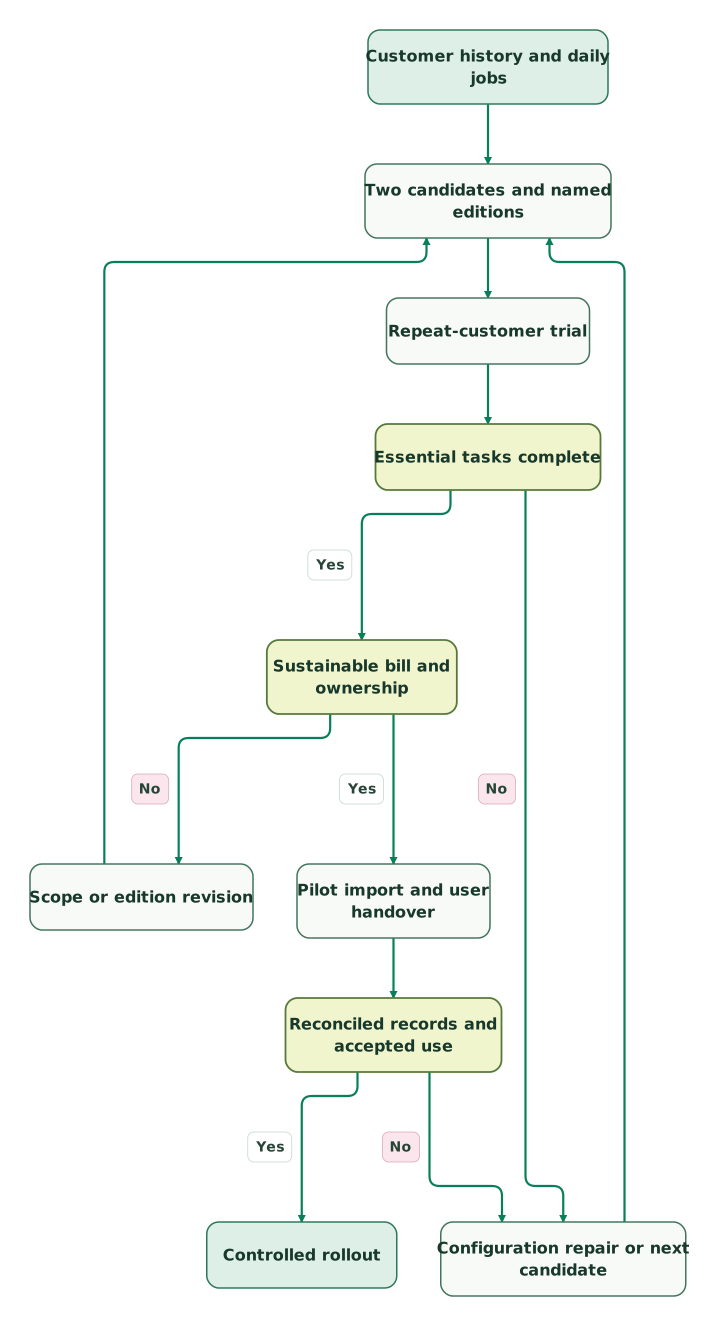
Read diagram as text
- Customer history and daily jobs to Two candidates and named editions.
- Two candidates and named editions to Repeat-customer trial.
- Repeat-customer trial to Essential tasks complete.
- Essential tasks complete to Configuration repair or next candidate: No.
- Configuration repair or next candidate to Two candidates and named editions.
- Essential tasks complete to Sustainable bill and ownership: Yes.
- Sustainable bill and ownership to Scope or edition revision: No.
- Scope or edition revision to Two candidates and named editions.
- Sustainable bill and ownership to Pilot import and user handover: Yes.
- Pilot import and user handover to Reconciled records and accepted use.
- Reconciled records and accepted use to Configuration repair or next candidate: No.
- Reconciled records and accepted use to Controlled rollout: Yes
CRM rollout checklist for a small team
A small rollout needs an accountable owner and a few dependable rules. Start with the customers, open work and history needed for current operations, then decide what older information should remain in an accessible archive.
Checklist
- One person owns the CRM configuration and another can cover them.
- Customer, opportunity and delivery records have distinct meanings.
- Each open opportunity has an owner, stage and next action.
- Required fields support a real decision or handoff.
- Permissions pass the absent-owner and restricted-access tests.
- Imported counts and relationships reconcile to the agreed source.
- Email, calendar and accounting connections have an error owner.
- The bought edition matches the successful trial configuration.
- Recurring costs, renewal terms and optional products are recorded.
- Staff can complete their daily work after the handover.
The CRM audit skill helps turn those checks into a repeatable review. Use CRM examples to map the jobs and records before making every old spreadsheet column a required field. When the difficult part is the implementation rather than the shortlist, bring the trial failures and sample data to our CRM implementation team.
Keep reading
Browse all CRM & Lifecycle guides
 CRM & Lifecycle
Salesforce Implementation Checklist: From Scope to a Working Release
Plan a Salesforce rollout with owners, migration rehearsals, permissions, integration tests, UAT, cutover and recovery gates before approving the release.
Jafrin Akter AloLast updated 14 min read
 CRM & Lifecycle
Salesforce to HubSpot migration: plan, field mapping and cutover checklist
Plan a Salesforce to HubSpot migration: phases, a field mapping template, load order, Smart Transfer limits, reconciliation checks and a safe cutover.
Jafrin Akter AloLast updated 21 min read
 CRM & Lifecycle
HubSpot implementation: a phased plan, template and launch checklist
Implement HubSpot in five phases: scope, data model, migration, integrations and launch. Includes a plan template, a worked example and a go-live checklist.
Jafrin Akter AloLast updated 22 min read
CRM & marketing automation
See the implementation scope, deliverables and acceptance checks.
Questions people ask
Which small-business CRM fits a team with no dedicated administrator?
Start by testing Less Annoying CRM or Bigin against the team's ordinary follow-up and customer-history tasks. Choose the one a named business owner can maintain without continual outside intervention. If the process requires more complex permissions or automation, price the required edition and ownership work before selecting a larger platform.
Can a small business use one CRM contact for several jobs?
A returning customer should usually retain one customer identity while each commercial opportunity or job has its own record. Test the relationship, permissions and reporting in your shortlisted product. Putting every job into the contact's status field can erase which work is open, won, delivered or waiting for payment.
Is a free CRM suitable for an established service company?
A free CRM can work when its user, history and workflow limits fit the business. Check the customer's full service history, colleague cover and export before committing. A two-person trial is not evidence that the same edition will work for six staff or several years of recurring customer relationships.
Should field technicians have the same CRM access as sales staff?
Give technicians the information and actions their work requires, then check the vendor's licensing and permission options for that role. They may need a job-management system and a controlled handoff from sales. Do not buy full sales seats automatically or assume a free viewer can edit work, access an integration or update customer records.
What should we move first when replacing our small-business CRM?
Move the records needed to continue active work: current customers, open opportunities, assigned tasks and the history required to serve them. Reconcile the pilot import before moving the rest. Preserve original identifiers and an accessible source copy, and decide separately how old records, duplicates and attachments should be handled.
Sources
- Less Annoying CRM pricing
- Bigin pricing and edition limits
- Pipedrive USD pricing
- Pipedrive plan features
- HubSpot product and services catalog
- HubSpot Free tools catalog
- HubSpot for Startups
- Zoho CRM edition and role guide
- Zoho CRM USD pricing explanation
- Copper pricing
- monday CRM pricing
- monday product and seat-group pricing rules

Written by
Jafrin Akter AloData Engineer and Co-founder at Martechdevs and Growth and Analytics Partners
Jafrin writes practical guides to marketing technology, customer data, analytics and AI workflows. Martechdevs is a Growth and Analytics Partners company.