
Copper CRM Alternatives: Five Options by Workflow, Cost and Migration
Choose Streak when working inside Gmail is the requirement, Pipedrive for a focused sales pipeline, and Zoho CRM for more prescribed sales processes. HubSpot fits a broader customer lifecycle, while Attio suits a configurable relationship model. Keep Copper as the baseline until the replacement fixes a named limitation and preserves the contact history, permissions and follow-up your team depends on.
On this page
Copper CRM alternatives compared
USD paid-plan references below use annual billing where stated, before add-ons, onboarding and implementation.
| Alternative | Paid candidate | Best fit | Main purchasing boundary |
|---|---|---|---|
| Streak | Pro $49/user/month annually | A CRM workflow inside Gmail | Pro+ for listed automation and integration scope |
| Pipedrive | Growth $24 or $39/user/month annually | Pipeline operation and email follow-up | Data controls, capacity and additional products |
| Zoho CRM | Professional $23/user/month annually | Prescribed process and sales operations | Edition-specific process limits and configuration |
| HubSpot | Sales Professional $90/Sales Seat/month with annual payment | Shared marketing, sales and service context | Required onboarding and separate products |
| Attio | Plus $40/workspace/month annually, including one user | Configurable relationship data | Additional users, ten-user Plus cap and Pro features |
Pipedrive's annual USD pricing displays more than one offer: Lite $14, Growth $24 or $39, Premium $49 or $59 and Ultimate $69 or $79 per seat/month. Confirm the applicable offer before purchase. The worked examples below use the $24/$49/$69 offer, with higher-offer sensitivities shown separately. Pipedrive annual pricing.
Sources: Streak, Pipedrive, Zoho USD card, HubSpot Sales, Attio USD plans. These are useful configurations to evaluate, not equivalent feature packages or the cheapest possible tier from every vendor.
At Martechdevs, we start a CRM replacement with the actual failure: incomplete sales follow-up, a missing process control, inaccessible history or an unsustainable bill. Replacing a product without identifying that failure can move the same operating problem into another interface.
The Copper baseline
Copper's current public annual prices are Basic at $23, Professional at $59 and Business at $99 per seat monthly. The published contact limits are 2,500 for Basic, 15,000 for Professional and unlimited for Business. Professional lists workflow automation, reporting and integrations; Business adds capabilities including email series and custom reports. Copper pricing.
First check whether the required capability is already available in the account, requires a plan change or needs a different process. A move driven by an outgrown contact limit has a different shortlist from a move driven by product-specific access or reporting requirements.
Google integration deserves a precise inventory. Copper's Google Contacts connection is a one-way sync from Copper into Google Contacts; changes made in Google Contacts do not return through that connection. Copper contact-sync direction. A replacement comparison should name each direction, object and owner instead of using “Google sync” as one undifferentiated feature.
Write down the current Gmail, calendar, contact and document workflows separately. Then identify which history is stored in Copper, which remains in Google and which is only linked. That inventory becomes the migration scope and prevents an apparently successful contact transfer from losing the context people actually use.
Gmail-first and pipeline alternatives
Streak
Streak is the first candidate to test when the team specifically wants its CRM inside Gmail. Pro includes the core CRM and shared pipelines, while Pro+ adds the listed integrations, automations and advanced reports. Enterprise adds further controls. Streak plan scope.
- Best for: a Gmail-centered team whose sales and relationship work can remain inside that operating environment.
- Pros: a direct fit for an inbox-led workflow, with unlimited contacts, pipelines and records on the listed paid plans.
- Cons: the required automation or governance can move the team beyond the Pro entry configuration.
- Free plan and startup offer: free email tools do not include CRM pipelines. A fourteen-day Pro+ trial is available; budget only separately confirmed startup offers.
- Choose it if: sellers can handle shared opportunities and history without leaving important work in private inbox conventions.
- Skip it if: the customer model and cross-function process need capabilities the tested Gmail-centered setup cannot support.
The free-plan distinction matters. Email tracking or snippets can improve an individual's inbox without replacing a shared CRM. Test ownership, access after an employee leaves and the receiving team's ability to understand an opportunity before comparing the free tier with a paid Copper deployment.
Pipedrive
Pipedrive Growth is a practical candidate for a team that wants a clearer sales pipeline and dependable follow-up. It includes full email synchronization and automation, while higher tiers provide additional data controls and other capabilities. Pipedrive plans.
- Best for: teams whose main replacement requirement is consistent sales execution.
- Pros: a focused pipeline and activity workflow with an identifiable automation plan.
- Cons: more specialized processes can need higher plans, add-ons or integrations, and record capacity requires attention.
- Free plan and startup offer: the public offer is a fourteen-day trial. Use a written agreement for any additional benefit.
- Choose it if: the team can maintain the customer context and next action with less daily friction.
- Skip it if: the intended replacement needs broader lifecycle or process controls that remain unresolved in the trial.
Pipedrive's capacity meter includes active leads and retained open, won and lost deals, excluding archived or deleted records. Its active-automation limits are a different measure. Pipedrive usage definitions. A contact export count alone therefore cannot establish the destination capacity needed for the migration.
Use the Pipedrive pricing guide to include the relevant extras and the HubSpot versus Pipedrive comparison if the decision widens to a shared lifecycle.
Broader process and relationship alternatives
Zoho CRM
Zoho CRM Professional is worth testing when the business needs process enforcement, inventory-related sales functions or CPQ. Enterprise adds another set of controls, including territories and approval/review capabilities. Price the edition that actually supports the requirement. Zoho edition guide.
- Best for: a team whose sales operations need a more explicit configured process.
- Pros: a broad range of capabilities to evaluate at the listed Professional price.
- Cons: the configuration and ongoing administration must remain understandable to the team.
- Free plan and startup offer: Free supports three users. Apply only an approved startup or bundle offer to the budget, with its expiry recorded.
- Choose it if: required transitions, data relationships and ordinary-user tasks work in the selected edition.
- Skip it if: the extra process machinery would create more maintenance than the business needs.
A lower price does not require migrating every old field. Review the purpose, owner and use of each retained value. Unused properties and duplicate stages can be archived rather than reproduced as permanent operating complexity. The HubSpot versus Zoho comparison covers the broader platform decision.
HubSpot
HubSpot is a candidate when Copper's replacement must connect marketing acquisition, sales follow-up and service context. Separate the relevant Hubs and seat types before comparing the price; a Sales subscription does not provide every advanced capability in another product. HubSpot product catalog.
- Best for: companies with a defined cross-function customer lifecycle.
- Pros: a shared CRM and connected products can reduce competing customer records and handoffs.
- Cons: onboarding, additional Hubs, specialist seats and usage can materially increase the complete bill.
- Free plan and startup offer: free tools support an initial evaluation, and eligible startups can apply through HubSpot for Startups.
- Choose it if: the complete selected package improves the customer path enough to justify its cost and ownership.
- Skip it if: the team only needs a narrow inbox or pipeline workflow and would leave most of the package unused.
The required $1,500 Sales Professional onboarding fee is separate from its subscription. Confirm what the onboarding actually delivers and retain custom migration or integration work as its own scope. Sales Professional pricing.
Attio
Attio is worth evaluating when the replacement needs a configurable relationship model and an owner who can maintain it. Its current commercial structure has a workspace base plus additional users, so it should be calculated differently from a flat per-seat offer. Attio USD pricing.
- Best for: a team with a clear data model that wants to shape its CRM around the commercial motion.
- Pros: email/calendar synchronization and configurable records, with custom objects and more permissions in Pro.
- Cons: required object scope, team access and usage can move the budget beyond Plus.
- Free plan and startup offer: Free supports three users. The startup program advertises 80% off annual Pro and credits in year one and 30% in year two, subject to approval and limits.
- Choose it if: the relationship model and required daily work fit naturally in a workspace the team can maintain.
- Skip it if: advanced permissions or usage require a package whose complete cost removes the intended advantage.
Plus includes one user at $40 per workspace monthly with annual billing, then $35 for each additional user, up to ten users. Pro starts at $100 with one user, then $79 for each additional user. Attio plan calculation. Ten Plus users therefore cost $40 + 9 × $35 = $355 monthly equivalent.
The startup eligibility includes a workspace created within ninety days, a company incorporated less than five years ago and venture backing or affiliation with an approved startup partner. The offer is limited to workspaces of up to ten seats. Attio startup terms. Model later years separately rather than treating the first-year benefit as the ordinary price.
Ten-user subscription comparison
The following USD examples use the lower Pipedrive offer and assume ten paid users and annual billing/payment at the cited rates. They exclude taxes, additional products, usage and implementation; required HubSpot onboarding is shown separately.
| Configuration | Annual subscription | Required fee shown here | Scope to validate |
|---|---|---|---|
| Copper Professional baseline | $7,080 | No fee assumed | Existing accepted workflow |
| Streak Pro | $5,880 | No fee assumed | Core Gmail CRM without Pro+ scope |
| Streak Pro+ | $8,280 | No fee assumed | Required automation and integrations |
| Pipedrive Growth | $2,880 | No fee assumed | Pipeline and follow-up |
| Zoho Professional | $2,760 | No fee assumed | Required process and administration |
| HubSpot Sales Professional | $10,800 | $1,500 onboarding | Selected sales scope and other Hub needs |
| Attio Plus | $4,260 | No fee assumed | Ten-user limit and required capabilities |
Sources: Copper, Streak, Pipedrive, Zoho, HubSpot, Attio. “No fee assumed” is a model input; confirm any required services or commercial minimum in the actual offer.
At the higher $39 Growth offer, the Pipedrive row becomes $4,680 annually. Its base difference from Copper Professional is then $2,400, compared with $4,200 on the lower offer, before migration and recurring additions.
For the Attio Plus example, the annual base difference from Copper Professional is $2,820. If the move adds an assumed $100 monthly of ongoing support, the net recurring saving becomes $1,620 a year. A hypothetical $4,000 migration then takes about 29.6 months to recover. A required Pro upgrade would change that calculation again.
Streak Pro+ illustrates the opposite case: its ten-user subscription is $1,200 higher than the Copper baseline. It can still be worth buying if the accepted workflow improves, but the business case should describe that improvement rather than promise a licence saving.
Copper export and migration scope
Copper's export guidance covers people, companies, opportunities, projects, tasks and leads, with filtering available. Activity history needs special attention: the guide directs customers to Copper Support for a one-time activity export. Copper export process.
Arrange that history before a cancellation deadline. A file of contact names and email addresses can omit the conversations, follow-up and project context that make the CRM useful. Give the migration plan an explicit deliverable for activity data and verify the destination can represent what the team needs.
A useful source inventory separates record data, activities, attachments or links, Google-owned information and automation configuration. Preserve identifiers and ownership across those layers. Do not rebuild a single contact record as several unrelated destination records because the exports arrive in separate files.
| Migration item | Required evidence | Common failure |
|---|---|---|
| People and companies | Stable source-to-target mapping | Duplicates from names or shared domains |
| Opportunities and projects | Correct customer and relationship | A project copied without commercial context |
| Activity history | Required dates, owners and record links | Contact-only export mistaken for complete history |
| Google connections | Explicit direction, scope and account owner | Competing updates or missing calendar context |
| Permissions | Ordinary-user access and denied-access tests | Private history exposed through a broad migration |
Use a representative sample before moving the full account. Include a company with several opportunities, a contact associated with multiple records and an inactive owner. Compare both the business totals and the next action an ordinary seller can perform.
For a Pipedrive destination, the import file limit is no more than 200,000 rows, one tab and under 50 MB, with format and field requirements. Pipedrive import limits. Chunking a file solves only the upload boundary; relationship mapping, retries and duplicates still need acceptance checks.
Best fit by replacement trigger
| Copper limitation | First candidate | Runner-up | Required proof |
|---|---|---|---|
| Strong preference for CRM inside Gmail | Streak | Retain and simplify Copper | Shared workflow and useful history |
| Inconsistent sales follow-up | Pipedrive | Copper process repair | Seller adoption and next-action coverage |
| More prescribed process controls | Zoho CRM | Higher appropriate Copper scope | Required transitions and administration |
| Marketing and service handoffs | HubSpot | Scoped integrations around current CRM | Complete lifecycle and total package cost |
| Unusual relationship model | Attio | Zoho CRM | Objects, permissions and operating ownership |
Replacement decision and rollout
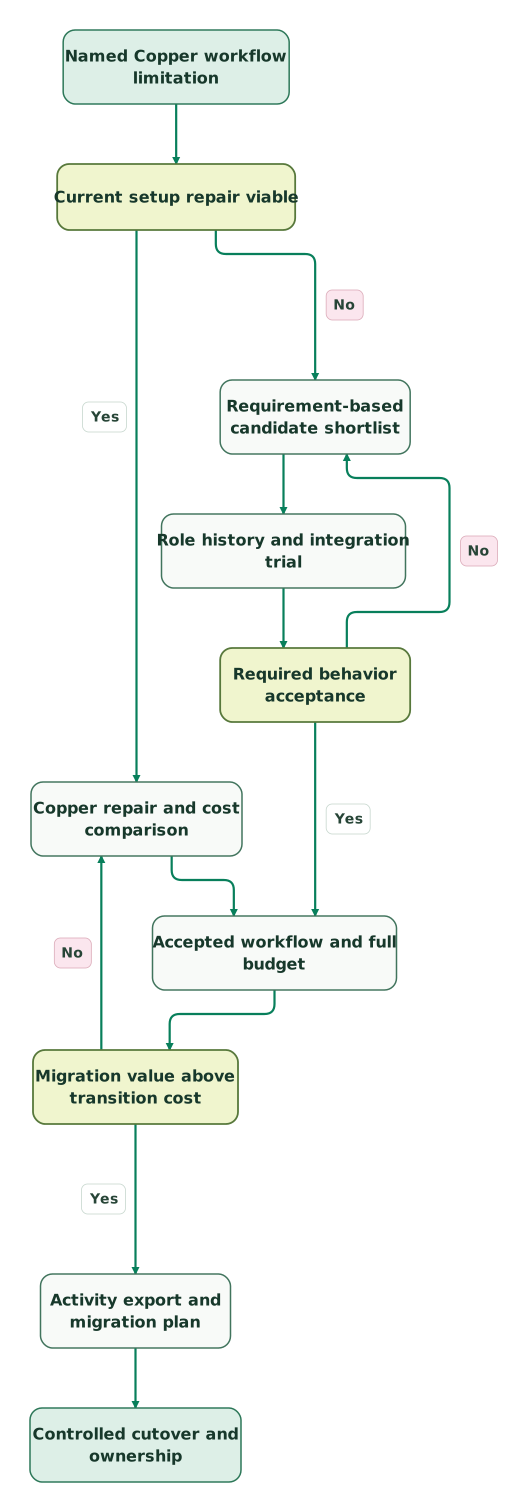
Read diagram as text
- Named Copper workflow limitation to Current setup repair viable.
- Current setup repair viable to Copper repair and cost comparison: Yes.
- Current setup repair viable to Requirement-based candidate shortlist: No.
- Copper repair and cost comparison to Accepted workflow and full budget.
- Requirement-based candidate shortlist to Role history and integration trial.
- Role history and integration trial to Required behavior acceptance.
- Required behavior acceptance to Requirement-based candidate shortlist: No.
- Required behavior acceptance to Accepted workflow and full budget: Yes.
- Accepted workflow and full budget to Migration value above transition cost.
- Migration value above transition cost to Copper repair and cost comparison: No.
- Migration value above transition cost to Activity export and migration plan: Yes.
- Activity export and migration plan to Controlled cutover and ownership
Checklist
- The replacement resolves a specific problem that repair cannot address economically.
- Required Gmail, calendar and contact behavior is tested separately.
- Paid tiers match the needed automation, permissions and data model.
- User counts and contact or record limits fit the retained data.
- Copper activity exports and required attachments are available before exit.
- Source IDs, relationships, ownership and history survive the trial migration.
- First-year and renewal budgets include implementation and ongoing work.
- Old automations and competing sync paths have a controlled cutover.
Use the CRM audit skill for the requirements and migration evidence. The Attio versus HubSpot guide helps compare flexible relationship data with a broader lifecycle platform. Request a CRM migration scope when the move depends on preserving customer history and a reliable operating process.
Keep reading
Browse all CRM & Lifecycle guides
 CRM & Lifecycle
Pipedrive alternatives: when a sales pipeline is not enough
Compare HubSpot, Attio, Close, Zoho CRM, Freshsales, monday CRM and folk as Pipedrive alternatives, priced for 10 sellers, with a test for when to switch.
Jafrin Akter AloLast updated 15 min read
 CRM & Lifecycle
HubSpot vs Zoho CRM: Compare the Process, Three-Year Cost and Migration Work
Compare HubSpot and Zoho CRM by free limits, edition gates, 3/10/25-user budgets, startup offers and five workflow tests before migration.
Jafrin Akter AloLast updated 18 min read
 CRM & Lifecycle
Attio pricing in 2026: seats, AI credits and the startup discount
Calculate Attio costs across paid seats and shared AI credits. Compare Plus and Pro, model startup discounts and control workflow consumption.
Jafrin Akter AloLast updated 10 min read
CRM & marketing automation
See the implementation scope, deliverables and acceptance checks.
Questions people ask
Is Streak's free email plan a full replacement for Copper CRM?
Streak's free offering includes Gmail email tools but does not include CRM pipelines. A shared CRM replacement needs the appropriate paid plan and a trial of the required ownership, records and history. Check automation and integration scope separately because those requirements can move the team from Pro to Pro+. Streak free and paid scope.
Does Copper's Google Contacts connection synchronize edits both ways?
Copper's documented Google Contacts connection sends changes from Copper to Google Contacts. Edits made in Google Contacts do not synchronize back through that connection. Record the actual direction and source owner before migration, then test the replacement's creation, update and deletion behavior separately. A general claim of Google integration does not establish identical synchronization semantics. Sync direction.
Can a normal Copper contact export include all activity history?
Copper's export guide treats activity export as a separate request to Support. Arrange and inspect that data before ending the subscription, alongside the ordinary record exports. Confirm the dates, owners and relationships the destination needs so a complete-looking contact list does not conceal missing sales context or unusable follow-up history. Copper exports.
Can Attio Plus pricing be extended to a twenty-user replacement team?
Attio Plus is limited to ten users, so a twenty-user forecast needs another eligible plan. Its pricing also combines a workspace base with additional-user charges. Use the correct plan formula and permissions requirement rather than multiplying a single displayed figure by headcount. Add credits or governance scope separately when the workflow needs them. Attio plans.
Should a cheaper alternative receive every field from the Copper account?
Move the information needed for current work, reporting and the agreed history requirements. Review unused fields, duplicate stages and obsolete automations before recreating them. Keep a suitable archive for retained source data and preserve identifiers for reconciliation. A controlled migration should simplify the daily process while maintaining the context and evidence the business still needs.
Sources
- Copper plans and pricing
- Copper Google Contacts integration
- Copper export guidance
- Streak plans and free email tools
- Pipedrive pricing
- Pipedrive usage definitions
- Pipedrive import requirements
- Zoho CRM USD edition prices
- Zoho edition and role guide
- HubSpot Sales pricing
- HubSpot product catalog
- HubSpot for Startups
- Attio USD pricing
- Attio startup program

Written by
Jafrin Akter AloData Engineer and Co-founder at Martechdevs and Growth and Analytics Partners
Jafrin writes practical guides to marketing technology, customer data, analytics and AI workflows. Martechdevs is a Growth and Analytics Partners company.