
Pipedrive vs Zoho CRM: Sales Workflow, Process Controls and Cost
Choose Pipedrive when a focused sales pipeline, follow-up and seller adoption are the main requirements. Choose Zoho CRM when the process needs capabilities such as Blueprint, inventory-related sales work or a broader configured customer model. Compare the edition that passes your actual workflow. Lower subscription cost is useful only when record quality, integrations and the team's daily work remain reliable.
On this page
Pipedrive and Zoho CRM compared
USD per-user monthly rates below require annual billing and exclude tax, add-ons and implementation.
| Decision | Pipedrive | Zoho CRM |
|---|---|---|
| Paid entry | Lite $14 | Standard $14 |
| Main workflow candidate | Growth $24 or $39 | Professional $23 |
| More advanced candidate | Premium $49 or $59; Ultimate $69 or $79 | Enterprise $40; Ultimate $52 |
| Evaluation route | Fourteen-day trial | Free edition for three users; paid-edition trial |
| Process-control distinction | Required fields from Premium, with channel exceptions | Blueprint from Professional, with edition limits |
Pipedrive's annual USD pricing displays more than one offer: Lite $14, Growth $24 or $39, Premium $49 or $59 and Ultimate $69 or $79 per seat/month. Confirm the applicable offer before purchase. The worked examples below use the $24/$49/$69 offer, with higher-offer sensitivities shown separately. Pipedrive annual pricing.
Sources: Pipedrive pricing, Zoho's USD edition card, Pipedrive required fields, Zoho edition guide.
At Martechdevs, we scope the CRM implementation around the point at which a salesperson must act, a manager must decide or another system must update the record. That makes the comparison concrete: the target system needs to support the required behavior through every channel the business actually uses.
Sales adoption and process fit
Pipedrive
Pipedrive is a sensible first trial for a team whose main problem is inconsistent pipeline visibility or missed follow-up. Growth adds full email synchronization and automation to the entry product. Start with the paid plan that covers the real tasks rather than assuming Lite includes the automated workflow. Pipedrive plans.
- Best for: sales teams with a clear motion and a preference for a focused operating process.
- Pros: a pipeline-centered workflow and distinct plan steps for follow-up, automation and data controls.
- Cons: more specialized operations can introduce add-ons or integrations; required-field behavior differs by update channel.
- Free plan and startup offer: the public offer is a fourteen-day trial. Budget ordinary subscription rates unless a separate written offer is approved.
- Choose it if: sellers can consistently find the next action, preserve deal context and keep the pipeline useful.
- Skip it if: the required approvals, process transitions or broader data model cannot be demonstrated in the proposed setup.
A simple interface still needs ownership rules. Decide who can accept a lead, move an opportunity, change its value and close it. Give the process owner an exception report for deals without a usable next action, rather than relying on the board's appearance to prove adoption.
Zoho CRM
Zoho CRM deserves an early trial when the business needs a more prescribed process. Its edition guide places Blueprint, inventory functions and CPQ in Professional, while Enterprise adds capabilities such as territories, sandbox and approval/review processes. Select those features from the actual requirement, not company size alone. Zoho edition scope.
- Best for: teams with explicit process gates, sales operations or a wider configured CRM requirement.
- Pros: lower listed Professional pricing and a broader set of process tools to evaluate within the product.
- Cons: configuration and operating ownership require attention, and advanced requirements can move the team to another edition or product.
- Free plan and startup offer: Free supports three users. Treat any startup or bundle benefit as a separately approved offer with clear scope and expiry.
- Choose it if: the configured transition, reporting and integration behavior passes without creating unnecessary daily work.
- Skip it if: a small sales team would maintain substantial complexity that adds little to its actual process.
The HubSpot versus Zoho guide is useful if marketing and service alignment becomes the deciding requirement. The Pipedrive alternatives guide provides other candidates when neither product passes the same accepted workflow.
Required fields and genuine process gates
Pipedrive's required fields are available from Premium. Its current guidance says these controls do not stop deal progression through imports, bulk editing, APIs, automations or third-party integrations. A rule that blocks a manual change can therefore leave another write path open. Required-field boundaries.
For a worked acceptance case, suppose a deal must have a confirmed delivery scope before entering negotiation. Test the manual edit, import, automated update and integration write separately. If a source can bypass the intended check, define validation and exception handling at that source instead of treating the UI rule as universal enforcement.
Zoho Blueprint provides a different process mechanism. The edition matrix lists three Blueprints in Professional, fifty in Enterprise and one hundred in Ultimate, including defaults. Limits for transitions and fields within a transition also differ. Blueprint limits.
Zoho's Blueprint API exposes the transitions available to a record and their fields and validation. An integration can be designed around that state rather than assuming every stage is a freely editable label. Blueprint record details.
That does not remove the need for acceptance testing. Test the actual entry criteria, transition owner, mandatory information and recovery path in the target edition. Include a reopened deal and an integration retry. A process that works only for a new record on the happy path is incomplete.
Worked licence budgets
These annual examples use the lower Pipedrive Growth offer at $24 and Zoho Professional at $23 per user monthly. The plans are candidate configurations with different capabilities. Subscription arithmetic does not establish functional equivalence.
| Paid users | Pipedrive Growth annually | Zoho Professional annually | Annual difference |
|---|---|---|---|
| 5 | $1,440 | $1,380 | $60 |
| 20 | $5,760 | $5,520 | $240 |
| 50 | $14,400 | $13,800 | $600 |
Rates: Pipedrive, Zoho USD prices. Add relevant apps, migration, usage and maintenance before comparing the complete annual commitment.
Twenty users moving from Zoho Professional to Enterprise add 20 × ($40 - $23) × 12 = $4,080 annually. That upgrade can be the better comparison when the required process exceeds Professional's scope. Similarly, moving twenty Pipedrive users from Growth to Premium adds $6,000 annually at the lower offer rates.
A hypothetical move from twenty-user Pipedrive Growth to Zoho Professional saves $240 in annual base subscription. If the destination adds $100 monthly of operating cost, it costs $960 more per year before an assumed $6,000 migration. That lower-offer scenario has no payback from subscription savings. At the higher $39 Growth offer, twenty Pipedrive users cost $9,360 annually, producing a $3,840 base difference from Zoho Professional. After the same $1,200 annual operating cost, $2,640 remains and the assumed $6,000 migration takes about 27.3 months to recover. The twenty-user Growth-to-Premium upgrade would cost $4,800 annually at the higher $39/$59 offer. A move would need a separately demonstrated operating benefit; replace the transition and maintenance assumptions with a scoped plan.
If the business gains a required control or a better customer handoff, savings need not be the only reason to move. Name that benefit and test it. Avoid representing a seat-price gap as money available to recover a migration before accounting for the work the new configuration needs.
Capacity, automations and API budgets
Pipedrive's combined capacity counts active leads plus open, won and lost deals, excluding archived or deleted records. On the current plans, Growth allows 5,000 times seats and Premium 15,000 times seats, both capped at 300,000 for the company. Contacts have a separate treatment. Pipedrive usage definitions.
Ten Growth seats therefore indicate 50,000 combined leads and deals. Fifty Premium seats would produce 750,000 by multiplication, but the actual ceiling remains 300,000. Include retained won/lost deals in the forecast; counting only today's open pipeline understates the relevant population.
Automation limits use another basis. Growth supports fifty active automations per company and Premium 150. More paid users do not multiply that particular allowance. Excess automatically created leads can be discarded when the record limit is reached, while excess deals can follow waitlist or import-skip handling. Capacity and failure behavior.
Zoho's API uses credits in a rolling twenty-four-hour window. Professional's base allowance is 50,000 plus 500 per licensed user, before add-ons; ten users therefore have 55,000. Some operations consume more than one credit, and concurrency limits apply separately. Zoho API limits.
Treat those limits as engineering inputs. Record the reads, writes, retries and bulk operations the integration generates. An apparently quiet sales team can have a busy synchronization process. A larger allowance is useful only if the permitted operations, identity and recovery design match the actual data flow.
Reporting and related applications
Agree the definition of a qualified opportunity, won revenue and ownership before comparing dashboards. Then reconcile a small set of known records in both tools. The dashboard should explain the individual deals behind a number and apply the same date and currency rules.
For an illustrative reporting test, one company has two opportunities: one won at $8,000 and one open at $5,000. Three contacts are associated with the company. The won-revenue result remains $8,000; joining every contact must not turn it into $24,000. The accepted result depends on record relationships and aggregation, not the number of charts available.
Broader Zoho products and Pipedrive add-ons need their own scope and cost lines. A CRM subscription does not automatically replace every email-marketing, project, finance or support system. Identify the application that owns each action and include any required paid licences on both sides of a connector.
Use the Pipedrive pricing guide for the wider subscription components and the martech stack cost guide for the complete operating model. Remove an old tool from the savings forecast only after its replacement works and its existing commitment can end.
Migration in either direction
Zoho provides a Pipedrive migration route using the source API and instance URL. Its mapping documentation includes organizations, people, deals, activities, products and other supported data. Review the exact mappings and import history before accepting the transfer. Pipedrive-to-Zoho migration.
The availability of a migration route does not prove that the destination reproduces every automation, permission or historical report. Preserve source identifiers and document the destination field and object for each required value. Decide which obsolete fields should remain in an archive rather than recreating them in the daily workflow.
For the reverse direction, Pipedrive supports XLS, XLSX and CSV imports with one tab, no more than 200,000 rows and a file under 50 MB. Review added, updated, merged and skipped outcomes, then correct the skip file where required. Pipedrive spreadsheet import.
| Migration test | Accepted evidence | Required repair |
|---|---|---|
| Identity | Each retained source ID maps to its intended destination | Duplicate or missing mapping |
| Relationships | People, organizations and deals remain connected | Orphaned or incorrect association |
| Process state | Open, won, lost and reopened records retain meaning | Unsupported or misleading stage conversion |
| Activities | Useful history and next actions remain usable | Wrong owner, date or activity type |
| Reporting | Selected business totals reconcile | Currency, date or aggregation mismatch |
Run the test as an ordinary seller and a manager, not only an administrator. Include records owned by inactive users and activity that crosses time zones. Freeze or redirect old automations deliberately during cutover, and keep a rollback source until the acceptance evidence is complete.
Best fit by sales situation
| Situation | First candidate | Runner-up | Decision evidence |
|---|---|---|---|
| Focused pipeline with inconsistent follow-up | Pipedrive Growth | Zoho Standard or Professional | Seller task completion and maintenance |
| Prescribed stage transitions and sales operations | Zoho Professional or Enterprise | Pipedrive with tested controls | Required process paths across all update channels |
| Three founders evaluating CRM basics | Zoho Free | Pipedrive trial | Real required tasks and future paid scope |
| Existing Pipedrive with stronger data requirements | Repair or Premium evaluation | Zoho trial | Cost of closing the specific gap |
| Existing Zoho with excessive complexity | Simplified Zoho configuration | Pipedrive trial | Useful process coverage after simplification |
CRM selection and transition
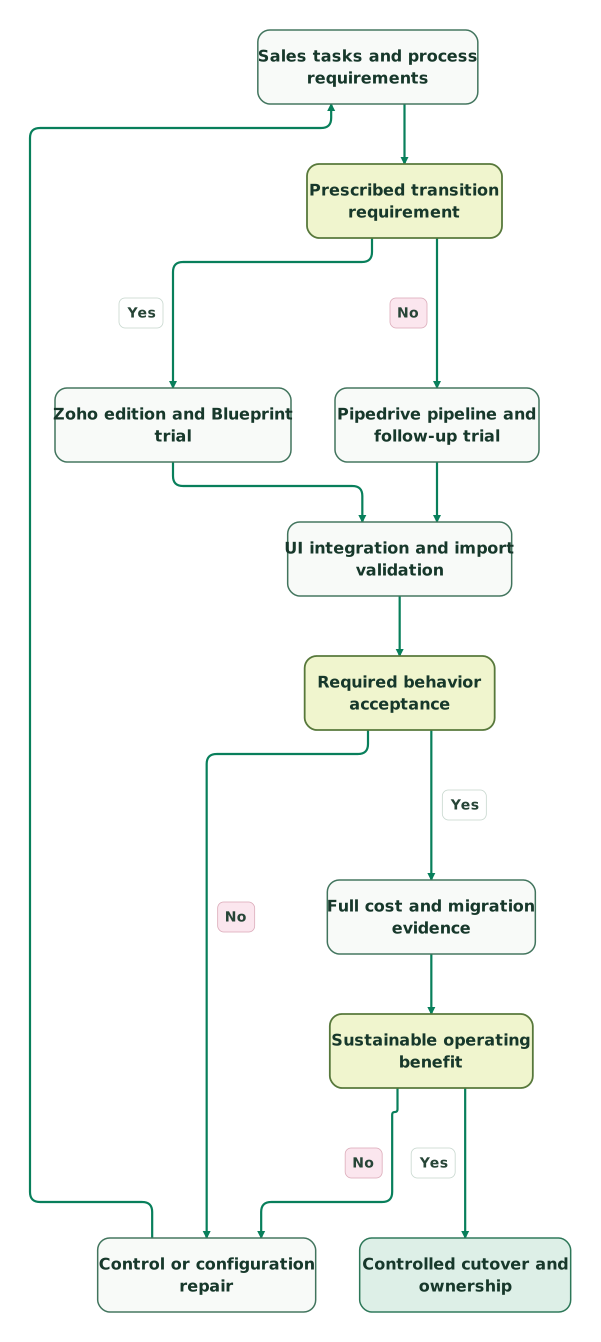
Read diagram as text
- Sales tasks and process requirements to Prescribed transition requirement.
- Prescribed transition requirement to Zoho edition and Blueprint trial: Yes.
- Prescribed transition requirement to Pipedrive pipeline and follow-up trial: No.
- Zoho edition and Blueprint trial to UI integration and import validation.
- Pipedrive pipeline and follow-up trial to UI integration and import validation.
- UI integration and import validation to Required behavior acceptance.
- Required behavior acceptance to Control or configuration repair: No.
- Control or configuration repair to Sales tasks and process requirements.
- Required behavior acceptance to Full cost and migration evidence: Yes.
- Full cost and migration evidence to Sustainable operating benefit.
- Sustainable operating benefit to Control or configuration repair: No.
- Sustainable operating benefit to Controlled cutover and ownership: Yes
Checklist
- Required sales tasks and process transitions are written before plan selection.
- UI, import, API and automation paths preserve the intended controls.
- Paid quantities and edition-specific features match the budget.
- Retained record counts, active automations and API capacity are forecast separately.
- Relationships, activity history and business totals reconcile after migration.
- Related products and recurring maintenance are included in the cost case.
- The receiving team can operate and repair the selected configuration.
- Cutover disables competing writes and preserves a rollback source.
Use the CRM audit skill to organize process, access and integration evidence. Our HubSpot lifecycle-stage guide also illustrates the importance of agreed lifecycle definitions across systems. Request a CRM implementation scope around the specific workflow and controls the team needs to maintain.
Keep reading
Browse all CRM & Lifecycle guides
 CRM & Lifecycle
HubSpot vs Zoho CRM: Compare the Process, Three-Year Cost and Migration Work
Compare HubSpot and Zoho CRM by free limits, edition gates, 3/10/25-user budgets, startup offers and five workflow tests before migration.
Jafrin Akter AloLast updated 18 min read
 CRM & Lifecycle
HubSpot vs Pipedrive: Costs and 6 Tests Before You Buy
Pipedrive vs HubSpot: Pipedrive Growth is $39 a seat, HubSpot Sales Hub Pro $90 plus $1,500 onboarding. Costs for 3, 10 and 25 sellers, free plans and 6 tests.
Jafrin Akter AloLast updated 24 min read
 CRM & Lifecycle
Pipedrive alternatives: when a sales pipeline is not enough
Compare HubSpot, Attio, Close, Zoho CRM, Freshsales, monday CRM and folk as Pipedrive alternatives, priced for 10 sellers, with a test for when to switch.
Jafrin Akter AloLast updated 15 min read
CRM & marketing automation
See the implementation scope, deliverables and acceptance checks.
Questions people ask
Do Pipedrive required fields block every imported or automated stage change?
Pipedrive's current required-field guidance lists exceptions for imports, bulk edits, APIs, automations and third-party integrations. Test those channels separately from manual entry. If a mandatory business check must apply to an external write, implement and verify it in the approved integration or source workflow, with an exception report for incomplete records. Required-field behavior.
Does Pipedrive's combined record allowance count closed deals?
Yes. The allowance includes active leads and open, won or lost deals that have not been archived or deleted. Forecast retained history as well as the current pipeline, and apply the company cap after multiplying the seat allowance. A count of open deals alone can materially understate the population that consumes capacity. Record-count rules.
Can Zoho Professional support an unlimited number of Blueprints?
Zoho's edition matrix lists three Blueprints for Professional, including the defaults, with larger allowances in Enterprise and Ultimate. Count the required processes and inspect their transition limits before selecting a plan. A feature being available in an edition does not mean every size of implementation fits that edition's allowance. Blueprint allowances.
Does a Zoho API credit always represent one API request?
The API uses operation-specific credit consumption, so some requests consume more than one credit. Concurrency and sub-concurrency limits also constrain execution separately from the rolling allowance. Estimate the actual operations, batches and retries in the integration rather than turning the published credit total into a universal number of successful requests. API credit rules.
Should a lower Zoho subscription price trigger an immediate Pipedrive migration?
A lower base subscription is one part of the business case. Include implementation, recurring integrations, maintenance, retraining and the risk of losing useful history or process behavior. Test the intended destination first and calculate payback using the complete recurring difference. Repairing the current configuration can be preferable when the required benefit is small or the transition cost is high.
Sources

Written by
Jafrin Akter AloData Engineer and Co-founder at Martechdevs and Growth and Analytics Partners
Jafrin writes practical guides to marketing technology, customer data, analytics and AI workflows. Martechdevs is a Growth and Analytics Partners company.