
monday CRM vs Salesforce: Process Fit, API Access and Full Cost
Choose monday CRM when a configurable sales workflow and visible operational handoff meet the business requirement. Choose Salesforce when a required customer model, application dependency or coordinated process justifies a broader platform and its administration. Test the exact editions and integrations before comparing price. The decision depends on what must remain correct across records, permissions, automation and reporting after the system is in daily use.
On this page
monday CRM and Salesforce compared
USD monthly per-user references below require annual billing except Salesforce Starter, which also offers monthly billing.
| Decision | monday CRM | Salesforce Sales |
|---|---|---|
| Paid entry | Basic $12; minimum three purchased seats | Starter $25 |
| Intermediate candidate | Standard $17; Pro $28 | Pro Suite $100 |
| Broader configuration | Ultimate by quote | Core $195; Advanced $395; Max $550 |
| Paid quantity | Seat bundles, then increments of five | Selected licences and chargeable users |
| Integration boundary | Connector eligibility, paid apps and API quotas | Edition rights, API add-ons and integration permissions |
Sources: monday CRM pricing, seat-bundle rules, Salesforce Sales pricing. Taxes, implementation, additional products and consumption are separate.
At Martechdevs, we define the CRM delivery scope from the hardest recurring business task. That can be a reliable deal-to-project handoff or a customer relationship that several departments must maintain. A product's entry tier is relevant only if it supports that task with the required access and operating controls.
Platform fit and administration
monday CRM
monday CRM is a candidate for teams that want sales work organized through visible boards, columns and configured workflows. Evaluate the CRM subscription separately from monday work management or other monday products. Familiarity with one product does not establish that the other product's commercial scope is already included. monday product plans.
- Best for: a team with a defined sales process and a practical requirement to coordinate work around each opportunity.
- Pros: direct process configuration and identifiable plan steps for communication, automation and sequences.
- Cons: data relationships and reporting still require design; seat bundles, contact limits and integrations can change the budget.
- Free plan and startup offer: the CRM pricing page advertises a fourteen-day trial. Include other startup benefits only after their terms are confirmed.
- Choose it if: users can complete the entire agreed workflow and the team can maintain its configuration.
- Skip it if: a required application, access rule or customer relationship cannot be represented and tested in the proposed setup.
The lower plan boundaries matter. Basic lists 1,000 active contacts and deals and five columns per board; Standard and Pro offer larger allowances. CRM plan limits. Count the actual fields and retained relationships before presenting Basic as the likely price of an established sales process.
Salesforce
Salesforce is a candidate when a specific platform requirement drives the purchase: a required application, an established Salesforce operating model or a customer process whose controls justify the selected edition. The current Sales packages are Starter, Pro, Core, Advanced and Max. Use the named package and quote rather than a generic “Salesforce licence” in the budget. Sales packages.
- Best for: organizations with a demonstrated platform requirement and a responsible owner for configuration and change.
- Pros: several package and integration options, with a wider platform available for the requirements that need it.
- Cons: subscriptions, applications, implementation and continuing administration can make the total larger than a seat calculation.
- Free plan and startup offer: Free Suite includes two licences; eligible venture-backed startups can apply through Launchpad for the available benefits.
- Choose it if: the hardest model, access and process requirements pass and justify the complete operating cost.
- Skip it if: a focused CRM workflow already satisfies the business and the additional platform scope would remain unused.
Sources: Free Suite, Salesforce Launchpad. Our Salesforce editions guide helps distinguish package choice from the licences and access each role needs.
Process and data-model acceptance
Define a small set of representative records before building either candidate. Include one company with several contacts, two simultaneous deals and an existing service or delivery relationship. Decide which record owns each value and how a change reaches the others.
For a worked case, a customer has one won deal for $12,000 and one open expansion for $4,000. The delivery team starts work from the won deal. The expansion must remain open, customer identity must remain shared, and the revenue report must show $12,000 won rather than combine every related amount indiscriminately.
A board design can make the work visible while leaving identity ambiguous. A more elaborate object model can preserve identity while making routine changes unnecessarily difficult. Test the same ordinary-user tasks in both, with a process owner who can explain the resulting relationships.
| Requirement | Trial evidence | Failed result |
|---|---|---|
| Shared customer identity | One intended company with the right contacts and deals | Duplicate customer records |
| Stage progression | Required information and responsible owner | Incomplete deal moves forward silently |
| Sales handoff | Receiving team has scope, deadline and commercial context | A title copied without usable detail |
| Restricted access | Required work permitted and unrelated records denied | Excess access or blocked essential tasks |
| Revenue reporting | Known deal totals reconcile | Values multiplied by related tasks or contacts |
The Salesforce implementation checklist provides a release discipline for that platform. Apply the same evidence standard to monday: required behavior should remain correct through manual changes, imports, automations and integrations.
Automation and capacity
monday CRM Standard lists 250 monthly custom automation actions and Pro lists 25,000. A triggered recipe can consume several actions, and automation and integration usage have distinct rules. CRM allowances, action counting.
Estimate the actual process. A hypothetical monthly workflow with 200 triggering events and three billed actions each consumes 600 actions. A count of one saved automation cannot be compared with the monthly execution allowance.
For Salesforce, inspect the selected package's automation and extension capabilities against the process rather than assuming every edition exposes the same controls. A configured approval, integration or scheduled job needs both the correct entitlement and an operating owner. Keep external services and AI consumption separate from the basic licence forecast.
Review failure paths in both candidates: duplicate delivery, an expired connection, an inactive owner and a record that no longer meets the automation criteria. Decide how the team detects and repairs each failure. A process that silently stops after a limit or permission change creates an operating cost that a subscription comparison will miss.
API access and connector eligibility
Salesforce lists Web Services API access as an additional $25 per user monthly for Pro Suite. Confirm the actual chargeable user population on the offer before applying that figure. API access enables a class of integration work; it does not prove that every packaged connector accepts the same licence. Salesforce API add-on.
monday's published Salesforce integration requirements name Salesforce Enterprise or Unlimited, the monday Enterprise plan, and a paid integration add-on. The connector guidance uses different edition names from the current Sales pricing page, so have the vendor map the proposed subscription to the connector's eligibility before purchase. Connector requirements.
For custom monday API work, include its daily calls, complexity, minute and concurrency limits. A simple request-count estimate can miss a large query's complexity or a burst of concurrent requests. monday API limits. Plan retries and monitoring as part of the integration, with a controlled identity and the minimum required access.
Use the Salesforce API limits guide for the Salesforce side. The relevant calculation is the workload generated by every connected application, including backfills and scheduled jobs, rather than the number of people clicking the CRM interface.
Worked annual subscription comparison
These USD examples use monday CRM Pro at $28 per purchased seat monthly and Salesforce Pro at $100 per user monthly, both billed annually. A separate Salesforce column assumes the $25 API add-on applies to every listed user. The configurations have different features and do not establish native-connector eligibility.
| Actual users | monday Pro purchased seats and annual cost | Salesforce Pro annual cost | Salesforce Pro plus assumed API annual cost |
|---|---|---|---|
| 3 | 3 seats: $1,008 | $3,600 | $4,500 |
| 6 | 10 seats: $3,360 | $7,200 | $9,000 |
| 20 | 20 seats: $6,720 | $24,000 | $30,000 |
Rates: monday CRM, monday bundles, Salesforce Pro and API. Additional applications, onboarding, migration, support and usage are excluded. monday requests a sales quote for larger teams above the public self-service range.
For six users, the API-inclusive Salesforce model is 6 × ($100 + $25) × 12 = $9,000. If the actual requirement instead selects Core, six users at $195 per month cost $14,040 annually before extras. Changing the package changes the entire comparison; the cheapest eligible configuration must first pass the workflow.
The Salesforce calculator supports its stated subscription assumptions. Keep the monday purchase quantity, integration fee and any unsupported Salesforce consumption separate rather than using one calculator as a complete implementation quote.
Migration economics and coexistence
A lower recurring subscription can support a move, but the one-time and ongoing work determine payback. Suppose a twenty-user team compares the $30,000 Salesforce Pro-plus-API example with $6,720 of monday Pro. The base difference is $23,280 annually.
If the monday design adds an assumed $500 monthly in other tools and maintenance, net annual savings become $17,280. With a hypothetical $15,000 migration, simple payback is approximately 10.4 months. Replace those planning inputs with the accepted scope, and remove any saving tied to an existing contract that cannot yet end.
Keeping both systems can also be reasonable when Salesforce owns the customer model and monday owns a bounded delivery workflow. Price both platforms, the eligible connector and the ongoing reconciliation. Avoid creating two competing sources for the same deal or customer value.
The two-way sync app has concrete boundaries. Its guidance says lookup updates from monday do not write back to Salesforce; formulas, connected boards and mirror columns do not sync back through that path. Deletions are not synchronized, and date versus date-time mappings need care. Two-way sync limitations.
Those details should shape the design before launch. If a destination row looks like a related customer but the relationship is actually flattened to text, a later edit may not change the source relationship. Reconcile identifiers and associations explicitly instead of assuming every visible field behaves as a two-way record link.
Cutover and ordinary-user testing
Export and preserve the records, relationships and activity required for continuity. Map source identifiers, ownership, stage meanings, currencies and dates into the target design. Reconcile a sample with difficult cases before transferring the entire production history.
Validate reporting and permissions after the data moves. A matching record count can coexist with duplicated revenue or excessive access. Test an ordinary seller, manager and integration identity, including the fields and records each must be denied.
During cutover, specify where new writes land and which old automations stop. Give each source-to-target transfer a replay-safe design and a visible exception path. Keep the prior system or an agreed archive readable until the final acceptance evidence is complete.
A successful move should leave a team that can maintain the configuration. Document the ownership of fields, automations, integrations and reports, and have the future operator perform a repair exercise. That exercise can expose hidden dependency on the implementer before it becomes a production problem.
Best fit by operating situation
| Situation | First candidate | Runner-up | Required evidence |
|---|---|---|---|
| Focused sales process with operational handoff | monday CRM | Salesforce Starter or Pro | Complete daily work and ownership |
| Required Salesforce application or existing platform dependency | Appropriate Salesforce package | monday for a bounded adjacent workflow | Actual application and access compatibility |
| Small team with basic CRM needs | Lowest eligible configuration | Another focused CRM | Required tasks without unused platform scope |
| Existing Salesforce with high administration cost | Repair and simplify current scope | Tested monday replacement | Full migration and operating-cost case |
| Two-team customer/delivery arrangement | One authoritative CRM plus scoped delivery system | Unified process redesign | Clear write ownership and synchronization limits |
Platform decision and rollout
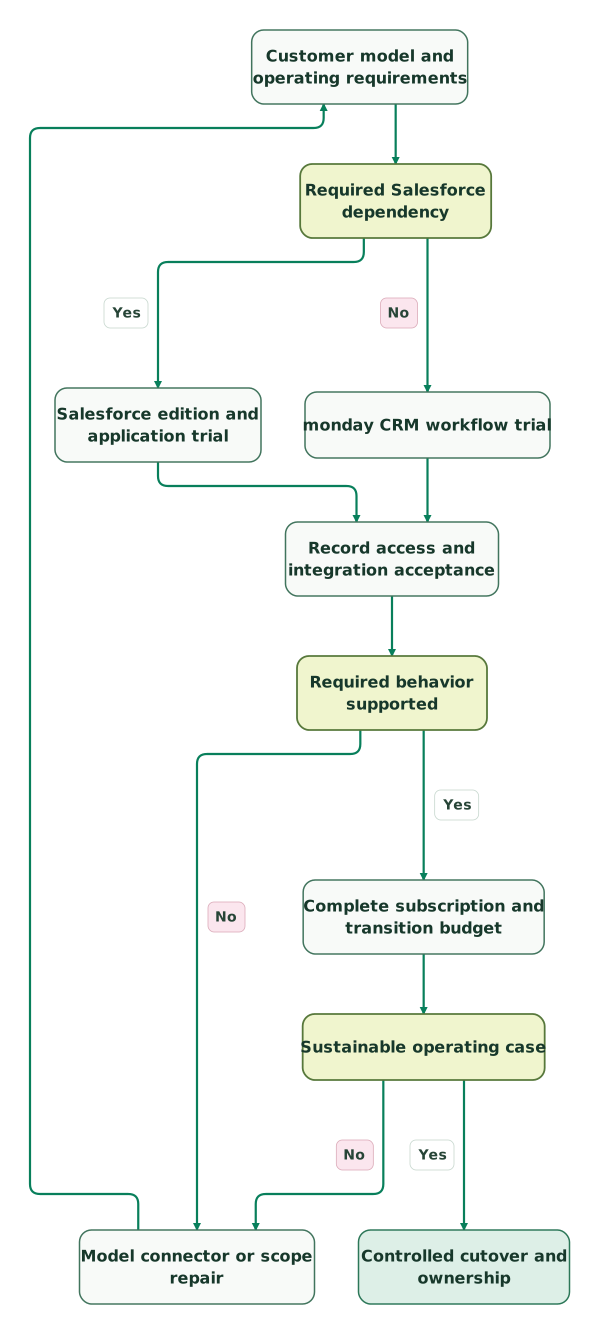
Read diagram as text
- Customer model and operating requirements to Required Salesforce dependency.
- Required Salesforce dependency to Salesforce edition and application trial: Yes.
- Required Salesforce dependency to monday CRM workflow trial: No.
- Salesforce edition and application trial to Record access and integration acceptance.
- monday CRM workflow trial to Record access and integration acceptance.
- Record access and integration acceptance to Required behavior supported.
- Required behavior supported to Model connector or scope repair: No.
- Model connector or scope repair to Customer model and operating requirements.
- Required behavior supported to Complete subscription and transition budget: Yes.
- Complete subscription and transition budget to Sustainable operating case.
- Sustainable operating case to Model connector or scope repair: No.
- Sustainable operating case to Controlled cutover and ownership: Yes
Checklist
- The named package supports the hardest required workflow.
- Actual users map to paid bundles, licences and application rights.
- API access and packaged-connector eligibility are checked separately.
- Record relationships and known report totals remain correct.
- Ordinary-user and integration permissions match the intended scope.
- Sync limitations, retries and deletion treatment are explicit.
- Existing commitments and all migration/maintenance costs enter the business case.
- The receiving team can operate, repair and extend the configuration.
Use the CRM audit skill to capture the requirements and access evidence. Our Salesforce implementation-cost guide separates platform purchase from delivery work. Request a CRM implementation scope around the customer model and operating process the selected system must preserve.
Keep reading
Browse all CRM & Lifecycle guides
 CRM & Lifecycle
Salesforce API Limits: Find the Consumer and Recover Failed Syncs
Diagnose Salesforce API limits, identify consuming integrations, reserve capacity for critical work and recover failed syncs with a tested batch planner.
Jafrin Akter AloLast updated 12 min read
 CRM & Lifecycle
Salesforce Implementation Checklist: From Scope to a Working Release
Plan a Salesforce rollout with owners, migration rehearsals, permissions, integration tests, UAT, cutover and recovery gates before approving the release.
Jafrin Akter AloLast updated 14 min read
 CRM & Lifecycle
Salesforce Implementation Cost: Scope, Partner Fees and a First-Year Budget
Estimate Salesforce implementation by scope and quoted rates. Compare Pro and Core, support, admin time, contingency and acceptance criteria.
Jafrin Akter AloLast updated 14 min read
CRM & marketing automation
See the implementation scope, deliverables and acceptance checks.
Questions people ask
Does Salesforce Pro API access guarantee the monday connector will work?
API access and a packaged connector's eligibility are separate conditions. monday's published integration requirements name specific Salesforce editions and a paid monday integration scope. Confirm how the proposed current Salesforce package maps to those requirements before buying. A general API add-on should not be treated as proof that a vendor-supported connector accepts the same configuration. Connector requirements.
Will deleting a synced monday item automatically delete its Salesforce record?
The documented Salesforce two-way sync app does not synchronize deletions. Define an explicit archive or deletion process and test its consequences in both systems. Otherwise, a record disappearing from one team's view can leave the source record active, or a later sync can make the apparent deletion confusing. Preserve a clear owner for lifecycle changes. Sync boundaries.
Can a monday lookup update change the linked customer in Salesforce?
The two-way sync guidance says lookup updates from monday do not update Salesforce through that path. A visible value should therefore not be assumed to be an editable relationship in both systems. Decide where the relationship is maintained, preserve identifiers and test the supported direction before using the synchronized column as an operational control. Lookup restrictions.
Is Salesforce Core the same budget as Salesforce Pro with API access?
They are different packages with different scope and listed amounts. Pro with its quoted API add-on is one candidate configuration; Core is another. Compare the exact required applications, controls and user entitlements before selecting either. A smaller arithmetic total matters only when that configuration can support the accepted workflow and its continuing administration. Sales pricing.
Should a business choose monday solely because the annual subscription is lower?
The complete case includes migration, integrations, maintenance, existing commitments and the capabilities that must survive. Trial the destination using ordinary users and difficult records, then compare the full recurring difference and transition cost. A lower licence bill can be useful, but a missing customer relationship or unreliable handoff can erase the expected benefit.
Sources
- monday CRM pricing and plan scope
- monday product plans and seat bundles
- monday automation and integration action counting
- monday API rate limits
- monday Salesforce integration requirements
- monday Salesforce two-way sync limitations
- Salesforce Sales pricing and API add-on
- Salesforce Free Suite
- Salesforce Launchpad

Written by
Jafrin Akter AloData Engineer and Co-founder at Martechdevs and Growth and Analytics Partners
Jafrin writes practical guides to marketing technology, customer data, analytics and AI workflows. Martechdevs is a Growth and Analytics Partners company.