
HubSpot vs Pipedrive: Costs and 6 Tests Before You Buy
Choose Pipedrive when the main job is running a focused sales pipeline with repeatable follow-up. Choose HubSpot when shared customer data across sales, marketing and service justifies the products and administration required. Compare the same roles, workflows and billing commitments before deciding: a low starting price, a free viewer seat and an advanced sales seat buy different things.
On this page
The useful question is whether the selected configuration can run your next sale, including the awkward parts: a duplicate inquiry, a reassigned owner, a stopped email sequence, an incomplete opportunity and the handoff after signature. A feature called “automation” does not answer those questions by itself.
Our CRM and lifecycle implementation work starts with a working sales process and a role map. This comparison narrows the choice to two products. Use the broader HubSpot alternatives guide if neither fits the customer model or operating requirements.
Which CRM is the stronger fit for your team?
Pipedrive is the stronger starting candidate for a team buying a sales operating system; HubSpot deserves the first evaluation when several customer-facing teams need a coordinated platform. Those are starting recommendations, not permission to skip the workflow trial.
Pipedrive
- Best for: A sales team that wants clear deal ownership, next actions and a manageable pipeline.
- Pros: Growth includes email sync, sequences, automation and forecasting. Premium adds controls and bundled tools that can matter more than the lowest seat price.
- Cons: Replacing an existing multi-team HubSpot setup can require separate marketing, support and data connections.
- Free tier and startup offer: A 14-day trial, rather than an ongoing free plan. Budget published pricing unless a specific startup offer is confirmed in writing.
- Choose it if: Sellers can complete their daily work on the selected plan and the surrounding tools have clear owners.
- Skip it if: The project depends on replacing several customer-facing systems with one shared operating model and the proposed integrations cannot deliver it.
The current Pipedrive feature matrix distinguishes Growth from Premium. Treat the named tier as part of every capability claim, rather than assuming that everything shown in a demo is included in Lite.
HubSpot
- Best for: A team coordinating customer acquisition, sales and service around shared records and responsibilities.
- Pros: The role-based seat structure can avoid paying a specialist seller rate for everyone who only needs core work or visibility.
- Cons: Specialist seats, additional Hubs, onboarding and usage can change the bill materially. Someone must own the configuration across teams.
- Free tier and startup offer: Free tools support two users and 1,000 contacts without a time limit; eligible startups can apply for separate discounts on qualifying products.
- Choose it if: The shared process is valuable enough to justify the complete quote and the team can maintain it.
- Skip it if: The purchase is mainly to solve a simple pipeline problem and the additional platform will remain unused.
The free-tool limits make HubSpot a useful small-scale starting point. They do not make its advanced selling features free. The seat definitions determine which paid users can actually perform those jobs.
How do HubSpot and Pipedrive prices compare?
Pipedrive's annual sales plans start below HubSpot Sales Hub Professional, but HubSpot Free and Starter solve a less expensive starting use case. Compare the plan that passes your requirements, not similarly positioned cards on two pricing pages.
USD per seat per month unless stated otherwise; taxes, additional usage, add-ons and implementation are excluded. Pipedrive figures are monthly equivalents paid annually. HubSpot Professional and Enterprise are shown separately from the Starter offer.
| Pipedrive plan | Annual-billing monthly equivalent | Annual payment per seat |
|---|---|---|
| Lite | $14 | $168 |
| Growth | $39 | $468 |
| Premium | $59 | $708 |
| Ultimate | $79 | $948 |
Pipedrive USD pricing. Pipedrive also offers monthly billing at a different rate; select that option in the quote before comparing cash flow. Annual subscriptions are paid upfront. Pipedrive billing.
| HubSpot Sales option | Advertised seat rate | Commitment or extra charge |
|---|---|---|
| Starter | From $7; $20 reference rate | Offer eligibility, duration and payment terms need confirmation |
| Professional, annual payment | $90 | Annual commitment; $1,500 one-time onboarding |
| Professional, monthly payment | $100 | Still an annual commitment; $1,500 one-time onboarding |
| Enterprise | From $150 | $3,500 one-time onboarding; confirm order terms |
HubSpot Sales pricing. The Starter promotion is for new customers, with selected offers available for a limited time. Do not turn the displayed $7 starting rate into a permanent renewal assumption. Starter offer conditions.
HubSpot Professional's monthly payment option does not mean month-to-month cancellation. Its renewal rules separate billing frequency from commitment: Professional and Enterprise require annual terms, and cancellation or downgrade takes effect at renewal.
This article's cost model uses Hub-based pricing. If the HubSpot order uses GTM and Ops seats under flexible seats-and-credits pricing, recalculate from that programme's quote. Its separate supplement defines different seats, capacity and usage rules. Mixing those entitlements with Hub-based rates produces an invalid comparison.
What would the same eight-person team pay?
Count the work each person needs before multiplying by a seat price. Consider this fictional team: five people use full selling tools, one person edits CRM records without specialist sales work, and two people view existing records and reports.
| Role | People | HubSpot Hub-based configuration | Pipedrive configuration |
|---|---|---|---|
| Sellers and selling manager | 5 | Sales Professional seats | Paid seats on the selected plan |
| CRM record editor | 1 | Professional Core seat, if its features cover the job | Paid seat on the selected plan |
| Record and report viewers | 2 | View-Only seats, within role permissions | Paid Deals app access for in-app CRM access |
HubSpot's free View-Only seats can view and filter reports and add notes on accessible CRM records. They cannot edit records, save reports, log emails or act as Super Admins. A Core seat does not unlock every specialist Sales feature. HubSpot seat access.
Pipedrive's free account-settings-only access does not include deals or core CRM data. Deals app access requires a paid seat. Therefore the two viewers in this example cannot be silently removed from the Pipedrive bill while retaining the same in-app access. Pipedrive access rights.
For planning, use HubSpot's $90 annual-payment Sales rate and $50/month catalog Professional Core rate, without assuming an additional Core-seat discount. The catalog says specialist seats already include Core access; do not buy a second Core seat for each seller. Core pricing follows the highest applicable purchased edition. HubSpot seat catalog.
USD annual planning amounts below assume unchanged seats and prices. The first-year HubSpot column includes published Sales Professional onboarding. Pipedrive columns include the subscription only. All rows exclude migration, custom implementation, tax, other products and usage. These configurations cover the stated access roles, not identical feature sets.
| Configuration | Seat calculation | First-year subtotal | Later-year subtotal |
|---|---|---|---|
| Pipedrive Growth, eight seats | 8 × 39 × 12 | $3,744 | $3,744 |
| Pipedrive Premium, eight seats | 8 × 59 × 12 | $5,664 | $5,664 |
| HubSpot Sales Professional, mixed roles | (5 × 90 + 1 × 50) × 12, plus onboarding initially | $7,500 | $6,000 |
The HubSpot calculation is a planning baseline, using the catalog Core rate rather than a quoted bundled or annual Core discount. Replace that line with the actual offer. It also assumes the editor does not need sequences, advanced quoting or another specialist tool.
Against Pipedrive Premium, this example's recurring gap is $336 per year, or $28 per month, before other costs. Against Growth, it is $2,256 per year. The relevant comparison depends on whether Growth passes the required workflow. A missing required-field control or document feature can change the plan before anyone compares totals.
For deeper line items, use HubSpot's seat, contact and credit costs and Pipedrive's plans and add-ons. Include the tools you can genuinely retire, plus the integrations and administration that remain. A subscription saving that creates a larger support burden is not a complete saving.
How do add-ons and startup discounts change the decision?
Add only the products the workflow requires, then compare their renewal cost alongside the core CRM.
Pipedrive includes LeadBooster, Projects and Smart Docs on Premium and Ultimate, while they are add-ons on Lite and Growth. Campaigns and Web Visitors remain add-ons across those plans. Purchased seats are charged whether assigned or empty. Pipedrive subscription components.
For HubSpot, separate sales follow-up from marketing campaigns and support operations. Buying Sales Hub does not establish the necessary entitlement for every activity in another Hub. Modern Revenue Hub quotes require the relevant subscription and a Revenue seat to create them; legacy Sales Hub quotes have different rules. HubSpot quote types.
That distinction matters when comparing Pipedrive Premium's document tools with a HubSpot proposal. Write down the required quote, signature and approval actions, then have the vendor identify the matching product and seat. Do not assume an existing account's legacy quotation experience is what a new purchase receives.
HubSpot for Startups offers eligible applicants up to 90% off in year one, 50% in year two and 25% in year three; another route offers 30% then 15%. Eligibility depends on the programme's funding or partner criteria, applies to net-new Professional or Enterprise products, and requires annual commitment. Obtain the actual accepted offer before budgeting it.
For an illustrative $5,400 eligible software amount, a confirmed 90%/50%/25% discount schedule would mean $540, $2,700 and $4,050 in successive years, before any excluded seats, onboarding, usage or services. Those figures are arithmetic on a hypothetical eligible amount, not a startup quote. Include the undiscounted year in the purchase decision too.
Which 6 workflow tests should decide between HubSpot and Pipedrive?
Run the same six tests in the exact editions being quoted, using ordinary user roles and controlled sample records. Record the result, any additional entitlement needed and who would maintain the solution.
1. Can a seller handle a fresh inquiry without losing ownership?
Start with one new lead, one existing contact submitting another inquiry and one customer with a new buying need. Ask the seller to identify the correct person and company, assign the opportunity, schedule the next action and explain its origin.
The evidence is a clean relationship between the inquiry, contact, account and opportunity. Reject a setup that creates another person every time a form fires or merges two legitimate opportunities simply because they share an email. Use the CRM property ownership rules to decide which integration can change owner, stage and source.
Measure the actual steps and missing information. Do not score “easy to use” from an empty pipeline: evaluate whether the seller can find the next action and the manager can identify unowned work after real-looking exceptions are added.
2. Can follow-up stop and restart under the right person's control?
Enroll a controlled prospect, reply, book a meeting, change the owner and inspect what is still scheduled. The important result is appropriate communication, not the number of emails a plan can queue.
HubSpot sequences require Sales or Service Professional/Enterprise with the relevant specialist seat. They use a connected individual work mailbox; a conversations team inbox cannot send them. Sequences can unenroll contacts on a reply or meeting. HubSpot sequence requirements.
Pipedrive sequences are available from Growth and work with leads or deals. They support activities and manual or automated email; automated sending requires individual authorization for each sequence. This sender authorization does not establish a recipient's marketing permission. Pipedrive sequences.
Have the actual sender demonstrate the intended workflow. A shared-mailbox requirement, an absent colleague or a reassignment can expose a gap that a vendor's administrator-led demo never exercises. Inspect the pending messages and the destination mailbox before expanding enrollment.
3. Do data controls work through every entry route?
Test a missing qualification field through the normal interface, an import and the integration that will update deals. A form-level block does not prove that other writers preserve the same rule.
Pipedrive places required fields on Premium and Ultimate in its current plan matrix. Its required-field behavior does not block progression through imports, bulk edits, APIs, automations or third-party integrations. Plan gates, required-field limitations.
HubSpot's pipeline rules also have specific enforcement boundaries. The guide describes enforcement for user-driven interfaces and API or integration calls passing a user ID, while listing bypasses for privileged users, workflows and API-created or edited records; deal approval is an exception to the bypass rule. HubSpot pipeline rules.
Treat these as separate routes to verify, not a universal “validation supported” checkbox. If an external process can create an incomplete opportunity, add validation to that writer or route the record into a visible exception queue before it enters the forecast.
4. Will imported records produce the intended follow-up?
Import a controlled record and verify both its data and its downstream actions. An accurate import can still leave the team without the activity or notification it expected.
Pipedrive says imports generally do not trigger event-based automations, except when updating or deleting leads. Date-triggered automations can be activated through imports. Pipedrive automation behavior.
Use an explicit enrollment plan in either CRM. Identify which migrated records should start a sequence or workflow, which must remain suppressed and how you will prove the distinction. Keep outbound actions disabled during the first rehearsal, inspect the eligible population and release only the approved group.
Compare imported and source counts by object and relationship, then spot-check owners, stages, amounts, currencies, activity history and permissions. A total of 5,000 contacts tells you little if their company associations or unsubscribe information disappeared.
5. Can the manager reproduce the forecast from individual deals?
Build one report from a small fixture with known outcomes. Include an open deal, a lost deal, a reopened deal, a missing close date, a recurring charge and an opportunity in another currency.
Require a written definition for amount, reporting currency, stage probability and time period. Then reconcile the displayed result to the individual records. Make the manager change one input and explain the resulting difference.
Keep forecast revenue, signed contract value and money collected separate. A visually convincing dashboard can combine those meanings while remaining numerically consistent. The useful CRM is the one whose definitions the team can maintain and whose unexplained differences can be traced to specific records.
6. Can a won deal become delivery work without creating another customer?
Mark the controlled deal as won and inspect the handoff: account identity, purchased scope, implementation owner, promised start conditions and customer communication. Then reopen or correct the deal and see what happens to the downstream record.
Test the quoting tool identified in the commercial proposal, including the actual person creating or approving it. Preserve the accepted document and relevant commercial facts rather than relying on a mutable deal amount as the only record of the agreement.
Pipedrive Projects or a HubSpot workflow may be part of the design, but name the exact target and owner. If delivery remains in another tool, test updates, duplicate prevention and failure recovery there. A visible “won” label is only the start of a successful handoff.
How do support and implementation responsibilities compare?
Compare the people who can contact support, the available channels and the boundary between product troubleshooting and implementation work.
HubSpot provides chat and email support from Starter, with phone support on Professional and Enterprise. On its newer seat-based accounts, accessing those channels requires an assigned Core, Sales or Service seat. Free tools rely on the knowledge base and community. HubSpot support access.
HubSpot support can help isolate issues, but does not write or implement your custom code; third-party integration troubleshooting is limited by visibility and may require the app provider. HubSpot support scope. Include a responsible developer or implementation partner for the workflows your team cannot maintain.
Pipedrive's contact page lists 24/7 live chat for all users and phone access for users with account-settings access on Premium or Ultimate. It lists English phone hours as Monday–Friday, 07:00–23:00 CET/CEST. However, the plan-feature matrix shows live chat starting at Growth. Confirm Lite's human support entitlement in writing if that affects the purchase. Pipedrive contact options, plan-feature matrix.
Support availability does not mean that account design, migration, third-party application repair or ongoing administration is included. Put those responsibilities into the implementation scope and agree who handles a broken lead-to-deal handoff before rollout.
What is the best choice by operating scenario?
Choose the product whose full configuration passes the work at an acceptable ongoing cost. Use the scenarios below to decide which configuration to test first.
| Scenario | First candidate | Runner-up | Decisive reason to change the order |
|---|---|---|---|
| Two founders proving a basic sales process | HubSpot Free | Pipedrive trial | The workflow exceeds free limits or requires paid follow-up automation |
| Five sellers with a simple pipeline and existing marketing tools | Pipedrive Growth | HubSpot Sales Professional | Shared-platform value exceeds the actual role-based cost gap |
| Sales team needing stronger data controls, documents and delivery coordination | Pipedrive Premium | HubSpot with the required Hubs | Required integrations or quoting behavior fail the acceptance tests |
| Marketing, sales and service jointly owning the customer journey | HubSpot with scoped products | Pipedrive plus connected tools | HubSpot's full bill or administration exceeds the benefit of the shared process |
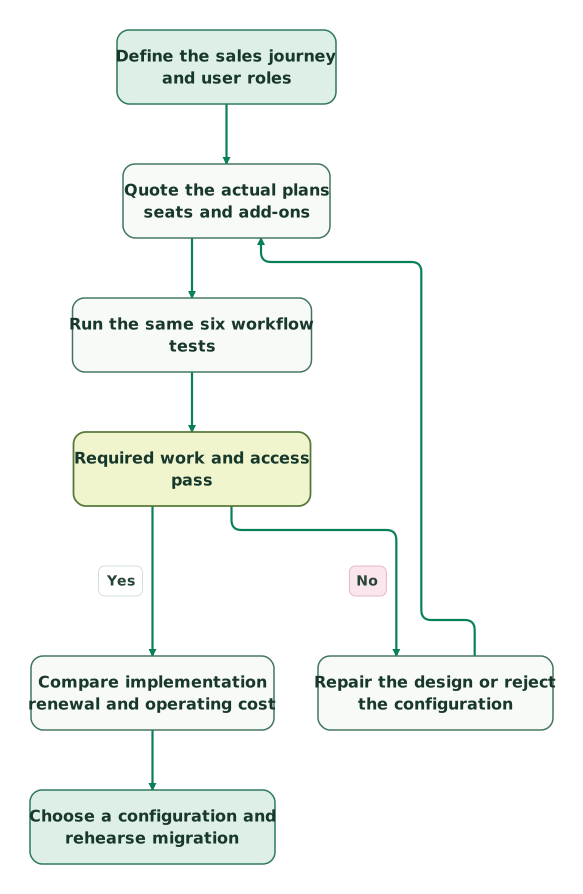
Use the trials to resolve the decisive uncertainty, rather than populating both CRMs with your entire database. The proposed sequence is:
Read diagram as text
- Define the sales journey and user roles to Quote the actual plans seats and add-ons.
- Quote the actual plans seats and add-ons to Run the same six workflow tests.
- Run the same six workflow tests to Required work and access pass.
- Required work and access pass to Repair the design or reject the configuration: No.
- Repair the design or reject the configuration to Quote the actual plans seats and add-ons.
- Required work and access pass to Compare implementation renewal and operating cost: Yes.
- Compare implementation renewal and operating cost to Choose a configuration and rehearse migration
Before buying:
Checklist
- The quote identifies currency, payment frequency and commitment separately.
- Each seller, editor and viewer has the required access.
- Add-ons, specialist quoting, usage and onboarding are itemized.
- Any discount has an eligibility decision, duration and renewal calculation.
- The six workflow tests have evidence from the intended user roles.
- Imports, integrations and manual changes preserve the agreed data rules.
- Migration includes relationships, history, suppression and a rollback plan.
- A named owner can maintain the process after the vendor onboarding ends.
If the choice remains unclear, bring the two configurations, role roster and failed test to a CRM implementation discussion. That gives the decision a concrete basis: which work is missing, what fixing it costs and who will own it.
Keep reading
Browse all CRM & Lifecycle guides
 CRM & Lifecycle
HubSpot implementation cost: onboarding fees, partner prices and your team's time
HubSpot implementation cost by layer: onboarding fees from $1,500, published partner prices, migration, integrations, internal time and a worked budget.
Jafrin Akter AloLast updated 14 min read
 CRM & Lifecycle
Pipedrive Pricing: Seats, Add-Ons and the Cost of Your Workflow
Compare Pipedrive plans by paid seats, add-ons, Projects access and usage limits. See annual cost examples and a practical Growth versus Premium calculation.
Jafrin Akter AloLast updated 9 min read
 CRM & Lifecycle
HubSpot Pricing: Seat Prices, Marketing Contacts, Credits and Onboarding
HubSpot is free for 2 users. Starter seats list at $20, Professional seats at $50 to $100, plus $250 per 5,000 marketing contacts and $1,500 to $3,000 onboarding.
Jafrin Akter AloLast updated 19 min read
CRM & marketing automation
See the implementation scope, deliverables and acceptance checks.
Questions people ask
Should the CRM decision depend on how many employees the company has?
Company headcount is a weak shortcut for CRM choice. Count the people performing each customer-facing or administrative job, then examine the process complexity. A small business with several products, legal entities or delivery models can have demanding requirements. A larger company may have one straightforward sales team. Price the actual roles and test the customer model before selecting a tier.
How should a team value software it can retire after choosing HubSpot?
Count a retirement saving only after confirming that the replacement covers the required workflow, users, history and contract exit. Keep the overlap period and migration work in the calculation. A theoretically redundant email or reporting tool may remain necessary for one critical requirement. Give each retirement a named owner and an acceptance condition before subtracting its subscription from the business case.
Should an existing Pipedrive customer switch just to get more AI features?
Switch only when a specific AI-assisted workflow produces a useful, verifiable improvement that the current setup cannot reasonably deliver. Compare approved tasks, data access, human review, failure handling and usage cost. Measure changes in completed work or decision quality during a controlled trial. An attractive demo or a longer list of agents does not establish that migration is worthwhile.
What should happen to historical pipeline reports during a CRM migration?
Preserve the source definitions and historical extracts before rebuilding reports in the destination. Map stages, owners, currencies and time boundaries explicitly, and identify history that the new report cannot reconstruct. Reconcile a known period before comparing performance. Keep a clear boundary between genuine business change and changes caused by the migration's new definitions or missing historical events.
Can teams use HubSpot for marketing and Pipedrive for sales together?
Yes, provided the connection has a clear purpose and field ownership rather than trying to synchronize everything. Define how people, companies and opportunities match, which system owns consent and lifecycle changes, and how failed updates are recovered. Test duplicate inquiries and customer re-entry. Include both subscriptions and connector administration when deciding whether the arrangement is worth maintaining.
Sources
- Pipedrive plan-feature matrix
- Pipedrive USD annual pricing
- Pipedrive billing, add-ons and purchased seats
- Pipedrive user access and paid seats
- HubSpot Free and Starter limits and offers
- HubSpot seat access
- HubSpot Sales USD pricing
- HubSpot seat catalog
- HubSpot renewal and commitment terms
- HubSpot flexible pricing supplement
- HubSpot for Startups
- HubSpot Revenue and legacy quote differences
- HubSpot sequence requirements
- Pipedrive sequences and sender authorization
- Pipedrive required-field limitations
- HubSpot pipeline-rule enforcement
- Pipedrive automation and imports
- HubSpot support channels and seats
- HubSpot support scope
- Pipedrive support channels and hours

Written by
Jafrin Akter AloData Engineer and Co-founder at Martechdevs and Growth and Analytics Partners
Jafrin writes practical guides to marketing technology, customer data, analytics and AI workflows. Martechdevs is a Growth and Analytics Partners company.